This reply has been marked as private.
Hey KCMRfm,
Thank you for the inquiry.
This is possible but you may need to modify the themes/enfold/config-templatebuilder/avia-shortcodes/timeline/timeline.php shortcode file directly or override it in your child theme. Please check the documentation below for more info on how to override a builder element.
// https://kriesi.at/documentation/enfold/intro-to-layout-builder/#add-elements-to-alb
You can add the custom shortcode around line 1363.
$output .= $timeline_items_html;
Another option is to extract the actual shortcode of the timeline element, place it in a Text or Code Block element and wrap it with your custom shortcode. In order to extract the shortcodes from the builder, you have to set the builder to debug mode first.
// https://kriesi.at/documentation/enfold/intro-to-layout-builder/#debug-mode
Best regards,
Ismael
Hi jb84,
Please try to add this CSS code in Enfold > General Styling > Quick CSS:
#top #header.header-scrolled #header_main .avia-menu-text {
    color: black;
}
Hope it helps.
Best regards,
Nikko
Hi spitsdesign,
I’m glad that @Guenni007 and Ismael could help you :)
Thanks for using Enfold and have a great day!
Best regards,
Nikko
Hi bemodesign,
Please try to add this CSS code in Enfold > General Styling > Quick CSS:
#top #offer .avia_textblock > div {
    margin-top: 20px;
    padding: 20px 20px 10px;
}
Hope it helps.
Best regards,
Nikko
Hi palmcaroline,
You can generate the private token here: https://build.envato.com/create-token/
Make sure you are setting it with the correct permission:
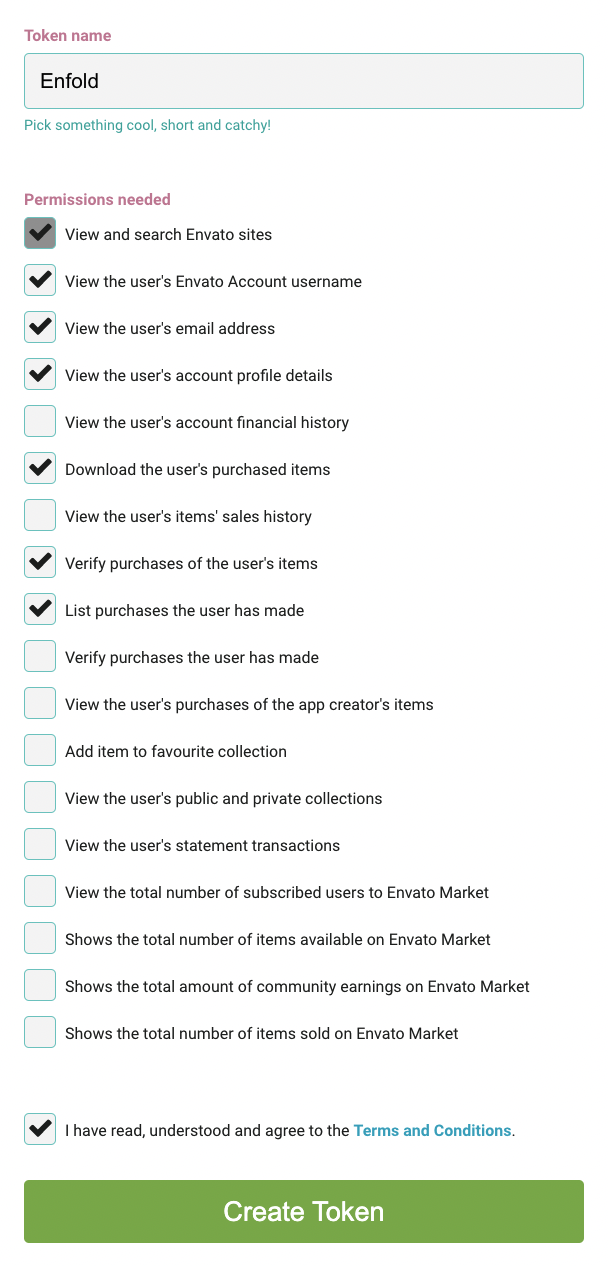
Full instruction is in the link given by Rikard.
If I understand correctly, you want me to use the same (?) key on the wordpress theme installation? Is it tied to one website or can it be used on multiple?
Try to delete the old one (unused) and generate a new one (use the link I gave). As for authentication, I’m not sure about how envato designed it but if you have one Enfold license, you should only connect one, basically it’s one to one ratio.
Best regards,
Nikko
Hi Ralf,
No worries :)
I’m glad that you were able to fix the issue.
Thanks for using Enfold and have a great day!
Best regards,
Nikko
Hi Nancy,
Please try to change the hook from woocommerce_before_single_product_summary to woocommerce_single_product_summary
Then add this CSS code in Enfold > General Styling > Quick CSS:
.single-product-summary .product_title {
    margin-top: 0;
}
Hope it helps.
Best regards,
Nikko
But if I use one of those slider templates I’m not sure how I will incorporate navigation and logo to be part of it. Just like example https://kriesi.at/themes/enfold-2017/
I want nice picture from the top of the page with navigation and logo on it. Is it possible just to import that slider or just home page? Then I would have to create what i below the slider from the beginning.
Hey ilonka78,
It looks like you used the construction demo to create your site, which has the fullwidth easy slider at the top, and you want to use the LayerSlider slider at the top like the 2017 demo, correct?
I can post the LayerSlider so that you can import it into your site and then you can remove the top slider on your page and add the LayerSlider element to your page if you like, but if you look at the free templates available in your LayerSlider you may find a slider that you like better than the 2017 demo slider, have you taken a look?
Try going to the LayerSlider templates:

then click sliders:

then click free to see only the free ones:

Best regards,
Mike
Hi,
Glad to hear that you have this sorted out, if you have any further questions please create a new thread and we will gladly try to help you. Thank you for using Enfold.
Best regards,
Mike
Hi,
Glad we were able to help, if you have any further questions please log into the support forum and create a new thread and we will gladly try to help you. Thank you for using Enfold.
Best regards,
Mike
I found that this error was due to an outdated Akismet plugin and not Enfold. HTH.
Jeff
Hey Jonathon Parris,
Thanks for the css, the issue is that your css for the H2 & H3 tags are don’t have enough specificity, you need to add some IDs and classes to override the theme css, like this:
@media only screen and (max-height: 767px) {
#top .main_color h2 {
font-size: 30px;
line-height: 30px;
font-family: "Bangers";
}

#top .main_color h3 {
font-size: 45px;
line-height: 45px;
font-family: "Bangers";
}
}
If this doesn’t help please log into the support forum and open a new thread with the url to the page in question so we can examine the specific element closer.
Please note that using the contact form is not appropriate for support question.
If you are unable to login to the support forum because you don’t have a activate support contract, please try going to your Theme Forest account and renew your support and then log in to the support forum and open a new thread.
Best regards,
Mike
Hi
This is my current website that was build a while ago using this demo https://kriesi.at/themes/enfold-overview/
I would like to change the look of it to something like that:
I will have new 2-3 images rotating
How can I change only that top slider part without importing whole new demo? I don’t want to loose content below the slider or overwrite anything.
Thank you
Hi tycrawf0rd ,
If you need further help, then please open a new thread and post a link to where we can see the problem you are having.
Best regards,
Rikard
Hey netztaucher,
I’m not sure exactly how that plugin add content, but I’m guessing that it’s not compatible with the Enfold layout builder. Maybe there is shortcode which you can use instead?
Best regards,
Rikard
 Jonathon Parris
Guest
Hello,
I have been using Enfold for a couple years and have decided to use the “custom.css” file to edit my sites. I’m trying to use the @media queries to react to mobile and desktop but the media queries won’t take affect. May I ask for some assistance? I will copy my current CSS into the next field.
Hey Fatih,
Please refer to this for registering your theme license: https://kriesi.at/documentation/enfold/theme-registration/
Best regards,
Rikard
hello,
if i layout a product with the advanced layout editor the button from the plugin
request a quote is not visible. when i switch to the standard editor all is fine.
there some topics about this and it is an enfold problem, but no one posted a fix.
can you help, please?
bis dann, marco.
-
This topic was modified 2 years, 4 months ago by
 netztaucher.
I think I have the solution: It is apparently the Post SMTP plugin that does it. It has a setting to fix it, and that seems to work.
Sorry for the inconvenience. I’m just using Enfold and that contact form for the first time and never had such an issue before.
Cheers,
Ralf
Hi,
I asked the Dev Team if this was possible and they said that they are not sure if the new Envato API allows that, but it will require them to research this further. The Dev Team asks that you open a Github Feature Request for this so it will be in the correct channel and you can follow the request while they investigate.
Thank you for your patience and for using Enfold.
Best regards,
Mike
 Fatih Camcıoğlu
Guest
Hello, I purchased your enfold theme, I couldn’t find where to write your license code in the theme settings, can you help me?
Hey Erik,
Did you client register her theme license? https://kriesi.at/documentation/enfold/theme-registration/. If you should need further help, then please provide us with more information about what version you are trying to update from. You can find more information about how you can update the theme here: https://kriesi.at/documentation/enfold/how-to-install-enfold-theme/#theme-update.
Best regards,
Rikard
Dear Kriesi-Team,
you provided me with a code for adapting the color of active anchor link menu items in #1414442, but unfortunately the code does not work anymore.
I want all menu items to stay the same color (regardless of their state: active, inactive, hover) and only want the active menu item (almost all menu items are anchorlinks on the homepage) to be “underlined” by your default active menu display (“aktiver Menüanzeige”) (set in your header-style). As said, it did work for a couple of months, but not anymore. Perhaps you changed some code with an Enfold update?
Thanks for your help!
Best regards,
Cornelie
Hi, i’m trying to create this type of “tag” filter using the masonry element. How I can do that.
This is what I’m referring:
https://kriesi.at/themes/enfold-2017/portfolio/portfolio-4-columns-centered-ajax/
 Erik Sävström Malm
Guest
Hi,
I have a new client that’s using an Enfold theme that she purchased through Envato. She is worried because she has a critical vulnerability report indicating that she needs to upgrade the theme. When trying to access the update through Envato, we’re coming up short, although she has previously received an email that she could download it.
I’m just starting out trying to help this client get her things in order, and therefore wonder if there are alternative ways to get periodic updates – should she in fact get an account on this site or do we need to push on Envato, trying to figure out things on that end? I have built several WP sites and work full time as a software developer, but I have no prior experience of buying themes through Envato, hence being a bit unsure regarding this.
I don’t think she has a lot of prior IT or computer experience and she hasn’t kept the information she has received over the years in order, hence everything is a bit messy and I’m doing my best to help her out.
Thanks in advance!
Hi,
Try this CSS in your Enfold Theme Options ▸ General Styling ▸ Quick CSS field:
#top .main_color .product[class*="product_cat-"] a .woocommerce-loop-product__title {
	color: #856c4d !important;
}
Please ensure to copy the code from the forum and not an email notification so the symbols are not converted.
After applying the css, please clear your browser cache and check.
Best regards,
Mike
Hi
is it possible with Enfold to achieved the image fullslider with small pictures (for previous/next) slides as you can see as the link in private?
Regards



