Hi,
Great, I’m glad that Ismael could help you out. I’ll close this thread for now then, please open a new thread if you should have any further questions or problems.
Best regards,
Rikard
This reply has been marked as private.
Hey marjolein sileon,
Thank you for your interest in the theme.
The Advance Layout Builder is not available for custom post types that are not included in the theme by default, but it can be enabled manually with a filter. Please check the documentation below.
// https://kriesi.at/documentation/enfold/intro-to-layout-builder/#alb-for-any-post-type
Also, please note that integrating custom fields to the builder elements may require some extra modifications.
Best regards,
Ismael
Hey Lene,
Thank you for the inquiry.
How did you duplicate the page? Did you use a plugin? Instead of duplicating the page, try to save the builder content as template, delete the old page, then apply the template to a new page.
// https://kriesi.at/documentation/enfold/intro-to-layout-builder/#templates
The link with visible codes is an RSS feed URL, automatically generated by WordPress. However, instead of displaying XML code, it shows HTML tags of the page, which is incorrect. If you want to disable it, add this code in the functions.php file.
/**
 * Display a custom message instead of the RSS Feeds.
 *
 * @return void
 */
function wpcode_snippet_disable_feed() {
    wp_die(
        sprintf(
            // Translators: Placeholders for the homepage link.
            esc_html__( 'No feed available, please visit our %1$shomepage%2$s!' ),
            ' <a href="' . esc_url( home_url( '/' ) ) . '">',
            '</a>'
        )
    );
}

// Replace all feeds with the message above.
add_action( 'do_feed_rdf', 'wpcode_snippet_disable_feed', 1 );
add_action( 'do_feed_rss', 'wpcode_snippet_disable_feed', 1 );
add_action( 'do_feed_rss2', 'wpcode_snippet_disable_feed', 1 );
add_action( 'do_feed_atom', 'wpcode_snippet_disable_feed', 1 );
add_action( 'do_feed_rss2_comments', 'wpcode_snippet_disable_feed', 1 );
add_action( 'do_feed_atom_comments', 'wpcode_snippet_disable_feed', 1 );
// Remove links to feed from the header.
remove_action( 'wp_head', 'feed_links_extra', 3 );
remove_action( 'wp_head', 'feed_links', 2 );
Best regards,
Ismael
Hey Michael,
Thank you for the inquiry.
You can adjust this in the Enfold > Shop Options > Header Account Icon settings. Select the first option to hide the account icon.
Best regards,
Ismael
Hi sharynt3,
I’m glad that Mike could help you :)
Thanks for using Enfold and have a great day!
Best regards,
Nikko
Hey sharynt3,
Try this CSS in your Enfold Theme Options ▸ General Styling ▸ Quick CSS field:
#top .avia-slider-testimonials.avia-testimonial-wrapper {
    overflow: visible;
}
#top .avia-slider-testimonials.avia-testimonial-wrapper .avia-slideshow-arrows {
	transform: translateY(0px);
}
This will please the arrows at the bottom of the element.
Please see the screenshot in the Private Content area of the expected results.
Best regards,
Mike
I recently bought another version of the Enfold Theme. However, when I attempt to use the AVIA Layout Builder that’s included, I encounter an issue where the entypo-fontello icons and similar features don’t load properly. Instead, I’m left with a table full of empty squares. Any advice on resolving this would be really helpful. Thanks!
Hi,
Glad Ismael could help, if you have any further questions please create a new thread and we will gladly try to help you. Thank you for using Enfold.
Best regards,
Mike
Hi,
Glad Ismael could help, if you have any further questions please create a new thread and we will gladly try to help you. Thank you for using Enfold.
Best regards,
Mike
Hi,
Glad Guenni007 could help, thank you Guenni007, if you have any further questions please create a new thread and we will gladly try to help you. Thank you for using Enfold.
Best regards,
Mike
Hi,
Glad Ismael could help, if you have any further questions please create a new thread and we will gladly try to help you. Thank you for using Enfold.
Best regards,
Mike
Hey Joshua,
If you can’t get the purchase code from the people who purchased your license, then you would have to purchase your own license here: https://themeforest.net/item/enfold-responsive-multipurpose-theme/4519990
Once you have access to the theme files, then the update to 5.6.8 has to be done manually from the version you are running, please refer to my replies in this thread: https://kriesi.at/support/topic/enfold-4-5-theme-update-update-failed-download-failed-a-valid-url-was-not-pro/#post-1021541
You can either update manually via FTP: https://kriesi.at/documentation/enfold/how-to-install-enfold-theme/#theme-update, or upload the new theme files via Appearance->Themes->Add New, and select to overwrite the old theme files after the upload has finished.
If that doesn’t work then please try to delete the whole theme folder, then replace it with the new version. Make sure that you have backups of the site before starting updating.
Also please read this after you have updated: https://kriesi.at/documentation/enfold/theme-registration/
Best regards,
Rikard
 Joshua Key
Guest
Hello, I am my Company’s new Administrator for our website. I have found that Junction Creative built our site and did not give us any register key for our Enfold Theme. Now that our website is down I have been tasked with figuring out what is needed to get us back up and running. It seems that our layer slider is outdated and was part of our Enfold theme. Our current version of Enfold is 4.7.4. I cannot update the Layer slider without updating Enfold to 4.7.9. I cannot update Enfold without a register key. Can that be provided through you or must I contact the company that built our website? The company that built it is “Junction Creative” I have reached out to them but have not received any correspondence yet. Do we need to purchase Enfold on our own? If we already have would you have a record of that? If we have not purchased Enfold on our own and need to then can I migrate the new registration to our existing website and update or will it need to be rebuilt from scratch?
Hey fabioque,
Thank you for the link to your site, in the theme settings the frontpage was also selected as the “blog” page, the frontpage can’t be both so I fixed this and now your site is working correctly.
Please clear your browser cache and check.
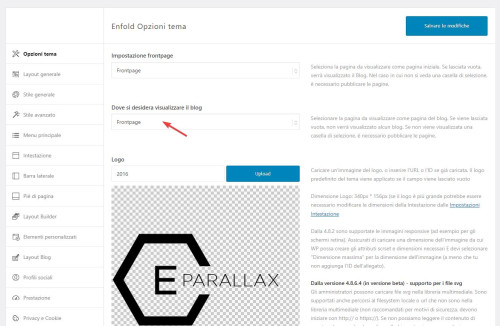
Best regards,
Mike
Hey ausgesonnen,
Please try the following in Quick CSS under Enfold->General Styling:
@media only screen and (max-width: 767px) {
.responsive #top #header .social_bookmarks {
    display: block;
}
}
Best regards,
Rikard
Hey ausgesonnen,
1. Please check your settings under Enfold->Main Menu->Burger/Mobile Menu.
2. Please try this CSS:
.html_av-overlay-full #av-burger-menu-ul li {
    font-size: 20px;
}
Best regards,
Rikard
Hi,
Glad Nikko was able to help, if you have any further questions please create a new thread and we will gladly try to help you. Thank you for using Enfold.
Best regards,
Mike
Hi
We are implementing a new Webshop with Enfold and WooCommerce.
Now we have a my account icon in the navigation bar which we have never seen in older Webshops we implemented with Enfold and WooCommerce.
Is this a new feature of Enfold or WooCommerce?
And where we can deactivate this?
Thanks very much.
Best regards
Mike
Dear Mike, dear Kriesi-Team,
in one of your threads Mike presented a solution for my problem on a test site for Enfold (see private content). Thanks for that! However, in a Google Search the test page of Mike pops up. You can propably understand that my client is not very happy with that. Could you please delete this test page? Thanks!
BR, CJGVD
Hi,
Glad Nikko was able to help, if you have any further questions please create a new thread and we will gladly try to help you. Thank you for using Enfold.
Best regards,
Mike
Hi,
Please find the link below to import the 2017 demo slider into your LayerSlider using the import button:

Best regards,
Mike
Hello,
Since a couple of weeks loses my site his styling.
Here a screenshot how the site looks:
https://www.stadsboerderijturnhout.be/wp-content/uploads/2023/12/Enfold-theme-correct.png
And here a screenshot how the site every morning looks like:
https://www.stadsboerderijturnhout.be/wp-content/uploads/2023/12/Enfold-theme-error.png
You will see that the menu, headlines, …. loses his font and styling.
How can i fix this?
Thanks in advance,
greetings
Paul
Hey Tomaz,
You can buy a new license here: https://themeforest.net/item/enfold-responsive-multipurpose-theme/4519990
Once you have access to the theme files, then the update to 5.6.8 has to be done manually from the version you are running, please refer to my replies in this thread: https://kriesi.at/support/topic/enfold-4-5-theme-update-update-failed-download-failed-a-valid-url-was-not-pro/#post-1021541
You can either update manually via FTP: https://kriesi.at/documentation/enfold/how-to-install-enfold-theme/#theme-update, or upload the new theme files via Appearance->Themes->Add New, and select to overwrite the old theme files after the upload has finished.
If that doesn’t work then please try to delete the whole theme folder, then replace it with the new version. Make sure that you have backups of the site before starting updating.
Also please read this after you have updated: https://kriesi.at/documentation/enfold/theme-registration/
Best regards,
Rikard
 marjolein sileon
Guest
I prefer to use Enfold for a new website. This website will be using CPT with custom fields. I want to be able to create a custom template for this CPT using the layout builder (instead of creating a custom PHP file for this post type).
Is this possible with the Enfold theme?
I checked the manual but cannot find this option.
 Tomaz
TomazGuest
Dear Kriesi.
Years ago an agency used Enfold to build our wordpress site. At themes I can find Enfold Version 4.5.5, Enfold child theme and Enfold Child congress theme (build by agency).
At the moment we are having an issue with the advanced layout builder. Part of the backend page is ok but one part only shows the code.
How can we fix this as we do not own the template? Can we buy template (again) and update it? Is this process safe as we do not want to destroy our site?
We use WordPress 6.3.2.
Thank you very much.
Best regards,
Tomaz
hi,
it works fine other themes, i works fine when i deactivate the layout editor.
so it is clearly an issue in enfold, right?
other user have problems to:
bis dann, marco.
Hi,
Thank you for the info.
To hide the label when an input field is active, please add this css code.
.wc-block-components-form .wc-block-components-text-input .is-active label, .wc-block-components-text-input.is-active label {
    opacity: 0;
}
You may need to toggle or temporarily disable the Enfold > Performance > File Compression settings afterward.
Best regards,
Ismael



