Viewing 30 results - 7,921 through 7,950 (of 244,447 total)
  • Author
    Search Results
  • heldentraeume
    Participant

    Aktuell ist vom Theme die Variante 5.7 installiert.

    Ich habe in Enfold einen Token erzeug und entsprechend den privaten Schlüssel hinterlegt.

    Auf dIe Version 5.7.1 ist nicht automatisch updatebar.
    Bei “manuell prüfen” wird keine neuere Verson vom Theme angezeigt
    Was kann ich tun um die komfortable Variante über den Punkt Enfold Theme-Update nutzen zu können
    bzw. mache ich verkehrt?

    Danke

    • This topic was modified 1 year, 10 months ago by heldentraeume.
    #1445283

    Hey xfacta,

    Thank you for the inquiry.

    Please add this css code to adjust the font size of the category heading:

    #top.archive.category #wrap_all .all_colors .post-entry h2.post-title.entry-title {
        font-size: 48px;
    }

    You can also just the style of the h2 element in the Enfold > Advanced Styling panel.

    Best regards,
    Ismael

    #1445281

    In reply to: bugs in your software

    Hey Tom,

    Thank you for the inquiry.

    You can easily open a new inquiry using the form on the following page:

    // https://kriesi.at/support/forum/enfold/#new-post

    However, it looks like you haven’t registered an account in the forum yet. Please verify your purchase code and register an account in the forum using the field in the link below:

    // https://kriesi.at/support/register/

    Regarding your inquiries, please follow the steps below:

    1.) To increase the font size of the input fields, please add this code in the Enfold > General Styling > Quick CSS field:

    #top .input-text, #top input[type="text"], #top input[type="input"], #top input[type="password"], #top input[type="email"], #top input[type="number"], #top input[type="url"], #top input[type="tel"], #top input[type="search"], #top textarea, #top select {
        font-size: 2em;
    }
    

    2.) We were able to successfully send a message using the form. Would you mind providing a short clip or a screenshot of the issue? You can use Imgur, Dropbox, or any file hosting site to share the screenshot.

    Best regards,
    Ismael

    #1445280

    Hey divinecurio,

    Thank you for the inquiry.

    You can set the mobile menu to display earlier, when the screen width is less than 990px. Please go to the Enfold > Main Menu > General tab, then set the Menu Items for Mobile setting to the second option (browser width below 990px).

    Best regards,
    Ismael

    #1445279

    Hey divinecurio,

    Thank you for the inquiry.

    We tried to login to the site but the password for the account is incorrect. Please check the info carefully, or provide another admin account. In the meantime, please temporarily disable the Enfold > Performance > File Compression settings and make sure that the Appearance > Theme File Editor is accessible.

    Best regards,
    Ismael

    Hi,

    The site seems to be cached with the old (incompatible) fonts.

    Which Google font did you upload? Did you download it directly from the Google Fonts site? You may need to toggle or temporarily disable the Enfold > Performance > File Compression settings to reload the new stylesheets with the new fonts. Also, please make sure to purge the cache afterward.

    Best regards,
    Ismael

    #1445267
    acelam714
    Participant

    Hello kriesi support

    I have a major issue with the Enfold Menu. It’s basically broken the navigation of my website.

    To start, I imported the Parallax Demo since it was easier and just started working from that. The menu slides up and down the page (on desktop and mobile) and I loved that function.

    Totay, I accidentally deleted the original menu. I recreated the menu just fine, but it no longer slides up and down the page despite the usage of anchor links such as #top, #services, etc. This has also completely broken the navigation on the mobile page as well and the anchors no longer take me to the desired area.

    Do you happen to know how to fix this and restore it to the parallax demo menu where it slides up and down?

    #1445248

    Hi,
    Glad to hear that you have this sorted out, if you have any further questions please create a new thread and we will gladly try to help you. Thank you for using Enfold.

    Best regards,
    Mike

    Hi,
    Glad we were able to help, if you have any further questions please create a new thread and we will gladly try to help you. Thank you for using Enfold.

    Best regards,
    Mike

    #1445246

    Hi,
    Please do not add the first inage which is the same as the featured image
    Enfold Support 5890
    this image is added automatically with the featured image.

    Best regards,
    Mike

    #1445227

    Hey Dominic,

    Please try the following in Quick CSS under Enfold->General Styling:

    .page-id-224 #after_section_1 .container, .page-id-224 #after_section_1 .content {
      padding: 0;
    }

    Best regards,
    Rikard

    #1445220

    In reply to: verical distance

    Hi,

    Great, I’m glad that Ismael could help you out. Please open a new thread if you should have any further questions or problems.

    Best regards,
    Rikard

    #1445196

    Hello,

    We sell Enfold exclusively on Envato/ThemeForest and according to our agreement with Envato, we cannot sell Enfold elsewhere.

    Thank you for reaching out to us though. We appreciate it.

    Best regards,
    Yigit

    #1445173
    abolfazl
    Guest

    hello

    We have contacted you from the design core group

    Our company intends to sell your products legally in Iran, but we want to negotiate with you regarding sales.

    Our site name: *

    We want to create a site similar to envato to sell Iranian products to foreign users and foreign products to Iranian users completely legally.

    As you know, many sites sell your product under the name of the original enflod template.

    Now we want to make this profiteering end and the customer will buy the template directly from you.

    Examples of sites that sell your template:

    *

    This site Sell your Theme 10 $ with 9020 sell (you can visit this site) 10×9020 = you lost 902006 $ just from this site

    *

    This site Sell your Theme 10 $ with 6967 sell (you can visit this site) 21×6967 = you lost 146307 $ just from this site

    Iran is a new country in terms of things related to IT and technology, and more and more Iranian sites are added to the internet day by day, your template is also very famous in Iran, and if you can have a direct link to sell your template to Iran. You can definitely avoid profiting from these sites and losing other money.

    Our suggestion is that we build a store site like Envato, then we sell your product directly to Iranian users using API.

    In this case, the user, who cannot buy the template directly from you, will buy the template from us and then receive support from you with API.

    If you would like to cooperate, tell me that I will answer you about the settlement process and other matters.

    Note that these profit-seeking companies heavily advertised your template in Iran, and if you sell your template directly through our company in Iran, you will definitely earn huge profits. Otherwise, in the near future, by visiting these sites, you will see how they will abuse your efforts and sell your nulled template to Iranians under the name of the original template.

    • This topic was modified 1 year, 10 months ago by Yigit. Reason: Moved links to the private content field
    #1445194
    Morgan
    Guest

    Hi, I am interested in using Enfold but need to know if it conforms to WCAG 2.0 Level AA first. Thanks!

    Hi,

    @totalweighing
    , Please open a new thread with this link with the url to the page in question and an admin login so we can be of more assistance, as this is not your thread posting your admin login here will not be private and you will not see our comments in the Private Content area.
    It gets confusing when we are working on more than one site per thread. Thanks for understanding.

    Best regards,
    Mike

    Wriverakap
    Participant

    Installed Enfold theme version 5.6.12 and used CSS File Merging and Compression from Performance tab. Based on this configuration below CSS generated and its causing the issue in PageSoeed Insights Eliminate. Render Blocking Resources for Mobile.

    Is there any way to remove above CSS from eliminate render blocking resources section?

    Thanks in advance.

    Wriverakap
    Participant

    Installed Enfold theme version 5.6.12 and used CSS File Merging and Compression from Performance tab. Based on this configuration below CSS generated and its causing the issue in PageSoeed Insights Eliminate. Render Blocking Resourcesfor Mobile.

    https://kap-staging.us/wp-content/uploads/dynamic_avia/avia-merged-styles-042fa6b5392c278a1dff78bfafded0fd–664de16dd8f52.css

    Is there any way to remove above CSS from eliminate render blocking resources section?

    Thanks in advance.

    #1445172
    LongJohn61
    Participant

    Hi,
    i create a new site and installed enfold (5.7.1) and his child; when i import the Default Demo, the menu is broken and some fonts do not appear.
    Thanks

    • This topic was modified 1 year, 10 months ago by LongJohn61.
    • This topic was modified 1 year, 10 months ago by LongJohn61.
    #1445149
    This reply has been marked as private.
    #1445145

    Hi,

    Does it work when you go to the WordPress admin panel > Enfold theme options > Select Your Editor, and select the Use Block Editor option ( https://imgur.com/a/AQFjNu0 )?

    Regards,
    Yigit

    #1445143
    #1445138

    Hi,
    Glad we were able to help, if you have any further questions please create a new thread and we will gladly try to help you. Thank you for using Enfold.

    Best regards,
    Mike

    #1445135

    Hi,

    I’m sorry, this section on our documentation was outdated. We’ve updated it.

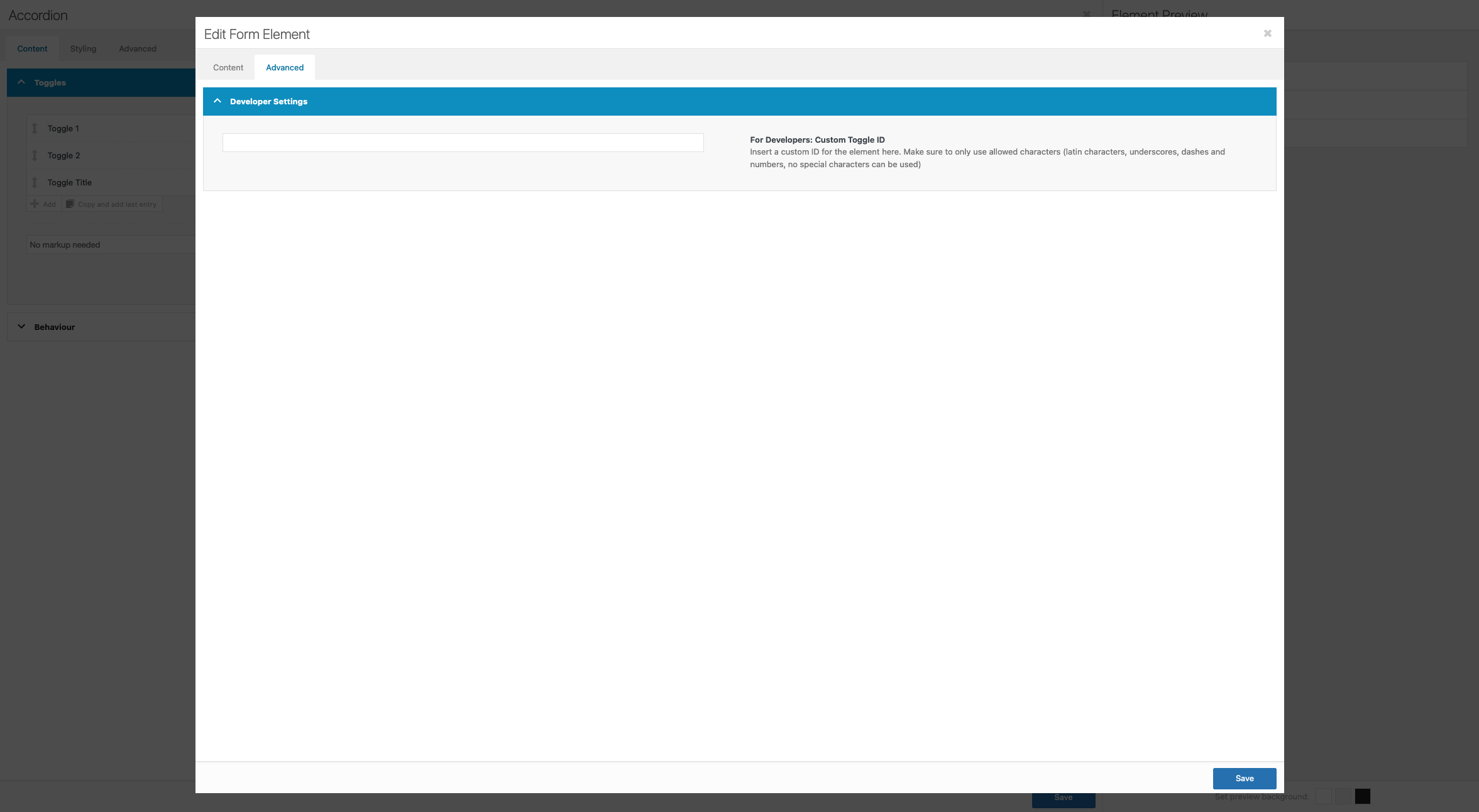
    You can edit the Custom Tab ID in the Toggle item > Advanced > Developer Settings > For Developers: Custom Tab ID.

    Please make sure that the Enfold theme options > Layout Builder > Show Advanced Options > Hide Advanced Layout Builder Developer Options option is not disabled.

    Regards,
    Yigit

    • This reply was modified 1 year, 10 months ago by Yigit.
    #1445112
    vbonora
    Participant

    Hi, I have a problem with Enfold and the Sensei PRO plugin. When I set the course access expiration for users, it doesn’t work, and the users continue to see the course. Sensei says that if I use the Block Editor, it works correctly, but I can only use the Classic Editor, so they told me to ask you. Could you help me?

    #1445104

    Hi Rikard,
    thanks for the quick reply!!

    If I turn off all plugins this comment appears
    And the site cannot be seen at all.

    אודות וורדפרס
    אורה אילון
    התאמה אישית
    1קיים עדכון 1 זמין
    00 תגובות בהמתנה
    חדש
    Edit Frontpage (Advanced Layout Builder)
    Theme Options
    Theme Extensions
    חיפוש
    שלום, orah-ayalon

    Fatal error: Uncaught Error: Call to undefined function pll_current_language() in /home/orahayal/public_html/wp-content/themes/enfold-child/functions.php:10 Stack trace: #0 /home/orahayal/public_html/wp-includes/class-wp-hook.php(326): av_change_logo(‘https://www.ora…’) #1 /home/orahayal/public_html/wp-includes/plugin.php(205): WP_Hook->apply_filters(‘https://www.ora…’, Array) #2 /home/orahayal/public_html/wp-content/themes/enfold/framework/php/function-set-avia-frontend.php(741): apply_filters(‘avf_logo’, ‘https://www.ora…’, ‘option_set’) #3 /home/orahayal/public_html/wp-content/themes/enfold/includes/helper-main-menu.php(163): avia_logo(‘https://www.ora…’, false, ‘span’, ‘height=”100″ wi…’) #4 /home/orahayal/public_html/wp-includes/template.php(812): require(‘/home/orahayal/…’) #5 /home/orahayal/public_html/wp-includes/template.php(745): load_template(‘/home/orahayal/…’, false, Array) #6 /home/orahayal/public_html/wp-includes/general-template.php(206): locate_template(Array, true, false, Array) #7 /home/or in /home/orahayal/public_html/wp-content/themes/enfold-child/functions.php on line 10

    If I run only this plugin polylang the site is working again.
    Now I see that I can update the template to Version (5.7.1).

    But this comment still appears in the editing window of the pages – as in the photo
    Deprecated: The get_page_by_title function was deprecated in version 6.2.0! WP_Query should be used instead. in /home/orahayal/public_html/wp-includes/functions.php on line 6078

    https://www.orah-ayalon.com/wp-content/uploads/2024/05/IMG-1.png

    Thank you,
    Yossi Yerushalmi

    ReeTab
    Participant

    Hi,

    We import press releases from a distributor via a plugin. These are collected into WordPress as “custom posts” (I’m not the developer on this, and describe as best as I can 😅). I use a shortcode to present these posts on the website. The post template that comes with the plugin is very basic (understandable) and just display the content basically. But since I want the look of the website, side bars etc, we copied the Enfold template in the child theme-folder and added the missing parts from the plugin. Everything works very well, except that the excerpts don’t render.

    I can see that the press releases has been imported in full, including the excerpts, since it’s editable in the WordPress admin when I edit the custom post.

    To solve this we also copied the includes/loop-index.php file and added these lines (on line 136), and after that everything worked well.

    `if (get_post_type() === ‘cision_block_post’) {
    $current_post[‘content’] = get_the_excerpt() . get_the_content();
    }

    However, if the main theme updates any of those files in the future I might miss important stuff. Is there a better way of solving this than use the method above?

    #1445096

    Hi,

    1. Please refer to this: https://kriesi.at/documentation/enfold/theme-registration/. If the updates should still not come through after that, then please try using this plugin: https://envato.com/market-plugin/

    2. What happens if you temporarily deactivate all plugins? If this appears after you activate the plugin that you referred to earlier, then it’s likely caused by that.

    Best regards,
    Rikard

    #1445088

    Hi Ismael

    Thank you for your reply.

    I’ve have had a dialogue with your colleague Rikard in another thread (https://kriesi.at/support/topic/remove-all-accordion-tab-urls-like-toggle-id-1-toggle-id-1-closed/#post-1444906) and according to him, it is possible to remove the toggle IDs without a freelancer to customize the page. He referred to this guide: https://kriesi.at/documentation/enfold/accordion/#custom-tab-and-toggle-ids-for-prettier-url-hashes. Unfortunately it didn’t work, so he offered me to have a closer look at it.

    Best regards,
    Maja

    #1445082

    In reply to: Blogs slider

    hi,

    there is nothing removed from the database, it is all there, it just won’t show….

    The staging has a pretty recent backup (less then a month old) with the same relevant data.
    I have put enfold5.2.1 on the staging again and changed ‘berichten’ with the same settings as live again. As you can see, the items now show. When you update enfold it will dissapear.

Viewing 30 results - 7,921 through 7,950 (of 244,447 total)