Hey Thomas,
Thank you for your patience the Enfold customizations for woocommerce are in \enfold\config-woocommerce\config.php .
Best regards,
Mike
Hey LesleyJean,
Thank you for your patience, unfortunately my research finds that the EventOn plugin doesn’t work well with Enfold. Unfortunately this is not one of our supported plugins, we suggest trying the Events Calendar plugin.
We are not able to support all plugins and our support scope is limited.
If you would like to request support for this plugin as a feature, the Dev Team has opened a new Github Feature Request for users to place requests and follow them as the Dev Team reviews them.
Thank you for your patience and understanding.
Best regards,
Mike
Hi,
Thanks for letting us know. Please open a new thread if you should have any further questions or problems.
Best regards,
Rikard
Hi,
Thanks for the update. Please open a new thread if you should have any further questions or problems.
Best regards,
Rikard
Hi,
Thanks for the login details. Could you try updating the theme to the latest version (5.7.1) to see if that helps please? https://kriesi.at/documentation/enfold/theme-update/. If not, then please try to temporarily deactivate all plugins to see what happens then.
Best regards,
Rikard
Hello! I have a template override for single blog post and I have a do_shortcode that brings in page content
<?php echo do_shortcode('[av_postcontent link="page,468" av_uid="av-lxp987fk" sc_version="1.0"]'); ?>
So I notice that it does bring in the page content, but that page content is just shortcode and processed shortcodes…how do I get to also process as well?
Hi
Please click the URL field and change it there:

Best regards,
Mike
I am using Enfold – parallax demo.
thelandgrp.com
There is a network error showing:
GET https://background.apistatexperience.com/starts/sees.js
net::ERR_CONNECTION_TIMED_OUT (index:182) (anonymous) @ (index) : 182.
Is this a necessary call for the template to work? If not, how do I remove the error?
Hi,
Thanks for the update. Please open a new thread if you should have any further questions or problems.
Best regards,
Rikard
Hey Ivana,
Please try the following in Quick CSS under Enfold->General Styling:
@media only screen and (max-width: 767px) {
  .responsive #top .av-large-testimonial-slider.avia-testimonial-wrapper .avia-testimonial {
    padding: 0;
  }
  #top .av-large-testimonial-slider .avia-testimonial-meta .avia-testimonial-image {
    width: 100%;
  }
  #top .av-large-testimonial-slider .avia-testimonial-meta-mini {
    text-align: center;
  }
}
Best regards,
Rikard
Hi there,
I followed your advice to create a dotsmenu as described here
What I actually want to achieve is creating a menu on the right side of the page similar to the described dotsmenu but it should show icons. I therefore created a new menu with entypo fontello icons and used it as a submenu.
Which part of the code given in the above mentioned link do I use to simply move the icon menu to the right side of the page? I tried to copy in the single parts of the code given, but it just does not work the way I want it to.
Your help is highly appreciated.
Regards
Daniela
Hey Meetx,
Thank you for the info.
You can find more information on privacy options in the documentation below:
// https://kriesi.at/documentation/enfold/privacy-cookies/
To find more info about the existing cookies, please follow this instruction:
// https://kriesi.at/documentation/enfold/privacy-cookies/#how-to-check-for-enabled-cookies
Best regards,
Ismael
Hi,
Glad Guenni007 & Ismael could help, thank you Guenni007, if you have any further questions please create a new thread and we will gladly try to help you. Thank you for using Enfold.
Best regards,
Mike
Hi,
Thanks for the feedback, we are excited also. If you have any further questions please create a new thread and we will gladly try to help you. Thank you for using Enfold.
Best regards,
Mike
i tested it with my own set of ArialMT – but also downloaded your woff2 and looked with : https://wakamaifondue.com/beta/ if those letters are inside your font.
i did it with the enfold included fontmanager: https://webers-testseite.de/arial-black-mit-umlauten/
my first suggestion – your font-family name is not well suited. on that page above ( wakamaifondue) you see:
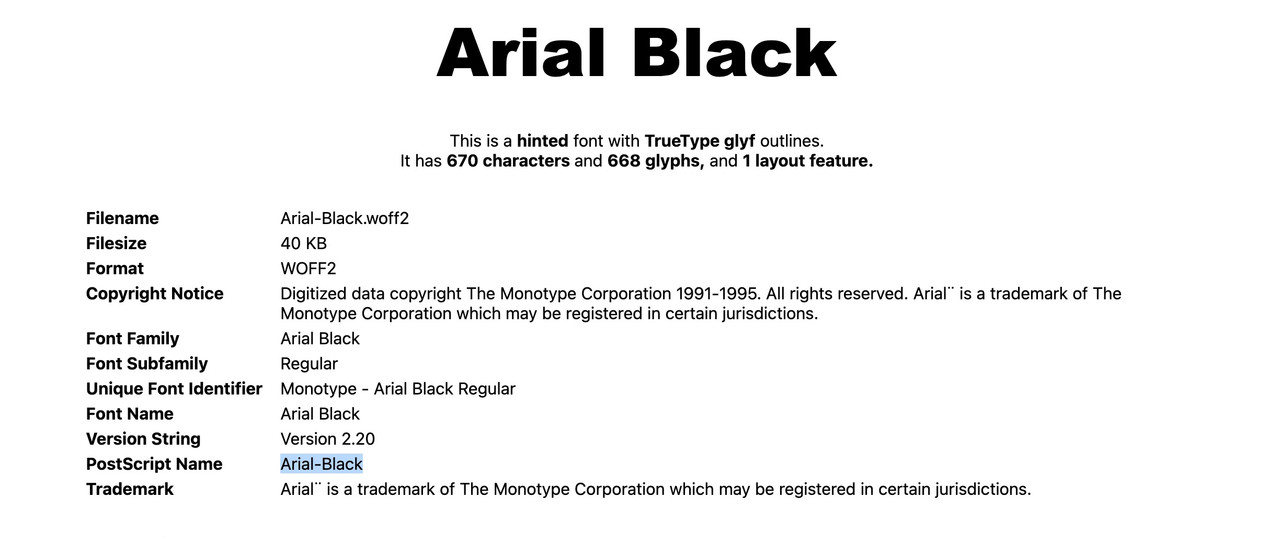 you see it is Arial-Black.
Maybe the existing Arial comes into conflict with it.
Just try the font-manager – put your font-faces all into one folder – call it ArialMT – zip it ( without Mac OSX extra invisible Files) and upload it to enfold.
PS: my ArialMT Fontset will generate as font-family: arialmt
It is going to be worth it and probably the best thing to happen to Enfold since it came onto the market! Really, really excited to unlock a whole new way of managing and displaying content in a more meaningful, sustainable and organized way!
Thank you Team Kriesi for finally making this possible! It has been a long time, but think this will unlock a sorts of new use cases for Enfold.
-jason
Hello,
I wanted to give you on update on the progress.
I followed your advice “Another way would be to use your webhost backup files to restore your site, and then disable your child theme and manually update like this:”
So from the dashboard I went to themes and deleted the Enfold Theme and used the upload new theme from the themes dashboard and it worked perfectly. Normally I do all of this manually with FTP but I like this way better.
Thank you for your help!!
Hey Support Team,
perhaps someone can help me.
I wanted the Arial Black for Headlines and I picked it at general Styling in enfold child settings.
For Chrome it workes, but Safari does not display the Arial Black – so I uploaded the Arial Black manually and used this code:
/* Arial Black */
@font-face {
    font-family: 'Arial';
    src: url('https://maxidewitt.wery-designstudio.de/wp-content/themes/enfold-child/fonts/Arial-Black.woff2') format('woff2'),
        url('https://maxidewitt.wery-designstudio.de/wp-content/themes/enfold-child/fonts/Arial-Black.woff') format('woff');
    font-weight: 900;
    font-style: normal;
    font-display: swap;
}
Now, safari is showing the Arial Black, but not for all Letters!
ÄÖÜ is not working.
What can I do?
Cheers
Monika
Hi,
Thanks for letting us know. Please open a new thread if you should have any further questions or problems.
Best regards,
Rikard
Hey Reut,
There’s nothing exactly like that in the theme by default unfortunately, the closest thing would be this demo: https://kriesi.at/themes/enfold-photography/. You can set the layout under Enfold->General Layout->Layout.
Best regards,
Rikard
Hi,
1. Try to set your container width to a higher pixel value, or a % value.
2. Please try the following in Quick CSS under Enfold->General Styling:
#top .flex_column_table.av-equal-height-column-flextable:not(:first-child) {
  margin-top: 20px;
}

.container {
  padding: 0px 20px;
}
Best regards,
Rikard
Hi,
You can try using a plugin like this to find out what is using the most resources on your installation: https://wordpress.org/plugins/query-monitor/. Enfold does not need the amount of memory which is in the text your posted.
Best regards,
Rikard
Hi,
So i have talked with our host again and regarding to the “Nosniff” thing they say this:
“We don’t use plesk nor apache, so no htaccess. We do use nginx and that ‘nosniff’ header is, I’m afraid, unalterable.”
The function that you mention do not work, i have tried insert it on some pages and the issue still occurs and even if i changed the performance settings:
1. Unique Timestamp Of Merged Files And WP Object Cache Bug -> Fix WP bug, disable unique timestamps
2. Remove Query String From Static Resources -> Remove query strings
We can see in the console that the issue always are this URL: “/wp-content/uploads/dynamic_avia/avia_posts_css/post-555.css?ver=ver-####”
#### are a different number each time.
And we can see that AVIA post are some from /themes/enfold/ so it is a theme issue and i need you to look further into this because our solution do not work.
They did also say this
“We (our host and us) found an issue on site X at this time.
Kinsta tech jump on the site – he found the error on the console:
“MIME type error” and clicked on the CSS link in that error – which showed a 404 page (which explains the MIME type as the page is not CSS).
He then jumped onto the server where the actual file in question was not found
“Screenshot 1”
During investigations the cache was invalidated (expired) and the site ‘fixed itself’ and was working without intervention – the tech at Kinsta then checked and the file was there again.
“Screenshot 2”
“stat screenshot”
Thank you for the quick support!
1. You can set the container width under Enfold->General Layout->Dimensions.
-> my maximum container width is 1510px. However, I would like to reduce the distance to the sidebar and the edge so that more content can be displayed, see screenshot 1,2,3
2. I’m not sure exactly how you are looking to change this, please provide a screenshot highlighting your intentions.
-> as you can see in screenshot 2, I would like to reduce the spacing.

Hey Rikard,
Thanx for the response.
The Enfold theme is now updated to 5.7.1, (but it doesn’t help).
Hey Martin,
Please try the following in Quick CSS under Enfold->General Styling:
span.text-sep {
  transform: rotate(-20deg);
}
Best regards,
Rikard
Hey Rolf,
1. You can set the container width under Enfold->General Layout->Dimensions.
2. I’m not sure exactly how you are looking to change this, please provide a screenshot highlighting your intentions.
3. Please try the following in Quick CSS under Enfold->General Styling:
#main {
  border-left: 1px solid red;
  border-right: 1px solid red;
}
Best regards,
Rikard
Hey Theodor,
Thanks for the login details. Could you try updating the theme to the latest version (5.7.1) to see if that helps please? https://kriesi.at/documentation/enfold/theme-update/.
Best regards,
Rikard
Hi,
Glad Rikard could help, if you have any further questions please create a new thread and we will gladly try to help you. Thank you for using Enfold.
Best regards,
Mike
Hello,
I’ve created this site (https://concordiazeeland.nl) years ago.
Enfold and the plugins are frequently updated.
But a few months ago the layout-view is different. There is nothing changed in the Enfold-pages.
On the homepage the header is 3 columns. But it isn’t show well: 2 columns and one under those.
I’ve tried to replace a new 3 column layout. The first time it show just fine, but the second time (refresh page) it’s the same problem.
Even if I created a new page, the problem is still there (https://concordiazeeland.nl/home3/).
Or replace an older lay-out of that page (for example 2019), the problem is just there. But in 2019 it was fine.
This problem is also above the footer.
There is a 2 column lay-out with an event-calendar and news. But it doesn’t show well either.
I don’t know where I can find the solution?
There is nothing changed in the site or database (says the hosting-provider).
I seems to be a problem inside Enfold or….
Can someone help me?
Thanx
(Sorry for my bad English ;-)



