
-
AuthorSearch Results
-
February 24, 2025 at 9:10 am #1477755
Topic: Changes in PHP 7.0 concerning functions.php
in forum EnfoldYourChoice Informatik GmbH
ParticipantHi
In the changelog for Enfold 7.0 you write the following:
tweak: splitted functions.php and functions-enfold.php in seperate files and restructured files in /includes folder
What this means concrete?
We have on almost all our Enfold websites some code in the functions.php. Do we have to move this to functions-enfold.php?
Best regards
Mike-
This topic was modified 1 year, 1 month ago by
YourChoice Informatik GmbH.
February 24, 2025 at 6:34 am #1477744In reply to: Content slider
Hi,
would it be possible to apply this only to the content slider on the home page?
Yes, this is possible. Please edit the Content Slider element, go to Advanced > Developer Settings, and enter “av-content-slider-nav-bottom” in the Custom CSS Class field. Then, replace the css code with:
#top .av-content-slider-nav-bottom .avia-smallarrow-slider-heading {
    position: absolute;
    bottom: -50px;
}
— https://kriesi.at/documentation/enfold/add-custom-css
Best regards,
IsmaelFebruary 24, 2025 at 6:31 am #1477743In reply to: Add Spacing and Panels/Text Boxes in Classic Editor
Hi,
Yes, it’s possible to use the ALB for the events page, but we don’t recommend it because this will limit the functionality of the events. Also, please note that not all event elements are available in the Advanced Layout Builder. If you want to proceed, you can include the event post type in the Enfold > Layout Builder > Activate Your Custom Post Types For ALB field.
Best regards,
IsmaelFebruary 24, 2025 at 6:13 am #1477739In reply to: webfonts in cookies-settings
Hi,
You can remove them from Enfold > Privacy & Cookies > Cookie Handling > Modal Window Custom Content. Look for the “Other External Services” entry, then remove that part from the Tab Content field.
< p >Google Map Settings:[av_privacy_google_maps]
Let us know if you need more info.
Best regards,
IsmaelFebruary 24, 2025 at 5:10 am #1477733Hi,
We set the image as the background in the Enfold > General Styling > Logo Area panel and adjusted the header height in Header > Header Layout > Header Size to a custom pixel value. We then added this css code to adjust the background image height and hide the default logo.
.header_color .header_bg {
    background: var(--enfold-header-color-background-image);
    background-size: auto 240px;
}

.logo img, .logo svg {
    display: none !important;
}
Screenshot:
Best regards,
IsmaelFebruary 23, 2025 at 11:19 pm #1477723In reply to: Fixing alignment of buttons
Hi,
your nav bar is white due to this setting in Enfold Theme Options ▸ General Styling ▸ Logo Area Background Color I do this for you:

Best regards,
MikeFebruary 23, 2025 at 10:26 pm #1477721In reply to: Changing fonts does not work
ok – ich sehe jetzt dein child-theme aktiv.
Wie erklärst du dir, das wenn ich in deiner Privacy die google webfonts erlaube – die schrift dann angezeigt wird?
dinpro-light steht oben mit dinpro-light() – da muss was beim generieren schief gelaufen sein. Ausserdem ist in deinen @font-face rules nur die din-alternate-cdnfonts zu sehen.
Man sieht das child-theme natürlich im Source Code – allerdings, nur bei den css und js files die auch davon herrühren: also z.B.<link rel="stylesheet" id="avia-style-css" href="https://marcusjeroch.de/wp-content/themes/enfold-child/style.css?ver=6.0.9" type="text/css" media="all"> <link rel="stylesheet" id="style-name-css" href="https://marcusjeroch.de/wp-content/themes/enfold-child/style.css?ver=6.7.2" type="text/css" media="all">Lass die Nutzung der oberen Webfonts (ausser den Websafe Fonts ausser acht. Lade die gewünschten Schriften hoch.
Also z.B deine DINPro und die OpenSans. Deine Open-Sans sollte funktionieren die ist dort richtig gelistet (allerdings nur als ttf )
Schmeiss deine DINPro aus dem Font Manager raus und lade diese mal hoch: https://webers-testseite.de/DINPro.zip
Die wird dann dort gelistet:
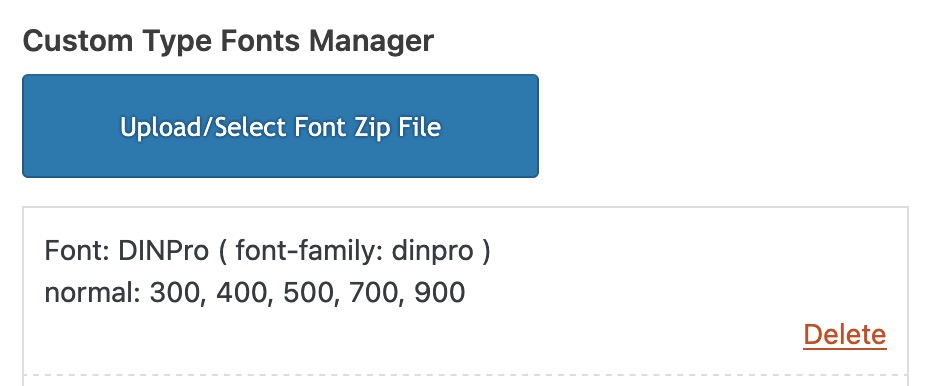
Wähle dann unter General Styling – Fonts diese Schriften aus (bei den Hochgeladenen Schriften unten)
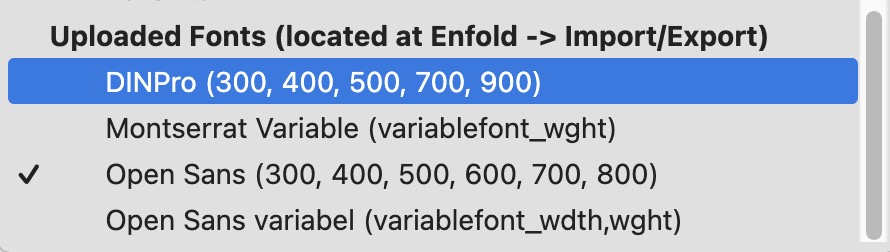
Du benötigst dann nicht mehr die Auflistung in der Privacy – da selbstgehostete Fonts verwendet werden.
February 23, 2025 at 8:13 pm #1477716Hi,
Thanks for that. I’m still not sure that I fully understand your intentions though, since the site you linked to has a background image on desktop resolutions, and only a text link on lower resolutions. Are you looking to set a background image to the header? If so, then that can be set under Enfold->General Styling->Logo Area.
Best regards,
RikardFebruary 23, 2025 at 4:28 pm #1477711In reply to: Issue with ALB using Woocommerce
Hi Mike
Sorry to bother you but I would like to solve the issue.
So I did some new research because I remembered using ALB with Woocommerce a while back. I uploaded in another subdomain Enfold Version: 6.0.1 and Woocommerce Version 9.1.1 and at this point ALB worked inside the Product Page. Clearly same Server as the other test.
Credentials in Private Content.
As I upgrade Woocommerce or the theme to the latest version the problem recurs.
Anyway if I can’t rsolve this inconvenience it’s not a problem, I will use Enfold for other projects. It still remains my favorite theme.
Best regards
Manu-
This reply was modified 1 year, 1 month ago by
manurimini.
February 23, 2025 at 2:00 pm #1477700In reply to: Fixing alignment of buttons
Hi,
This is in the Enfold Theme Options ▸ General Styling

this is in the Enfold Theme Options ▸ Advanced Styling

Best regards,
MikeFebruary 23, 2025 at 10:59 am #1477690In reply to: Similar themes to Enfold or design options
Hi,
Got it. Is there a way to copy certain elements from a demo without asking support?
You can enable debug mode under Enfold->Layout Builder->Show Advanced Options in order to copy parts from demo content.
Best regards,
RikardFebruary 23, 2025 at 10:54 am #1477689In reply to: Changing fonts does not work
This new and short video proves everything i already said:
[video src="https://marcusjeroch.de/downloads/enfold-child.mp4" /]– Child theme: yes
– any customization: noAgain:
It is NOT POSSIBLE to change the font to dinpro-light or din alternate cdnfonts
If you can do the trick – please do itMarcus
PS: Check the demos https://kriesi.at/themes/enfold-overview/ and look into the source code!!
You dont see the child theme mentioned in the source
Even on a fresh installation with an child theme – you will always see the parent theme.
Why: Probably because all the stuff that needs to be loaded comes from the parent…since the child itself has ZERO instructionsFebruary 23, 2025 at 10:40 am #1477685In reply to: Issue with ALB using Woocommerce
I know Mike. I have set the max_input_vars to 10000 and memory_limit to 1024 (I don’t have the option to set it to 768. It automatically goes from 512 to 1024.) and then give it a try. Since nothing changed I reset the values to default.
Now, if you want to have a test, is set to max_input_vars 10000 and memory_limit 1024 and also the max_execution_time to 300 like you have. But the issue persists.
I don’t think is a matter of Server since I have the same issue on other 2 servers of different hosting companies.
If you want I can send you the credentials for the other two hosting servers but nothing changes. As I do the shift on the Advanced Layout Builder the spinning wheel comes out and won’t let me drag the blocks.
Also, not all Hosting Servers have the ability to have so much memory available. With the default setting Enfold and Woocommerce work great, the only problem is if you want to build a page with the Avanced Layout Builder.
It’s a pity ’cause I like Enfold so much.
Best regards
Manu-
This reply was modified 1 year, 1 month ago by
-
This reply was modified 1 year, 1 month ago by
-
This reply was modified 1 year, 1 month ago by
February 23, 2025 at 8:25 am #1477680In reply to: Similar themes to Enfold or design options
you can find all demos on GitHub Library: Link
download the zip file you need. Extract the xml file of it and look for the needed enfold shortcode of the wanted page — easiest way: search for the page ID as: post_id>206 or finding the home page on that demo search for: CDATA[home]
copy the needed enfold shortcodes from :
<content:encoded><![CDATA[
… here is the avia shortcode inside
]]></content:encoded>
this copied shortcodes you can enter on a new page inserting it to the debug mode input field (activate the debug mode on : Layout Builder – Debug Mode (Backend Only))
save that new page – now you have copied all the layout of the wanted page.You had to edit now that page elements to enter your image/media links inside that code.
February 23, 2025 at 1:20 am #1477677In reply to: Layout-Errors cookies-badge/modal window
Hi,
Glad to hear that you have this sorted out, if you have any further questions please create a new thread and we will gladly try to help you. Thank you for using Enfold.Best regards,
MikeFebruary 23, 2025 at 1:18 am #1477676In reply to: Similar themes to Enfold or design options
Hi,
Currently, all of our demos are shown here, typically new demos are created to demonstrate new features.
such as the Parallax demoBest regards,
MikeFebruary 22, 2025 at 10:32 pm #1477669rehgold
ParticipantUnfortunately, I can’t find out on my own.
I want to move an existing website to enfold theme. In the old theme, the header logo
is adapted to the browser window and is fully responsive. I can’t do that with enfold. Does anyone have a suggestion?Thanks in advance
RainerFebruary 22, 2025 at 8:39 pm #1477662In reply to: webfonts in cookies-settings
Hey slikslok,
You can change the Enfold Theme Options ▸ Cookie Consent ▸ Cookie Handling ▸ Default Cookie Behaviour


Try each setting to find the result you want.Best regards,
MikeFebruary 22, 2025 at 8:01 pm #1477655Hi,
Glad we were able to help, if you have any further questions please create a new thread and we will gladly try to help you. Thank you for using Enfold.Best regards,
MikeFebruary 22, 2025 at 7:29 pm #1477649In reply to: Similar themes to Enfold or design options
Hi,
Your link points to a theme using elementor, the pages don’t look any different than what could be created in Enfold, with some work.
There are no themes or builders that work like Enfold.Best regards,
MikeFebruary 22, 2025 at 7:10 pm #1477645In reply to: Make h1 class=”main-title lowercase?
Hey MarcusJeroch,
Try this CSS in your Enfold Theme Options ▸ General Styling ▸ Quick CSS field:#top #wrap_all .post-entry .post-title { text-transform: none; }If this doesn’t help, please link to your page with this title.
Best regards,
MikeFebruary 22, 2025 at 7:09 pm #1477644In reply to: Changing fonts does not work
i see this in your DOM:

no child just enfold.
next: see if i switch on the usage of google web fonts via your privacy settings:
https://webers-testseite.de/jeroch.mp4on your @font-face rules a lot of open-sans and one Din font:

activation of uploaded Fonts : the list of uploaded fonts is at the end of that enfold list:

something went wrong with your uploading ( on that child-theme with dinpro-light ) –
and yes i have seen that on your video the child was activate ( but now the theme itself is in use)
 February 22, 2025 at 5:41 pm #1477637
Hey Jak73,
Try this CSS in your Enfold Theme Options ▸ General Styling ▸ Quick CSS field:.avia-video, .avia-video iframe, .avia-video video { background-color: #f2d8c4; }After applying the css, please clear your browser cache and check.
Best regards,
MikeFebruary 22, 2025 at 5:17 pm #1477632Hey Jak73,
Try this CSS in your Enfold Theme Options ▸ General Styling ▸ Quick CSS field:@media only screen and (max-width: 989px) { #top.home #leistungen .avia-builder-el-8 p { margin-bottom: 1.85em; } }adjust to suit.
Best regards,
MikeFebruary 22, 2025 at 5:08 pm #1477630In reply to: Crumbreads and Sidebars
on transparency – there will be no breadcrumb – see functions-enfold.php:
if(!empty($transparency)) $header['header_title_bar'] = 'hidden_title_bar';but you can place it via a shortcode –
see snippet and usage on : https://webers-testseite.de/breadcrumbs-shortcode/February 22, 2025 at 4:37 pm #1477628In reply to: Logo not is not center with menu on desktop
Hi,
Try adding this CSS in your Enfold Theme Options ▸ General Styling ▸ Quick CSS field:@media only screen and (min-width: 990px) { .logo .avia-standard-logo-sub img.alternate { position: relative; } } @media only screen and (max-width: 989px) { .responsive .logo a { display: table-cell; vertical-align: middle; height: 90px; } } @media only screen and (min-width: 990px) { #header:not(.av_header_transparency) .logo { top: 36%; } }Best regards,
MikeFebruary 22, 2025 at 4:35 pm #1477627In reply to: Changing fonts does not work
First of all – your business location is Germany – so you had to be GDPR (DSGVO) compliant.
For that reason – do you have any entrance inside your theme to hamper google font support of the theme. F.e. via a snippet plugin?
like:function my_output_google_webfonts_script( $activate ){ return false; } add_filter( 'avf_output_google_webfonts_script', 'my_output_google_webfonts_script', 10, 1 );
ORfunction enfold_customization_switch_fonts() { global $avia; $avia->style->print_extra_output = false; } add_action( 'init', 'enfold_customization_switch_fonts' );you only uploaded open-sans and din-alternate-cdnfonts
Next question: on your video i see that you are using a child-theme – but on your live site i do not see that you are using it?
ON your Privacy setting : if i accept using Google Web fonts i see:
my recommendation on GDPR compliance : use selfhosted fonts – upload them via font-manager as you did with open-sans.
Then you do not need to mention the google webfont usage hint on privacy.February 22, 2025 at 3:55 pm #1477625In reply to: Crumbreads and Sidebars
Hey Hank,
breadcrumbs: there are two places to look, Enfold Theme Options ▸ Header ▸ Header Layout ▸ Header Title and Breadcrumbs and on each page there is the page layout ▸ Title Bar Settings
sidebars: if you add a full width element like a color section, grid row, etc, the sidebar will be pushed down below it.Best regards,
MikeFebruary 22, 2025 at 2:51 pm #1477619Hi,
Glad Guenni007 could help, thank you Guenni007, if you have any further questions please create a new thread and we will gladly try to help you. Thank you for using Enfold.Best regards,
MikeFebruary 22, 2025 at 1:45 pm #1477612In reply to: Similar themes to Enfold or design options
Dear Mercedes salesman, could you please tell me if other cars are just as good and which one I should buy instead? Really now?
Enfold is also a for-profit business. As a participant, I think I’m allowed to say this; I hope you don’t mind. -
This topic was modified 1 year, 1 month ago by
-
AuthorSearch Results
Viewing 30 results - 3,781 through 3,810 (of 244,492 total)
-
Search Results
-
Hi
In the changelog for Enfold 7.0 you write the following:
tweak: splitted functions.php and functions-enfold.php in seperate files and restructured files in /includes folder
What this means concrete?
We have on almost all our Enfold websites some code in the functions.php. Do we have to move this to functions-enfold.php?
Best regards
Mike


