Hey LesleyJean,
Thank you for your patience, unfortunately my research finds that the EventOn plugin doesn’t work well with Enfold. Unfortunately this is not one of our supported plugins, we suggest trying the Events Calendar plugin.
We are not able to support all plugins and our support scope is limited.
If you would like to request support for this plugin as a feature, the Dev Team has opened a new Github Feature Request for users to place requests and follow them as the Dev Team reviews them.
Thank you for your patience and understanding.
Best regards,
Mike
Hey Aubin,
Thank you for the inquiry.
1.) Please ask your hosting provider to create a site backup or restore point prior to changing your WordPress site’s URL from non-www to www. After creating a site backup, follow the steps below:
– Log in to your WordPress admin dashboard.
– Navigate to Settings > General.
– Update the URLs:
— In the “WordPress Address (URL)” field, change your URL from http://example.com to http://www.example.com.
— In the “Site Address (URL)” field, change your URL from http://example.com to http://www.example.com.
– Save Changes:
— Scroll down and click the “Save Changes” button.
– Update .htaccess File (optional but recommended for SEO and redirecting):
— Access your website’s files via FTP or the hosting file manager.
— Locate and edit the .htaccess file in your website’s root directory.
— Add the following code to redirect non-www to www:
`
# Redirect non-www to www
RewriteEngine On
RewriteCond %{HTTP_HOST} ^example\.com [NC]
RewriteRule ^(.*)$ http://www.example.com/$1 [L,R=301]
`
— Replace example.com with your actual domain name.
– Clear Your Cache:
— Clear your browser cache and any caching plugins you might be using.
– Verify the Changes:
— Check your website to ensure it loads correctly with the www prefix.
– You may need to update the DNS records if necessary. Please ask your hosting provider about this before proceeding.
2.) Are you using the WooCommerce plugin? The product page should have filter or sorting options by default if you’re using the plugin. Please check the documentation below for more info.
3.) You will have to install a plugin such as WPML or Polylang in order to create a multilingual site or add a language switcher. Please check the links below:
// https://wpml.org/documentation/theme-compatibility/enfold/
// https://wpml.org/tutorials/2016/02/enfold-theme-and-wpml/
If you have any additional questions at this time we kindly ask that you open them up in a separate thread. The longer threads get in the forum, they become more difficult to support as they tend to drift off topic and they also make it troublesome for users trying to search for solutions. Keeping threads relevant to their original inquiry ensures that we can keep better track of what has been resolved and that users can more effectively find answers to similar issues they might be experiencing.
Thanks!
Best regards,
Ismael
Hi,
I reviewed the other thread with the solution and see that they didn’t disable the X-Content-Type-Options “nosniff” they only changed it from being in the nginx http and https directives additional headers box in plesk apache and nginx settings but instead are in the htaccess file.
Try asking your webhost to try this, the nosniff is still activate but in a different way. Perhaps they will understand this better and can adjust your server settings to suit.
The theme can not make these changes to your server and thus can not correct the error that the web browser is having with the server.
From our research there has only been three examples of this issue from the thousands of activate users using Enfold and the other two both found this code in their functions.php to solve:
function custom_avf_post_css_create_file( $create ){
  return true;
}
add_filter( 'avf_post_css_create_file', 'custom_avf_post_css_create_file', 10, 1 );
Best regards,
Mike
Hey vbonora,
Thank you for the inquiry.
You can use the dropdown to sort the icons by family or set. The default set included in the theme is entypo-fontello, but it’s possible to add more sets using the Enfold > Import/Export > Iconfont Manager. You can also use the search field to search for icons by their name (e.g., mail, facebook, star), or use the same field to search by character code or Unicode. For more info, please check the links below:
Using the Iconfont Manager:
https://kriesi.at/documentation/enfold/icon/#adding-your-own-fontello-or-flaticon-icons-
How to find the icon Unicode or character code:
https://kriesi.at/documentation/enfold/icon/#how-to-find-the-icon-unicode
Best regards,
Ismael
Hi,
Thank you for the update.
The uploaded images are a little too big for the page or the slider. The rendered size of the slides is only 911x610px, but the uploaded images are twice the size (2240x1150px), which is too large. Please install an image compression tool and try to upload smaller images, perhaps half the current size. Also, ensure that the Enfold > Performance > Responsive Images and Lazy Loading > Responsive Images option is checked or enabled.
// https://wordpress.org/plugins/search/image+compression/
Best regards,
Ismael
Hi,
Thank you for your advice previously on how to set up Enfold up with some accessibility criteria. I have just been asked by the client for another feature to be made more accessible.
The search function.
1. Is it possible for the search function to have a hover effect? (i.e. clarity that it is clickable)
2. On the phone can the search function icon be bigger and have more distance from the menu icon?
Best regards
Nick
Is there a way to remove the header from a specific page in Enfold. The page I reference below is the one driving the search results – so if I can not show the header and footer, but mostly header on that page when I iframe it would solve my problem.
What are your thoughts?
Hey dancedojo,
I’m not seeing this when I search


I don’t know why you would be seeing this.
Best regards,
Mike
Hey, I updated the enfold theme in March to version 5.6.3.
Previously, in google search results the homepage url would always show as “https://thedancedojo.com”
Now, it’s showing as the full page url: “https://thedancedojo.com/home2020”
Screenshot: https://monosnap.com/file/5alXbdMNYlxxDr7p8emjYRw6Vbl7UE
Did you change anything around how you handle homepages in the theme?
Do you know why this would be happening?
Please let me know how I can get it back to how it was: thedancedojo.com
Thanks,
Robin
Good morning!
I have several problems on sii-talents.de – I hope you can help.
1) I had to uninstall the CAching plugins because they were preventing the site from updating. Which plugin do you recommend so that it still works?
2) Blog display (this is a problem on all websites): My goal is to have a custom blog layout. Like here: https://sii-talents.de/aktuell/
But:
If it is set in the Enfold theme options that the blog should be displayed on a specific page, then it is not possible to have “a grid layout” for the blog layout when clicking on a category. The blog articles then appear completely below each other. That is stupid.
So I play a trick and don’t select a page as a blog in the Enfold theme options, simply design a blog page that is not set as such and select the “grid layout”. But that’s not good for search engines! So how can my goal be achieved?
3) Concerns the menu in the socket: After clicking on a menu item, the font turns dark gray and then the visitor does not see the menu link – the background is also dark gray. But: this is not done in the layout settings. The font is set to white in all cases.
4) The main color is set for the font color for links, text initials and other elements. Other elements are button colors, e.g. in slideshows. How can I separate this without having to set the button color separately on each individual page?
best regards
Susanne
Hi All
I just updated my enfold to 5.7.1 and the search box background is now green.
You can see the problem here (search icon is in the top right)
http://www.lupineadventure.co.uk
I have the following in my custom CSS which has always worked to turn it white up to now.
/* Search Field*/
#top .header_color input[type=’text’] {background-color: #ffffff;}
Can anyone suggest why this is no longer working
Hey Guenter,
Thank you for sharing, I left the page empty so the visual sitemap is centered in the page.
But my install automatically creates /wp-sitemap.xml like this https://kriesi.at/themes/enfold-2017/wp-sitemap.xml

will Google Search Console not accept that link?
Best regards,
Mike
Hi,
Thank you for your patience, when I check your page as mobile the image src is 260px 153px

the other image sizes are in the srcset, which a available sizes for larger screens, so in this case the correct image size has been picked.
When I test in lighthouse, it only tests the full image size even though the correct image height & width is there 260px 153px
I researched this and found many comments like this, in this thread the lighthouse code serves up to 3x the image size in the test, and looks like they recommend changing it.
So since we can see that the correct image is the src image, this looks like a error in the lighthouse test. The only recommend that I found was to use a tag for the test to work correctly, but this would not be effective just for the test.
Best regards,
Mike
Hey Tom,
Thank you for the inquiry.
You can easily open a new inquiry using the form on the following page:
// https://kriesi.at/support/forum/enfold/#new-post
However, it looks like you haven’t registered an account in the forum yet. Please verify your purchase code and register an account in the forum using the field in the link below:
// https://kriesi.at/support/register/
Regarding your inquiries, please follow the steps below:
1.) To increase the font size of the input fields, please add this code in the Enfold > General Styling > Quick CSS field:
#top .input-text, #top input[type="text"], #top input[type="input"], #top input[type="password"], #top input[type="email"], #top input[type="number"], #top input[type="url"], #top input[type="tel"], #top input[type="search"], #top textarea, #top select {
    font-size: 2em;
}
2.) We were able to successfully send a message using the form. Would you mind providing a short clip or a screenshot of the issue? You can use Imgur, Dropbox, or any file hosting site to share the screenshot.
Best regards,
Ismael
Hey Diana,
For #2 the selection menu items in “uppercase” due to this custom css, try to find the text-transform and remove:

if you can’t find it try adding this CSS in your Enfold Theme Options ▸ General Styling ▸ Quick CSS field:
#top #main .avia_ajax_form .select {
    text-transform: none !important;
}
For your first question, the background color is set by your browser, it is blue on my computer:

When I search stackoverflow.com I’m not able to find any working solutions, most people say that it is not possible, I tried for almost an hour but didn’t find one.
Best regards,
Mike
Hi,
Try this CSS in your Enfold Theme Options ▸ General Styling ▸ Quick CSS field to keep the “View all reseults” the same color on hover, or adjust to suit:
.av_ajax_search_entry.av_ajax_search_entry_view_all:hover {
	color: var(--enfold-header-color-primary);
}
I don’t see any gap created by the ajax search results widget please upload a screenshot demonstrating the error so we can understand better.
Best regards,
Mike
Hey zimbo,
It looks like there is an empty div added in the Phone Number Or Small Info Text option under Enfold->Header, please remove anything which might be there. After that then you can try using this CSS to align the search field:
#top #searchform > div {
  float: right;
}
Best regards,
Rikard
I want to trial using the above plugin to replace the default theme search on a dev/test server: https://dev.henleyherald.com/
You can see that “Append Search Icon To Main Menu” is enabled in Theme Options and I (initially) want to keep the icon where it is and see how the plugin works in practice.
The plugin instructions are to place a shortcode “[wpdreams_ajaxsearchlite]” or “<?php echo do_shortcode(‘[wpdreams_ajaxsearchlite]’); ?>” into your template or post-page to get it enabled but I cannot figure out how or where to do this in the theme or its settings. I have read Enfold Documentation but cannot find anything to guide me in that.
Please can you advise?
As per the title, I have the same problem as reported in this thread: https://kriesi.at/support/topic/update-from-wp-6-4-4-to-wp-6-5-2-breaks-enfold-header-main-navigation/
I have updated the dev/test site http://dev.jacksgallery.co.uk/ and if you compare to the www site, https://www.jacksgallery.co.uk/, running 6.4.4, you can see the problem on the dev site in the top header with the search box.
Unfortunately the OP did not state how he solved the problem.
As per the OP, commenting out “add_shortcode(‘avia_search’, ‘get_search_form’);” in functions.php restores the header to as it was but of course without the search box (the shortcode displays where the search box should be), which is the whole point of having the header_meta div.
Please can you advise how to fix this so that I can safely update the www site and restore the dev site?
### WordPress Environment ###

WordPress address (URL): https://www.seemann-henschel.de
Site address (URL): https://www.seemann-henschel.de
WC Version: 8.9.0
REST API Version: ✔ 8.9.0
Action Scheduler Version: ✔ 3.7.4
Log Directory Writable: ✔
WP Version: 6.5.3
WP Multisite: –
WP Memory Limit: 512 MB
WP Debug Mode: –
WP Cron: ✔
Language: de_DE_formal
External object cache: –

### Server Environment ###

Server Info: Apache
PHP Version: 8.1.19
PHP Post Max Size: 96 MB
PHP Time Limit: 300
PHP Max Input Vars: 10000
cURL Version: 7.38.0
OpenSSL/1.0.2l

SUHOSIN Installed: –
MySQL Version: 5.7.25
Max Upload Size: 96 MB
Default Timezone is UTC: ✔
fsockopen/cURL: ✔
SoapClient: ✔
DOMDocument: ✔
GZip: ✔
Multibyte String: ✔
Remote Post: ✔
Remote Get: ✔

### Database ###

WC Database Version: 8.9.0
WC Database Prefix: wp_
Datenbank-Gesamtgröße: 200.84MB
Datenbank-Datengröße: 161.84MB
Datenbank-Indexgröße: 39.00MB
wp_woocommerce_sessions: Daten: 0.06MB + Index: 0.02MB + Engine InnoDB
wp_woocommerce_api_keys: Daten: 0.02MB + Index: 0.03MB + Engine InnoDB
wp_woocommerce_attribute_taxonomies: Daten: 0.02MB + Index: 0.02MB + Engine InnoDB
wp_woocommerce_downloadable_product_permissions: Daten: 0.02MB + Index: 0.06MB + Engine InnoDB
wp_woocommerce_order_items: Daten: 0.02MB + Index: 0.02MB + Engine InnoDB
wp_woocommerce_order_itemmeta: Daten: 1.52MB + Index: 0.67MB + Engine InnoDB
wp_woocommerce_tax_rates: Daten: 0.02MB + Index: 0.06MB + Engine InnoDB
wp_woocommerce_tax_rate_locations: Daten: 0.02MB + Index: 0.03MB + Engine InnoDB
wp_woocommerce_shipping_zones: Daten: 0.02MB + Index: 0.00MB + Engine InnoDB
wp_woocommerce_shipping_zone_locations: Daten: 0.02MB + Index: 0.05MB + Engine InnoDB
wp_woocommerce_shipping_zone_methods: Daten: 0.02MB + Index: 0.00MB + Engine InnoDB
wp_woocommerce_payment_tokens: Daten: 0.02MB + Index: 0.02MB + Engine InnoDB
wp_woocommerce_payment_tokenmeta: Daten: 0.02MB + Index: 0.03MB + Engine InnoDB
wp_woocommerce_log: Daten: 0.02MB + Index: 0.02MB + Engine InnoDB
matomo_access: Daten: 0.02MB + Index: 0.02MB + Engine InnoDB
matomo_archive_blob_2022_01: Daten: 1.52MB + Index: 0.02MB + Engine InnoDB
matomo_archive_blob_2022_02: Daten: 0.02MB + Index: 0.02MB + Engine InnoDB
matomo_archive_blob_2022_03: Daten: 0.02MB + Index: 0.02MB + Engine InnoDB
matomo_archive_blob_2022_04: Daten: 0.02MB + Index: 0.02MB + Engine InnoDB
matomo_archive_blob_2022_05: Daten: 0.02MB + Index: 0.02MB + Engine InnoDB
matomo_archive_blob_2022_06: Daten: 0.02MB + Index: 0.02MB + Engine InnoDB
matomo_archive_blob_2022_07: Daten: 0.02MB + Index: 0.02MB + Engine InnoDB
matomo_archive_blob_2022_08: Daten: 3.17MB + Index: 0.14MB + Engine InnoDB
matomo_archive_blob_2022_09: Daten: 2.52MB + Index: 0.16MB + Engine InnoDB
matomo_archive_blob_2022_10: Daten: 3.52MB + Index: 0.17MB + Engine InnoDB
matomo_archive_blob_2022_11: Daten: 3.52MB + Index: 0.14MB + Engine InnoDB
matomo_archive_blob_2022_12: Daten: 3.52MB + Index: 0.17MB + Engine InnoDB
matomo_archive_blob_2023_01: Daten: 3.52MB + Index: 0.17MB + Engine InnoDB
matomo_archive_blob_2023_02: Daten: 3.41MB + Index: 0.14MB + Engine InnoDB
matomo_archive_blob_2023_03: Daten: 3.52MB + Index: 0.13MB + Engine InnoDB
matomo_archive_blob_2023_04: Daten: 0.02MB + Index: 0.02MB + Engine InnoDB
matomo_archive_blob_2023_05: Daten: 0.02MB + Index: 0.02MB + Engine InnoDB
matomo_archive_blob_2023_06: Daten: 0.02MB + Index: 0.02MB + Engine InnoDB
matomo_archive_blob_2023_07: Daten: 0.02MB + Index: 0.02MB + Engine InnoDB
matomo_archive_blob_2023_08: Daten: 0.02MB + Index: 0.02MB + Engine InnoDB
matomo_archive_blob_2023_09: Daten: 0.02MB + Index: 0.02MB + Engine InnoDB
matomo_archive_blob_2023_10: Daten: 0.02MB + Index: 0.02MB + Engine InnoDB
matomo_archive_blob_2023_11: Daten: 0.02MB + Index: 0.02MB + Engine InnoDB
matomo_archive_blob_2023_12: Daten: 0.33MB + Index: 0.05MB + Engine InnoDB
matomo_archive_blob_2024_01: Daten: 3.52MB + Index: 0.16MB + Engine InnoDB
matomo_archive_blob_2024_02: Daten: 0.31MB + Index: 0.05MB + Engine InnoDB
matomo_archive_blob_2024_03: Daten: 0.02MB + Index: 0.02MB + Engine InnoDB
matomo_archive_blob_2024_04: Daten: 0.02MB + Index: 0.02MB + Engine InnoDB
matomo_archive_blob_2024_05: Daten: 0.02MB + Index: 0.02MB + Engine InnoDB
matomo_archive_invalidations: Daten: 0.02MB + Index: 0.02MB + Engine InnoDB
matomo_archive_numeric_2022_01: Daten: 0.02MB + Index: 0.03MB + Engine InnoDB
matomo_archive_numeric_2022_02: Daten: 0.02MB + Index: 0.03MB + Engine InnoDB
matomo_archive_numeric_2022_03: Daten: 0.02MB + Index: 0.03MB + Engine InnoDB
matomo_archive_numeric_2022_04: Daten: 0.02MB + Index: 0.03MB + Engine InnoDB
matomo_archive_numeric_2022_05: Daten: 0.02MB + Index: 0.03MB + Engine InnoDB
matomo_archive_numeric_2022_06: Daten: 0.02MB + Index: 0.03MB + Engine InnoDB
matomo_archive_numeric_2022_07: Daten: 0.02MB + Index: 0.03MB + Engine InnoDB
matomo_archive_numeric_2022_08: Daten: 0.20MB + Index: 0.22MB + Engine InnoDB
matomo_archive_numeric_2022_09: Daten: 0.20MB + Index: 0.27MB + Engine InnoDB
matomo_archive_numeric_2022_10: Daten: 0.27MB + Index: 0.30MB + Engine InnoDB
matomo_archive_numeric_2022_11: Daten: 0.31MB + Index: 0.31MB + Engine InnoDB
matomo_archive_numeric_2022_12: Daten: 0.25MB + Index: 0.33MB + Engine InnoDB
matomo_archive_numeric_2023_01: Daten: 0.25MB + Index: 0.27MB + Engine InnoDB
matomo_archive_numeric_2023_02: Daten: 0.20MB + Index: 0.23MB + Engine InnoDB
matomo_archive_numeric_2023_03: Daten: 0.16MB + Index: 0.22MB + Engine InnoDB
matomo_archive_numeric_2023_04: Daten: 0.02MB + Index: 0.03MB + Engine InnoDB
matomo_archive_numeric_2023_05: Daten: 0.02MB + Index: 0.03MB + Engine InnoDB
matomo_archive_numeric_2023_06: Daten: 0.02MB + Index: 0.03MB + Engine InnoDB
matomo_archive_numeric_2023_07: Daten: 0.02MB + Index: 0.03MB + Engine InnoDB
matomo_archive_numeric_2023_08: Daten: 0.02MB + Index: 0.03MB + Engine InnoDB
matomo_archive_numeric_2023_09: Daten: 0.02MB + Index: 0.03MB + Engine InnoDB
matomo_archive_numeric_2023_10: Daten: 0.02MB + Index: 0.03MB + Engine InnoDB
matomo_archive_numeric_2023_11: Daten: 0.02MB + Index: 0.03MB + Engine InnoDB
matomo_archive_numeric_2023_12: Daten: 0.08MB + Index: 0.06MB + Engine InnoDB
matomo_archive_numeric_2024_01: Daten: 0.31MB + Index: 0.30MB + Engine InnoDB
matomo_archive_numeric_2024_02: Daten: 0.05MB + Index: 0.06MB + Engine InnoDB
matomo_archive_numeric_2024_03: Daten: 0.02MB + Index: 0.03MB + Engine InnoDB
matomo_archive_numeric_2024_04: Daten: 0.02MB + Index: 0.03MB + Engine InnoDB
matomo_archive_numeric_2024_05: Daten: 0.02MB + Index: 0.03MB + Engine InnoDB
matomo_brute_force_log: Daten: 0.02MB + Index: 0.02MB + Engine InnoDB
matomo_changes: Daten: 0.02MB + Index: 0.02MB + Engine InnoDB
matomo_custom_dimensions: Daten: 0.02MB + Index: 0.02MB + Engine InnoDB
matomo_goal: Daten: 0.02MB + Index: 0.00MB + Engine InnoDB
matomo_locks: Daten: 0.02MB + Index: 0.00MB + Engine InnoDB
matomo_logger_message: Daten: 0.02MB + Index: 0.00MB + Engine InnoDB
matomo_log_action: Daten: 0.36MB + Index: 0.09MB + Engine InnoDB
matomo_log_conversion: Daten: 0.02MB + Index: 0.03MB + Engine InnoDB
matomo_log_conversion_item: Daten: 0.02MB + Index: 0.02MB + Engine InnoDB
matomo_log_link_visit_action: Daten: 0.20MB + Index: 0.16MB + Engine InnoDB
matomo_log_profiling: Daten: 0.02MB + Index: 0.02MB + Engine InnoDB
matomo_log_visit: Daten: 1.52MB + Index: 0.45MB + Engine InnoDB
matomo_option: Daten: 0.02MB + Index: 0.02MB + Engine InnoDB
matomo_plugin_setting: Daten: 0.02MB + Index: 0.02MB + Engine InnoDB
matomo_privacy_logdata_anonymizations: Daten: 0.02MB + Index: 0.02MB + Engine InnoDB
matomo_report: Daten: 0.02MB + Index: 0.00MB + Engine InnoDB
matomo_report_subscriptions: Daten: 0.02MB + Index: 0.02MB + Engine InnoDB
matomo_segment: Daten: 0.02MB + Index: 0.00MB + Engine InnoDB
matomo_sequence: Daten: 0.02MB + Index: 0.00MB + Engine InnoDB
matomo_session: Daten: 0.02MB + Index: 0.00MB + Engine InnoDB
matomo_site: Daten: 0.02MB + Index: 0.00MB + Engine InnoDB
matomo_site_setting: Daten: 0.02MB + Index: 0.02MB + Engine InnoDB
matomo_site_url: Daten: 0.02MB + Index: 0.00MB + Engine InnoDB
matomo_tracking_failure: Daten: 0.02MB + Index: 0.00MB + Engine InnoDB
matomo_twofactor_recovery_code: Daten: 0.02MB + Index: 0.00MB + Engine InnoDB
matomo_user: Daten: 0.02MB + Index: 0.02MB + Engine InnoDB
matomo_user_dashboard: Daten: 0.02MB + Index: 0.00MB + Engine InnoDB
matomo_user_language: Daten: 0.02MB + Index: 0.00MB + Engine InnoDB
matomo_user_token_auth: Daten: 0.02MB + Index: 0.02MB + Engine InnoDB
wp_actionscheduler_actions: Daten: 11.54MB + Index: 4.39MB + Engine MyISAM
wp_actionscheduler_claims: Daten: 0.00MB + Index: 0.00MB + Engine MyISAM
wp_actionscheduler_groups: Daten: 0.00MB + Index: 0.01MB + Engine MyISAM
wp_actionscheduler_logs: Daten: 11.51MB + Index: 7.18MB + Engine MyISAM
wp_borlabs_cookie_consent_log: Daten: 1.64MB + Index: 0.46MB + Engine MyISAM
wp_borlabs_cookie_content_blocker: Daten: 0.01MB + Index: 0.00MB + Engine MyISAM
wp_borlabs_cookie_cookies: Daten: 0.01MB + Index: 0.00MB + Engine MyISAM
wp_borlabs_cookie_groups: Daten: 0.00MB + Index: 0.00MB + Engine MyISAM
wp_borlabs_cookie_script_blocker: Daten: 0.00MB + Index: 0.00MB + Engine MyISAM
wp_borlabs_cookie_statistics: Daten: 0.46MB + Index: 0.46MB + Engine MyISAM
wp_commentmeta: Daten: 0.02MB + Index: 0.03MB + Engine InnoDB
wp_comments: Daten: 0.02MB + Index: 0.09MB + Engine InnoDB
wp_duplicator_pro_entities: Daten: 0.01MB + Index: 0.00MB + Engine MyISAM
wp_duplicator_pro_packages: Daten: 0.17MB + Index: 0.00MB + Engine MyISAM
wp_easywpsmtp_debug_events: Daten: 0.02MB + Index: 0.00MB + Engine InnoDB
wp_easywpsmtp_tasks_meta: Daten: 0.00MB + Index: 0.00MB + Engine MyISAM
wp_layerslider: Daten: 0.02MB + Index: 0.00MB + Engine InnoDB
wp_layerslider_drafts: Daten: 0.00MB + Index: 0.00MB + Engine MyISAM
wp_layerslider_revisions: Daten: 0.02MB + Index: 0.00MB + Engine InnoDB
wp_links: Daten: 0.02MB + Index: 0.02MB + Engine InnoDB
wp_novalnet_aff_account_detail: Daten: 0.02MB + Index: 0.02MB + Engine InnoDB
wp_novalnet_aff_user_detail: Daten: 0.02MB + Index: 0.02MB + Engine InnoDB
wp_novalnet_callback_history: Daten: 0.02MB + Index: 0.00MB + Engine InnoDB
wp_novalnet_subscription_details: Daten: 0.02MB + Index: 0.03MB + Engine InnoDB
wp_novalnet_transaction_detail: Daten: 0.02MB + Index: 0.09MB + Engine InnoDB
wp_options: Daten: 7.23MB + Index: 1.20MB + Engine InnoDB
wp_pmxi_files: Daten: 0.02MB + Index: 0.00MB + Engine InnoDB
wp_pmxi_hash: Daten: 0.01MB + Index: 0.01MB + Engine MyISAM
wp_pmxi_history: Daten: 0.02MB + Index: 0.00MB + Engine InnoDB
wp_pmxi_images: Daten: 0.44MB + Index: 0.00MB + Engine InnoDB
wp_pmxi_imports: Daten: 0.14MB + Index: 0.00MB + Engine InnoDB
wp_pmxi_posts: Daten: 0.05MB + Index: 0.00MB + Engine InnoDB
wp_pmxi_templates: Daten: 0.05MB + Index: 0.00MB + Engine InnoDB
wp_postmeta: Daten: 51.14MB + Index: 12.36MB + Engine InnoDB
wp_posts: Daten: 31.06MB + Index: 1.31MB + Engine InnoDB
wp_redirection_404: Daten: 2.02MB + Index: 0.31MB + Engine InnoDB
wp_redirection_groups: Daten: 0.02MB + Index: 0.03MB + Engine InnoDB
wp_redirection_items: Daten: 0.05MB + Index: 0.09MB + Engine InnoDB
wp_redirection_logs: Daten: 0.14MB + Index: 0.05MB + Engine InnoDB
wp_snippets: Daten: 0.00MB + Index: 0.00MB + Engine MyISAM
wp_storeabill_documentmeta: Daten: 0.00MB + Index: 0.00MB + Engine MyISAM
wp_storeabill_documents: Daten: 0.00MB + Index: 0.01MB + Engine MyISAM
wp_storeabill_document_itemmeta: Daten: 0.00MB + Index: 0.00MB + Engine MyISAM
wp_storeabill_document_items: Daten: 0.00MB + Index: 0.00MB + Engine MyISAM
wp_storeabill_document_noticemeta: Daten: 0.00MB + Index: 0.00MB + Engine MyISAM
wp_storeabill_document_notices: Daten: 0.00MB + Index: 0.00MB + Engine MyISAM
wp_storeabill_journals: Daten: 0.00MB + Index: 0.00MB + Engine MyISAM
wp_termmeta: Daten: 0.05MB + Index: 0.03MB + Engine InnoDB
wp_terms: Daten: 0.02MB + Index: 0.03MB + Engine InnoDB
wp_term_relationships: Daten: 0.09MB + Index: 0.06MB + Engine InnoDB
wp_term_taxonomy: Daten: 0.02MB + Index: 0.03MB + Engine InnoDB
wp_usermeta: Daten: 0.08MB + Index: 0.03MB + Engine InnoDB
wp_users: Daten: 0.02MB + Index: 0.05MB + Engine InnoDB
wp_wc_admin_notes: Daten: 0.02MB + Index: 0.00MB + Engine InnoDB
wp_wc_admin_note_actions: Daten: 0.02MB + Index: 0.02MB + Engine InnoDB
wp_wc_category_lookup: Daten: 0.02MB + Index: 0.00MB + Engine InnoDB
wp_wc_customer_lookup: Daten: 0.02MB + Index: 0.03MB + Engine InnoDB
wp_wc_download_log: Daten: 0.02MB + Index: 0.03MB + Engine InnoDB
wp_wc_orders: Daten: 0.00MB + Index: 0.00MB + Engine MyISAM
wp_wc_orders_meta: Daten: 0.00MB + Index: 0.00MB + Engine MyISAM
wp_wc_order_addresses: Daten: 0.00MB + Index: 0.00MB + Engine MyISAM
wp_wc_order_coupon_lookup: Daten: 0.02MB + Index: 0.03MB + Engine InnoDB
wp_wc_order_operational_data: Daten: 0.00MB + Index: 0.00MB + Engine MyISAM
wp_wc_order_product_lookup: Daten: 0.09MB + Index: 0.06MB + Engine InnoDB
wp_wc_order_stats: Daten: 0.16MB + Index: 0.14MB + Engine InnoDB
wp_wc_order_tax_lookup: Daten: 0.02MB + Index: 0.03MB + Engine InnoDB
wp_wc_product_attributes_lookup: Daten: 0.01MB + Index: 0.03MB + Engine MyISAM
wp_wc_product_download_directories: Daten: 0.00MB + Index: 0.01MB + Engine MyISAM
wp_wc_product_meta_lookup: Daten: 0.06MB + Index: 0.09MB + Engine InnoDB
wp_wc_rate_limits: Daten: 0.00MB + Index: 0.00MB + Engine MyISAM
wp_wc_reserved_stock: Daten: 0.00MB + Index: 0.00MB + Engine MyISAM
wp_wc_tax_rate_classes: Daten: 0.02MB + Index: 0.02MB + Engine InnoDB
wp_wc_webhooks: Daten: 0.02MB + Index: 0.02MB + Engine InnoDB
wp_woocommerce_gzd_dhl_im_products: Daten: 0.00MB + Index: 0.00MB + Engine MyISAM
wp_woocommerce_gzd_dhl_im_product_services: Daten: 0.00MB + Index: 0.00MB + Engine MyISAM
wp_woocommerce_gzd_dhl_labelmeta: Daten: 0.02MB + Index: 0.03MB + Engine InnoDB
wp_woocommerce_gzd_dhl_labels: Daten: 0.02MB + Index: 0.03MB + Engine InnoDB
wp_woocommerce_gzd_packaging: Daten: 0.00MB + Index: 0.00MB + Engine MyISAM
wp_woocommerce_gzd_packagingmeta: Daten: 0.00MB + Index: 0.00MB + Engine MyISAM
wp_woocommerce_gzd_shipmentmeta: Daten: 0.06MB + Index: 0.03MB + Engine InnoDB
wp_woocommerce_gzd_shipments: Daten: 0.22MB + Index: 0.14MB + Engine InnoDB
wp_woocommerce_gzd_shipment_itemmeta: Daten: 0.28MB + Index: 0.38MB + Engine InnoDB
wp_woocommerce_gzd_shipment_items: Daten: 0.22MB + Index: 0.31MB + Engine InnoDB
wp_woocommerce_gzd_shipment_labelmeta: Daten: 0.00MB + Index: 0.00MB + Engine MyISAM
wp_woocommerce_gzd_shipment_labels: Daten: 0.00MB + Index: 0.00MB + Engine MyISAM
wp_woocommerce_gzd_shipping_provider: Daten: 0.02MB + Index: 0.02MB + Engine InnoDB
wp_woocommerce_gzd_shipping_providermeta: Daten: 0.06MB + Index: 0.03MB + Engine InnoDB
wp_woof_query_cache: Daten: 0.02MB + Index: 0.02MB + Engine InnoDB
wp_woof_sd: Daten: 0.00MB + Index: 0.00MB + Engine MyISAM
wp_yoast_indexable: Daten: 0.39MB + Index: 0.11MB + Engine MyISAM
wp_yoast_indexable_hierarchy: Daten: 0.02MB + Index: 0.07MB + Engine MyISAM
wp_yoast_migrations: Daten: 0.00MB + Index: 0.01MB + Engine MyISAM
wp_yoast_primary_term: Daten: 0.00MB + Index: 0.01MB + Engine MyISAM
wp_yoast_seo_links: Daten: 0.23MB + Index: 0.07MB + Engine MyISAM
wp_yoast_seo_meta: Daten: 1.72MB + Index: 1.84MB + Engine MyISAM

### Post Type Counts ###

acf-field: 29
acf-field-group: 2
attachment: 3114
avia_framework_post: 37
customize_changeset: 3
cwginstocknotifier: 500
document_template: 5
invoice: 4
itsec-dash-card: 8
itsec-dashboard: 1
nav_menu_item: 72
oembed_cache: 7
page: 55
post: 53
product: 317
revision: 1836
sh_event: 55
shop_order: 1443
shop_order_refund: 1
wp_global_styles: 1
wpcf7_contact_form: 3

### Security ###

Secure connection (HTTPS): ✔
Hide errors from visitors: ✔

### Active Plugins (30) ###

Advanced Custom Fields: von WP Engine – 6.2.9
Autoptimize: von Frank Goossens (futtta) – 3.1.11
Back In Stock Notifier for WooCommerce | WooCommerce Waitlist Pro: von codewoogeek – 5.3.2
BackWPup: von WP MEDIA SAS – 4.0.4
Borlabs Cookie - Cookie Opt-in: von Borlabs GmbH – 2.2.67
Contact Form 7 to NEWSTROLL api: von NEWSTROLL.de – 1.0.0
Classic Editor: von WordPress-Mitwirkende – 1.6.3
Classic Widgets: von WordPress-Mitwirkende – 0.3
Contact Form 7: von Takayuki Miyoshi – 5.9.4
Disable Comments: von WPDeveloper – 2.4.6
Easy WP SMTP: von Easy WP SMTP – 2.3.0
Enable Media Replace: von ShortPixel – 4.1.5
Limit Login Attempts Reloaded: von Limit Login Attempts Reloaded – 2.26.9
Loco Translate: von Tim Whitlock – 2.6.9
One Stop Shop für WooCommerce: von vendidero – 1.6.2
Redirection: von John Godley – 5.4.2
Regenerate Thumbnails: von Alex Mills (Viper007Bond) – 3.1.6
Seemann Henschel Import Cron: von clickstorm GmbH – 1.0
SVG Support: von Benbodhi – 2.5.5
Germanized für WooCommerce Pro: von vendidero – 3.10.2
Germanized für WooCommerce: von vendidero – 3.16.5
Google Analytics for WooCommerce: von WooCommerce – 2.0.7
heidelpay WooCommerce: von heidelpay – 1.6.0
HUSKY - Products Filter Professional for WooCommerce: von realmag777 – 1.3.5.3
WooCommerce: von Automattic – 8.9.0
Yoast SEO: von Team Yoast – 22.7
WP All Import Pro: von Soflyy – 4.8.5
WP Crontrol: von John Blackbourn – 1.16.3
WP All Import - ACF Add-On: von Soflyy – 3.3.8
WP All Import - WooCommerce Import Add-On Pro: von Soflyy – 4.0.0

### Inactive Plugins (0) ###

### Must Use Plugins (1) ###

WP Migrate DB Compatibility: von Delicious Brains – 1.2

### Settings ###

API Enabled: –
Force SSL: –
Currency: EUR (€)
Currency Position: right_space
Thousand Separator: .
Decimal Separator: ,
Number of Decimals: 2
Taxonomies: Product Types: external (external)
grouped (grouped)
simple (simple)
variable (variable)

Taxonomies: Product Visibility: exclude-from-catalog (exclude-from-catalog)
exclude-from-search (exclude-from-search)
featured (featured)
outofstock (outofstock)
rated-1 (rated-1)
rated-2 (rated-2)
rated-3 (rated-3)
rated-4 (rated-4)
rated-5 (rated-5)

Connected to WooCommerce.com: –
Enforce Approved Product Download Directories: –
HPOS feature enabled: –
Order datastore: WC_Order_Data_Store_CPT
HPOS data sync enabled: –

### Logging ###

Enabled: ✔
Handler: Automattic\WooCommerce\Internal\Admin\Logging\LogHandlerFileV2
Retention period: 30 Tage
Level threshold: –
Log directory size: 793 kB

### WC Pages ###

Shop-Basis: #506 - /shop/
Warenkorb: #507 - /warenkorb-2/
Kasse: #28 - /checkout/
Ihr Konto: #14 - /mein-konto/
Allgemeine Geschäftsbedingungen: #697 - /agb/

### Theme ###

Name: Enfold Child
Version: 1.0
Author URL: http://kriesi.at
Child Theme: ✔
Parent Theme Name: Enfold
Parent Theme Version: 5.7.1
Parent Theme Author URL: https://kriesi.at
WooCommerce Support: ✔

### Templates ###

Overrides: enfold-child/woocommerce/checkout/thankyou.php Version 3.7.0 ist veraltet. Die Hauptversion ist 8.1.0
enfold-child/woocommerce/single-product/meta.php
enfold-child/woocommerce/single-product/product-image.php Version 3.5.1 ist veraltet. Die Hauptversion ist 7.8.0
enfold-child/woocommerce/single-product/short-description.php
enfold-child/woocommerce/single-product/title.php

Outdated Templates: ❌


						Erfahren Sie
wie Sie aktualisieren können

### Admin ###

Enabled Features: activity-panels
analytics
product-block-editor
coupons
core-profiler
customize-store
customer-effort-score-tracks
import-products-task
experimental-fashion-sample-products
shipping-smart-defaults
shipping-setting-tour
homescreen
marketing
mobile-app-banner
navigation
onboarding
onboarding-tasks
product-variation-management
product-virtual-downloadable
product-external-affiliate
product-grouped
product-linked
product-pre-publish-modal
product-custom-fields
remote-inbox-notifications
remote-free-extensions
payment-gateway-suggestions
shipping-label-banner
subscriptions
store-alerts
transient-notices
woo-mobile-welcome
wc-pay-promotion
wc-pay-welcome-page

Disabled Features: minified-js
new-product-management-experience
settings
async-product-editor-category-field
launch-your-store

Daily Cron: ✔ Next scheduled: 2024-05-15 09:25:07 +02:00
Options: ✔
Notes: 19
Onboarding: completed

### Action Scheduler ###

Abgeschlossen: 30.144
Oldest: 2024-04-14 09:49:19 +0200
Newest: 2024-05-15 09:45:13 +0200

Fehlgeschlagen: 2.204
Oldest: 2020-11-09 15:53:52 +0100
Newest: 2024-05-13 14:47:24 +0200

Ausstehend: 10
Oldest: 2024-05-15 09:50:05 +0200
Newest: 2024-05-16 05:01:00 +0200

### Status report information ###

Generated at: 2024-05-15 09:49:53 +02:00
Hey JLJF-Janet,
Thank you for the inquiry.
According to the errors above, the private or personal token lacks the required permissions. Please try generating the token again and ensure that the required scopes or permissions are checked. For more info, please review the documentation below:
// https://kriesi.at/documentation/enfold/theme-registration/#how-to-generate-a-envato-personal-token
These are the required permissions:
- View and search Envato sites (checked by default) (Required)
- View the user’s Envato Account username
- View the user’s email address
- View the user’s account profile details
- Download the user’s purchased items (Required)
- Verify purchases of the user’s items
- List purchases the user has made (Required)
Best regards,
Ismael
Hi,
Glad we were able to help, I don’t this search widget originally had this behavior as I couldn’t reproduce it, but nonetheless glad that it works for you now. If you have any further questions please create a new thread and we will gladly try to help you. Thank you for using Enfold.
Best regards,
Mike
Hey zhengqinglan,
Thank you for the inquiry.
According to the error message, the token lacks the required permissions. Please review the documentation below and generate another token, ensuring that the necessary permissions are checked.
// https://kriesi.at/documentation/enfold/theme-registration/#how-to-generate-a-envato-personal-token
Make sure to enable these scopes:
View and search Envato sites (checked by default) (Required)
View the user’s Envato Account username
View the user’s email address
View the user’s account profile details
Download the user’s purchased items (Required)
Verify purchases of the user’s items
List purchases the user has made (Required)
Best regards,
Ismael
Hi,
When I check your search fits well between the logo and the cart icon:

your css is for screen sizes starting at 990px and above, I guess you could rewite the css for other screens sizes, try modeling the css above for the screen size that you want to change.
Best regards,
Mike
Hello all. For some reason, this search bar got much smaller in width. Any idea why, or how I can make it go back to full width? I strongly suspect this happened on the latest Enfold update. Thanks.
-
This reply was modified 1 year, 10 months ago by
 Illingco.
Hi,
Glad that this helped, I don’t think that it would conflict but I don’t know for sure and I can’t test, if you do try the plugin you can always keep this in mind as you test.
In my research and testing I found a working way to add a option “category” to the sort by filter
add_filter( 'avf_wc_product_order_dropdown_frontend', 'my_add_custom_sorting_options' );
function my_add_custom_sorting_options( $options ){
	$options[ 'cat' ] = 'Category';
	return $options;
}

but this doesn’t work because there doesn’t seem to be a built-in query to orderby categories, or at least I couldn’t find one. I assume that the plugin creates a query to do this.
Otherwise perhaps this will put you on the right track and you or your team can write a query for this, I was not able to.
Best regards,
Mike
Hi,
Thank you for your patience and the link to your page, to research the issue of the video loading twice I copied your page to my test site and each of your videos only loaded once, you have one at the top startseite.mp4 and one at the bottom hintergrundvideo_1.mp4

I then checked your page again and each video was loaded twice:

I tried disabling your plugins and testing again, but it still showed the videos loading twice, so I’m not sure if this is a cache issue. Does your web server use a “object” cache such as Memcached, Redis, Varnish? I’m not sure what would cause the videos to load twice but it doesn’t seem to be caused by the theme since I can’t reproduce it.
If you do have a server cache try disabling it and see if that helps, it may take a few hours.
As for the prelaoding issue, the prelaoder will not show the page until it is fulling loaded, and when it is off your page will show before it is fulling loaded, so this behavior is expected since you page is loading slowly. I also note that my clone of your site loads in under 9 seconds even though all of the images and videos are pull from your server, you site is taking over 22 seconds, this is strange.
Best regards,
Mike
Hi, I’m having a similar problem to the one I had in 2019 with the Enfold / WordPress updates affecting the way the child theme functions.php is supposed to work. The link to that ticket is https://kriesi.at/support/topic/error-with-enfold-child-theme-functions-php-move-search-icon-since-wp5-2-upgrade/
When I performed the updates the search box is now appearing in the top left above the logo where it is not supposed to be. The search box in the top bar to the right is where we have placed the search icon. In Enfold’s child theme functions.php, we have been using the following:
function av_move_search(){
?>
<script>
/* appends search button to the top secondary menu */
jQuery(window).load(function(){
jQuery(“#menu-item-search”).detach().appendTo(‘#header_meta .sub_menu ul’)
});
</script>
<?php
}
add_action(‘wp_footer’, ‘av_move_search’);
It has worked fine except for the glitchy problem in 2019, which we resolved by rolling back the WordPress version and then waiting a bit to update. This time though I thought I’d leave it for you to see so you can advise us on a better approach for when this happens. Could you please take a look? Thank you.
Hi,
I’m not sure what you mean, I see your header on the search results page, see the screenshot in the Private Content area.
Perhaps you mean that there is a large space at the top, try this CSS in your Enfold Theme Options ▸ General Styling ▸ Quick CSS field:
.html_header_top.html_header_topbar_active.html_header_sticky #top #main.swp-rp-main {
	padding-top: 0;
	margin-top: 0;
}
Best regards,
Mike
Hi,
Thank you for your patience, I set the function above back to the original code from the documentation and then added a custom searchform.php file to your child theme with this:
<?php
if( ! defined( 'ABSPATH' ) )   { exit; }

global $avia_config;


// Modify the search parameters for custom search URL
$search_params = apply_filters('avf_frontend_search_form_param', array(
    'placeholder'   => __('Search', 'avia_framework'),
    'search_id'     => 'swps',  // Changed from 's' to 'swps'
    'form_action'   => home_url('/') . '?swp_form%5Bform_id%5D=1', // Appended custom query string
    'ajax_disable'  => false
));

$disable_ajax = $search_params['ajax_disable'] == false ? '' : 'av_disable_ajax_search';

$icon = av_icon_char('search');
$class = av_icon_class('search');
?>

<form action="<?php echo $search_params['form_action']; ?>" id="searchform" method="get" class="<?php echo $disable_ajax; ?>">
    <div>
        <input type="submit" value="<?php echo $icon; ?>" id="searchsubmit" class="button <?php echo $class; ?>" />
        <input type="text" id="s" name="<?php echo $search_params['search_id']; ?>" value="<?php echo esc_attr(get_search_query()); ?>" placeholder="<?php echo esc_attr($search_params['placeholder']); ?>" />
    </div>
</form>
now your ajax form “Show all results” link points to ?swp_form%5Bform_id%5D=1&swps=
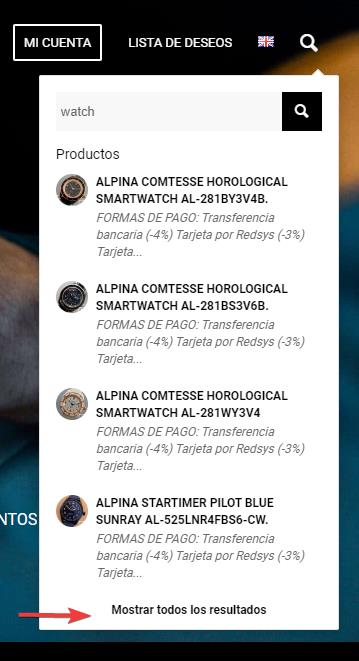
and lands on your custom SearchWP results page:

Best regards,
Mike



