
-
AuthorSearch Results
-
January 27, 2023 at 5:58 am #1395510
In reply to: LInk to an image
Hi enfold,
Since that option isn’t available, I think the workaround would be to use the fade-to-another-image hover effect, but you’ll need to create a button or a link below to redirect the user to another page.
Please check Ismael’s answer in this thread: https://kriesi.at/support/topic/image-links-not-working-for-images-with-fade-to-another-image-under-animation/#post-1377788
Hope it helps.Best regards,
Nikko-
This reply was modified 3 years, 2 months ago by
Nikko.
January 27, 2023 at 4:07 am #1395496In reply to: Space between 2 button in navigation menu
Hey carlosTLM98,
Thank you for the inquiry.
Adding this css code should create some space between the buttons.
li#menu-item-453 {
    margin-left: 18px;
}
Please make sure to toggle or temporarily disable the Enfold > Performance > File Compression settings after adding the css.
Best regards,
IsmaelJanuary 26, 2023 at 6:19 pm #1395428In reply to: Build a almost ready Template
Hey Nikko,
on this Page you send me there are some informations about the avia builder and I already use the button for saving whole pages and styles etc in one website.
But when I create a complete new Website for a new client. New WordPress and new enfold.
There I want to Upload the css and the Buttons i designed for the client before.how can I export and Import complete Pages and Saved modules and css not just the settings in the Theme?
Cheers
MonikaJanuary 26, 2023 at 12:08 pm #1395360In reply to: add a button next to social Media Buttons
Hey,
Thanks for the information!
You can refer to this post: https://kriesi.at/documentation/enfold/social-share-buttons/#how-to-add-custom-social-icons-to-enfold-options and add a new icon to social share profiles and link it to your shop page :)
If you need assistance with this, please let us know!
Cheers!
YigitJanuary 26, 2023 at 11:43 am #1395351Topic: add a button next to social Media Buttons
in forum Enfoldwebbits
ParticipantHi,
is it possible to add an button next to the social Media Buttons in enfold? In detail, I want to add a Button which links to the site’s shop.
kind regards!
January 26, 2023 at 5:57 am #1395296In reply to: www.sinabouyssy.com
Hi Norbert,
The version of Enfold you currently use is using the old API (username and API key) which Envato has already deprecated therefore you can’t update it with the usual method.
You can do the following process instead:First make a backup:
– Site Backup: https://kriesi.at/documentation/enfold/backup-wordpress-site/
– Theme Settings Backup: https://kriesi.at/documentation/enfold/backup-theme-settings/Option 1: Use Envato Market to update your site
– link: https://envato.com/market-plugin/Option 2: Update manually
1. Login to ThemeForest and download the Enfold theme, right-click over the downloaded zip file and extract/unzip it.
2. It should generate a new folder, open it and look for the enfold folder
3. Right-click the enfold folder then zip it, here’s a tutorial on how to create a zip file in windows: https://www.howtogeek.com/668409/how-to-zip-and-unzip-files-on-windows-10/ (this should create enfold.zip
4. Log in to WordPress as and Admin.
5. Install and activate a maintenance plugin and put your site in Maintenance mode.
6. Go to Appearance > Themes, switch to a default WordPress theme like TwentyTwenty then delete Enfold.
7. Click on the ADD NEW button.
8. Click on the UPLOAD THEME button.
9. Click BROWSE and choose enfold.zip file
10. Click the INSTALL NOW button and switch to Enfold or your child theme.
11. Remove the maintenance mode then deactivate and remove the maintenance plugin.Then register the theme by following the instructions in https://kriesi.at/documentation/enfold/theme-registration/
Once this is done, the next time you update, you’ll only need to go to Enfold > Theme Updates and click on the Update button.Best regards,
NikkoJanuary 25, 2023 at 3:56 pm #1395178In reply to: Text Box is not showing preview
Hi AU5985,
Thanks for giving us admin access.
It seems that you are using a very old version of Enfold (4.3) which was released in April 2018, please try to update the site to the latest version (5.4).
The current version you are using is still using the old API (username and API key) which envato has already deprecated therefore you can’t update it with the usual method.
You can do the following process instead:First make a backup:
– Site Backup: https://kriesi.at/documentation/enfold/backup-wordpress-site/
– Theme Settings Backup: https://kriesi.at/documentation/enfold/backup-theme-settings/Option 1: Use Envato Market to update your site
– link: https://envato.com/market-plugin/Option 2: Update manually
1. Login to ThemeForest and download the Enfold theme, right-click over the downloaded zip file and extract/unzip it.
2. It should generate a new folder, open it and look for the enfold folder
3. Right-click the enfold folder then zip it, here’s a tutorial on how to create a zip file in windows: https://www.howtogeek.com/668409/how-to-zip-and-unzip-files-on-windows-10/ (this should create enfold.zip
4. Log in to WordPress as and Admin.
5. Install and activate a maintenance plugin and put your site in Maintenance mode.
6. Go to Appearance > Themes, switch to a default WordPress theme like TwentyTwenty then delete Enfold.
7. Click on the ADD NEW button.
8. Click on the UPLOAD THEME button.
9. Click BROWSE and choose enfold.zip file
10. Click the INSTALL NOW button and switch to Enfold or your child theme.
11. Remove the maintenance mode then deactivate and remove the maintenance plugin.Then register the theme by following the instructions in https://kriesi.at/documentation/enfold/theme-registration/
Once this is done, the next time you update, you’ll only need to go to Enfold > Theme Updates and click on the Update button.Once it is updated please let us know if the issue still persists.
Best regards,
NikkoJanuary 25, 2023 at 3:33 pm #1395163In reply to: Burger Menu disable underline
Hi,
Please add the following code to the Quick CSS field in Enfold theme options > General Styling tab
a:where(:not(.wp-element-button)) {
  text-decoration: none;
}
Regards,
YigitJanuary 25, 2023 at 3:33 am #1395023In reply to: Installing Enfold 5.4 over version 4.2
Hi adrenal,
That version of Enfold is still using the old API (username and API key) which envato has already deprecated therefore you can’t update it with the usual method.
You can do the following process instead:First make a backup:
– Site Backup: https://kriesi.at/documentation/enfold/backup-wordpress-site/
– Theme Settings Backup: https://kriesi.at/documentation/enfold/backup-theme-settings/Second setup a staging site, some hosting provider offer an option to create a staging site via cpanel, if your webhost does not have it on your cpanel then you can use plugins, please check this article: https://wpengine.com/resources/what-is-a-staging-site-why-have-one/#How_to_Create_a_Staging_Site_for_WordPress
Once you have setup a staging site, please proceed to update the stage site in order to test if it will mess up your site or not:
Option 1: Use Envato Market to update your site
– link: https://envato.com/market-plugin/Option 2: Update manually
1. Login to ThemeForest and download the Enfold theme, right-click over the downloaded zip file and extract/unzip it.
2. It should generate a new folder, open it and look for the enfold folder
3. Right-click the enfold folder then zip it, here’s a tutorial on how to create a zip file in windows: https://www.howtogeek.com/668409/how-to-zip-and-unzip-files-on-windows-10/ (this should create enfold.zip
4. Log in to WordPress as and Admin.
5. Install and activate a maintenance plugin and put your site in Maintenance mode.
6. Go to Appearance > Themes, switch to a default WordPress theme like TwentyTwenty then delete Enfold.
7. Click on the ADD NEW button.
8. Click on the UPLOAD THEME button.
9. Click BROWSE and choose enfold.zip file
10. Click the INSTALL NOW button and switch to Enfold or your child theme.
11. Remove the maintenance mode then deactivate and remove the maintenance plugin.If update is successful on the staging site then please proceed to update the live site.
Then register the theme by following the instructions in https://kriesi.at/documentation/enfold/theme-registration/
Once this is done, the next time you update, you’ll only need to go to Enfold > Theme Updates and click on the Update button.If update is not successful then, please give us temporary admin access to your staging site and we’ll try to check further.
Best regards,
NikkoJanuary 24, 2023 at 2:33 pm #1394928Topic: theme bug
in forum Pre Sale QuestionsGael DOMPEYRE
GuestHi,
I’ve bought your enfold theme licence Ad9roEu2B27gDD in order to update the template on http://www.domainedeguillau.fr
But your avia editor is still bugging: when we want to update pages, the editor open its windows but for all items except for code blocs, none of the changes are recorded. A click on the “save/update” button don’t do anything and a click on the closing cross don’t do anything aswell.
So or you can fix this bug using the accesses below or I’ll ask for a refund and we’ll use another editor.
No hard feelings
RegardsJanuary 22, 2023 at 7:14 pm #1394709In reply to: Button hover styles
Hi,
Please try adding this css to your Enfold Theme Options ▸ General Styling ▸ Quick CSS field:#top #main .small-button a:hover .avia-button.avia-color-light { border: none; opacity: 0; }After applying the css, please clear your browser cache and check.
Best regards,
MikeJanuary 22, 2023 at 5:01 pm #1394706In reply to: TikTok Icon Social Media Buttons
Hey lauragrashoff,
The TikTok icon is not available on Fontello.com so you need to create it by finding an SVG and converting it on Fontello to create the icon font

The icon font will be black and white a colored SVG won’t work. But if you find a png with a transparent background then you can convert it here. For example I found a TikTok icon here and downloaded it as a SVG and then uploaded it to Fontello which converted it for me. This is the fontello-tiktok.zip file I’m using in this example.
Then to create the TikTok social profile follow the steps outlined here in our documentation.
For example, I added this code to the end of my child theme functions.php file in Appearance ▸ Editor, If you are not using a child theme I recommend the WPcode plugin this plugin supports PHP code snippets, JavaScript code snippets, & CSS code snippets and allows you to export and import your custom code snippets to other sites that you may have or as a backup.function avia_add_custom_icon($icons) { $icons['tiktok'] = array( 'font' =>'fontello', 'icon' => 'ue800'); return $icons; } add_filter('avf_default_icons','avia_add_custom_icon', 10, 1); function avia_add_custom_social_icon($icons) { $icons['TikTok'] = 'tiktok'; return $icons; } add_filter('avf_social_icons_options','avia_add_custom_social_icon', 10, 1); add_filter('avia_social_share_link_arguments', 'avia_add_social_share_link_arguments', 10, 1); function avia_add_social_share_link_arguments($args){ $tiktok = array('tiktok' => array("encode"=>true, "encode_urls"=>false, "pattern" => "https://www.tiktok.com/", 'label' => __("Share on TikTok",'avia_framework'))); $args = array_merge($tiktok, $args); return $args; }Then I enabled it at Enfold Theme Options ▸ Social Profiles ▸ Your social profiles
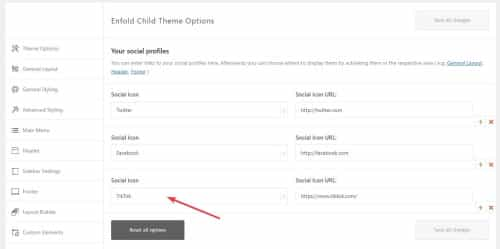
Now it shows on the frontend:

Now to add the on mouse-over color add this css to your Enfold Theme Options ▸ General Styling ▸ Quick CSS field:#top #wrap_all .av-social-link-tiktok:hover a{ color:#fff; background-color:#00f2ea; }Now go to the theme options Enfold Theme Options ▸ Blog Layout ▸ Profile Links At The Bottom Of Your Blog Post and enable the TikTok item:

and now on blog posts when the share box shows TikTok will be included:

Best regards,
MikeJanuary 20, 2023 at 6:03 pm #1394585Topic: Open modal on button click stopped working
in forum Enfoldelsmore01
ParticipantHi,
I setup modals to open on button/link clicks according to this post:
They used to work, but not anymore. The link just opens another tab in my browser. Should it still work in recent versions of Enfold? I’m currently using 5.0.1.
January 20, 2023 at 1:04 pm #1394511In reply to: centering button
Hey,
Thanks for contacting us!
Please add the following code to the Quick CSS field in Enfold theme options > General Styling tab
@media only screen and (max-width: 767px) {
.avia_transform .avia-button-wrap.av-14b7av-40967159c1685d687e874f52f7c3cc4f-wrap {
  float: none;
}
.avia-button-wrap.av-14b7av-40967159c1685d687e874f52f7c3cc4f-wrap.avia_animated_button.av-animated-when-visible-95.pop-up.avia-button-right.avia-builder-el-5.avia-builder-el-no-sibling.avia_start_animation.avia_start_delayed_animation {
  margin: auto;
  float: none;
  max-width: 200px;
}
}
Best regards,
YigitJanuary 19, 2023 at 6:34 pm #1394439Topic: Support forum
in forum Pre Sale Questionskaren moate
GuestHi this has been dead in the water for a couple of days – I’ve got a secondary menu used in. the bar above the header, added coloured buttons but they are not outputting. Any ideas is this a bug? I’ve used coloured buttons in menus on other sites, first time using them in the top bar.
All the best
January 19, 2023 at 3:46 pm #1394053In reply to: Font Awesome on Enfold
yes – they changed the server and something on board soft. So my post is located in the endless expanses of the Internet clouds.
Here is my second trial:i would do the following to keep the similar usage as the entypo fontello icons:
Download the free Fontawesome – unzip it and extract the svg folders. There are probably three. Open one of these folders – e.g. the solid folder. Now go to the fontello page. There is a custom icon field at the top. Drag all – or only the svg icons you want into it. Activate all of them (you can do this by dragging the left mouse button). Give them a name in the upper right corner ( e.g. fontawesome-solid ) and download this set.
Upload this zip to Enfold – Import/Export – Iconfont Manager.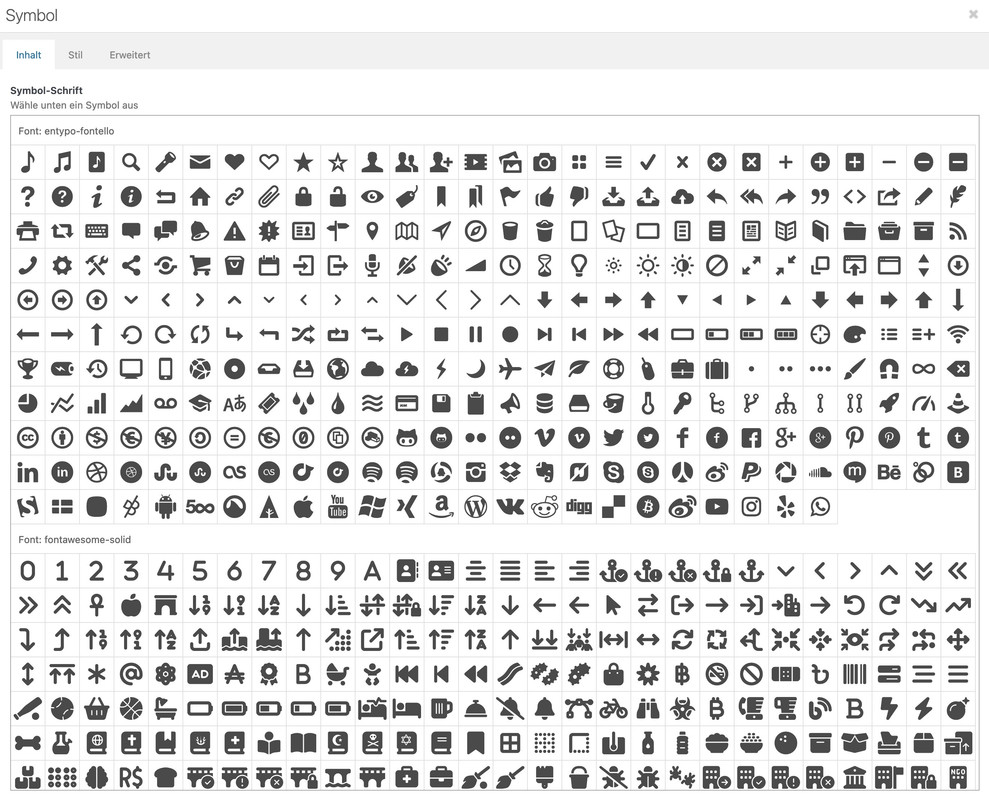
-
This reply was modified 3 years, 2 months ago by
Kriesi.
January 18, 2023 at 1:48 pm #1393902In reply to: My Socials
Hey,
Thanks for contacting us!
You can add custom social icons by referring to this post: https://kriesi.at/documentation/enfold/social-share-buttons/#how-to-add-custom-social-icons-to-enfold-options
Discord icon is not available on Fontello therefore I am afraid we are not able to add it in Enfold but I will check with our devs :)
Best regards,
YigitJanuary 14, 2023 at 5:33 pm #1378689In reply to: Button styling customisation
Hi,
Thanks for sharing Guenni007, this looks nice, but the main goal of THP Studio is to achieve a skewed border between the two buttons like in this example

do you have any ideas to achieve this?Best regards,
MikeJanuary 14, 2023 at 3:00 pm #1378676In reply to: Button styling customisation
Hi,
Thanks for the link to the example, these buttons have multiple divs in them to create the skew so we would not be able to style one of our buttons to match this, but you could add these buttons to your page in a Code Block element, on my example page I added the button code and the css in the same Code Block element:

try this code:<style> .home-section-cta-wrap { position: relative; z-index: 100; display: -webkit-box; display: -webkit-flex; display: -ms-flexbox; display: flex; margin-top: 24px; -webkit-box-pack: center; -webkit-justify-content: center; -ms-flex-pack: center; justify-content: center; } .main_color .home-section-cta-wrap a { color: #fff !important; } .skewed-button { position: relative; width: 180px; padding: 10px 60px 10px 32px; -webkit-transition: width 0.2s ease; transition: width 0.2s ease; font-weight: 500; text-align: center; text-decoration: none; } .skewed-button-bg { position: absolute; left: 0; top: 0; right: 32px; bottom: 0; z-index: -1; border-style: solid none solid solid; border-width: 1px; border-color: #e0e0e0; border-top-left-radius: 1px; border-bottom-left-radius: 1px; border-bottom-right-radius: 1px; } .button-skew { position: absolute; left: auto; top: 0; right: 0; bottom: 0; z-index: -1; width: 50%; margin-top: -1px; margin-right: -18px; margin-bottom: -1px; border-top: 1px solid #000; border-right: 2px solid #000; border-radius: 0 2px 1px 1px; -webkit-transform: skew(-45deg, 0deg); -ms-transform: skew(-45deg, 0deg); transform: skew(-45deg, 0deg); } .skewed-button.skewed-button--right { margin-left: -12px; padding-right: 32px; padding-left: 60px; } .skewed-button-bg.skewed-button--right.cc-pink { border-style: solid; border-color: #ff6180; background-color: #ff6180; } .skewed-button-bg.skewed-button--right { left: 32px; right: 0; border-top-right-radius: 1px; border-bottom-left-radius: 0; } .button-skew.button-skew--right { left: 0; right: auto; margin-right: 0; margin-left: -22px; border-style: none none solid solid; border-bottom-width: 1px; border-left-width: 2px; border-radius: 1px 0 0 2px; } .button-skew { background-color: inherit; border-color: inherit !important; } .skewed-button:hover { width: 200px; } </style> <div class="home-section-cta-wrap"> <a href="#" class="w-inline-block skewed-button"> <div class="skewed-button-bg"> <div class="button-skew"></div> </div> <div>Learn more</div> </a> <a href="#" class="skewed-button skewed-button--right cc-white-text w-inline-block"> <div class="skewed-button-bg skewed-button--right cc-pink"> <div class="button-skew button-skew--right"></div> </div> <div>Buy now</div> </a> </div>Please ensure to copy the code from the forum and not an email notification so the symbols are not converted.
I hope this helps.Best regards,
MikeJanuary 14, 2023 at 10:22 am #1378661In reply to: Lightbox popup on Enfold
first try this filter in your child-theme functions.php :
add_filter( 'avf_default_lightbox_no_scroll', '__return_true' );
if it does not work –you can give in your case to that text manuall the second custom class: no-scroll
Just put to that place where you entered your inline-popup class
so enter : inline-popup no-scroll_____________
Why do I mention : “in your case”.
Mostly you can’t assign the trigger class directly to the link. e.g. a button ALB – the custom class would go to a parent element of the link ( so it’s not at the anchor).
So I mostly enter the trigger class to a parent element – and noted this inline popup snippet like this way:function inline_popup_enabler(){ ?> <script> (function($){ $(window).on('load',function(){ $('.inline-popup').find('a').addClass('no-scroll'); $('.inline_popup').magnificPopup({ delegate: 'a', type:'inline', midClick: true }); }); })(jQuery); </script> <?php } add_action('wp_footer', 'inline_popup_enabler');But now since Enfold 5.1 there is this filter: avf_default_lightbox_no_scroll
January 14, 2023 at 12:36 am #1378657In reply to: Button styling customisation
here are some customizations on enfold Buttons: https://enfold.webers-webdesign.de/buttons/
______________
btw: for better selecting Buttons in a button-row i had written that little snippet to have unique ID’s on each Button:
function id_to_button_row_buttons(){
?>
<script>
(function($) {
  $('.avia-buttonrow-wrap').each(function(a){
    var ButtonRowID = ($(this).attr('id') !== undefined) ? $(this).attr('id') : 'button_row'+(a+1);
    var that = this;
    $('.avia-button', this).each(function(i){
      $(this).attr('id', ButtonRowID+'-button'+(i+1));
    });
  });
})(jQuery);
</script>
<?php
}
add_action( 'wp_footer', 'id_to_button_row_buttons');
you can see here in the DOM how it works ( first button row has no custom class – second got abc as custom-class.)
https://webers-testseite.de/buttonrow/January 13, 2023 at 3:49 pm #1378607Topic: Colour 2nd button
in forum Enfoldshedoesitcoaching
ParticipantHi Enfold team,
I want to changed the colour of a button on one of my pages (id=8476). I did this via the CMS.
There are 2 buttons on this page.The first one is the right colour now (#00A8A8), but unfortunately the 2nd ons is still red.
Have I used the wrong code?I also see a sort of red line at the buttom of the green button. Do you see that as well?
Thanks for your help!
January 12, 2023 at 11:31 pm #1378500Topic: Button styling customisation
in forum EnfoldTHP Studio
ParticipantHey guys,
Got a client who wants some very specific button styles that aren’t out of the box with Enfold and wondered if you could let me know if this is possible and point me in the right direction with CSS needed to accomplish it.
Note that the buttons have inverted styling when next to each other like in the example (probably using a Button Row element)
See private field for a screenshot of the styling.
Thanks,
Tim
-
This topic was modified 3 years, 2 months ago by
THP Studio.
-
This topic was modified 3 years, 2 months ago by
January 11, 2023 at 7:04 pm #1378299Topic: Creating a global elements in Enfold.
in forum Enfoldlevlaneadvertising
ParticipantHello!
We were curious how can we create global elements in Enfold? I’m not talking about custom elements described here: https://kriesi.at/documentation/enfold/custom-element-templates/ We need to create a global element like let’s say a custom call to action element with image, button and text that we want to display on curtain pages. And we want to be able to update an image or button or text in that call to action so the change would take an affect globally.
Please let us know.
Thank you!January 11, 2023 at 11:15 am #1378233Topic: Theme Update not working
in forum Enfolddave_montana
ParticipantI’ve been trying to update Enfold Theme since 5.2.1 I do the update and then my home page has errors in the design, on my about page the images dont show up and so I recover my old version and wait for the next update with bug fixes.
I have done this three times, again this morning trying to update to 5.3.1.1 the same thing has happened.
Does this happen to any one else? can some one help me? I’ve also noticed that since doing the recovery I get a message
(Your WordPress install has old directories from its state before you restored/migrated (technical information: these are suffixed with -old). You should press this button to delete them as soon as you have verified that the restoration worked.) when I do this it gives me an error message ( done with UpdraftPlus Backup/Restore ) My regular backup is not working anymore either?January 8, 2023 at 7:40 pm #1377995In reply to: Advanced Layer Slider: reveal text on hover
Hey Restel-Vietz,
Thanks for the link to your page, but the 6 buttons look like they are in a LayerSlider so I don’t know if there is a way to do that in the LayerSlider.
But if you want 6 buttons on the left reveal different text in the same space on the right try using the tab element and choose the Tab Position to the side


You can make the tabs look a little more like buttons with this css:.main_color .tabcontainer div { border-color: transparent; } .main_color .tabcontainer .tab { color: #000; background-color: #fff; } .js_active .tabcontainer .tab { float: none; text-align: center; box-shadow:0px 0px 0px 2px black inset; }My demo example:

Best regards,
MikeJanuary 8, 2023 at 6:04 pm #1377993Hi,
Thanks for your patience,
#1 to move the woo product sidebar from under the product to a classic sidebar position please follow this thread.
#2 I couldn’t add the page you linked to because this is an automatically created page, not an ALB page. It is the woocommerce shop page on your site it is ▸ https://sandbox.akhurst.com/shop/
you will notice the message at the top of the page: the default WooCommerce Shop Overview and therefore does not support the Enfold advanced layout editor

If you want to create this page on another page use the Product Grid element

I don’t see a sidebar on the example page that you linked to, but you can create a ALB product page and add an image and use the product purchase button

and then below that use a product slider with 3 columns

the next section would have a simple button to a category archive page with a couple of images and linkes to different categories

the rest of the page follows this, so I think you get the idea.
I hope this helps.Best regards,
MikeJanuary 8, 2023 at 4:52 pm #1377987Hey Thomas,
Thanks for your question, I don’t see that we have a documented list of all frontend CSS & JS files, but I created this list by disabling CSS & JS Merging And Compression and setting Template Builder Elements to Always load all elements in Enfold Theme Options ▸ Performance ▸ Website Performance And Optimization and then checked my demo site frontend source code.
This gave me 121 items, including the LayerSlider and some WordPress items.<link rel='stylesheet' id='avia-grid-css' href='/wp-content/themes/enfold/css/grid.css?ver=5.3.1.1' type='text/css' media='all' /> <link rel='stylesheet' id='avia-base-css' href='/wp-content/themes/enfold/css/base.css?ver=5.3.1.1' type='text/css' media='all' /> <link rel='stylesheet' id='avia-layout-css' href='/wp-content/themes/enfold/css/layout.css?ver=5.3.1.1' type='text/css' media='all' /> <link rel='stylesheet' id='avia-module-audioplayer-css' href='/wp-content/themes/enfold/config-templatebuilder/avia-shortcodes/audio-player/audio-player.css?ver=5.3.1.1' type='text/css' media='all' /> <link rel='stylesheet' id='avia-module-blog-css' href='/wp-content/themes/enfold/config-templatebuilder/avia-shortcodes/blog/blog.css?ver=5.3.1.1' type='text/css' media='all' /> <link rel='stylesheet' id='avia-module-postslider-css' href='/wp-content/themes/enfold/config-templatebuilder/avia-shortcodes/postslider/postslider.css?ver=5.3.1.1' type='text/css' media='all' /> <link rel='stylesheet' id='avia-module-button-css' href='/wp-content/themes/enfold/config-templatebuilder/avia-shortcodes/buttons/buttons.css?ver=5.3.1.1' type='text/css' media='all' /> <link rel='stylesheet' id='avia-module-buttonrow-css' href='/wp-content/themes/enfold/config-templatebuilder/avia-shortcodes/buttonrow/buttonrow.css?ver=5.3.1.1' type='text/css' media='all' /> <link rel='stylesheet' id='avia-module-button-fullwidth-css' href='/wp-content/themes/enfold/config-templatebuilder/avia-shortcodes/buttons_fullwidth/buttons_fullwidth.css?ver=5.3.1.1' type='text/css' media='all' /> <link rel='stylesheet' id='avia-module-catalogue-css' href='/wp-content/themes/enfold/config-templatebuilder/avia-shortcodes/catalogue/catalogue.css?ver=5.3.1.1' type='text/css' media='all' /> <link rel='stylesheet' id='avia-module-comments-css' href='/wp-content/themes/enfold/config-templatebuilder/avia-shortcodes/comments/comments.css?ver=5.3.1.1' type='text/css' media='all' /> <link rel='stylesheet' id='avia-module-contact-css' href='/wp-content/themes/enfold/config-templatebuilder/avia-shortcodes/contact/contact.css?ver=5.3.1.1' type='text/css' media='all' /> <link rel='stylesheet' id='avia-module-slideshow-css' href='/wp-content/themes/enfold/config-templatebuilder/avia-shortcodes/slideshow/slideshow.css?ver=5.3.1.1' type='text/css' media='all' /> <link rel='stylesheet' id='avia-module-slideshow-contentpartner-css' href='/wp-content/themes/enfold/config-templatebuilder/avia-shortcodes/contentslider/contentslider.css?ver=5.3.1.1' type='text/css' media='all' /> <link rel='stylesheet' id='avia-module-countdown-css' href='/wp-content/themes/enfold/config-templatebuilder/avia-shortcodes/countdown/countdown.css?ver=5.3.1.1' type='text/css' media='all' /> <link rel='stylesheet' id='avia-module-gallery-css' href='/wp-content/themes/enfold/config-templatebuilder/avia-shortcodes/gallery/gallery.css?ver=5.3.1.1' type='text/css' media='all' /> <link rel='stylesheet' id='avia-module-gallery-hor-css' href='/wp-content/themes/enfold/config-templatebuilder/avia-shortcodes/gallery_horizontal/gallery_horizontal.css?ver=5.3.1.1' type='text/css' media='all' /> <link rel='stylesheet' id='avia-module-maps-css' href='/wp-content/themes/enfold/config-templatebuilder/avia-shortcodes/google_maps/google_maps.css?ver=5.3.1.1' type='text/css' media='all' /> <link rel='stylesheet' id='avia-module-gridrow-css' href='/wp-content/themes/enfold/config-templatebuilder/avia-shortcodes/grid_row/grid_row.css?ver=5.3.1.1' type='text/css' media='all' /> <link rel='stylesheet' id='avia-module-heading-css' href='/wp-content/themes/enfold/config-templatebuilder/avia-shortcodes/heading/heading.css?ver=5.3.1.1' type='text/css' media='all' /> <link rel='stylesheet' id='avia-module-rotator-css' href='/wp-content/themes/enfold/config-templatebuilder/avia-shortcodes/headline_rotator/headline_rotator.css?ver=5.3.1.1' type='text/css' media='all' /> <link rel='stylesheet' id='avia-module-hr-css' href='/wp-content/themes/enfold/config-templatebuilder/avia-shortcodes/hr/hr.css?ver=5.3.1.1' type='text/css' media='all' /> <link rel='stylesheet' id='avia-module-icon-css' href='/wp-content/themes/enfold/config-templatebuilder/avia-shortcodes/icon/icon.css?ver=5.3.1.1' type='text/css' media='all' /> <link rel='stylesheet' id='avia-module-icon-circles-css' href='/wp-content/themes/enfold/config-templatebuilder/avia-shortcodes/icon_circles/icon_circles.css?ver=5.3.1.1' type='text/css' media='all' /> <link rel='stylesheet' id='avia-module-iconbox-css' href='/wp-content/themes/enfold/config-templatebuilder/avia-shortcodes/iconbox/iconbox.css?ver=5.3.1.1' type='text/css' media='all' /> <link rel='stylesheet' id='avia-module-icongrid-css' href='/wp-content/themes/enfold/config-templatebuilder/avia-shortcodes/icongrid/icongrid.css?ver=5.3.1.1' type='text/css' media='all' /> <link rel='stylesheet' id='avia-module-iconlist-css' href='/wp-content/themes/enfold/config-templatebuilder/avia-shortcodes/iconlist/iconlist.css?ver=5.3.1.1' type='text/css' media='all' /> <link rel='stylesheet' id='avia-module-image-css' href='/wp-content/themes/enfold/config-templatebuilder/avia-shortcodes/image/image.css?ver=5.3.1.1' type='text/css' media='all' /> <link rel='stylesheet' id='avia-module-hotspot-css' href='/wp-content/themes/enfold/config-templatebuilder/avia-shortcodes/image_hotspots/image_hotspots.css?ver=5.3.1.1' type='text/css' media='all' /> <link rel='stylesheet' id='avia-module-magazine-css' href='/wp-content/themes/enfold/config-templatebuilder/avia-shortcodes/magazine/magazine.css?ver=5.3.1.1' type='text/css' media='all' /> <link rel='stylesheet' id='avia-module-masonry-css' href='/wp-content/themes/enfold/config-templatebuilder/avia-shortcodes/masonry_entries/masonry_entries.css?ver=5.3.1.1' type='text/css' media='all' /> <link rel='stylesheet' id='avia-siteloader-css' href='/wp-content/themes/enfold/css/avia-snippet-site-preloader.css?ver=5.3.1.1' type='text/css' media='all' /> <link rel='stylesheet' id='avia-module-menu-css' href='/wp-content/themes/enfold/config-templatebuilder/avia-shortcodes/menu/menu.css?ver=5.3.1.1' type='text/css' media='all' /> <link rel='stylesheet' id='avia-module-notification-css' href='/wp-content/themes/enfold/config-templatebuilder/avia-shortcodes/notification/notification.css?ver=5.3.1.1' type='text/css' media='all' /> <link rel='stylesheet' id='avia-module-numbers-css' href='/wp-content/themes/enfold/config-templatebuilder/avia-shortcodes/numbers/numbers.css?ver=5.3.1.1' type='text/css' media='all' /> <link rel='stylesheet' id='avia-module-portfolio-css' href='/wp-content/themes/enfold/config-templatebuilder/avia-shortcodes/portfolio/portfolio.css?ver=5.3.1.1' type='text/css' media='all' /> <link rel='stylesheet' id='avia-module-post-metadata-css' href='/wp-content/themes/enfold/config-templatebuilder/avia-shortcodes/post_metadata/post_metadata.css?ver=5.3.1.1' type='text/css' media='all' /> <link rel='stylesheet' id='avia-module-progress-bar-css' href='/wp-content/themes/enfold/config-templatebuilder/avia-shortcodes/progressbar/progressbar.css?ver=5.3.1.1' type='text/css' media='all' /> <link rel='stylesheet' id='avia-module-promobox-css' href='/wp-content/themes/enfold/config-templatebuilder/avia-shortcodes/promobox/promobox.css?ver=5.3.1.1' type='text/css' media='all' /> <link rel='stylesheet' id='avia-sc-search-css' href='/wp-content/themes/enfold/config-templatebuilder/avia-shortcodes/search/search.css?ver=5.3.1.1' type='text/css' media='all' /> <link rel='stylesheet' id='avia-module-slideshow-accordion-css' href='/wp-content/themes/enfold/config-templatebuilder/avia-shortcodes/slideshow_accordion/slideshow_accordion.css?ver=5.3.1.1' type='text/css' media='all' /> <link rel='stylesheet' id='avia-module-slideshow-feature-image-css' href='/wp-content/themes/enfold/config-templatebuilder/avia-shortcodes/slideshow_feature_image/slideshow_feature_image.css?ver=5.3.1.1' type='text/css' media='all' /> <link rel='stylesheet' id='avia-module-slideshow-fullsize-css' href='/wp-content/themes/enfold/config-templatebuilder/avia-shortcodes/slideshow_fullsize/slideshow_fullsize.css?ver=5.3.1.1' type='text/css' media='all' /> <link rel='stylesheet' id='avia-module-slideshow-fullscreen-css' href='/wp-content/themes/enfold/config-templatebuilder/avia-shortcodes/slideshow_fullscreen/slideshow_fullscreen.css?ver=5.3.1.1' type='text/css' media='all' /> <link rel='stylesheet' id='avia-module-slideshow-ls-css' href='/wp-content/themes/enfold/config-templatebuilder/avia-shortcodes/slideshow_layerslider/slideshow_layerslider.css?ver=5.3.1.1' type='text/css' media='all' /> <link rel='stylesheet' id='avia-module-social-css' href='/wp-content/themes/enfold/config-templatebuilder/avia-shortcodes/social_share/social_share.css?ver=5.3.1.1' type='text/css' media='all' /> <link rel='stylesheet' id='avia-module-tabsection-css' href='/wp-content/themes/enfold/config-templatebuilder/avia-shortcodes/tab_section/tab_section.css?ver=5.3.1.1' type='text/css' media='all' /> <link rel='stylesheet' id='avia-module-table-css' href='/wp-content/themes/enfold/config-templatebuilder/avia-shortcodes/table/table.css?ver=5.3.1.1' type='text/css' media='all' /> <link rel='stylesheet' id='avia-module-tabs-css' href='/wp-content/themes/enfold/config-templatebuilder/avia-shortcodes/tabs/tabs.css?ver=5.3.1.1' type='text/css' media='all' /> <link rel='stylesheet' id='avia-module-team-css' href='/wp-content/themes/enfold/config-templatebuilder/avia-shortcodes/team/team.css?ver=5.3.1.1' type='text/css' media='all' /> <link rel='stylesheet' id='avia-module-testimonials-css' href='/wp-content/themes/enfold/config-templatebuilder/avia-shortcodes/testimonials/testimonials.css?ver=5.3.1.1' type='text/css' media='all' /> <link rel='stylesheet' id='avia-module-timeline-css' href='/wp-content/themes/enfold/config-templatebuilder/avia-shortcodes/timeline/timeline.css?ver=5.3.1.1' type='text/css' media='all' /> <link rel='stylesheet' id='avia-module-toggles-css' href='/wp-content/themes/enfold/config-templatebuilder/avia-shortcodes/toggles/toggles.css?ver=5.3.1.1' type='text/css' media='all' /> <link rel='stylesheet' id='avia-module-video-css' href='/wp-content/themes/enfold/config-templatebuilder/avia-shortcodes/video/video.css?ver=5.3.1.1' type='text/css' media='all' /> <link rel='stylesheet' id='dashicons-css' href='/wp-includes/css/dashicons.min.css?ver=6.1.1' type='text/css' media='all' /> <link rel='stylesheet' id='admin-bar-css' href='/wp-includes/css/admin-bar.min.css?ver=6.1.1' type='text/css' media='all' /> <link rel='stylesheet' id='layerslider-front-css' href='/wp-content/themes/enfold/config-layerslider/LayerSlider/assets/static/public/front.css?ver=7.6.7' type='text/css' media='all' /> <link rel='stylesheet' id='layerslider-css' href='/wp-content/themes/enfold/config-layerslider/LayerSlider/assets/static/layerslider/css/layerslider.css?ver=7.6.7' type='text/css' media='all' /> <link rel='stylesheet' id='wp-block-library-css' href='/wp-includes/css/dist/block-library/style.min.css?ver=6.1.1' type='text/css' media='all' /> <link rel='stylesheet' id='avia-scs-css' href='/wp-content/themes/enfold/css/shortcodes.css?ver=5.3.1.1' type='text/css' media='all' /> <link rel='stylesheet' id='avia-popup-css-css' href='/wp-content/themes/enfold/js/aviapopup/magnific-popup.min.css?ver=5.3.1.1' type='text/css' media='screen' /> <link rel='stylesheet' id='avia-lightbox-css' href='/wp-content/themes/enfold/css/avia-snippet-lightbox.css?ver=5.3.1.1' type='text/css' media='screen' /> <link rel='stylesheet' id='avia-widget-css-css' href='/wp-content/themes/enfold/css/avia-snippet-widget.css?ver=5.3.1.1' type='text/css' media='screen' /> <link rel='stylesheet' id='avia-dynamic-css' href='/wp-content/uploads/dynamic_avia/enfold_child.css?ver=63bad66d43ca1' type='text/css' media='all' /> <link rel='stylesheet' id='avia-custom-css' href='/wp-content/themes/enfold/css/custom.css?ver=5.3.1.1' type='text/css' media='all' /> <link rel='stylesheet' id='avia-style-css' href='/wp-content/themes/enfold-child/style.css?ver=5.3.1.1' type='text/css' media='all' /> <script type='text/javascript' src='/wp-includes/js/jquery/jquery.min.js?ver=3.6.1' id='jquery-core-js'></script> <script type='text/javascript' src='/wp-includes/js/jquery/jquery-migrate.min.js?ver=3.3.2' id='jquery-migrate-js'></script> <script type='text/javascript' src='/wp-content/themes/enfold/js/avia-compat.js?ver=5.3.1.1' id='avia-compat-js'></script> <script type='text/javascript' src='/wp-content/themes/enfold/js/waypoints/waypoints.min.js?ver=5.3.1.1' id='avia-waypoints-js'></script> <script type='text/javascript' src='/wp-content/themes/enfold/js/avia.js?ver=5.3.1.1' id='avia-default-js'></script> <script type='text/javascript' src='/wp-content/themes/enfold/js/shortcodes.js?ver=5.3.1.1' id='avia-shortcodes-js'></script> <script type='text/javascript' src='/wp-content/themes/enfold/config-templatebuilder/avia-shortcodes/audio-player/audio-player.js?ver=5.3.1.1' id='avia-module-audioplayer-js'></script> <script type='text/javascript' src='/wp-content/themes/enfold/config-templatebuilder/avia-shortcodes/chart/chart-js.min.js?ver=5.3.1.1' id='avia-module-chart-js-js'></script> <script type='text/javascript' src='/wp-content/themes/enfold/config-templatebuilder/avia-shortcodes/chart/chart.js?ver=5.3.1.1' id='avia-module-chart-js'></script> <script type='text/javascript' src='/wp-content/themes/enfold/config-templatebuilder/avia-shortcodes/contact/contact.js?ver=5.3.1.1' id='avia-module-contact-js'></script> <script type='text/javascript' src='/wp-content/themes/enfold/config-templatebuilder/avia-shortcodes/slideshow/slideshow.js?ver=5.3.1.1' id='avia-module-slideshow-js'></script> <script type='text/javascript' src='/wp-content/themes/enfold/config-templatebuilder/avia-shortcodes/countdown/countdown.js?ver=5.3.1.1' id='avia-module-countdown-js'></script> <script type='text/javascript' src='/wp-content/themes/enfold/config-templatebuilder/avia-shortcodes/gallery/gallery.js?ver=5.3.1.1' id='avia-module-gallery-js'></script> <script type='text/javascript' src='/wp-content/themes/enfold/config-templatebuilder/avia-shortcodes/gallery_horizontal/gallery_horizontal.js?ver=5.3.1.1' id='avia-module-gallery-hor-js'></script> <script type='text/javascript' src='/wp-content/themes/enfold/config-templatebuilder/avia-shortcodes/headline_rotator/headline_rotator.js?ver=5.3.1.1' id='avia-module-rotator-js'></script> <script type='text/javascript' src='/wp-content/themes/enfold/config-templatebuilder/avia-shortcodes/icon_circles/icon_circles.js?ver=5.3.1.1' id='avia-module-icon-circles-js'></script> <script type='text/javascript' src='/wp-content/themes/enfold/config-templatebuilder/avia-shortcodes/icongrid/icongrid.js?ver=5.3.1.1' id='avia-module-icongrid-js'></script> <script type='text/javascript' src='/wp-content/themes/enfold/config-templatebuilder/avia-shortcodes/iconlist/iconlist.js?ver=5.3.1.1' id='avia-module-iconlist-js'></script> <script type='text/javascript' src='/wp-content/themes/enfold/config-templatebuilder/avia-shortcodes/image_hotspots/image_hotspots.js?ver=5.3.1.1' id='avia-module-hotspot-js'></script> <script type='text/javascript' src='/wp-content/themes/enfold/config-templatebuilder/avia-shortcodes/magazine/magazine.js?ver=5.3.1.1' id='avia-module-magazine-js'></script> <script type='text/javascript' src='/wp-content/themes/enfold/config-templatebuilder/avia-shortcodes/portfolio/isotope.min.js?ver=5.3.1.1' id='avia-module-isotope-js'></script> <script type='text/javascript' src='/wp-content/themes/enfold/config-templatebuilder/avia-shortcodes/masonry_entries/masonry_entries.js?ver=5.3.1.1' id='avia-module-masonry-js'></script> <script type='text/javascript' src='/wp-content/themes/enfold/config-templatebuilder/avia-shortcodes/menu/menu.js?ver=5.3.1.1' id='avia-module-menu-js'></script> <script type='text/javascript' src='/wp-content/themes/enfold/config-templatebuilder/avia-shortcodes/notification/notification.js?ver=5.3.1.1' id='avia-module-notification-js'></script> <script type='text/javascript' src='/wp-content/themes/enfold/config-templatebuilder/avia-shortcodes/numbers/numbers.js?ver=5.3.1.1' id='avia-module-numbers-js'></script> <script type='text/javascript' src='/wp-content/themes/enfold/config-templatebuilder/avia-shortcodes/portfolio/portfolio.js?ver=5.3.1.1' id='avia-module-portfolio-js'></script> <script type='text/javascript' src='/wp-content/themes/enfold/config-templatebuilder/avia-shortcodes/progressbar/progressbar.js?ver=5.3.1.1' id='avia-module-progress-bar-js'></script> <script type='text/javascript' src='/wp-content/themes/enfold/config-templatebuilder/avia-shortcodes/slideshow/slideshow-video.js?ver=5.3.1.1' id='avia-module-slideshow-video-js'></script> <script type='text/javascript' src='/wp-content/themes/enfold/config-templatebuilder/avia-shortcodes/slideshow_accordion/slideshow_accordion.js?ver=5.3.1.1' id='avia-module-slideshow-accordion-js'></script> <script type='text/javascript' src='/wp-content/themes/enfold/config-templatebuilder/avia-shortcodes/slideshow_fullscreen/slideshow_fullscreen.js?ver=5.3.1.1' id='avia-module-slideshow-fullscreen-js'></script> <script type='text/javascript' src='/wp-content/themes/enfold/config-templatebuilder/avia-shortcodes/slideshow_layerslider/slideshow_layerslider.js?ver=5.3.1.1' id='avia-module-slideshow-ls-js'></script> <script type='text/javascript' src='/wp-content/themes/enfold/config-templatebuilder/avia-shortcodes/tab_section/tab_section.js?ver=5.3.1.1' id='avia-module-tabsection-js'></script> <script type='text/javascript' src='/wp-content/themes/enfold/config-templatebuilder/avia-shortcodes/tabs/tabs.js?ver=5.3.1.1' id='avia-module-tabs-js'></script> <script type='text/javascript' src='/wp-content/themes/enfold/config-templatebuilder/avia-shortcodes/testimonials/testimonials.js?ver=5.3.1.1' id='avia-module-testimonials-js'></script> <script type='text/javascript' src='/wp-content/themes/enfold/config-templatebuilder/avia-shortcodes/timeline/timeline.js?ver=5.3.1.1' id='avia-module-timeline-js'></script> <script type='text/javascript' src='/wp-content/themes/enfold/config-templatebuilder/avia-shortcodes/toggles/toggles.js?ver=5.3.1.1' id='avia-module-toggles-js'></script> <script type='text/javascript' src='/wp-content/themes/enfold/config-templatebuilder/avia-shortcodes/video/video.js?ver=5.3.1.1' id='avia-module-video-js'></script> <script type='text/javascript' src='/wp-includes/js/hoverintent-js.min.js?ver=2.2.1' id='hoverintent-js-js'></script> <script type='text/javascript' src='/wp-includes/js/admin-bar.min.js?ver=6.1.1' id='admin-bar-js'></script> <script type='text/javascript' src='/wp-content/themes/enfold/js/avia-snippet-hamburger-menu.js?ver=5.3.1.1' id='avia-hamburger-menu-js'></script> <script type='text/javascript' src='/wp-content/themes/enfold/js/avia-snippet-parallax.js?ver=5.3.1.1' id='avia-parallax-support-js'></script> <script type='text/javascript' src='/wp-content/themes/enfold/js/aviapopup/jquery.magnific-popup.min.js?ver=5.3.1.1' id='avia-popup-js-js'></script> <script type='text/javascript' src='/wp-content/themes/enfold/js/avia-snippet-lightbox.js?ver=5.3.1.1' id='avia-lightbox-activation-js'></script> <script type='text/javascript' src='/wp-content/themes/enfold/js/avia-snippet-sticky-header.js?ver=5.3.1.1' id='avia-sticky-header-js'></script> <script type='text/javascript' src='/wp-content/themes/enfold/js/avia-snippet-footer-effects.js?ver=5.3.1.1' id='avia-footer-effects-js'></script> <script type='text/javascript' src='/wp-content/themes/enfold/js/avia-snippet-widget.js?ver=5.3.1.1' id='avia-widget-js-js'></script> <script type='text/javascript' src='/wp-includes/js/dist/vendor/regenerator-runtime.min.js?ver=0.13.9' id='regenerator-runtime-js'></script> <script type='text/javascript' src='/wp-includes/js/dist/vendor/wp-polyfill.min.js?ver=3.15.0' id='wp-polyfill-js'></script> <script type='text/javascript' src='/wp-includes/js/dist/hooks.min.js?ver=4169d3cf8e8d95a3d6d5' id='wp-hooks-js'></script> <script type='text/javascript' src='/wp-includes/js/dist/i18n.min.js?ver=9e794f35a71bb98672ae' id='wp-i18n-js'></script> <script type='text/javascript' src='/wp-includes/js/dist/url.min.js?ver=bb0ef862199bcae73aa7' id='wp-url-js'></script> <script type='text/javascript' src='/wp-includes/js/dist/api-fetch.min.js?ver=bc0029ca2c943aec5311' id='wp-api-fetch-js'></script> <script type='text/javascript' src='/wp-content/themes/enfold/config-layerslider/LayerSlider/assets/static/layerslider/js/layerslider.utils.js?ver=7.6.7' id='layerslider-utils-js'></script> <script type='text/javascript' src='/wp-content/themes/enfold/config-layerslider/LayerSlider/assets/static/layerslider/js/layerslider.kreaturamedia.jquery.js?ver=7.6.7' id='layerslider-js'></script> <script type='text/javascript' src='/wp-content/themes/enfold/config-layerslider/LayerSlider/assets/static/layerslider/js/layerslider.transitions.js?ver=7.6.7' id='layerslider-transitions-js'></script>I hope this helps you.
Best regards,
MikeJanuary 6, 2023 at 5:23 pm #1377880That worked, thanks!
I was just using the “Check manually” button on the Enfold page and it would say an update was available, and I got the error referenced above when I used WordPress’s update system.
January 4, 2023 at 4:19 pm #1377612Hey Elena,
1- I went to Enfold theme options > Advanced Styling and edited “All Headings (H1-H6)” and set text transform to none.
2- Buttons are transparent on my end – https://imgur.com/a/NiRWDdC. Could you please elaborate on the changes you would like to make? :)
Best regards,
Yigit -
This reply was modified 3 years, 2 months ago by
-
AuthorSearch Results
-
Search Results
-
Hi,
is it possible to add an button next to the social Media Buttons in enfold? In detail, I want to add a Button which links to the site’s shop.
kind regards!
Topic: theme bug
Hi,
I’ve bought your enfold theme licence Ad9roEu2B27gDD in order to update the template on http://www.domainedeguillau.fr
But your avia editor is still bugging: when we want to update pages, the editor open its windows but for all items except for code blocs, none of the changes are recorded. A click on the “save/update” button don’t do anything and a click on the closing cross don’t do anything aswell.
So or you can fix this bug using the accesses below or I’ll ask for a refund and we’ll use another editor.
No hard feelings
RegardsHi,
I setup modals to open on button/link clicks according to this post:
They used to work, but not anymore. The link just opens another tab in my browser. Should it still work in recent versions of Enfold? I’m currently using 5.0.1.
Topic: Support forum
Hi this has been dead in the water for a couple of days – I’ve got a secondary menu used in. the bar above the header, added coloured buttons but they are not outputting. Any ideas is this a bug? I’ve used coloured buttons in menus on other sites, first time using them in the top bar.
All the best
Topic: Colour 2nd button
Hi Enfold team,
I want to changed the colour of a button on one of my pages (id=8476). I did this via the CMS.
There are 2 buttons on this page.The first one is the right colour now (#00A8A8), but unfortunately the 2nd ons is still red.
Have I used the wrong code?I also see a sort of red line at the buttom of the green button. Do you see that as well?
Thanks for your help!
Topic: Button styling customisation
Hey guys,
Got a client who wants some very specific button styles that aren’t out of the box with Enfold and wondered if you could let me know if this is possible and point me in the right direction with CSS needed to accomplish it.
Note that the buttons have inverted styling when next to each other like in the example (probably using a Button Row element)
See private field for a screenshot of the styling.
Thanks,
Tim
Hello!
We were curious how can we create global elements in Enfold? I’m not talking about custom elements described here: https://kriesi.at/documentation/enfold/custom-element-templates/ We need to create a global element like let’s say a custom call to action element with image, button and text that we want to display on curtain pages. And we want to be able to update an image or button or text in that call to action so the change would take an affect globally.
Please let us know.
Thank you!Topic: Theme Update not working
I’ve been trying to update Enfold Theme since 5.2.1 I do the update and then my home page has errors in the design, on my about page the images dont show up and so I recover my old version and wait for the next update with bug fixes.
I have done this three times, again this morning trying to update to 5.3.1.1 the same thing has happened.
Does this happen to any one else? can some one help me? I’ve also noticed that since doing the recovery I get a message
(Your WordPress install has old directories from its state before you restored/migrated (technical information: these are suffixed with -old). You should press this button to delete them as soon as you have verified that the restoration worked.) when I do this it gives me an error message ( done with UpdraftPlus Backup/Restore ) My regular backup is not working anymore either?


