-
Search Results
-
Hi, I’m experiencing two problems since updating to Enfold 4.0.2.
The first is that when I open many content elements such as a Special Heading or a Button, the title at the top of the window shows the name of the element (sometimes it appears that some characters are missing) and the words Element Preview displayed over the top of each other. Interestingly, if I copy the text and paste it into a text editor, only the words Element Preview appear. Also, I do not see the actual element preview you mention in the description of new features in Enfold.
The second problem is that a link entitled ‘Section content hidden. Click here to show it’ appears under each Color Section. The link attached to the text differs from section to section. For example, http://<addressremoved>/wp-admin/post.php?post=8&action=edit# or http://<addressremoved>/wp-admin/post.php?post=1212&action=edit#. Clicking these links has no apparent effect. However, sometimes but not always it causes WordPress to warn about moving away from the page as if an edit had been made.
As fas as I can see, these problems have not affected how the site actually displays.
Thank you for your assistance.
Hello support. I’ve added a color section on the top of my Enfold home page and linked to a YouTube video that’s playing as a background. It plays automatically when viewed on a desktop but just shows the YouTube play icon and a still image from the video on my iphone and ipad.
If I push the play button it doesn’t do anything on iphone or ipad. It would be great if it played on mobile and tablet too.
Thanks in advance for your help. Gary
I was able to create a button (using CSS) and figure out how to have my GravityForm appear a modal window from other Enfold forum entries. However, if a user click anywhere in the form, the modal window closes! I am glad to have gotten the modal window working, but of course need to allow users to interact with the form.
Any ideas how to make this happen?
Thanks!
Hello…
I have code to create a booking link however I just want a URL not code…
The link will open in the window as an overlay rather than sending the user to another page…
Please assist here or show me the css that will work…
I will copy and past the links along with screen grabs to see the code…
Hi,
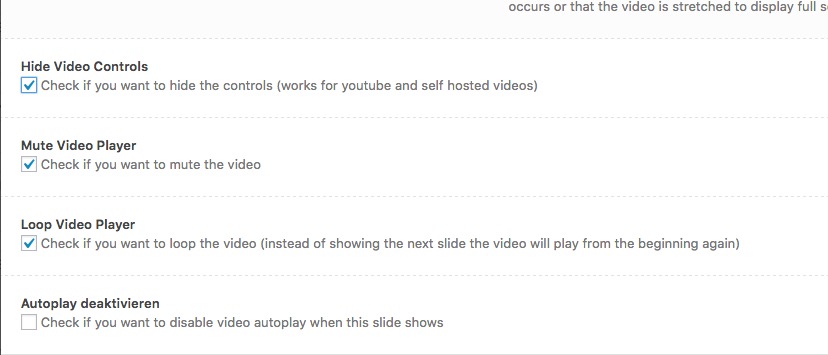
i would not like the user to stop the video by clicking on the video.
Like in your demo: http://kriesi.at/themes/enfold-startup/i already hide and mute the mute and hide the controls:
https://dl.dropboxusercontent.com/s/kuhfktewe3fiqv0/2017-03-01%20at%2017.58.jpgwhat am i doing wrong?
Topic: Making YOU look good too!
I’m already a happy Enfold Customer : ) You make ME look good. So to repay the favor, I want to point out to you…
On page: http://kriesi.at/archives/enfold-reimagined-version-4-0
1-Under page title, 1st paragraph:
“thats probably” should be “that’s probably”2-Under list bullets, 1st paragraph:
“themeforest with an astonoshing” should be “Themeforest with an astonishing”
and
“thats quite insane” should be “that’s quite insane”3-Under #1 The Editor
“several protoypes built by ourself, there ” should be “several prototypes built by ourselves, there”4-Under #2 Design and availability of layout builder elements
“are the progress bar, the testimonial element and the iconbox but others will soon follow.
We also tried to streamline a lot of the design elements on our pages among all elements (eg: the loader that is visible once you click a lightboxed image, a portfolio ajax item, a masonry load more button etc was”
should be (iconbox, lightboxed,ajax, eg, etc corrections…)
“are the progress bar, the testimonial element and the icon box but others will soon follow.
We also tried to streamline a lot of the design elements on our pages among all elements (e.g.: the loader that is visible once you click a light-box image, a portfolio Ajax item, a masonry load more button etc. was”5-Under heading #3 The Main Demo there is a misspelling.
“They are SILL beloved by a lot of” should be “They are still”
“usual changelog with a list of bugfixes and improvements.” should be “usual change log with a list of bug fixes and improvements.”Just keeping your crayons sharp the way you keep our web sites.
Kind regards sent your way.
jWP 4.7.2 – Enfold 3.8 – I have built and support a 1 year old Enfold site for the Northern Sands – it is being re-branded right now so I have to change all the colours – my idea was to start with a standard scheme then edit in the accurate corporate colours – a simple exercise I have done many times – I have purchased enfold for various projects (over 10 x npw).
I have an example page on a URL I have attached that clearly shows the new colours on the logo and if you go to theme schemes it is a totally different scheme selected than the buttons and the footer shown.
ACTION TAKEN SO FAR
1. Reset theme settings (a bit of a pain but I remembered to copy most of the code I needed to recreate.
2. Changed theme to 2015 then back again to enfold – seemed to remember a lot this time.Still can’t get rid of the wine coloured buttons
Hi there, we are happily using the enfold theme for a new customer. But he likes to get rid of the date and the comment count at the blog template at his starting page.
I unchecked the »show date« at our enfold child theme, but it still is showing.
For the Comments count I found the Custom CSS at this thread:
.blog-categories, .slide-meta-comments {
  display:none !important;
}
This works now. But we still want to get rid of the date. Do you have a Custom CSS for this too? Or any other solution?
Kind regards,
RenkoHere is what the blog template looks like now, we want to get rid of everything below the button »Weiterlesen« (=read more):

Topic: Masonry – Inner sort
Hello
I’m working in the Enfold Masonry blog area. How do I increase the text size in the ‘inner sort button’ area?
http://test.shp.net.au/projects/
Thank you
Hi All!
Still loving Enfold! Thanks so much for all your hard work on creating, upgrading, and providing support for Enfold. Have a couple of questions:
1. Is it possible to put the social share buttons in the sidebar?
2. Is it possible to have them display vertically?V.
Hello,
I am running on PHP 7, have the latest Enfold Theme and have the latest version of Woo Commerce. I can add items to the cart, but when I change the number of items in the card drop down menu, then clock on the Update Cart button, nothing happens.
I read through the support threads and they say that this bug is fixed, but for some reason it is not fixed for me.
Please help?
Nicole
Topic: Tap to call button
Hello,
I am running PHP Version 7.1.0-2+deb.sury.org~xenial+1 with latest Wordoress and using the latest Enfold Version.
Unfortunately the Button Link Select is not visible … i cannot set a Link for a Button.
Can someone help me? As i read it should be fixed already … but not on my wordpress.
Thank yiou,
BastianHi,
I really like this social button shown in the far right footer on this page https://wordpress.org/plugins/slick-social-share-buttons/screenshots/
how can i do that with enfold?

Ich habe mit Enfold die Möglichkeit, die Beiträge und andere Inhalte sehr leicht über die sozialen Medien mittels der Social Media Buttons unter dem jeweiligen Beitrag zu teilen. Klasse!
Aber: Nun stellt sich mir die Frage welche Erklärungen ich dazu in der Datenschutzerklärung aufnehmen muss, damit ich als Anbieter nicht Opfer von Abmahnungen werde.
Haben diese Social-Media-Buttons den Status von Plugins (keine WordPress-Plugins sondern eher allgemeine Website-Plugins via Code-Snippets)?
Wenn ja:
– Ist der Anbieter der Buttons (=Plugins/Snippets) das zugehörigen Social Network?
– Benötigt man dann einen Auftragsdatenverarbeitungsvertrag mit den jeweiligen Netzwerken?
Wenn nein:
– Dann ist die Verwendung der Buttons urheberrechtlich bedenklich. Wie kann ich das heilen?Mein Rechtsanwalt machte mich gerade diesbezüglich darauf aufmerksam, dass dies grundsätzlich sehr problematisch sei.
Jemand mit rechtlichem Sachverstand, der diesbezüglich helfen kann?Beste Grüße
RicoHallo,
ich nutze Enfold mit WooCommerce. Im Secondary Menu habe ich eine Produktsuche sowie zwei Buttons Mein Konto und Anmelden platziert. Wenn ich die Seite über die Browser Firefox und Safari öffne, funktioniert das so, wie ich es mir vorstelle. Leider rutscht im Microsoft Edge das Suchfeld nach oben. Außerdem ist das Menu nicht responsive. Lässt sich das Problem über Quick CSS lösen? Leider habe ich nur Basiskenntnisse in CSS und habe auch hier im Forum nichts ähnliches gefunden.Kann ich das Main Menu über CSS so verändern, dass es im Tablet nicht in zwei Reihen angezeigt wird, sondern nur in einer (Schrift kleiner, Menüpunkte näher aneinander)?
Danke für Hilfe
Sonja