Hi,
Try this example CSS in your Enfold Theme Options ▸ General Styling ▸ Quick CSS field to make the background color red, font white, and remove the border radius:
#top #wrap_all .slideshow_inner_caption .avia-slideshow-button.avia-button {
    background-color: red;
    color: white;
    border-radius: 0;
}
adjust to suit.
To make the button background color blue on hover add this css:
#top #wrap_all .slideshow_inner_caption .avia-slideshow-button.avia-button:hover {
    background-color: blue;
    color: white;
    border-radius: 0;
}
you can also change the font color and border radius on hover.
Best regards,
Mike
Hi,
Please note the Lock icon on the button for the Insert Shape button, these means that it is a Premium Feature

Most features are included with the theme, but LayerSlider has reserved some features for the premium version.
Best regards,
Mike
Wow, thank you so much! For now, I’ve added the first CSS you gave me, but I like the way you have it on the sample site (centered at the top), so yes, I’m going to try it. And this will be so great to have on hand for future sites. I love Enfold and use it for all my sites, it is only the header that can still be difficult to customize. (So hoping some day the header will be a page option like the footer, or have more options for buttons and icons etc in the top bar). Thank you thank you. Your support is amazing, as always! (going to try this tomorrow).
Hey Yaphoon,
Thank you for the inquiry.
1.) To remove the author info, add this css code:
.blog-author, .entry-author-link, .date-container +.text-sep {
    display: none !important;
}
2.) You may need to increase the height of the sliders in order to create space for the buttons. Please add this css code:
@media only screen and (max-width: 767px) {
  /* Add your Mobile Styles here */
  .av-8s87-7d0351f1511ec5a8401695817e77ff6a .avia-slideshow-inner,
  .av-8s87-7d0351f1511ec5a8401695817e77ff6a .avia-slideshow-inner li,
  .av-8s87-7d0351f1511ec5a8401695817e77ff6a .avia-slideshow-inner li img,
  .av-8s87-7d0351f1511ec5a8401695817e77ff6a .avia-slideshow-inner li>a {
    height: 360px !important;
    object-fit: cover;
  }
}
3.) To display the submenu items by default, you can set the Enfold > Main Menu > Burger/Mobile Menu > Menu Icon Submenu Items settings to the first option (Always display submenu).
Best regards,
Ismael
Dear Enfold-Team,
I created a custom partner/logo element. Under the first tab “Content” the button to add images is missing. I cant add images to the element.
There is a blank space where the button usually sits and the text next to it says:
Add Images
Here you can add new Images to the partner/logo element.
Thanks for your help, Tom E.
See the private screenshot link…
I am purchased Enfold theme and stated working on it. till today every things is working fine. but suddenly i have noticed the update button click did not work for me and its showing updating failed. Due to this i am enable to make changes on home page section. apart from home page all other page is updating successfully. Please look on this and assist me how to solve this problem.
This reply has been marked as private.
Hello I have inserted a sticky button in this page: https://gonowjets.com/lan-gonowjets/ “Reservar vuelo” with this code in quick CSS but I don’t know why instead being a normal button it is much bigger…. I have the same code and same button with other web site with enfold and works perfect (here works fine: https://faceclinic.es/lan/aravaca-lan-dental-0324/).
Can you help me on that ? I don’t know why the button gets like that. Thank you.
/* crear barra contacto en landings */
.mobile-nav {
background: rgba(255,255,255,0.01);
position: fixed;
bottom: 0;
height: 90px;
width: 120%;
display: flex;
justify-content: space-around;
}
.bloc-icon {
display: flex;
justify-content: center;
align-items: center;
}
.bloc-icon img {
width: 30px;
}
@media screen and (min-width: 2000px) {
.mobile-nav {
display: none;
}
}
Hi,
Please try the following in Quick CSS under Enfold->General Styling:
#top div .av-dark-form input[type="text"], #top .av-custom-form-color .button {
  border-width: 1px !important;
}
Best regards,
Rikard
 Kenji Narita
Guest
Hello!
My name is Kenji Narita and I work in web production in Japan.
I’m translating from Japanese to English, so I’m sorry if some sentences are difficult to understand.
A client consulted with me about not being able to update Enfold.
Enfold version: 4.5.4
Enfold Child Version: 1.0
It looks like this site was originally created by a different web production company.
Therefore, the production company was responsible for managing Enfold and logging into Envato Market.
However, I was advised that the production company had gone bankrupt and updates were no longer possible.
There was no update button on the WordPress theme screen, so I created an Envato Market account with my own address and tried to update it, but I couldn’t because there was no purchase history.
I haven’t been able to update since I can’t contact the production company.
In this case, do I have to purchase and update the theme for a fee?
Hi,
You can use the button element options to create this:


The button element has many more options, please review them, as you choose “custom colors” in the drop down you will be given more options.
Best regards,
Mike
Hi,
Thank you for the link to your site and your patience, for your first slide with the button, it has a link so adding the button creates a nesting link, which typically wil cause issues, but it looks like this css will help:
#main .aviaccordion-excerpt p > a {
    text-decoration: none;
}

#main .main_color a.my-accordion-button {
	  text-decoration: none;
    background: blue;
    padding: 10px;
    border-radius: 2px;
    color: #FFF;
    position: relative;
    top: 135px;
}
#main .aviaccordion-slide-link .aviaccordion-title {
    top: -50px;
    position: relative;
}
#main .aviaccordion-slide-link {
    text-decoration: none;
}
this is the expected results:

Best regards,
Mike
Hey ballindigital,
Try this CSS in your Enfold Theme Options ▸ General Styling ▸ Quick CSS field:
#top .avia_cart_buttons {
    opacity: 1;
}
#top div.avia_cart_buttons a.button.product_type_simple.add_to_cart_button.ajax_add_to_cart:hover,
#top div.avia_cart_buttons a.button.show_details_button:hover {
    color: black !important;
}
After applying the css, please clear your browser cache and check.
Best regards,
Mike
Hey Stefan,
I believe that you are referring to this button:

It seems to look correct to me, the orange arrow expands the button options and they also show in the center of the mobile screen.
Perhaps a screenshot of what you see would help.
Best regards,
Mike
I am up to date on enfold using (5.6.12)
Display excerpt is checked. And the title and caption are displaying, however the button is overlapping the text and title instead of displaying beneath it.
The button is added with html just like you show above, and it appears however in the wrong place.
Hello,
We are working on creating a new website using the Agency – Enfold Parallax Demo, and we came across an issue that we can’t find a solution. We are creating the main menu and providing in the links the #{and the id of the section}, so far so good. The problem comes when the user clicks on a button to change the page, then the menu is becoming not functional because the urls (Section IDs) are not present in the specific page.
Please advise.
Best,
Androklis
-
This topic was modified 1 year, 11 months ago by
 androklis.
Hey Stefan,
Thank you for the inquiry.
There is no option for this by default but you might be able to use the avf_form_send filter to check the content of the contact form fields before sending the email. Usage examples can be found in the links below:
// https://kriesi.at/support/topic/contact-form-submit-button-hook/#post-1370093
// https://kriesi.at/support/topic/form_submit-event-not-fired-with-enfold-form/#post-1425948
// https://kriesi.at/support/topic/work-with-variables-sent-by-enfold-form-avia_process_form_data/#post-1070392
Best regards,
Ismael
Hey Yaphoon,
Thank you for the inquiry.
You can use the avia_social_share_link_arguments filter in the functions.php file to add more icons to icons to social share box. Please check the link below for more info:
// https://kriesi.at/documentation/enfold/social-share-buttons/#display-custom-social-icons-in-social-share-box
Best regards,
Ismael
Is there a way to get the enfold share buttons to appear at the top of a blog post also? Right now they only appear at the bottom. I would like them at the top and bottom.
Hi,
When I check your page on desktop the css I posted above is not applied, and this is what makes the button larger and center, so I don’t know if you have an error in your css, or if you didn’t add it because you didn’t understand, but this is the desktop part of the css that you should ensure to use:
@media only screen and (min-width: 768px) {
#top .caption_bottom .slideshow_caption .slideshow_inner_caption {
    position: relative;
    text-align: center;
}
#top .slideshow_inner_caption .avia-slideshow-button.avia-button {
    width: 300px;
    height: 100px;
    font-size: 24px;
}
.html_header_transparency #top #main .caption_bottom .slideshow_caption {
    padding-top: 0;
}
}
this is the result:

I now assume that you now wanted the button to move up a little, so you would then add this css:
@media only screen and (min-width: 768px) {
.slideshow_inner_caption {
	top: -100px;
}
}
for this result:

feel free to adjust to suit.
Best regards,
Mike
Hi,
Try this CSS in your Enfold Theme Options ▸ General Styling ▸ Quick CSS field:
@media only screen and (min-width: 768px) {
#top .caption_bottom .slideshow_caption .slideshow_inner_caption {
    position: relative;
    text-align: center;
}
#top .slideshow_inner_caption .avia-slideshow-button.avia-button {
    width: 300px;
    height: 100px;
    font-size: 24px;
}
.html_header_transparency #top #main .caption_bottom .slideshow_caption {
    padding-top: 0;
}
}
@media only screen and (max-width: 767px) {
	#top .caption_bottom .slideshow_caption .slideshow_inner_caption {
    position: relative;
    text-align: center;
}
#top .slideshow_inner_caption .avia-slideshow-button.avia-button {
	padding: 10px 6px;
	font-size: 10px;
}
}
After applying the css, please clear your browser cache and check.
Best regards,
Mike
Hi,
I was just working on another thread where a similar issue was that the sub-menu and the burger menu were still open when the browser back button was used, this is due to the browser serving a browser cached version of the page. The following javascript solved this in my tests, and while my above solution worked for the custom button issue you are having I thought that perhaps this would be a better solution for you as it will also solve the use of the browser back button, so give this a try instead of the above solutions and see if it works for you. I recommend using the WP Code plugin then add a new snippet, in the top right corner use the javascript snippet as the code type:

and add this code:
window.addEventListener('pageshow', (event) => {
    if (window.matchMedia('(min-width: 990px)').matches) {
        document.querySelectorAll('.sub-menu').forEach((subMenu) => {
            subMenu.style.opacity = '0';
            subMenu.style.visibility = 'hidden';
        });
    } else {
        const overlay = document.querySelector('.av-burger-overlay');
        if (overlay) {
            overlay.style.display = 'none';
            overlay.style.opacity = '0';
        }
        const hamburger = document.querySelector('.av-hamburger');
        if (hamburger) {
            hamburger.classList.remove('is-active');
        }
        document.documentElement.classList.remove('av-burger-overlay-active', 'av-burger-overlay-active-delayed');
    }
});
Please ensure to copy the code from the forum and not an email notification so the symbols are not converted.
After applying the css, please clear your browser cache and check.
Best regards,
Mike
Hey Bruno,
Thanks for the screenshots, I tested this on my demo site with Safari on Mac and Firefox on Windows and the sub-menu and the burger menu were open when the browser back button was used, this is due to the browser serving a browser cached version of the page. The following javascript solved this in my tests, I recommend using the WP Code plugin then add a new snippet, in the top right corner use the javascript snippet as the code type:
and add this code:
window.addEventListener('pageshow', (event) => {
    if (window.matchMedia('(min-width: 990px)').matches) {
        document.querySelectorAll('.sub-menu').forEach((subMenu) => {
            subMenu.style.opacity = '0';
            subMenu.style.visibility = 'hidden';
        });
    } else {
        const overlay = document.querySelector('.av-burger-overlay');
        if (overlay) {
            overlay.style.display = 'none';
            overlay.style.opacity = '0';
        }
        const hamburger = document.querySelector('.av-hamburger');
        if (hamburger) {
            hamburger.classList.remove('is-active');
        }
        document.documentElement.classList.remove('av-burger-overlay-active', 'av-burger-overlay-active-delayed');
    }
});
Please ensure to copy the code from the forum and not an email notification so the symbols are not converted.
After applying the css, please clear your browser cache and check.
Best regards,
Mike
Good day,
When using the Health Demo as the basis for my homepage I have the following problem and cannot solve it.
If I select a submenu item in the Service menu (e.g. Nutrition) and then navigate back using the Safari browser’s back button, the menu is not displayed correctly. (the menu is opened and the menu sub-item of my previous selection is displayed).
This error appears on the iPAD in the Safari browser during the demo https://kriesi.at/themes/enfold-health-coach/
but also on my own homepage. I cleared the cache several times, but that didn’t solve the problem.
I know I could use the burger menu for iPAD, but I want to use the normal menu for landscape mode.
Thank you very much for your help and
With kind regards
Bruno
Hi,
When the menu is open this class is added: is-active

I don’t really understand why you are doing this, but I think it has to do with your custom button with the script onclick="window.history.back() it seems like if you didn’t use that you would not have this issue, correct?
Try using a button with a proper link.
Best regards,
Mike
Hey greg47,
Thanks for the video, the first thing that I notice is that you entered a second html & head tag ino your page with the script that ChatGPT gave you:

typically when ChatGPT gives you this it is to point out that the script goes into the head of your page, I recommend not adding this.
So it looks like you are creating a event that will click the burger menu, the check to see if the menu is open is missing the class is-active so the script will run in all cases, even if it is alread closed.
Try changing this line: var menuButton = document.querySelector('.av-hamburger.av-hamburger–spin.av-js-hamburger.av-inserted-main-menu');
to this var menuButton = document.querySelector('.av-hamburger.av-hamburger–spin.av-js-hamburger.av-inserted-main-menu.is-active');
Then it should only click the menu if it is open.
Best regards,
Mike
Hey Tanja,
You could try using the shortcodes which can be found here: https://kriesi.at/documentation/enfold/social-share-buttons/
Best regards,
Rikard
Hello,
when automatically translating pages using WPML (as defined here: https://kriesi.at/documentation/enfold/translation/#span-stylefontweight-400translate-everythingspan) Everything is automatically translated except buttons and special headings.
Once the page is translated if we enter in the advanced WPM translator, you can search the string and it appears without translation, then you can translate it manually.
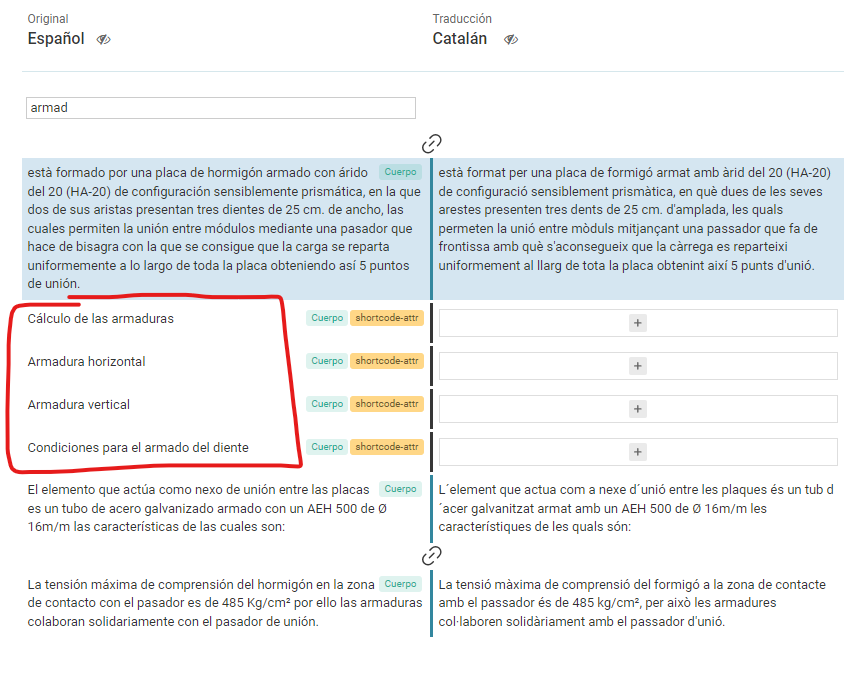
How can we automatically translate all page content including av_heading heading amb buttons?
Thanks in advance.



