Hi
I hope you are having a great day.
Kindly,
adjust for me the /enfold/includes/loop-index.php
So the output will be:
Post heading
Category
date and time.
Kindly, do it for me, I am visually impaired and I am not familiar with Quick CSS.
I understand this cannot be adjusted from the settings at Enfold Theme Options > Blog Layout > Blog meta elements because if I adjust it from there, it will add read more button and I don’t want that to happen
In short, on my homepage I want my poasts to appear like this:
Blog post title Heading
Category
Date and time
Example
Best Bluetooth Speakers to choose from in Nigeria
NEWS
Tuesday, September 3, 2019 9:26 AM
I want the three items i.e
Blog heading
Category
Date and time
to be links
Your help would be really appreciated
I hope you have a great rest of your day.
Best
Moses
Reply To: Enfold b
Hey mayamaria,
Thank you for using Enfold.
Do you want to have all those form fields sent when you click a single button? That is not possible by default. Only the contact form with the submit button will have its fields submitted. You should add those fields in a single contact form if you want to send them together.
Best regards,
Ismael
Hi Guenni007,
thank you for your statement. In our case we used the theme update functionality, too – by loading up a zip-file with the presented button.
Nevertheless at least one custom css has been ignored after updating. And, as I wrote already, the Developer Tab with the field for inserting the custom class name within ALB modules has disappeared – at least for the ALB-Module “Text Block”. This definitely occurred some time after the update because I have had the opportunity to control the class name shortly after realizing that the class’ css wasn’t used. When looking at the revisions there the class name seem to be still existing because the string can be found.
Sounds like the update is somewhat buggy because of some other issues reported in other threads in the enfold subforum?
-
This reply was modified 6 years, 7 months ago by
 Armin-H.
Hi
I’m using the mega menu on the version 4.6 of Enfold. All links are working on desktop view but when switching to the mobile menu, half fail to open or recognise the link. The custom link titles are also there
I’ve tried using .hide_from_mobile {display:none!important} on the unwanted blank columns or titles, but it doesn’t seem to work.
Links/buttons not working are:
Our specialisms
Parents and community
News
Staff
Can you help?
Thanks
Steve
Hi
I’ve sorted it by creating a duplicate of the mega menu as a normal (non mega) menu and selecting alt menu in Enfold mobile menu settings.
Cheers
Steve
-
This topic was modified 6 years, 7 months ago by
 pixelist.
As Promised, the solution below changes the default search form to make it:
-Show products in a grid
-Add SKUs to the standard search
-Fixes the Ajax search so it all matches
Replace the search form
Edit the searchform.php (use your child theme to make a copy) Replace the default form with the following:
 <form role="search" method="get" id="searchform" action="<?php echo home_url( '/' ); ?>">
			<div>
				<input type="text" id="s" name="s" value="<?php if(!empty($_GET['s'])) echo get_search_query(); ?>"  placeholder='<?php echo $search_params['placeholder']; ?>'>
				<input type="submit" value="<?php echo $icon; ?>" id="searchsubmit" class="button <?php echo $class; ?>" />
				<input type="hidden" name="post_type" value="product">
			</div>
		</form>
Add SKUs to the default search
The guy who put this together is brilliant thank you! Add the following to your child theme’s functions.php file:
/**  __________________________________   ENHANCE THE STANDARD SEARCH
 * Join posts and postmeta tables
 * 					 This one hels to include the SKU in tzhe standard search
 * http://codex.wordpress.org/Plugin_API/Filter_Reference/posts_join
 */
function cf_search_join( $join ) {
    global $wpdb;
    if ( is_search()  || !empty($_REQUEST['s'] )) {
        $join .=' LEFT JOIN '.$wpdb->postmeta. ' ON '. $wpdb->posts . '.ID = ' . $wpdb->postmeta . '.post_id ';
    }
    return $join;
}
add_filter('posts_join', 'cf_search_join' );

/**
 * Modify the search query with posts_where
 *
 * http://codex.wordpress.org/Plugin_API/Filter_Reference/posts_where
 */
function cf_search_where( $where ) {
    global $pagenow, $wpdb;
    if ( is_search() || !empty($_REQUEST['s'] ) ) {
        $where = preg_replace(
            "/\(\s*".$wpdb->posts.".post_title\s+LIKE\s*(\'[^\']+\')\s*\)/",
            "(".$wpdb->posts.".post_title LIKE $1) OR (".$wpdb->postmeta.".meta_value LIKE $1)", $where );
    }
    return $where;
}
add_filter( 'posts_where', 'cf_search_where' );

/**
 * Prevent duplicates
 *
 * http://codex.wordpress.org/Plugin_API/Filter_Reference/posts_distinct
 */
function cf_search_distinct( $where ) {
    global $wpdb;
    if ( is_search() || !empty($_REQUEST['s'] ) ) {
        return "DISTINCT";
    }
    return $where;
}
add_filter( 'posts_distinct', 'cf_search_distinct' );
/* END   Search includes SKU  */
Hope this helps other people. It makes the Search in Enfold do what it should when Woocommerce is installed.
Hi, same problem here.
It seems that both button: OK and LEARN MORE consent cookies, the LEARN MORE BUTTON doesn’t bring to the “learn more page”. I manually inserted in the privacy/cookies settings.
Another problem: in contact forms enfold doesn’t show me the privacy checkbox, even if i have checked the option on privacy/cookie settings.
In another website, I also have one more problem: background color customization for the cookie consent message bar doesn’t work (image attached).
Everything was working before the 4.6 update.
-
This reply was modified 6 years, 7 months ago by
 darioferbor.
Hi,
We are able to remove the excerpts and read more buttons by going to Enfold Theme Options > Blog Layout > List Layout – Simple (Title and meta information only)
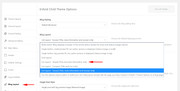
But this setting still added another read more link, so I removed it with this css:
#top.home .bloglist-simple .post-meta-infos .read-more-link {
	display: none !important;
}
It is now all set, please clear your browser cache and check.
Best regards,
Mike
Hi, Mike,
Thanks for your answer,
I use the Enfold option “Privacy and Cookies” and there are two problems after the update:
the first problem was also found by other people, here is the link
the second problem: I have a “read more” button but even if the link is right, it does not go to the specific page. That is, the link no longer works. with the previous version 4.5.7 it was all right.
Forgive me for my bad English.
thank you
Best regards
Bruno
Hi! I updated the Enfold template version to 4.6, and after this the “read more” button in the cookie bar on top of page is not active anymore. It is not a matter of wrong linking, because the destination page is still there and the link reference is correct, but it is not active.
Any suggestions? Thanks.
Bruno
Hello,
I updated Enfold to version 4.6 and after that I noticed that the background video that I had in a color section is not starting whenever the user sees the cookie consent message. Note that the video is an MP4 file stored on the site’s server, it’s not a Youtube or Vimeo video, so the cookie consent message mechanism should not be blocking its playback.
With this problem, the first page looks really ugly for first-time visitors who have to click ok on the cookie consent message, so I had to temporarily switch the setting for the cookie consent message from “enable and show message” to “use as a simple message bar only”. The video now autoplays but, unfortunately, the [av_privacy_google_tracking] button has no effect.
How is it possible to have the cookie consent message set to “enable and show message” AND at the same time have color sections where background videos always autoplay when their location is on the site’s server?
Thanks in advance for your help.
Yiannis
Hey bobfurgo,
Here is the code you can put in Enfold > General Styling > Quick Css, if it does not work, put into themes/enfold/css/custom.css
.header_color .main_menu ul:first-child > li.free-estimate-button > a {
  color: #fff;
}
If you need further assistance please let us know.
Best regards,
Victoria
Hey linguservice,
Here is the code you can put in Enfold > General Styling > Quick Css, if it does not work, put into themes/enfold/css/custom.css
 #top #header.header_color.av_header_transparency .av-main-nav > li > a .avia-menu-text {
   color: #6786a1 !important;
 }
  #top #header.header_color.av_header_transparency .av-main-nav > li.av-menu-button > a .avia-menu-text {
   color: #fff !important;
 }
If you need further assistance please let us know.
Best regards,
Victoria
Hi,
Thank you for using Enfold.
Click the “Individuelle..” or “Custom..” text/button to assign a custom color to the palette. Let us know if that works.
Best regards,
Ismael
Hi,
Please try adding this code to the Quick CSS section under Enfold > General Styling or to your child theme’s style.css file:
CSS Snippet:
/* CSS - */

#menu-item-shop .dropdown_widget {
    right: auto !important;
    top: 91px;
    left: 0 !important;
}
You may not see the changes until the cached files are cleared in your browser.
Please perform the below steps to clear the browser cache:
1. Disable “merging and compression” for CSS and JS files from Enfold > Performance.
2. If a caching plugin is installed check the plugin settings and clear the cache and deactivate the plugins for testing purpose.
3. Hard refresh by pressing Ctrl + Shift + F5 on your browser or press the F12 key to open chrome dev tools and right click on the refresh button and select “Empty Cache and Hard Reload”.

Best regards,
Vinay
Hi,
Thank you for sharing the details.
Please use the CSS provided in this link.
You may not see the changes until the cached files are cleared in your browser.
Please perform the below steps to clear the browser cache:
1. Disable “merging and compression” for CSS and JS files from Enfold > Performance.
2. If a caching plugin is installed check the plugin settings and clear the cache and deactivate the plugins for testing purpose.
3. Hard refresh by pressing Ctrl + Shift + F5 on your browser or press the F12 key to open chrome dev tools and right click on the refresh button and select “Empty Cache and Hard Reload”.
If you still have an issue please share the exact link to the page on which you have the image issue.
Best regards,
Vinay
Hi,
i have 2 problems with Enfold Theme:
1)after enabling Google reCAPTCHA I see “I’m not a robot” in my contact form, but after clicking the checkbox, I see my submit button;
2) also, in the Contact form i setting “Redirect”option” ( with a thankyou page), but the page, after enabling Google reCAPTCHA, doesn’t open, because contact form wait clicl on send button.
Hey Enfold, so on mobile portrait and landscape screen I wont to remove my captions and buttons in my fullwidth slider. I use the slider as my top banner. Can you help?
Hey Zohiraissi,
Please refer to the following:
Best regards,
Jordan Shannon
 Thomas
Guest
Propulsion works with simple shortcodes, perhaps these are its default shortcodes, such as the following examples:
[button link=”https://www.website.com/webpage/” text=”grey”]Order, Learn More[/button]
[hr_invisible]
etc.
Will these Propulsion shortcodes work in Enfold too?
Best regards,
Thomas Kurzej
Thanks for replying quickly to my question. Another one:
Propulsion works with simple shortcodes, perhaps these are its default shortcodes, such as the following examples:
[button link=”https://www.website.com/webpage/” text=”grey”]Order, Learn More[/button]
[hr_invisible]
etc.
Will these Propulsion shortcodes work in Enfold too?
Best regards,
Thomas Kurzej
Hi,
Thank you for the link, the page with the pencil is actually a category archive page, and clicking the pencil takes you to the actual post.
To add the social share buttons to a category page please edit the enfold/archive.php page on line 90 and look for:
                        get_template_part( 'includes/loop', 'index' );
                    }

                    ?>

				<!--end content-->
				</main>
and change to:
                        get_template_part( 'includes/loop', 'index' );
                    }
                    echo do_shortcode("[av_social_share title='Share this entry' style='' buttons='custom' share_facebook='aviaTBshare_facebook' share_twitter='aviaTBshare_twitter' share_gplus='aviaTBshare_gplus' share_linkedin='aviaTBshare_linkedin' share_mail='aviaTBshare_mail' custom_class='' admin_preview_bg='' av_uid='av-670mc8'] ");
                    ?>

				<!--end content-->
				</main>
or make a backup of your archive.php file and try uploading this replacment file:
https://www.dropbox.com/s/ct4k9l7xw04xa4p/archive_with_social_share.zip?dl=0
Best regards,
Mike
Hi!
I’m making a new site using the One Page template https://kriesi.at/themes/enfold-landing-page/. I am just realizing before launch that I don’t like the fact the browser’s back button takes the user back to the previous web page, but not back to the previous #bookmark within the same page. I like the jump feature for navigation, but think it’s nature for people to hit the back button when they want to see what they were just looking at. Is there a way to over-ride this so when a user clicks the brower’s back button, they will be taken back to the last bookmarked section (for example,. going from the link mysite.com/#pricing to the link mysite.com/#faq when clicking the back button, instead of leaving the website)? As a second resort, is there a way to make the “up” arrow that floats on the screen turn into a Back button that takes the user back to the previous bookmark instead of the top of the page?
Thanks!
Hey acmaerospace,
Please have a look at the following threads
https://kriesi.at/support/topic/enfold-remove-scroll-top-button/
Best regards,
Victoria
Hi LesleyJean,
Here is the code you can put in Enfold > General Styling > Quick Css, if it does not work, put into themes/enfold/css/custom.css
#menu-item-29 a .avia-menu-text {
    background-image: url(https://bethelisecoaching.com/wp-content/uploads/2019/08/Beth-Elise-Button-BG.jpg);
}
If you need further assistance please let us know.
Best regards,
Victoria
Hi, we didn’t find answers to the following two topics:
1. How can we define “custom buttons”, e.g. https://www.dropbox.com/s/ym3rqjihlf9z9dn/button.jpg?dl=0
So the symbol on the right side of the button should have the height of the button.
2. How can we define individual font colors to be easily used in WordPress editor? E.g. https://www.dropbox.com/s/yizimk83jwgmrm1/font-individual-color.jpg?dl=0
We want to define them in Enfold child theme.
Thanks a lot.
 Rene
ReneGuest
Hi,
I bought the Enfold theme and also installed it onto a Clients Server and so far it is working well. But there are some Problems that i noticed.
1. On Chrome The page looks good and also most buttons etc are in one line. But on the Firefox and Internetexplorer there are some issues. Im not sure how to fix this.
2. The Theme currently is Boxed layout. There the content looks good but now the clients want full Width BUT the Content Boxed like it is. So in generall no problem. But i have some color sections with different colors. (You can see in example Link.)
SO now i need to know how can i get full width but the color sections with it colors also full width to the end of the sites?
3.Then the Header Area. When im Loged in to the page then im not able to see the Wp-Admin Area on the Frontend.
I installed Enfold Child Theme.
Hope you can Help me!
Kind Regards
Rene
Hello Enfold Team,
Enfold contact form … or what solution do you recommend?
I would like to relinquish a simple registration for a raffle.
1 question. Does the form also 2 columns? If so, what do I have to do.
2nd Question: Idelal would have a prominent “Join Now” button. If you make this click you should see a pop-up (Thank you for your participation. We wish you good luck!)
If an additional plug-in would be used, that’s fine with me too.
https://www.dropbox.com/s/bmhu2x5qzr7pqdy/Bildschirmfoto%202019-08-23%20um%2014.15.51.png?dl=0
Thanks so much!
Stefan
Hey Dzimnikov,
1: Sorry IOS blocks auto play on mobile devices, Apple has made many press releases about this, your best option is to adjust the text that overlays the play button so your visitors can press play on the video.
2: The black bar is due to padding from the text above pushing down, to correct please try this code in the General Styling > Quick CSS field or in the WordPress > Customize > Additional CSS field:
@media only screen and (max-width: 767px) {
#infotophelmet > div > div.container > main {
	padding-bottom: 25px !important;
}
}
3: Your css was very close, please try this css instead:
@media only screen and (max-width: 766px) {
  #contactarea .entry-content-wrapper {
  display: flex !important;
  flex-wrap: wrap !important;
  }
  #contactarea .flex_column.first {
      order: 2 !important;
      display: flex !important;
  }
  #contactarea .flex_column.vermap {
      order: 1 !important;
      display: flex !important;
  }
}
Then clear your browser cache and check.
4: To remove “Enfold WordPress Theme by Kriesi” from the footer, please add the [nolink] shortcode in the copyright field
5: Your links to the “Privacy Policy” and “Terms of Use” are both “http” please change to “https”
Best regards,
Mike
Hey LesleyJean,
Please try the following in Quick CSS under Enfold->General Styling:
#menu-item-29 a {
  font-family: 'Raleway';
  font-size: 18px;
  font-weight: 900;
  color: #fff;
  background-image: url(‘https://bethelisecoaching.com/wp-content/uploads/2019/08/Beth-Elise-Button-BG.jpg’);
}
Best regards,
Rikard



