Viewing 30 results - 211 through 240 (of 612 total)
  • Author
    Search Results
  • #1159129
    This reply has been marked as private.
    #1158088

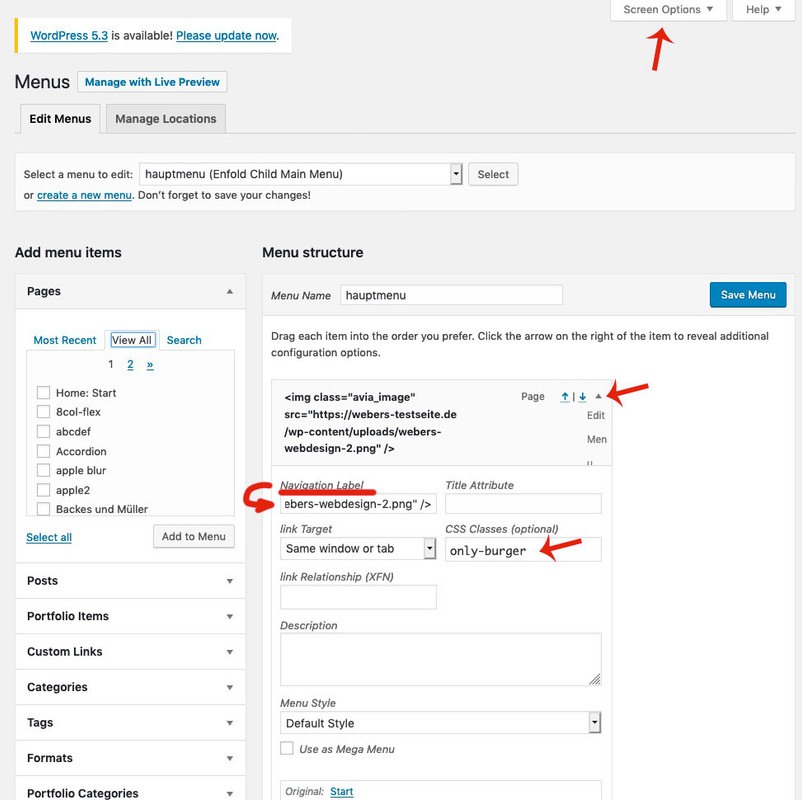
    Goto the menu settings dialog

    • add to your main menu two home links
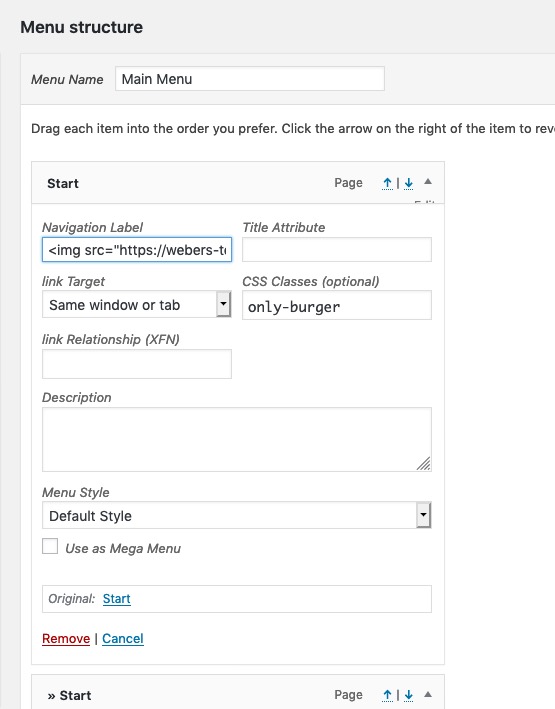
    • open the top one of them to see the menu-item settings by clicking on that little arrow on the right of the menu list point
    • you can now enter on navigation label an img src html like:
      <img class="avia_image" src="/wp-content/uploads/logo.png" alt="logo" title="maybe your Domainname" />
    • if you can not see in that menu item settings dialog the classes – you had to open on top of your window that flyout “Screen Options” and mark the needed fields
    • that menu item gets now a meanigfull name f.e.: only-burger
    • just a bit in quick css:
      #avia-menu .only-burger.menu-item { display: none !important }
    • if you want to get rid of second home link on hamburger menu – you know what to do?
      f.e. give a custom-class to that home menu-item : only-desktop
    • and have then for both : #avia-menu .only-burger.menu-item, #av-burger-menu-ul .only-desktop { display: none !important }

    #1156445

    Hi,
    Please try this instead:

    #top.home #av_section_1 > div > div > div > div > div.flex_column.avia-builder-el-2 > div > div > div > img:hover {
        -webkit-transform: rotate(30deg);
        -moz-transform: rotate(30deg);
        -ms-transform: rotate(30deg);
        transform: rotate(30deg);
        -webkit-transition: all 0.4s ease-in-out;
        -moz-transition: all 0.4s ease-in-out;
        -o-transition: all 0.4s ease-in-out;
        transition: all 0.4s ease-in-out;
    }

    After applying the css, Please clear your browser cache and check.
    If this doesn’t work, please add a custom class to the image so we can try again.

    Best regards,
    Mike

    #1156253

    Hi,

    Thank you for the update.

    The following css code should constrain the width of the background image to only within the slider container.

    @media only screen and (max-height: 1366px) {
        .home #fullscreen_slider_2 .avia-slideshow > ul > li {
    	background-size: contain;
        }
    }
    

    Apply a unique css class or ID to the slider if you want to replace the default selectors.

    // https://kriesi.at/documentation/enfold/add-custom-css/#enable-custom-css-class-name-support

    Best regards,
    Ismael

    #1153542

    Hey Moondreamer21,
    Thanks for the links, I have adjusted your new page and added all of the necessary css in a code block on the page, it is not in your Quick CSS, it is in a code block so you can copy it in the future, here it is again:

    .html_entry_id_17448 #main { 
    	/*size of page*/
    max-width: 80% !important; margin: 0px auto !important; 
    }
    html.html_entry_id_17448 {
    /*background of page*/
    background: url("https://www.barrelracingtips.com/wp-content/uploads/2018/07/booksbodybg.jpg") #330000 !important; 
    }
    #top.page-id-17448 #header {
    /*remove page header*/
    display: none !important;
    }
    #top.page-id-17448 .container_wrap.title_container {
    /*remove title container*/
    display: none !important;
    }
    .html_header_top.html_header_sticky #top.page-id-17448 #wrap_all #main {
    /*remove padding*/
        padding-top: 0px!important;
    }
    #top.page-id-17448 #after_full_slider_1.main_color {
    /*remove background-image after slider*/
        background-image: none !important; 
    }
    @media only screen and (max-width: 430px) { 
    /*mobile adjustment*/
    #top.page-id-17448 .avia-slide-wrap {
    height: 190px !important; 
    }
    #top.page-id-17448 .avia-slide-wrap img {
        top: 31% !important; 
    }
    }
    @media only screen and (min-width: 431px) and (max-width: 1023px) { 
    /*more mobile adjustment*/
    #top.page-id-17448 .avia-slide-wrap {
    height: 360px !important; 
    }
    #top.page-id-17448 .avia-slide-wrap img {
        top: 60px !important; 
    }
    }
    

    Now please note the page id 17448 it is the page id of your new page, if you make another page you will need to change this number in all of the code above.
    I also copied the form from your first book page that was in a code block to your new page, just for an example should you want to create a new form in the future, heres the code again:

    <form id="optin" class="optin" action="https://www.aweber.com/scripts/addlead.pl" method="post" style="
        width: 100%;position:absolute;
    ">
    <div style="display: none;"><input name="meta_web_form_id" type="hidden" value="1944510671">
    <input name="meta_split_id" type="hidden" value="">
    <input name="listname" type="hidden" value="stbrsamazon">
    <input id="redirect_2f105a715ab5b2b3e16de5031a3d8e13" name="redirect" type="hidden" value="https://www.barrelracingtips.com/free-speed-development-guide">
    <input name="meta_redirect_onlist" type="hidden" value="https://www.barrelracingtips.com/already-received">
    <input name="meta_adtracking" type="hidden" value="Secrets_to_Barrel_Racing_Success_Free_Gift_Header_Form">
    <input name="meta_message" type="hidden" value="1">
    <input name="meta_required" type="hidden" value="name,email">
    <input name="meta_tooltip" type="hidden" value="name||Name,,email||Email,,custom Amazon Order Number||Amazon Order Number"></div>
    <div style="
        width: 100%;
    ">
    <div id="name" class="af2-element" style="
        width: 10%;
        /* max-width: 140px; */
        display: inline-block;
    "><input class="text name" tabindex="600" name="name" required="" type="text" placeholder="Name" style="
        background: white;
    "></div>
    <div id="email" class="af2-element" style="
        width: 10%;
        display: inline-block;
    "><input class="text name" tabindex="601" name="email" required="" type="email" placeholder="Email" style="
        background: white;
    "></div>
    <div id="number" class="af2-element" style="
        width: 20%;
        display: inline-block;
    "><input class="text" tabindex="602" name="custom Amazon Order Number" required="" type="text" placeholder="Amazon Order Number" style="
        background: white;
    "></div>
    <div id="submitbutton" class="af-element buttonContainer newbutton" style="
        width: 10%;
        display: inline-block;
    "><input class="submit" tabindex="603" name="submit" type="submit" value="Send it!" style="
        border: solid thin darkgray;
        background-color: lightgrey;
        padding: 10px;
        /* border-radius: 2px; */
        color: black;
        margin: 5px;
        height: 35px;
    "></div>
    </div>
    <div style="display: none;"></div>
    </form>

    and that should be it, please clear your browser cache and check.

    Best regards,
    Mike

    #1152002

    Hey Videmi,

    Thank you for the inquiry.

    Yes, this is possible. First, you have to add a custom css class name to the Image elements so that you can style them differently. If you haven’t enabled the custom css class field yet, go to the Enfold > Layout Builder panel and toggle the “Custom CSS classes input field” settings. You can then use the following css code in the Quick CSS field or the child theme’s style.css file.

    .custom-css-class .avia-image-overlay-wrap a.avia_image {
        min-height: 140px;
    }
    
    .custom-css-class .avia-image-overlay-wrap a.avia_image img {
        object-fit: cover;
    }

    Make sure to replace the “custom-css-class” name with the actual class name of the Image elements. You will probably have to apply same steps for the special heading elements.

    Best regards,
    Ismael

    #1148230

    Topic: Hot Spot Image

    in forum Enfold
    marcel
    Participant

    Hello there,
    I’ve got a problem with my Hot Spot Image element, especially with the text of the hot spots. My plan is to achieve a design where if you hover the hot spot with your mouse you will see the text of the hot spot appearing in a way that the text will still be placed on the picture. Please have a look: https://dev.durom-hueftprobleme.de/meine-rechte ; I think that the problem at the moment is actually that if the hot spot is hovered with the mouse the text will appear over the hot spot. that’s why the text floats out of the picture. I would be very happy about a fast reply so that I can fix the problem for my customer. A suitable CSS-Code with explaination would be outstanding!!!

    Kind regards

    PS.:
    The text of the hot spot replies to the classes:
    .page-id-1650 .av-tt-hotspot,
    .page-id-1650 .av-tt-hotspot .avia-arrow

    #1145392

    In reply to: change image on hover

    Hi,
    Typically after you add the file to enfold-child/shortcodes/ folder you would need to add this code to your functions.php:

    function avia_include_shortcode_template($paths)
    {
    	$template_url = get_stylesheet_directory();
        	array_unshift($paths, $template_url.'/shortcodes/');
    
    	return $paths;
    }
    add_filter('avia_load_shortcodes', 'avia_include_shortcode_template', 15, 1);

    But this is not working for me. We recently made some changes which may have broken this add-on.
    I recommend using css like this:

    .team-img-container:hover img {
      opacity: 0 !important; 
      transition: opacity .5s linear !important; 
      }
      .team-img-container {
      background: url('https://test.kriesi.at/enfold-2017/wp-content/uploads/sites/24/2017/02/people-2.jpg') !important;
      background-size: contain !important; 
      }
    

    via GIPHY

    Naturally, you will need to add a custom class to each team member and adjust the code so they can have a different hover image.

    Best regards,
    Mike

    #1143495

    so this is my last trial for now:
    it only works for devices not on resize option
    this is a one fullwidth-slider only on that page which has the outlook of a fullscreen-slider on desktop devices.
    and if it is load on mobile devices it is a full-width slider.

    https://webers-testseite.de/guenni/two-sliders-2/
    i gave to the fullwidth-slider the custom-class: fullscreen-onbig
    there i my page id in the code – adjust it.

    function make_background_image(){
    if ( is_page(804) ) {  
    ?>
    <script>
    (function($){
    $(document).ready(function() { 
          var sliderLi = $('html.avia_desktop .fullscreen-onbig .avia-slideshow-inner li');
          sliderLi.each(function() {
            var bgUrl = $(this).find('img').attr('src');
            $(this).css({
                'height'  : '100vh',
                'background-image'  : 'url('+ bgUrl +')',
                'background-size': 'cover',
                'background-repeat': 'no-repeat',
                'background-position': 'center center',
            });
            $(this).find('img').detach();
          }); 
    });
    })(jQuery);
    </script>
    <?php
    }
    }
    add_action('wp_footer', 'make_background_image');

    https://gtmetrix.com/reports/webers-testseite.de/953lvr7o

    #1141048
    Yigit
    Keymaster

    Hi,

    We wanted to create this thread as a channel to share the fixes that will be included in upcoming updates and known issues that are being worked on.

    Current fixes for upcoming version 4.7.4.1 are as following (last update 2020-05-12)

    • Feature: New alignment options ALB element “Special Heading”
    • Feature: input field to add custom subject text for ALB contact form autoresponder email
    • Feature: Option for transition effect speed in ALB Easy Slider, Fullwidth Easy Slider, Fullscreen Slider
    • Feature: Added options for custom title and alt attribute in ALB image element
    • fixed: accordion slider hides some slide item after closing the lightbox
    • fixed: small typo instgram
    • fixed: WC 4.0 bug grouped products and quantity button not working
    • fixed: Transparent logo missing alt and title attr when attachment URL instead ID
    • fixed: bbPress and custom footer page not showing correctly on some pages
    • fixed: CSS bug Accordion hidden below Special Heading in Color section
    • fixed: WP 5.4 Block editor breaks ALB layout in backend
    • fixed: removed wrong href in div id=”av-cookie-consent-badge”
    • fixed: removed wp_nonce check in reCaptcha V3 to avoid problems with caching plugins
    • fixed: bug switching ALB back to Classic Editor broken layout and js errors (WP 5.4 related ?)
    • fixed: CSS problem with equal height after individual height columns forming a grid
    • fixed: WP 5.4 block editor using ALB – scroll bug dragging ALB elements
    • fixed: added a check that $posts is an array in helper-assets.php – caused by 3rd party plugins
    • fixed: shifted values in color picker (theme options page)
    • fixed: type errors in message text
    • Fixed: Plugin conflict calling filter display_post_states incorrectly
    • added: filter avf_transparency_logo_data: modify transparency logo url, title, alt attributes
    • added: class post-format-{$post_format} to article in postslider.php
    • added: filter avf_attachment_copyright_text – allows to filter copyright text in ALB image element
    • tweak: new option “Remove query string from static resources” in Performance->Show advanced options
    • tweak: Link settings moved to content tab for all ALB button elements
    • tweak: ensure function aviaFontManagementBase::get_font_list returns an array
    • updated: Italian language files
    • updated: Dutch language files
    • added: Greek language files
    • tweak: All language files have been synchronised – obsolete strings removed

    In Pull Requests:

    • feature: New demo importer with download of demos from external server

    In Progress:

    • Responsive images – adding scrset attribute to images

    Fixes for released version 4.7.4:

    • fixed: catalog CSS not enqueued with ALB WC product elements
    • fixed: ADA compliance aria-hidden, aria-label for MOBILE Hamburger menu
    • fixed: ALB seperator whitespace with icon: limit width to 45% container width for each ruler
    • fixed: small typo tempalte
    • fixed: CSS bug icon grid with display tooltip and mobile
    • fixed: CSS ALB Gridrow – 1 column with link column not fullwidth
    • fixed: CSS indent bug in nested sidebar menus (left/right sidebar, widget menus)
    • fixed: Fullwidth Easy Slider issue where auto rotate stops working in Safari after a video slide
    • feature: Add custom ID and CSS class to timeline milestones
    • feature: Integrate Smash Balloon Instagram Feed plugin (free and pro version)
    • Feature: ALB magazine element supports post-format link
    • tweak: Option to disable adding timestamp to compressed css and js files
    • tweak: Advanced Styling selectors more strict to override standard selectors from stylesheets and custom css
    • tweak: ajax search support for WC option “Hide out of stock items from the catalog”
    • tweak: use get_title instead of inconsistent use of direct access to post_title in various places
    • added: title attribute to postslider link in ALB element
    • added: filter avf_postslider_link_title_attr: modify title attribute for link in ALB postslider
    • added: filter avf_show_option_toggles_advanced: Adds an extra select option to hide section headers in ALB
    • added: filter avf_ajax_search_woocommerce_params: allows to change displaying products out_of_stock, featured and hidden
    • added: filter avf_legacy_suppress_wp_filter_post_title: allows a fallback for unfiltered post_title where direct access was used previously
    • removed: deprecated classes hentry and vcard (microformats.com)
    • updated: French language file – equal alb options translation, “Google” services translated as “Mailchimp”
    • updated: Dutch language files
    • updated: German language files
    • updated: Italian language files

    Fixes for version 4.7.3 are as following

    • improved: theme options to disable ALB modal popup options toggles (revert to old ALB design)
    • fixed: Blog multiauthor preview image links to author and not to post
    • fixed: ADA compliance aria-hidden for social icons and social share buttons
    • fixed: social share buttons added with filter no longer shown in 4.7.1.1
    • fixed: CSS for reCaptcha V3, added classes for reCaptcha V2 and reCaptcha V3 to form
    • fixed: ALB contact form datepicker throws js error when jQuery is loaded in footer
    • fixed: ALB editor Add Cell/Set Cell Size buttons not responsive for translations
    • fixed: Custom pages query to exclude hiding a page when same page object is queried
    • fixed: small typo in Iconbox element
    • fixed: Easy Slider caption sizes reverting back to “use default” after making custom settings
    • fixed: Google vocabulary.org schema is deprecated
    • fixed: Content partially cut off in Cookie modal window on mobile Safari
    • added: filter avf_merged_files_unique_id: allows to remove/customize added unique id for merged files
    • added: filter avf_folder_security: customize folder security from 755 on folder creation
    • tweak: Column links open in new window and not in new tab for some browsers (e.g. FF)
    • tweak: Developer fields missing in fullwidth sub menu element
    • tweak: improved creation of avia folders and security
    • tweak: schema.org markup for testimonials
    • Improved GPDR:
      • feature: new option Accept essential cookies on pageload, user must opt in for other cookies
      • added: Cookie info message now supports starts with, ends with, contains for cookie names (filter avf_privacy_cookie_infos)
      • added: description text for some essential WP, WPMLcookies
      • fixed: bug with custom wildcard cookies and path not /
      • fixed: bug in option allow all cookies and services on pageload
    • Updated: Old Instagram icon to new one in social profiles
    • Updated: background color for social yelp icon to #d32323 on hover
    • updated: German language files, , de_DE GDPR translation adjustments
    • updated: Italian language file
    • updated: Dutch language files
    • updated: French language file – equal alb options translation

    Regards,
    Yigit

    P.S.: Please do not report issues here, instead start a new thread.

    • This topic was modified 5 years, 8 months ago by Yigit.
    #1140639

    Hi,
    For the category banner, this is as close as I could get it as it’s a different element than on your shop page, Please try this code in the General Styling > Quick CSS field or in the WordPress > Customize > Additional CSS field:

    #av_product_description,#av_product_description > .av-parallax {
    	transform: none !important; 
        height: 173px !important; 
    }
    #av_product_description .av-section-color-overlay {
    	opacity: 0.1 !important;
        background-color: #1b4b7b !important; 
    }
    #av_product_description > .av-section-color-overlay-wrap h1 {
    	float: left !important;
    	font-size: 35px !important; 
        color: #1b4b7b !important;
        font-weight: 600 !important; 
    }
    #av_product_description .av-parallax-inner.av-parallax-woo {
        background-position: 100% 50% !important; 
        background-repeat: no-repeat !important; 
        background-size: contain !important; 
    }
    #av_product_description > div.av-section-color-overlay-wrap > div.container > main {
    	padding-top: 30px !important; 
    }

    Then clear your browser cache and check. Please see the screenshot in Private Content area.
    I’m not sure about your next question but you can only have one banner per category.
    If you are asking about putting banners on individual product pages, this is possible but with a custom function that you will have to manually add the image url and product or page id. This example adds a banner to any product, note that the image url is from my localhost so you will have to change it. Also the above css is required to style it like the following screenshot.

    add_action('ava_after_main_container', 'add_banner_before_breadcrumb'); 
    function add_banner_before_breadcrumb() {
    	if ( is_product() )
    	{
    		echo'<div id="av_product_description" class="avia-section main_color avia-section-large avia-no-border-styling avia-full-stretch av-parallax-section av-section-color-overlay-active avia-bg-style-parallax container_wrap fullsize" data-section-bg-repeat="stretch" style="color:#000000;">';
    		echo'<div class="av-parallax avia-full-stretch active-parallax" data-avia-parallax-ratio="0.3"><div class="av-parallax-inner av-parallax-woo" style="background-image: url(https://test.test/wp-content/uploads/2019/09/bildleiste_isc_produkte_neu-1500x170.jpg); main_color background-attachment: scroll; background-position: 50% 50%; background-repeat: no-repeat;"></div></div><div class="av-section-color-overlay-wrap">';
    		echo'<div class="container"><main class="template-page content av-content-full alpha units"><h1><p>'. get_the_title() .'</p></h1></main></div></div></div>';
    	}
    }

    2019-09-22-091231

    Best regards,
    Mike

    #1139645

    Yes Enfold > Layout Builder > Builder Options For Developers options ARE ENABLED to “show and allow” as stated ^ above
    And Yes – the css classes ARE IN the Developers tab. the class appears but the css is being ignored.

    the “more books” and “media mentions” button have class in developers tab subtledbvdb

    the class appears in the html

    `<div class=”avia-button-wrap avia-button-center avia-builder-el-10 el_after_av_hr el_before_av_hr subtledbvdb“><span class=”avia_button_icon avia_button_icon_left ” aria-hidden=”true” data-av_icon=”” data-av_iconfont=”entypo-fontello”></span><span class=”avia_iconbox_title”> More book reviews</span></div>

    the child theme has the style.css:
    .subtleDbvdb.avia-button.avia-size-medium {
    color: #7CA0b6;
    font-size: 16px;
    font-weight: bold;
    }
    The css that has been working until 4.6.2 is being ignored.

    and “more books” area = Partner/logo element has a custom class dbvdbMoreBooks in developers tab that kept the images the same height and the background transparent

    the child theme style.css:
    /* book display */
    .dbvdbMoreBooks .slide-image {
    background-color: transparent !important;
    }
    .dbvdbMoreBooks img{
    max-height: 250px !important;
    }
    This css also was working until 4.6.2 is being ignored.
    Please advise how to fix it.

    #1138557
    Maskenzauber
    Participant

    Hi
    after i updated your theme the layout is completly crashed.
    Examples:
    – What has been a gallery with miniatures before is now one long row of big images below each other.
    -Lightboxes dont work anymore
    -The whole layout structure is foobar!
    If i look in the backend everything looks fine, the ALB shows everything as its supposed to be, but the output in the frontend is horrible.
    Please check at first if there is something in our childthemes functions.php which maybe doesnt work anymore and which could cause that conflict.
    The problem arises only on pages that uses a custom post type. The developer of the plugin says its a theme issue

    Here it is:

    <?php
    //$avia_config['imgSize']['square-custom'] = array('width'=>300, 'height'=>300); // small image for blogs
    //$avia_config['imgSize']['square2'] = array('width'=>400, 'height'=>400); // small image for blogs
    /*
    * Add your own functions here. You can also copy some of the theme functions into this file. 
    * WordPress will use those functions instead of the original functions then.
    */
    function enqueue_parent_theme_style() {
          wp_enqueue_style( 'parent-style', get_template_directory_uri().'/style.css' );
    }
    add_action( 'wp_enqueue_scripts', 'enqueue_parent_theme_style');
    
    /* Proper way to enqueue styles and scripts
     */
    function theme_name_scripts() {
    	wp_enqueue_style( 'style-name', get_stylesheet_uri() );
    }
    add_action( 'wp_enqueue_scripts', 'theme_name_scripts' );
    
    /* Activate Avia debug mode */
    add_action('avia_builder_mode', "builder_set_debug");
    function builder_set_debug()
    {
    	return "debug";
    }
    add_filter('avf_builder_boxes', 'add_builder_to_posttype');
    
    function add_builder_to_posttype($metabox)
    {
    	foreach($metabox as &$meta)
    	{
    		if($meta['id'] == 'avia_builder' || $meta['id'] == 'layout')
    		{
    			$meta['page'][] = 'angebot'; /*instead add the name of the custom post type here*/
    			$meta['page'][] = 'bild-des-tages'; /*instead add the name of the custom post type here*/
    		}
    	}
    	
    
    	return $metabox;
    }
    add_filter('avf_blog_style','avia_change_category_blog_layout', 10, 2); 
    function avia_change_category_blog_layout($layout, $context){
    if($context == 'archive') $layout = 'blog-grid';
    return $layout;
    }
    add_filter('avf_blog_style','avia_change_tag_blog_layout', 10, 2); 
    function avia_change_tag_blog_layout($layout, $context){
    if($context == 'tag') $layout = 'blog-grid';
    return $layout;
    }
    /* Länge des Auszug auf Blogseite */
    add_filter('avf_postgrid_excerpt_length','avia_change_postgrid_excerpt_length', 10, 1);
    function avia_change_postgrid_excerpt_length($length)
    {
       $length = 100;
       return $length;
    }
    /* Doppelten Breadcrumb entfernt */
    add_filter( 'avia_breadcrumbs_trail', 'mmx_remove_element_from_trail', 50, 2 );
    function mmx_remove_element_from_trail( $trail, $args ) {
    	if ( is_single() ) {
    		unset ($trail[2]);
    	}
    	return $trail;
    } 
    add_filter('avf_form_use_wpmail', 'avia_change_php_mail', 10, 3);
    function avia_change_php_mail($active, $new_post, $form_params){
    return true;
    }
    add_theme_support('avia_template_builder_custom_css');
    
    add_filter('avf_logo_subtext', 'kriesi_logo_addition');
    function kriesi_logo_addition($sub)
    {
    	$sub .= "<div id='headText'>
    					<a href='http://www.maskenzauber.com'><h1>Venezianische<span> Masken</span></h1></a>
    					<span id='subslogan'>und Headdresses</span>
    				</div>";
    	$sub .= "<div id='headClaim'>
    				<strong>Hier kommt</strong>
    					eine Unterzeile hin
    				</div>";
    	return $sub;
    }
    add_filter('avf_title_args','fotos_remove_bc');
    
    function fotos_remove_bc($args){
    
        if(is_single() && 'post' == get_post_type())
        {
            $args['breadcrumb'] = false;
        }
        return $args;
    }
    add_filter('avf_title_args','fotosangebot_remove_bc');
    
    function fotosangebot_remove_bc($args){
    
        if(is_single() && 'angebot' == get_post_type())
        {
            $args['breadcrumb'] = false;
        }
        return $args;
    }
    //entfernt den Kommentarblock und die Datumsangaben aus dem Combo Widget  // 
    
    class avia_combo_widget extends WP_Widget {
    
    		function avia_combo_widget() {
    			//Constructor
    			$widget_ops = array('classname' => 'avia_combo_widget', 'description' => 'A widget that displays your popular posts, recent posts, recent comments and a tagcloud' );
    			$this->WP_Widget( 'avia_combo_widget', THEMENAME.' Combo Widget', $widget_ops );
    		}
    
    		function widget($args, $instance)
    		{
    			// prints the widget
    
    			extract($args, EXTR_SKIP);
    			$posts = empty($instance['count']) ? 4 : $instance['count'];
    
    			echo $before_widget;
    			echo "<div class='tabcontainer border_tabs top_tab tab_initial_open tab_initial_open__1'>";
    
    			echo '<div class="tab first_tab active_tab widget_tab_popular"><span>'.__('Popular', 'avia_framework').'</span></div>';
    			echo "<div class='tab_content active_tab_content'>";
    			avia_get_post_list('cat=&orderby=comment_count&posts_per_page='.$posts);
    			echo "</div>";
    
    			echo '<div class="tab widget_tab_recent"><span>'.__('Recent', 'avia_framework').'</span></div>';
    			echo "<div class='tab_content'>";
    			avia_get_post_list('showposts='. $posts .'&orderby=post_date&order=desc');
    			echo "</div>";
    
    			echo '<div class="tab last_tab widget_tab_tags"><span>'.__('Tags', 'avia_framework').'</span></div>';
    			echo "<div class='tab_content tagcloud'>";
    			wp_tag_cloud('smallest=12&largest=12&unit=px');
    			echo "</div>";
    
    			echo "</div>";
    			echo $after_widget;
    		}
    
    		function update($new_instance, $old_instance)
    		{
    			$instance = $old_instance;
    			foreach($new_instance as $key=>$value)
    			{
    				$instance[$key]	= strip_tags($new_instance[$key]);
    			}
    
    			return $instance;
    		}
    
    		function form($instance) {
    			//widgetform in backend
    
    			$instance = wp_parse_args( (array) $instance, array('count' => 4) );
    			if(!is_numeric($instance['count'])) $instance['count'] = 4;
    
    	?>
    			<p>
    			<label for="<?php echo $this->get_field_id('count'); ?>">Number of posts you want to display:
    			<input class="widefat" id="<?php echo $this->get_field_id('count'); ?>" name="<?php echo $this->get_field_name('count'); ?>" type="text" value="<?php echo esc_attr($instance['count']); ?>" /></label></p>
    
    		<?php
    		}
    	}
    	
    	
    	function avia_get_post_list( $avia_new_query , $excerpt = false)
    	{
    		global $avia_config;
    		$image_size = isset($avia_config['widget_image_size']) ? $avia_config['widget_image_size'] : 'widget';
    		$additional_loop = new WP_Query($avia_new_query);
    
    		if($additional_loop->have_posts()) :
    		echo '<ul class="news-wrap">';
    		while ($additional_loop->have_posts()) : $additional_loop->the_post();
    
    		$format = "";
    		if(get_post_type() != 'post') 		$format = get_post_type();
    		if(empty($format)) 					$format = get_post_format();
         	if(empty($format)) 					$format = 'standard';
    
    		echo '<li class="news-content post-format-'.$format.'">';
    
    		//check for preview images:
    		$image = "";
    
    		if(!current_theme_supports('force-post-thumbnails-in-widget'))
    			{
    			$slides = avia_post_meta(get_the_ID(), 'slideshow');
    
    			if( $slides != "" && !empty( $slides[0]['slideshow_image'] ) )
    			{
    				$image = avia_image_by_id($slides[0]['slideshow_image'], 'widget', 'image');
    			}
    		}
    
    		if(!$image && current_theme_supports( 'post-thumbnails' ))
    		{
    			$image = get_the_post_thumbnail( get_the_ID(), $image_size );
    		}
    
    		$time_format = apply_filters( 'avia_widget_time', get_option('date_format')." - ".get_option('time_format'), 'avia_get_post_list' );
    
    		$nothumb = (!$image) ? 'no-news-thumb' : '';
    
    		echo "<a class='news-link' title='".get_the_title()."' href='".get_permalink()."'>";
    		echo "<span class='news-thumb $nothumb'>";
    		echo $image;
    		echo "</span>";
    		echo "<strong class='news-headline'>".avia_backend_truncate(get_the_title(), 55," ");
    		//echo "<span class='news-time'>".get_the_time($time_format)."</span>";
    		echo "</strong>";
    		echo "</a>";
    
    		if('display title and excerpt' == $excerpt)
    		{
    			echo "<div class='news-excerpt'>";
    			the_excerpt();
    			echo "</div>";
    		}
    
    		echo '</li>';
    
    		endwhile;
    		echo "</ul>";
    		wp_reset_postdata();
    		endif;
    	}
    //erzeugt Next / Preview Links in Blogposts auch bei Verwendung von Fullwidth-Slider //
    	if(!function_exists('avia_post_nav'))
    {
    	function avia_post_nav($same_category = false, $taxonomy = 'category')
    	{
    		global $wp_version;
    	        $settings = array();
    	        $settings['same_category'] = $same_category;
    	        $settings['excluded_terms'] = '';
    			$settings['wpversion'] = $wp_version;
    
    		$settings['type'] = get_post_type();
    		$settings['taxonomy'] = ($settings['type'] == 'portfolio') ? 'portfolio_entries' : $taxonomy;
    
    		if(!is_singular() || is_post_type_hierarchical($settings['type'])) $settings['is_hierarchical'] = true;
    		if($settings['type'] === 'topic' || $settings['type'] === 'reply') $settings['is_bbpress'] = true;
    
    	        $settings = apply_filters('avia_post_nav_settings', $settings);
    	        if(!empty($settings['is_bbpress']) || !empty($settings['is_hierarchical']) || !empty($settings['is_fullwidth'])) return;
    	
    	        if(version_compare($settings['wpversion'], '3.8', '>=' ))
    	        {
    	            $entries['prev'] = get_previous_post($settings['same_category'], $settings['excluded_terms'], $settings['taxonomy']);
    	            $entries['next'] = get_next_post($settings['same_category'], $settings['excluded_terms'], $settings['taxonomy']);
    	        }
    	        else
    	        {
    	            $entries['prev'] = get_previous_post($settings['same_category']);
    	            $entries['next'] = get_next_post($settings['same_category']);
    	        }
    	        
    		$entries = apply_filters('avia_post_nav_entries', $entries, $settings);
            $output = "";
    
    		foreach ($entries as $key => $entry)
    		{
                if(empty($entry)) continue;
    			$the_title 	= isset($entry->av_custom_title) ? $entry->av_custom_title : avia_backend_truncate(get_the_title($entry->ID),75," ");
    			$link 		= isset($entry->av_custom_link)  ? $entry->av_custom_link  : get_permalink($entry->ID);
    			$image 		= isset($entry->av_custom_image) ? $entry->av_custom_image : get_the_post_thumbnail($entry->ID, 'thumbnail');
    			
                $tc1   = $tc2 = "";
                $class = $image ? "with-image" : "without-image";
    
                $output .= "<a class='avia-post-nav avia-post-{$key} {$class}' href='{$link}' >";
    		    $output .= "    <span class='label iconfont' ".av_icon_string($key)."></span>";
    		    $output .= "    <span class='entry-info-wrap'>";
    		    $output .= "        <span class='entry-info'>";
    		    $tc1     = "            <span class='entry-title'>{$the_title}</span>";
    if($image)  $tc2     = "            <span class='entry-image'>{$image}</span>";
                $output .= $key == 'prev' ?  $tc1.$tc2 : $tc2.$tc1;
                $output .= "        </span>";
                $output .= "    </span>";
    		    $output .= "</a>";
    		}
    		return $output;
    	}
    }
    	add_filter('avf_debugging_info', 'remove_debugging_info', $info);
    
    function remove_debugging_info($info) {
    $info = '';
    return $info;
    }
    
    remove_action( 'init', 'cptui_create_custom_post_types', 10 );
    add_action( 'init', 'cptui_create_custom_post_types', 11 );
    // Nach Dateinamen in der Mediathek suchen
    function posts_search_media_filenames($search, $a_wp_query) 
    {
        global $wpdb, $pagenow;
    
        // Only Admin side && Only Media Library page
        if ( !is_admin() && 'upload.php' != $pagenow ) return $search;
    
        // Original search string:
        // AND (((wp_posts.post_title LIKE '%search-string%') OR (wp_posts.post_content LIKE '%search-string%')))
        $search = str_replace(
            'AND ((', 
            'AND (((' . $wpdb->prefix . 'posts.guid LIKE \'%' . $a_wp_query->query_vars['s'] . '%\') OR ', 
            $search
        ); 
    
        return $search;
    }
    add_filter('posts_search', 'posts_search_media_filenames', 10, 2);
    // Sortiert alle Bilder in der masonry-Galerie nach Zufall
    add_filter('avia_masonry_entries_query', 'avia_random_image_query', 10, 2);
    function avia_random_image_query($query, $params)
    {
        if(!empty($query['post_mime_type']) && $query['post_mime_type'] == 'image')
        {
            $query['orderby'] = "rand";
        }
    
        return $query;
    }
    function remove_avia_search(){
        remove_filter( 'wp_nav_menu_items', 'avia_append_search_nav', 10, 2 );
    }
    add_action( 'init' , 'remove_avia_search' );
    add_filter( 'avf_main_menu_nav' , 'um_enfold_menu' , 100 , 1 );
    function um_enfold_menu( $menu ){
      $menu = ubermenu( 'main' , array( 'theme_location' => 'avia' , 'echo' => false ) );
      return $menu;
    }
    add_image_size( 'my-ubermenu-image-size', 100, 100, true );
    #1138213

    Well on Menu ( Dashboard – Appearance – Menus ) you can

    add an additional home link.
    you can add html code to the “Navigation Label” of that menu-item.

    do you know how to make those extra infos visible on menu options?
    There is a flyout menu on top “Screen Options” mark css-classes too!
    on each menu-item there is a little arrow on the right:

    insert in navigation label the html vor your logo
    f.e.
    <img src="/wp-content/uploads/logo.png" /> maybe an absolute path is necessary
    give to that menu item a custom-class: only-burger

    now – to see the doubled Home-Menu-item Link only on hamburger:

    #avia-menu .only-burger.menu-item {
        display: none;
    }

    so this image is the first list item on your hamburger – and has direct link to home. – bingo

    #1133168

    Thank you. I got the iconbox to work, but not the icon grid.

    I put the following CSS into CSS box:

    .avia-icongrid.custom-icongrid li:nth-child(1) .icongrid-char:before {
    content: “”;
    background-image: url(https://bp.domain.com/wp-content/uploads/2019/08/1-Start.png);
    background-repeat: no-repeat;
    background-size: contain;
    background-position: center;
    width: 50px;
    height: 50px;
    display: inline-block;
    position: relative;
    border-radius: 50%;
    }

    Then, I put custom-icongrid into the custom CSS class field.

    Thank you again for your help.

    #1133167
    This reply has been marked as private.
    #1130951
    claudipro
    Participant

    Hello,
    I have to add the Telegram Icon to the socket on the website. I thougt I can choose under Enfold Child>Social Media Profiles by example flickr and overwrite the flickr Icon in framework>images>icons.
    This Idea does not work. Than I found that code, I am not sure if this will work or is there a more easy way?
    Thank you
    Claudia

    // Register a new icon as a theme icon
    function avia_add_custom_icon($icons) {
    $icons[‘tel’] = array( ‘font’ =>’entypo-fontello’, ‘icon’ => ‘ue854’);
    return $icons;
    }
    add_filter(‘avf_default_icons’,’avia_add_custom_icon’, 10, 1);

    // Add new icon as an option for social icons
    function avia_add_custom_social_icon($icons) {
    $icons[‘tel’] = ‘tel’;
    return $icons;
    }
    add_filter(‘avf_social_icons_options’,’avia_add_custom_social_icon’, 10, 1);
    and think of to set the css styles for hover state too!
    all icons get the class : av-social-link-xxx

    so f.e. with example above: tel

    #top #wrap_all .av-social-link-tel:hover a {
    color: #fff;
    background-color: #006567;
    }

    #1125419

    Sorry – i think this will work – but with my method you got that little message posibility in the gradient section and –
    you can have all gradients (even images) in that second color-section without making allways another png file for it.

    create your layout in this way:
    you need for it two color-sections
    the first color-section with your image and the content – i give a custom class to it:
    background-with-content
    the following second color-section – this is only for the gradient ( and maybe one short info text) with custom class:
    background-with-message

    the image and the gradient could be done in the alb element itself as you know allready.

    put this to your quick css:

    .avia-section.background-with-content {
      border-bottom-right-radius: 200px;
      z-index: 5;
      position: relative;
    }
    
    .avia-section.background-with-message {
      position: relative;
      margin-top: -200px;
      z-index: 0;
    }
    
    .avia-section.background-with-message .container {
        height: 300px !important
    }
    
    .avia-section.background-with-message .container .content {
        vertical-align: bottom;
        padding-bottom: 20px !important
    }

    looks this way: https://webers-testseite.de/rounded-background-gradient/

    Edit: on very small screens you had to make a rule for that message in the gradient container.
    padding-bottom or font-size etc.

    #1124440

    In reply to: Image Fade in on scoll

    Hey Manuel,
    Thanks for the link, using your image’s class “portraittest” I believe this css will achieve what you are looking for:

    .portraittest {
        -webkit-animation: avia-ttb 3.8s 1 cubic-bezier(0.175, 0.885, 0.320, 1.275) !important; 
        animation: avia-ttb 3.8s 1 cubic-bezier(0.175, 0.885, 0.320, 1.275) !important; 
        opacity: 1;
    }

    Please note the 3.8s at the beginning, this makes the animation slower/longer, by default it is 0.8s, so please adjust to suit.
    I recommend adding the css to WordPress > Customize > Additional CSS as it has priority, please clear your browser cache and check.

    Best regards,
    Mike

    #1122719
    BlutVampir
    Participant

    As the Grit Element is all the time Fullwidth and cannot be changed to Content Width, I did edit and create a new Element, which has same functionallity, but has the content width (not destroying pages with sidebars).

    As others look for it and no solution is provided, here is mine.

    create new file and add it in childtheme:

    add_filter('avia_load_shortcodes', 'avia_include_shortcode_template', 15, 1);
    function avia_include_shortcode_template($paths)
    {
    	$template_url = get_stylesheet_directory();
    	array_unshift($paths, $template_url.'/shortcodes/');
    	return $paths;
    }

    create folder shortcode in childtheme and add file there (name is not important):

    <?php
    /**
     * Grid Row
     * 
     * Shortcode which adds multiple Grid Rows below each other to create advanced grid layouts. Cells can be styled individually
     */
    
     // Don't load directly
    if ( !defined('ABSPATH') ) { die('-1'); }
    
    if ( !class_exists( 'avia_sc_grid_row_nofullwidth' ) )
    {
    	
    	class avia_sc_grid_row_nofullwidth extends aviaShortcodeTemplate{
    
    			static $count = 0;
    			
    
    			/**
    			 * Create the config array for the shortcode grid row
    			 */
    			function shortcode_insert_button()
    			{
    				$this->config['type']				=	'layout';		
    				$this->config['self_closing']		=	'no';
    				$this->config['contains_text']		=	'no';
    				$this->config['layout_children']	=	array(  
    															'av_cell_one_full', 
    															'av_cell_one_half', 
    															'av_cell_one_third', 
    															'av_cell_one_fourth', 
    															'av_cell_one_fifth', 
    															'av_cell_two_third', 
    															'av_cell_three_fourth', 
    															'av_cell_two_fifth', 
    															'av_cell_three_fifth', 
    															'av_cell_four_fifth'
    														);
    				
    				
    				$this->config['name']		= __('Grid Row (Content Width)', 'avia_framework' );
    				$this->config['icon']		= AviaBuilder::$path['imagesURL']."sc-layout_row.png";
    				$this->config['tab']		= __('Layout Elements', 'avia_framework' );
    				$this->config['order']		= 15;
    				$this->config['shortcode'] 	= 'av_layout_grit';
    				$this->config['html_renderer'] 	= false;
    				$this->config['tinyMCE'] 	= array('disable' => "true");
    				$this->config['tooltip'] 	= __('Add multiple Grid Rows below each other to create advanced grid layouts. Cells can be styled individually', 'avia_framework' );
    				$this->config['drag-level'] = 1;
    				$this->config['drop-level'] = 100;
    				$this->config['disabling_allowed'] = false;
    
    			}
    			
    			function extra_assets()
    			{
    				//load css
    				wp_enqueue_style( 'avia-module-gridrow' , AviaBuilder::$path['pluginUrlRoot'].'avia-shortcodes/grid_row/grid_row.css' , array('avia-layout'), false );
    			}
    
    			/**
    			 * Editor Element - this function defines the visual appearance of an element on the AviaBuilder Canvas
    			 * Most common usage is to define some markup in the $params['innerHtml'] which is then inserted into the drag and drop container
    			 * Less often used: $params['data'] to add data attributes, $params['class'] to modify the className
    			 *
    			 *
    			 * @param array $params this array holds the default values for $content and $args.
    			 * @return $params the return array usually holds an innerHtml key that holds item specific markup.
    			 */
    
    			function editor_element($params)
    			{
    				
    				/*
    				$params['content'] = trim($params['content']);
    				if(empty($params['content'])) $params['content'] = "[av_cell_one_half first][/av_cell_one_half] [av_cell_one_half][/av_cell_one_half]";
    */
    
    			
    				extract($params);
    				
    				$name = $this->config['shortcode'];
    				$data['shortcodehandler'] 	= $this->config['shortcode'];
        			$data['modal_title'] 		= $this->config['name'];
        			$data['modal_ajax_hook'] 	= $this->config['shortcode'];
    				$data['dragdrop-level'] 	= $this->config['drag-level'];
    				$data['allowed-shortcodes']	= $this->config['shortcode'];
    				
    				if(!empty($this->config['modal_on_load']))
        			{
        				$data['modal_on_load'] 	= $this->config['modal_on_load'];
        			}
    
        			$dataString  = AviaHelper::create_data_string($data);
    				
    				
    				if($content)
    				{
    					$final_content = $this->builder->do_shortcode_backend($content);
    					$text_area = ShortcodeHelper::create_shortcode_by_array($name, $content, $args);
    				}
    				else
    				{
    					$cell = new avia_sc_cell_one_half($this->builder);
    					$params = array('content' => "", 'args' => array(), 'data'=>'');
    					$final_content  = "";
    					$final_content .= $cell->editor_element($params);
    					$final_content .= $cell->editor_element($params);
    					$text_area = ShortcodeHelper::create_shortcode_by_array($name, '[av_cell_one_half][/av_cell_one_half] [av_cell_one_half][/av_cell_one_half]', $args);
    				
    				}
    				
    				$title_id = !empty($args['id']) ? ": ".ucfirst($args['id']) : "";
    				$hidden_el_active = !empty($args['av_element_hidden_in_editor']) ? "av-layout-element-closed" : "";


    				$output  = "<div class='avia_layout_row {$hidden_el_active} avia_layout_section avia_pop_class avia-no-visual-updates ".$name." av_drag' ".$dataString.">";
    				$output .= "    <a class='avia-add-cell avia-add'  href='#add-cell' title='".__('Add Cell','avia_framework' )."'>".__('Add Cell','avia_framework' )."</a>";
        				$output .= "    <a class='avia-set-cell-size avia-add'  href='#set-size' title='".__('Set Cell Size','avia_framework' )."'>".__('Set Cell Size','avia_framework' )."</a>";
    
    				$output .= "    <div class='avia_sorthandle menu-item-handle'>";
    				$output .= "        <span class='avia-element-title'>".$this->config['name']."<span class='avia-element-title-id'>".$title_id."</span></span>";
    				$output .= "        <a class='avia-delete'  href='#delete' title='".__('Delete Row','avia_framework' )."'>x</a>";
    				$output .= "        <a class='avia-toggle-visibility'  href='#toggle' title='".__('Show/Hide Section','avia_framework' )."'></a>";
    
    				if(!empty($this->config['popup_editor']))
        			{
        				$output .= "    <a class='avia-edit-element'  href='#edit-element' title='".__('Edit Row','avia_framework' )."'>".__('edit','avia_framework' )."</a>";
        			}
    				$output .= "<a class='avia-save-element'  href='#save-element' title='".__('Save Element as Template','avia_framework' )."'>+</a>";
    				$output .= "        <a class='avia-clone'  href='#clone' title='".__('Clone Row','avia_framework' )."' >".__('Clone Row','avia_framework' )."</a></div>";
        								$output .= "    <div class='avia_inner_shortcode avia_connect_sort av_drop' data-dragdrop-level='".$this->config['drop-level']."'>";
    				$output .= "<textarea data-name='text-shortcode' cols='20' rows='4'>".$text_area."</textarea>";
    				$output .= $final_content;
    				
    				$output .= "</div>";
    				
    				$output .= "<a class='avia-layout-element-hidden' href='#'>".__('Grid Row content hidden. Click here to show it','avia_framework')."</a>";
    				
    				$output .= "</div>";
    
    				return $output;
    			}
    
    			/**
    			 * Popup Elements
    			 *
    			 * If this function is defined in a child class the element automatically gets an edit button, that, when pressed
    			 * opens a modal window that allows to edit the element properties
    			 *
    			 * @return void
    			 */
    			function popup_elements()
    			{
    			    global  $avia_config;
    				
    		
    				$this->elements = array(
    					array(
    						"type" 	=> "tab_container", 'nodescription' => true
    					),
    					
    					array(
    						"type" 	=> "tab",
    						"name"  => __("Content" , 'avia_framework'),
    						'nodescription' => true
    					),
    					array(
    						"name" 	=> __("Grid Borders",'avia_framework' ),
    						"id" 	=> "border",
    						"desc"  => __("Choose if your layout grid should display any border",'avia_framework' ),
    						"type" 	=> "select",
    						"std" 	=> "",
    						"subtype" => array(	__('No Borders' , 'avia_framework' ) =>'',
    									__('Borders on top and bottom' , 'avia_framework' ) =>'av-border-top-bottom',
    									__('Borders between cells' , 'avia_framework' ) =>'av-border-cells',
    									__('Borders on top and bottom and between cells' , 'avia_framework' ) =>'av-border-top-bottom av-border-cells',
    									)
    				    ),
    				    
    				    
    				    array(	
    							"name" 	=> __("Custom minimum height", 'avia_framework' ),
    							"desc" 	=> __("Do you want to use a custom or predefined minimum height?", 'avia_framework' ),
    							"id" 	=> "min_height_percent",
    							"type" 	=> "select",
    							"std" 	=> "",
    							"subtype" => array(	
    												__( 'At least 100&percnt; of Browser Window height', 'avia_framework' )	=> '100',
    												__( 'At least 75&percnt; of Browser Window height', 'avia_framework' )	=> '75',
    												__( 'At least 50&percnt; of Browser Window height', 'avia_framework' )	=> '50',
    												__( 'At least 25&percnt; of Browser Window height', 'avia_framework' )	=> '25',
    												__( 'Custom height in &percnt; based on browser windows height', 'avia_framework' )	=> 'percent',
    												__( 'Custom height in pixel', 'avia_framework' )						=> '',
    											)
    						),
    					
    					array(	
    							'name' 	=> __( 'Section minimum custom height in &percnt;', 'avia_framework' ),
    							'desc' 	=> __( 'Define a minimum height for the gridrow in &percnt; based on the browser windows height', 'avia_framework' ),
    							'id' 	=> 'min_height_pc',
    							'required'	=> array( 'min_height_percent', 'equals', 'percent' ),
    							'std' 	=> '25',
    							'type' 	=> 'select',
    							'subtype' => AviaHtmlHelper::number_array( 1, 99, 1 )
    						),
    				    
    				    
    				    array(	
    							"name" 	=> __("Minimum height", 'avia_framework' ),
    							"desc" 	=> __("Set the minimum height of all the cells in pixel. eg:400px", 'avia_framework' ),
    							"id" 	=> "min_height",
    							"required"=> array('min_height_percent','equals',''),
    							"type" 	=> "input",
    							"std" 	=> "0",
    						),
    				    
    					
    			        array(
    						"name" 	=> __("Section Colors",'avia_framework' ),
    						"id" 	=> "color",
    						"desc"  => __("The section will use the color scheme you select. Color schemes are defined on your styling page",'avia_framework' ) .
    						           '<br/><a target="_blank" href="'.admin_url('admin.php?page=avia#goto_styling').'">'.__("(Show Styling Page)",'avia_framework' )."</a>",
    						"type" 	=> "select",
    						"std" 	=> "main_color",
    						"subtype" =>  array_flip($avia_config['color_sets'])
    				    ),
    				    
    				    
    				    array(
    						"name" 	=> __("Mobile Behaviour",'avia_framework' ),
    						"id" 	=> "mobile",
    						"desc"  => __("Choose how the cells inside the grid should behave on mobile devices and small screens",'avia_framework' ),
    						"type" 	=> "select",
    						"std" 	=> "av-flex-cells",
    						"subtype" => array(	__('Default: Each cell is displayed on its own' , 'avia_framework' ) =>'av-flex-cells',
    											__('Cells appear beside each other, just like on large screens' , 'avia_framework' ) =>'av-fixed-cells',
    									)
    				    ),
    				    
    				    array(	"name" 	=> __("For Developers: Section ID", 'avia_framework' ),
    							"desc" 	=> __("Apply a custom ID Attribute to the section, so you can apply a unique style via CSS. This option is also helpful if you want to use anchor links to scroll to a sections when a link is clicked", 'avia_framework' )."<br/><br/>".
    									   __("Use with caution and make sure to only use allowed characters. No special characters can be used.", 'avia_framework' ),
    				            "id" 	=> "id",
    				            "type" 	=> "input",
    				            "std" => ""),
    				            
    				    array(	"id" 	=> "av_element_hidden_in_editor",
    				            "type" 	=> "hidden",
    				            "std" => "0"),
    				    
    				    array(
    						"type" 	=> "close_div",
    						'nodescription' => true
    					),
    					
    				array(
    									"type" 	=> "tab",
    									"name"	=> __("Screen Options",'avia_framework' ),
    									'nodescription' => true
    								),
    								
    								array(
    							"name" 	=> __("Mobile Breaking Point",'avia_framework' ),
    							"desc" 	=> __("Set the screen width when cells in this row should switch to full width", 'avia_framework' ),
    							"type" 	=> "heading",
    							"description_class" => "av-builder-note av-neutral",
    							),
    							
    							
    						array(	
    						"name" 	=> __("Fullwidth Break Point", 'avia_framework' ),
    						"desc" 	=> __("The cells in this row will switch to fullwidth at this screen width ", 'avia_framework' ),
    						"id" 	=> "mobile_breaking",
    						"type" 	=> "select",
    						"std" 	=> "",
    						"subtype" => array(	
    								__('On mobile devices (at a screen width of 767px or lower)','avia_framework' ) =>'',
    								__('On tablets (at a screen width of 989px or lower)',  'avia_framework' ) =>'av-break-at-tablet',
    									)
    					),	


    								array(
    								"name" 	=> __("Element Visibility",'avia_framework' ),
    								"desc" 	=> __("Set the visibility for this element, based on the device screensize.", 'avia_framework' ),
    								"type" 	=> "heading",
    								"description_class" => "av-builder-note av-neutral",
    								),
    							
    								array(	
    										"desc" 	=> __("Hide on large screens (wider than 990px - eg: Desktop)", 'avia_framework'),
    										"id" 	=> "av-desktop-hide",
    										"std" 	=> "",
    										"container_class" => 'av-multi-checkbox',
    										"type" 	=> "checkbox"),
    								
    								array(	
    									
    										"desc" 	=> __("Hide on medium sized screens (between 768px and 989px - eg: Tablet Landscape)", 'avia_framework'),
    										"id" 	=> "av-medium-hide",
    										"std" 	=> "",
    										"container_class" => 'av-multi-checkbox',
    										"type" 	=> "checkbox"),
    										
    								array(	
    									
    										"desc" 	=> __("Hide on small screens (between 480px and 767px - eg: Tablet Portrait)", 'avia_framework'),
    										"id" 	=> "av-small-hide",
    										"std" 	=> "",
    										"container_class" => 'av-multi-checkbox',
    										"type" 	=> "checkbox"),
    										
    								array(	
    									
    										"desc" 	=> __("Hide on very small screens (smaller than 479px - eg: Smartphone Portrait)", 'avia_framework'),
    										"id" 	=> "av-mini-hide",
    										"std" 	=> "",
    										"container_class" => 'av-multi-checkbox',
    										"type" 	=> "checkbox"),
    	
    								
    							array(
    									"type" 	=> "close_div",
    									'nodescription' => true
    								),	


    					array(
    						"type" 	=> "close_div",
    						'nodescription' => true
    					),		


    				array(
    						"type" 	=> "close_div",
    						'nodescription' => true
    					),
    				    
                    );
    			}
    
    			/**
    			 * Frontend Shortcode Handler
    			 *
    			 * @param array $atts array of attributes
    			 * @param string $content text within enclosing form of shortcode element
    			 * @param string $shortcodename the shortcode found, when == callback name
    			 * @return string $output returns the modified html string
    			 */
    			function shortcode_handler($atts, $content = "", $shortcodename = "", $meta = "")
    			{
    				extract(AviaHelper::av_mobile_sizes($atts)); //return $av_font_classes, $av_title_font_classes and $av_display_classes 
    								
    			    $atts = shortcode_atts( array(
    											'color'					=> 'main_color',
    											'border'				=> '',
    											'min_height'			=> '0',
    											'min_height_percent'	=> '',
    											'min_height_pc'			=> 25,
    											'mobile'				=> 'av-flex-cells',
    											'mobile_breaking'		=> '',
    											'id'					=> ''
    				
    										), $atts, $this->config['shortcode'] );
    				
    				if( 'percent' == $atts['min_height_percent'] )
    				{
    					$atts['min_height_percent'] = $atts['min_height_pc'];
    				}
    				
    				extract( $atts );
    				
    				$output = '';
    				$params = array();
    				
    				$params['class'] = "av-layout-grid-container entry-content-wrapper {$color} {$mobile} {$mobile_breaking} {$av_display_classes} {$border} {$meta['el_class']}";
    				$params['open_structure'] = false; 
    				$params['custom_markup'] = $meta['custom_markup'];
    				$params['data'] = '';
    				
    				if( $min_height_percent != '' )
    				{
    					$params['class'] .= " av-cell-min-height av-cell-min-height-{$min_height_percent}";
    					$params['data'] .= " data-av_minimum_height_pc='{$min_height_percent}'";
    				}
    				
    				//we dont need a closing structure if the element is the first one or if a previous fullwidth element was displayed before
    				if(isset($meta['index']) && $meta['index'] == 0) $params['close'] = false;
    				if(!empty($meta['siblings']['prev']['tag']) && in_array($meta['siblings']['prev']['tag'], AviaBuilder::$full_el_no_section )) $params['close'] = false;
    				
    				if(isset($meta['index']) && $meta['index'] > 0) $params['class'] .= " submenu-not-first";


    				avia_sc_cell::$attr = $atts;
    				//$output .=  avia_new_section($params);
    				$output .=  "<div style='clear:both'></div><div class='nocontentwidth'>";
    				$output .=  ShortcodeHelper::avia_remove_autop($content,true) ;
    				//$output .= avia_section_after_element_content( $meta , 'after_submenu_' . avia_sc_grid_row_nofullwidth::$count, false);
    				$output .=  "</div>
    				<style>.nocontentwidth .flex_cell.avia-builder-el-first { padding-left: 0px; } .nocontentwidth .flex_cell.avia-builder-el-last { padding-right: 0px; }</style>
    				<div style='clear:both'></div>";
    				// added to fix https://kriesi.at/support/topic/footer-disseapearing/#post-427764
    				avia_sc_section::$close_overlay = "";
    				
    				
    				return $output;
    			}
    	}
    }

    The new element is visible in the Layout Section of the Visual Builder.

    #1121208

    Hey guys,

    in which position should I implement the piece of code to display the date?

    blog.php

    <?php
    /**
     * Blog Posts
     * 
     * Displays Posts from your Blog
     */
    if ( ! defined( 'ABSPATH' ) ) {  exit;  }    // Exit if accessed directly
    
    if ( ! class_exists( 'avia_sc_blog' ) )
    {
    	class avia_sc_blog extends aviaShortcodeTemplate
    	{
    			/**
    			 * Create the config array for the shortcode button
    			 */
    			function shortcode_insert_button()
    			{
    				$this->config['self_closing']	=	'yes';
    				
    				$this->config['name']		= __('Blog Posts', 'avia_framework' );
    				$this->config['tab']		= __('Content Elements', 'avia_framework' );
    				$this->config['icon']		= AviaBuilder::$path['imagesURL']."sc-blog.png";
    				$this->config['order']		= 40;
    				$this->config['target']		= 'avia-target-insert';
    				$this->config['shortcode'] 	= 'av_blog';
    				$this->config['tooltip'] 	= __('Displays Posts from your Blog', 'avia_framework' );
    				$this->config['preview'] 	= false;
    				$this->config['disabling_allowed'] = "manually";
    				$this->config['disabled']	= array(
    												'condition'	=> ( avia_get_option( 'disable_blog' ) == 'disable_blog' ), 
    												'text'		=> __( 'This element is disabled in your theme options. You can enable it in Enfold &raquo; Performance', 'avia_framework' )
    												);
    				
    			}
    			
    			function extra_assets()
    			{
    				//load css
    				wp_enqueue_style( 'avia-module-blog' , AviaBuilder::$path['pluginUrlRoot'].'avia-shortcodes/blog/blog.css' , array('avia-layout'), false );
    				wp_enqueue_style( 'avia-module-postslider' , AviaBuilder::$path['pluginUrlRoot'].'avia-shortcodes/postslider/postslider.css' , array('avia-layout'), false );
    			}
    			
    			
    			/**
    			 * Popup Elements
    			 *
    			 * If this function is defined in a child class the element automatically gets an edit button, that, when pressed
    			 * opens a modal window that allows to edit the element properties
    			 *
    			 * @return void
    			 */
    			function popup_elements()
    			{
    				$this->elements = array(
    					
    					array(
    							"type" 	=> "tab_container", 'nodescription' => true
    						),
    						
    					array(
    							"type" 	=> "tab",
    							"name"  => __("Content" , 'avia_framework'),
    							'nodescription' => true
    						),
    					
                        array(	'name' 		=> __( 'Do you want to display blog posts?', 'avia_framework' ),
    							'desc' 		=> __( 'Do you want to display blog posts or entries from a custom taxonomy?', 'avia_framework' ),
    							'id' 		=> 'blog_type',
    							'type' 		=> 'select',
    							'std'		=> 'posts',
    							'subtype'	=> array( 
    												__( 'Display blog posts', 'avia_framework' )						=> 'posts',
    												__( 'Display entries from a custom taxonomy', 'avia_framework' )	=> 'taxonomy')
    											),


    					array(	"name" 		=> __("Which categories should be used for the blog?", 'avia_framework' ),
    							"desc" 		=> __("You can select multiple categories here. The Page will then show posts from only those categories.", 'avia_framework' ),
    				            "id" 		=> "categories",
    				            "type" 		=> "select",
    	        				"multiple"	=> 6,
                                "required" 	=> array('blog_type', 'equals', 'posts'),
    				            "subtype" 	=> "cat"),
    
                        array(
                            "name" 	=> __("Which Entries?", 'avia_framework' ),
                            "desc" 	=> __("Select which entries should be displayed by selecting a taxonomy", 'avia_framework' ),
                            "id" 	=> "link",
                            "fetchTMPL"	=> true,
                            "type" 	=> "linkpicker",
                            "subtype"  => array( __('Display Entries from:',  'avia_framework' )=>'taxonomy'),
                            "multiple"	=> 6,
                            "required" 	=> array('blog_type', 'equals', 'taxonomy'),
                            "std" 	=> "category"
                        ),
    					
    					array(	
    						'type'			=> 'template',
    						'template_id' 	=> 'date_query',
    					),
    					
    					array(
    							"name" 	=> __("Blog Style", 'avia_framework' ),
    							"desc" 	=> __("Choose the default blog layout here.", 'avia_framework' ),
    							"id" 	=> "blog_style",
    							"type" 	=> "select",
    							"std" 	=> "single-big",
    							"no_first"=>true,
    							"subtype" => array( __('Multi Author Blog (displays Gravatar of the article author beside the entry and feature images above)', 'avia_framework') =>'multi-big',
    												__('Single Author, small preview Pic (no author picture is displayed, feature image is small)', 'avia_framework') =>'single-small',
    												__('Single Author, big preview Pic (no author picture is displayed, feature image is big)', 'avia_framework') =>'single-big',
    												__('Grid Layout', 'avia_framework') =>'blog-grid',
                                                    __('List Layout - Simple (Title and meta information only)', 'avia_framework' ) =>'bloglist-simple',
                                                    __('List Layout - Compact (Title and icon only)', 'avia_framework' ) =>'bloglist-compact',
                                                    __('List Layout - Excerpt (Title, meta information and excerpt only)', 'avia_framework' ) =>'bloglist-excerpt',
    
    												/* 'no sidebar'=>'fullsize' */
    										)),
    
                        array(
                            "name" 	=> __("Blog List Width", 'avia_framework' ),
                            "desc" 	=> __("Define the width of the list", 'avia_framework' ),
                            "id" 	=> "bloglist_width",
                            "type" 	=> "select",
                            "std" 	=> "",
                            "required" 	=> array('blog_style', 'contains', 'bloglist'),
                            "subtype" =>   array(
                                __('Auto',  'avia_framework' ) =>'',
                                __('Force Fullwidth',  'avia_framework' ) =>'force_fullwidth'
                                )),
    
                        array(
    							"name" 	=> __("Blog Grid Columns", 'avia_framework' ),
    							"desc" 	=> __("How many columns do you want to display?", 'avia_framework' ),
    							"id" 	=> "columns",
    							"type" 	=> "select",
    							"std" 	=> "3",
    							"required" 	=> array('blog_style', 'equals', 'blog-grid'),
    							"subtype" => AviaHtmlHelper::number_array(1,5,1)),
    
    					array(
    							"name" 	=> __("Define Blog Grid layout", 'avia_framework' ),
    							"desc" 	=> __("Do you want to display a read more link?", 'avia_framework' ),
    							"id" 	=> "contents",
    							"type" 	=> "select",
    							"std" 	=> "excerpt",
    							"required" 	=> array('blog_style', 'equals', 'blog-grid'),
    							"subtype" =>   array(
                                        __('Title and Excerpt',  'avia_framework' ) =>'excerpt',
                                        __('Title and Excerpt + Read More Link',  'avia_framework' ) =>'excerpt_read_more',
                                        __('Only Title',  'avia_framework' ) =>'title',
                                        __('Only Title + Read More Link',  'avia_framework' ) =>'title_read_more',
                                        __('Only excerpt',  'avia_framework' ) =>'only_excerpt',
                                        __('Only excerpt + Read More Link',  'avia_framework' ) =>'only_excerpt_read_more',
                                        __('No Title and no excerpt',  'avia_framework' ) =>'no')
                                ),
    
    					array(
    							"name" 	=> __("Blog Content length", 'avia_framework' ),
    							"desc" 	=> __("Should the full entry be displayed or just a small excerpt?", 'avia_framework' ),
    							"id" 	=> "content_length",
    							"type" 	=> "select",
    							"std" 	=> "content",
    							"required" 	=> array('blog_style', 'doesnt_contain', 'blog'),
    							"subtype" => array(
    								__('Full Content',  'avia_framework' ) =>'content',
    								__('Excerpt',  'avia_framework' ) =>'excerpt',
                                    __('Excerpt With Read More Link',  'avia_framework' ) =>'excerpt_read_more')),
    
    					array(
    							"name" 	=> __("Preview Image Size", 'avia_framework' ),
    							"desc" 	=> __("Set the image size of the preview images", 'avia_framework' ),
    							"id" 	=> "preview_mode",
                                "required" 	=> array('blog_style', 'doesnt_contain', 'bloglist'),
    							"type" 	=> "select",
    							"std" 	=> "auto",
    							"subtype" => array(__('Set the preview image size automatically based on column or layout width','avia_framework' ) =>'auto',__('Choose the preview image size manually (select thumbnail size)','avia_framework' ) =>'custom')),
    
    					array(
    							"name" 	=> __("Select custom preview image size", 'avia_framework' ),
    							"desc" 	=> __("Choose image size for Preview Image", 'avia_framework' ),
    							"id" 	=> "image_size",
    							"type" 	=> "select",
    							"required" 	=> array('preview_mode','equals','custom'),
    							"std" 	=> "portfolio",
    							"subtype" =>  AviaHelper::get_registered_image_sizes(array('logo'))
    							),
    
    					array(
    							"name" 	=> __("Post Number", 'avia_framework' ),
    							"desc" 	=> __("How many items should be displayed per page?", 'avia_framework' ),
    							"id" 	=> "items",
    							"type" 	=> "select",
    							"std" 	=> "3",
    							"subtype" => AviaHtmlHelper::number_array(1,100,1, array('All'=>'-1'))),
    
                        array(
                            "name" 	=> __("Offset Number", 'avia_framework' ),
                            "desc" 	=> __("The offset determines where the query begins pulling posts. Useful if you want to remove a certain number of posts because you already query them with another blog or magazine element.", 'avia_framework' ),
                            "id" 	=> "offset",
                            "type" 	=> "select",
                            "std" 	=> "0",
                            "subtype" => AviaHtmlHelper::number_array(1,100,1, array(__('Deactivate offset','avia_framework')=>'0', __('Do not allow duplicate posts on the entire page (set offset automatically)', 'avia_framework' ) =>'no_duplicates'))),
    
    					array(
    							"name" 	=> __("Pagination", 'avia_framework' ),
    							"desc" 	=> __("Should a pagination be displayed? Pagination might not work as expected when there is more than one blog posts element on a page, a post or on the blog page.", 'avia_framework' ),
    							"id" 	=> "paginate",
    							"type" 	=> "select",
    							"std" 	=> "yes",
    							"subtype" => array(
    								__('yes',  'avia_framework' ) =>'yes',
    								__('no',  'avia_framework' ) =>'no')),
    								
    								
    					array(
    							"name" 	=> __("Conditional display", 'avia_framework' ),
    							"desc" 	=> __("When should the element be displayed?", 'avia_framework' ),
    							"id" 	=> "conditional",
    							"type" 	=> "select",
    							"std" 	=> "",
    							"subtype" => array(
    								__('Always display the element',  'avia_framework' ) =>'',
    								__('Remove element if the user navigated away from page 1 to page 2,3,4 etc ',  'avia_framework' ) =>'is_subpage')),
    					
    					array(
    							"type" 	=> "close_div",
    							'nodescription' => true
    						),
    						
    						
    								array(
    									"type" 	=> "tab",
    									"name"	=> __("Screen Options",'avia_framework' ),
    									'nodescription' => true
    								),
    								
    								
    								array(
    								"name" 	=> __("Element Visibility",'avia_framework' ),
    								"desc" 	=> __("Set the visibility for this element, based on the device screensize.", 'avia_framework' ),
    								"type" 	=> "heading",
    								"description_class" => "av-builder-note av-neutral",
    								),
    							
    								array(	
    										"desc" 	=> __("Hide on large screens (wider than 990px - eg: Desktop)", 'avia_framework'),
    										"id" 	=> "av-desktop-hide",
    										"std" 	=> "",
    										"container_class" => 'av-multi-checkbox',
    										"type" 	=> "checkbox"),
    								
    								array(	
    									
    										"desc" 	=> __("Hide on medium sized screens (between 768px and 989px - eg: Tablet Landscape)", 'avia_framework'),
    										"id" 	=> "av-medium-hide",
    										"std" 	=> "",
    										"container_class" => 'av-multi-checkbox',
    										"type" 	=> "checkbox"),
    										
    								array(	
    									
    										"desc" 	=> __("Hide on small screens (between 480px and 767px - eg: Tablet Portrait)", 'avia_framework'),
    										"id" 	=> "av-small-hide",
    										"std" 	=> "",
    										"container_class" => 'av-multi-checkbox',
    										"type" 	=> "checkbox"),
    										
    								array(	
    									
    										"desc" 	=> __("Hide on very small screens (smaller than 479px - eg: Smartphone Portrait)", 'avia_framework'),
    										"id" 	=> "av-mini-hide",
    										"std" 	=> "",
    										"container_class" => 'av-multi-checkbox',
    										"type" 	=> "checkbox"),
    			
    								
    							array(
    									"type" 	=> "close_div",
    									'nodescription' => true
    								),	


    					array(
    						"type" 	=> "close_div",
    						'nodescription' => true
    					),
    					
    					
    				);


    				if(current_theme_supports('add_avia_builder_post_type_option'))
                    {
                        $element = array(
                            "name" 	=> __("Select Post Type", 'avia_framework' ),
                            "desc" 	=> __("Select which post types should be used. Note that your taxonomy will be ignored if you do not select an assign post type.
                                          If yo don't select post type all registered post types will be used", 'avia_framework' ),
                            "id" 	=> "post_type",
                            "type" 	=> "select",
                            "required" 	=> array('blog_type', 'equals', 'taxonomy'),
                            "multiple"	=> 6,
                            "std" 	=> "",
                            "subtype" => AviaHtmlHelper::get_registered_post_type_array()
                        );
    
                        array_splice($this->elements, 4, 0, array($element));
                    }
    
    			}
    
    			/**
    			 * Editor Element - this function defines the visual appearance of an element on the AviaBuilder Canvas
    			 * Most common usage is to define some markup in the $params['innerHtml'] which is then inserted into the drag and drop container
    			 * Less often used: $params['data'] to add data attributes, $params['class'] to modify the className
    			 *
    			 *
    			 * @param array $params this array holds the default values for $content and $args.
    			 * @return $params the return array usually holds an innerHtml key that holds item specific markup.
    			 */
    			function editor_element($params)
    			{
    				$params['innerHtml'] = "<img src='".$this->config['icon']."' title='".$this->config['name']."' />";
    				$params['innerHtml'].= "<div class='avia-element-label'>".$this->config['name']."</div>";
    				$params['content'] 	 = NULL; //remove to allow content elements
    
    				return $params;
    			}
    
    			/**
    			 * Frontend Shortcode Handler
    			 *
    			 * @param array $atts array of attributes
    			 * @param string $content text within enclosing form of shortcode element
    			 * @param string $shortcodename the shortcode found, when == callback name
    			 * @return string $output returns the modified html string
    			 */
    			function shortcode_handler($atts, $content = "", $shortcodename = "", $meta = "")
    			{
    				global $avia_config, $more;
    				
    				$screen_sizes = AviaHelper::av_mobile_sizes($atts);
    				extract($screen_sizes); //return $av_font_classes, $av_title_font_classes and $av_display_classes 
    				
    				if(empty($atts['categories'])) $atts['categories'] = "";
                    if(isset($atts['link']) && isset($atts['blog_type']) && $atts['blog_type'] == 'taxonomy')
                    {
                        $atts['link'] = explode(',', $atts['link'], 2 );
                        $atts['taxonomy'] = $atts['link'][0];
    
                        if(!empty($atts['link'][1]))
                        {
                            $atts['categories'] = $atts['link'][1];
                        }
                        else if(!empty($atts['taxonomy']))
    					{
    						$term_args = array( 
    										'taxonomy'		=> $atts['taxonomy'],
    										'hide_empty'	=> true
    									);
    						/**
    						 * To display private posts you need to set 'hide_empty' to false, 
    						 * otherwise a category with ONLY private posts will not be returned !!
    						 * 
    						 * You also need to add post_status "private" to the query params of filter avia_post_slide_query.
    						 * 
    						 * @since 4.4.2
    						 * @added_by Günter
    						 * @param array $term_args 
    						 * @param array $atts 
    						 * @param boolean $ajax
    						 * @return array
    						 */
    						$term_args = apply_filters( 'avf_av_blog_term_args', $term_args, $atts, $content );						
    
    						$taxonomy_terms_obj = AviaHelper::get_terms( $term_args );
    						
                            foreach ($taxonomy_terms_obj as $taxonomy_term)
                            {
                                $atts['categories'] .= $taxonomy_term->term_id . ',';
                            }
                        }
                    }
    
    				$atts = shortcode_atts( array(
    											'blog_style'		=> '',
    											'bloglist_width'	=> '',
    											'columns'			=> 3,
    											'blog_type'			=> 'posts',
    											'items'				=> '16',
    											'paginate'			=> 'yes',
    											'categories'		=> '',
    											'preview_mode'		=> 'auto',
    											'image_size'		=> 'portfolio',
    											'taxonomy'			=> 'category',
    											'post_type'			=> get_post_types(),
    											'contents'			=> 'excerpt',
    											'content_length'	=> 'content',
    											'offset'			=> '0',
    											'conditional'		=> '',
    											'date_filter'		=> '',
    											'date_filter_start'	=> '',
    											'date_filter_end'	=> '',
    											'date_filter_format'	=> 'mm / dd / yy'
    										), $atts, $this->config['shortcode'] );
    				
    				$page = get_query_var( 'paged' ) ? get_query_var( 'paged' ) : get_query_var( 'page' );
    				if( ! $page ) 
    				{
    					$page = 1;
    				}
    				
    				/**
    				 * Skip blog queries, if element will not be displayed
    				 */
    				if( $atts['conditional'] == 'is_subpage' && $page != 1 ) 
    				{
    					return '';
    				}
    				
    				if( $atts['blog_style'] == 'blog-grid' )
    				{
    					$atts['class'] = $meta['el_class'];
    					$atts['type']  = 'grid';
    					$atts = array_merge($atts, $screen_sizes);
    					
    					/**
    					 * @since 4.5.5
    					 * @return array
    					 */
    					$atts = apply_filters( 'avf_post_slider_args', $atts, $this->config['shortcode'], $this );
    					
    					//using the post slider with inactive js will result in displaying a nice post grid
    					$slider = new avia_post_slider( $atts );
    					
    					$old_page = null;
    					$is_single = is_single();
    					
    					if( 'yes' == $atts['paginate'] )
    					{
    						if( $is_single && isset( $_REQUEST['av_sc_blog_page'] ) && is_numeric( $_REQUEST['av_sc_blog_page'] ) )
    						{
    							$old_page = get_query_var( 'paged' );
    							set_query_var( 'paged', $_REQUEST['av_sc_blog_page'] );
    						}
    					}
    					
    					$slider->query_entries();
    					
    					if( 'yes' == $atts['paginate'] && $is_single )
    					{
    						add_filter( 'avf_pagination_link_method', array( $this, 'handler_pagination_link_method'), 10, 3 );
    					}
    					
    					$html = $slider->html();
    					
    					if( 'yes' == $atts['paginate'] && $is_single )
    					{
    						remove_filter( 'avf_pagination_link_method', array( $this, 'handler_pagination_link_method'), 10 );
    					}
    					
    					if( ! is_null( $old_page ) )
    					{
    						if( $old_page != 0 )
    						{
    							set_query_var( 'paged', $old_page );
    						}
    						else
    						{
    							remove_query_arg( 'paged' );
    						}
    					}
    					
    					return $html;
    				}
    				
    				$old_page = null;
    				$is_single = is_single();
    				
    				if( 'yes' == $atts['paginate'] )
    				{
    					if( $is_single && isset( $_REQUEST['av_sc_blog_page'] ) && is_numeric( $_REQUEST['av_sc_blog_page'] ) )
    					{
    						$old_page = get_query_var( 'paged' );
    						set_query_var( 'paged', $_REQUEST['av_sc_blog_page'] );
    					}
    				}
    
    				$this->query_entries( $atts );
    				
    				if( 'yes' == $atts['paginate'] && $is_single )
    				{
    					add_filter( 'avf_pagination_link_method', array( $this, 'handler_pagination_link_method'), 10, 3 );
    				}
    					
    
    				$avia_config['blog_style'] = $atts['blog_style'];
    				$avia_config['preview_mode'] = $atts['preview_mode'];
    				$avia_config['image_size'] = $atts['image_size'];
    				$avia_config['blog_content'] = $atts['content_length'];
    				$avia_config['remove_pagination'] = $atts['paginate'] === "yes" ? false :true;
    				
    				/**
    				 * Force supress of pagination if element will be hidden on foillowing pages
    				 */
    				if( $atts['conditional'] == 'is_subpage' && $page == 1 )
    				{
    					$avia_config['remove_pagination'] = true;
    				}
    
    				$more = 0;
    				ob_start(); //start buffering the output instead of echoing it
    				get_template_part( 'includes/loop', 'index' );
    				$output = ob_get_clean();
    				wp_reset_query();
    				
    				if( 'yes' == $atts['paginate'] && $is_single )
    				{
    					remove_filter( 'avf_pagination_link_method', array( $this, 'handler_pagination_link_method'), 10 );
    				}
    
    				if( ! is_null( $old_page ) )
    				{
    					if( $old_page != 0 )
    					{
    						set_query_var( 'paged', $old_page );
    					}
    					else
    					{
    						remove_query_arg( 'paged' );
    					}
    				}
    				
    				avia_set_layout_array();
    
    				if($output)
    				{
    					$extraclass = function_exists('avia_blog_class_string') ? avia_blog_class_string() : "";
    					$extraclass .= $atts['bloglist_width'] == 'force_fullwidth' ? ' av_force_fullwidth' : "";
                        $markup = avia_markup_helper(array('context' => 'blog','echo'=>false, 'custom_markup'=>$meta['custom_markup']));
    					$output = "<div class='av-alb-blogposts template-blog {$extraclass} {$av_display_classes}' {$markup}>{$output}</div>";
    				}
    
    				return $output;
    			}
    
    			/**
    			 * 
    			 * @since < 4.0
    			 * @param array $params
    			 */
    			protected function query_entries( array $params )
    			{
    				global $avia_config;
    				
    				$query = array();
    
    				if( ! empty($params['categories']) && is_string($params['categories'] ) )
    				{
    					//get the categories
    					$terms 	= explode( ',', $params['categories'] );
    				}
    
    				$page = get_query_var( 'paged' ) ? get_query_var( 'paged' ) : get_query_var( 'page' );
    				if(!$page || $params['paginate'] == 'no') $page = 1;
    
                    if($params['offset'] == 'no_duplicates')
                    {
                        $params['offset'] = 0;
                        $no_duplicates = true;
                    }
    
                    if(empty($params['blog_type']) || $params['blog_type'] == 'posts') $params['post_type'] = 'post';
                    if(empty($params['post_type'])) $params['post_type'] = get_post_types();
                    if(is_string($params['post_type'])) $params['post_type'] = explode(',', $params['post_type']);
    				
    				//wordpress 4.4 offset fix
    				if( $params['offset'] == 0 )
    				{
    					$params['offset'] = false;
    				}
    				else
    				{	
    					//if the offset is set the paged param is ignored. therefore we need to factor in the page number
    					$params['offset'] = $params['offset'] + ( ($page -1 ) * $params['items']);
    				}
    				
    				$date_query = array();
    				if( 'date_filter' == $params['date_filter'] )
    				{
    					$date_query = AviaHelper::add_date_query( $date_query, $params['date_filter_start'], $params['date_filter_end'], $params['date_filter_format'] );
    				}
    				
    				//if we find categories perform complex query, otherwise simple one
    				if(isset($terms[0]) && !empty($terms[0]) && !is_null($terms[0]) && $terms[0] != "null" && !empty($params['taxonomy']))
    				{
    					$query = array(	
    								'paged'			=> $page,
    								'posts_per_page' => $params['items'],
    								'offset'		=> $params['offset'],
    								'post__not_in'	=> ( ! empty( $no_duplicates ) ) ? $avia_config['posts_on_current_page'] : array(),
    								'post_type'		=> $params['post_type'],
    								'date_query'	=> $date_query,
    								'tax_query'		=> array( 	
    													array( 	
    															'taxonomy' 	=> $params['taxonomy'],
    															'field' 	=> 'id',
    															'terms' 	=> $terms,
    															'operator' 	=> 'IN'
    														)
    													)
    								);
    				}
                    else
    				{
    					$query = array(	
    								'paged'				=> $page,
    								'posts_per_page'	=> $params['items'],
    								'offset'			=> $params['offset'],
    								'post__not_in'		=> ( ! empty( $no_duplicates ) ) ? $avia_config['posts_on_current_page'] : array(),
    								'post_type'			=> $params['post_type'],
    								'date_query'		=> $date_query
    								);
    				}
    
    				/**
    				 * 
    				 * @since < 4.0
    				 * @param array $query
    				 * @param array $params
    				 * @return array
    				 */
    				$query = apply_filters( 'avia_blog_post_query', $query, $params );
    
    				$results = query_posts( $query );
    
                    // store the queried post ids in
                    if( have_posts() )
                    {
                        while( have_posts() )
                        {
                            the_post();
                            $avia_config['posts_on_current_page'][] = get_the_ID();
                        }
                    }
    			}
    			
    			/**
    			 * Using this element not in a page ( = is_single() ) returns a wrong pagination
    			 * 
    			 * @since 4.5.6
    			 * @param string $method
    			 * @param type $pages
    			 * @param type $wrapper
    			 * @return string
    			 */
    			public function handler_pagination_link_method( $method, $pages, $wrapper )
    			{
    				if( is_single() || ( 'get_pagenum_link' == $method ) )
    				{
    					$method = 'avia_sc_blog::add_blog_pageing';
    				}
    				
    				return $method;
    			}
    			
    			/**
    			 * Called when this element not in a page ( = is_single() ). 
    			 * Add our custom page parameter.
    			 * 
    			 * @since 4.5.6
    			 * @param int $page
    			 * @return string
    			 */
    			static public function add_blog_pageing( $page )
    			{
    				$link = get_pagenum_link( 1 );
    				
    				if( $page != 1 )
    				{
    					$link = add_query_arg( array( 'av_sc_blog_page' => $page ), $link );
    				}
    				else
    				{
    					$link = remove_query_arg( 'av_sc_blog_page', $link );
    				}
    				
    				return $link;
    			}
    		
    	}
    	
    }
    
    #1110805
    This reply has been marked as private.
    #1109345

    Hey P4K,

    Thank you for using Enfold.

    Could you give us a screenshot of the layout that you have in mind? You can use imgur or dropbox.

    You should be able to apply the grayscale effect to a specific image element using this css code.

    .avia_image {
        -webkit-filter: grayscale(1);
        filter: grayscale(1);
    }

    Just replace the “.avia-image” selector with a custom css class.

    // https://kriesi.at/documentation/enfold/intro-to-layout-builder/#turn-on-custom-css-class-field-for-all-alb-elements

    Best regards,
    Ismael

    #1108233
    Guenni007
    Participant

    multiline menu with shrinking header
    (The values refer to two lines – more than two lines work, but there we have to make some compromises. because the size of the shrunken header limits the number of lines – so for 3 lines it would be an alternative to have the menu-items centered horizontaly)

    How to give a custom-class to a menu-item:

    On dashboard – appearance – menus we had on the very top a slide-out button “Screen Options” with options to set for menu-dashboard
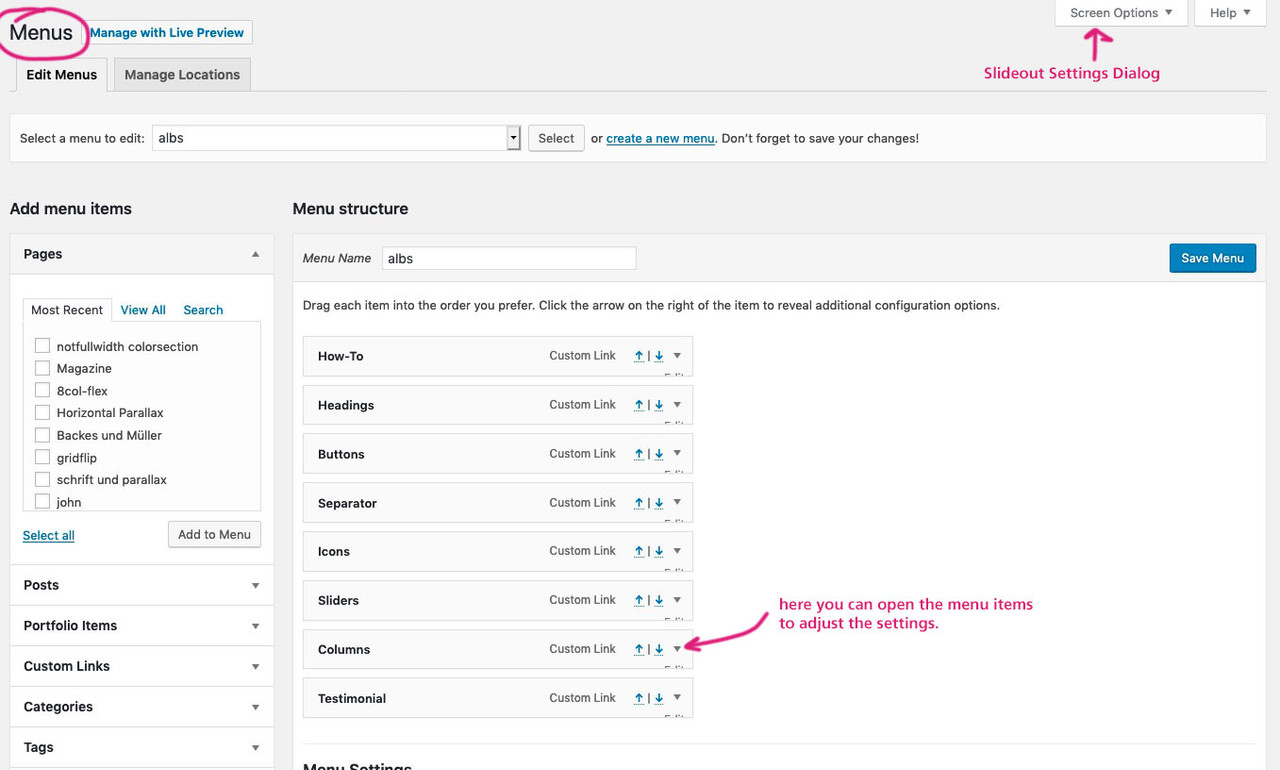
    so press this “Screen Options” slide-out settings dialog and mark the things you like to have for menu-styling
    we need for it the “CSS Classes” – each menu-item has that little arrow on the right side
    (see my comment in the image: here you can open the menu items to adjust the settings)

    you will see for one menu-item the following:
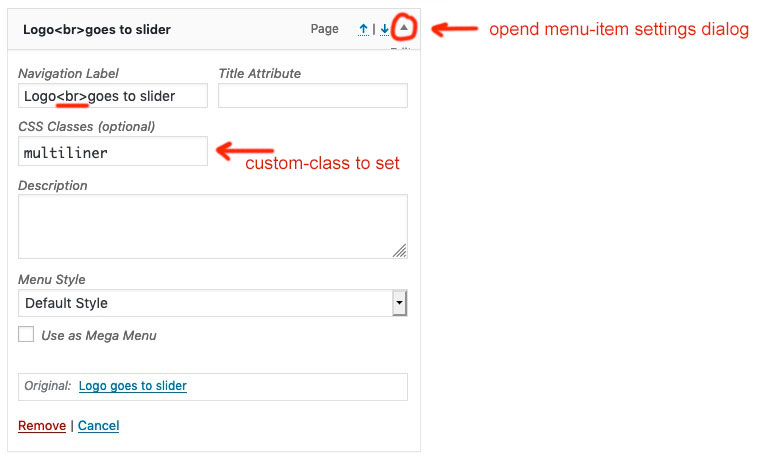
    on that “Navigation Label” input field you can put in what you like to have (even image links – you know that)
    for multiline you can use the br-tag ( <br> ).
    Put in the CSS Classes input field : multiliner

    these are all menu-settings to have

    __________

    We now had to bind the shrink calculation to the padding-top for menu-items and set the line-height to a different amount then the default one for oneliners

    So upload a copy of the avia-snippet-sticky-header.js Script to your enfold-child/js folder (on default there is no js folder – create one ) – this one will be used for your enfold installation now.

    and we need this snippet to have a child-theme shrinking script:

    add_action( 'wp_enqueue_scripts', 'wp_change_sticky_header_script', 100 );
    function wp_change_sticky_header_script() {
       wp_deregister_script( 'avia-sticky-header' );
       wp_enqueue_script( 'avia-sticky-header-child', get_stylesheet_directory_uri().'/js/avia-snippet-sticky-header.js', array('avia-default'), $vn, true);
    }

    Goto Dashboard – Appearance – Editor
    here you have your child-theme files – and now on the js subfolder the new script.
    Under “Theme Files” you can click on this script because we had to insert some new code:

    Find the line (on default Enfold 4.5.7 it is line 54) : topbar_height = header.find('#header_meta').outerHeight(),

    under that line insert:

    multiliner_padding = header.find('#avia-menu .multiliner > a'),
    multiliner_lh = 20, // set the desired line-height for the multilines

    now find (on default Enfold 4.5.7 it is line 92) : logo.css({'maxHeight': newH + 'px'});

    insert after :

    
    multiliner_padding.css({'padding-top': newH/2 - multiliner_lh/2 + 'px', 'line-height': multiliner_lh + 'px'});

    save that file by click on “update file”
    thats it

    ___________

    in order for the new changes to take effect, you may need to refresh the merged files
    Enfold (Child) – Performance – check that “Delete old CSS and JS files?” and “Save all changes”
    refresh your browser chache too please.

    See a working example on : https://webers-testseite.de/cynthia/

    #1106587

    Hi,

    Thank you for the update.

    It may not be what you’re expecting, but that is how the cell’s background image is supposed to resize on mobile view. One workaround is to hide those particular grid cells on mobile view and replace them with a different element. You can use the elements’ Screen Options panel to toggle their visibility for different screen sizes.

    Or use this css code to adjust the position of the image inside the background positioning area.

    @media only screen and (max-width: 767px) {
    #hello .flex_cell.no_margin.av_one_half.avia-builder-el-12.el_after_av_cell_one_half.avia-builder-el-last.avia-full-stretch.av-zero-padding {
        background-position: 70% 0 !important;
    }
    }

    You may need to apply a Custom CSS Class to that particular element and use that instead of the default css selector above.

    // https://kriesi.at/documentation/enfold/intro-to-layout-builder/#turn-on-custom-css-class-field-for-all-alb-elements

    Best regards,
    Ismael

    #1095526

    Hi,

    Thanks for the update.

    This css code should pull the “rolling pin” image upwards.

    .avia-image-container.av-styling-.avia-builder-el-9.avia-builder-el-no-sibling.avia-align-center {
        margin-top: -150px;
    }
    

    That css code contains a generic selector in it. You have to turn on the custom css class field so that you can apply a more specific class attribute or selector.

    // https://kriesi.at/documentation/enfold/intro-to-layout-builder/#turn-on-custom-css-class-field-for-all-alb-elements

    Best regards,
    Ismael

    #1093053

    In reply to: Animate.css & Wow.js

    Hi,
    Sorry for the late reply, did you see this css to block all animations at the above link?

    .avia_transform .avia_start_animation.left-to-right.avia_image, .avia_transform .avia-icon-list .avia_start_animation .iconlist_icon, .avia_transform .avia_start_animation.avia-testimonial .avia-testimonial-image { 
    -webkit-animation: none!important;
    -moz-animation: none!important;
    -o-animation: none!important;
    animation: none!important; opacity: 1!important;
    -webkit-transform: scale(1)!important;
    -moz-transform: scale(1)!important;
    -o-transform: scale(1)1important;
    transform: scale(1)!important; }

    But I believe that this will not allow you to use a alternative animation because you will not be able to use these classes, you will have to add new classes to your elements for the animation.
    Another point is that each element css file has the animation added, so the cleanest way would be to edit each one of them and delete the animation css, and then add the theme classes to your animate.css file, but this would still be a lot of editing.
    Perhaps the easiest way would be to add your new animation to each element with the !important; on the rule and then add it to your WordPress > Customize > Additional CSS which overrides all other css.
    This would be easy if your only changing a few of them.
    How many different elements do you want to change the animation on?

    Best regards,
    Mike

    #1088087

    In reply to: footer mobil phone

    Hi,

    You should replace the “avia-builder-el-6” selector with a custom css class that is specified manually.

    // https://kriesi.at/documentation/enfold/intro-to-layout-builder/#turn-on-custom-css-class-field-for-all-alb-elements

    Turn on the custom css class as instructed in the documentation, add a custom css class attribute to the image element and then use that in place of the generic selector “avia-builder-el-6”.

    .page-id-399 .custom-css-class {
         height: 400px! important;
         min-height: 400px! important;
    }
    

    Replace “custom-css-class” with what it is that was specified in the custom css class field.

    Best regards,
    Ismael

    #1083355

    Hi,

    On mobile devices, the parallax effect is disabled and the background attachment is set to scroll, so the background image is not going to animate. The background also tends to look a little different on mobile view because the image has to be resized in order to keep its aspect ratio. You can, however, change the background position with css to recenter the images’ point of interest.

    @media only screen and (max-width: 767px) {
    .avia_mobile .avia-full-stretch {
        background-attachment: scroll !important;
        background-position: 50% 130px !important;
    }
    }

    Turning the custom css class attribute should help.

    // https://kriesi.at/documentation/enfold/intro-to-layout-builder/#turn-on-custom-css-class-field-for-all-alb-elements

    Best regards,
    Ismael

    #1082626

    Hi,

    The images are not displaying when the Section ID is filled because of this css code.

    #so-123 img {
        opacity: 0!important;
    }

    Looks like you’re using the generic (.avia-builder-el-11, .avia-builder-el-6 etc) class attributes as selectors for the elements. Those class attributes are temporary and can change based on the number of elements in the page and their order in the builder. Turn on the custom css class field in order to apply a permanent css class attribute to the elements, which can then be used to change their style.

    // https://kriesi.at/documentation/enfold/intro-to-layout-builder/#turn-on-custom-css-class-field-for-all-alb-elements

    Best regards,
    Ismael

Viewing 30 results - 211 through 240 (of 612 total)