
-
AuthorSearch Results
-
March 22, 2023 at 8:15 am #1401975
Topic: Underline links in Accordion Container
in forum Enfoldasociacionespanolaaustria
ParticipantHi, I have this code to underline my links.
/*** links subrayados ***/
.avia_textblock p a, .avia_textblock li a, .avia-tooltip p a {
text-decoration:underline !important;
}Could you please give me the code to add the text in the accordion container?
Thanks in advance!
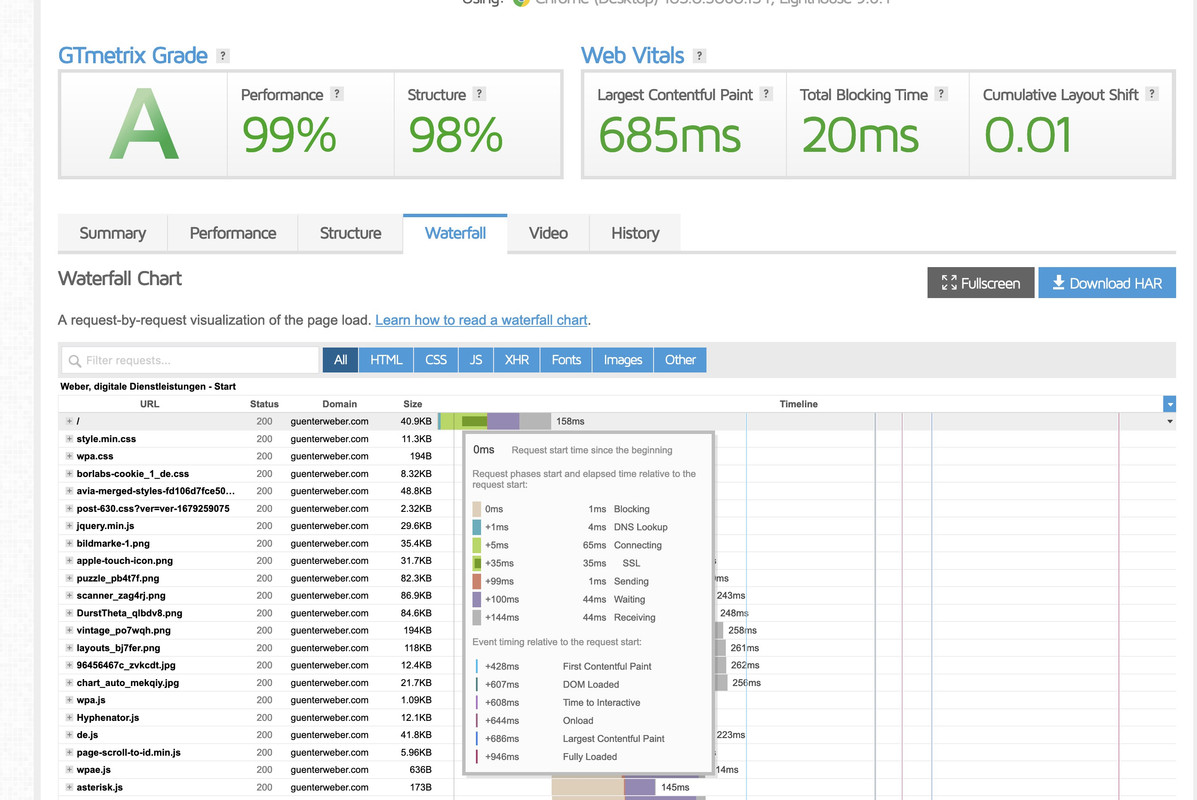
ArantzaMarch 19, 2023 at 9:54 pm #1401731In reply to: Sitespeed Slow (TTFB +10 seconds)
there are many factors that can influence the TTBF values. Go and test your page on : gtmetrix.com
you can see on waterfall tab more info on how the influence is for TTBF:
Hover that first line on Waterfall where / is – a tooltip with more info opens.
 March 13, 2023 at 3:14 pm #1401045
In reply to: Tool tip / hover not working
Hi Philipp,
Tooltips are hidden by the following custom CSS code
/* Hide tooltip */
.avia-tooltip {
	display: none !important;
}
I commented it out and that helped.
Please review your website.
Best regards,
YigitMarch 13, 2023 at 8:27 am #1400994In reply to: Tool tip / hover not working
Hi Rikard,
update to the lastet Version is done. But unfortunatelly the update didn’t solve the problem with the tooltipps.
Thanks for your help.
Best regards,
PhilippMarch 10, 2023 at 4:43 pm #1400730In reply to: WPRocket Delayed Javascript execution
What I see in the browser console is the following error when the display of accordion slider fails:
Uncaught TypeError: e.AviaTooltip is not a constructorFebruary 24, 2023 at 11:58 am #1399138so maybe he has a customisation to get frontside background-image. On former times i do have a script for that too.
so now i know that this is the fact. – Remove your custom script – And those extraimages on the flipbox content. All is now possible in the ALB itself.
You can even change the order of showing. You can decide to show first backside and on hover the front is shown.here are some possibilities – very nice is the tooltip now: https://enfold.webers-webdesign.de/gridflip/
February 23, 2023 at 12:34 pm #1398993Hey Tom,
I reported the issue to our developers.
Issue should be fixed in upcoming version.As a temporary solution, I added the following code to the bottom of the Quick CSS field in Enfold theme options > General Styling
/* Temporary CSS fix for TEC styling */
:root{
    --tec-color-text-events-title-day:var(--tec-color-text-events-title);
    --tec-color-text-events-title-latest-past:var(--tec-color-text-events-title);
    --tec-color-text-event-title-list:var(--tec-color-text-events-title);
    --tec-color-text-events-title-month-multiday:var(--tec-color-text-events-title);
    --tec-color-text-events-title-widget-list:var(--tec-color-text-events-title);
    --tec-color-text-secondary-event-date-month:var(--tec-color-text-secondary-event-date);
    --tec-color-text-secondary-event-date-month-mobile:var(--tec-color-text-secondary-event-date-month);
    --tec-color-text-day-of-week-month:var(--tec-color-text-secondary);
    --tec-color-day-marker-month:var(--tec-color-text-primary);
    --tec-color-day-marker-month-hover:var(--tec-color-text-primary-hover);
    --tec-color-day-marker-month-active:var(--tec-color-text-primary-active);
    --tec-color-day-marker-current-month:var(--tec-color-day-marker-month);
    --tec-color-day-marker-current-month-hover:var(--tec-color-day-marker-month-hover);
    --tec-color-day-marker-current-month-active:var(--tec-color-day-marker-month-active);
    --tec-color-day-marker-past-month:var(--tec-color-text-primary);
    --tec-color-day-marker-past-month-hover:var(--tec-color-day-marker-past-month);
    --tec-color-day-marker-past-month-active:var(--tec-color-day-marker-past-month);
    --tec-color-text-day-of-week-week:var(--tec-color-text-secondary);
    --tec-border-radius-month-multiday:9.5px;
    --tec-color-border-secondary-month-grid:var(--tec-color-border-secondary);
    --tec-color-border-active-month-grid-hover:var(--tec-color-border-active);
    --tec-color-background-month-grid:transparent;
    --tec-color-background-tooltip:var(--tec-color-background);
    --tec-color-text-events-bar-input:var(--tec-color-text-primary);
    --tec-color-text-events-bar-input-placeholder:var(--tec-color-text-secondary);
    --tec-opacity-events-bar-input-placeholder:var(--tec-opacity-default);
    --tec-color-border-events-bar:var(--tec-color-border-secondary);
    --tec-color-background-events-bar:var(--tec-color-background);
    --tec-color-background-view-selector:var(--tec-color-background-events-bar);
    --tec-color-background-view-selector-tabs:var(--tec-color-background-view-selector);
    --tec-color-background-view-selector-list-item-hover:var(--tec-color-background-secondary);
    --tec-color-background-subscribe-list-item-hover:var(--tec-color-background-secondary);
    --tec-color-text-view-selector-list-item:var(--tec-color-text-primary);
    --tec-color-text-view-selector-list-item-hover:var(--tec-color-accent-secondary-hover);
    --tec-color-background-search-container:var(--tec-color-background-events-bar);
    --tec-color-text-events-bar-submit-button:var(--tec-color-background);
    --tec-color-text-events-bar-submit-button-active:var(--tec-color-text-events-bar-submit-button);
    --tec-color-text-events-bar-submit-button-hover:var(--tec-color-text-events-bar-submit-button);
    --tec-color-background-events-bar-submit-button:var(--tec-color-button-primary);
    --tec-color-background-events-bar-submit-button-hover:var(--tec-color-button-primary-hover);
    --tec-color-background-events-bar-submit-button-active:var(--tec-color-button-primary-active);
    --tec-color-icon-events-bar:var(--tec-color-icon-primary);
    --tec-color-icon-events-bar-active:var(--tec-color-icon-active);
    --tec-color-icon-events-bar-hover:var(--tec-color-icon-hover)
}
You can remove in the version after 5.4.1Edit: After checking your other thread, I realized we must hear back from our devs. As I mentioned in the other thread, TEC styling should inherit Enfold theme options.
Best regards,
Yigit-
This reply was modified 3 years, 1 month ago by
Yigit.
February 16, 2023 at 4:36 am #1398157In reply to: name of image in gallery
Hi martinmoravek1,
Please try to add this in your child themes functions.php file:
function temporary_removal_title_tags(){
?>
<script>
  window.onload = function() {
      var links = document.querySelectorAll('a, img, *[title]');
      for (var i = 0; i < links.length; i++) {
          var link = links[i];
          link.onmouseover = function() {
              this.setAttribute("data-tooltip", this.title);
              this.title = "";
          };
          link.onmouseout = function() {
              this.title = this.getAttribute("data-tooltip");
          };
          link.onmousedown = function() {
              this.title = this.getAttribute("data-tooltip");
          };
      }
  };
</script>
<?php
}
add_action('wp_footer', 'temporary_removal_title_tags');
If you don’t have a child theme yet, then go to https://kriesi.at/documentation/enfold/child-theme/ and download the child theme there (instructions on how to use it is also there)
Hope it helps.Best regards,
NikkoFebruary 4, 2023 at 7:13 am #1396632In reply to: Search icon mobile version
Hi,
Thanks for your patience, try adding this code to the end of your child theme functions.php file in Appearance ▸ Editor:function search_for_mobile_sidebar_header() { ?> <script> window.addEventListener('DOMContentLoaded', function() { (function($){ var width = $(window).width(); var search = $('<li id="menu-item-search" class="mobile-search menu-item menu-item-search-dropdown menu-item-avia-special" role="menuitem"><a aria-label="Search" href="?s=" rel="nofollow" data-avia-search-tooltip="<form role="search" action="https://your-domain.com/" id="searchform" method="get" class=""><div><input type="submit" value="" id="searchsubmit" class="button avia-font-entypo-fontello" /><input type="text" id="s" name="s" value="" /></div></form>" aria-hidden="false" data-av_icon="" data-av_iconfont="entypo-fontello" style=""><span class="avia_hidden_link_text">Search</span></a></li>'); if (width <= 767) { $(search).insertBefore('.main_menu'); } else {} })(jQuery); }); </script> <?php } add_action('wp_footer', 'search_for_mobile_sidebar_header');Then add this css to your child theme stylesheet or the theme option Quick CSS:
@media only screen and (max-width: 767px) {
.responsive #top #wrap_all #menu-item-search.mobile-search {
top: 0;
height: 80px;
right: 50px;
display: inline-block;
position: absolute;
}
}
Please ensure to copy the code from the forum and not an email notification so the symbols are not converted.
Please see the screenshot in the Private Content area of the expected results.Best regards,
Mike-
This reply was modified 3 years, 2 months ago by
Mike. Reason: corrected quotes in code
January 26, 2023 at 10:52 pm #1395463Again, from a third place: the quotation marks are not text and do not belong to the Title Text.
You can easily check this yourself by hovering the mouse over the link. Then the browser shows you the title in a tooltip.
There you see – no quotation marks. They belong to the attributes of a tag! Nothing more. As with every alt-tag, title-tag src etc. pp …(click to enlarge)

__________
next: https://html.spec.whatwg.org/multipage/links.html#link-type-bookmarkwhy does it disturb your?
January 26, 2023 at 5:28 am #1395288In reply to: Different typography size in pages and posts
Hi,
Thank you for the links.
Did you add the following css code somewhere? It sets the font size to 15px by default on pages.
body, body .avia-tooltip {
    font-size: 15px;
}
The css below is the default style.
#top .fullsize .template-blog .post .entry-content-wrapper {
    text-align: justify;
    font-size: 1.15em;
    line-height: 1.7em;
    max-width: 800px;
    margin: 0 auto;
    overflow: visible;
}
To fix the issue, you have to adjust the first css rule and make sure that it is the same as the default style.
Best regards,
IsmaelJanuary 24, 2023 at 9:04 pm #1394997Sandy
ParticipantThe Related Entries do not seem to be displaying correctly by common tags. Instead almost all pages seem to suggest the same (very old) posts regardless.
The site is set up this way:
Enfold / Blog Layout / Related Entries – Set to “Show thumbnails and display title by tooltip”Please review the Custom CSS and let me know what steps are needed to have more relevant posts appear in Related Entries.
January 24, 2023 at 7:11 pm #1394984In reply to: Remove alt image name
Hi 95mc,
Please try to use this code: (based on Guenni007’s code in this thread: https://kriesi.at/support/topic/issue-with-lightbox-image-titles/#post-1356119 I just added .av-masonry-image-container in the list of elements)
function temporary_removal_title_tags(){
?>
<script>
  window.onload = function() {
      var links = document.querySelectorAll('a, img, .av-masonry-image-container');
      for (var i = 0; i < links.length; i++) {
          var link = links[i];
          link.onmouseover = function() {
              this.setAttribute("data-tooltip", this.title);
              this.title = "";
          };
          link.onmouseout = function() {
              this.title = this.getAttribute("data-tooltip");
          };
          link.onmousedown = function() {
              this.title = this.getAttribute("data-tooltip");
          };
      }
  };
</script>
<?php
}
add_action('wp_footer', 'temporary_removal_title_tags');
Hope this helps.
Best regards,
NikkoJanuary 15, 2023 at 4:59 pm #1378753In reply to: SocialMedia-Link for FB doesn't work (anymore)
Hi,
Thank you for your patience when I look at the links in your footer I see the social links are a “share box”.
I assume that you added this by using the “social buttons” element in your footer page, this element is a “share box” and not a social profile link.
You can copy the social profile code from your header and add in a code block element or you can use the icon elements to create your own social links.
Please see this thread
If you like the layout you currently have and just want to change the links for your footer page “share box”, Try adding this code to the end of your child theme functions.php file in Appearance ▸ Editor:function change_share_box_links_to_social_profile_links() { ?> <script> window.addEventListener('DOMContentLoaded', function() { (function($){ var facebook = "https://facebook.com"; var linkedin = "https://linkedin.com"; var instagram = "https://instagram.com"; var youtube = "https://youtube.com"; $("#footer-page .av-share-box-list").each(function(){ $(this).find(".av-share-link.av-social-link-facebook a").attr("href", facebook); $(this).find(".av-share-link.av-social-link-linkedin a").attr("href", linkedin); $(this).find(".av-share-link.av-social-link-instagram a").attr("href", instagram); $(this).find(".av-share-link.av-social-link-youtube a").attr("href", youtube); }); })(jQuery); }); </script> <?php } add_action('wp_footer', 'change_share_box_links_to_social_profile_links');and adjust the social links to suit.
Best regards,
MikeDecember 22, 2022 at 11:56 am #1377091is there a link i can see?
I use this snippet to remove the title tag only temporarily on hover. On click and on mouseout it is restored.
function temporary_removal_title_tags(){
?>
<script>
  window.onload = function() {
      var links = document.querySelectorAll('a, img, *[title]');
      for (var i = 0; i < links.length; i++) {
          var link = links[i];
          link.onmouseover = function() {
              this.setAttribute("data-tooltip", this.title);
              this.title = "";
          };
          link.onmouseout = function() {
              this.title = this.getAttribute("data-tooltip");
          };
          link.onmousedown = function() {
              this.title = this.getAttribute("data-tooltip");
          };
      }
  };
</script>
<?php
}
add_action('wp_footer', 'temporary_removal_title_tags');
December 8, 2022 at 3:28 pm #1375539In reply to: Background color on hotspots is gone
Hi Chrilles,
Thanks for contacting us!
Main color background color seems to be set to transparent, hence the issue. Please add following code to Quick CSS field in Enfold theme options > General Styling tab
.avia-tooltip, .avia-tooltip .avia-arrow {
  background-color: white;
}
Best regards,
YigitNovember 22, 2022 at 4:37 pm #1373546Topic: Removing/hiding alt titles of all images
in forum EnfoldHurricane
ParticipantHello, I’d like to remove the tooltip, titles showing up on hover for all of the images on my website. I’ve already tried the solutions found on the following three links and they don’t work.
Thanks,
Jacob
November 15, 2022 at 5:34 pm #1372680The line says in function.php line 74
wp_register_script ( ‘gigla-custom’, ‘http://gigla.se/wp-content/themes/enfold-child/js/gigla-custom.js’, array(‘jquery’), $vn, true );
<?php
/* Child theme specific functions */
/* Added by Maria *//* PT Sans: already in theme; 400/regular, 700/bold + italic */
/* LOAD the following extra fonts:
PT Sans Narrow: 400/regular, 700/bold
PT Sans Caption: 400/regular. Not added: 700/bold.
NOTE: Caption will only be used in explanation or image text,
so it doesn’t need to be added to the styling panel.
PT Serif: 400/regular, 700/bold. There are also italic normal, italic bold
Serif can be used as paragraph font instead of sans */
function theme_enqueue_styles() {
wp_enqueue_style( ‘parent-style’, get_template_directory_uri() . ‘/style.css’ );
wp_enqueue_style( ‘chld_thm_cfg_ext1’, ‘https://fonts.googleapis.com/css?family=PT+Sans+Narrow:400,700’ );
wp_enqueue_style( ‘chld_thm_cfg_ext2’, ‘https://fonts.googleapis.com/css?family=PT+Sans+Caption&display=swap’ );
wp_enqueue_style( ‘chld_thm_cfg_ext3’, ‘https://fonts.googleapis.com/css?family=PT+Serif:400,700’ );
}
add_action( ‘wp_enqueue_scripts’, ‘theme_enqueue_styles’ );
/* add Narrow to the styling panel – heading fonts */
add_filter( ‘avf_google_heading_font’, ‘avia_add_heading_font’);
function avia_add_heading_font($fonts)
{
$fonts[‘PT Sans Narrow’] = ‘PT Sans Narrow’;
return $fonts;
}
/* add Serif to the styling panel – content fonts */
add_filter( ‘avf_google_content_font’, ‘avia_add_content_font’);
function avia_add_content_font($fonts)
{
$fonts[‘PT Serif’] = ‘PT Serif’;
return $fonts;
}/* enable svg upload – use this only temporary, turn off after uploading */ /*
function cc_mime_types($mimes) {
$mimes[‘svg’] = ‘image/svg+xml’;
return $mimes;
}
add_filter(‘upload_mimes’, ‘cc_mime_types’);
*//* set to debug, useful to see shortcodes – use this only temporary */ /*
add_action(‘avia_builder_mode’, “builder_set_debug”);
function builder_set_debug()
{
return “debug”;
}
*//* Remove title pop-ups from links and images */
function add_custom_tooltip(){
?>
<script>
jQuery(window).load(function(){
jQuery(‘a’).removeAttr(‘title’);
jQuery(‘img’).removeAttr(‘title’);
});
</script>
<?php
}
add_action(‘wp_footer’, ‘add_custom_tooltip’);/* Register a custom jquery file */
wp_register_script ( ‘gigla-custom’, ‘http://gigla.se/wp-content/themes/enfold-child/js/gigla-custom.js’, array(‘jquery’), $vn, true );
wp_enqueue_script ( ‘gigla-custom’ );November 12, 2022 at 11:25 pm #1372361if you do not want to completely remove the titles – just do that on mouseover:
( play a bit with the selectors – maybe it is not useful to have that for all elements with titles )function temporary_removal_title_tags(){ ?> <script> window.onload = function() { var links = document.querySelectorAll('a, img, *[title]'); for (var i = 0; i < links.length; i++) { var link = links[i]; link.onmouseover = function() { this.setAttribute("data-tooltip", this.title); this.title = ""; }; link.onmouseout = function() { this.title = this.getAttribute("data-tooltip"); }; link.onmousedown = function() { this.title = this.getAttribute("data-tooltip"); }; } }; </script> <?php } add_action('wp_footer', 'temporary_removal_title_tags');November 11, 2022 at 8:34 am #1372160In reply to: Turning off Title Tooltip in Masonry Gallery
Hey hmsvictory,
Thank you for the inquiry.
Are you referring to the title attribute popup? Please note that the title attribute is important for search engines and the tooltip is a default browser feature, so we don’t recommend removing it. But if you want to proceed and remove the attribute, try adding in the functions.php file any of the script or code provided in the following threads.
// https://kriesi.at/support/topic/issue-with-lightbox-image-titles/#post-1356119
// https://kriesi.at/support/topic/image-names-appearing-on-hover/#post-1355003
// https://kriesi.at/support/topic/how-to-remove-filename-which-shows-when-mouse-arrow-is-on-a-picture/#post-1324132Best regards,
IsmaelNovember 10, 2022 at 10:59 pm #1372138Topic: Turning off Title Tooltip in Masonry Gallery
in forum Enfoldhmsvictory
ParticipantWhen you mouse over the images in the Masonry Gallery, a tooltip popup shows the title. If I wanted to disable this tooltip popup, what changes are necessary in the code? I tried a solution from 2014 on this forum but it did not work in the current version.
November 8, 2022 at 11:55 am #1371737In reply to: Google Maps Icon
Hi ussma,
Thanks for giving us admin access, I changed it on your site (though you might still want to change the image).
You can modify it by editing the Google Map element, click on the address, open Marker and Tooltip and then change Custom Map Marker Image.
Hope this helps.Best regards,
Nikko-
This reply was modified 3 years, 5 months ago by
Nikko.
November 5, 2022 at 11:10 pm #1371502In reply to: Masonry Gallery Perfect Grid Spacing Issue
Thank you, perfect.
I am thinking about turning off the image title tooltips that popup in the galleries. Is it better for SEO to keep the image titles there?
October 26, 2022 at 9:40 am #1370271Hi,
Thank you for the update.
The recommendation above will actually disable the tooltip and directly open the hotspot link on tap. You will also have the option to add the link directly inside the tooltip content but as describe in the option, the content will display below the hotspot image. Did you try it?
Best regards,
IsmaelOctober 25, 2022 at 8:01 pm #1370236Thanks for the quick reply. I don’t think I’ve described this well enough; let me try again. On mobile/tablet, pressing a hotspot initiates the tooltip. I want to initiate the hotspot link. The user has to click on a hotspot three times to initiate the Hotspot Link. The first tap shows the tooltip, the second tap does nothing, the third tap opens the hotspot link.
October 25, 2022 at 9:28 am #1370108Hi,
Thank you for the update.
Have you tried decreasing the animation duration (300) to 200 or lower value? You can also replace the animation function with css to instantly hide the tooltips.
 $('.avia-tooltip').css({
                        opacity: 0,
                        display: 'none'
                    });
Let us know if this helps.
Best regards,
IsmaelOctober 25, 2022 at 9:15 am #1370103Hey armourcreative,
Thank you for the inquiry.
There is an option to show the hotspot tooltip info below the hotspot image on mobile view. Please go to the Advanced > Responsive toggle and enable the Hotspot on mobile devices option.
Best regards,
IsmaelOctober 24, 2022 at 6:39 pm #1370034armourcreative
ParticipantCan I disable tooltips when a hotspot link is present, or disable Tooltips altogether (not in styles, but in script). On mobile, users must click a hotspot three times to initiate the link. In this case, when a link is present, there’s no need for the tooltip. I can hide the tooltips in CSS, but that’s not a solution.
October 22, 2022 at 7:55 pm #1369813domchocolate
ParticipantI refer to https://kriesi.at/support/topic/image-hotspot-and-tab-section/
Thanks again for the solution you offered here. I have been testing it and it mostly works, however, I’ve noticed it can be buggy from time to time. Sometimes when tabbing across to a different tab the tooltips don’t work/pop up.I notice it particularly on the second tab on hotspots 1-3. Any ideas?
Here’s the page: https://owe.brother.design/projects/#2025-2027
-
This topic was modified 3 years, 5 months ago by
domchocolate.
October 12, 2022 at 9:43 am #1368536In reply to: Image Hotspot and Tab Section
Hey domchocolate,
Thank you for the inquiry.
Adding the following script in the functions.php file might help. The script should hide the tooltip when switching tabs.
// custom script: hide tooltip on tab click
function ava_custom_script_hide_tooltip()
{
    ?>
    <script type="text/javascript">
        (function($) {
            $(document).ready(function() {
                $('.av-tab-section-tab-title-container').on('click', function(event) {
                    $('.avia-tooltip').animate({
                        opacity: 0,
                        display: 'none'
                    }, 300);
                });
            });
        })(jQuery);
    </script>
    <?php
}
add_action( 'wp_footer', 'ava_custom_script_hide_tooltip', 9999 );
Best regards,
Ismael -
This reply was modified 3 years, 1 month ago by
-
AuthorSearch Results
-
Search Results
-
Hi, I have this code to underline my links.
/*** links subrayados ***/
.avia_textblock p a, .avia_textblock li a, .avia-tooltip p a {
text-decoration:underline !important;
}Could you please give me the code to add the text in the accordion container?
Thanks in advance!
ArantzaThe Related Entries do not seem to be displaying correctly by common tags. Instead almost all pages seem to suggest the same (very old) posts regardless.
The site is set up this way:
Enfold / Blog Layout / Related Entries – Set to “Show thumbnails and display title by tooltip”Please review the Custom CSS and let me know what steps are needed to have more relevant posts appear in Related Entries.
Hello, I’d like to remove the tooltip, titles showing up on hover for all of the images on my website. I’ve already tried the solutions found on the following three links and they don’t work.
Thanks,
Jacob
When you mouse over the images in the Masonry Gallery, a tooltip popup shows the title. If I wanted to disable this tooltip popup, what changes are necessary in the code? I tried a solution from 2014 on this forum but it did not work in the current version.
Can I disable tooltips when a hotspot link is present, or disable Tooltips altogether (not in styles, but in script). On mobile, users must click a hotspot three times to initiate the link. In this case, when a link is present, there’s no need for the tooltip. I can hide the tooltips in CSS, but that’s not a solution.
I refer to https://kriesi.at/support/topic/image-hotspot-and-tab-section/
Thanks again for the solution you offered here. I have been testing it and it mostly works, however, I’ve noticed it can be buggy from time to time. Sometimes when tabbing across to a different tab the tooltips don’t work/pop up.I notice it particularly on the second tab on hotspots 1-3. Any ideas?
Here’s the page: https://owe.brother.design/projects/#2025-2027


