Hey Advantage09,
Thank you for the inquiry.
1.) The contact form has an option to display missing or invalid fields. Please set the Content > Frontend > Display Fields With Error settings to “yes”.
2.) Adding the following script in the functions.php might help.
function ava_custom_script() {
	?>
	<script>
		(function($) {
			$(document).ready(function() {
				$('#top #avia-menu').attr('role', 'menubar');
			});
		}(jQuery));
	</script>
	<?php
}
add_action('wp_footer', 'ava_custom_script');
Best regards,
Ismael
Hey flylanddesigns,
Thank you for the inquiry.
Unfortunately, adding this feature to the Masonry element would require significant modifications to the theme. You may have noticed that the AJAX Portfolio preview includes specific elements designed exclusively for the “portfolio” post type, which can be added using the dedicated Ajax Portfolio Preview Settings. These customization options and content fields are not available for other post types, and the Portfolio Grid element is the only component capable of displaying these elements. Additionally, the functionality provided by the AJAX preview script is specifically designed for the Portfolio Grid element and cannot be utilized with the Masonry element without substantial customization to the templates.
Best regards,
Ismael
Hello together,
I’m looking for a solution to add the content of 3-5 advanced custom fields to a portfolio single.
Which theme file could I manipulate to reach a solution? Is it possible with the function.php or do I have to manipulate the portfolio-single?
More Details:
I like to build portfolio items, which inserts by default content like: portfolio-title (page title), product-description (page short description), price_old from acf, price_new from acf and one image form acf. After that content the ALB-Content (additional masonry-gallery, video, table or something) should appear.
It sounds easy, but I didn’t find a solution so far.
Regards
Chris
Hi,
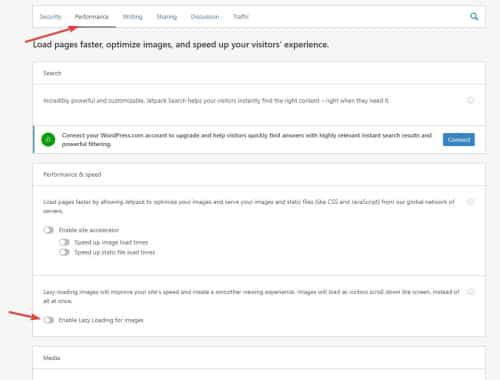
Thank you for the link to your site and the screenshots, the large gap under the slider was caused by the JetPack image lazyload option, I disabled it for you and cleared your Autoptimize cache and now it is solved;
For the footer of your SBC page I added this css to your Quick CSS, clear your browser cache and check.
@media only screen and (max-width: 767px){
.responsive #top #footer .flex_column {
    margin: 0;
    margin-bottom: 20px;
    width: 100%;
}
}
It looks like the page structure is not correct on that page but I’m not sure the cause for it, if this css works and you don’t see any other issues then fine, otherwise try disabling all of your plugins and check again, if this doesn’t correct please create a staging site so we can investigate further. Is this page a custom post type? I didn’t find it in with your pages in the backend. Is it using the Advanced Custom Fields plugin? Is this the only page with this issue?
Best regards,
Mike
Hi All, I have a client that would like to have a select field on the page using a custom template – allowing them to select the main menu to be displayed. I’m using Advanced Custom Fields plugin for the select field. I have created a page template based on the template-builder.php. The new template calls a custom header file (copy of header.php) that finally calls “helper-custom-menu” (instead of “helper-main-menu”). I think I found the area where I need to change the code to make this all work, but it surely does NOT work. Does anyone have any suggestions on what needs to be changed for this to work correctly? Here’s the code section I changed:
                        /*
                        *   display the main navigation menu
                        *   modify the output in your wordpress admin backend at appearance->menus
                        */
                            if( $headerS['bottom_menu'] )
                            {
                                $output .= '</div>';
                                $output .= '</div>';

                                if( ! empty( $headerS['header_menu_above'] ) )
                                {
                                    $avia_config['temp_logo_container'] = "<div class='av-section-bottom-logo header_color'>{$output}</div>";
                                    $output = '';
                                }

                                $output .= "<div id='header_main_alternate' class='container_wrap'>";
                                $output .= "<div class='container'>";
                            }

                            $avia_theme_location = 'avia';
                            $avia_menu_class = $avia_theme_location . '-menu';
                            $select_menu = the_field( 'select_wp_menu' )

                            $main_nav = "<nav class='main_menu' data-selectname='" . __( 'Select a page', 'avia_framework' ) . "' " . avia_markup_helper( array( 'context' => 'nav', 'echo' => false ) ) . '>';

                            $args = array(
                                        'theme_location'    => $avia_theme_location,
                                        'menu'              => $select_menu,
                                        'menu_class'        => 'menu av-main-nav',
                                        'container_class'   => $avia_menu_class.' av-main-nav-wrap'.$icon_beside,
                                        'items_wrap'        => '<ul role="menu" class="%2$s" id="%1$s">%3$s</ul>',
                                        'fallback_cb'       => 'avia_fallback_menu',
                                        'echo'              =>  false,
                                        'walker'            => new avia_responsive_mega_menu()
                                    );

                                $wp_main_nav = wp_nav_menu( $args );
                                $main_nav .= $wp_main_nav;
Hello there,
we are using a download-plugin for tracking PDF downloads. In order to have a custom construct around the download field, we’ve added a shortcode which also echoes the download-shortcode coming from the plugin. This works like we’ve expected.
The problem occurs while using a customized column-shortcode from Enfold ALB.
We have added a restriction within the columns (column.php), which allows the user to access specific parts of the page if you are the given “level”.
Within the shortcode handler function, I’ve added this:
      if($atts['group_visibility']) {

                if(is_user_logged_in()) {

                    $term = get_term( $atts['group_visibility'], 'packages' )->term_id;
                    $userid = get_current_user_id();
                    $userterms = wp_get_post_terms( $userid , 'packages', array( 'fields' => 'ids' ) );

                    if(!in_array($term,$userterms)) {
                        $restricted = true;
						$restrictedClass = 'restricted-div';
                        $outputaddition = $this->displayRestrictionMessage('Not available for your package.',$deviceID,'package-restriction');
                    }
                } else {
                    $restricted = true;
					$restrictedClass = 'restricted-div';
					$outputaddition = $this->displayRestrictionMessage('You need to be logged in to see this information.',$deviceID,'logged-restriction');
                }

            }
This also works fine, later on we have this:
           if(!$restricted) {
                //if the user uses the column shortcode without the layout builder make sure that paragraphs are applied to the text
                $content = ( empty( $avia_config['conditionals']['is_builder_template'] ) ) ? ShortcodeHelper::avia_apply_autop( ShortcodeHelper::avia_remove_autop( $content ) ) : ShortcodeHelper::avia_remove_autop( $content, true );
                $output .=		trim( $content );
            } else {
		$output .= $outputaddition;
	}
but this breaks the shortcode in the
The shortcode in the “page content” ALB template displays the calendar, but when restricted (hence echoing “outputaddition” instead of the content), the shortcode in the “page content” ALB template somehow displays a download-shortcode – which doesn’t make any sense.
Do you have an Idea on how these changes can affect a shortcode on the page?
If you need any credentials, please let me know.
Regards
-
This topic was modified 2 years, 10 months ago by
 emilconsor.
-
This topic was modified 2 years, 10 months ago by emilconsor.
Hi,
Thanks for posting your code, but I didn’t find anything in it for custom fields, please link to the thread where you found the customization.
// https://pastebin.com/7Kn8R4ZR
Best regards,
Mike
hello, i think the custom code was for displaying custom fields on the post grid. i have pasted hte whole file below but you can find a copy of it on the link i sent above.
thanks for your help
Hey jordan204,
I think you could do it with Pods – Custom Content Types and Fields or Advanced Custom Fields (ACF), and search YouTube for tutorials on how to set it up. I don’t use either, but I feel that you will have a steep learning curve and unless to are doing hundreds of them doing it manually would be faster. If you are going to do hundreds of them I would hire a freelancer on Upwork to set it up for you, it would be faster and reasonably priced.
Best regards,
Mike
Hi Jason,
Thank you for coming back.
I agree that this is getting an important feature and I have put this on top of my to do list with a high priority. Though it has heavy impact on the existing code and it will take some time.
I will try to have a first implementation for 5.7 (starting with standard WP custom fields and then ACF elements step by step).
I hope this gives you a roadmap for near future and allows you to stay with Enfold.
Best regards,
Günter
Hi,
I’ve been tagged on this topic recently. I’ve not been using ACF up to now but I installed the free plugin to get an idea what it does. And I also had a look how Elementor handles it (https://elementor.com/help/elementor-acf/).
The problem is not to display the custom fields (which is actually only post meta data to read) but the overall integration of custom post types, taxonomies and how to display it.
It is possible to use our Advanced Layout Builder for custom post type “posts” (as we do already for the portfolio) but this is only for one post and (currently) not reuseable.
What you are looking for is to design a template (with the ability to show custom meta data) which is reused for other posts. And this for single post and multiple posts (blog).
This at the moment is only possible by creating or editing the underlying php template files using the default WP routing.
I will add this as a feature request to our dev repo and will keep an eye on it.
Best regards,
Günter
Hey There
I want to build a custom Table for my client and i have two Challenges:
1. The first field is still white, but it should be transparent.
2. I need a color-Code for the courses of this fitness studio
For Example: Dot/Circle-Icon in the fields. Each Course should have a different coloured Dot next to it.
Under the Table I will write an overview with a legend with more informations about the Course.
2b: If its not possible to put an icon with a specific color in the Fields: can I also change the different field-colors?
I need some kind of Changing Colors for each course.
Thank you!
This ist the Css:
`
/*Tabelle*/
.main_color table, .main_color table tbody, .main_color table tr, .main_color table td {
background-color: transparent !important;
border: 3px solid black!important;
}
/* Alternate row color */
#top .avia-table tr:nth-child(even)
{ color: black !important;
}
This reply has been marked as private.
Hey fimondi,
Thank you for the inquiry.
You can use the SearchWP plugin to make a specific custom field searchable and include them in the search index. The preview text of the portfolio item is a custom field called “_preview_text”. Please check the documentation below for more info on how to include a custom field as one of the attributes in the search engine.
// https://searchwp.com/how-to-add-wordpress-custom-fields-search/
Best regards,
Ismael
Hi Ismael,
Sorry, I forgot to disable 2FA temporarily, but it is now. To answer your questions, yes, I did have some animations in one of the reported fields but I turned it off after reading other threads on this topic. However, this has not improved my score. As for your custom script question, the answer there is no.
Again any help or insight you can provide is greatly appreciated.
-James
Hi Nikko,
Thank you for getting back to me.
All of my images are 1000 x 1000px, for the first item I created an image 2000 x 2000px (2 times bigger) which didn’t change in height or width. I figured out that creating an image at 16:9 will take up 2 column spaces wide but obviously not in height and 9:16 will take up 2 columns spaces in height but not in width. Still don’t have a solution that takes up 2 column spaces both in height and width.
I think this approach is too hit-and-miss for what I am trying to achieve, as well as the lightbox image then presenting the image at that cropped size, where it would be better if it displayed the full uncropped image.
What other options do I have? I don’t want to add a third-party plugin.
Can I modify the masonry_gallery.php in a way where I can specify my own HTML? that way I can create the layout without modifying the size of the images.
<div class="grid">
  <div class="grid-item">...</div>
  <div class="grid-item grid-item--width2">...</div>
  <div class="grid-item">...</div>
  ...
</div>
Or modifying that function you shared https://kriesi.at/support/topic/change-image-size-on-masonry-gallery/ here to achieve my layout?
My only other thought to achieve this is to create a custom element in my shortcodes folder and have the user input images in Advanced Custom Fields.
Your help would be greatly appreciated.
Thanks in advance
Sean
Edit: because you have deactivate merging i can see that you have entered the values with comma – but you had to choose the dot 1.25 not 1,25
Next: you have entered the values vice versa. The shrinkfactor 1.25 is on line 91 and the 5 is on line 78
sorry i put in the table fields commata too.
A shrink value of 5 means that it shrinks to 1/5th of the starting height. e.g.: Start at 100px End at 20px
yes nomenklatura is not precise enough the shrink-factor is : 1/5 – but the value to enter on that line is 5
Better name for it the mathematik correct way: denominator
i will correct the link of mine.
___________
just for understanding those calculations ( no need to read – but maybe you understand what is happening ):
“st” is probably the abbreviation for scroll top.
The line 78 checks if the scroll distance (now for the default value 2) is still smaller than half the initial height (for slim this is 82px; for large it is 116px and for custom the set value). As long as this is the case, the current header height corresponds to the value: initial height minus scroll distance.
After that ( else case ) the height of the header is equal to : initial height divided by shrink factor. ( Line 91)
This reply has been marked as private.
Hi Support,
I was wondering if there was a way to use a custom template part that is tied to a custom element template.
For example, I am using Advanced Custom Fields and let’s say my custom template part looked something like the following:
<?php
/**
* Breaker bar
*
* @param string title
* @param string summary
*/
?>
<?php
$title = get_field('breaker_title');
$summary = get_field('breaker_summary');
?>
<section class="breaker">
<div class="container">
<div class="breaker-box">
<div class="breaker-content">
<h2 class="breaker-title"><?php echo $title; ?></h2>
<span class="breaker-summary"><?php echo $summary; ?></span>
</div>
</div>
</div>
</section>
Do you have a base file that I can put in the config-templatebuilder/avia-shortcodes/ that has something like “_get_template_part” to return the above component to where ever the custom element template (CET) was placed on a page?
I did think about creating an actual page template but that would then mean the components are hardcoded to the page, and it would be nice if the user could place that component wherever they wanted on the page.
I’m aware I can modify one of the avia-shortcodes by including it in my child theme, but they all seem to be quite large, I assume because they have all the extra customisation options for the particular component you have copied, but I wouldn’t require those (styling tab, development tab etc), I just want some code to be outputted.
Thanks
Sean
Hi Ismael
Thank you for your response, that’s my issue I have triple checked and can’t see where the custom tags go “Toggle Sorting Tags” field doesn’t exist in the accordion section?
Could you add a couple of dummy text fields so I can visually see what I am missing?
Andrew
Let me try a deeper explanation of #1 above.
I have a single product in a store.
I have added the PayPal standard checkout.
The checkbox for accepting the site’s Terms & Conditions is required.
The “container” at the bottom of the checkout page contains the PayPal buttons and the required T&C checkbox.
The required T&C checkbox is BELOW the PayPal buttons.
Customers can not see the checkbox.
Customers attempt to pay via PayPal, but of course it will not process.
SOLUTION NEEDED: HOW DO I MOVE THE CHECKBOX ABOVE THE PAYPAL BUTTONS? SAME AREA, DIFFERENT ORDER.
Checkbox first. PayPal buttons below.
NOTE: I have tried several checkout plugins for managing checkout fields. None so far have options for the payment area.
Hello there,
I’ve come across a PHP Snippet that I am trying to incorporate in my child theme’s functions.php file. My goal is to hide the following section when the user selects the Local Pickup option when checking out:

This is the link to the code that I found, and I’ve attached the code to this post as well.
/**
 * @snippet       Hide Shipping Fields for Local Pickup
 * @how-to        Get CustomizeWoo.com FREE
 * @sourcecode    https://businessbloomer.com/?p=72660
 * @author        Rodolfo Melogli
 * @testedwith    WooCommerce 3.5.7
 * @donate $9     https://businessbloomer.com/bloomer-armada/
 */

add_action( 'woocommerce_after_checkout_form', 'bbloomer_disable_shipping_local_pickup' );

function bbloomer_disable_shipping_local_pickup( $available_gateways ) {

   // Part 1: Hide shipping based on the static choice @ Cart
   // Note: "#customer_details .col-2" strictly depends on your theme

   $chosen_methods = WC()->session->get( 'chosen_shipping_methods' );
   $chosen_shipping = $chosen_methods[0];
   if ( 0 === strpos( $chosen_shipping, 'local_pickup' ) ) {
   ?>
      <script type="text/javascript">
         jQuery('#customer_details .col-2').fadeOut();
      </script>
   <?php
   }

   // Part 2: Hide shipping based on the dynamic choice @ Checkout
   // Note: "#customer_details .col-2" strictly depends on your theme

   ?>
      <script type="text/javascript">
         jQuery('form.checkout').on('change','input[name^="shipping_method"]',function() {
            var val = jQuery( this ).val();
            if (val.match("^local_pickup")) {
                     jQuery('#customer_details .col-2').fadeOut();
               } else {
               jQuery('#customer_details .col-2').fadeIn();
            }
         });
      </script>
   <?php

}
I’m assuming that '#customer_details .col-2' from the included PHP snippet above needs to be changed to something like woocommerce-shipping-destination and "woocommerce-shipping-calculator"
Any help is appreciated, thanks very much!
Hi,
When I check your child theme I see that you had an old header.php but no footer.php these to files went together so I would expect an error using the old header.php and a new footer.php. But your header.php is disabled right now and you are seeing the error so it doesn’t point to that as the error.
I see you are using Advanced Custom Fields, is this what is adding the recipes?
I mean that your recipe post type only shows shortcodes so are these shortcodes injected into a custom post loop to display?
If so this might be added to page as a footer because the code is looking for a div like “content” or such.
This would explain why when you use no page as a footer and just the normal footer with widgets the error doesn’t occur.
Best regards,
Mike
Hi,
Thanks for the login, so your header.php is adding the Google Tag Manager code and some ontraport scripts, this can be added to the child theme functions.php and is not a big deal. We don’t recommend using a header.php or footer.php in your child theme or you will keep having to update these files in most updates.
Your footer seems to be adding some call-to-action scripts, so this can also be moved to the functions.php
Your custom single.php & related-posts.php files have minor edits and I have made updated versions for these for v5.2.1
But your loop-index.php has major customizations and the v5.2.1 version is quite different so you are going to need to customize a new v5.2.1 loop-index.php for when you update. If you had hired someone to do this before please ask them to help you again because I don’t understand the customization and it is beyond what I can help you with.
Your custom contentslider.php was only edited to show the arrow and dot navigation at the same time so it should be easy to update.
If the theme had not changed so much from 4.5.7 to 5.2.1 then you could have just used your custom files and updated with no issues, but back around v5 the theme added more features and changed many core files like the loop-index.php
I found that your Advanced Custom Fields plugin adds custom classes to your pages and your css is based on this, so this is why when we updated the elements on your homepage was so different because we had disabled all of your plugins so the Advanced Custom Fields plugin was not added the custom classes and your css was not working.
So at least we figured that out.
So we could probably update with the new files I made for you and most of your pages would be fine, but not your loop-index.php, so I imagine that you are going to want to wait to update until you get a new custom loop-index.php created.
Best regards,
Mike
Hi,
ACF is your plugin Advanced Custom Fields
I don’t see how the Header.php and Footer.php would change the layout it is not expected.
How about we try again, please restore the staging site back to the old version that is correct, and then I will investigate it first and then try to update again and see what happens.
Sorry for the back and forth, but I have not seen this kind of error before.
Best regards,
Mike
Hi,
The header_block class is not present on the page you linked to, please check. Also, you only need to add the class in the Custom CSS class field, not in all the fields.
Best regards,
Rikard
Hi,
there is a new question for another website (link in private content).
The application is divided into 4 fields of 1/4 each. When I activated the privacy policy, the 4th field moved to the second line. The 4th field (the Send button) should be back in the first line on the far right and then the checkbox with the note for the privacy policy below it.
Many thanks and best regards
Hi,
Sorry for the delay. We are still not sure what is causing the issue, but it seems to only happen after the toggle_shipping function in the plugins\woocommerce\assets\js\frontend\cart.js file ran, which affects the quantity fields for some reason. Adding this script in the functions.php file might help to reactivate the quantity buttons after the shipping state changed.
function av_custom_inline_script() {
	wp_add_inline_script( 'jquery',
		"
		(function($) {
			$( document.body ).on( 'country_to_state_changed', function() {
				avia_apply_quant_btn();
			} );
		})(jQuery);
		"
	);
     }
add_action( 'wp_enqueue_scripts', 'av_custom_inline_script' );
Best regards,
Ismael
Hi,
Thanks for the link to your page, the top element is the special heading element and in the title field you have added an emoji, these title fields do not support HTML or HTML Entities
So each this you save the page they will be lost, if you open the element you will see it doesn’t show:

if you add HTML you will see the warning message, this is also for emoji’s I will recommend to the Dev Team to add the warning for emoji’s

To solve this you can add the emojis via CSS with the :before / :after selector see the example in this article.
For example:
.av-special-heading-tag::after {
    content: "💸";
    display: inline !important;
    border: none !important;
    box-shadow: none !important;
    height: 1em !important;
    width: 1em !important;
    margin: 0 0.07em !important;
    vertical-align: -0.1em !important;
    background: none !important;
    padding: 0 !important;
}
I would recommend adding a custom class the special headings that you want this to show on so it doesn’t show on all special headings, unless that is what you want.
I created a test page for you linked below with a special heading element and the custom class flying-money-emoji

Then I added this CSS in a code block on the page:
.flying-money-emoji .av-special-heading-tag::after {
    content: "💸";
    display: inline !important;
    border: none !important;
    box-shadow: none !important;
    height: 1em !important;
    width: 1em !important;
    margin: 0 0.07em !important;
    vertical-align: -0.1em !important;
    background: none !important;
    padding: 0 !important;
}
This is the result:

Please give this a try.
Best regards,
Mike
Hi team
Please add this function to your next Update:
Alert message on Form when required fields not filled.
As Popup Lightbox or like CF7 Form does: on bottom of form with a little message in a box.
On darker templates no chance to see the red borders of required form fields.
Millions of ENFOLD customers would appreciate this, believe me.
Thank you
Steve



