-
Search Results
-
Hello,
I am looking to change the order of the posts using the blog posts element.I have 2 custom fields I can use either:
newsdate (added manually)
or
xn-wppe-expiration (added by plugin to expire posts)I have added the following modified code to the functions.php on my child theme, tried the original posted cant find the link now but can add later if needed
I’ve added the values 1,2,3,4,5 to the fields and selected the options added to the Blog posts section, I select Meta Value, News Date or Expiration Date and ascending or descending but it just reverts back to the post date as the sorting field, the values save properly as they stay when I go back in
code added is:
if(!function_exists(‘avia_custom_query_extension’))
{
function avia_custom_query_extension($query, $params)
{
global $avia_config;
if(!empty($avia_config[‘avia_custom_query_options’][‘order’]))
{
$query[‘order’] = $avia_config[‘avia_custom_query_options’][‘order’];
}if(!empty($avia_config[‘avia_custom_query_options’][‘orderby’]))
{
$query[‘orderby’] = $avia_config[‘avia_custom_query_options’][‘orderby’];
}unset($avia_config[‘avia_custom_query_options’]);
return $query;
}add_filter(‘avia_masonry_entries_query’, ‘avia_custom_query_extension’, 10, 2);
add_filter(‘avia_post_grid_query’, ‘avia_custom_query_extension’, 10, 2);
add_filter(‘avia_post_slide_query’, ‘avia_custom_query_extension’, 10, 2);
add_filter(‘avia_blog_post_query’, ‘avia_custom_query_extension’, 10, 2);
add_filter(‘avf_magazine_entries_query’, ‘avia_custom_query_extension’, 10, 2);add_filter(‘avf_template_builder_shortcode_elements’,’avia_custom_query_options’, 10, 1);
function avia_custom_query_options($elements)
{
$allowed_elements = array(‘av_blog’,’av_masonry_entries’,’av_postslider’,’av_portfolio’,’av_magazine’);if(isset($_POST[‘params’][‘allowed’]) && in_array($_POST[‘params’][‘allowed’], $allowed_elements))
{
$elements[] = array(
“name” => __(“Custom Query Orderby”,’avia_framework’ ),
“desc” => __(“Set a custom query orderby value”,’avia_framework’ ),
“id” => “orderby”,
“type” => “select”,
“std” => “”,
“subtype” => array(
__(‘Default Order’, ‘avia_framework’ ) =>”,
//__(‘Sort Date’, ‘avia_framework’ ) =>’xn-wppe-expiration’,
//__(‘EventDate’, ‘avia_framework’ ) =>’newsdate’,
__(‘Title’, ‘avia_framework’ ) =>’title’,
__(‘Random’, ‘avia_framework’ ) =>’rand’,
__(‘Date’, ‘avia_framework’ ) =>’date’,
__(‘Author’, ‘avia_framework’ ) =>’author’,
__(‘Name (Post Slug)’, ‘avia_framework’ ) =>’name’,
__(‘Modified’, ‘avia_framework’ ) =>’modified’,
__(‘Comment Count’, ‘avia_framework’ ) =>’comment_count’,
__(‘Page Order’, ‘avia_framework’ ) =>’menu_order’,
__(‘Meta Value’, ‘avia_framework’ ) =>’meta_value’,
__(‘Meta Value Number’, ‘avia_framework’ ) =>’meta_value_num’)
);$elements[] = array(
“name” => __(“Custom Query Meta Key”,’avia_framework’ ),
“desc” => __(“Set custom meta keys to order by”,’avia_framework’ ),
“id” => “meta_key”,
“type” => “select”,
“std” => “”,
“subtype” => array(
__(‘None’, ‘avia_framework’ ) =>”,
__(‘News Date’, ‘avia_framework’ ) =>’newsdate’,
__(‘Expiration Date’, ‘avia_framework’ ) =>’xn-wppe-expiration’));$elements[] = array(
“name” => __(“Custom Query Order”,’avia_framework’ ),
“desc” => __(“Set a custom query order”,’avia_framework’ ),
“id” => “order”,
“type” => “select”,
“std” => “”,
“subtype” => array(
__(‘Default Order’, ‘avia_framework’ ) =>”,
__(‘Ascending Order’, ‘avia_framework’ ) =>’ASC’,
__(‘Descending Order’, ‘avia_framework’ ) =>’DESC’));
}return $elements;
}add_filter(‘avf_template_builder_shortcode_meta’, ‘avia_custom_query_add_query_params_to_config’, 10, 4);
function avia_custom_query_add_query_params_to_config($meta, $atts, $content, $shortcodename)
{
global $avia_config;
if(empty($avia_config[‘avia_custom_query_options’])) $avia_config[‘avia_custom_query_options’] = array();if(!empty($atts[‘order’]))
{
$avia_config[‘avia_custom_query_options’][‘order’] = $atts[‘order’];
}if(!empty($atts[‘orderby’]))
{
$avia_config[‘avia_custom_query_options’][‘orderby’] = $atts[‘orderby’];
}return $meta;
}
}After updating to WP 5.7 WordPress metaboxes underneath the Gutenberg editor can’t open/close when Enfold is activated. There are no errors in the browser console, no errors in the WP debug log and no other indication as to why.
Only meta boxes in position “standard” appears to be affected. Sidebar metaboxes can collapse as normal.Metaboxes works as they should on all standard themes and with other non-Enfold themes activated.
I have tried to disable all plugins and leave the activated Enfold as the only change to WP standards. When enabling Enfold open/close stops working.Clicking the toggle icon arrow still fires the ajax request that sets the cookie remembering that it should be open, so after clicking it is possible to reload the page and the panel will be open.
The site is in local development and not public, so I can’t provide credentials.
Can you help me resolve?
Enfold version: 4.8.1
Wordpress version: 5.7
PHP: 7.4.10Regards
KasperDear Enfold-Team,
I am noticing a weird behavior in the backend:
– in developer tools the field for custom css-class appears twice
– the same happens in the custom element template with the “custom element” buttonI have attached links to screenshots below.
Any idea how to fix this?
Thanks,
PatrickHello and thank you in advance for any help.
I wanted to setup a custom field for a portfolio grid entry. Instead of having the title or excerpt show, I would like the designer’s name to show underneath each portfolio entry. I tried to follow this topic, but got lost when you had to adjust the the page template builder: https://kriesi.at/support/topic/portfolio-grid-how-to-show-custom-fields/
A link to the staging site is shown in the private content.
Thank you in advance.
Hi,
I would really appreciate your help. After I update to the latest version (4.8.1) the pages break if I have a masonry in them. I have upgraded successfully on other sites and therefore i suspect this has something to do with customizations I have had done in the child theme.
I found some discussions and hints but unfortunately I cannot find a cure no matter how I search https://kriesi.at/documentation/enfold/intro-to-layout-builder/#add-elements-to-alb and https://kriesi.at/support/topic/masonry-is-not-working/
I suspect there is something in the child themes function.php – can you perhaps see?
Grateful for any help I can get :)
Is there any way to order portfolio items using a custom field?
I have added a custom field using the advanced custom fields plugin.
The field is called ‘orientation’ and has options of portrait or landscape.
I would like to order the portfolio items using this field in order images of a similar orientation are grouped together.
I am happy to add the functoinality a different way if needs be.
(it would be even better if I coudl order first by the Orientation and then by Post Title, but the orientation is the most important)
Thanks in advanceI am facing a strange problem. I am building a website for renting apartments. I have created a custom post type “apartment”. I also use ACF to create custom fields for apartment features and address to be displayed on a Google map.
Following the instructions on ACF (https://www.advancedcustomfields.com/resources/google-map/) I succeeded to make a page with the map showing all the apartments. For this I created a shortcode containing the following php function which I added to a code block element
function locations_map (){

   $apartment_query = new WP_QUERY('post_type=apartment&posts_per_page=-1');
    if ( $apartment_query->have_posts() ) {
    ob_start(); ?>
    <div class="acf-map" style="overflow: hidden; position: relative;">
      <?php while ( $apartment_query->have_posts() ) {
        $apartment_query->the_post();
        $indirizzo = get_field('indirizzo');
        $title = get_the_title();
        $url = get_permalink();
        $posti_letto = get_field('posti_letto');
        $prezzo_minimo = get_field('prezzo_minimo');
        $type_icon =  'http://localhost:8888/mario/wp-content/themes/yaiv/images/marker-home.png';
        ?>
        <div class="marker" data-lat="<?php echo $indirizzo['lat']; ?>" data-lng="<?php echo $indirizzo['lng']; ?>" data-img ="<?php echo $type_icon; ?>">
            <div class="inside-marker">
              <h4><a href="<?php echo $url; ?>"><?php echo $title; ?></a></h4>
              <?php
                  echo '<span style="font-size:18px;">People ' . $posti_letto.'</span><br>';
                  echo 'from '. $prezzo_minimo . '/night';
              ?>
          </div>
        </div>
    <?php } ?>
    </div>
    <?php wp_reset_postdata();
    }
    return ob_get_clean();
}
add_shortcode( 'locations_map', 'locations_map' );
The result, which is working fine, is as from the picture below

In frontend I wanted, for each apartment post (where descriptions and features are showed), a map displayed with the location of that single apartment. I hence prepared a second shortcode with the folowing php function
function single_map (){
$indirizzo = get_field('indirizzo');
$type_icon = 'http://localhost:8888/mario/wp-content/themes/yaiv/images/marker-home.png';
echo '<div class="acf-map" style="overflow: hidden; position: relative;">';
if( $indirizzo ): ?>
        <div class="marker" data-lat="<?php echo esc_attr($indirizzo['lat']); ?>" data-lng="<?php echo esc_attr($indirizzo['lng']); ?>" ></div>
<?php endif;
echo '</div>';
}
add_shortcode( 'single_map', 'single_map' );
However the problem is that when I add to the codeblock element the new [single_map], in frontend there is the proper map showed at the beginning of the .main container (with the marker working well), and a second map (with no marker and no correct center) in the codeblock, like the picture attached.

I did some trials and saw that also simple text shortcodes behave in the same way when added to the custom post type.
I also tried to deregister all Enfold native google map api scripts, but I had no results. Unfortunately the web site is still on my local machine, so I cannot give you access right now. Do you have any idea how to solve it?
Topic: customized lightbox markup
on image alb element i have inserted some code to have two additional input fields showing only if i have a link on them:
looks this way:
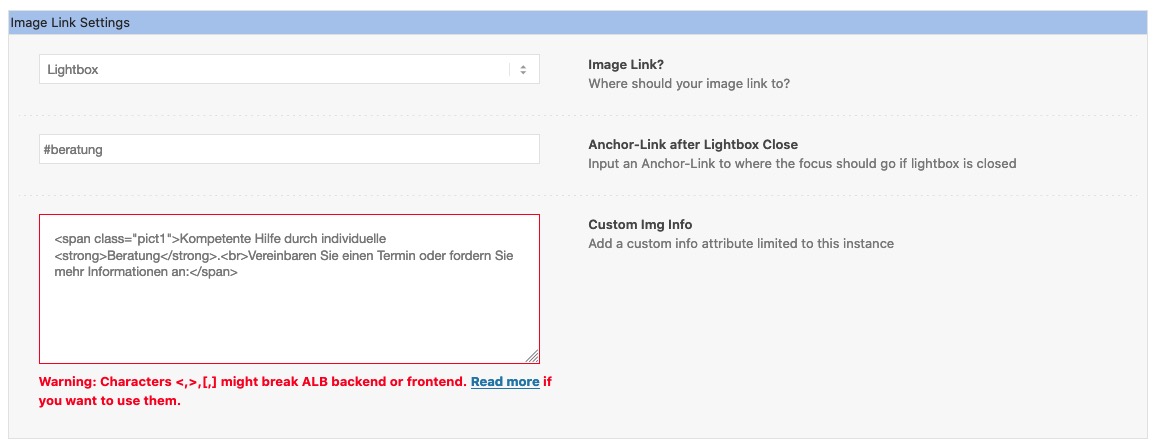
now i can use these additional attributes on the image-tag to style my own markup for lightbox.
My trouble now is : on chrome and safari the script works and the lightbox is shown in the wanted way – even with merging on.With firefox it only works sometimes when i switch off the merging – but with merged files it never works.
(by the way i tested to exclude the lightbox scripts from merging) but no improvement.)because i used the original trigger with an additonal selector :
$('#bildnavigation .lightbox-added').magnificPopup({
so I suspect that the original script that is on lightbox-added is in competition with my code and on firefox just the original takes precedence.So is there a way to hamper the original Script that my custom script had the chance to work?
i tried to wrap the click event of that .lightbox-added anchor and an e.preventDefault(); – that will have effect – but then the lightbox gallery does not work anymore.
See all infos on private ContentTopic: Front end errors
I am getting the following errors on the front end. I have already uploaded via FTP the latest version of the theme files (manually removing all the old fields from the previous version) and I am using PHP 7.3.27
Fatal error: Uncaught Error: Call to undefined function avia_get_option() in /home/customer/www/milkasprofessional.com/public_html/wp-content/themes/enfold/header.php:6 Stack trace: #0 /home/customer/www/milkasprofessional.com/public_html/wp-includes/template.php(730): require_once() #1 /home/customer/www/milkasprofessional.com/public_html/wp-includes/template.php(676): load_template(‘/home/customer/…’, true, Array) #2 /home/customer/www/milkasprofessional.com/public_html/wp-includes/general-template.php(48): locate_template(Array, true, true, Array) #3 /home/customer/www/milkasprofessional.com/public_html/wp-content/themes/enfold/index.php(10): get_header() #4 /home/customer/www/milkasprofessional.com/public_html/wp-includes/template-loader.php(106): include(‘/home/customer/…’) #5 /home/customer/www/milkasprofessional.com/public_html/wp-blog-header.php(19): require_once(‘/home/customer/…’) #6 /home/customer/www/milkasprofessional.com/public_html/index.php(17): require(‘/home/customer/…’) #7 {main} thrown in /home/customer/www/milkasprofessional.com/public_html/wp-content/themes/enfold/header.php on line 6
Hi,
I hope this is my last question to the WooCommerce shop :)
If I put a product in the cart or if I delete one or change the number of product in the cart, there comes a message in a light green field. (One image is in the Dropbox – link in private content: Bild 4)
If I create a new account but I still have one, there is an error: “A customer account already exists for this email address. Please login”. This field is in a light pink.There are some similar fields in the login area, cart or checkout in green or pink. Is it possible to have this fields in another colour?
And a second question: The whole WooCommerce sites – for example: Login, my account, shopping cart, etc. have another font-family. And the footer in the WooCommerce sites have this other font-family too. I can’t understand this. I use Nunito Font at the whole site for the Text. How can I change this?
Thank you and greetings
SabineTopic: Custom fields doesn't work
Hi,
At the backend, into a post, I try to activate the custom fields through “the three dots on the top right of the post > Preferences > Additional panels > Custom fields but it doesn’t work.
Could you help me?
Thanks in advance,
Jordi
Hi guys,
I still can’t get a CPT (created with Toolset) to work in a single template with Enfold. In other words, the custom content is not visible at the frontend of the website.
I have read several threads and understand that several users are struggling with this. Do I understand correctly that the problem is mainly the (inconsistent) use of avia_markup_helper()? ( https://kriesi.at/support/topic/toolset-enfold-2/#post-1103880 )
Is there already a solution or workaround to make the custom fields visible at the frontend? Or is the solution to choose another theme than Enfold? Then unfortunately I would have to rebuild the customer’s entire website…
I hope there is a work-around by now! Have a nice day!
Ita