Forum Replies Created
-
AuthorPosts
-
Hey,
Please refer to this post – https://kriesi.at/support/topic/updating-to-enfold-4-5-and-validating-personal-token/
If you would like us to update the theme for you, please have a backup and post URL of your website as well.Regards,
YigitHey MrPoBoi,
Could you please post FTP and WP admin logins here privately so we can see the issue?
There have been major changes on WooCommerce since that thread was active so i believe it would be the best if we checked it on your site.Best regards,
YigitHey!
@mrpoboi I will reply to your thread here – https://kriesi.at/support/topic/how-to-disable-enfold-woocommerce
Let us continue there :)Cheers!
YigitHi,
You are welcome! :)
For your information, you can take a look at Enfold documentation here – https://kriesi.at/documentation/enfold/
If you have any other questions or issues, feel free to start a new thread under Enfold sub forum and we will gladly try to help you :)Best regards,
YigitHi,
Please refer to this post – https://kriesi.at/support/topic/updating-to-enfold-4-5-and-validating-personal-token/
Regards,
YigitHey!
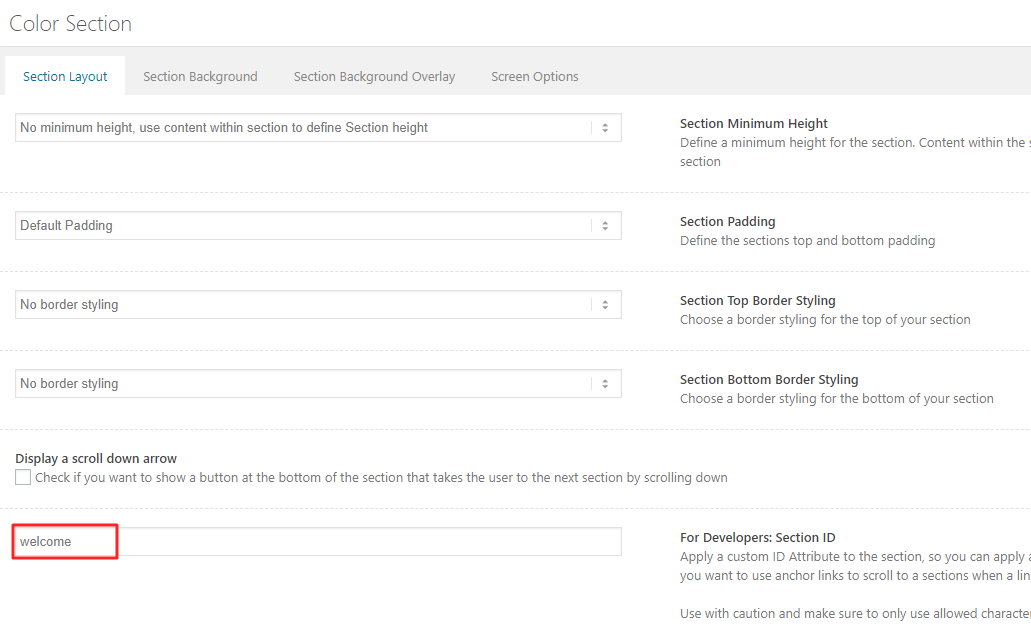
Please edit your Color Section element and give it a unique ID – https://kriesi.at/documentation/enfold/wp-content/uploads/sites/22/2018/08/anchors.png
And then add following code to Quick CSS in Enfold theme options > General Styling#your-custom-id .av-boxed-grid-style .avia-testimonial_inner { background-color: orange; }Cheers!
YigitHey,
I updated Enfold on your installation. Please review your website :)
Cheers!
YigitHi Avery,
Please refer to this post – https://kriesi.at/documentation/enfold/header/#adding-a-header-widget-area and add widget area to your header and display your number using that widget area :)
Regards,
YigitHey,
Thanks for contacting us!
You are currently using a very old version of Enfold. Updating the theme to the latest version 4.5.2 should solve the issues you are having.
Please login on ThemeForest with the account you used to purchase Enfold and update the theme via FTP – https://kriesi.at/documentation/enfold/install-enfold-theme/#ftp-install
Please also register to our support forum – https://kriesi.at/support/register/ to receive full support.
Best regards,
YigitHi,
I just tested on my local installation and it seems to work fine.
Visitors who are not logged in should be redirected to the page you choose in Enfold theme options. Have you tried checking in incognito mode?Best regards,
YigitHey Simon,
I checked your forum thread and it seems like issue was resolved – https://kriesi.at/support/topic/update-failed-when-i-try-to-publish-a-new-page/. Shall we continue there? :)
Regards,
YigitHey,
Glad @marco3253 could help! Would you need further assistance? :)
@marco3253 Thanks for your help! :)Best regards,
YigitHey,
Thanks for contacting us!
1- Yes, you can use the same license on your test site as well.
2- Yes, you can change text color of Text Block element. If you would like to change background color, you can adjust the background color of column element your Text Block is in :)I hope that helps! Let us know if you have any other questions!
Best regards,
YigitHi Tessa,
Thanks for contacting us!
Please register to our support forum – https://kriesi.at/support/register/, login and then refer to this post – https://kriesi.at/support/topic/updating-to-enfold-4-5-and-validating-personal-token/.
Best regards,
YigitHi,
Thanks for contacting us!
We always recommend the latest version of the theme to avoid having issues with your theme. Enfold 4.5.2 is compatible with WordPress 5.x
If you have any other questions or issues, please register to our support forum – https://kriesi.at/support/register/ and start a new thread under Enfold sub forum :)
Regards,
YigitHi,
Thanks for contacting us!
Please go to Appearance > Menus and create a menu, add your menu items to your menu and choose “Enfold main menu” under menu settings and save. If that does not help, please check if you have added Home menu item twice.
If you have any other questions or issues, please register to our support forum – https://kriesi.at/support/register/ and start a new thread under Enfold sub forum :)
Best regards,
YigitHi,
You are welcome! :)
For your information, you can take a look at Enfold documentation here – https://kriesi.at/documentation/enfold/
If you have any other questions or issues, feel free to start a new thread under Enfold sub forum and we will gladly try to help you :)Best regards,
YigitHi,
You are welcome! :)
For your information, you can take a look at Enfold documentation here – https://kriesi.at/documentation/enfold/
If you have any other questions or issues, feel free to start a new thread under Enfold sub forum and we will gladly try to help you :)Best regards,
YigitHi,
You are welcome!
Currently slider only supports two buttons in captions.Best regards,
YigitHi,
You are welcome! Let us know if you have any other questions or issues :)
Best regards,
YigitHi,
It seems like Enfold theme was deleted. Theme would not disappear itself therefore i am guessing someone who has access to WP dashboard or FTP has deleted it.
I tried re-installing it however it did not work. Theme should be re-installed via FTP. Please refer to this post – https://kriesi.at/documentation/enfold/install-enfold-theme/#ftp-install and install Enfold via FTP.Best regards,
YigitHey,
I went to Enfold theme options > Import & Export and deleted Flaticon_sports icon fonts and that helped but as a result, icons are now missing. Could you please refer to this post – https://kriesi.at/documentation/enfold/icon/#adding-your-own-fontello-or-flaticon-icons- and upload icons that you would need from fontello or flaticon? :)
Cheers!
YigitHi,
I updated Enfold to the latest version. Please review your website.
Cheers!
YigitHi,
You seem to be using PHP version older than 5.4. Please ask your hosting provider to upgrade your PHP version to minimum 5.4 and preferably to 7.x.
Best regards,
YigitHi Martine,
Please refer to this post – https://kriesi.at/documentation/enfold/menu/#add-icons-to-menu-item
Cheers!
YigitHey,
Please go to Enfold theme options > Header > Header Style and choose to display “default” instead of “minimal”
Cheers!
YigitHi,
Please try adding following code to bottom of Functions.php file in Appearance > Editor
Best regards,
YigitHey,
Please try adding this code to the Quick CSS section under Enfold > General Styling or to your child theme’s style.css file:
CSS Snippet:
.recentcomments a, .widget_recent_entries li a {
    font-style: normal;
}
Best regards,
Yigit -
AuthorPosts