

Forum Replies Created
-
AuthorPosts
-
Hey rasmusheil,
Can you try adding the solution I posted on this thread: https://kriesi.at/support/topic/enfold-alb-drag-and-drop-not-working/#post-1244924 ?
Hope it helps.Best regards,
NikkoSeptember 25, 2020 at 5:17 am in reply to: Special Heading – Subheading Heading Tag Updates #1248309Hi TLPLindseyMuchka,
The only way that could be done is to override the Special Heading element: https://kriesi.at/documentation/enfold/intro-to-layout-builder/#add-elements-to-alb
However, it would take some time to do it.
I would suggest to use 2 Special Headings instead.Best regards,
NikkoSeptember 25, 2020 at 5:11 am in reply to: critical error on single portfolio pages after updates #1248305Hi Monique,
We’re glad to hear that :)
Thanks for using Enfold and have a great day!Best regards,
NikkoSeptember 25, 2020 at 5:10 am in reply to: Disk space gets full too quickly due to too many images #1248304Hey Markus,
Please follow Mike’s advise in this thread: https://kriesi.at/support/topic/cleaning-up-multiple-picture-sizes/
Hope it helps.Best regards,
NikkoSeptember 25, 2020 at 5:06 am in reply to: Help me ASAP please. I have no idea what is this #1248302Hi buciks1,
First one – https://imgur.com/a/bwLOt2F <<< here I have no idea what to do
There’s a backup to the enfold theme however it’s incomplete. I removed it which fixed the issue.Second one – https://imgur.com/a/irg1UOB <<<< here this disappeared today
WordPress 5.5 has removed the jQuery Migrate file which is used by our theme in its older versions, to temporarily fix it I have installed and activated Enable jQuery Migrate Helper to your site. This shows up jQuery Migrate Helper — Warnings encountered in the backend which are files that are dependent on the jQuery Migrate file.
The latest version of Enfold has already patched this (version 4.7.6.3), you are currently using 4.5.4.
Please update to the latest version of Enfold and once it is updated, you can remove the plugin I installed.
Don’t forget to create a backup first before updating.Best regards,
NikkoHey groupegeloso,
Please post us your login credentials (in the “private data” field), so we can take a look at your backend.
- Install and activate ” Temporary Login Without Password “.
- Go to ” Users > Temporary Logins ” on the left-side menu.
- Click ” Create New “.
- Add the email address for the account ( you can use (Email address hidden if logged out) ), as well as the ” Role ” making that the highest possible and the expiry about four days
( to be sure that we have enough time to debug ). - Click ” Submit “.
- You’ll now have a temporary account. Please provide us here in the private section the URL, so we can login and help you out.
When your issue is fixed, you can always remove the plugin!
If you prefer to not use the plugin, you can manually create an admin user and post the login credentials in the “private data” field.Best regards,
NikkoSeptember 25, 2020 at 4:57 am in reply to: URGENT: Avia repeatedly causing web server to reach capacity #1248297Hey djcopywriter,
I tried to login with the credentials you gave however it doesn’t work, please check.
Can you try to upgrade PHP version to 7.3? and check if the same error still persists.Best regards,
NikkoHey CenturyAC,
Thanks for giving us admin access.
WordPress 5.5 has removed the jQuery Migrate file which is used by our theme in its older versions, to temporarily fix it I have installed and activated Enable jQuery Migrate Helper to your site. This shows up jQuery Migrate Helper — Warnings encountered in the backend which are files that are dependent on the jQuery Migrate file.
The latest version of Enfold has already patched this (version 4.7.6.3), you are currently using 3.6.1. Please update to the latest version of Enfold and once it is updated, you can remove the plugin I installed.
You can follow this procedure to update to the latest version of Enfold since updating via Theme Options is not possible in your case (make sure to have a backup as well, just in case):- Login to ThemeForest and download the Enfold theme.
- Right-click over the downloaded zip file and extract/unzip it.
- It should generate a new folder, open it and look for the enfold folder
- Right-click the enfold folder then zip it, here’s a tutorial on how to create a zip file in windows: https://www.howtogeek.com/668409/how-to-zip-and-unzip-files-on-windows-10/ (this should create enfold.zip
- Log in to WordPress as and Admin.
- Install and activate a maintenance plugin and put your site in Maintenance mode.
- Go to Appearance > Themes, switch to a default WordPress theme like TwentyTwenty then delete Enfold.
- Click on the ADD NEW button.
- Click on the UPLOAD THEME button.
- Click BROWSE and choose enfold.zip file
- Click the INSTALL NOW button and switch to Enfold or your child theme.
- Remove the maintenance mode then deactivate and remove the maintenance plugin.
If your live site needs to be up at all times then I would sugggest creating a staging site first and do the updates there and check if there are any issues.
If there are no issues then apply the updates to your live site, if issues appear then you can make adjustments or you can ask us for help then once fixed, apply the updates to your site and any adjustments needed will be added immediately.
Here’s a simple tutorial on how to create a staging site: https://themeisle.com/blog/wordpress-staging-site/Also, since envato is not using API key anymore, you will need to register the theme again in order to update via Theme Options, please follow the instructions in our documentation: https://kriesi.at/documentation/enfold/theme-registration/
Best regards,
NikkoHi zwalkcodes,
Yes, however it’s private.
Please tell us the version that you would like to request?Best regards,
NikkoHi Eisi101,
We’re glad to hear that :)
Thanks for using Enfold and have a great day!Best regards,
NikkoSeptember 24, 2020 at 3:28 pm in reply to: Enfold 4.7.6.3 Update Breaks Multiple Pages On Site #1248191Hey zwalkcodes,
Thanks for giving us admin access.
For Enfold 4.4, please refer to my response in private content.
I would suggest rolling back your live site to your last backup that worked.
Also, please create a staging site where you can test the updates first before applying to your live site.
Here’s a simple tutorial on how to create a staging site: https://themeisle.com/blog/wordpress-staging-site/
Once you made updates there and see any issues, then please, give us temporary admin access to your staging site so we can look into it and try to help you.
As for learndash issue, please check this thread: https://kriesi.at/support/topic/materials-in-learndash-not-visible-with-alb-activated-another-settings-problem/Best regards,
NikkoHey frankeee,
Thanks for giving us admin access.
I checked the page in the screenshot and the Advanced Layout Builder is showing however the page itself is not loading some CSS (see screenshot in private content).
Can you try to set max_execution_time to 240? let us know if this helps.Best regards,
NikkoHey MarquenterreNature,
Yes, that’s most likely the primary factor to the speed of your site.
Here’s a benchmark comparing the PHP versions according to: https://kinsta.com/blog/php-benchmarks/
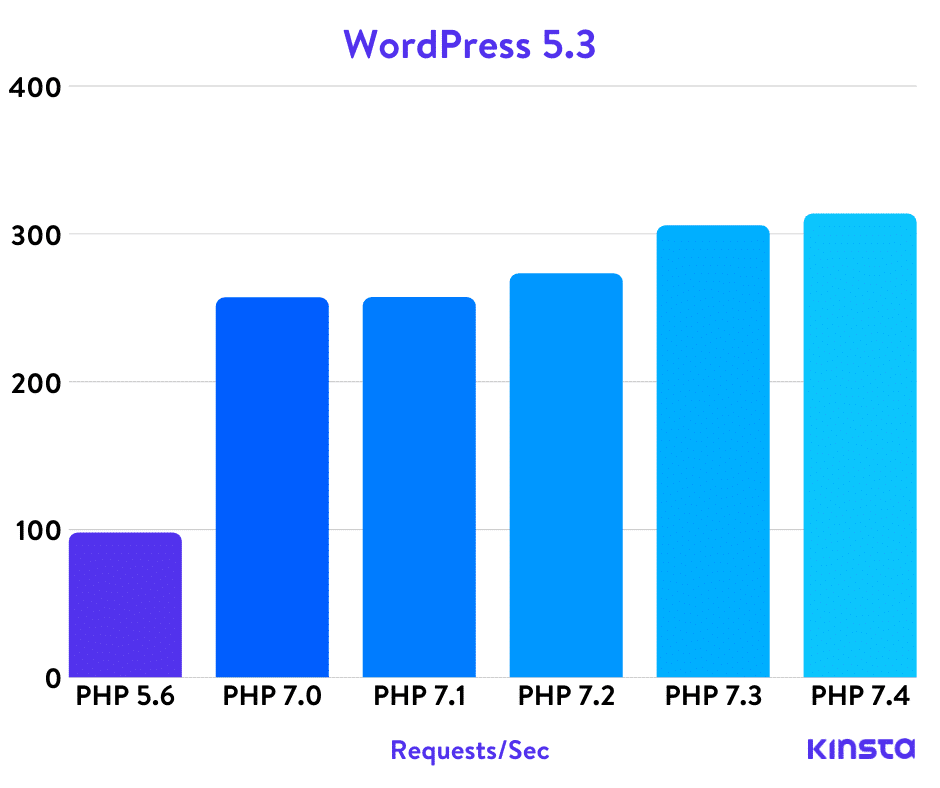
You must also update WordPress, Enfold and other plugins, however you’ll need to backup your site first before doing anything just in case.Best regards,
NikkoHey amyteslin,
The new site is showing the coming soon page.
Can you give us temporary admin access on your new site? so we can also check it.
Just post the credentials in private content.Best regards,
NikkoHey Marcus,
Please post us your login credentials (in the “private data” field), so we can take a look at your backend.
- Install and activate ” Temporary Login Without Password “.
- Go to ” Users > Temporary Logins ” on the left-side menu.
- Click ” Create New “.
- Add the email address for the account ( you can use (Email address hidden if logged out) ), as well as the ” Role ” making that the highest possible and the expiry about four days
( to be sure that we have enough time to debug ). - Click ” Submit “.
- You’ll now have a temporary account. Please provide us here in the private section the URL, so we can login and help you out.
When your issue is fixed, you can always remove the plugin!
If you prefer to not use the plugin, you can manually create an admin user and post the login credentials in the “private data” field.Best regards,
NikkoHey Richard,
Please check the private content.
Best regards,
NikkoHi volmering,
Yes, please add this in your child theme’s functions.php:
if ( did_action( 'woocommerce_init' ) ) {
    avia_woocommerce_product_gallery_support_setup();
} else {
    add_action( 'woocommerce_init', 'avia_woocommerce_product_gallery_support_setup', 10);
}

function avia_woocommerce_product_gallery_support_setup() {
    if( ! avia_woocommerce_version_check( '3.0.0' ) ) {
        return;
    }
    $options = avia_get_option();

    if( ! array_key_exists( 'product_gallery', $options ) || ( 'wc_30_gallery' != $options['product_gallery'] ) ) {
        $options['product_gallery'] = '';
    }

    if( 'wc_30_gallery' == $options['product_gallery'] ) {
        add_theme_support( 'wc-product-gallery-zoom' );
        add_theme_support( 'wc-product-gallery-lightbox' );
        add_theme_support( 'wc-product-gallery-slider' );
        add_theme_support( 'avia-wc-30-product-gallery-feature' );
    }
    return;
}
Best regards,
NikkoHi Famigliacinquepuntozero,
I apologize for that.
Please go to our documentation: https://kriesi.at/documentation/enfold/google-map/
And find A simplified look at Google maps API key registration:
Please follow the instructions in there.
If it does not help, please create a separate thread and give us temporary admin access to your site and post it in private content.
Private content is only visible to moderators as well as the thread creator, for security purposes please create a new one.Best regards,
NikkoHi Jeff,
I have tried to check again your site and it’s really a weird issue.
I’m trying to do some modification on the homepage so we can atleast find the cause of the issue however the backend responds with Error 403 Forbidden.
Can you try to whitelist the IP in private content?Best regards,
NikkoHi brand,
We’re glad that we could help :)
Thanks for using Enfold and have a great day!Best regards,
NikkoHi volmering,
Thanks for giving us a site to check upon.
Unfortunately, it seems more complicated for it to work, I found two reasons.
1. The plugin removes the link because Enfold does not support wc-product-gallery-lightbox
2. The images are fetched via AJAX, magnific popup is loaded first before the images.The only solution is to use the default lightbox of Woocommerce instead of Magnific Popup.
To do this, modify enfold > config-woocommerce > config.php (line 200) just remove the comment on this code:// add_theme_support( 'wc-product-gallery-lightbox' );I hope this helps.
Best regards,
NikkoHi Mejba Uddin Biplob,
The contextual_help was used before by the bundled layerslider but with the version bundled in the recent versions of Enfold, this code is removed.
You can do a thorough check with the theme and you won’t find it, the only 2 possibilities I can think of is there’s a plugin using it or there’s none but just cached.Best regards,
NikkoHi Mejba Uddin Biplob,
Thanks for giving us admin and FTP access.
Where do we see the issue? can you try to clear the cache from the caching plugin as well as on your browser and check again?
You’re also using PHP version 7.0.33 which is already obsolete according to https://www.php.net/supported-versions.php please update it to 7.3Best regards,
NikkoHi ryandxd,
The page you posted is fixed.
Can you post the links to the pages that has issues in private content as well?
Also please try to enable the mod_security and see if still loads.
I noticed that the page you specifically pointed returns a 403 forbidden in admin-ajax because of either this text inside it:
include: or include :
The fix I made was just to remove the colon, I believe there’s some security settings in your server that prevents that rejects that specific text probably because it’s some keyword.
Removing the colon works or you can replace with the word includes:Best regards,
NikkoHi devesuki,
To be honest I’m not really sure what’s causing it since the size is pretty small but the time it takes to seems to be too long.
Best regards,
NikkoHi Melanie,
I tried to check your site again however I’m getting this:
401 - UNAUTHORISEDThe link you gave also shows open sans, can you try to clear the browser cache? or maybe use another browser and check, it’s probably due to cache.
Best regards,
NikkoHi annameis,
We’re glad that we could help :)
Thanks for using Enfold and have a great day!Best regards,
NikkoHi DimitriMTM,
Yes, it does take manual steps then create a template out of them to use for other posts.
Otherwise, it’s better to use the default editor then maybe use the Magic Wand Tool if you only need few elements from the Advanced Page Builder.Best regards,
NikkoSeptember 24, 2020 at 3:29 am in reply to: Error message: There has been a critical error on your website. #1248021Hi envato99,
You’re welcome :)
Just let us know if you need further assistance.Best regards,
NikkoSeptember 24, 2020 at 2:27 am in reply to: Search Icon – Getting Images to Show (Products Specificially) #1248020Hi MacKenzie,
I checked the link and it worked properly.
The Ufile servers should be up now, let me know if you still can’t download it.Best regards,
Nikko -
AuthorPosts
