

Forum Replies Created
-
AuthorPosts
-
Hi,
Ich sehe, dass Sie Enfold v4.1.2 verwenden, das dieses Problem hatte. Bitte aktualisiere auf v4.2.6.
Versuchen Sie, manuell über FTP zu aktualisieren: https://vimeo.com/67209750
Bitte beachten Sie, dass Sie den Theme-Ordner “enfold” entfernen sollten, bevor Sie den neuen Ordner hinzufügen, damit alte Dateien nicht zurückbleiben.I see that you are using Enfold v4.1.2, which had this issue. Please update to v4.2.6.
Try to update manually via FTP: https://vimeo.com/67209750
Please note that you should remove the theme folder “enfold” before adding the new one, so old files are not left behind.Best regards,
MikeHi,
Typically this is due to a older PHP version being used by your webhost, please ask them to update your PHP version to v7
Another solution could be to replace your header.php with this one.Best regards,
MikeHey goosgrafisch,
To remove the white area above and below your MasterSlider, please try this css in your WordPress > Customize > Additional CSS#top.home main.content { padding-top: 0px!important; padding-bottom: 0px!important; }Best regards,
MikeHey june,
I tested your form, but it doesn’t make since to me, after entering my email, it says I can download from “here” which is a blank line, I tried clicking the “download tool” button but it just jumped to the top of the page, with no pop-up?
Perhaps a better solution would be to include the download link in a auto response to the sign up form, this way you won’t get fake emails, or try a plugin that will hide the download button until after the sign up so it is clear when to click it.
Before And After plugin
I hope this helps.Best regards,
MikeHey fumsel,
Ich habe mir deine Seite angesehen, aber ich kann das Problem mit dem Farbbereich nicht sehen. Kannst du bitte einen Screenshot hinzufügen, um das zu erklären?I have taken a look at your site but I can’t see the issue with the color section, can you please add a screenshot to help explain?
Best regards,
MikeHey Marcus,
I believe this is a DNS and host records issue, please ask your webhost or domain register to assist, as they have more experience with this.Best regards,
MikeHey RoyalFlushGroup,
I don’t recognize this folder as legitimate for and themes or plugins, try using the file manager in your cpanel to compress the folder, much like zipping a folder on your desktop, then delete the folder to see if there are any effects on your site. If you find you want it back you can extract the archive to get the folder back.
Also check with webhost as many have malware scanners available, such as “Patchman”Best regards,
MikeHey premierepc,
Please try disabling all of your plugins. If that resolves the issue, reactivate each one individually until you find the cause.Best regards,
MikeHey Laura,
Please include the url to the page in question so we can take a closer look and assist with custom css.Best regards,
MikeHey mleite1,
To change the size of titles on different devices, try this code in WordPress > Customize > Additional CSS:@media only screen and (max-width: 767px) { h3.av-special-heading-tag,h2.av-special-heading-tag,.eapps-instagram-feed-title { font-size: 10px !important; } } @media only screen and (min-width: 768px) and (max-width: 1023px) { h3.av-special-heading-tag,h2.av-special-heading-tag,.eapps-instagram-feed-title { font-size: 20px !important; } }This is two sets of rules, the top set is for mobile up to tablet, and the font-size will be 10px, The second set is for tablet up to laptop, and the font will be 20px.
Your current rules will be for laptops and up including desktops.
Please feel free to adjust the font-sizes to suit.Best regards,
MikeHey wacky32,
We believe so, the issue so far has been to make the theme backward compatible with older PHP versions.Best regards,
MikeHey djsnowamn,
Try this code in the General Styling > Quick CSS field:.post-entry span.blog-categories.minor-meta,.post-entry footer.entry-footer { display:none !important; |If this doesn’t help, please include the url to the page in question so we can take a closer look.
Best regards,
MikeHi,
@wacky32 Please open a new thread so we can assist, we will want communicate in the Private Content area, such as your URL & admin login, but as this is not your thread your info will not be private. Thanks for your patience and understanding.
In your new thread please provide admin login info and detail your issue.I have viewed your site and it seems to be loading fine, right now, Please include admin login so we can see the issue.
Best regards,
MikeHi,
I tried both domains via ftp, both say the user is ok, but the pass failed.
Do you have a another password?Best regards,
MikeHi,
Glad we could help, Please let us know if you would like further assistance, or if we should close this thread.Best regards,
MikeApril 17, 2018 at 1:58 pm in reply to: Enfold-theme makes WordPress-panel become White Page of Death. #943102Hi,
Glad we were able to help, we will close this now. Thank you for using Enfold.
For your information, you can take a look at Enfold documentation here
and the video tutorials here
And if there are features that you wish Enfold had, you can request them and vote the requested ones here
For any other questions or issues, feel free to start new threads under Enfold sub forum and we will gladly try to help you :)Best regards,
MikeHi,
Please try changing the code in your code block in the two places that “test-popup” are, the link & the ID:<a href="#test-popup" <div id="test-popup"they both must match, notice one has the # and the other don’t
Best regards,
MikeHi,
@mandar_v Please open a new thread so we can assist, we will want communicate in the Private Content area, such as your URL & admin login, but as this is not your thread your info will not be private. Thanks for your patience and understanding.
In your new thread please provide admin login info and detail your issue.Best regards,
MikeApril 17, 2018 at 1:50 pm in reply to: How to setup the Column animation speed or duration ? #943099Hi,
I adjusted your css to this:/* single product sidebar left */ .single-product-main-image { width: 25%; } .single-product-summary { overflow: hidden; width: 45%; float: right; margin-right: 5%; } .single-product-main-image { float: right; margin-right: 0px !important; } .single-product .sidebar { width: 25%; float: left; border-left-style: none !important; border-left-width: 0px !important; } .single-product .inner_sidebar { margin-left: 0px !important; margin-right: 50px !important; }Please check.
For future readers, this was the function to create a single product sidebar:// single product sidebar add_action('init','ava534345953_init', 50); function ava534345953_init() { add_action( 'woocommerce_after_single_product_summary', 'avia_add_sidebar', 25); } function avia_close_image_div() { echo "</div>"; } function avia_add_sidebar() { if(is_product()) { $avia_config['currently_viewing'] = "shop_single"; get_sidebar(); } }Best regards,
MikeHi,
Sorry this is turning into a bigger task than it first sounded, for a NAT router you will need to allow Filezilla though, these steps should help.
But if you add the FTP access to the Private Content area, I’ll take a look for you. If you are unsure if you have the correct FTP info, then perhaps include access to your webhost cPanel, so we can solve your editor issue quickly.Best regards,
MikeHi,
You can add the links to the pages in this thread, as it will be for the same solution. We won’t need to login.
I will describe the steps for anyone to follow along.1: Using the browser inspector, or developer tools, select the form and right click for the “Edit as HTML” option.
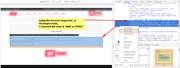
2: Then copy all the HTML for the form and paste in a plain text editor, such Sublime Text, NotePad++, Geany, etc.
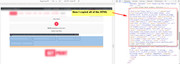
3: Then move the last form element, the submit button, to the top of the others, and add “inline” to the classes, and paste the modified code into a “code block” element on your page.
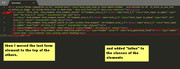
4: Then use this css to make a inline contact form with the button first instead of last:#top .avia_ajax_form .form_element_fourth.inline { width: 23.4%!important; margin-right: 0 !important; }Best regards,
MikeHi,
@PaulSmit I was able to manually import the demo for you, your new password was emailed to you, along with another email to confirm your site email, please confirm.
I didn’t post here because this is not your thread, so you will not not see the Private Content area, nor is it private.
Please check all site setting and feel free to remove the temp admin account.
Please let us know if this solves your issue.Best regards,
MikeHi,
I tried using a color section with a background video and it worked well for many elements placed on top such as a text element, like the example site.
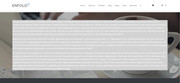
It didn’t work with a blog element though.
I did find some more info on background videos: Creating a fullscreen HTML5 video background with CSS But I don’t think this will work with the bog element either.Best regards,
MikeHi,
Can I ask a few questions, have you ever used FTP before (Filezilla), do you know your FTP address, user name and password?
How about your webhost’s cPanel or dashboard?
It should have a “file manager” there.
What webhost do you use?Best regards,
MikeHi,
Typically the error on line 6 of file wp-content/themes/enfold/header.php is due to a older PHP version being used by your webhost, please ask them to update your PHP version to v7
Another solution could be to replace your header.php with this one.
Sorry for the same answer twice now, but since WordPress 4.9 has moved to PHP v7 we had to follow, an older Enfold will not help as those customers have the same issue with the new WordPress. Although our dev team has created the header.php above to help with this, but in the long run updating the PHP is going to be necessary. Webhosts are aware of this issue.Best regards,
MikeHi,
Thank you for the kind words, and thank you for using Enfold :)Best regards,
MikeHi,
I added this code to your button to add the arrow:<span class="avia_button_icon avia_button_icon_left " aria-hidden="true" data-av_icon="" data-av_iconfont="entypo-fontello"></span>To change to title of your popup, please add this code to your General Styling > Quick CSS field, in this example code the color is white, and the font-size 30px:
.white-popup h3 {
color: #fff !important;
font-size: 30px !important;
}
Please adjust to suit.
Best regards,
MikeHi,
This test code block form is your homepage form that I copied the html code from, now you can use it to replace the homepage form.
Typically your forms will not have a issue because the button will be at the bottom, but if you wish to create a new form on one line, we will be happy to assist again. Sorry that I don’t have a better answer for your situation, but we are happy we could assist.Best regards,
Mike -
AuthorPosts
