

Forum Replies Created
-
AuthorPosts
-
Hi,
Which text block title would you like to change?
This works on the h3 headings that you have on your page.Best regards,
MikeHi,
When you updated, did you update via ftp, or the admin panel?
If you updated via ftp, please include ftp access in the Private Content area.Best regards,
MikeApril 24, 2018 at 3:43 am in reply to: SSL-Umstellung, AVIA Java-Script lädt unsicheres Bild nach #945647Hi,
Froh, dass wir helfen konnten, schließen wir das jetzt. Danke für die Benutzung von Enfold.Zu Ihrer Information können Sie sich die Dokumentation hier herunterladen
und die Video-Tutorials hier
Und wenn es Funktionen gibt, die Enfold haben möchte, können Sie diese anfordern und die gewünschten abstimmen
Für weitere Fragen oder Probleme, können Sie neue Threads unter Enfold Sub Forum starten und wir werden gerne versuchen, Ihnen zu helfen :)———————
Glad we were able to help, we will close this now. Thank you for using Enfold.For your information, you can take a look at Enfold documentation here
and the video tutorials here
And if there are features that you wish Enfold had, you can request them and vote the requested ones here
For any other questions or issues, feel free to start new threads under Enfold sub forum and we will gladly try to help you :)Best regards,
MikeHi,
@Gashland Evangelical Presbyterian Church,
Please open a new thread so we can assist, we will want communicate in the Private Content area, such as your URL & admin login, but as this is not your thread your info will not be private. Thanks for your patience and understanding.
In your new thread please provide admin login info, FTP access, & which demo you would like assistance with.Best regards,
MikeApril 24, 2018 at 3:38 am in reply to: external links are not opened in new tab, even though it is configured correctly #945643Hi,
Thank you for that, but that was not the issue. I found that the issue is the plugin “Google Analytics Germanized” if you deactivate it the links work correctly, please try.Best regards,
MikeHi,
I see your webhost has PHP Version: 5.4.45 installed, please ask them to update your PHP version to v7.Best regards,
MikeApril 24, 2018 at 2:47 am in reply to: Please read – Regarding Wordfence LayerSlider warning on Enfold 4.0.3 #945636Hi,
How did you try to disable the layerslider? I take it that your site was working fine, and then one day it didn’t, was that after a update or something else? It looks like the login page is working, Can you please include a admin login in the private content area so we can take a closer look.
Please provide FTP access so we can assist more.Best regards,
MikeHi,
Sorry the image is not helping, what we really need is the sectors, classes, & elements to write the right code for you.
Is the site on your localhost, or not published?
Can you send us a copy of it using the plugin above?Best regards,
MikeHi,
No that code is not right.
also, the code has the max-width of (max-width: 1023px) I will change.
New code:/*TITULOS PARA DEVICES E DESKTOP*/ /*DEVICES*/ @media only screen and (max-width: 767px) { .av-special-heading.av-special-heading-h3 h3.av-special-heading-tag { font-size: 44px !important; } } /*DESKTOP*/ @media only screen and (min-width: 768px) { .av-special-heading.av-special-heading-h3 h3.av-special-heading-tag { font-size: 70px !important; } }new code in Instagram Feed
@media only screen and (max-width: 767px) {
.eapps-instagram-feed-title-visible {
    font-size: 44px !important;
}
}

@media only screen and (min-width: 768px) {
.eapps-instagram-feed-title-visible {
    font-size: 70px !important;
}
}
Best regards,
MikeApril 23, 2018 at 1:43 pm in reply to: external links are not opened in new tab, even though it is configured correctly #945391Hi,
Strange, please download and link to .htaccess file via dropbox or Google Drive.Best regards,
MikeHi,
Your css was missing a “)” so the desktop rules was not working.
I fixed your css and tested “carmel5” homepage, your css rules say under 767px, font should be 44px & between 768px – 1023px, font should be 70px.
This is now working, please check.
I had to move the Instagram Feed css rules to the plugins Custom CSS tab, because it was overwriting it there, if you want to change it, please go there.
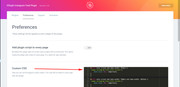
I also recommend removing your committed out css rules, as this could cause trouble for you someday.
Please clear your browser cache and check.Best regards,
MikeHi,
Great job on the site :)
Glad we were able to help, we will close this now. Thank you for using Enfold.For your information, you can take a look at Enfold documentation here
and the video tutorials here
And if there are features that you wish Enfold had, you can request them and vote the requested ones here
For any other questions or issues, feel free to start new threads under Enfold sub forum and we will gladly try to help you :)Best regards,
MikeHi,
Please check the url, doesn’t seem to be valid, or your nameserver is not setup
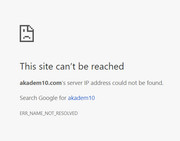
also I see a password above but no user name.Best regards,
MikeHi,
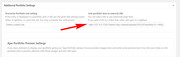
To open portfolio image in lightbox, please go to the portfolio item and near the bottom go to Additional Portfolio Settings > Overwrite Portfolio Link setting and choose custom link, then in the next box enter the url to the image:
Best regards,
MikeHi,
On https you are getting mixed content:Mixed Content: The page at 'https://your-site.com/' was loaded over HTTPS, but requested an insecure image 'http://your-site.com/wp-content/uploads/2017/08/pl-logo.png'. This content should also be served over HTTPS. (index):1 Mixed Content: The page at 'https://your-site.com/' was loaded over HTTPS, but requested an insecure favicon 'http://your-site.com/wp-content/uploads/2016/09/rm_favicon.png'. This content should also be served over HTTPS.The free version of the plugin works very well.
I’m seeing the icons on the home page and the Fontello social icons in the socket in IE11 & Edge for both http & https
and no errors about it above.
So I’m not sure why you are not seeing it in IE11Best regards,
MikeHey jelle,
Perhaps a plugin such as Last Modified TimestampBest regards,
MikeHi,
We will leave this open for now, let us know if you do need assistance installing the demo.Best regards,
MikeHey chrislim,
I was unable to login, please check login info.
I see you have a JetPack js error
Try disabling all of your plugins. If that resolves the issue, reactivate each one individually until you find the cause.Best regards,
MikeApril 22, 2018 at 6:34 pm in reply to: New Automatic Google Adsense Ads; want ads only in the post and no in pages. #945091Hi,
Glad we were able to help, we will close this now. Thank you for using Enfold.For your information, you can take a look at Enfold documentation here
and the video tutorials here
And if there are features that you wish Enfold had, you can request them and vote the requested ones here
For any other questions or issues, feel free to start new threads under Enfold sub forum and we will gladly try to help you :)Best regards,
MikeHi,
Glad we were able to help, we will close this now. Thank you for using Enfold.For your information, you can take a look at Enfold documentation here
and the video tutorials here
And if there are features that you wish Enfold had, you can request them and vote the requested ones here
For any other questions or issues, feel free to start new threads under Enfold sub forum and we will gladly try to help you :)Best regards,
MikeHi,
Sounds like you have a different error,
Can you please include a admin login in the private content area so we can take a closer look.Best regards,
MikeHey beauch66,
Your favicon is showing for me in Firefox, but I notice that the code of your page looks like you are using a caching plugin and/or minifying, I also see reference to Cloudflare.
If you are using a caching plugin, you will need to clear the cache after changing the favicon, or switching to or from a plugin. If you are using minifying it also will need to be cleared. If you are using a CDN, such as Cloudflare you will need to wait for it to update it’s own cache.
As a rule of thumb, browsers look for the favicon as “favicon.ico” in your root directory, I recommend using this online converter to upload your “favicon-32×32-1.png” and convert to “favicon.ico” and then upload to your root folder, the same place as your wordpress “index.php”
This, along with your theme options, will help all browsers find your favicon.Best regards,
MikeHi,
Glad we were able to help, we will close this now. Thank you for using Enfold.For your information, you can take a look at Enfold documentation here
and the video tutorials here
And if there are features that you wish Enfold had, you can request them and vote the requested ones here
For any other questions or issues, feel free to start new threads under Enfold sub forum and we will gladly try to help you :)Best regards,
MikeHi,
Thank you for sharing your solution, we will close this now. Thank you for using Enfold.For your information, you can take a look at Enfold documentation here
and the video tutorials here
And if there are features that you wish Enfold had, you can request them and vote the requested ones here
For any other questions or issues, feel free to start new threads under Enfold sub forum and we will gladly try to help you :)Best regards,
MikeHey CassieRamos,
Typically this is due to a older PHP version being used by your webhost, please ask them to update your PHP version to v7
Another solution could be to replace your header.php with this one.Best regards,
MikeHey DimaP,
Without seeing the site, I’m thinking that the Fontello font is loading from http and IE11 is not automatically switching to https, a easy solution is to use the plugin Really Simple SSL to correct the url.Best regards,
MikeHey bilgecelik,
Sometimes the dynamic elements don’t show correctly in a preview, please activate or save the page and then view.Best regards,
MikeHey werbeagenturlauf,
Please include the url to the page in question so we can assist.Best regards,
MikeHey Matthew Lautensack,
Thank you for contacting us, The Advanced Layout Builder is unique to Enfold, our most complete and advanced theme.
If you would like to see the ALB in action and the different elements included, please see this series of video tutorials contributed by Enfold community, please scroll to the bottom half of the page:Best regards,
MikeApril 22, 2018 at 5:27 pm in reply to: New Automatic Google Adsense Ads; want ads only in the post and no in pages. #945072Hey José Ramón,
This is the first time I’ve heard of Google Adsense automatic ads, but I believe that within your Adsense control panel you should be able to exclude pages of your site, I recommend looking for the correct way there.
But another method would be to use a conditionally function in WordPress to only post the header code on posts. First remove your Adsense header code, then add it to this function in your functions.php
*Hopefully you are using a child theme because when editing functions.php you should use the child theme, so your changes will not be lost with future theme updates Read about it & Get it here// adsense code only on single posts function add_custom_adsense(){ if ( is_single() ) { ?> <script> //ADD YOUR ADSENSE CODE HERE </script> <?php } } add_action('wp_head', 'add_custom_adsense');Best regards,
Mike -
AuthorPosts
