

Forum Replies Created
-
AuthorPosts
-
December 20, 2018 at 4:41 am in reply to: Enfold 4.5 Theme Update "Update Failed: Download failed. A valid URL was not pro #1047566
Hi,
@hylandgraphics are you using a newly created token by following these steps?
Because your error is: “Last time we checked the token we were not able to connected to Envato”
Please try allowing all of the permissions for the token and create it while in incognito mode.Best regards,
MikeHi,
I took a look at your page and see that you are getting a Uncaught SyntaxError: Invalid or unexpected token
Looking at your page source code I believe that you have changed the recaptcha message to:Please confirm you are also not a bot. You can then hit the Submit Button.with a braking return, please adjust so all of the text is on one line.
Best regards,
MikeHi,
I tried the form again when logged out and it didn’t work, I have asked the rest of the team for ideas on this, Thank you for your patience.Also the reason the calendar was not working is because the option at Enfold Theme Options > Performance > Disable Template Builder Elements was not set to: Always load all elements so the calendar was not loading correctly, I changed this for you.
Best regards,
MikeHi,
@big-webdesign are you using WP Engine? If not which webhost are you using?
The modification of the wp-config.php that I’m thinking of is adding:define('CONCATENATE_SCRIPTS', false);Perhaps if I could FTP in and see your wp-config.php I could be of more assistance.
I recommend opening a new thread, and include your admin login & ftp access in the Private Content area, but as this is not your thread your login info will not be private if posted here.
You can link to the new thread here so we can find it easier.Best regards,
MikeDecember 19, 2018 at 2:19 pm in reply to: Add image caption to images on single product page #1047192Hi,
Well glad that it is working for you, unless there is anything else we can help with on this issue, shall we close this then?Best regards,
MikeHi,
That is good news, we will keep this open to hear back from you.Best regards,
MikeDecember 19, 2018 at 2:08 pm in reply to: Download limit in Envato stopping me updating to 4.5.1 #1047184Hi,
We have just released Enfold v4.5.2 which includes a patch for the updater that in some cases was pinging the Envato API too often, and may have been triggering the download limit.Best regards,
MikeHey Ben,
Thank you for contacting us, you can order support though Envato (Theme Forest), typically you would extend it though your account dashboard at Theme Forest, but since the license is not registered to you within Theme Forest, please contact Theme Forest from this page and let them know that Enfold is your theme.Once you have made your purchase, here is how to register at the support forum:
Please register here kriesi.at/support/register with your item purchase code .Go to https://kriesi.at/support/ select the theme you purchased bookmark the URL.
Example: https://kriesi.at/support/enfold
Scroll to the bottom of the page to open a new ticket.
Best regards,
MikeHey Heathcliffe,
Github doesn’t have a download for that one file, you have to navigate up to the parent directory and then download the whole directory.
Here is a DropBox link that is just the plugin.Best regards,
MikeHi,
To hide the next previous navagation, Please try this code in the General Styling > Quick CSS field or in the WordPress > Customize > Additional CSS field:#top .avia-post-nav { display: none !important; }Best regards,
MikeHey Dra,
I took a look at your site and see that you are using Enfold 4.5, this issue had a couple of work arounds to solve, but today we released the patch for this and a couple of other issue. Please update to v4.5.2Best regards,
MikeDecember 19, 2018 at 5:34 am in reply to: Enfold 4.5 Theme Update "Update Failed: Download failed. A valid URL was not pro #1047103Hi,
We have just released Enfold v4.5.2 which includes a patch for the updater that in some cases was pinging the Envato API too often.
Perhaps your 403 was related to this.Best regards,
MikeHi,
Sorry I’m not quite sure where your “span.posted_in” is, and for your product page, your description look full width, unless you want it under the image, in which case, please see this solution.Best regards,
MikeHi,
You can use this css, but you will want to add a custom class to the special heading so that this doesn’t add the background to every special heading.h3.av-special-heading-tag { background: rgba(0,0,0,0.8) !important; padding: 10px 15px !important; }
Best regards,
MikeHi,
@2011apuchin I took a look at your functions.php and it looks like you have a function to open a popup automatically with a delay.Best regards,
MikeDecember 19, 2018 at 4:24 am in reply to: Add image caption to images on single product page #1047096Hi,
That’s great news. Was the code you posted earlier compete? I’m just wondering why I’m getting an error with it.Best regards,
MikeDecember 18, 2018 at 2:50 pm in reply to: Add image caption to images on single product page #1046892Hi,
I’m sorry, you are correct, my Product gallery in the Enfold > Shop options was set to “Default enfold product gallery”, and my code doesn’t work in that case.
After changing my setting I tried your code to see if I could adjust it any, but I just got an error “Warning: Missing argument 3 for thumb_add_title()” I tried searching for the correct code but didn’t find it.
Is your code above missing something?
I took a look at your site and see your caption over the images, but they are not moving down on each image click as you describe.Best regards,
MikeHi,
I checked again and it worked. I checked on the German language page. Perhaps try disabling any AD blocker or social media blocker in your browser, if you have one. Perhaps take a look in your spam folder, and don’t use the same email as the one in your form.
I’m using the Chrome browser on Windows, it should not matter though.Best regards,
MikeHi,
The code for debug mode needs to be placed after line 17 in the functions.php, right after this line:if(isset($avia_config['use_child_theme_functions_only'])) return;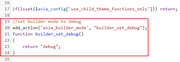
I added it for you, please check.Best regards,
MikeHi,
@big-webdesign I first enabled all builder elements to be loaded at: Enfold Theme Options > Performance > Disable Template Builder Elements > Always load all elements Then your page gave the error: jQuery is not defined with this clue I noticed that your jQuery options are not showing in the theme options:

so I believe your webhost has added the function to load your jQuery after the footer in your wp-config.php file, some Managed WordPress Hosts do this to speed up the site.
Please ask your webhost to help you remove the code so your jQuery loads in the header.
I also recommend updating your Enfold to version 4.5.1 so you can switch to the advanced layout builder on the pages, you should have a button like this at the top of your pages:

Best regards,
MikeDecember 18, 2018 at 6:08 am in reply to: Add image caption to images on single product page #1046737Hi,
Thank you Victoria this led to the solution for the standard woocommerce product page.
Colin, your product page is behaving differently, and you don’t have the thumbnails div below your product image, so I’m not sure it will work for you. Are you using a plugin for your product image?
Try adding this code to the end of your functions.php file in Appearance > Editor:function add_caption_below_product_image() { echo '<h4 style="text-align: center;">'; $caption = get_post( get_post_thumbnail_id() )->post_excerpt; echo $caption; echo '</h4>'; } add_action( 'woocommerce_product_thumbnails', 'add_caption_below_product_image' );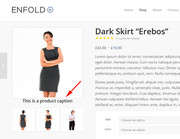
Best regards,
MikeHi,
Thanks for the explanation and image, to do this the overflow needs to be hidden. This css will solve your issue:.avia-image-container.av-hover-grow { overflow: hidden !important; }Best regards,
MikeHi,
Thanks for the image, your masonry section doesn’t have the ID of “videos” assigned. Please take a look and add it. If this doesn’t help, please include a admin login private content area so we can assist.Best regards,
MikeHi,
@2011apuchin, thanks for the login, I added the popup function to your functions.php, it was probably overwritten when you updated.
Then I created a test page /magnificpopup-test/ where I created a test popup that works good. Please check.
Feel free to delete the test page as you wish.
@big-webdesign, please include a admin login in the private content area so we can take a closer look.Best regards,
MikeHi,
Sorry for the late reply, I tested your layerslider form by adding my email address to it and I received a sent message & the email.
I see that you have a hidden second form under the first, which could be causing the conflict when it was not hidden.
Please check again, I believe you’ll find that it’s working.Best regards,
MikeDecember 17, 2018 at 2:22 pm in reply to: Add image caption to images on single product page #1046301Hi,
My demo was using a woocommerce 3 product page, please include a link to your page.Best regards,
MikeDecember 17, 2018 at 2:25 am in reply to: Update nicht möglich, Formatierungen stimmen teilweise nicht #1046115Hi,
Please try this code in the General Styling > Quick CSS field or in the WordPress > Customize > Additional CSS field:#top .av-special-heading-h3.blockquote h3.av-special-heading-tag { font-size: 1em !important; }Best regards,
MikeDecember 17, 2018 at 2:05 am in reply to: Gallery Content/Images not Loading for All Sections #1046113Hey So Evolve,
Since you have quite a few images, it looks like the animation delay is holding up the bottom images from displaying. When I check with the Chrome dev tools, the images a downloaded fairly quickly.
You could try this edit to reduce the animation delay.
Or you could try this css to remove the animation:
Please try this code in the General Styling > Quick CSS field or in the WordPress > Customize > Additional CSS field:.av-masonry-entry { visibility: visible !important; opacity: 1 !important; } .avia_desktop.avia_transform3d .av-masonry-entry.av-masonry-item-loaded .av-inner-masonry { -webkit-animation: none !important; animation: none !important; } .av-masonry-entry { opacity: 1 !important; visibility: visible !important; }Best regards,
MikeHi,
Sorry for the late reply, but it sounds like you got it working, so unless there is anything else we can help with on this issue, shall we close this then?Best regards,
MikeHey diefleischerei,
Try adding this code to the end of your functions.php file in Appearance > Editor:function open_masonry_in_new_tab(){ ?> <script> (function($){ $(document).ready(function(){ $('a.av-masonry-entry').click(function(){ window.open(this.href); return false; }); }); })(jQuery); </script> <?php } add_action('wp_footer', 'open_masonry_in_new_tab');Best regards,
Mike -
AuthorPosts
