

Forum Replies Created
-
AuthorPosts
-
January 11, 2019 at 1:20 am in reply to: Remove Website box from Blog Comments and change format #1052548
Hi,
Thank you, I’m glad to help.
I assume that we can close this now, but I like a ask first, so shall we close this then?Best regards,
MikeJanuary 11, 2019 at 1:01 am in reply to: Enfold 4.5 Theme Update "Update Failed: Download failed. A valid URL was not pro #1052545Hi,
That is great news!
Glad we were able to help, we will close this now. Thank you for using Enfold.For your information, you can take a look at Enfold documentation here
For any other questions or issues, feel free to start new threads under Enfold sub forum and we will gladly try to help you :)Best regards,
MikeHi,
Please try this css:@media only screen and (max-width: 767px) { #custom_html-2, #custom_html-3 { display: none !Important; } }Best regards,
MikeHi,
Good news, the dev team has corrected the issue and it be in the next update. But for now you can use this patch.
Please download the zip file in the Private Content area, and extract it, then upload the two files to your
/enfold/config-templatebuilder/avia-shortcodes/portfolio/
directory.
You will need to ensure the new files overwrite your cached files, please disable your Enfold Theme Options > Performance > JS & CSS file merging and compression for testing, afterward enabling again should overwrite the cache.
Also clear your browser cache a few times.
Then you will need to wrap your shortcode in the widget with this div:<div class="av-portfolio-grid-sorting-container"> [your shortcode] </div>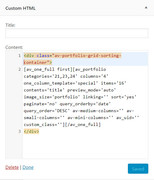
I tested this on my localhost, but please let us know if it also works for you.
Thanks again for your patience.Best regards,
MikeJanuary 10, 2019 at 2:50 pm in reply to: Enfold 4.5 Theme Update "Update Failed: Download failed. A valid URL was not pro #1052338Hi,
@muuclemens You will need to update the parent theme with the Enfold v4.5.2 update, that is from within FTP you need to delete the parent theme “enfold” then upload the new theme folder via ftp. If you do this then the updater will show that you have the latest version v4.5.2
You will not be using the updater to update, you will be doing it manually with ftp.You can also do it this way with ftp:
via FTP, look for the “enfold” folder at /wp-content/themes/enfold/ and rename to “enfold-old” then upload the new version as the folder “enfold”
Please don’t try to overwrite the theme folder, as this will leave old files behind and cause errors.
Once you have cleared your browser cache and tested that your site is working correctly, you can delete the old folder “enfold-old”.
If for some reason you want to go back to the old version, simply remove the new folder and change the name of “enfold-old” back to “enfold”As for if you can create a new thread, I assume so since you are posting to this thread, please give it a try.
Best regards,
MikeJanuary 10, 2019 at 2:20 pm in reply to: Remove Website box from Blog Comments and change format #1052332Hi,
To remove the “comment-form-cookies-consent” check box, I went to WordPress > Settings > General > Discussion Settings > Show comments cookies opt-in checkbox and unchecked it, and I removed the script that changed the wording.
I then updated the comment form to show a placeholder, and the font size for the submit button, and the mobile view of the “Privacy Policy” tick box line.Please clear your browser cache and check.
Best regards,
MikeJanuary 10, 2019 at 1:40 pm in reply to: Enfold 4.5 Theme Update "Update Failed: Download failed. A valid URL was not pro #1052327Hi,
@muuclemens
It sounds like you didn’t update the parent theme, but the child theme instead.
We will have to take a look to be sure, Please open a new thread so we can assist, and include your admin login & FTP access in the Private Content area, but as this is not your thread your login info will not be private if posted here.
If you updated the child theme style.css as stated above, do you have a backup of the style.css file, of did it not contain any custom css?Best regards,
MikeHi,
I recreated this on my localhost, and my research points to how the browser window width is calculated including the scroll bar.
The best solution I can offer is a jQuery script to correct it.
I tested this and it works, but only when the browser is loaded, if the widow width is changed, such as resizing the widow, it doesn’t work 100% of the time.
Try adding this code to the end of your functions.php file in Appearance > Editor:function custom_script(){ ?> <script> $(window).resize(function(){ if ($(window).width() <= 767){ $('.av-small-hide').css({ 'display': 'none' }); } }); </script> <?php } add_action('wp_footer', 'custom_script');Best regards,
MikeJanuary 10, 2019 at 6:16 am in reply to: Pages link not showing up and the page editor never loads #1052175Hi,
You will need to manually update the theme. The easiest way is to update via FTP, and if you choose to do that just Please don’t try to overwrite the theme folder with the new theme, as this will leave old files behind and cause errors. Please delete the old theme folder “enfold” from within FTP, and then upload the new theme folder.
If you are not comfortable with FTP then you can follow these steps to use a plugin to update.
After you update you will need to set up a new Envato Token as the old API has been discontinued, you will find detailed instructions here.Best regards,
MikeHi,
I was going to test the solution on my localhost, but while I was setting up the anchor on the page and in the menu I noticed that the mobile menu already closes when jumping to a anchor. I tested it on two installs, so it seems that this bug has been fixed.
But I do note that it’s not working on your site, yet I also notice that your anchor acts differently and doesn’t smooth scroll to the anchor, it’s very instant. Please try disabling your plugins to see if that corrects the issue, or please include a admin login in the private content area so we can take a closer look.
By the way, is your custom menu anchor link set up this this?
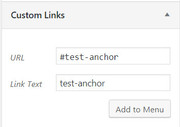
Best regards,
MikeHi,
Thank you for the login, you had updated the theme correctly, there must have been a caching issue, where the new css didn’t completely take hold. It’s all set now
Please clear your browser cache, maybe a couple of times, and then check.
Thank you for your patience.Best regards,
MikeJanuary 10, 2019 at 4:37 am in reply to: Remove Website box from Blog Comments and change format #1052163Hi,
I rewrote the placeholder script and added it and it seems to be working correctly now:function add_placeholders(){ ?> <script> (function($){ $(document).ready(function(){ $(".comment-form-author input#author").attr("placeholder", "Name"); $(".comment-form-email input#email").attr("placeholder", "email"); }); })(jQuery); </script> <?php } add_action('wp_footer', 'add_placeholders');To make the name and email field and submit button full width, I added this in your Quick CSS:
#top .comment-form-email input, #top .comment-form-author input,#top .comment_container .form-submit input.submit {
    width: 100% !important;
}
To correct the font size for the checkbox text, I added this Quick CSS:
#top label[for=wp-comment-cookies-consent], #top label[for=comment-form-av-privatepolicy] {
    font-weight: bold !important;
    font-size: 0.92em !important;
}
To remove the text “and website” from the label, I added this script to your functions.php:
function replace_consent_text(){
?>
<script>
(function($){
$(document).ready(function(){
$("label[for=wp-comment-cookies-consent]").text("Save my name and email in this browser for the next time I comment.");
});
})(jQuery);
</script>
<?php
}
add_action('wp_footer', 'replace_consent_text');
Please clear your browser cache and check.
Best regards,
MikeJanuary 10, 2019 at 1:20 am in reply to: Pages link not showing up and the page editor never loads #1052143Hi,
I see that you updated WordPress, but you didn’t update Enfold.
Sorry I should have been clearer, Please update Enfold.Best regards,
MikeHi,
Thank you, I understand now, I activated the debugger to check the code of the page but didn’t find any errors, then I copied the page to my localhost, and it loaded good.
I deactivated all of your plugins, but the error continued. Then I copied the page to a new page on you site, which also give the error again.
I checked a couple of other pages on your site and they gave a server 500 error.
I recommend asking your webhost if they can see the cause for the server error in the error log, because I’m beginning to believe that is where the error is.
I see that you are using PHP v7.2, if your webhost doesn’t find a cause, please try downgrading your PHP to v7.0 to see if that helps.
Please let us know what your web host finds.Best regards,
MikeHi,
That’s great news! unless there is anything else we can help with on this issue, shall we close this then?
Also I found what looks like a duplicate post from you, shall we also close that one too?Best regards,
MikeHi,
Glad we were able to help, we will close this now. Thank you for using Enfold.For your information, you can take a look at Enfold documentation here
For any other questions or issues, feel free to start new threads under Enfold sub forum and we will gladly try to help you :)Best regards,
MikeJanuary 9, 2019 at 7:56 am in reply to: Remove Website box from Blog Comments and change format #1051610Hey hbourdillon,
To remove the “website” field, Please add this code in the General Styling > Quick CSS field or in the WordPress > Customize > Additional CSS field:.comment_container p.comment-form-url { display: none !important; }To format the comments fields to look like the ‘Subscribe to Blog’ section, we will first need to hide the labels with this css:
.comment_container label[for=author],.comment_container label[for=email] {
display: none !important;
}
Then we will need to add the placeholders in the fields, by adding this code to the end of your functions.php file in Appearance > Editor:
function add_placeholders(){
  ?>
  <script>
  function placeholders() {
  document.querySelector("input#author")
  .setAttribute("placeholder", "Name");
  document.querySelector("input#email")
  .setAttribute("placeholder", "email");
}
$(document).ready(placeholders);
  </script>
  <?php
  }
  add_action('wp_footer', 'add_placeholders');
Here’s the expected results:

After you add this code, Please clear your browser cache.Best regards,
MikeHi,
I believe that the error is from your PHP time limit, which is 30 seconds, which seems too short, please ask your webhost to increase it, most sites have no limit. There are a few different ways to do this but it depends on your server, I recommend not doing this yourself.Best regards,
MikeHi,
Glad we were able to help, we will close this now. Thank you for using Enfold.For your information, you can take a look at Enfold documentation here
For any other questions or issues, feel free to start new threads under Enfold sub forum and we will gladly try to help you :)Best regards,
MikeHi,
I took a look at your issue and believe that I have corrected it, Please clear your browser cache and check.
Your site should follow your setting at Enfold Theme Options > General Layout > Dimensions > Maximum Container width which is set to 3000px right now, please adjust to suit.
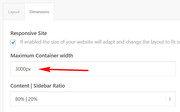
Best regards,
MikeHey palenal,
Please try this solutionBest regards,
MikeHi,
Sorry for the late reply, Please try this code in the General Styling > Quick CSS field or in the WordPress > Customize > Additional CSS field:@media only screen and (min-width: 767px) and (max-width: 1050px) { #top #wrap_all .av_header_transparency { background-color: #000000 !important; color: #ffffff; border-color: #000000; } .phone-info { float: none !important; width: 100%; clear: both; text-align: center !important; } #top .logo { height: 100px !important; max-width: 60% !important; } #top .av-main-nav .menu-item-avia-special { display: block !important; } #top .av-main-nav .menu-item { display: none !important; } }I set the max-width to 1050px, but feel free to adjust to suit.
Best regards,
MikeHi,
Glad to help, we will leave this open to hear back from you after you update to ensure the issue is solved.Best regards,
MikeHey Amajjika,
Sorry for the late reply, and thank you for the login. I was able to get your site back online by deactivating your plugins.
You had the 500 error until I deactivated the CloudFlare Flexible SSL plugin which allowed the source code of the page to load but you still couldn’t see the page visually, until I deactivated the many woocommerce plugins at which time the site began working again.
Please try activating your plugins one at a time to find the one causing the issue.
I did reactivate your maintenance plugin, but it seems it’s settings show the maintenance page to logged in users also, so you will need to deactivate to see your site.Best regards,
MikeHey Jamie Krakar,
The email address on file is (Email address hidden if logged out)
I updated it to (Email address hidden if logged out)
and updated the password for you below, you should also get a email with it.Best regards,
MikeHi,
Typically this occurs when the Enfold Theme Options > Performance > JS & CSS file merging and compression is enabled, for the merged files to be updated (rebuilt) the theme options needs to be saved, this is the big blue button “Save all changes”, which also happens to be the same button to save the Quick CSS.
Glad that you have discovered this, but I wanted to explain why this is for you.
Unless there is anything else we can assist with on this issue, shall we close this then?Best regards,
Mike -
AuthorPosts
