

Forum Replies Created
-
AuthorPosts
-
Hi,
Glad we were able to help, we will close this now. Thank you for using Enfold.For your information, you can take a look at Enfold documentation here
For any other questions or issues, feel free to start new threads under Enfold sub forum and we will gladly try to help you :)Best regards,
MikeHi,
The easiest solution for you is to use the classes that are added to the menu by the “Page Scroll To” plugin, since you are already using it.
So, you have a choice, you can use the “mPS2id-clicked” class for items clicked, but this will follow the user around changing the color on the items just because they clicked it, not because they are there. Or you can use the “mPS2id-highlight” class that will only change the color if the user is there, no matter if they clicked it or not.
I recommend the latter because it will make sense to the user, but it’s up to you.
the css for clicking the first menu item is:a.mPS2id-clicked span#mg_navikiste_hallo { background: #7682A9 !important; }the css for hovering that item is:
a span#mg_navikiste_hallo:hover
{background: #7682A9 !important;
}
the css for the “highlight” class, meaning that you are there:
a.mPS2id-highlight span#mg_navikiste_hallo
{background: #7682A9 !important;
}
Note there are some settings for the plugin, such as *”highlight only one item at a time” & *”keep item highlighted until next item” that you may want to use. (*this is from memory, not the exact text)
Best regards,
MikeFebruary 16, 2019 at 3:55 am in reply to: Change Frame and "Send" Button Color in Contact Form #1067609Hi,
Please try this code in the General Styling > Quick CSS field or in the WordPress > Customize > Additional CSS field:#top.page-id-867 .single_toggle .toggle_content p { color: #696969 !important; }Best regards,
MikeHi,
Please try this code in the General Styling > Quick CSS field or in the WordPress > Customize > Additional CSS field:@media only screen and (max-width:767px){ #top #av-burger-menu-ul { vertical-align: top !important; } }Best regards,
MikeHi,
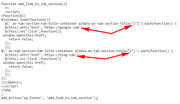
Ok, I created a function for you that adds a link to a tab section and then opens in a new tab, Try adding this code to the end of your functions.php file in Appearance > Editor:function add_link_to_tab_section(){ ?> <script> (function($){ $(window).load(function(){ $('.av-tab-section-tab-title-container a[data-av-tab-section-title="1"]').each(function() { $(this).attr('href','https://google.com'); $(this).on('click',function(){ window.open(this.href); return false; }); }); $('.av-tab-section-tab-title-container a[data-av-tab-section-title="2"]').each(function() { $(this).attr('href','https://bing.com'); $(this).on('click',function(){ window.open(this.href); return false; }); }); }); })(jQuery); </script> <?php } add_action('wp_footer', 'add_link_to_tab_section');in this example I have added two links, you can add more if you like. To understand how it works, notice that each tab gets this attribute: [data-av-tab-section-title=”1″] from left to right, each is a new number, 1,2,3,ect.
so the script targets the tab by this number, and then adds the link on the next line. You will see above “google.com” & “bing.com” adjust these to suit.
Best regards,
MikeHi,
Anchor highlighting broken? That’s odd, it seems like we had this sorted out, are you still building two demo sites or has your client made a choice as to which one they like?
To have your header only show on scrolling up, please try the headroom.js script
1: Mobile menu reveal on scrolling up with headroom js
2: Mobile menu reveal on scroll up
When I check the tabs on mobile they are all the same height so the page doesn’t jump up and down when the tabs change, but you want the height to change with each tab?Best regards,
MikeHi,
The tab element doesn’t have a way to add links to the images, and css can’t add links, you have to use some javascript. How about trying the Partner Logo element, it allows links to be added to the images:
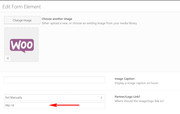
and you can create a single row for the element:

if you use white or transparent backgrounds it won’t look like boxes:

Best regards,
MikeFebruary 15, 2019 at 6:00 am in reply to: Background color changes randomly in Microsoft Edge on pages with color sections #1067290Hi,
Thank you for the login, please enable the WordPress > Design > Theme > Editor option, or provide ftp access, I believe I’m making headway but I need to check on something with your child theme.Best regards,
MikeHi,
Thanks, I took a look and the menu links are white. I also checked on other pages where you don’t have a transparent header, and those menu links are also white.
Sorry, but this was your request, correct?Best regards,
MikeHi,
I was able to login, and found that you had some “curly quotes” in your code. I removed, please try now.Best regards,
MikeFebruary 15, 2019 at 1:26 am in reply to: Magnificent Popup bug – …magnificPopup is not a function #1067242Hi,
Glad we were able to help, we will close this now. Thank you for using Enfold.For your information, you can take a look at Enfold documentation here
For any other questions or issues, feel free to start new threads under Enfold sub forum and we will gladly try to help you :)Best regards,
MikeFebruary 15, 2019 at 1:23 am in reply to: Sprungmarke wird nicht korrekt angesteuert, in Kombination mit LayerSlider #1067241Hi,
Thanks, I’m really trying :)
So Mac is the only issue now? I use Chrome on Windows for my work here, and it’s working good.
This might turn a little tricker because adjusting for Mac might throw Windows off, I’ll try. Please include a screenshot of what you are seeing on Mac.Best regards,
MikeHi,
Bitte fügen Sie der betreffenden Seite die URL hinzu, damit wir die Überblendung untersuchen können. Wenn ich es richtig verstanden habe, gibt es eine Verzögerung, bevor das Fade Ihres Layers beginnt.— Translated with Google —
Please include the url to the page in question so we can examine the fade.
If I understand correctly there is a delay before the fade of your layerslider begins?Best regards,
MikeHi,
Glad to hear, I assume we can close this now, but I like to ask first. Shall we close this then?Best regards,
MikeFebruary 14, 2019 at 2:56 pm in reply to: Alternate Menu for Mobile while having desktop sidebar menu #1066981Hi,
Sorry for the late reply, I was able to reproduce, so I submitted to the dev team.
Thank you for your patience.Best regards,
MikeFebruary 14, 2019 at 2:34 pm in reply to: Background color changes randomly in Microsoft Edge on pages with color sections #1066973Hi,
Thank you for the screenshots, I have taken a look at your pages with Edge on Windows 10, and I see the issue you describe. I see that the header weaves in and out, above and below the color sections as I scroll down, and with the core background color being red,.html_stretched #wrap_all { background-color: #800000; }in some of the sections this background color and header is getting a higher z-index, but as you point out inspecting it is difficult.
First, how do you want the header, on top as you scroll down, or behind?
Then please include an admin login in the Private Content area so I can check your css and try to correct.Best regards,
MikeFebruary 14, 2019 at 6:44 am in reply to: Option to select a category for a single post is no longer available #1066813Hi,
Glad we were able to help, we will close this now. Thank you for using Enfold.For your information, you can take a look at Enfold documentation here
For any other questions or issues, feel free to start new threads under Enfold sub forum and we will gladly try to help you :)Best regards,
MikeFebruary 14, 2019 at 6:13 am in reply to: Sprungmarke wird nicht korrekt angesteuert, in Kombination mit LayerSlider #1066797Hi,
Thank you, this is a tricky one. But I made another adjustment, Please clear your browser cache and check.
You can add images via https://postimg.cc/Best regards,
MikeHi,
Das ist ein kleiner Trick, bitte erstellen Sie eine HTML-Ebene und lassen Sie sie auf allen Folien anzeigen. Wenn Sie einen neuen Schieberegler erstellen möchten, können Sie ihn auch in den neuen Schieberegler kopieren, ohne dass er neu erstellt werden muss.
Um die Ebene zu kopieren, gehen Sie zur Registerkarte “Stile” und klicken Sie auf “ Ebenenstile kopieren “:
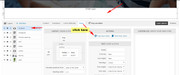
Gehen Sie dann zum neuen Schieberegler, wählen Sie eine neue HTML-Ebene aus und klicken Sie auf “ Ebenenstile einfügen “.

— Translated with Google —
That is a little tricker, please try creating a HTML layer and have it show on top of all slides, then if you want to create a new slider you can also copy it to the new slider without needing to re-build it.
To copy the layer, go to the styles tab and click “Copy layer styles“:
then go to the new slider and choose a new HTML layer, and click “Paste layer styles”
Best regards,
MikeHi,
Sorry about that, I followed your link and see that the dropdown background color is black with white text, I assume this was to fix the white text issue. To make the text black, add this css:#top .main_color select { color: #000 !important; }As for adding a text field after variation choice, please try a plugin such as: Woocommerce Custom Fields For Variation
Best regards,
MikeHi,
Thank you for explaining, I believe this would create quite a challenge because the image in the tab is the link for the tab, so there would be competing links in the same area.

Best regards,
MikeHi,
Thank you, I have inspected the page and see that you forgot to put the “p” in the css for paragraph, when this is included the H2 do not change color.#top .avia_textblock p strong { color: #c9c4c1 !important; }Best regards,
MikeHi,
Ok, but what about navigating to the different tabs to see the tab content? Please see in this image that the images are a part of the tab links.
Best regards,
MikeFebruary 14, 2019 at 3:59 am in reply to: Magnificent Popup bug – …magnificPopup is not a function #1066757Hi,
Glad to hear, thank you.
Unless there is anything else we can assist with on this issue, shall we close this then?Best regards,
MikeHi,
To use the OpenStreetMap, try using the OSM – OpenStreetMap plugin and follow the instructions on their documentation site.For the favicon, Safari uses “apple-touch-icon”, you will have to specify the icon for the Apple devices, please read this post.
To show all 4 tabs on mobile, Please try this code in the General Styling > Quick CSS field or in the WordPress > Customize > Additional CSS field:
@media only screen and (max-width: 424px) {
.js_active .av-tab-section-tab-title-container {
    min-width: 320px !important;
    left: 0px !important;
}
}
@media only screen and (min-width: 425px) and (max-width: 767px) {
.js_active .av-tab-section-tab-title-container {
    min-width: 425px !important;
    left: 0px !important;
}
}
Best regards,
MikeHi,
To show the image overlay title full time on the page /slow-combustion-woodheating/
Please try this code in the General Styling > Quick CSS field or in the WordPress > Customize > Additional CSS field:.av-overlay-on-hover .avia-image-container-inner .av-image-caption-overlay { opacity: 1 !important; filter: alpha(opacity=100) !important; }On the home page the titles already show before hover, but hovering makes them transparent, this looks like it is caused by this custom css, please try removing:
.av-overlay-hover-deactivate:hover .av-caption-image-overlay-bg {
    opacity: 0 !important;
}
If you can’t find it, then try adding this css:
#top.home #after_full_slider_1 .av-overlay-hover-deactivate:hover .av-caption-image-overlay-bg {
    opacity: 1 !important;
}
Best regards,
MikeFebruary 13, 2019 at 7:07 am in reply to: Magnificent Popup bug – …magnificPopup is not a function #1066301Hey Doron,
Sorry for the late reply, I took a look at your site and found that you had an old “header.php” in your child theme that was not working correctly with the lightbox, so I renamed it to “header.php.old” and uploaded the new header.php
Then the lightbox was working, but your popups were not showing because your class in the links were not correct and the css was using the same css for the overlay of the lightbox. I corrected one of the team members for you to see the correct way. I fixed the “Chairman of the Board” with no image, you will see it now opens with a white background. The css for this is in the “code block” element at the bottom of the page, because when I tried to add it to your “Quick CSS” it didn’t work, I believe you have css errors in your “Quick CSS” Please try checking this by pasting all of your css into the WordPress > Customize > Additional CSS and look for the errors (red X)Best regards,
MikeHi,
Sorry for the late reply, to do this and easily reuse the code for other sections, you will need to change your sections a little. The first section is fine because it only has one video, but the second section has many videos and elements in it, so please try moving the other videos down into the next section, then add this css in your “Quick CSS” :@media only screen and (max-width:767px) { .responsive #av_section_1 > .container, .responsive #av_section_2 > .container { padding-left: 0 !important; padding-right: 0 !important; width: 100% !important; min-width: 100% !important; margin: 0px !important; } }note that the code has “#av_section_1” & “#av_section_2”, when you use this code on other pages just rename them to the sections you want to taeget.
Best regards,
MikeHey Elsterhund,
Bitte entschuldigen Sie die verspätete Antwort. Bitte fügen Sie ein “Code-Block” -Element unter Ihrem Layerslider hinzu:
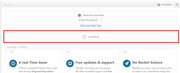
Bitte fügen Sie Ihren “div” -Code wie folgt hinzu:<div class="over-slider"> Box over slider</div>Fügen Sie diese CSS dann Ihrem “Quick CSS” hinzu, um Ihre Box zu stylen, über den Layerslider zu verschieben und geben Sie einen Z-Index:
.over-slider {
    margin-top: -100px;
    z-index: 5;
    background-color: #fff;
    color: #000 !important;
    text-align: center;
}
Sie müssen den Z-Index des Layers auch mit css wie folgt senken:
#layer_slider_1 {
z-index: 0 !important;
}
Jetzt haben Sie eine Box über Ihrem Layerslider:

Bitte lassen Sie uns wissen, ob dies hilft.— Translated with Google —
Sorry for the late reply, please try adding a “code block” element below your layerslider like this:
inside, please add your “div” code like this:<div class="over-slider"> Box over slider</div>Then add this css to your “Quick CSS” to style your box, move it over your layerslider, and give it some z-index:
.over-slider {
    margin-top: -100px;
    z-index: 5;
    background-color: #fff;
    color: #000 !important;
    text-align: center;
}
you will also need to lower the z-index of the layerslider, with css like this:
#layer_slider_1 {
z-index: 0 !important;
}
Now you have a box over your layerslider:
Please let us know if this helps.Best regards,
Mike -
AuthorPosts
