

Forum Replies Created
-
AuthorPosts
-
Hey itziarsolla,
Thank you for the logins, can you please explain what you mean by the site looks “bad” when you update?
Are elements broken, do you get an error message?Best regards,
MikeHi,
I see that you are using Enfold v4.5.3, please restore the site and update to v4.5.4, and include ftp access so I can take a look.
Can I disable your plugins and try to make a edit on your homepage so I can see this error?Best regards,
MikeHi,
Glad we could help, sorry that you were at a standstill, I think we misunderstood what the issue was, but now you are good to go :)
I took a look at “Manufaktur-Section” and it looks centered to me, Please see the screenshot in Private Content area.
Please try to write on the screenshot to show what is not centered.
Here is a free online tool to write on a screenshotsBest regards,
MikeMarch 9, 2019 at 1:48 am in reply to: WooCommerce, Enfold, Shortcodes and after_theme_setup #1076519Hi,
Thanks for the login, I was able to login to your WordPress but not your FTP
Please check the ftp login info, if it is correct perhaps my IP is blocked.
Please see the Private Content area for my IP.Best regards,
MikeHi,
I’m sorry, I think I have confused you by suggesting an extra step to make a backup of the theme settings file.
All you need to do is upload the child theme by going to Appearance –> Themes –> Add New –> Upload File
and then activate it.
Then go to your Enfold Theme Options > Import/Export > Import Settings from your Parent Theme.
If you have a backup of your site, I will be happy to do this for you, if you wish.Best regards,
MikeHi,
That is great news, you will need to ensure that you have registered the theme and created to Envato Token. Envato has changed from a API to a Token. Please follow the instructions here
Then You should be all set. Once you follow these instructions please let us know when we can close this thread.Best regards,
MikeHi,
Thank you for the login, I was able to get it working for you. For the example I made the left image goes to the section right below the image, and the right image goes to the last section.
Please remember that you can only have the ID once on the same page, placing the same ID in two sections will break the link.
So for the link write it like #hometomed
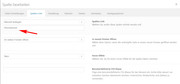
for the target, place the anchor in the “Für Entwickler: Section ID” with no hash tag, like this:
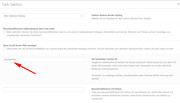
You will need to clear your browser cache, I had to a couple of times brfore it started working.
Please take a look and test the links I made, then try changing to where you want them to point, please let us know if you need more help.Best regards,
MikeHi,
I added the alt tag by including this code in the function:$(this).find("a").attr("alt",captiontext + space + pagetitle);It looks like the function is working in the portfolio, perhaps I’m looking in the worng area, please link directly to where it is not working.
Best regards,
MikeMarch 8, 2019 at 1:50 pm in reply to: Background image of (some) content blocks aren't visible any more after update #1076364Hi,
Glad we were able to help, we will close this now. Thank you for using Enfold.For your information, you can take a look at Enfold documentation here
For any other questions or issues, feel free to start new threads under Enfold sub forum and we will gladly try to help you :)Best regards,
MikeMarch 8, 2019 at 1:49 pm in reply to: "Don't display image on single post" checkbox is missing in ENFOLD 4.5.4 #1076361Hi,
Glad we were able to help, we will close this now. Thank you for using Enfold.For your information, you can take a look at Enfold documentation here
For any other questions or issues, feel free to start new threads under Enfold sub forum and we will gladly try to help you :)Best regards,
MikeHey letka76,
Sorry for the late reply, I tried to find a RSS feed reader online that would show me more that just the title and link, but that is all that I could see. I still tried to read the raw file, and I think that the error you are talking about is that the rss feed is including some of the theme’s shortcode. Is that correct?
If not can you include a screenshot of how the article looks in your reader, with the error? To add a screenshot please try using https://postimages.org/ and pasting the image URL in your post.
I also see that you are using Enfold v4.5.2, but the latest version is 4.5.4, perhaps the new version doesn’t have this error, could you please update?
If the error is the shortcode, we have a patch to fix several errors that have to do with the shortcode, and I could apply it to your site if you include ftp access in the Private Content area.Best regards,
MikeMarch 8, 2019 at 6:53 am in reply to: "Don't display image on single post" checkbox is missing in ENFOLD 4.5.4 #1076233Hey JanGud,
Sorry for the late reply, the check box was replaced with a selectbox in the layout column above the featured image in v4.5.4
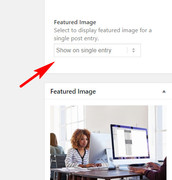
because of a change in WordPress.
Please look there.Best regards,
MikeHi,
I believe I got the title bar to show fully on the scroll back. When you test please clear the WP Rocket cache also.Best regards,
MikeHi,
I took a look at your menu and found that the menu was not set in the settings, so I fixed that. I don’t know why it would have changed other that your theme was very old and may have not communicated well with the new one during the first load, I have not seen this happen before.
When I first logged in before uploading the new theme I saw that all of the widgets were removed from the widget areas & footers, but they were down lower in the “Inactive Widgets” area. I just assumed that you did that.
So I put the widgets back in the footers, but I had to guess were they go, please adjust to suit.
Please check again.Best regards,
MikeHi,
Your sidebar looks much better now, the only “jump” I see now is due to the “Filter by price” first loading as input fields and then switching to a “range slider” element. I don’t see a way around that, unless you use the “Page Preloading” option in the theme options so only the final page render is shown.For your “easy” question about the buttons, are you using a plugin that is overriding the products? The buttons should be showing. Please try disabling any special woocommerce plugins to see if they show. Otherwise please include admin access so we can investigate.
Best regards,
MikeHi,
Entschuldigung, der Login funktioniert nicht für mich, bitte überprüfen. Wir können auf Deutsch kommunizieren, aber ich werde Google Translate verwenden. Bitte entschuldigen Sie die Fehler.Sorry the login is not working for me, please check.
We can communicate in German, but I will be using Google Translate, so please pardon any errors.Best regards,
MikeHi,
That is great news, I deleted the “enfold-old” for you. I will also go ahead and close this thread.
Thank you for using Enfold.For your information, you can take a look at Enfold documentation here
For any other questions or issues, feel free to start new threads under Enfold sub forum and we will gladly try to help you :)Best regards,
MikeHi,
I took a look at this and tried to isolate your page title, so that it was not a long string of keywords, I found that your “AddToAny Share Buttons” plugin at the bottom of your page held just the title so I wrote this script to add the article title + page title to your articles:function article_titles_attr(){ ?> <script> (function($){ $(document).ready(function(){ $(".slide-entry").each(function(){ var space = " ", returnValue = ""; var pagetitle = $(".a2a_kit").attr("data-a2a-title"); var captiontext = $(this).find("h3.slide-entry-title").text(); $(this).find("a").attr("title",captiontext + space + pagetitle ); }); }); })(jQuery); </script> <?php } add_action('wp_footer', 'article_titles_attr');For the magazine titles I added this function, but not all of the pages have a AddToAny Share element, so some of them might not show the page title:
function magazine_titles_attr(){
  ?>
  <script>
(function($){
  $(document).ready(function(){
  $(".av-magazine-entry").each(function(){
    var space = " ", returnValue = "";
    var pagetitle = $(".a2a_kit").attr("data-a2a-title");
    var captiontext = $(this).find("h3.av-magazine-title").text();
    $(this).find("a").attr("title",captiontext + space + pagetitle);

});
});
})(jQuery);
</script>
<?php
}
add_action('wp_footer', 'magazine_titles_attr');
Best regards,
MikeHi,
@westefan we have an early fix for this error which I have tested on a few sites and is working If you would like me to apply this to your site I will need ftp access to do so. Or if you are ok with your workaround, you could just wait for the next update to be released. It’s up to you.
@kreazwo if the workaround is not working for you I can apply the patch to your site, Please include a admin login & FTP access in the Private Content area of a new thread, because since this is not your thread posting your login here will not be private.
If you do start a new thread please post a link to it here so I can find it.Best regards,
MikeMarch 8, 2019 at 1:46 am in reply to: Background image of (some) content blocks aren't visible any more after update #1076187Hi,
Glad to hear that the crisis is over. Many of our users use staging sites to test updates before updating their live sites, you may also benefit from this approach. The dev team is still making adjustments to the next version, that I was going to try on your site.
So I would recommend waiting for the next version to be released and then test on your staging site first.
We can leave this open if you wish, or we can close it and open a new thread if you find issues with the new version.
Closing it would keep a bunch of people from adding their “me too” comments :)Best regards,
MikeHi,
Thank you, I see that your theme folder has an unusual directory name, “enfold_bak” this is not an issue but you should note that. I renamed your current theme to “enfold-old” then I uploaded the new “enfold_bak” and checked that your site is working correctly. Please also check for yourself.
Once you are happy you, (or I) can delete the “enfold-old” via ftp, (not the WP theme page)
Should for some reason you wish to roll-back to the old version, it’s easy to do, simply rename the new “enfold_bak” to “enfold-new” via ftp and then rename “enfold-old” to “enfold_bak” then refresh your page.I added your instagram to your page sidebar widget to test and it is working now please check.
Best regards,
MikeHi,
Glad to hear you do, we will close this now. Thank you for using Enfold.Best regards,
MikeHi,
Ok, I thought when you said “So question is, what has happened to the latest theme to stop the search working fully?”
that you meant the search was working differently and then you updated the site, and now it doesn’t work.
So in that case, perhaps trying one of the solutions above will assist?Best regards,
MikeMarch 7, 2019 at 2:51 pm in reply to: Background image of (some) content blocks aren't visible any more after update #1075993Hi,
The version I installed was not the same version you can download, it was one with many fixes from the dev team, they just didn’t change the version number. But It should not have caused such trouble, I’ve used it to fix about six sites before yours. But it is why I installed it and renamed your old one “enfold-old”, so we could easily roll back.
Anyways I’m glad you can restore. Does your webhost offer one click staging site or “clone” so that we can work on a clone and leave the live site alone?
Here are some screenshots of what it might look like:
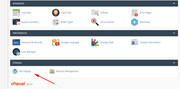
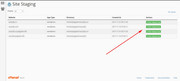
Please keep us posted.
Best regards,
MikeHi,
I see what you mean, do you see this happening in any other elements on your site, or is it only in the icon grid?Best regards,
Mike -
AuthorPosts
