

Forum Replies Created
-
AuthorPosts
-
Hi,
When I look at your site your css is showing, and it can be seen it the source code of the page.
Please clear your browser cache and check.Best regards,
MikeHi,
I see that you already tried to update with the plugin, but you got an error which could be because your “PHP upload limit” is smaller than the file is 18mb, in which case you could ask your webhost to make the limit larger and then use the plugin.
To see your server settings go to: WordPress > Dashboard > LayerSlider > Options and click “System Status” and look under “Server Settings”
Or it could be a different issue, but I would have to take a look to see. In any case, updating via FTP is easy, why not give it a try?
First, login to your site via FTP, or use your file manager in your cPanel and go to:
your_site\wp-content\themes
you should see your \enfold\ directory,
now extract and upload your update directory in \themes\, name it \enfold-new\
now rename your old theme to \enfold-old\ and your new one to \enfold\
Now check if your site is working ok, if it is, test all of it, don’t rush. If it’s still good then you can delete “enfold-old” via FTP then your done :)If it’s not working good, or not at all, then go back via FTP and rename both folders back to the way they were, remember the site runs on the one that is “enfold”, and switching back will bring it back to the older version.
Please let us know if this helped.
Best regards,
MikeHi,
Thank you for the login, Ok it didn’t work the way I thought it would, but adding a max-width for the top level menu items seemed to do the trick.li span.avia-menu-text { overflow-wrap: break-word; word-wrap: break-word; -ms-word-break: break-all; word-break: break-all; word-break: break-word; } li.menu-item-top-level { max-width: 105px !importBest regards,
MikeMarch 10, 2019 at 10:41 pm in reply to: Advanced layer slider not working displaying correctly #1077148Hi,
Thanks for the login, I see you are using PHP version 5.4.45 where the minimum recommended version is 5.6
This will cause many issues, please ask your webhost to update the PHP. It is standard that v5.4 is too old.
While you are talking with them ask to change your PHP time limit, right now it’s 30 seconds, try to get 90, 180, or unlimited.Best regards,
MikeHi,
Glad we were able to help, we will close this now. Thank you for using Enfold.For your information, you can take a look at Enfold documentation here
For any other questions or issues, feel free to start new threads under Enfold sub forum and we will gladly try to help you :)Best regards,
MikeHi,
Glad we were able to help, we will close this now. Thank you for using Enfold.For your information, you can take a look at Enfold documentation here
For any other questions or issues, feel free to start new threads under Enfold sub forum and we will gladly try to help you :)Best regards,
MikeHi,
Glad we were able to help, we will close this now. Thank you for using Enfold.For your information, you can take a look at Enfold documentation here
For any other questions or issues, feel free to start new threads under Enfold sub forum and we will gladly try to help you :)Best regards,
MikeHi,
Glad we were able to help, we will close this now. Thank you for using Enfold.For your information, you can take a look at Enfold documentation here
For any other questions or issues, feel free to start new threads under Enfold sub forum and we will gladly try to help you :)Best regards,
MikeHi,
@Emmygraph Please include an admin login in the Private Content area of a new thread, since this is not your thread your login info won’t be private here.Best regards,
MikeMarch 10, 2019 at 10:17 pm in reply to: Colors from the health Demo have taken over the entire theme! #1077130Hi,
Glad to hear it’s resolved, we will close this now. Thank you for using Enfold.
For your information, you can take a look at Enfold documentation here
For any other questions or issues, feel free to start new threads under Enfold sub forum and we will gladly try to help you :)Best regards,
MikeHi,
@DigitalEssence thanks for assisting.
@susyed this sounds like a DNS setting, please check.Best regards,
MikeMarch 10, 2019 at 10:11 pm in reply to: How to float Blog posts grid to the right without changing order #1077124Hi,
Glad Yigit could help, we will close this now. Thank you for using Enfold.For your information, you can take a look at Enfold documentation here
For any other questions or issues, feel free to start new threads under Enfold sub forum and we will gladly try to help you :)Best regards,
MikeHi,
@Roger Thanks for the login, the reason your text is not floating around your slider is because both elements are in columns that dictate they are certain widths. To get the text and special heading to float around the slider like this:

please try putting all of them in the same column, like this:
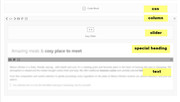
Now we will float the elements, set the width of the elements and give them a clear so that the text will wrap:.test_section .avia-slideshow { float: left !important; margin: 0 20px 20px 0 !important; width: 50% !important; } .test_section .av-special-heading,.test_section .av_textblock_section,.test_section .avia_textblock { text-align: justify !important; text-indent: 2em !important; clear: right !important; margin-top: 0px !important; }I created an example for you on your homepage for you to see, but I hid it with “display: none !important;” at the top of the css in the code block. Just open the code block and remove “display: none !important;” and then save an look on the front end.
If you like this please move the css to your Quick CSS and move the element where you want it. Let us know if we can assist more.
Best regards,
MikeHi,
Please note that if you are using the “performance” settings to merge your css and you add css to your child theme “style.css” directly it may not take effect until you save your theme options again to rebuild your merged css.
Once you add css to style.css, please go you your “Quick CSS” and enter a blank space so that you can click the theme settings “save all changes” button and update your merged css.Best regards,
MikeMarch 10, 2019 at 8:42 pm in reply to: COMMUNITY QUESTION: What functions, hooks and filters in your functions.php? #1077109Hi,
Thanks for sharing, I look forward to seeing more replies. I believe the group Basilis is talking about is here
Another function many people use often is the moral box (lightbox popup),function popup_inline() { ?> <script type="text/javascript"> jQuery(window).load(function(){ jQuery('.open-popup-link').magnificPopup({ type:'inline', midClick: true }); }); </script> <?php } add_action('wp_head', 'popup_inline');Best regards,
MikeHi,
Thanks @DigitalEssence for assisting.
@WolfgangEmmer please let us know if we can assist more.Best regards,
MikeMarch 10, 2019 at 8:27 pm in reply to: Color Section: Always display full image, adjust dimensions #1077104Hey restube,
For the top color section image to always be full size, Please try this code in the General Styling > Quick CSS field or in the WordPress > Customize > Additional CSS field:#top.page-id-70 #av_section_1 { background-position: top !important; background-size: cover !important; height: 100vh !important; }I see that you are hiding the color section for mobile devices so there is no reason to add media queries to the css.
Best regards,
MikeHey Peter,
Entschuldigung, dass Sie dieses Problem haben. Ich habe nachgeschaut und festgestellt, dass Sie PHP-Version: 5.4.45 verwenden. Die empfohlene Mindest-PHP-Version ist 5.6. Ich sehe auch, dass Ihre MySQL-Version: 5.0.96 die empfohlene Mindestversion von MySQL 5.6 ist Sollte dies zu Problemen führen, bitten Sie Ihren Webhost, diese zu aktualisieren.— Translated with Google —
Sorry you are having this issue, I have taken a look and see that you are using PHP Version: 5.4.45 the recommend minimum PHP version is 5.6
I also see that your MySQL Version: 5.0.96 the recommended minimum MySQL version is 5.6
This will cause this issue, please ask your webhost to update these.Best regards,
MikeHi,
I took a look at your site and see that you have the header set to “transparency” probably from the demo, to correct please go to edit the page and in the layout options in the sidebar look for “Header visibility and transparency” and choose “no transparency”

Best regards,
MikeHey sosob10,
Are you sure there is not an error on your server side? To check please try switching to a default WP theme and see if you still get an 404.
If you don’t get a 404 then please include a admin login & FTP access in the Private Content area so we can take a look.Best regards,
MikeHi,
@JeffBianchi we can assist, but we will need an admin login and ftp access in the Private Content area.
I see that this is not your thread, so posting this info here will not be private, I recommend starting a new thread with this info and then post a link to the new thread here.Best regards,
MikeHi,
Yes I understand what happens when the occurances of <br /> disappear, this css typically forces the brakes to occur, prehaps I targeted the wrong sector. Please include a admin login in the Private Content area so I can test.Best regards,
MikeHi,
1: yes
2: it would be ok, but your customizations in the child theme would be gone. But there is no reason to think you will lose your child theme.
3: this is correct.Best regards,
MikeHi,
Please try:@media only screen and (max-width: 999px) { #av-tab-section-1 .av-tab-section-tab-title-container { width: 99% !important; max-width: 99% !important; min-width: 99% !important; } }Best regards,
MikeMarch 10, 2019 at 6:24 pm in reply to: Anzeigeprobleme bei color section mit diagonal border #1077072Hi,
Glad we were able to help, we will close this now. Thank you for using Enfold.For your information, you can take a look at Enfold documentation here
For any other questions or issues, feel free to start new threads under Enfold sub forum and we will gladly try to help you :)Best regards,
MikeMarch 10, 2019 at 6:22 pm in reply to: 2 columns in socket, both 50%, one aligned left, the other right #1077068Hi,
Glad we were able to help, we will close this now. Thank you for using Enfold.For your information, you can take a look at Enfold documentation here
For any other questions or issues, feel free to start new threads under Enfold sub forum and we will gladly try to help you :)Best regards,
MikeHi,
Glad we were able to help, we will close this now. Thank you for using Enfold.For your information, you can take a look at Enfold documentation here
For any other questions or issues, feel free to start new threads under Enfold sub forum and we will gladly try to help you :)Best regards,
MikeHi,
Glad we were able to help, we will close this now. Thank you for using Enfold.For your information, you can take a look at Enfold documentation here
For any other questions or issues, feel free to start new threads under Enfold sub forum and we will gladly try to help you :)Best regards,
MikeMarch 10, 2019 at 6:05 pm in reply to: Pricing table column height are uneven when heading row has images #1077053Hi,
Please try this code in the General Styling > Quick CSS field or in the WordPress > Customize > Additional CSS field:#top.home #av_section_5 .avia-table div { vertical-align: top !important; }Then clear your browser cache and check.
Best regards,
MikeHi,
Yes this is an advance of the next update. I was able to login to your ftp, but I don’t seem to have full access, I can only see some directories but no files. Nonetheless I tried to upload the new version but about halfway it froze saying I didn’t have permission.
If you want to try yourself, please follow these steps, assuming your parent theme is in the directory “enfold”:
First extract and upload the file in the Private Content area to create the directory “enfold-new”
Then rename your current theme directory to “enfold-old” via ftp, then change the directory “enfold-new” to “enfold” and check that your site is working correctly.
Once you are happy you can delete the “enfold-old” via ftp, (not the WP theme page)
Should for some reason your site crashes or wish to roll-back to the old version, it’s easy to do, simply rename the new “enfold” to “enfold-new” via ftp and then rename “enfold-old” to “enfold” then refresh your page.
Or you can give me full access and I will do this for you.Best regards,
Mike -
AuthorPosts
