

Forum Replies Created
-
AuthorPosts
-
Hi,
Only two for the rules have “#top.page-id-2438” just remove it and it should work for all of the pages.Best regards,
MikeApril 3, 2019 at 4:16 am in reply to: Possible bug; first entry in masonry posts displays 7px padding #1086316Hi,
This should, unless you change the elements on the page.
If you do we will be happy to assist again.Best regards,
MikeHi,
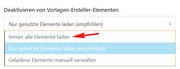
Glad to hear you found the issue. I believe the error you are getting is because in your performance settings your “Disable template creator items” is set to “Load only used elements (recommended)”
Please change to “Always load all elements” and then try again.
Best regards,
MikeHi,
Sorry I didn’t write any css to change the color of the logo, I used two different logo images in the two logo places that I described above.
For an ID to the slider, the slider already has an ID #fullscreen_slider_1 Please try the link in the Private Content area, just use this IDBest regards,
MikeHi,
To also remove the image please try adding this css:#top.page-tribe-attendee-registration div.page-thumb { display: none !important; }Sorry, but I can't test this issue on a clean install because it seems that your plugin is a paid one. But I can say that our dev team has fixed a few issues with the footer as a page, and perhaps this will be cleared up with the next update.
Best regards,
MikeHi,
I believe you are saying that you tried adding it and now it is working.
That’s great. This thread is getting quite long now, perhaps we should close it now and if you have any other issues you can open a new thread?Best regards,
MikeHi,
Glad we could help. This thread is getting quite long now, perhaps we should close it now and you could open a new thread if you need future help?Best regards,
MikeHi,
@ycinformatik that is good news that it is now working with posts, and it should work with pages, but could you please check and report back? I would like to report that both are now working to the dev team with your confirmation, so they can add it to the upgrade, Thanks :)Best regards,
MikeHi,
Good news the dev team believes this will help, please see the link in the Private Content area to two files, and upload them to your FTP to these locations:/enfold/config-templatebuilder/avia-shortcodes/blog/blog.php /enfold/framework/php/function-set-avia-frontend.phpBe sure to save the original files as backup, Then clear your browser cache and any cache plugin or server cache, and check if this solves.
Best regards,
MikeHey keribird,
Sorry for the late reply, I took a look at your page and I see there is two forms on it, but I really don’t know this plugin or why this is happening. If I understand correctly when you change the page template this doesn’t happen?
When I try to open the page in the editor from the from end I get the error message:
“You attempted to edit an item that doesn’t exist. Perhaps it was deleted?”
But it open fine from the back end and only shows a tribe shortcode.
I also took a look at the padding around the form elements and the page, but it is coming from the plugin and not the theme.
I did come up with a way to hide the second form with this css, please give it a try in your Quick CSS:#top.page-tribe-attendee-registration div.tribe-block__tickets__registration__event:nth-child(even) { display: none !important; }Best regards,
MikeApril 2, 2019 at 5:16 am in reply to: Email Code not Allowing me to send email from website #1085830Hi,
Glad to hear you got it sorted out. I assume we can close this now, but I like to ask. Shall we close this then?Best regards,
MikeApril 2, 2019 at 5:14 am in reply to: Burger Menu title is transparent so menu scrolls behind title #1085828Hi,
Glad to hear you got it sorted out, unless there is anything else we can help with on this issue, shall we close this then?Best regards,
MikeHi,
Glad to hear all is going well and your using Enfold for more projects, thanks.
Try adding this code to the end of your functions.php file in Appearance > Editor:function move_widget_over_shop(){ ?> <script> (function($){ $(document).ready(function(){ if ($(window).width() <= 766) { $('.archive.woocommerce-page .smartphones_sidebar_active').each(function() { $( this ).find('#woof_widget-2').insertBefore('.template-shop.content'); $('.template-shop.content').css({'padding': '0px'}); $('#woof_widget-2').css({'padding': '0px'}); $('.widget-woof').css({'padding-bottom': '0px'}); }); } else { } }); })(jQuery); </script> <?php } add_action('wp_footer', 'move_widget_over_shop');This will move the widget for mobile only, if testing the page in Chrome dev tools, please reload it in mobile view, it may not work if you try resizing the page by grabing the edge of the window and shrinking down.
Best regards,
MikeHi,
@Sachasilvestri, I see that the titles end with “undefined” I believe this is because the script was getting some info from the social app plugin at the bottom of each page, I believe it was the page title, but I don’t see it on this page, please try adding it.Best regards,
MikeHi,
Glad to hear, to use it for the “Brennerei-Auswahl” menu, please replace “#menu-item-3477” with “#menu-item-19330” in the css.Best regards,
MikeHi,
Glad that we were able to assist, unless there is anything else we can assist with on this issue, shall we close this then?Best regards,
MikeHi,
Glad to see that you got it sorted out now, I assume we can close this now, but I like to ask. Shall we close this then?Best regards,
MikeHi,
Thanks for the login, in the css below, feel free to adjust the font sizes and colors to suit. We can’t make the sidebar tabs stretch to the bottom, but this css removes the bottom padding so it reaches to the bottom.#top.page-id-2438 .main_color .tabcontainer .tab { color: #fff !important; font-size: 20px; line-height: 20px; padding-top: 15px; padding-bottom: 15px; } #top.page-id-2438 .main_color .tabcontainer .tab.active_tab { color: #000 !important; background-color: #b2b7bb !important; border-color: #b2b7bb !important; } #av-layout-grid-1 > div.flex_cell.no_margin.av_two_third.avia-builder-el-1.el_before_av_cell_one_third.avia-builder-el-first { padding-bottom: 0px !important; }Best regards,
MikeHi,
Please check that the code doesn’t have any “curly quotes” in it, often this happens when copying the code from an email or if you have an enhanced clipboard, I’m thinking this because I’m getting the correct space on my localhost.
I adjusted the code here:add_filter('avf_form_subject','avia_change_mail_subject', 10, 3); function avia_change_mail_subject($subject, $new_post, $form_params) { $subject = sprintf('%s %s', $new_post['3_1'], $new_post['4_1']); return $subject; }Please let us know if this helps, otherwise Please include an admin login in the Private Content area so we can be of more assistance.
Best regards,
MikeHi,
Glad to hear that @Guenni007 was able to help.
Shall we close this then?Best regards,
MikeApril 2, 2019 at 2:44 am in reply to: woocommerce shop – sorting by price breaks with simple and variable products #1085783Hi,
I was able to reproduce on my localhost, but if you could add the variables to your staging site it would be a big help for the dev team when they take a look, that way they can just work on a solution.
Thanks :)Best regards,
MikeApril 1, 2019 at 12:58 am in reply to: Email Code not Allowing me to send email from website #1085218Hey Lauren,
Sorry for the late reply, I took a look at your site and the email icons and the email addresses, all of which are working for me.
I use the chrome browser and gmail as my email client, when I click them gmail opens for me and I get no error when sending.
Please see the screenshot in Private Content area.
Also when I hover over the icons my browser show the link address and it is correct, without any extra @email.com
What email client are you using that is trying to send to the wrong address?
There must be a setting in it for it to recognize the mailto: correctly
have you tried using different browsers to click the link?Best regards,
MikeHey realisedesign,
Sorry for the late reply, Thanks for the link to your site, it helps. I was able to get this working for you, please adjust colors to suit.

.top-home-cta a.avia-button{
background: #7db9e8 !important;
border-color: #1e5799 !important;
background: -moz-linear-gradient(top, #7db9e8 0%, #2989d8 50%, #1e5799 100%) !important;
background: -webkit-linear-gradient(top, #7db9e8 0%,#2989d8 50%,#1e5799 100%) !important;
background: linear-gradient(to bottom, #7db9e8 0%,#2989d8 50%,#1e5799 100%) !important;
filter: progid:DXImageTransform.Microsoft.gradient( startColorstr='#7db9e8', endColorstr='#1e5799',GradientType=0 ) !important;
}
I remember working on this one not too long ago, I liked the animation :)

.top-home-cta a.avia-button {
color: rgba(255,255,255,0.9) !important;
border-radius: 50px !important;
background: linear-gradient(-45deg, #FFA63D, #FF3D77, #338AFF, #3CF0C5) !important;
border-color: transparent !important;
background-size: 600% !important;
animation: anime 16s linear infinite;
}

@keyframes anime {
0% {
background-position: 0% 50%;}
50% {
background-position: 100% 50%;}
100% {
background-position: 0% 50%;}
}
Best regards,
MikeMarch 31, 2019 at 11:44 pm in reply to: WooCommerce cart item deletion behaviour with Enfold #1085211Hi,
Sorry I only disabled the password mode while I was testing, and then I enabled it again. I did so because you eluded that it was working differently for logged in users and I couldn’t log out and still test the page?
But I know that I enabled it again afterwards, but if I didn’t enable it correctly I’m sorry.So we agree then that the issue only occurs when then W3 Total Cache is active? In this case I’m not able or qualified to debug the W3 Total Cache plugin.
Best regards,
MikeHi,
Can you link to the page in the Private Content area? It would be easier for me.Best regards,
MikeMarch 31, 2019 at 11:21 pm in reply to: woocommerce shop – sorting by price breaks with simple and variable products #1085207Hey M1000000,
Sorry for the late reply, thanks for the detailed report and the staging site, but the link to the problem was a different domain and a 404.
So I took a look at your shop page and see that sorting by price whether ascending or descending the lowest price is taken by Enfold.
But as I started to dig into this deeper I found that none of your variables have variable pricing, on the front end they show two prices but on the back end there is only one price and no variables.
Probably something to do with how it was imported. So I tried testing on my localhost, but didn’t find a solution within the theme files.
I asked the dev team if they can offer a solution.
Thank you for your patience.Best regards,
MikeMarch 31, 2019 at 8:50 pm in reply to: WooCommerce cart item deletion behaviour with Enfold #1085166Hi,
Thanks for the feedback, no I didn’t change any settings, the first time. So now I disabled the password mode and enabled Enfold performance and logged out, removing the products worked correctly. Then I enabled W3 Total Cache and the issue occurred.
I then disabled Enfold performance with W3 Total Cache on and the issue occurred again.
This is looking like a W3 Total Cache issue to me.
I also tested on a clean install on my localhost with no plugins other than woocommerce, and I don’t get any errors removing products with or without Enfold performance on.Best regards,
Mike -
AuthorPosts
