

Forum Replies Created
-
AuthorPosts
-
Hey Jennifer,
Thanks for the login, but it doesn’t give us admin access so we can’t assist with this. Please give us admin access, and it would be better if we had FTP access because sometimes the theme editor doesn’t have the right permissions to edit the files.
Another option is to try this css:li > .iconlist_icon { font-size: 30px !important; line-height: 30px !important; }Best regards,
MikeHey simbakatze,
Yes enfold does work with PHP v7.2
You will need to update via FTP because of the recent changes at Theme Forest and their updater.
It’s easy though, please follow these steps:
First, with FTP access, uploaded the new version of “enfold” into /wp-content/themes/ as a directory named “enfold-new”
Second, then in FTP rename your current theme from “enfold” to “enfold-old” and then rename “enfold-new” to “enfold”
Third, in your web browser check that your site is working correctly.
Forth, Once you are happy you can delete the “enfold-old” via ftp, (not from the WP theme page)
Fifth, Should for some reason you wish to roll-back to the old version, it’s easy to do, simply rename the new “enfold” to “enfold-new” via ftp and then rename “enfold-old” to “enfold” then refresh your page.
I recommend this way because you should never try to overwrite the theme directory because it will leave old files behind and cause errors, and doing it this way also allows you to roll back if your site crashes
One more point for very old versions with plugins, you should disable old plugins and remove scripts from your widgets and pages that may crash your site, this doesn’t happen often but it does sometimes.Best regards,
MikeHi,
Our theme is only sold through Theme Forest, and Theme Forest has an affiliate program, so you can earn money every time you refer Enfold.
I hope this helps and we look forward to your referrals :)Best regards,
MikeApril 7, 2019 at 10:07 pm in reply to: Solved:Maximum Container width suddenly too narrow and unresponsive when changed #1088052Hey zehessc,
Glad to hear you found the solution, we will close this then. Thank you for using Enfold.Best regards,
MikeHi,
I took a look at your footer for the menu item “service areas” but for me it is only showing as a text item, when I inspect it I see this css working:.widget ul ul li { display: none; }which is the css from Michael above, perhaps you need to clear your browser cache, because I can’t hover, or click, for a drop down on it.
(BTW, nice design)
Best regards,
MikeHi,
Yay! Glad we were able to help, we will close this now. Thank you for using Enfold.For your information, you can take a look at Enfold documentation here
For any other questions or issues, feel free to start new threads under Enfold sub forum and we will gladly try to help you :)Best regards,
MikeApril 7, 2019 at 9:43 pm in reply to: How to have the menu item change color when active Using Full Width Sub Menu #1088047Hi,
Oh, I’m sorry I missed that.
OK, I see it’s a mess :) To make the current menu item white and for the menu item to be white on hover,
Please try this code in the General Styling > Quick CSS field or in the WordPress > Customize > Additional CSS field:#top #sub_menu1 .av-subnav-menu > li.current_page_item { background-color: #75253e !important; border-bottom: 0px solid #75253e !important; padding: 0px !important; } #top #sub_menu1 .av-subnav-menu > li.current_page_item > a,#top #sub_menu1 .av-subnav-menu > li > a:hover { color: #fff !important; }Best regards,
MikeHi,
Thanks but I’m not sure what is wrong, I also tried using a VPN with a de IP, but still no go?
Please see the screenshot in Private Content area.Best regards,
MikeHi,
Ok, so you have a white circle that is a “Information graphic” that you want to show on a slider?
How about adding a slide to the slider that shows for 1 second? If you use the LayerSlider you can do this and make the “Information graphic” a link, if you wish. I think it can also be triggered by touch or click.Best regards,
MikeHi,
That’s great news! We will close this now. Thank you for using Enfold.Best regards,
MikeApril 7, 2019 at 8:46 pm in reply to: How can I list posts by category and custom taxonomy? #1088039Hi,
Sorry, I have never used the plugin, but it has very good reviews, have you tried asking the author what is needed for it to work?
I wish I could help you with it but we have quite a backlog here. Thanks for understanding.Best regards,
MikeHi,
I took another look, and for tablet size on your homepage the extra space is caused by the empty color section

Please see the screenshot in Private Content area for how this space looks on the frontend of your homepage, if you remove it then you won’t have the space.
For the header on your homepage please add this css code in the General Styling > Quick CSS field or in the WordPress > Customize > Additional CSS field:#top.home .av_header_transparency .header_bg { opacity: 1 !important; }This will allow your background image to show, on the homepage.
Best regards,
MikeHi,
Thank you for the login, I removed 3 menu color elements in the advanced styling panel and now your animated sub-menus are working.
Please clear your browser cache and check.Just in case you wanted to know what the colors were in the elements I removed, I’ll post here, but your css seems to be taking care of it:
#719430 bg
#377021 border
#fff menu bg
#000 font colorBest regards,
MikeHi,
Ok, other than the crip error I found no changes in disabling the plugins, but I did find that you have “Load jQuery in your footer” in your performance settings, and disabling “Autoptimize” and “Cache Enabler” seemed to make a difference, since the element needs jQuery it was probably loading once your jQuery was available. I think “Autoptimize” also loads jQuery in the footer, but I didn’t find the setting I expected to see. Please check this out.
I was going to turn “Autoptimize” back on but the icons didn’t load when it was on, I think you’ll need to clear the cache, so I left it off because I didn’t think you wanted your site seen missing icons.Best regards,
MikeHi,
Thank you for setting up the staging site, I was able to login. So I followed the steps in your video and at the point that the variable build broke this was the error you had:meta-boxes-product-variation.min.js?ver=3.5.7:1 Uncaught TypeError: window.alert is not a function at Object.success (meta-boxes-product-variation.min.js?ver=3.5.7:1) at i (load-scripts.php?c=0&load[]=jquery-core,jquery-migrate,jquery-ui-core,jquery-ui-widget,jquery-ui-mouse,jquery-ui-sortable&ver=5.1.1:2) at Object.fireWith [as resolveWith] (load-scripts.php?c=0&load[]=jquery-core,jquery-migrate,jquery-ui-core,jquery-ui-widget,jquery-ui-mouse,jquery-ui-sortable&ver=5.1.1:2) at y (load-scripts.php?c=0&load[]=jquery-core,jquery-migrate,jquery-ui-core,jquery-ui-widget,jquery-ui-mouse,jquery-ui-sortable&ver=5.1.1:4) at XMLHttpRequest.c (load-scripts.php?c=0&load[]=jquery-core,jquery-migrate,jquery-ui-core,jquery-ui-widget,jquery-ui-mouse,jquery-ui-sortable&ver=5.1.1:4)
I disabled all plugins, except woocommerce, and tried again. I again got the error that the plugin is trying to give a alert box.
Your site didn’t have a core theme installed so I tested this on my localhost by exporting your products and imported them, and then switched to a core theme, which worked because the “alert box” was given without a error:

I took a look at the test products that I created on your site when your page locked up, and found that the product variations were successfully created, so I conclude that the error is that when the alert box is given by woocommerce to say that the job is done, there is a javascript error that throws the error “window.alert is not a function”.I have put these findings in a issue report for the dev team to test and recreate, and as soon as I hear back from them I will post here. Please leave the staging site up should they want to check anything.
Thank you for your patience.Best regards,
MikeHi,
Please try using the Classic Editor for your custom post types, the dev team has been working on the integration which will be in the next update. I will post what I found here but I not sure it will work without the other updated files for the next update, which is not ready yet.
If you want to try it then make sure to make a copy the file you will be replacing so you can roll it back.
The file you will replace is: /enfold/config-templatebuilder/avia-template-builder/config/meta.php
with this oneBest regards,
MikeHi,
Thanks, I took another look and see that the html in the infusion form is rentering in the backend within the debugger, this has broken the elements in the builder. Please see the screenshot in Private Content area, you will see that in the debugger field the form is showing instead of the code.
I checked the code snippet you posted in the Private Content area for un-closed div’s and found none and I also checked it in a validator and it passed, but when I added it to my localhost it also broke my page on the backend. So the solution here is to create a “shortcode” from your form so it will only render on the front end.
While you can do this yourself if you have that experience, but I will recommend using a plugin for ease of use.
I tested: Insert Html Snippet , just add your html in the plugin field:
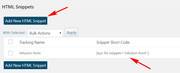
and then add the “shortecode” to a code block element:[xyz-ihs snippet="infusion-form"]and it will work on the frontend without braking your backend.
Please note that when you try to remove the code block that you have there now you will probably lose most of your page, that’s what happened to my test page, so just be ready to re-build your page.Best regards,
MikeApril 7, 2019 at 5:15 am in reply to: How to have the menu item change color when active Using Full Width Sub Menu #1087879Hey webworm72,
Sorry for the late reply, I took a look at your page, and it seems that you have found the solution to this because when I check your menu items:
accounting, information technology, operations, & procedurment
they are white when on the current item page.
Please let us know if there is anything else we can help with,
Please see the screenshot in Private Content area.Best regards,
MikeHi,
Sorry for the late reply, Please try this code in the General Styling > Quick CSS field or in the WordPress > Customize > Additional CSS field:.avia-icon-list-container > ul.avia-icon-list > li > .iconlist_icon { background-color: #f28148 !important; }Best regards,
MikeHi,
Sorry for the late reply, glad to hear you found a solution. To remove the hover effect Please try this code in the General Styling > Quick CSS field or in the WordPress > Customize > Additional CSS field:#av-tab-section-1 .av-tab-section-image { opacity: 1 !important; }Best regards,
MikeApril 7, 2019 at 4:16 am in reply to: Wrap products with same subcategory in div WooCommerce #1087875Hey (Email address hidden if logged out) ,
Sorry for the late reply, but it looks like you have already found the solution for this, I was going to suggest to try adding this code to the end of your functions.php file in Appearance > Editor:function custom_script(){ ?> <script> (function($){ $(document).ready(function(){ $('li.product_cat-alpincenter-bottrop.product_cat-winter-all-incl-dagticket-zat-zon').wrapAll('<div class="new" />') }); })(jQuery); </script> <?php } add_action('wp_footer', 'custom_script');Best regards,
MikeHey stefan,
Please see our documentation for Masonry overlay animation 2 please scroll down a little on the page:

Here is an example:.avia_desktop.avia_transform3d .av-caption-on-hover.av-caption-style- .av-masonry-entry.av-masonry-item-with-image:hover .av-inner-masonry-content { transition: bottom .2s ease-in !important; bottom: 0px !important; position: absolute !important; min-height: 102px; transform-style: none !important; -webkit-transform-style: none !important; } .main_color .avia-arrow { background-color: transparent !important; } .main_color .site-background { background-color: rgb(0, 0, 0) !important; } h3.av-masonry-entry-title.entry-title { color: #fff !important; } #top .av-inner-masonry-content { -webkit-transform: rotateX(0deg) !important; transform: rotateX(0deg) !important; }Best regards,
MikeHey christwars,
Sorry for the late reply, I couldn’t see your mockup because I was getting a 404. But I believe I understand what you were trying to do. Please see the screenshot in Private Content area of the results I achieved.
Please try this code in the General Styling > Quick CSS field or in the WordPress > Customize > Additional CSS field:@media only screen and (max-width: 767px) { #av_section_2 .flex_column_table .flex_column.av_one_fourth:nth-child(odd) { width: 48% !important; float: right !important; padding: 20px 1px 1px 1px !important; min-height: 268px !important; } #av_section_2 .flex_column_table .flex_column.av_one_fourth:nth-child(even) { width: 48% !important; float: left !important; padding: 20px 1px 1px 1px !important; min-height: 268px !important; } #av_section_2 .flex_column_table .flex_column.av_one_fourth .el_after_av_image { margin-top: 20px !important; } }Best regards,
MikeHey tekniskakari,
Sorry for the late reply, when I look at your page it looks lined up, Please see the screenshot in Private Content area.
Is this how you are seeing it?Best regards,
MikeHey opificioilgranello,
Sorry for the late reply, I believe I found the reference to the code you are using and it was designed to show without the count.
In your case you want to show the count, so a solution would be to use the woocommerce cart instead of your shortcode and then replace the icon to your bag in the functions.php file at around line 248:'cart' => array( 'font' =>'entypo-fontello', 'icon' => 'ue859'),just replace ue859 with your icon code.
Best regards,
MikeHi,
Sorry for the late reply, unfortunately for small numbers changing the “3000” will not slow the count down, it is designed for larger numbers with more than two places.
This is what the last reply in this thread was trying to say:Unfortunately, it’s not possible to control the speed of the requestAnimationFrame function which is responsible for the animation without creating a custom script. You might want to consult a freelance developer: http://kriesi.at/contact/customization
Also here: https://developer.mozilla.org/en-US/docs/Web/API/window/requestAnimationFrame
The number of callbacks is usually 60 times per second, but will generally match the display refresh rate in most web browsers as per W3C recommendation.
Best regards,
MikeHey John,
Sorry for the late reply, I have taken a look at your page and on the backend there several elements that are not working correctly, I see that you are using v4.5.1 with Yoast
There were a couple of issues with this version, so I recommend updating to v4.5.5 to ensure that you are not experiencing one of them.Best regards,
MikeHi,
Sorry for the late reply, I checked your site at 767px on Chrome and found a couple of rules competing.
Please try this code in the General Styling > Quick CSS field or in the WordPress > Customize > Additional CSS field:@media only screen and (max-width: 999px) { .responsive #top .container .av-content-small, .responsive #top #wrap_all .flex_column, .responsive #top #wrap_all .av-flex-cells .no_margin {margin: 0;width: 100% !important; } }This sould resolve the issue.
Please see the screenshot in Private Content area.Best regards,
Mike -
AuthorPosts
