

Forum Replies Created
-
AuthorPosts
-
Hi,
Glad we were able to help, we will close this now. Thank you for using Enfold.For your information, you can take a look at Enfold documentation here
For any other questions or issues, feel free to start new threads in the Enfold forum and we will gladly try to help you :)Best regards,
MikeHi,
Oh I see, only in mobile, I tested again and found that the mobile search contains “checkout” in the url and leads to your error, while the header search bar doesn’t.
I believe this is due to your script in your functions.php is containing +page+ as the form action
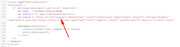
I believe changing this to your home url will correct, but please test by editing the functions.php via ftp.Best regards,
MikeHi,
Unfortunately I have not tried any of these, nor have I seen any reports, but this post links to one they say works (2016)
Last year this author says his free plugin works with Enfold.
There may be others, these were just the first two I found on Google.
But we can leave this open and perhaps a fellow member will post their experience.Best regards,
MikeHi,
If you would like the border to only be around the middle activate image then Please try this code in the General Styling > Quick CSS field or in the WordPress > Customize > Additional CSS field:.av-horizontal-gallery-enlarge-effect .av-horizontal-gallery-wrap.av-active-gal-item { box-sizing: border-box; -moz-box-sizing: border-box; -webkit-box-sizing: border-box; border: 2px solid #000; margin: 3px; }If you would like the border around all of them, try this css:
div.av-horizontal-gallery-wrap {
    box-sizing: border-box !important;
    -moz-box-sizing: border-box !important;
    -webkit-box-sizing: border-box !important;
    border: 2px solid #000 !important;
    margin: 3px !important;
}
Then please clear your browser cache.
Best regards,
MikeHi,
Sorry for the late reply, I took a look at your test page and see that the YouTube icon link was full width covering the others, this css would correct:#top.page-id-162 span.av_font_icon { width: 40px !important; margin: auto !important; }This is designed to only work on the test page #top.page-id-162 it would be better if the icons had a custom class so to not interfere with other icons on the site. Do you mean that you would like all 3 to be in a 1/3 element, such as in a footer widget?
I added the css to your test page and made the element 1/3 so you could see.Best regards,
MikeHi,
Thank you, I also tested, since there is no error from WordPress I believe the error occurs after it is sent. Does your webhost have spam assassin or other spam protection installed? In this case they may require a static sender address or a “reply to” mail header. You will need to ask them if this is true and what they require, we can assist with a filter for this.
Since CF7 is working for you I believe this rules out that your webhost is requiring you to use SMTP to send messages.Best regards,
MikeHey Karl,
Do you mean this check box:
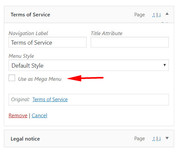
and now you have a “pop-up” option? Please include a screenshot of the menu item.
Perhaps try disabling your plugins and see if it changes back.Best regards,
MikeHi,
Sorry this was an error, I clicked the wrong button.
When I look at your IMPRESSUM page on chrome, it looks like the same 404 page as on Firefox, is it meant to be a 404 page?
The same for your home page, or domain root. Are you using a maintenance plugin? Please see the link in the Private Content area.
Is this the correct page?Best regards,
MikeHi,
Please try adding this css:#top.page-id-209 .avia_ajax_form p * { color: #3fb19d !important; }It also looks as though there is a class error in your form, have you added:
’#top.page-id-209 av-centered-form ’in the class field?
I recommend removing this as you may have issues in the future.Best regards,
MikeHi,
Sorry for the late reply, I see that your header is shrinking on your home page, so this is odd. I also see that you are using WordPress v4.9.7, please try updating and clearing your browser and server cache, it looks like I’m getting different behavior for the same page on some page loads.
I was also going to suggest disabling your plugins to see if that helps but I see that many of your plugins need to be updated such as woocommerce and it’s addons, this can cause unexpected behavior.Best regards,
MikeHi,
Glad to hear it’s sorted out, I have tried to see why, but I’m still not sure, perhaps a plugin or server setting?Best regards,
MikeHi,
Sorry for the late reply, I tried taking another look but it eludes me, I will ask the team to take a look to see if they see the issue.
Thank you for your patience.Best regards,
MikeHi,
Sorry for the late reply, I still couldn’t login, but I see in your child theme > includes/loop-index.php your code is not correct, I tried to update but could not via the WordPress > Appearance > Editor as it needs to be done via ftp. Please try to correct:
This is what you have:$blog_meta_output = "<a href='{$link}' class='post-author-format-type'><span class='rounded-container'>".$gravatar.$icon."</span></a>";it needs to be:
$blog_meta_output = "<a href='{$link}' class='post-author-format-type'><span class='rounded-container'>".$gravatar.$icon."</span>".$author_name."</a>";as you will see you need the “.$author_name.”
Best regards,
MikeHi,
Sorry, I’m also not able to reproduce this, perhaps it is browser specific, which browser are you using?Best regards,
MikeHey fta-edfc,
I have taken a look at your page and site on the front end and back end, but I’m not seeing the error.
Please explain how we can reproduce this error.Best regards,
MikeHey Joe,
Please include the url to the page in question so we can take a closer look, can you also include a mockup image so we can see where you would like the border.Best regards,
MikeHey bediuzzaman said nursi,
Thank you, but I believe this was sent in error. We will close this now.Best regards,
MikeHey Filipe Santos,
Thanks for contacting us!For technical support please register here kriesi.at/support/register with your item purchase code .
Go to https://kriesi.at/support/ select the theme you purchased bookmark the URL.
Example: https://kriesi.at/support/enfold
Scroll to the bottom of the page to open a new ticket.
Best regards,
MikeHey tixxpff,
As I understand your situation, taking the debugger shortcode and creating new pages by adding the shortcode via the Classic Editor is not the same as debugger to debugger. While this does “work” when opening WordPress will still view it as Classic Editor content.
Opening each page and saving as an “Advanced Layout Builder” page should correct, but for a “bulk” save option, I have not found a solution.
But I have assisted with a function that will automatically open each page / post in the Advanced Layout Builder, but if you have posts that you don’t want to be in the Advanced Layout Builder format, this may cause issues, so I’m not sure this is a “clean” solution. If you wish to try, Try adding this code to the end of your functions.php file in Appearance > Editor:function trigger_alb_on_load(){ ?> <script> (function($){ $(window).load(function() { $("#avia-builder-button").trigger('click'); }); })(jQuery); </script> <?php } add_action('admin_head-post-new.php', 'trigger_alb_on_load');If you are going to select the correct pages and open to save, it may save you some time, but I wouldn’t recommend using this for a client as they may get confused when opening non-Advanced Layout Builder posts.
I hope this helps.Best regards,
MikeHi,
Thanks for the link,
Please try this code in the General Styling > Quick CSS field or in the WordPress > Customize > Additional CSS field:#top.page-id-209 div .av-light-form .input-text, #top.page-id-209 div .av-light-form input[type='text'], #top.page-id-209 div .av-light-form input[type='input'], #top.page-id-209 div .av-light-form input[type='password'], #top.page-id-209 div .av-light-form input[type='email'], #top.page-id-209 div .av-light-form input[type='number'], #top.page-id-209 div .av-light-form input[type='url'], #top.page-id-209 div .av-light-form input[type='tel'], #top.page-id-209 div .av-light-form input[type='search'], #top.page-id-209 div .av-light-form textarea, #top.page-id-209 div .av-light-form select, #top.page-id-209 div div .av-light-form .button { border-color: #3fb19d !important; } #top.page-id-209 .av-custom-form-color * { color: #3fb19d !important; } #top.page-id-209 .av_seperator_big_border .av-main-nav > #menu-item-search > a { border-width: 0px !important; }Please clear your browser cache and check.
Best regards,
MikeHi,
Thank you for the images, I recommend changing your css to this:.entry-content p a:not(.lightbox-added) {...}and then clear your browser cache, and check.
The reason adding a caption doesn’t show the underline is because the classes are no longer .entry-content p a it is then .entry-content a and not inside the paragraph (p).
Please let us know if this helps, if you are still having images showing the underline then a login would help because trying to override the “!important;” in your css is a little hard.Best regards,
MikeHi,
Thank you, Please try this code in the General Styling > Quick CSS field or in the WordPress > Customize > Additional CSS field:#top.single-post .big-preview { display: none !important; }Best regards,
MikeHey Raphael,
Thanks for the link, I took a look and found that you have this css hiding the form:#top form { display: none!important; }Please remove this css, and clear your browser cache.
Best regards,
MikeHi,
To correct the “back to top” button, Please try this code in the General Styling > Quick CSS field or in the WordPress > Customize > Additional CSS field:#scroll-top-link { transform: rotate(-90deg) !important; }As for your css merging, I couldn’t see any difference between it being on or off, Please clear your browser cache and check.
If there is still a difference, please explain one element to look at so we can test.Best regards,
MikeHey oscarluque,
This is because the “textshadow” you gave it is a class and not an ID
Please try this css instead:.textshadow .av-special-heading-tag { text-shadow: 0px 0px 5px black !important; }Best regards,
MikeHey Banshee350,
Unfortunately, the links in the social icons are site-wide and not based on ID’s
I can offer this filter that perhaps could be elaborated, but it would require quite a bit of customization.
Sorry, but I hope this helps.Best regards,
MikeHey bauchope,
I took a look at your site and many of the pages, but I’m not sure which page you are referring to, is it the “News” page?
If so, I would recommend reducing the font size, or using a second element that only shows at this size but with only 3 columns, or 2 columns so it displays better.
I don’t have an iPad but I’m trying to simulate it in landscape as 1024px x 768px.
Can you include a screenshot?Best regards,
MikeHey mwvcaa,
Please try this code in the General Styling > Quick CSS field or in the WordPress > Customize > Additional CSS field:#top.page-id-319 #av-tab-section-1 .avia-builder-el-16 .av-layout-tab-inner { height: 2132px !important; }Best regards,
MikeHey dchcolorado,
Please try this code in the General Styling > Quick CSS field or in the WordPress > Customize > Additional CSS field:.blog-meta > a.small-preview { display: none !important; } .single-small .post_author_timeline { border-right-width: 0px !important; }Best regards,
Mike -
AuthorPosts
