

Forum Replies Created
-
AuthorPosts
-
Hey nickgin,
Sorry for the late reply, I took a look at your site and couldn’t reproduce the wrong url with /cart/
I began at your site and added an item to the cart, and then searched “pet”, I also went into the checkout page and searched “pet”
both times I landed at: https://zoomit.gr/wordpress_2/?s=pet
with no “/cart/”, am I testing this correctly?
I do note that I do land on a “404” for “pet”, but I assume that my language (EN) will do this and it’s a different (if any) issue.Best regards,
MikeHey kashmyra,
Sorry for the late reply, I would recommend installing the plugin WP Mail Logging to see what errors are occurring when the contact form is used. Sometimes the mail is sent but the server trashes as spam because of the server rules.Best regards,
MikeHey AuroraArcus,
Sorry for the late reply, I have taken a look and some of your images don’t seem to be on your server anymore, please see the example link in the Private Content area.
Can you verify if the path to your images has changed, such as the /year/month/ and are the posts / pages that had these images are still there?
I see that you only have 2 posts and 10 pages. I not sure what could cause this, but I don’t believe updating Enfold would do this. Please try these steps.Best regards,
MikeHey Cynthia45,
Please include an admin login in the Private Content area, so we can be of more assistance.Best regards,
MikeHi,
Your site is giving the error:Failed to load resource: the server responded with a status of 403 (Forbidden)a “403 error” comes from your server, please ask your webhost to check your server logs for a cause.
I do see that you are using WordPress v4.8.9 & Enfold v4.5.7, while I have not seen any reports of a conflict with these, I also would ask to correct this first. Please try to manually update your WordPress to v5.x to see if that solves.Best regards,
MikeHi,
Thanks, as I look at your first screenshots I’m not seeing these errors, please see my screenshots below.
I assume that you have tried clearing your browser cache, which browser are you using?Best regards,
MikeHi,
Thanks for the login, I gave a few things a try and unfortunately it didn’t work as I expected, but I was able to place the icon list over the slider with a negative margin-top css..avia-icon-list-container { margin-top: -50vh!important; }This css could be added to your Quick CSS, but I added it to a code block element so you could see it easier.
Please take a look at the page and the elements and let us know if this helps.Best regards,
MikeHi,
I see that your favicon.ico is now on the site in the /wp-content/ directory, please try uploading to the root directory via ftp, that is the same directory as index.phpBest regards,
MikeHi,
Thank you for the screenshot, it demonstrates better. I checked in Chrome, Firefox, Edge & IE11 but it seems this only happens in Safari.
Please try this code in the General Styling > Quick CSS field or in the WordPress > Customize > Additional CSS field:div#av-tab-section-1 { margin:-.1px !important; }Best regards,
MikeMay 16, 2019 at 6:23 pm in reply to: image background efect (increasing and decreasing) in color section #1101552Hi,
You will want to add a custom class to your image, and then use that custom class in the first line of the css:
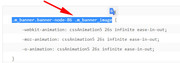
Please try setting up a test page on your site with a custom class that we can see, and we can demonstrate the adjustments.Best regards,
MikeHi,
Glad we were able to help, we will close this now. Thank you for using Enfold.For your information, you can take a look at Enfold documentation here
For any other questions or issues, feel free to start new threads in the Enfold forum and we will gladly try to help you :)Best regards,
MikeHi,
Glad we were able to help, we will close this now. Thank you for using Enfold.For your information, you can take a look at Enfold documentation here
For any other questions or issues, feel free to start new threads in the Enfold forum and we will gladly try to help you :)Best regards,
MikeHi,
Thanks for the login, I didn’t see the 1px white line in your screenshot, but I took a look at your “Quick CSS” and found a few errors which I corrected based on your statement:when it worked that also solved the one line issue on mobile
Please check if this helped.
Best regards,
MikeHi,
I took a look at your site and I see you are getting a 404 error on the favicon.
I also see that your favicon is in this format:
favicon.jpg
As a rule of thumb, browsers look for the favicon as “favicon.ico” in your root directory, I recommend using this online converter to upload your “favicon.jpg” and convert to “favicon.ico” and then upload to your root folder, the same place as your wordpress “index.php”Best regards,
MikeHey Arrastia,
Sorry, I also don’t see your earlier request, can you elaborate about your issue with a link to a page showing the issue?Best regards,
MikeHey macika,
This is the css, please adjust to suit:#top #wrap_all .av-social-link-mail:hover a { background-color: #9fae37 !important; }Then clear your browser cache and check.
Best regards,
MikeHey macika,
Thanks for your question, with these version numbers please first update WordPress and ensure your PHP version is at least v5.6
Then update Enfold via FTP to v4.5.7
Please note that you should rename the “enfold” folder in /wp-content/themes/ to “enfold-old” via FTP, then upload the new “enfold” folder, once you see the new “enfold” is working you can delete the “enfold-old” folder.
Otherwise if it crashes, rename the new enfold folder to “enfold-new” and rename the “enfold-old” back to “enfold”.
Please don’t try to overwrite the theme folder, as this will leave old files behind and cause errors.Best regards,
MikeMay 15, 2019 at 4:23 am in reply to: image background efect (increasing and decreasing) in color section #1100794Hey ftt123,
Thanks for the link, this is created by this css:.m_banner.banner-node-86 .m_banner_image { -webkit-animation: cssAnimation5 26s infinite ease-in-out; -moz-animation: cssAnimation5 26s infinite ease-in-out; -o-animation: cssAnimation5 26s infinite ease-in-out; } @-webkit-keyframes cssAnimation5 { 0% { -webkit-transform: rotate(0deg) scale(1) skew(0deg) translate(0px); } 35% { -webkit-transform: rotate(0deg) scale(1.25) skew(0deg) translate(4%,0); } 50% { -webkit-transform: rotate(0deg) scale(1.25) skew(0deg) translate(4%,0); } 85% { -webkit-transform: rotate(0deg) scale(1) skew(0deg) translate(0px); } 100% { -webkit-transform: rotate(0deg) scale(1) skew(0deg) translate(0px); } } @-moz-keyframes cssAnimation5 { 0% { -moz-transform: rotate(0deg) scale(1) skew(0deg) translate(0px); } 35% { -moz-transform: rotate(0deg) scale(1.25) skew(0deg) translate(4%,0); } 50% { -moz-transform: rotate(0deg) scale(1.25) skew(0deg) translate(4%,0); } 85% { -moz-transform: rotate(0deg) scale(1) skew(0deg) translate(0px); } 100% { -moz-transform: rotate(0deg) scale(1) skew(0deg) translate(0px); } } @-o-keyframes cssAnimation5 { 0% { -o-transform: rotate(0deg) scale(1) skew(0deg) translate(0px); } 35% { -o-transform: rotate(0deg) scale(1.25) skew(0deg) translate(4%,0); } 50% { -o-transform: rotate(0deg) scale(1.25) skew(0deg) translate(4%,0); } 85% { -o-transform: rotate(0deg) scale(1) skew(0deg) translate(0px); } 100% { -o-transform: rotate(0deg) scale(1) skew(0deg) translate(0px); } }If you adjust the classes you can use it for any image on any site, hope this helps
Best regards,
MikeHey webprodigy,
Thanks for the login, I took a look at your page and found that you had a few css errors in your Quick CSS, which I corrected.
I also found that you had this css to hide the burger menu, which I removed:@media screen and (max-width:1150px) { nav.main_menu { display: none !important; } }Please clear your browser cache and check.
Best regards,
MikeHi,
Thanks for the login, but I was not able to login via FTP, please check.Best regards,
MikeHi,
Glad you were able to translate everything with the Poedit.
To be clear are you replacing text with your “new sentence” or adding a totally “new sentence”?
If it’s a new line of code and sentence, please try to add only in your language.Best regards,
MikeHi,
Sorry, I don’t think I was as clear as I should have been, when you create your shortcode within the wand, then replace the shortcode within the function above and add it to your functions.php

then you can add this new shortcode to your slider
“[icon_short_code]”
Perhaps I could demonstrate better with an admin login and a test page?Best regards,
MikeHi,
Thanks for the FTP access, I tried uploading the demo, but I’m not sure this ftp account is actually correct, I was also not able to login to your dashboard.easywp.com, It says the login is not correct. Do you have this with “namecheap”?
Please verify your login details.Best regards,
MikeHi,
Sorry, but I’m not seeing a difference between your original screenshot and now. But you can change the height of the images in the code above. When I look at your site the header has to accommodate your logo.
How much smaller do you want the header?Best regards,
MikeHey innobuilder,
Thanks for the login, what is your webhost? Some hosts have security settings that block our demo import.
Please check your PHP settings to see if the secure options are activated.
“allow_url_fopen, “allow_url_include” and “register_globals” are “off”
Try turning these “on”.
Then please use the wp-reset plugin to reset your install before importing a new demo.
If this doesn’t help, please include ftp access in the private content area so we can help install the “2017 Demo” for you.
This is the one you want, correct?
Also, please update to v4.5.7Best regards,
MikeHey Niklas,
Thanks for the link, but I’m not sure that I see the issue, please see the screenshot in Private Content area.
If you could provide a screenshot of the issue it would help, thanks.Best regards,
MikeMay 13, 2019 at 1:29 am in reply to: Layerslider is invisible and not displayed on the homepage #1099861 -
AuthorPosts
