

Forum Replies Created
-
AuthorPosts
-
Hi,
Thanks for the feedback, I checked again and found two issues, one is that your Enfold Theme Options > Performance > CSS file merging and compression was on, so the site cache can be harder to clear, I recommend leaving this off until your site is done, or at least try toggling it on & off when your custom css doesn’t seem to work.
Second, in your Quick CSS you were using “//” to comment out lines, this is not valid for css, it’s good for php code:

For css please use “/* your text */”
I corrected it for you and now you code is working, Please clear your browser cache and check.Best regards,
MikeJune 4, 2019 at 2:46 am in reply to: WordPress sends message about technical problem with Enfold #1106884Hi,
Thank you for the FTP access, I renamed your current theme to “enfold-old” then I uploaded the new “enfold” and checked that your site is working correctly. Please also check for yourself.
Once you are happy you, (or I) can delete the “enfold-old” via ftp, (not the WP theme page)
Should for some reason you wish to roll-back to the old version, it’s easy to do, simply rename the new “enfold” to “enfold-new” via ftp and then rename “enfold-old” to “enfold” then refresh your page.Please check if this solves your issue.
** I do note that in your child theme the “class-breadcrumb.php” is quite different than the theme version, so if you still have the issue please try activating the new parent theme to rule out a child theme functions.php or class-breadcrumb.php causing the issue.
Best regards,
MikeHi,
Thank you, I have looked at your maintenance page and the logo is not pulled from the settings it is an image on the page, but due to a small kink it is hidden on the backend. I have corrected it for you and will report this to the dev team. Thanks for pointing this out.Best regards,
MikeHi,
Thanks, with Chrome the elements drag into place for me, even when I try to drag them to the bottom of the page.
I do note that when the “Block Editor” is used dragging down is a little “jumpy” and not smooth, and when using the “Classic Editor” it is smooth, but this is a “Block Editor” issue. I set the site to use the Classic Editor at: Enfold Theme Options > Select Your Editor
Please clear your browser cache and check.I also checked our GitHub for this issue and the Block Editor and found that the dev team has worked on this and is already a part of the next update: [Gutenberg] Bugfixes and Improvements #2077 so for now please use the Classic Editor.
Best regards,
MikeHi,
Thanks for the clarification, I was able to login and found that the font “transfonter.org” is used on the homepage slider “WELCOME”
It seems that the transfonter.org site converts fonts to other formats, so I searched your media files, and downloaded the font and demo page and compared the slider text, it seems to match well.
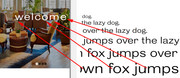
does this screenshot match what you see? Perhaps you need to clear your browser cache.Best regards,
MikeJune 4, 2019 at 12:12 am in reply to: Single Blog Post, Archive and Category doesn't show my fullwidht submenu #1106865Hi,
Please try this code in the General Styling > Quick CSS field or in the WordPress > Customize > Additional CSS field:#top.single span.text-sep-date { display: none !important; } .html_elegant-blog #top.single .post-entry .post-meta-infos { float: none !important; }Best regards,
MikeHi,
I checked again and your images are now showing, Please clear your browser cache and check.
Please see the screenshot in Private Content area.Best regards,
MikeHi,
Thanks for the SiteGround login but when I click the button “go to admin panel” I get a WordPress login prompt, and the above login details don’t work there.
Please check.Best regards,
MikeHi,
I added the css to your Quick CSS and then added an item to the cart and it works fine,

Please clear your browser cache and check.Best regards,
MikeHi,
Please try putting the input box inside of a column element that matches the width you wish to use, such as 1/2 or 1/3
We could assist with some css, if we could examine the site.Best regards,
MikeHey acroterion,
Unfortunately, this is not going to work because the icons are actually fonts and the “code” in your json is not going to match the database.
I wish it was this easy :)
So please upload your new icons as a pack and use it as a addon to the “icons” of your elements
I know you are trying to find a quick way through this, but unfortunately, there is not.Best regards,
MikeHi,
Try adding this code to the end of your functions.php file in Appearance > Editor:function alt_custom_script(){ ?> <script> (function($){ $(document).ready(function(){ $('span.subtext img').prop('alt', 'your new alt'); }); })(jQuery); </script> <?php } add_action('wp_footer', 'alt_custom_script');Please adjust the “your new alt” in the code to suit.
Best regards,
MikeHi,
Glad Rikard could help, we will close this now. Thank you for using Enfold.For your information, you can take a look at Enfold documentation here
For any other questions or issues, feel free to start new threads in the Enfold forum and we will gladly try to help you :)Best regards,
MikeJune 3, 2019 at 3:24 am in reply to: H1 and H2 Headings in Uppercase Guttenberg Editor Only #1106532Hi,
Glad Yigit was able to help, we will close this now. Thank you for using Enfold.For your information, you can take a look at Enfold documentation here
For any other questions or issues, feel free to start new threads in the Enfold forum and we will gladly try to help you :)Best regards,
MikeHey nickgin,
Please try this code in the General Styling > Quick CSS field or in the WordPress > Customize > Additional CSS field:#footer .textwidget ul.social_bookmarks { width: 40px !important; display: inline-block !important; }Best regards,
MikeHi,
Thank you for the login, I see that you are using Enfold v4.5.1 and WordPress v5.2.1
Unfortunately, Enfold v4.5.1 has some bugs and didn’t include our option to use the Classic Editor in the options:
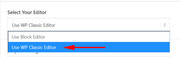
Please update via FTP to Enfold v4.5.7 and try again, if you still find an issue try switching to the “Classic Editor”
Yet I don’t believe you will find this issue with the latest version.The easiest and safest way to do this is to download the newest version from Theme Forest and rename your current theme to “enfold-old” then upload the new “enfold” and check that your site is working correctly.
Once you are happy you can delete the “enfold-old” via ftp, (not the WP theme page)
Should for some reason you wish to roll-back to the old version, it’s easy to do, simply rename the new “enfold” to “enfold-new” via ftp and then rename “enfold-old” to “enfold” then refresh your page.
Please don’t try to overwrite the theme folder, as this will leave old files behind and cause errors.Best regards,
MikeHey noizzion,
Bitte überprüfen Sie die Option: Einklappen> Shop-Optionen> Produktgalerie> WooCommerce 3.0-Produktgalerie
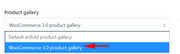
— Translated with Google —
Please check that the option: Enfold > Shop Options > Product gallery > WooCommerce 3.0 product gallery
Best regards,
MikeHi,
Please try this code in the General Styling > Quick CSS field or in the WordPress > Customize > Additional CSS field:.slide-content span.blog-categories.minor-meta { display: none !important; }Best regards,
MikeHi,
Glad to hear you were able to solve this, we will close this now. Thank you for using Enfold.For your information, you can take a look at Enfold documentation here
For any other questions or issues, feel free to start new threads in the Enfold forum and we will gladly try to help you :)Best regards,
MikeHey beckett5955,
For the version 3.0.8 you will need to update via FTP, due to the Theme Forest API/Token update.
Please ensure that your PHP is at least v5.6
Then follow these steps:
First download the theme from Theme Forest.
Then open it and extract the “enfold.zip” file and then extract it to your desktop as /enfold/
Then rename to /enfold-new/ and upload the folder to your /wp-content/themes/ folder via FTP or your file manager in your webhost cPanel
Then via FTP or your cPanel file manager, at /wp-content/themes/ rename /enfold/ to /enfold-old/ and rename /enfold-new/ to /enfold/Now your new version is installed, please check your site. If all is well then “Good Job!” If not then reverse the last rename step above and your site will be restored.
Please don’t try to overwrite the theme folder, as this will leave old files behind and cause errors.Best regards,
MikeJune 3, 2019 at 1:48 am in reply to: Single Blog Post, Archive and Category doesn't show my fullwidht submenu #1106510Hi,
Sorry, I think we are both on the site at the same time, and I saw your message about the doubled submenus so I restored your code.Best regards,
MikeHey kccollege,
Thank you for the links, I believe that you mean that the sidebar is showing below the content of the page just above the footer.
Please see the screenshot in Private Content area.
Typically, this occurs when a “full-width” element is in the page because it pushes the sidebar down below it. Such as a “color section”. I don’t see that this is the case this time, but I see in your page source code that your “gform_widget” has 100% width so I wonder if this is caused by a plugin.
I’m a little hesitant to make any changes because viewing your site in English and saving can be an issue. Please try disabling your plugins and checking again to see if this helps.
If this is no help, please see if your webhost offers a “staging site” typically this is a “one-click” option in your cPanel:
Here are some screenshots of what it would look like:

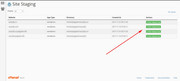
Best regards,
MikeHi,
I took a look at your site and it seems that the demo is installed correctly now, please see the link in the Private Content area.
it looks like you are using a count down page for your front page, but all of the pages and image seem to be there.
Did you already solve this?Best regards,
MikeHi,
Glad to hear that you got it sorted out, we will close this now. Thank you for using Enfold.For your information, you can take a look at Enfold documentation here
For any other questions or issues, feel free to start new threads in the Enfold forum and we will gladly try to help you :)Best regards,
MikeJune 3, 2019 at 12:23 am in reply to: Single Blog Post, Archive and Category doesn't show my fullwidht submenu #1106500Hey NoraGTS,
I believe this is a duplicate post of one I’m helping with now, if so let’s close this one and work in the other one :)Best regards,
MikeJune 2, 2019 at 11:51 pm in reply to: Single Blog Post, Archive and Category doesn't show my fullwidht submenu #1106488Hi,
I commented out your old function and added the new one, now the submenu shows on all 3 of the links above.
Please clear your browser cache and check.
I’m not sure which image should show on your single blog posts at the top, please advise.Best regards,
MikeHi,
Glad we were able to help, we will close this now. Thank you for using Enfold.For your information, you can take a look at Enfold documentation here
For any other questions or issues, feel free to start new threads in the Enfold forum and we will gladly try to help you :)Best regards,
MikeJune 2, 2019 at 11:28 pm in reply to: Single Blog Post, Archive and Category doesn't show my fullwidht submenu #1106479Hi,
I would recommend setting your theme option to no sidebar as the default, and then try adding this code to the end of your functions.php file in Appearance > Editor:add_action('ava_after_main_title', 'ava_after_main_title_mod'); function ava_after_main_title_mod() { echo do_shortcode("[av_submenu which_menu='center' menu='25' position='center' color='main_color' sticky='true' mobile='disabled' mobile_submenu=''][av_submenu_item title='Menu Item 1'][av_submenu_item title='Menu Item 2'] [av_submenu_item title='Menu Item 3'] [/av_submenu]"); }Best regards,
Mike -
AuthorPosts
