

Forum Replies Created
-
AuthorPosts
-
Hi,
@PhilCl please include admin login in the Private Content area so we can be of more assistance.Best regards,
MikeHey Joe,
Please try this code in the General Styling > Quick CSS field or in the WordPress > Customize > Additional CSS field:#after_masonry { border-color: transparent !important; }Best regards,
MikeHey Elena,
Thanks for the link, but unfortunately the video is embeded in an iframe with the gray area, which is their advertising area.
One can’t control the element through an iframe, such as the color of the page, in this case the height is set to show the gray area.Best regards,
MikeHey azhemp,
I have included the two layersliders in the Private Content area from the “Default Demo” you can import them though layerslider.
But please note that the “Default Demo” doesn’t include all of the media files.
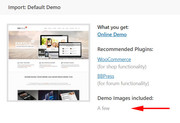
The demo export files are in the theme at: \enfold\includes\admin\demo_filesBest regards,
MikeHey S-edwards,
I see that you are getting this error:/wp-admin/admin-ajax.php: Failed to load resource: the server responded with a status of 400 ()Please try checking your PHP version, v7.1 is recommended.
If this doesn’t help, please include an admin login in the private content area so we can be of more assistance.Best regards,
MikeHi,
Sorry for the late reply, I have taken a look at your site and since it has been crashing, please include FTP access in the Private Content area, so we can try to install this for you.Best regards,
MikeHi,
Sorry for the late reply, Please try this code in the General Styling > Quick CSS field or in the WordPress > Customize > Additional CSS field:@media only screen and (max-width: 500px) { #audit_dynamic_form.seoaudit_widget { margin-bottom: 150px !important; } }Then clear your browser cache and check.
Best regards,
MikeHi,
Please try this code in the General Styling > Quick CSS field or in the WordPress > Customize > Additional CSS field:#top.home .main_color table { background: transparent !important; }Best regards,
MikeJune 8, 2019 at 8:45 pm in reply to: Search bar results that pop down not displaying as intended #1108491Hi,
Sorry for the late reply, I took a look at your site and see that the ajax search in the header.
It looks like something is overriding the css, have you tried disabling your plugins and clearing your browser cache to find a conflict?
Did you add any css that might be a conflict, if so try removing it and clearing your browser cache.
If this doesn’t help, please include an admin login in the private content area so we can be of more assistance.
and please let us disable your plugins to test.Best regards,
MikeHey schoenj,
Sorry for the late reply and thanks for the login, I see that your WordPress email is from gmail, and the autoresponder is from your domain. This can cause your server to flag the email as spam.
Please try setting your WordPress email to the domain email, then try using the “Reply-To Email Address” field in your SMTP plugin.
I tested your SMTP “test” email and it is sending fine, so that is good.Best regards,
MikeHi,
Sorry for the late reply, for your layerslider elements showing off the page, please clone a second layerslider and adjust the canvas to be very large and adjust the elements to look good at that size, then use the screen option to choose when to show each slider.Best regards,
MikeHi,
Sorry for the late reply, you can add icons to the end of your masonry titles with css like this:h3.av-masonry-entry-title:after { content: url(https://png.icons8.com/color/20/ffffff/usa.png); display: inline-block; padding-right: 10px; }just adjust the icon url above.
you can also show a different one for each of your post types or category by adding the unique class for those items before the other classes in the css above.
Please let us know if there is anything else we can assist with.Best regards,
MikeHey salveglobal,
I took a look at your site and I believe the css in your Quick CSS was created for a pricing table, and not for the table on your homepage “Formulas to stay”
To make the table and borders transparent Please try this code in the General Styling > Quick CSS field or in the WordPress > Customize > Additional CSS field:#top.home .main_color tr:nth-child(odd), #top.home .main_color tr:nth-child(even) { background: transparent !important; } #top.home .main_color tr, #top.home .main_color td, #top.home tr th:first-child, #top.home tr td:first-child, #top.home tr:first-child th, #top.home tr:first-child td { border-color: transparent !important; }Best regards,
MikeJune 8, 2019 at 6:27 pm in reply to: Unable to create a Color Section with full-width content as shown in tutorial #1108471Hi,
Glad we were able to help, we will close this now. Thank you for using Enfold.For your information, you can take a look at Enfold documentation here
For any other questions or issues, feel free to start new threads in the Enfold forum and we will gladly try to help you :)Best regards,
MikeJune 8, 2019 at 6:24 pm in reply to: Single Blog Post, Archive and Category doesn't show my fullwidht submenu #1108470Hi,
Please try this code in the General Styling > Quick CSS field or in the WordPress > Customize > Additional CSS field:@media only screen and (max-width: 767px) { #footer .flex_column { margin: 0; margin-bottom: 20px; width: 100% !important; } }Best regards,
MikeHey kellyCraftMedia,
Sorry this happened, I was able to re-open your other topic and posted a possible solution.
Let’s continue in the other thread.Best regards,
MikeHi,
Please try this code in the General Styling > Quick CSS field or in the WordPress > Customize > Additional CSS field:@media only screen and (max-width: 500px) { #socket > div { width: 65% !important; max-width: 65% !important; } #socket .avia3-menu { width: 85% !important; margin: auto !important; } #socket .avia3-menu li { padding-bottom: 2px !important; } }Best regards,
MikeHey red2design,
Please try this code in the General Styling > Quick CSS field or in the WordPress > Customize > Additional CSS field:@media only screen and (max-width: 767px) { #footer { background-size: contain !important; } }Best regards,
MikeJune 8, 2019 at 4:18 pm in reply to: Unable to create a Color Section with full-width content as shown in tutorial #1108452Hey bruwa,
Please try this code in the General Styling > Quick CSS field or in the WordPress > Customize > Additional CSS field:#section-container-width { background-size: cover !important; }Best regards,
MikeHey f.giorgini,
Sorry for the late reply, glad to hear you were able to create a solution, but can you link to a copy of your layerslider_after_slider_content function so we can try to recreate the issue?Best regards,
MikeHey P4K,
Sorry for the late reply, thanks for the shortcode and the link to your site. I have investigated this on my localhost and found that if you add a non-breaking space to the end of your number it will move the comma over one space, but the progress bar then fills out completely, as if the number is 100%.
Unfortunately the element only works will whole numbers, and I don’t see an easy way to adjust this without quite a bit of re-writing of the element, which is more than we can do here.
If you really want this customization, we can recommend Codeable for their experience and expertise with Enfold. Please follow the link to discuss your project and time frame with them.Best regards,
MikeHi,
Glad Nikko was able to help, we will close this now. Thank you for using Enfold.For your information, you can take a look at Enfold documentation here
For any other questions or issues, feel free to start new threads in the Enfold forum and we will gladly try to help you :)Best regards,
MikeJune 8, 2019 at 2:09 pm in reply to: Single Blog Post, Archive and Category doesn't show my fullwidht submenu #1108437Hi,
When I look at your current questions now, I don’t see one that is related to the sub-menu.
When I look at your padding it seems average, but this css should help:@media only screen and (max-width: 767px) { #top > div.container_wrap.container_wrap_first.main_color.fullsize > div { padding: 0px !important; } }Best regards,
MikeJune 8, 2019 at 7:54 am in reply to: is a central representation of a Masonry gallery possible? #1108415Hey m_reiprich,
Thank you for the links, instead of using and iframe or widget how about creating a shortcode for this Masonry gallery?
Then you could just use [our_supporters] to display the element
Here is an example, Try adjusting the shortcode in this code to your Masonry gallery and add it to the end of your functions.php file in Appearance > Editor:// our supporters shortcode = [our_supporters] function supporters_sc( ){ return do_shortcode('[av_font_icon icon="ue889" font="entypo-fontello" size="20px"][/av_font_icon]'); } add_shortcode( 'our_supporters', 'supporters_sc' );Just replace:
[av_font_icon icon="ue889" font="entypo-fontello" size="20px"][/av_font_icon]with the shortcode you want to use.
Please let us know if we can assist further.Best regards,
MikeHey Jan,
Thank you for the login, I examined your page and the \enfold\config-templatebuilder\avia-shortcodes\slideshow_revolution.php and found line 126 could be edited to change the ID
look for:$params['id'] = "layer_slider_".( avia_sc_revolutionslider::$slide_count );change to:
$params['id'] = "revolution_slider_".( avia_sc_revolutionslider::$slide_count );Please try to make this change via ftp to see if it helps, if so then we can create a child element for you and submit it to the dev team for review to include in an update.
If you wish I can help edit the file if you include ftp access in the Private Content area.Best regards,
MikeHey Michael,
I believe this javascript will help you. It looks like the javascript is added to your webview app instead of your site.Best regards,
MikeHey Sebastiaan,
Thank you for the video, so what is happening is that products created with the standard editor show the default product page with the default elements, but products created with the Advanced Layout Builder do not show these elements because it’s designed to give you a blank canvas to create with, and you will need to add the elements manually.
Please also note that the builders are not meant to be interchangeable, that is editing your pages with a different builder each time can cause lost or missing elements or other errors.Best regards,
MikeHi,
I recommend installing the plugin Widget Options, this will allow you to add a widget to your “archive” sidebar and only show it on certain categories.Best regards,
Mike -
AuthorPosts
