

Forum Replies Created
-
AuthorPosts
-
June 16, 2019 at 3:56 pm in reply to: Got the message – Your homepage cannot be indexed by search engines #1110802
Hi,
Glad Rikard could help you get it sorted out. Shall we close this thread then?Best regards,
MikeHi,
The related posts is not included automatically with the Advanced Layout Builder posts. But you can add it with a shortcode just be sure that your post shares tags with other posts, as this is what the element uses to get the other posts.
Try adding this code to the end of your functions.php file in Appearance > Editor:function related_posts_shortcode( $attr ) { ob_start(); get_template_part( 'includes/related-posts' ); return ob_get_clean(); } add_shortcode( 'rpost', 'related_posts_shortcode' );and then add this code in a “code block” element to display the related posts element:
[rpost]Best regards,
MikeHi,
Thanks for sharing your solution, your “-webkit-transform: none);” has a stray “)” otherwise it looks good.Best regards,
MikeHi,
Thanks for sharing your solution, we will close this now. Thank you for using Enfold.Best regards,
MikeHey mirotck,
Thanks for the link, I see that your logo has a lot of white space to the left, can you move your logo over some?
Please see the screenshot in Private Content area.Best regards,
MikeJune 16, 2019 at 2:40 pm in reply to: Advanced Layout Editor Not Resolving Post Sidebar Properly #1110792Hey StrategyDriven,
Thank you for the link to your site, I couldn’t login because of this message: “WordPress Login Temporarily Disabled”
Your page looks like it is using a full-width grid at the bottom of the page. Sidebars will always show below full-width elements.
Please try removing this and see if your sidebar returns to it’s placement.Best regards,
MikeHi,
Thank you for the login to your site, but I was not able to login to your ftp or strato, please check.
I did notice that your PHP Limit was 1200 which may not be enough time to unpack all of the files, please ask strato to change it to no limit. Or try uploading the files manually via ftp or in your “file manager”
the enfold directory needs to be in the themes directory, like this:
/wp-content/themes/enfold/
Then you can activate it in the themes panel.Best regards,
MikeHey mirotck,
Please try going to Enfold Theme Options > Advanced Styling and choose Main Menu Links then check the box at the bottom “Apply only to active state” and set your colors.
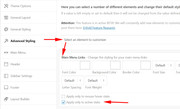
Please clear your browser cache and check.Best regards,
MikeHey birgitthaler,
Thanks for the login, Please try this code in the General Styling > Quick CSS field or in the WordPress > Customize > Additional CSS field:.mfp-arrow,.mfp-counter { display: none !important; } .mfp-container { pointer-events: none !important; }This will only allow one image to be seen.
Best regards,
MikeHey Roy,
Thanks for contacting us, but we don’t create websites or offer SEO, we create the theme that many top sites use to create their sites with. I hope you take a minute to look at our theme, thanks and have a great day.Best regards,
MikeHi,
I changed the code slightly so it will fire in the head instead of in the footer, but I noticed that you are getting some “Mixed Content” warnings because the links in the code are for http and not https, I tried just adding the “s” but then you get a 404
Please ask the author if they have a https address.Best regards,
MikeHi,
Thanks for the login, I couldn’t see the borders in the menu, and the menu text didn’t align center for me. I tested in Chrome, Firefox, Edge & IE11
Please see the screenshot in the Private Content area. Please try clearing your site and browser cache. Are you using Safari?Best regards,
MikeHey design_necca,
Thank you for explaining your swoosh, for your situation, there is not a css swoosh that can be added to take the place of your photoshop swoosh.
You could edit the sections in photoshop to make the sections transparent with the orange swoosh, but your still opening with photoshop.Best regards,
MikeHey KarenOlaf,
Fügen Sie im Bereich Private Inhalte einen Administrator-Login und einen FTP-Zugang ein, damit wir sehen können, warum Sie ihn nicht installieren können.— Translated with Google —
Please include an admin login & FTP access in the Private Content area so we can see why you can’t install it.
Best regards,
MikeHi,
Will all of the featured images going to link to the same site or page or does each need to be a different link?Best regards,
MikeHey Karen Hoffmann,
Please include an admin login & FTP access in the Private Content area so we can take a closer look.Best regards,
MikeHey VM,
Please see this post To disable the parent menu link so it cannot be clicked and show only the submenu items on hover please follow the below steps.Please go to Appearance > Menus > Select a menu to edit > Your menu
Expand the “Custom Links” options.
Create a parent menu item with its URL as “#” so it will not be clickable.
Add the submenu items to the parent menu.
Save your menu.Best regards,
MikeHi,
Please include an admin login in the Private Content area so we can see what is going on with your privacy policy link.Best regards,
MikeHi,
Glad we were able to help, we will close this now. Thank you for using Enfold.For your information, you can take a look at Enfold documentation here
For any other questions or issues, feel free to start new threads in the Enfold forum and we will gladly try to help you :)Best regards,
MikeHi,
Glad to hear it’s solved, unless there is anything else we can help with on this issue, shall we close this then?Best regards,
MikeHi,
Try adding this code to the end of your functions.php file in Appearance > Editor:function custom_script(){ ?> <script> (function($){ $(document).ready(function(){ $('.av-magazine-thumbnail a:not(:has(img))').closest( '.av-magazine-thumbnail' ).css({'opacity':'0'}); }); })(jQuery); </script> <?php } add_action('wp_footer', 'custom_script');it will remove the image frame when no image is included.
Please see the screenshot in Private Content area.Best regards,
MikeHi,
To center the “related products” title and increase the font, Please try this code in the General Styling > Quick CSS field or in the WordPress > Customize > Additional CSS field:.related.products { text-align: center !important; } .related.products > h2 { font-size: 22px !important; }please adjust to suit, Then clear your browser cache and any cache plugin, and check.
To change the related products text, Try adding this code to the end of your functions.php file in Appearance > Editor:
function custom_related_products(){
  ?>
  <script>
(function($){
  $(document).ready(function(){
  $('.related.products h2').each(function() {
    var text = $(this).text();
    $(this).text(text.replace('Related products', 'Awesome Deals'));
});
});
})(jQuery);
</script>
<?php
}
add_action('wp_footer', 'custom_related_products');
Please adjust “Awesome Deals” to suit. Also note that with this text replace, case does matter, see ‘Related products’
Best regards,
MikeHey rasa,
Please try adding your text into the title of your masonry galleryMap to the Unknown<br />2018<br /> Colored and Metallic Pens on Paper <br />8.5″ x 11″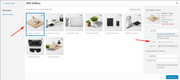
when I tested this it seem to work fine.
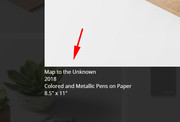
I also note that you are using Enfold v4.5.4, so if this still doesn’t help, please try updating to v4.5.7Best regards,
MikeHey Tobias,
Please try the author_link filter in your functions.php:// redirect author link add_filter( 'author_link', 'modify_author_link', 10, 1 ); function modify_author_link( $link ) { $link = 'http://example.com/'; return $link; }Please adjust the url to suit.
Best regards,
MikeJune 15, 2019 at 3:02 pm in reply to: Force product title to use H1 tag when using Advanced Layout Builder #1110668Hey IdeaZone2550,
For the standard product pages, the product title is in H1 tags, but when you create your own product page you will need to add each element. It sounds like you have added a title or you are referring to the top title bar:
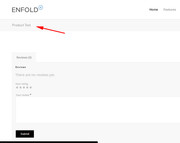
Please link to your product page so we can take a closer look.Best regards,
MikeHi,
Please try this link and in the sidebar navigation go to Main Menu > Main menu linksDisable parent menu link: To disable the parent menu link so it cannot be clicked and show only the submenu items on hover please follow the below steps.
Please go to Appearance > Menus > Select a menu to edit > Your menu
Expand the “Custom Links” options.
Create a parent menu item with its URL as “#” so it will not be clickable.
Add the submenu items to the parent menu.
Save your menu.Best regards,
MikeHey Julie,
If I understand correctly you would like to hide pages 5538 & 5536 from the sidebar navagation. Will this be for all pages or just some?
For example to hide the pages from certain pages, try some css like this:#top.page-id-5536 .widget_nav_menu .page-item-5536,#top.page-id-5536 .widget_nav_menu .page-item-5538 { display: none !important; }To hide them from all pages, please try css like this:
.widget_nav_menu .page-item-5536,.widget_nav_menu .page-item-5538 {
display: none !important;
}
To exclude pages from the screaches you will need to use a function like the one you poasted, have you tested this one?
Please let us know if this helps.Best regards,
MikeHey sky19er,
Thanks for the links and showing your css, but as I look at your homepage with the transparent glassy header I don’t see the logo jumping on scroll.
Please include a screenshot of what you are seeing, you can add screenshots by uploading your images to a service such as postimages.org and pasting the html code given in your post.Best regards,
Mike -
AuthorPosts
