

Forum Replies Created
-
AuthorPosts
-
June 20, 2019 at 4:51 am in reply to: Updating WordPress version / Enfold Theme / PHP Questions #1111794
Hi,
I believe the reason your site was broken was because you overwrote the v3.8.5 theme files. Please try the steps above where the new files are in a new folder called “enfold-new”
If you would like a hand with this Please include an admin login & FTP access in the Private Content area.
Also upload your updated theme as a zip to your theme’s folder.Best regards,
MikeHi,
To add new links to the Enfold Theme Options > Footer > Copyright field, simply add your html like this:<a href="https://www.yourdomain.com/link">Link</a>I checked the copyright field again and see that the text is already floating to the left, meaning that it aligns to the left of the page, so you should be all set.
Best regards,
MikeHi,
Glad to hear this helped. Please link to an example page that has a hero image that you want to remove because there is no fallback image. Also include another page that does have a fallback image and you don’t want to remove so I can check my code.
Is this for only certain screen sizes? I’m not really sure of your goal, or the space you are referring to:
…the actual space where the fallback image is supposed to go…
typically the fallback image takes the same space as the missing image.Best regards,
MikeJune 20, 2019 at 3:59 am in reply to: IconFont Manager: Uploading fontello font server error #1111789Hi,
I tested your icon zip file on my localhost but it still gave the same error, I tried to create a new file for you but I couldn’t find the same icons on fontello.
I assume that you simply choose them and downloaded the zip file, I choose 6 new icons and uploaded them with no issues, please check. Were these icons from their stock choices?
Please try re-creating your file and upload again.Best regards,
MikeHi,
Thanks for the login, I see that your default color for the “strong” tag is red, while you can change this in your Enfold Theme Options > Advanced Styling > Strong I will assume that there are cases on your site that you wish to continue with this color scheme. So please try this code in the General Styling > Quick CSS field or in the WordPress > Customize > Additional CSS field:.avia-image-container strong { color: #fff !important; }This will give you the white color on this element.
Each of the titles are “strong” but I don’t see your COMMUNITY & CONNECTIONS title to see if it’s also “strong” is this on a different page? I searched your pages but didn’t find that title.Best regards,
MikeHi,
Please include an admin login in the Private Content area, so we can examine closer.Best regards,
MikeHi,
Sorry for the late reply, thanks for the login, I see that your Privacy Policy link in your copyright section of your footer contains no link.
You will want to create a link like this:<a href="https://www.yourdomain.com/Privacy-Policy">Privacy Policy</a>I tried looking for your Privacy Policy page to create the link for you but I found none. If you would like help with this please link directly to the Privacy Policy page.
Best regards,
MikeHi,
Sorry for the late reply, please add more content so we can create 4 columns instead of two. It’s too bad that the plugin doesn’t offer some basic css but I’m sure we can help.
Your screenshot shows 4 items each for “my auctions” and “watchlist” which are two different elements.Best regards,
MikeJune 18, 2019 at 1:55 pm in reply to: IconFont Manager: Uploading fontello font server error #1111303Hi,
Your icon font fontello-7b142a38 is already installed:
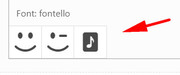
But I could removed it and reinstalled it.
Your other fontello-64e06485 is giving this error:admin-ajax.php Failed to load resource: the server responded with a status of 500 (Internal Server Error)Please ask your webhost if the server log shows an error for this.
Best regards,
MikeHi,
Please link directly to the page so we can see why your “strong” tag is not working.Best regards,
MikeHi,
You can remove the Enfold link by adding [nolink] into the Enfold Theme Options > Footer > Copyright field.
You can also add new links into this field.
If you want the links to float left, then add a custom class to your link and add css for floating:.custom-class { float:left !important; }Best regards,
MikeHi,
On your “events” page to only show the title, choose “Only Title” in the blog element options.

Then we will hide the categories with this css:.blog-categories.minor-meta { display: none !important; }Please clear your browser cache and check the first blog element on your events page.
Best regards,
MikeHi,
@formwild your code in your child theme functions.php should look like this:function custom_more_script(){ ?> <script> (function($){ $(document).ready(function(){ $(".more-link").text("Über das Buch"); }); })(jQuery); </script> <?php } add_action('wp_footer', 'custom_more_script');If this doesn’t work for you then we will need to login to examine it closer.
Please open a new thread so we can assist, and include your admin login in the Private Content area, but as this is not your thread your login info will not be private if posted here.Best regards,
MikeJune 18, 2019 at 12:12 pm in reply to: How to Hide Elemetns or adjust font size under Screen Options for Ipad Pro #1111275Hi,
Please ensure that your custom classes are enabled at: Enfold Theme Options > Layout Builder > Show element options for developers

Then as you edit each element a new field will show at the bottom of the screen for custom classes or sometimes custom IDsBest regards,
MikeHi,
Glad we could help, unless there is anything else we can help with on this issue, shall we close this then?Best regards,
MikeJune 17, 2019 at 1:07 am in reply to: Product Page with Avia Layout Architekt, Variable Product missing #1110879Hi,
Sorry for the late reply, in the theme options at: Enfold Theme Options > Shop Options > Product gallery there are two choices, WooCommerce gallery and Enfold gallery. Please give this a try.Best regards,
MikeHi,
To add a bottom line, Please try this code in the General Styling > Quick CSS field or in the WordPress > Customize > Additional CSS field:.js_active .top_tab .tab { border-bottom: solid .5px !important; }Best regards,
MikeJune 17, 2019 at 12:02 am in reply to: How to Hide Elemetns or adjust font size under Screen Options for Ipad Pro #1110875Hey webworm72,
You can use these media queries:/* ----------- iPad Pro ----------- */ /* Portrait and Landscape */ @media only screen and (min-width: 1024px) and (max-height: 1366px) and (-webkit-min-device-pixel-ratio: 1.5) { } /* Portrait */ @media only screen and (min-width: 1024px) and (max-height: 1366px) and (orientation: portrait) and (-webkit-min-device-pixel-ratio: 1.5) { } /* Landscape */ @media only screen and (min-width: 1024px) and (max-height: 1366px) and (orientation: landscape) and (-webkit-min-device-pixel-ratio: 1.5) { }Try adding a custom class or ID to the text area and then we can set the size in percentages like:
font-size: 70% !important;Best regards,
MikeHey ezmob,
Please don’t set your homepage as your 404 page, a 404 error code will also be given. Please try using a custom page with a link to your homepage or your top article.Best regards,
MikeJune 16, 2019 at 11:17 pm in reply to: Change 'Blog – Latest news' in breadcrumbs to something else #1110872Hey Jillian,
Try adding this code to the end of your functions.php file in Appearance > Editor:function custom_script(){ ?> <script> (function($){ $(document).ready(function(){ $('.main-title.entry-title a').each(function() { var text = $(this).text(); $(this).text(text.replace('Blog - Laatste Nieuws', 'News')); }); }); })(jQuery); </script> <?php } add_action('wp_footer', 'custom_script');this script looks for exact phrases so I added your “Blog – Laatste Nieuws” for you, please adjust “News” to suit.
Best regards,
MikeHi,
Sorry for the late reply, odd that they don’t at least have a default style. Right now it’s 100% width which is ok when it’s in the sidebar, but on your page it may look better as two columns. Please try this code in the General Styling > Quick CSS field or in the WordPress > Customize > Additional CSS field:#my-auctions-2 { width: 47% !important; display: inline-block; } #watchlist-auctions-3 { width: 47% !important; float: right; }Then clear your browser cache and any cache plugin, and check.
Best regards,
MikeJune 16, 2019 at 8:26 pm in reply to: IconFont Manager: Uploading fontello font server error #1110865Hi,
Sorry for the late reply, I have tried to import a font from your media library to your Custom Font Manager and this worked well. But I see that you seem to have a mix of fonts and icon fonts in your media library, perhaps you tried to import the wrong one?Best regards,
MikeHi,
I believe that you are using a blog element on your blog page, which has it’s own settings. The Enfold Theme Options > Blog Layout > Blog meta elements controls the elements showing on the built-in blog page which is set at Enfold Theme Options > And where do you want to display the Blog?Best regards,
MikeHi,
Sorry, I meant that I would like to login and edit the copyright field to see why your Privacy Policy link is not working.
The login above only lets me see the page, not edit.Best regards,
MikeHi,
You can see the changelog here there were a lot of changes but nothing really stands out to me as a cause.
It looks like your custom plugin was created with ACF, does ACF have any debugging tools?Best regards,
MikeHi,
Thank you for the login, I was able to also ftp in and upload the theme for you.
I then activated Enfold for you, you can start building or import a demo, I checked your PHP settings again and everything seems fine now.Best regards,
MikeHi,
I didn’t find a filter for it but I did write this javascript to replace the image url with the title url.
Try adding this code to the end of your functions.php file in Appearance > Editor:function archive_img_link(){ ?> <script> (function($){ $(document).ready(function(){ $(".entry-content-wrapper").each(function(){ var posturl = $(this).find("h2.post-title.entry-title a").attr("href"); $(this).find(".big-preview.multi-big a").attr("href", posturl); }); }); })(jQuery); </script> <?php } add_action('wp_footer', 'archive_img_link');Please give this a try and also check other pages and posts for conflicts.
Best regards,
Mike -
AuthorPosts
