

Forum Replies Created
-
AuthorPosts
-
June 10, 2019 at 12:44 am in reply to: Enfold Safari & Internet Explorer Darstellungsproblem #1108717
Hi,
Sorry for the late reply, I’ve been testing gradient text with IE11, and I have found that the css used for this effect doesn’t work in IE11. To see please check out this site
with Chrome or Edge:
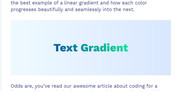
with IE11:
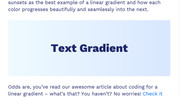
Best regards,
MikeJune 10, 2019 at 12:04 am in reply to: How to change the font color of an error message (contact form 7) #1108716Hey bruwa,
Please try this code in the General Styling > Quick CSS field or in the WordPress > Customize > Additional CSS field:span.wpcf7-not-valid-tip { color: #3345f5 !important; }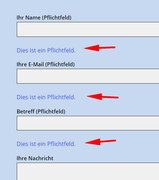
Best regards,
MikeHi,
Thanks for the login I took a look at your header.php in the child theme and see that it an old version that doesn’t include the last lightbox fix.
Please save a copy of your header.php as a backup for yourself and then move or remove the child theme header.php on the server so it’s not in use and see if this helps.Best regards,
MikeJune 9, 2019 at 11:23 pm in reply to: IconFont Manager: Uploading fontello font server error #1108709Hey mightyfrank,
Thanks for the login, I took a look and your settings seem fine as well as your files.
I see the error you are getting is “/wp-admin/admin-ajax.php 500 (Internal Server Error)” please ask your webhost to look into this and let us know what is causing the error.Best regards,
MikeHi,
Please try this code in the General Styling > Quick CSS field or in the WordPress > Customize > Additional CSS field:@media only screen and (max-width: 767px) { #menu-item-shop { margin-right: 50px !important; } }Best regards,
MikeHey jpluedtke,
Thanks for the screenshot and link, Try adding this code to the end of your functions.php file in Appearance > Editor:function ns_custom_script(){ ?> <script> (function ($) { $(window).load(function(){ $( "#menu-item-shop" ).appendTo( ".inner-container" ); $("#menu-item-shop").css({ 'float': 'right' }); $(".cart_dropdown").css({ 'border-width': '0px' }); $("span.logo").css({ 'display': 'none' }); }); })(jQuery); </script> <?php } add_action('wp_footer', 'ns_custom_script');Then clear your browser cache and any cache plugin, and check.
Best regards,
MikeHey kellyCraftMedia,
2: I believe this css will help with your underlines:#main a,#main .sidebar a,#footer a,#socket a, #main p a { text-decoration: underline !important; } a.avia-button,a span.avia_iconbox_title,#top .av_font_icon a.av-icon-char { text-decoration: none!important; }1: Please try this css for your header:
#header.av_header_glassy,#header {
background-color: rgba(71, 70, 67, 0.9) !important;
}

.responsive #top .header_bg {
    opacity: 0 !important;
}

#top .av_header_glassy.av_header_transparency #header_main {
    border-color: transparent !important;
}
I recommend testing the above css in the WordPress > Customize > Additional CSS field and Then clear your browser cache and any cache plugin, and check.
Best regards,
MikeHey Mike,
Please include what you are adding to the code block, I tested on my localhost and couldn’t reproduce this. Here’s what I added to my code block:<p>this is a test</p> <p>new line <br> another line <br> end of lines</p>Best regards,
MikeHi,
Glad we were able to help, we will close this now. Thank you for using Enfold.For your information, you can take a look at Enfold documentation here
For any other questions or issues, feel free to start new threads in the Enfold forum and we will gladly try to help you :)Best regards,
MikeHi,
Thanks for the login, I see that you are getting this error:/wp-admin/admin-ajax.php Failed to load resource: the server responded with a status of 406 ()Typically this is due to an ModSecurity error, please see this article for steps to follow to correct.
or ask your webhost to take a look at the error and take the appropriate steps.Best regards,
MikeHey Tobias,
The reason that your titles were not showing is because you had this function removing them:function remove_title_attr(){ ?> <script> jQuery(window).load(function(){ jQuery('#wrap_all a').removeAttr('title'); jQuery('#wrap_all img').removeAttr('title'); }); </script> <?php } add_action('wp_footer', 'remove_title_attr');So I commented this out so you could see.
Best regards,
MikeHey Julien,
Sorry I was not able to find any other issues like this, so perhaps an easy mistake has been made. Please try to follow these steps to see this corrects the issue.Best regards,
MikeJune 9, 2019 at 1:26 am in reply to: PROBLEMI CON IL CARICAMENTO DEL DEMO ENFLOD IN WORDPRESS LOCALE #1108516Hi,
Thanks for the screenshot, it looks like the menus need to be set, the one showing has to many items.
Please try going to your menus and choose the main menu and location. Then go to Enfold Theme Options > Performance > JS & CSS file merging and compression and disable both and save your theme settings, and Then clear your browser cache, and check.Best regards,
MikeJune 9, 2019 at 1:16 am in reply to: Mobile navigation: only open dropdown with av-submenu-indicator #1108515Hey Roel,
Sorry this is not possible without quite a lot of re-writing. But please let us know if there is anything else we can assist with.Best regards,
MikeHey nordicvision,
I took a look at your updated site and not see any 404’s for missing css files, how did you update?
Please include an admin login in the Private Content area to the staging site.Best regards,
MikeHi,
@PhilCl please include admin login in the Private Content area so we can be of more assistance.Best regards,
MikeHey Joe,
Please try this code in the General Styling > Quick CSS field or in the WordPress > Customize > Additional CSS field:#after_masonry { border-color: transparent !important; }Best regards,
MikeHey Elena,
Thanks for the link, but unfortunately the video is embeded in an iframe with the gray area, which is their advertising area.
One can’t control the element through an iframe, such as the color of the page, in this case the height is set to show the gray area.Best regards,
MikeHey azhemp,
I have included the two layersliders in the Private Content area from the “Default Demo” you can import them though layerslider.
But please note that the “Default Demo” doesn’t include all of the media files.

The demo export files are in the theme at: \enfold\includes\admin\demo_filesBest regards,
MikeHey S-edwards,
I see that you are getting this error:/wp-admin/admin-ajax.php: Failed to load resource: the server responded with a status of 400 ()Please try checking your PHP version, v7.1 is recommended.
If this doesn’t help, please include an admin login in the private content area so we can be of more assistance.Best regards,
MikeHi,
Sorry for the late reply, I have taken a look at your site and since it has been crashing, please include FTP access in the Private Content area, so we can try to install this for you.Best regards,
MikeHi,
Sorry for the late reply, Please try this code in the General Styling > Quick CSS field or in the WordPress > Customize > Additional CSS field:@media only screen and (max-width: 500px) { #audit_dynamic_form.seoaudit_widget { margin-bottom: 150px !important; } }Then clear your browser cache and check.
Best regards,
MikeHi,
Please try this code in the General Styling > Quick CSS field or in the WordPress > Customize > Additional CSS field:#top.home .main_color table { background: transparent !important; }Best regards,
MikeJune 8, 2019 at 8:45 pm in reply to: Search bar results that pop down not displaying as intended #1108491Hi,
Sorry for the late reply, I took a look at your site and see that the ajax search in the header.
It looks like something is overriding the css, have you tried disabling your plugins and clearing your browser cache to find a conflict?
Did you add any css that might be a conflict, if so try removing it and clearing your browser cache.
If this doesn’t help, please include an admin login in the private content area so we can be of more assistance.
and please let us disable your plugins to test.Best regards,
MikeHey schoenj,
Sorry for the late reply and thanks for the login, I see that your WordPress email is from gmail, and the autoresponder is from your domain. This can cause your server to flag the email as spam.
Please try setting your WordPress email to the domain email, then try using the “Reply-To Email Address” field in your SMTP plugin.
I tested your SMTP “test” email and it is sending fine, so that is good.Best regards,
MikeHi,
Sorry for the late reply, for your layerslider elements showing off the page, please clone a second layerslider and adjust the canvas to be very large and adjust the elements to look good at that size, then use the screen option to choose when to show each slider.Best regards,
Mike -
AuthorPosts
