

Forum Replies Created
-
AuthorPosts
-
Hi,
Sorry for the late reply, does your auction plugin have shortcodes that can be used instead of the widgets?
Perhaps we can add the shortcodes to code block elements and align them better on your page.Best regards,
MikeJune 23, 2019 at 4:31 pm in reply to: Preventing Fullwidth Break Point on Mobile for Specific Sections #1112712Hi,
Glad this helped, yes you can change the post entry # to apply to a new section, or if you add a custom class to the element and use this class instead of the post entry # you can apply it to anywhere on your site.
Please let us know if you want a hand in setting this up.Best regards,
MikeHi,
What I mean is that there is no restore after using “Reset all option”, but your webhost typically automatically creates backups and perhaps you can restore from a few days ago. If it’s not a big deal to you then don’t worry, I only point this out because I saw your site before and feel bad that you have lost your work now.Thank you for the FTP access, I renamed your current theme to “enfold-old” then I uploaded the new “enfold” and checked that your site is working correctly. Please also check for yourself.
Once you are happy you, (or I) can delete the “enfold-old” via ftp, (not the WP theme page)
Should for some reason you wish to roll-back to the old version, it’s easy to do, simply rename the new “enfold” to “enfold-new” via ftp and then rename “enfold-old” to “enfold” then refresh your page.But I see that updating your site didn’t solve, you still have an error from: #wp-auth-check-form and you also have: Last time we checked the token we were not able to connected to Envato
Please ensure that your token has the correct permissions checked off, please read here for more info
Best regards,
MikeHi,
Thanks for the login, I took a look at your site and backend, and tested by creating a new user with the details that you posted above for us that you said you couldn’t create. I then tried to edit your contact page a saw the error above the title field.
I found that you had checked “Load jQuery in your footer” in your theme settings which can cause errors because when a plugin or script is loading before the footer is loaded the jQuery will not be available. I also changed your default WordPress editor to the Classic Editor at: Enfold Theme Options > Select Your Editor > Use WP Classic Editor
I then made a small change to your contact page, saved, checked, and then undid without issue.
Please clear your browser cache and check.Best regards,
MikeHey craig_corfield,
Thanks for the link, but I don’t see your error on your site. But when you manually updated did you try to overwrite the theme folder?
Please don’t try to overwrite the theme folder, as this will leave old files behind and cause errors.
Please note that you should rename the “enfold” folder in /wp-content/themes/ to “enfold-old” via FTP, then upload the new “enfold” folder, once you see the new “enfold” is working you can delete the “enfold-old” folder.
Otherwise if it doesn’t work, rename the new enfold folder to “enfold-new” and rename the “enfold-old” back to “enfold” and let us know.Best regards,
MikeHi,
Thanks for the link, I tested your iframe and js on my localhost after cleaning the code of curly quotes and it seems to work fine.
I’m not sure how you were trying to add it to your Advanced Layout Builder, but I used the code block element for the iframe and code.
If you would like me to try to add it to your site, please let me know where you want it, otherwise please try to add it again in a code block element.Best regards,
MikeHi,
Glad we were able to help, we will close this now. Thank you for using Enfold.For your information, you can take a look at Enfold documentation here
For any other questions or issues, feel free to start new threads in the Enfold forum and we will gladly try to help you :)Best regards,
MikeHi,
Glad Victoria could help, we will close this now. Thank you for using Enfold.For your information, you can take a look at Enfold documentation here
For any other questions or issues, feel free to start new threads in the Enfold forum and we will gladly try to help you :)Best regards,
MikeHi,
Thanks for the link, the reason your sub-title is not centered on mobile is because of this custom css in your child theme stylesheet:/* Allineamento testo solo per desktop */ @media (max-width: 768px) { p {text-align: left;} }You could remove this to correct it, but I assume you want this for your text blocks, so please try this code in the General Styling > Quick CSS field or in the WordPress > Customize > Additional CSS field:
@media only screen and (max-width: 768px) {
.av-subheading p {
text-align: center!important
}
}
Best regards,
MikeHi,
Thanks for the link to your site, the toggle is designed to “slide” down to show the content.
I tried to find some javascript to center the content on click, but it was not reliable.Best regards,
MikeJune 23, 2019 at 1:23 am in reply to: Preventing Fullwidth Break Point on Mobile for Specific Sections #1112665Hi,
Please try this code in the General Styling > Quick CSS field or in the WordPress > Customize > Additional CSS field:@media only screen and (max-width: 767px) { .post-entry-734 div .av_one_fifth { margin-left: 6% !important; width: 15.2% !important; } .post-entry-734 div .av_one_fifth.avia-builder-el-36 { margin-left: 0% !important; width: 15.2% !important; } }Then clear your browser cache and any cache plugin, and check.
Best regards,
MikeHey nickgreaves,
Please try this code in the General Styling > Quick CSS field or in the WordPress > Customize > Additional CSS field:#menu-item-2048 > div { left: -205px !important; } #menu-item-2975 > div { left: -235px !important; }Best regards,
MikeHey sumio17,
When using the color sections you do have the option of “slanted border” which can be seen here. But for creating your own “wavy” borders, you can upload background images to columns or color sections.
Another option is to apply the background image with css. Here is a good video on how to do this.Best regards,
MikeHey Aurora,
Thanks for the login, I see that you are using the Advanced Layout Builder for your Blog page, when using the Advanced Layout Builder you will need to manually add the “comment element” to display the comments. This is to give you better control over your layout when compared to the default layout.Best regards,
MikeHey sutara,
I see that at the end of your post is “Fixed”, so I assume this is resolved and we can close this now, but if you still need help Please include an admin login & FTP access in the Private Content area.Best regards,
MikeHi,
Sorry, there is not an option to adjust the borders in the advanced css options.
After you try this, please let us know if it works for you.
Please ensure to clear your browser cache when you test.Best regards,
MikeHey tguarente,
Thanks for the login, I see that your logo had a lower z-index than your menu container, so it was behind it.
I adjusted your css to this:.container.av-logo-container { top: 0; z-index: 50; }so the logo is on top now and can be clicked, Please clear your browser cache twice and check.
For your token I see you are using Enfold v4.5.5, unfortunately, there was an error in this version that will require a manual update via ftp for the token and future updates to work, if you would like a hand with manually updating Please include FTP access in the Private Content area.Best regards,
MikeJune 22, 2019 at 10:46 pm in reply to: Cannot Update Post With .pdf Contained in The Text, Showing 404 Error #1112655Hey plafonta,
Odd, I see that you are using a child theme do you have any custom files in the child theme such as header.php?
I also see that “Download Brochure” works with .pdf but “Download Inclusions” doesn’t.
Please include admin login in the Private Content area so we can investigate further, ftp access would also be nice.Best regards,
MikeJune 22, 2019 at 10:10 pm in reply to: Code Block Element doesn't handle shortcodes properly #1112651Hi,
Wooho! Congrats and thanks @Guenni007 :)Best regards,
MikeJune 22, 2019 at 10:06 pm in reply to: Blog Overview Page: Open new window at click on article #1112650Hey pumpmakers,
Try adding this code to the end of your functions.php file in Appearance > Editor:function custom_blank_script(){ ?> <script> (function($){ $(document).ready(function(){ $("#top.page-id-13358 .post-entry a").attr('target', '_blank'); }); })(jQuery); </script> <?php } add_action('wp_footer', 'custom_blank_script');Best regards,
MikeHey golffan,
When I compare
https://chiropracticscience.com/?feed=podcast
http://z9q.9ce.myftpupload.com/?feed=podcast
both feeds look the same, but to answer your question you can roll back by renaming your theme folder via ftp to “enfold-new” then upload your old version as “enfold” via ftp and then check your site.
If you wish to undo this simply rename your old version to “enfold-old” via ftp and your original version to “enfold”Basically whichever version is named “enfold” will be the one that is loaded and the one named “enfold-x” will not be loaded.
I hope this makes sense, please let us know if we can be of more assistance.Best regards,
MikeJune 22, 2019 at 9:26 pm in reply to: User permission: Save and delete templates in Page Builder #1112632Hey OverlapAT,
Unfortunately this option is not available. You can manually disable elements in the builder or only load the elements that were added in the page in the Performance panel and look for the “Disable Template Builder Elements” section. Unfortunately, you can’t set it for a specific user role.Best regards,
MikeJune 22, 2019 at 9:11 pm in reply to: How to change CSS in config-templatebuilder/avia-shortcodes #1112624Hi,
Please copy your /wp-content/themes/enfold/config-templatebuilder/avia-shortcodes/table (or any shortcode folder) to your child theme in a folder named “shortcodes” like this:
/wp-content/themes/enfold-child/shortcodes/table/
in this folder please include the modfied table.css
then add this code to the end of your child theme functions.php file in Appearance > Editor:function avia_include_shortcode_template($paths) { $template_url = get_stylesheet_directory(); array_unshift($paths, $template_url.'/shortcodes/'); return $paths; } add_filter('avia_load_shortcodes', 'avia_include_shortcode_template', 15, 1);Now your custom file will be loaded.
Best regards,
MikeHi,
Please try this code in the General Styling > Quick CSS field or in the WordPress > Customize > Additional CSS field:#top.home #main .main_color { border-color: transparent !important; }Best regards,
MikeHi,
Glad to hear you have solved this, we will close this now. Thank you for using Enfold.For your information, you can take a look at Enfold documentation here
For any other questions or issues, feel free to start new threads in the Enfold forum and we will gladly try to help you :)Best regards,
MikeHey bortphotography,
Without examining your site I’m guessing that the “globe favicon” is in your root folder which is where most browsers look for the favicon by default, please try uploading your favicon to your root via ftp and clear your browser cache a couple of times.
If this doesn’t help then please link to your site so we can examine and tell us which browser you are using.Best regards,
MikeHi,
Thanks for the login, I took a look at your header widget and found that your widget area was named “Header Widget”, but the function is named “header” so I created a new widget area named the same and now the buttons show.
Please review and remove your widget area or rename and remove the one I created.
I also commented out your widget background color because it created a green stripe in the header and I was not sure what styling you wanted, but now that you can see the buttons you can adjust the css to suit.
Please let us know if there is anything more we can assist with.Best regards,
MikeHi,
Sorry for the late reply, I was able to login and check your site and view your screenshots and read the past posts.
In your first post you wrote that the “custom.css” was being overwritten, but when I check the file I don’t see any css rules added, I also don’t see any rules added to WordPress > Customize > Additional CSS and only two rules in your Quick CSS for both languages.
Typically with css issues like this, when custom css is added to theme files such as “custom.css” or “style.css” the performance css merged file needs to be updated by saving the theme settings again, but since you don’t have any added css in those files, this may not be the issue.
I would recommend disabling your cache plugin and the performance merging with the “Delete old CSS and JS files” checked.
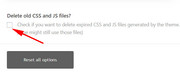
I would try this for you but I’m not clear what css is being overwritten, your screenshots seem to show the menu sidebar breaking out of it’s container:
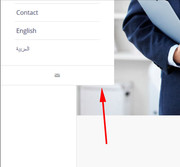
but I couldn’t see this error on your site.
second, it seems your RTL language the menu sidebar is also out of the container,
to correct the menu sidebar, Please try this code in the General Styling > Quick CSS field or in the WordPress > Customize > Additional CSS field:.html_header_left #top.rtl #main { margin-left: 0px !important; margin-right: 200px !important; }Best regards,
MikeHi,
Thanks @Guenni007 :)Best regards,
MikeJune 22, 2019 at 5:33 pm in reply to: Issue with uploaded font disappearing when SSL certificate is applied. #1112593Hi,
Thanks @Guenni007 :)Best regards,
Mike -
AuthorPosts
