Forum Replies Created
-
AuthorPosts
-
Hi,
Thanks for the ftp access, I was not able to adjust the code to do want you wanted, I did find that if I use this css with it I could show it only on the /en/my-account/ page.#top:not(.page-id-29) .auction-time-countdown { display: none !important; }Please clear your browser cache and check.
Best regards,
MikeHi,
Sorry for the late reply, to adjust the text size in the masonry please try this code in the General Styling > Quick CSS field or in the WordPress > Customize > Additional CSS field:h3.av-masonry-entry-title.entry-title { font-size: 30px !important; }Please adjust the font size to suit, and Then clear your browser cache and any cache plugin, and check.
Best regards,
MikeJune 30, 2019 at 9:48 pm in reply to: Cannot Update Post With .pdf Contained in The Text, Showing 404 Error #1114714Hi,
I tried to create a pdf link in a code block element, but that also wouldn’t save.
But I could save on a post, please see link in the Private Content area.I also found that you can use links created with: https://www.shorturl.at/
I tested this with your page, please check.Best regards,
MikeHi,
Sorry, I don’t think I was very clear. The “meta property” in the header is one place the date shows
But the date also shows lower in the page because of the “helper-markup.php” file
So it is in two places.Best regards,
MikeHi,
I uploaded it again to your main site and now it seems to be working correctly.
Please clear your browser cache and check.Best regards,
MikeHi,
I have found the solution for the audio player, it needed to be turned off:
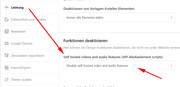
I have done this for you, Please clear your browser cache and check.Best regards,
MikeHi,
The structured-data datePublished is from Enfold, did you find the edit above removes it?Best regards,
MikeHi,
Glad to hear this is working, we could try adjusting it to only work on the one page like this:add_action( 'woocommerce_after_shop_loop_item_title','wpgenie_show_counter_in_loop',50 ); if ( is_page('29') ) { function wpgenie_show_counter_in_loop() { global $product; $time = ''; if ( ! isset( $product ) ) { return; } if ( 'auction' !== $product->get_type() ) { return; } $timetext = esc_html__( 'Time left', 'wc_simple_auctions' ); if ( ! $product->is_started() ) { $timetext = esc_html__( 'Starting in', 'wc_simple_auctions' ); $counter_time = $product->get_seconds_to_auction(); } else { $counter_time = $product->get_seconds_remaining(); } $future_class = ( $product->is_closed() === false ) && ( $product->is_started() === false ) ? 'future' : ''; $time = '<span class="time-left ">' . $timetext . '</span> <div class="auction-time-countdown ' . $future_class . '" data-time="' . esc_attr( $counter_time ) . '" data-auctionid="' . intval( $product->get_id() ) . '" data-format="' . esc_attr( get_option( 'simple_auctions_countdown_format' ) ) . '"></div>'; if ( $product->is_closed() ) { $time = '<span class="has-finished">' . __( 'Auction finished', 'wc_simple_auctions' ) . '</span>'; } echo $time; } }I couldn’t test it on your site without ftp access.
Best regards,
MikeHi,
Yes I sure that this not from Enfold, this is all of the dates in your header:<meta property="article:published_time" content="2012-02-21T13:48:40+00:00"> <meta property="article:modified_time" content="2019-06-30T17:10:27+00:00"> <meta property="og:updated_time" content="2019-06-30T17:10:27+00:00">To remove the structured-data datePublished from the post please try editing:
\enfold\includes\helper-markup.php
starting about line 372 look for:if( !in_array('date', $exclude) ) { $output .= "<span class='av-structured-data' {$entry_time_markup}>{$post->post_date}</span>"; } if( !in_array('date_modified', $exclude) ) { $output .= "<span class='av-structured-data' {$date_markup}>{$post->post_modified}</span>"; }and comment out like this:
/*if( !in_array('date', $exclude) )
		{
			$output .= "<span class='av-structured-data' {$entry_time_markup}>{$post->post_date}</span>";
		}

		if( !in_array('date_modified', $exclude) )
		{
			$output .= "<span class='av-structured-data' {$date_markup}>{$post->post_modified}</span>";
		}*/
Best regards,
MikeJune 30, 2019 at 7:30 pm in reply to: Put GDPR checkbox & text under submit button not before – how? #1114659Hi,
Thanks for the login, I have taken another look but I don’t see another way around this.
As for your WPRocket, the idea was that the script would be included in the cache and execute before the page was done loading.
But it looks like this won’t be the case. Since this is at the bottom of the page it won’t be seen unless you reload on top of it.
Have you thought about using the “preloader” option in the theme settings, so the script is not seen?
Best regards,
MikeHi,
To only target the second slide, please try this css instead:@media only screen and (min-width: 767px) and (max-width: 1023px) { .avia-slideshow-inner > li.slide-2 > div.avia-slide-wrap { max-height: 220px !important; } } @media only screen and (min-width: 1024px) and (max-width: 1438px) { .avia-slideshow-inner > li.slide-2 > div.avia-slide-wrap { max-height: 293px !important; } } @media only screen and (min-width: 1439px) { .avia-slideshow-inner > li.slide-2 > div.avia-slide-wrap { max-height: 430px !important; } }Please adjust the height to suit and clear your browser cache.
Best regards,
MikeHi,
Thank you, in your staging site I renamed your current theme to “enfold-old” then I renamed the new beta version “enfold” via ftp and then checked that your site was working correctly. I found that your contact shortcode in the footer widget was now working, with no other errors.
Please clear your browser cache and check.Best regards,
MikeHi,
Thanks for the feedback, the date is in your “structured-data” Please try going to Enfold Theme Options > Layout Builder > Automated Schema.org HTML Markup and disabling.
It is also showing in your header asmeta property="article:published_time"which I believe is from an seo plugin because it’s not in our demos, please check and deactavate.
Best regards,
MikeHi,
The theme doesn’t make any connections to your site unless you are installing a demo, in which case it’s:Please ask your webhost to check your PHP settings to see if the secure options are activated.
If “allow_url_fopen, “allow_url_include” and “register_globals” are “off”
Try turning these “on”.Best regards,
MikeJune 30, 2019 at 4:59 pm in reply to: Share buttons in blog posts opening new tabs instead of pop-up #1114604Hi,
I found that adding the attribute:onclick="window.open(this.href, 'windowName', 'width=1000, height=700, left=24, top=24, scrollbars, resizable'); return false;"forces a popup.
Try adding this code to the end of your functions.php file in Appearance > Editor:Please see belowBest regards,
MikeJune 30, 2019 at 3:15 pm in reply to: Broken Themes The following themes are installed but incomplete. #1114595Hi,
Glad we were able to help, we will close this now. Thank you for using Enfold.For your information, you can take a look at Enfold documentation here
For any other questions or issues, feel free to start new threads in the Enfold forum and we will gladly try to help you :)Best regards,
MikeJune 30, 2019 at 3:00 pm in reply to: Advanced Layout Builder has vanished after taking update #1114593Hi,
Thanks for the login, I tried resetting your site and import a demo and found that you got this error:/wp-admin/admin-ajax.php Failed to load resource: the server responded with a status of 503 (Backend fetch failed)Is your webhost using “Varnish cache server” or similar? Try asking your webhost to turn it off for now, or ask your webhost to check the server logs for the cause.
Another cause sometimes is the PHP security options are activated.
If “allow_url_fopen, “allow_url_include” and “register_globals” are “off”
Try turning these “on”, these are advanced settings so you may need to ask your webhost for help with this.Best regards,
MikeHi,
Glad to hear you have sorted it out, we will close this now. Thank you for using Enfold.For your information, you can take a look at Enfold documentation here
For any other questions or issues, feel free to start new threads in the Enfold forum and we will gladly try to help you :)Best regards,
MikeHi,
I took a look at your issue and came up with this jQuery to try:
Try adding this code to the end of your functions.php file in Appearance > Editor:function custom_script(){ ?> <script> jQuery(window).load(function(){ var el = document.querySelector('.avia-builder-el-62'); el.outerHTML = '<span class="wistia_embed wistia_async_yc4a91nw7z popover=true popoverAnimateThumbnail=true popoverContent=link" style="display: inline; position: relative;"><a href="#"><img src="https://flowster.app/wp-content/uploads/2019/06/Flowster-laptop-mockup-WP-FORUM.png" class="avia_image litespeed-loaded" data-src="https://flowster-wp.sfo2.cdn.digitaloceanspaces.com/2019/06/Flowster-mockup-laptop-cell-phone.webp" alt="" title="" itemprop="thumbnailUrl" data-was-processed="true"></a>' + el.innerHTML + '</span>'; }); </script> <?php } add_action('wp_footer', 'custom_script');while it does play the video in a popup, the laptop image is too small. But perhaps this will help put you on the right path.
Best regards,
MikeHey Munford,
For a more advanced search, you can use Relevanssi. You can find the implementation hereBest regards,
MikeHi,
Glad to hear that it is sorted out now, unless there is anything else we can help with on this issue, shall we close this then?Best regards,
MikeHey bur2000,
Please try this solutionBest regards,
MikeHey Miki,
Thank you for the link to your page, the menu items are not showing because they are empty, it seems this is blocked by the password protection, is this a plugin or the default password protection?To hide the gray box we would need to find a class for password protection and not, but I don’t see one.
Perhaps we could assist more if we could login to see your backend.Best regards,
MikeHey moderntech2014,
Sorry for the late reply, I was not able to login or see your site, are you blocking some countries?Best regards,
MikeJune 30, 2019 at 1:32 am in reply to: Blog posts displayed in Masonry element open up in new tab? #1114546Hey bobfurgo,
Sorry for the late reply, we could do this with some javascript but we will need to see the page to examine the sectors.
Right now the page requires a login to view.Best regards,
MikeHey jscarlett,
Sorry for the late reply, please try changing your css above to this:@media only screen and (max-width: 1430px) { nav.main_menu { display: none !important; } #avia-menu .menu-item { display: none; } .av-burger-menu-main.menu-item-avia-special { display: block !important; } }Best regards,
Mike -
AuthorPosts