

Forum Replies Created
-
AuthorPosts
-
Hey jamesedwardcouncill,
Thanks for the link, I didn’t find any padding on your logo or menu, but I did find that your height is 116px, where typically it’s 88px.
Please try this code in the General Styling > Quick CSS field or in the WordPress > Customize > Additional CSS field:@media only screen and (min-width: 767px) { .html_header_top.html_header_sticky.html_large #header_main .container,.avia-menu.av-main-nav-wrap.av_menu_icon_beside,.menu-item.menu-item-top-level,.menu-item.menu-item-top-level a { height: 88px !important; line-height: 88px !important; } }Then clear your browser cache and check.
Please see the screenshot in Private Content area of the expected results.Best regards,
MikeAugust 21, 2019 at 3:44 am in reply to: Need to download Enfold again and not on theme forest downloads #1129397Hey lisetyrrell,
Can you please explain what is “wonky” about your frontpage, perhaps it is an issue with the version and another solution other than reinstalling the same version would help more.
I see that you are using the Autoptimize plugin, this sometimes can cause issues when the theme and Autoptimize are both merging or minifying javascript, I assume you have tried disabling plugins as a test.
Is it that you don’t see any Enfold version in your Theme Forest download area, or is it that you only see a older version in your download area?
I ask because some users have reported that Theme Forest often shows the original version number bought in the download area, but when it’s downloaded it is the latest version, it seems that while the file gets updated the page doesn’t show the correct version number.
To check the actual version number of the download, please extract the file to your computer and find the style.css file at:
enfold/style.css
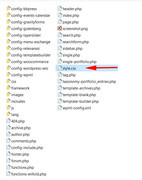
Then look on line 4 for the version number:
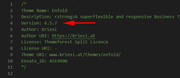
Best regards,
MikeAugust 20, 2019 at 8:31 am in reply to: Next/Previous working across categories/ how to restrict to same category #1129152Hi,
Thank you for sharing your solution, I’m certain others will find this helpful.
We will close this now, as you asked. Thank you for using Enfold.Best regards,
MikeHi,
To add screenshots to this thread please use an image host such as https://postimages.org/ and then post the links.
For your question about “Tags”, I took a look at both of your links and the first one has the word “Tags” in the post (screenshot 1) and the second link has the word “Tag” in the URL (screenshot 2)
So I assume that you would like the word “Nøgleord” to replace both?For the first one, Try adding this code to the end of your functions.php file in Appearance > Editor:
function custom_tag_script(){
  ?>
  <script>
(function($){
  $(document).ready(function(){
  $('.blog-tags.minor-meta strong').each(function() {
    var text = $(this).text();
    $(this).text(text.replace('Tags', 'Nøgleord'));
});
});
})(jQuery);
</script>
<?php
}
add_action('wp_footer', 'custom_tag_script');
Please see the screenshot 3 in Private Content area.
For the second one, the word “Tag” can be changed at WordPress > Settings > Permalink Settings > Tag base
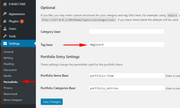
then the URL is changed:
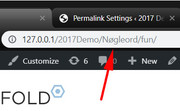
Please let me know if I understood correctly.
Best regards,
MikeHi,
Thanks for the feedback, when you test the plugin try making the custom menu with full path url’s so from the privacy policy it will link back to your homepage.
Please let us know how you make out.Best regards,
MikeAugust 20, 2019 at 6:25 am in reply to: Sometimes it shows a google map, sometimes it don't… #1129125Hi,
Glad to hear that you found the solution and thanks for sharing.
Since you don’t seem to have any errors from the old header.php right now, which typically has to do with the lightbox or a low PHP version, I would say that updating the header.php is not important for you. But please keep this in mind should you experience an odd error in the future, at that time you could test an updated header.php just to see if it helps.Best regards,
MikeHi,
Thank you for explaining, so I examined the sub menu items and found that there was no css causing the italics and the browser listed the text as font style as “normal”
If I changed the font in your advanced styles to another built-in font the error didn’t occur, after I cleared my cache.
I downloaded the font zip from your media library and tested on my localhost, and the error occurred for me also.
But I could not find a reason for this, I do note that the advanced styling doesn’t give the option to choose a font style for the “main menu”.
I tried deleting the italic font files from the zip file and then imported it again and this time the error didn’t occur. I then tested adding the “em” tag and also tested using “font-style: italic;” css, both of which displayed italics.
So it seems that the italic font files are not needed to display italic, but for some reason, the files are causing an error.Please give this a try, and let us know if it helps.
Best regards,
MikeHi,
The reason your menu is not “working” on this page is because all of your menu items are pointing to anchors that do not exist on this page.
I see that your menu has been created for a “one page” site, which is your homepage. So when you created your menu you used the custom menu links option and you put hash tag links in the url, such as “#about”, which points to the anchors on the homepage, which is correct and works well. But now when you created this new page the menu has no anchors to point to so nothing happens when you click them.To change this and have different custom menus on different pages you can install the Menu Swapper plugin and create custom menus that can be assigned to any page that you wish.
I have tested this to ensure that it works with the current version of Enfold. Please give this a try, I recommend watching the video on the plugin page to understand how to use it. Please let us know if you have any questions about setting it up for Enfold.Best regards,
MikeAugust 20, 2019 at 3:56 am in reply to: Enfold Security – Suspicious Functions (Unsanitized + Unserialized User Inputs) #1129080Hi,
@mhedhli, I have sent this request.
Thank you for your patience for a reply.Best regards,
MikeHi,
Sorry for the late reply, for the first screenshot, I believe this css is in your child theme styles.css or in the Quick CSS of another language. Some language plugins create a theme panel for each language.
For your second screenshot, the font size for the H3 is barred because the text is in italics “em” tag (font-size: 100%;), which is in an H3 tag (19px), in this case “em” wins, but the font size is still 19px.
Your third screenshot is not working because the css in the first issue is overriding:
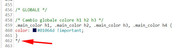
But as I took this screenshot I noticed a roge */ please see the arrow pointing to it, and please check your css carefully, if you have more of these it could block out huge chunks of css.Best regards,
MikeHi,
Sorry for the late reply, but glad you were able to sort it out, thanks for using Enfold.Best regards,
MikeAugust 19, 2019 at 12:08 am in reply to: Enfold 4.5 Theme Update "Update Failed: Download failed. A valid URL was not pro #1128749Hi,
Thanks :)
Glad we were able to help, Thank you for using Enfold.For your information, you can take a look at Enfold documentation here
For any other questions or issues, feel free to start new threads in the Enfold forum and we will gladly try to help you :)Best regards,
MikeHi,
Sorry for the late reply, and thanks for the image and login.
I didn’t find the advanced styling that was in your screenshot, so I added it, and when I checked the front end I found this css overriding:#top #header #avia-menu > li:hover > a { background: #fff !important; border: 0 !important; } #top #header #avia-menu > li:hover > a span.avia-menu-text { color: #710e15 !important; border: 0 !important; }This was in your WordPress > Customize > Additional CSS so I committed out and cleared your site cache.
But this didn’t allow your advanced styling or Quick CSS to work. I could not find any errors and don’t see any plugins that may cause this.
But your WordPress > Customize > Additional CSS does seem to work with this:#top #header #avia-menu > li:hover > a { background: #710e15 !important; } #top #header #avia-menu > li:hover > a span.avia-menu-text { color: #fff !important; }Does your web server have a server level cache?
I do notice your PHP version is 5.6.2, please ask your webhost to update to v7.2Best regards,
MikeHey Urs E.,
Sorry for the late reply, have you tried entering the API’s in the theme settings for each language? That is the German one in the German theme panel, and the English one in the English theme panel?
Typically the Quick CSS field is separate in each language so I assume the whole theme panel is separate.Best regards,
MikeHi,
lol, yes you know me too well :)
Glad we were able to help, we will close this now. Thank you for using Enfold.For your information, you can take a look at Enfold documentation here
For any other questions or issues, feel free to start new threads in the Enfold forum and we will gladly try to help you :)Best regards,
MikeAugust 18, 2019 at 11:01 pm in reply to: Sometimes it shows a google map, sometimes it don't… #1128740Hi,
Sorry for the late reply and thanks for the login and links.
For the page that doesn’t have the map you are getting the “mediaelementplayer is not a function” error. I see that the page has a video and a Google Map iframe that is in “street view” so I changed your “Self hosted videos and audio features (WP-Mediaelement scripts)” setting so the “mediaelementplayer” would be a function, this has worked for this error in the past, but it didn’t on your site, it, in fact, caused the error on the working page, so I reverted the setting back and solved the error on the working page.
On further investigation, I found that your child theme is using an old header.php, which is known to cause lightbox errors, but I don’t think you are using our lightbox, I see the FooBox plugin.
I found a function on StackOverflow that may work, but your site says that the functions.php must be changed via sftp so I can’t add it, perhaps you can try. I did test it on my localhost and it caused no errors.So to summarize, please try:
1: Try removing the Google “street view” map next to the video at the bottom of the page, perhaps a conflict?
2: Disabling your plugins, perhaps one is causing a video conflict, the broken page is the only video I could find?
3: Update your child theme header.php
4: Try the function at the StackOverflow link above.Best regards,
MikeHi,
Sorry for the late reply, I took a look at your Google API screenshots in your media library, and they look correct when I compare to mine. I tested my API on your site and it worked correctly, I use “no restrictions” for testing.
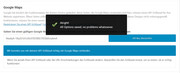
Please try creating a new API key with no restriction at all:
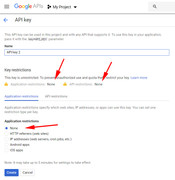
and wait 1 hour, then add it into your theme settings, this should work. Then wait 24 hours before adding any restrictions to the key.Best regards,
MikeAugust 18, 2019 at 8:55 pm in reply to: Why Does My Layer Sliders No longer work when importing #1128726Hi,
Sorry for the late reply, at your link above (twice) the two sliders on your page are working for me. The first slider automatically switches and the one below with the chair works well.
Did you already resolve this?Best regards,
MikeAugust 18, 2019 at 8:50 pm in reply to: How to Realize Bullet Window Effect by Button element? #1128725Hi,
Sorry for the late reply, I have not used this plugin before, but from your screenshots and the plugin documentation, it looks like you would use this as the url in the button: #popmake-3586
If this doesn’t help, please include an admin login in the private content area so we can be of more assistance.Best regards,
MikeHi,
Well done :)
Glad we were able to help, we will close this now. Thank you for using Enfold.For your information, you can take a look at Enfold documentation here
For any other questions or issues, feel free to start new threads in the Enfold forum and we will gladly try to help you :)Best regards,
MikeHi,
Glad to hear, the text block above the buttons have margin also, I didn’t address that, I was only looking at the top part.
Please try this css instead:#top.page-id-1346 .av_one_third.av-zero-column-padding .av_promobox:first-child { margin: 0 !important; } #top.page-id-1346 .av_one_third.av-zero-column-padding .av_promobox:nth-child(2) { margin: 0 !important; }There is still a little padding above the buttons, but I’m not sure how close you want the buttons to the text.
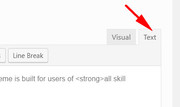
For your button shortcode, if you add it to a text block element you need to switch to the “text” tab, not the “visual” tab:
Best regards,
MikeHi,
You need to add the second slider to the page in the backend, so you have two sliders like this:

Best regards,
MikeHi,
You don’t need to add the ID’s to the lyerslider, it is automatically created in the theme, and add the css above, as is, to your Quick CSS in the theme.Best regards,
MikeHi,
In the css it is #layer_slider_1 & #layer_slider_2 as above.*side note*
In css the hashtag means ID & a dot means class.
But if you ever add custom classes or ID’s in the elements you would not add the dots & hashtags, I hope I’m not confusing you, if so just ignore this side note :)Best regards,
MikeHi,
Ok, we will close this now. Thank you for using Enfold.For your information, you can take a look at Enfold documentation here
For any other questions or issues, feel free to start new threads in the Enfold forum and we will gladly try to help you :)Best regards,
MikeHi,
I recommend using the auto-generated slider ID’s, for example, the slider that is on your front page now is “#layer_slider_1” so if you add another one to the page it should be “#layer_slider_2”
I understand that your site is live and you won’t want it to look too odd for very long, so I recommend creating your second slider and then add an admin login in the Private Content area, I will add it to your front page and add the css and test for you, if you wish.
Or you could try adding the second slider and try this css code in the General Styling > Quick CSS field or in the WordPress > Customize > Additional CSS field:@media only screen and (min-width: 501px) { #layer_slider_1 { display: block !important; } #layer_slider_2 { display: none !important; } } @media only screen and (max-width: 500px) { #layer_slider_2 { display: block !important; } #layer_slider_1 { display: none !important; } }I tested this on my localhost and it works correctly using the auto generated ID’s, but you will want to remove the other css added from the above posts.
Then clear your browser cache and check.Best regards,
MikeHey Julie,
Sorry for the late reply, thanks for the login. I took a look at your page and see italics, but everywhere I look in the backend I also see manually entered<em>, such as the Team Member Description & Accordion Toggles, so I’m not sure where you see the error and have a italics you do not want. Please advise. One possibility is that you have an open italics tag somewhere that is affecting the regular text.
Best regards,
MikeHi,
Sorry for the late reply, the best solution, in this case, is to create a second slider for mobile devices. You can clone your desktop version and then adjust the canvas size to match mobile, that is to make it taller than wide 425px x 168px or how ever tall you wish it to be.
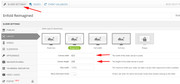
Then you can make your text and buttons larger and align them on the page as you like.
Then you can use css to hide and show the two sliders depending on the screen size, for example:@media only screen and (min-width: 768px) { #layerslider-1 { display: block !important; } #layerslider-2 { display: none !important; } } @media only screen and (max-width: 767px) { #layerslider-2 { display: block !important; } #layerslider-1 { display: none !important; } }If you would like help with the css please create the slider and include admin login in the Private Content area so we can examine the sectors and write the css.
Best regards,
MikeHi,
Sorry for the late reply, the best solution, in this case, is to create a second slider for mobile devices. You can clone your desktop version and then adjust the canvas size to match mobile, that is to make it taller than wide 425px x 168px or how ever tall you wish it to be.
Then you can make your text and buttons larger and align them on the page as you like.
Then you can use css to hide and show the two sliders depending on the screen size, for example:@media only screen and (min-width: 768px) { #layerslider-1 { display: block !important; } #layerslider-2 { display: none !important; } } @media only screen and (max-width: 767px) { #layerslider-2 { display: block !important; } #layerslider-1 { display: none !important; } }If you would like help with the css please create the slider and include admin login in the Private Content area so we can examine the sectors and write the css.
Best regards,
Mike -
AuthorPosts
