

Forum Replies Created
-
AuthorPosts
-
September 1, 2019 at 1:44 am in reply to: I can't view the CSS edits made in Enfold Child Stylesheet #1132598
Hey Gianlucabu,
Glad to hear you have sorted this out, we will close this now. Thank you for using Enfold.For your information, you can take a look at Enfold documentation here
For any other questions or issues, feel free to start new threads in the Enfold forum and we will gladly try to help you :)Best regards,
MikeSeptember 1, 2019 at 1:40 am in reply to: "Read more" button on cookie bar after 4.6 update #1132597Hey grafiko_at_62,
Do you believe that it is due to the cookie bar at the top? I couldn’t recreate this error. Please link to your site so we can assist.
Have you tried to disable your plugins to rule out a conflict?Best regards,
MikeHey Diana,
Thank you for the screenshots, the standard editor is not designed to work with the Advanced Layout Builder, so whichever builder you start with please continue with that one. If you want to use the standard editor and add an ALB element to it you can use the shortcode wand that is in the standard toolbar.Best regards,
MikeHi,
Glad to help, but I may be overthinking your request, so you want to remove the categories and author and replace with the post time? Also date and time are not links?
Please see the screenshot in Private Content area.Best regards,
MikeHi,
Yes this code could break if you move the page elements around, I recommend adding custom classes to the 3 elements and adjust the css. You can add column IDs by enabling the theme option at: Enfold Theme Options > Layout Builder > Builder Options For Developers I’m pretty sure this was an option in v4.5.7, but I know it is in v4.6 I recommend updating as there is a large list of fixes in this one.
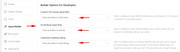
here’s the option in the column element:
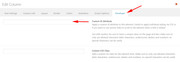
Best regards,
MikeHey nickthe,
Thanks for the link and explanation, Please try this code in the General Styling > Quick CSS field or in the WordPress > Customize > Additional CSS field:#top.home .container_wrap .avia-builder-el-first { margin-top: -80px !important; margin-right: -80px !important; }Please see the screenshot in Private Content area.
Best regards,
MikeHey ryane2222,
Do you want to change it or remove it? This css will remove it:#top.single-product .image-overlay-inside:before { display: none !important; }Best regards,
MikeHi,
Thanks for the login and screenshots, please try updating to v4.6 I believe your install is corrupt as you don’t have the sidebar.phpBest regards,
MikeHi,
Glad we were able to help, Thank you for using Enfold.For your information, you can take a look at Enfold documentation here
For any other questions or issues, feel free to start new threads in the Enfold forum and we will gladly try to help you :)
You also have a great holiday weekend!Best regards,
MikeHey mosesjohnson,
Thanks for the login, to remove the default socket link, and add a link to the top of your page, I added this to your Enfold Theme Options > Footer > Copyright field:[nolink] © Copyright - <a href="/#top">Geeks Modo</a>Please clear your browser cache and check.
Best regards,
MikeHey photographie-tous-azimuts,
Please try this code in the General Styling > Quick CSS field or in the WordPress > Customize > Additional CSS field, it will only work on this one page:@media only screen and (max-width: 767px) { #top.postid-1212 #after_submenu_1 .entry-content-wrapper { display: flex !important; flex-wrap: wrap !important; } #top.postid-1212 #after_submenu_1 .flex_column.avia-builder-el-20 { order: 2 !important; } #top.postid-1212 #after_submenu_1 .flex_column.avia-builder-el-22 { order: 1 !important; } }Best regards,
MikeHey icentrics,
Thank you for the login, I checked your page in Chrome, Firefox, Edge & IE11 and the slider and images loaded.
Please try clearing your browser cache and checking again.Best regards,
MikeHey flomojoe,
This is handled by the plugin, please see this documentation I found for you at wpforms.
If you have further questions about wpforms I’m sure their support would have more experience with the plugin.Best regards,
MikeHey alexander villumsen,
Please try this code in the General Styling > Quick CSS field or in the WordPress > Customize > Additional CSS field:.html_header_sidebar .logo { width: 30% !important; padding: 10px !important; border-bottom-width: 0px !important; }Feel free to adjust the values to suit, Then clear your browser cache and any cache plugin, and check.
Best regards,
MikeHi,
We will close this now. Thank you for using Enfold.For your information, you can take a look at Enfold documentation here
For any other questions or issues, feel free to start new threads in the Enfold forum and we will gladly try to help you :)Best regards,
MikeAugust 31, 2019 at 9:25 pm in reply to: Hamburger menu icon – png for open and another for closed #1132562Hey katjax3,
Sorry for the late reply, Please try this code in the General Styling > Quick CSS field or in the WordPress > Customize > Additional CSS field instead of your css above:.av-inserted-main-menu .av-hamburger-box::before { content: url(https://png.icons8.com/flat_round/50/000000/list.png) !important; display: block; padding-top: 15px } .av-inserted-main-menu.is-active .av-hamburger-box::before { content: url(https://img.icons8.com/cotton/50/000000/menu.png) !important; display: block; padding-top: 15px; } .av-hamburger-inner {display:none!important;}Best regards,
MikeHey caw67,
Sorry for the late reply, I assume the string for “I agree” is for a button, please try updating to v4.6 because we have a new option that allows you to change the button labels:
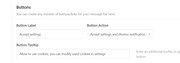
Before updating, it’s a good practice to create a full backup with your webhost’s tools.Best regards,
MikeHey crtdude,
Sorry for the late reply, and thanks for the link to the test results. I have taken a look at it and the Yslow score, and I see that there is an explanation for each of the “F” items and what they expect to see changed, so it seems that a person could manually make some of these changes.
But it seems to me that Yslow is targeted towards static html sites because of the “Reduce the number of DOM elements” recommendation, which is not going to be possible.I ran a different test on your site using WebPageTest.org and found that out of a 15s load time the “tawk.to” (chat client) took 9.5s
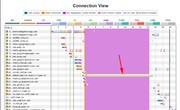
but other than that your site seems to be loading good for WordPress with plugins.
As for cache plugins, I have seen very few problems with WP Rocket and WP Optimize, but Autoptimize is often the first thing to disable to solve issues.
I hope this helps.Best regards,
MikeHi,
Glad to hear it’s sorted out now, thanks @Monopsony.
We will close this now. Thank you for using Enfold.For your information, you can take a look at Enfold documentation here
For any other questions or issues, feel free to start new threads in the Enfold forum and we will gladly try to help you :)Best regards,
MikeHi,
Sorry, is the special character the umlaut, the two dots over the U, or is it something that is not in the screenshot?Best regards,
MikeHi,
Glad to hear that the update worked for you, I see the space and it seems to be in-line css that is from a setting or the slider, I’m not quite sure, I tried checking but I don’t know the Slider Revolution settings well, but this css that I added to your quick css corrects:#revolutionslider_1 { min-height: 0 !important; }Please clear your browser cache and check.
Best regards,
MikeHey Arnout_Reitsma,
I have tried to test the cookie notice and sumo on a fresh install of v4.6, I set the popup for every one day and exit intent, once I logged out as admin sumo behaved correctly and only showed once, perhaps while logged in the popup is in demo mode? The cookie notice only showed once. Are you testing while logged out? Have you tried deactivating other plugins to test?Best regards,
MikeHi,
Please try updating to Enfold v4.6, if you update via ftp you will be able to test v4.6 and keep your current version just in case you wish to roll back.
The easiest and safest way to do this is to download the newest version from Theme Forest and rename your current theme to “enfold-old” via ftp then upload the new “enfold” via ftp and check that your site is working correctly.
Should for some reason you wish to roll-back to the old version, it’s easy to do, simply rename the new “enfold” to “enfold-new” via ftp and then rename “enfold-old” to “enfold” then refresh your page.
Or if you are happy you can delete the “enfold-old” via ftp, (not the WP theme page)
Please don’t try to overwrite the theme folder, as this will leave old files behind and cause errors.Best regards,
MikeAugust 31, 2019 at 5:29 am in reply to: google listing showing the original wordpress install information #1132490Hey isreynolds_137,
Thank you for the link, I didn’t find “just another wordpress site” in your source code or sitemap, and your listing on Google seems correct to me, please see the screenshot in Private Content area.
I would say that the latest crawl corrected your issue.
Please clear your browser cache and check.Best regards,
MikeAugust 31, 2019 at 5:06 am in reply to: An image with an insecure url of "http://test.kriesi.at/… #1132489Hey lelef,
This image is set as a background image from the demo in what is now the “CABINET D’AVOCATS…” section, please open this section and add any background image and save, then go back and remove the image you added and save again. The error will also be removed.
If you have any trouble with this please include an admin login in the Private Content area so we can assist.Best regards,
MikeHey adrianvanwyk,
It looks like IE11 is giving the error 304 Not Modified for your images, it also looks like each of your images has a timestamp at the end of your url like this./Planet-Logo-35.png?time=1567183895It looks like IE11 doesn’t support this, do you use IE11 or are you just testing with it? Oddly enough viewing the page with Edge emulating IE11 the images show, so I guess that bug was removed from Edge.
Best regards,
MikeHi,
Sorry for the late reply, I believe I have it sorted out now, please try adding this code to the end of your functions.php file in Appearance > Editor:function new_custom_script(){ ?> <script> (function($){ $(document).ready(function(){ $( '.post-entry' ).each(function() { $( this ).find( '.blog-categories.minor-meta:first' ).css({'color':'#969696','font-size': '17px','font-weight': 'bold','margin-top':'20px'}).insertBefore( $(this).find('h2.post-title.entry-title ') ); $( this ).find( '.post-meta-infos:first' ).css({'border-top':'2px solid #b41528','color':'#969696','font-size': '17px','font-weight': 'bold','margin-top':'0px'}).insertBefore( $(this).find('h2.post-title.entry-title ') ); }); }); })(jQuery); </script> <?php } add_action('wp_footer', 'new_custom_script');Best regards,
MikeHi,
Thank you for the screenshot, I see that you created the line with using underline dashes in between paragraph tags, while often browsers will interpret this as a solid line, in this case, Safari is correct. Please try using a “horizontal rule” or HR tag.
I also see that you have built the page with Elementor, so while I believe that it offers the horizontal rule, I can’t really advise on this.Best regards,
MikeHi,
Thank you for the FTP access, I updated your theme and gave it a quick check and it seems to be working correctly, but please check yourself. Please try installing the WP Mail Logging plugin. Also please ask your webhost if they require a reply-to or other fields in the mail header, or a matching mail domain to the server.Best regards,
Mike -
AuthorPosts
