

Forum Replies Created
-
AuthorPosts
-
Hi,
Sorry for the late reply, to change the color of the phone number and remove the hover background color, Please try this code in the General Styling > Quick CSS field or in the WordPress > Customize > Additional CSS field:.special-color a .avia-menu-text { color: #e3622b !important; } .special-color a:hover .avia-menu-text { background-color: transparent !important; color: #e3622b !important; }Then clear your browser cache and any cache plugin, and check.
If this doesn’t help, please include an admin login in the private content area so we can be of more assistance.Best regards,
MikeHey kachangie,
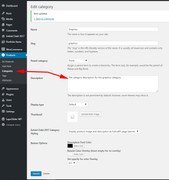
Sorry for the late reply, to have a text banner on your product category pages, please edit your product category and add your text in the description field and choose a font color:
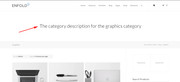
This will show as a text banner:
Best regards,
MikeSeptember 21, 2019 at 5:28 pm in reply to: The entire Enfold interface is no longer visible on my site #1140487Hey yvangapin,
Sorry for the late reply, Please include an admin login in the Private Content area so we can investigate further.Best regards,
MikeHey Yewbarton,
Sorry for the late reply, I have replied to your duplicate post lets please continue there.Best regards,
MikeHey Yewbarton,
Sorry for the late reply, I have replied to your duplicate post lets please continue there.Best regards,
MikeSeptember 21, 2019 at 4:33 pm in reply to: Masonry Gallery gap between elements large screen #1140478Hi,
Sorry for the late reply and thank you for the screenshot and link. Please try this code in the General Styling > Quick CSS field or in the WordPress > Customize > Additional CSS field:@media only screen and (min-width: 1440px) { .av-masonry-image-container img { width: 100% !important; } }Then clear your browser cache and check.
Best regards,
MikeHey conflock,
Sorry for the late reply, I have not been able to produce any errors that trigger emails such as these with WordPress v5.2.3 and Enfold v4.6.2
I see that some of your errors above are from plugins, please try disabling your plugins and custom scripts and functions, a good way to test without affecting your live site is to create a staging site, most web hosts have a one-click option to do this for you.Best regards,
MikeHey rixi,
Sorry for the late reply, please go to the Enfold theme setting: Enfold Theme Options > Shop Options > Main Shop Page Banner when this is changed to Yes, display a banner image a new option below will appear Enable Banner for product category pages You can enable the shop banner for all categories as well and set individual banners by editing the category.Best regards,
MikeHey rescott72,
Sorry for the late reply, the shortcode to remove the copyright link is: [nolink] with no space.
Please give this a try and check again.Best regards,
MikeHi,
@Apachee, sorry for the late reply, Please try this code in the General Styling > Quick CSS field or in the WordPress > Customize > Additional CSS field:#top.home #revolutionslider_1 { min-height: 0 !important; }This assumes that the slider is only on your homepage. Please clear your browser cache and check.
Best regards,
MikeHi,
@abrar000 sorry for the late reply and thanks for the login.
The original demo that you have installed is showing correctly on your site, it doesn’t include all of the images and content, it was only meant to give a basic idea of the layout so you could start adding your content.
The Enfold 2017 demo is a much more complete demo, with examples of each element if you would like a try it instead, but you will need to reset your site with the WordPress Reset PluginBest regards,
MikeHi,
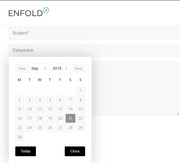
Please explain how the datepicker is not working for you and link to an example, I have tested the datepicker with a clean install of v4.6.2 and it seems to work correctly:
Best regards,
MikeHi,
Thank you for sharing your solution, glad we were able to help. Thanks for using Enfold.Best regards,
MikeHi,
Thanks for the screenshot, that was hard for me to see :)
Try looking for this css in your custom css:.sub_menu ul, .sub_menu ul li { background-color: #fff !important; }and replace with:
.sub_menu ul, .sub_menu ul li {
    background-color: #f8f8f8 !important;
}
Best regards,
MikeHi,
Glad to hear, to have the text on top please try adding this css:.orange_hover:hover h1 { z-index: 50; position: relative; }Best regards,
MikeSeptember 20, 2019 at 6:03 am in reply to: Polylang Plugin doesn't work anymore after upgrade to 4.6! #1140112Hi,
Glad we were able to help, you may wish to review Privacy and Cookies Thank you for using Enfold.For your information, you can take a look at Privacy and Cookies and Enfold documentation here
For any other questions or issues, feel free to start new threads in the Enfold forum and we will gladly try to help you :)Best regards,
MikeHi,
Thanks, I was able to login, I see that your footer icons are each in a 1/4 column, this is why they are spread out.
I moved them to a single column and then added this css to line them up and center them:.footer-icons .av_font_icon { width: 41px; display: inline-block; margin: auto; } .footer-icons { text-align: center !important; }Then to make your widget menu a single line and centered I added this css:
#menu-footer-menu li {
	  width: 110px !important;
	  display: inline-block !important;
}
#menu-footer-menu {
	  text-align: center;
}
Please clear your browser cache and check.Best regards,
MikeHi,
I am also using Chrome, I see from your screenshot that you are looking at a different url than the root url I was.
So I see that this is not occurring on the home page or the shop page, but only on the page in the menu under the shop, but I’m not sure if these are archive, category or etc pages but the extra robots meta is being added by your seo plugin under TITLES & METAS with these checkboxes:

So you could uncheck these.Best regards,
MikeHi,
Adding the tel link (yellow in the screenshot) to the span creates a separate link below the logo link (green in the screenshot)

add_filter('avf_logo_subtext', 'kriesi_logo_addition');
function kriesi_logo_addition($sub) {
    $sub .= '<span><a href="tel://1-555-555-5555">+1 (555) 555-5555</a></span>';
    return $sub;
}
But I would recommend creating a header widget area and placing your phone link in it for better control.
Best regards,
MikeHi,
The link above says we recommend PHP version 7.0 or greater.
Please see the link above for the other PHP settings recommended. One setting that I don’t see listed that you will need to ensure is turned on is the PHP ZipArchive Extension, most hosts have this enabled automatically, but it is a good idea to check.Best regards,
MikeHey STeve R Pelman,
Thank you for your purchase, you can download your theme files from your Theme Forest account where you made your purchase. Please login at the top right side of the page. Theme Forest is the only authorized licensor of Enfold.Best regards,
MikeSeptember 19, 2019 at 1:40 am in reply to: Special Header Padding, Background Color, Text color and Centering Text #1139761Hi,
Thank you for the login, perhaps some screenshots will help, I see that your custom classes for the elements are not enabled so to do so I went to Enfold Theme Options > Layout Builder > Builder Options For Developers > Custom CSS classes input field

Now when you open any element you will see a new option for Developer > Custom CSS Class, this is where I added the custom class Rikard posted:

Now this css is working for special heading “Rooms”, but your special headings such as “Lincoln’s Suite” has the extra padding on the bottom because someone added some custom css in a code block on the page:<style type = "text/css"> .av-special-heading-tag { background: #a10000 !important; padding-top: 10px; padding-bottom: 10px; } </style>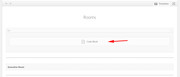
so I would recommend creating another custom class for those elements and adding it to your Quick CSS so you can remove the code block css.Best regards,
MikeHi,
Thanks for the login, but when trying to reach your site I get the 429 error (too many requests) please check with your webhost.Best regards,
MikeSeptember 19, 2019 at 12:49 am in reply to: Pages eating themselves, content deleting and no clue why? #1139757Hey stoneroad,
Typically this is due to unclosed html tags in the title fields, such as the <strong> tag.
You can check your page with the Shortcode parser to see if similar errors exist, or if you Enable the Avia Layout Builder Debugger and copy the page shortcode to a plain text file and link to it via DropBox I can check it on my localhost.Best regards,
MikeSeptember 19, 2019 at 12:38 am in reply to: Mailchimp – Form fully filled, it say isn’t filled #1139756Hi,
Thanks for including your page shortcode but we can not use it in this case because the mailchimp form will not show for us without the API in the theme settings. So we would need to test on your site. I tested the form in your second post and while I did get a response I saw the button didn’t update. I also saw that your page gave this error:the server responded with a status of 503It looks like jetpack is enabled, please try disabling it and your other plugins and checking again, otherwise please ask your webhost to check the server log to see if it shows the reason for the server error.
Best regards,
MikeSeptember 19, 2019 at 12:01 am in reply to: CSS to create extra space between h2 and h3 in post. #1139751Hi,
Thank you for the login, I randomly picked a post as an example and an H3 > H2, please see the screenshot in Private Content area.
This css should work though out your site on posts only:#top.single-post #wrap_all .entry-content h3 { padding-top:10px!important; }please adjust the padding to suit.
Best regards,
MikeHey Kirstie,
Thank you for the link to your site, the last element is being resized due to this css:#top .flex_cell:last-child { border-right-width: 12px!important; }It looks like it has been added to your child theme style.css, please try removing it and adding this css instead:
#top.home #av-layout-grid-1.av-layout-grid-container {
    width: 99% !important;
}
Best regards,
MikeHey athen49,
Sorry for the late reply, I took a look at your site but it seems that you have already accomplished this, is this resolved then?
Please see the screenshot in Private Content area.Best regards,
MikeHey michaelspencer,
Sorry for the late reply, but I have checked your page with Chrome and Firefox and I don’t see a play button, Please see the screenshot in Private Content area.
Is this already resolved?Best regards,
MikeSeptember 18, 2019 at 10:28 pm in reply to: Two different meta robots entries on some pages #1139732 -
AuthorPosts
