

Forum Replies Created
-
AuthorPosts
-
Hi,
I checked and it is working for me, while your header is sticky. Please clear your browser cache and check.Best regards,
MikeHi,
Thank you for the login, I also tried testing a fresh theme and disabling your plugins without success, I also checked for any similar issues but found none after the latest update. As I wrote above testing with your events export on my site works, so I will ask our team to take a look and advise.
Did this stop working after only the update, which version were you using?Best regards,
MikeHi,
Do you mean that you would like to add text to the sidebar header under the logo for portfolio pages? For this you would create a header widget.
Or do you mean you want to add text at the top of the page above the portfolio sort bar?

Best regards,
MikeHi,
Sorry for the late reply, I have taken a look at your screenshots and edited the DE language files:
de_DE.po
de_DE.mo
found at:
\wp-content\themes\enfold\lang
Please download the zip file in the Private Content area and backup your current de_DE language files then replace with these and clear your browser cache and check.Please note that I assumed you are using de_DE.po and not de_DE_formal.po, and I used Google Translate, so I hope this was correct. We do have German speakers but as it’s the weekend I tried to assist, if this helped I can do more of the missing translation in the helper-privacy.php file.
Best regards,
MikeHi,
Glad Nikko was able to help, we will close this now. Thank you for using Enfold.For your information, you can take a look at Enfold documentation here
For any other questions or issues, feel free to start new threads in the Enfold forum and we will gladly try to help you :)Best regards,
MikeHi,
Glad we were able to help, we will close this now. Thank you for using Enfold.For your information, you can take a look at Enfold documentation here
For any other questions or issues, feel free to start new threads in the Enfold forum and we will gladly try to help you :)Best regards,
MikeHi,
Sorry for the late reply and thanks for the login, I took a look and your child theme functions.php and found that the url didn’t point to your second logo image correctly, so I fixed it. Here is a snippet using our logo should anyone want to try this on their site:add_filter('avf_logo_subtext', 'kriesi_logo_addition'); function kriesi_logo_addition($sub) { $sub .= '<img src="https://kriesi.at/wp-content/themes/kriesi/images/logo.png"/>'; return $sub; }I then added this css to your child theme styles.css to switch the logos on scroll:
#header.header-scrolled span.logo > a > img {
	display: none !important;
}
Please clear your browser cache and check.
Best regards,
MikeHi,
Sorry for the late reply, Please try this code in the General Styling > Quick CSS field or in the WordPress > Customize > Additional CSS field:#top.page-id-5813 #av_section_2 > div > div > div > div > div > div.avia-data-table-wrap.avia_responsive_table > table > tbody > tr.avia-heading-row > th:nth-child(1), #top.page-id-5813 #av_section_2 > div > div > div > div > div > div.avia-data-table-wrap.avia_responsive_table > table > tbody > tr > td:nth-child(1), #top.page-id-5813 #av_section_2 > div > div > div > div > div > div.avia-data-table-wrap.avia_responsive_table > table > tbody > tr.avia-heading-row > th:nth-child(3), #top.page-id-5813 #av_section_2 > div > div > div > div > div > div.avia-data-table-wrap.avia_responsive_table > table > tbody > tr > td:nth-child(3) { width: 15% !important; } #top.page-id-5813 #av_section_2 > div > div > div > div > div > div.avia-data-table-wrap.avia_responsive_table > table > tbody > tr.avia-heading-row > th:nth-child(2), #top.page-id-5813 #av_section_2 > div > div > div > div > div > div.avia-data-table-wrap.avia_responsive_table > table > tbody > tr > td:nth-child(2) { width: 70% !important; }Best regards,
MikeHi,
Sorry for the late reply and thanks for the login, I see that your theme is up to date and your page was reporting an error with the plugin “Easy Google fonts” which had not fonts selected so I disabled to resolve the error, even though there are no errors now your event countdown is not working. I exported your events to my localhost and created a page with the event countdown using your same settings and it works for me.
I suspect that a plugin is causing the error or an error occurred during your last update, assuming the countdown worked before the update, how did you update? I see that you have a plugin “Easy Updates Manager” did you use this?
I checked the events_countdown.php file and it matches mine.
I recommend disabling your plugins to see if that solves it and if not please include FTP access in the Private Content area so we can try updating your theme with a fresh version.Best regards,
MikeHi,
Sorry for the late reply and thanks for the link. Please try adding this script to the end of your functions.php file in Appearance > Editor:function close_mobile_menu_script(){ ?> <script> (function($){ var width = $(window).width() $("li.current_page_item > a").click(function(){ if ((width <= 768)) { setTimeout(function() { $('.av-hamburger').removeClass('is-active'); $('html').removeClass('av-burger-overlay-active av-burger-overlay-active-delayed'); $('.av-burger-overlay').css({ 'display' : 'none', 'opacity' : '0' }); }, 500); } else {} }); })(jQuery); </script> <?php } add_action('wp_footer', 'close_mobile_menu_script');It is not ment to replace your other script, this one is to only close your mobile menu after click, it also checks the screen width so not to confident with your regular menu and it adds a slight delay because I found it was closing too quickly before the scroll took place.
I tested it by injecting the script via the browser on your site and it worked well, after adding it please clear your browser cache and caching plugins and check.Best regards,
MikeHi,
I adjusted the function to this and it is working correctly now, please clear your browser cache and check.function custom_script(){ ?> <script> (function($){ $("li.current_page_item > a").click(function(){ $('.av-hamburger').removeClass('is-active'); $('html').removeClass('av-burger-overlay-active'); $('html').removeClass('av-burger-overlay-active-delayed'); $('.av-burger-overlay').css({ 'display' : 'none', 'opacity' : 0 }); }); })(jQuery); </script> <?php } add_action('wp_footer', 'custom_script');Best regards,
MikeHi,
Glad we were able to help, we will close this now. Thank you for using Enfold.For your information, you can take a look at Enfold documentation here
For any other questions or issues, feel free to start new threads in the Enfold forum and we will gladly try to help you :)Best regards,
MikeOctober 20, 2019 at 2:46 pm in reply to: Custom CSS class option disappear on textblock element #1149629Hi,
Glad we were able to help, we will close this now. Thank you for using Enfold.For your information, you can take a look at Enfold documentation here
For any other questions or issues, feel free to start new threads in the Enfold forum and we will gladly try to help you :)Best regards,
MikeHey EventLawyers,
Thanks for the screenshots, but your menu is working fine for me.

It looks like you are checking from within WordPress, have you tried checking with your mobile device after clearing your browser cache?Best regards,
MikeHey ragalahari99,
There is no need to activate the layerslider, it is a bundled plugin that is ready to use. There are I believe two premium functions that will not work and it is only updated when the theme updates unless you purchase the stand-alone plugin and deactivate the bundled version in the theme settings.Best regards,
MikeOctober 20, 2019 at 3:40 am in reply to: Custom CSS class option disappear on textblock element #1149531Hey cornaviera,
I believe that you are referring to an issue that the developer tab in the textblock element is empty, this will be corrected with the next release, the dev team says we can replace the textblock.php file with the v4.6.2 version if really needed.
Please see Private Content area for download and save your current file as backup:
\enfold\config-templatebuilder\avia-shortcodes\textblock.phpBest regards,
MikeHi,
Sorry for the late reply, I tested your MapBox code above and after fixing the curly quotes it worked for me in a code block element. Please test by creating a new page and put all of this code in a code block element, as is, and publish. I’m not sure if you will need to remove your current code to remove any conflicts.<script src='https://api.tiles.mapbox.com/mapbox-gl-js/v1.4.1/mapbox-gl.js'></script> <link href='https://api.tiles.mapbox.com/mapbox-gl-js/v1.4.1/mapbox-gl.css' rel='stylesheet' /> <style> #map { position:absolute; top:0; bottom:0; width:100%; height: 100vh;} .avia_codeblock_section {height: 100vh;} </style> <div id='map'></div> <script> mapboxgl.accessToken = 'pk.eyJ1IjoiZ2RsbndzIiwiYSI6ImNrMW11Ym9jMjAzMjQzZ25xam1oMmhwcnoifQ.JSIPcNr0kAA5KYkzqoZW_g'; var map = new mapboxgl.Map({ container: 'map', // container id style: 'mapbox://styles/mapbox/dark-v10', //hosted style id center: [-77.38, 39], // starting position zoom: 3 // starting zoom }); </script>
Best regards,
MikeHey Terve,
Sorry for the late reply, yes entypo-fontello is always loaded because it is heavily used by the builder, theme option and frontend elements, for example on your page, the font is being used on your page with the “back to top” button and the submenu indicators. I also checked some of your other pages and see quite a few elements that are using the font such as icon boxes, next / previous icons, button icons etc.
I did try finding a solution to remove it for you, but only found this they are also loaded in the functions.php at about line 228
Trying to replace with another font would require a lot of code rewriting.Best regards,
MikeHi,
Sorry for the late reply, I see that your mobile the missing menu item “camps” was set to display:none
Please try this code in the General Styling > Quick CSS field or in the WordPress > Customize > Additional CSS field to correct:@media only screen and (max-width: 767px) { .av-burger-overlay .av-burger-overlay-scroll .av-burger-overlay-inner ul#av-burger-menu-ul > li:nth-child(4) { display: block !important; } }Best regards,
MikeOctober 20, 2019 at 1:14 am in reply to: Advanced Layout Editor for Woocommerce and Waitlist Plugin Compatibility #1149525Hey 118group,
Sorry for the late reply, I took a look at your page but I don’t see the “add to cart” button, but I do see a “Update Waitlist” button. Is this what you meant?
Please see the screenshot in Private Content area.Best regards,
MikeHi,
Glad we were able to help, we will close this now. Thank you for using Enfold.For your information, you can take a look at Enfold documentation here
For any other questions or issues, feel free to start new threads in the Enfold forum and we will gladly try to help you :)Best regards,
MikeHi,
To add your custom font icon to the left of the title and keep the +/- icon to the right I adjusted your css in the Quick CSS to this:.family .toggler:before { content: "\f104"; font-family: flaticon; position: relative; font-size: 28px !important; } .family .toggler:before { margin-right: 24px !important; } .family .activeTitle .toggler:before { content: "\f104"; font-family: flaticon; }please clear your browser cache and check.
I also checked your page on Mac with Safari and Chrome, and on Windows 10 in Chrome, Firefox, Edge & IE11 and the icon error in your screenshots doesn’t occur for me. Please try clearing your Safari browser cache.Best regards,
MikeHi,
To change the excerpt length Try adding this code to the end of your functions.php file in Appearance > Editor:function custom_excerpt_length( $length ) { return 20; } add_filter( 'excerpt_length', 'custom_excerpt_length', 999 );and adjust “20” to suit.
Best regards,
MikeHi,
Thank you, I reset your site and activated woocommerce so the demo would include the store options, you will need to complete the woocommerce install wizard with your personal info. Since you had been having trouble installing the demo I approached the install assuming that your webhost security settings was blocking our demo file url and uploaded the demo images and edited the install .xml so the install would import the images from your domain.
The import worked fine, please clear your browser cache and check.Best regards,
MikeHi,
Thanks for the login, following the steps in the link you provided the code in your child theme footer.php is incorrect and you are missing the includes > admin > register-widget-area.php from your child theme, with it’s added code. Once you make these corrections it will probably work correctly.Best regards,
MikeHey FA123,
Sorry for the late reply, to make your phone numbers a link please format them like this:<a href="tel://1-555-555-5555">+1 (555) 555-5555</a>and adjust the number to suit.
To make the menu item a phone link please enter this as the link:tel://1-555-555-5555and this as the text or title:1-555-555-5555
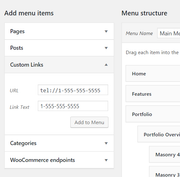
To add the icon before your phone number in your menu link please add the code in the menu title before the number:<span class="av-icon-char" style="font-size:14px;line-height:14px;" aria-hidden="true" data-av_icon="" data-av_iconfont="entypo-fontello"></span>Best regards,
MikeOctober 19, 2019 at 4:15 am in reply to: Full width easy slider scroll down arrow, no function #1149455Hey Dirk,
Sorry for the late reply and thanks for the login. The reason your link was not working was because you had another element under your slider that is hidden for desktop elements, so the link wanted to point to this element, but it was hidden, thus not reachable.
I switched the elements and now your link works.
Please clear your browser cache and check.Best regards,
MikeHi,
Glad to hear you have found a solution, thanks for using Enfold.Best regards,
MikeHi,
Sorry for the late reply, and thanks for the logins.
We can help install the Enfold 2017 Demo, but I see that you already have a demo installed and wanted to point out that we will need to reset your site to install another demo. Do you want us to continue?Best regards,
MikeHi,
Sorry for the late reply, please replace the previous css with this and adjust the padding and margin first number to suit, leave the second number as zero.#top .avia-content-slider h3.slide-entry-title { font-size: 18px !important; padding: 1px 0px !important; margin: 1px 0px !important; }Best regards,
Mike -
AuthorPosts
