

Forum Replies Created
-
AuthorPosts
-
November 25, 2019 at 1:04 pm in reply to: Enfold: Latest version of Event Calendar not working with Counter #1159849
Hi,
Sorry, I have not heard back on any solutions yet, not being able to reproduce on our servers makes it tricky.
What web host are you using? Is this a “managed WordPress” hosting? Web hosts have different “security” settings, perhaps this is relevant.
Thank you for your patience.Best regards,
MikeNovember 25, 2019 at 12:45 pm in reply to: Sticky header increase hight when scrolling down #1159834Hi,
Glad we were able to help, we will close this now. Thank you for using Enfold.For your information, you can take a look at Enfold documentation here
For any other questions or issues, feel free to start new threads in the Enfold forum and we will gladly try to help you :)Best regards,
MikeNovember 25, 2019 at 12:43 pm in reply to: Clone website and change the Child Theme Name doesn't work #1159832Hi,
Glad we were able to help, we will close this now. Thank you for using Enfold.For your information, you can take a look at Enfold documentation here
For any other questions or issues, feel free to start new threads in the Enfold forum and we will gladly try to help you :)Best regards,
MikeHi,
Glad we were able to help, we will close this now. Thank you for using Enfold.For your information, you can take a look at Enfold documentation here
For any other questions or issues, feel free to start new threads in the Enfold forum and we will gladly try to help you :)Best regards,
MikeHi,
Glad @ichtarzan was able to help, we will close this now. Thank you for using Enfold.For your information, you can take a look at Enfold documentation here
For any other questions or issues, feel free to start new threads in the Enfold forum and we will gladly try to help you :)Best regards,
MikeHi,
Thank you, I understand better now, so to have the different entries either square, landscape, or portrait, like in the example page, you need to add tags to the items, I can see this in the source code:

and you need to choose the last layout option:
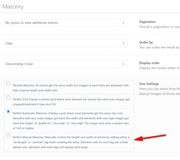
this is the easiest option, the automatic option you are using will work, but you must format your images before you upload in 16:9, either landscape or portrait, or as a square, this is not as easy, but it does work.Best regards,
MikeNovember 25, 2019 at 12:07 pm in reply to: Make mobile header transparency with Enfold Landing Page demo #1159810Hi,
Glad we were able to help, and thanks for sharing your solution, we will close this now. Thank you for using Enfold.For your information, you can take a look at Enfold documentation here
For any other questions or issues, feel free to start new threads in the Enfold forum and we will gladly try to help you :)Best regards,
MikeHi,
Glad we were able to help, we will close this now. Thank you for using Enfold.For your information, you can take a look at Enfold documentation here
For any other questions or issues, feel free to start new threads in the Enfold forum and we will gladly try to help you :)Best regards,
MikeNovember 25, 2019 at 12:03 pm in reply to: Contact Form Element Not Being Sent To Email when filled out on phone #1159805Hi,
Unfortunately, I didn’t find this to be true. Please try removing all required field checks from your form, so that all fields could be empty to see if that will allow it to be sent via the phone.
If so, then try adding the basic “not empty” check back to a few at a time, perhaps the error occurs after “X” number of fields, or it’s some kind of phone memory limit, I’m not sure, but your form is very large.Best regards,
MikeHi,
Thank you, when you open a post or page you do have the option to switch to ALB within Gutenberg, just as you did within the Classic Editor, but I advise not to switch back and forth between Gutenberg or the Classic Editor & ALB, they are not interchangeable.
You can add ALB shortcodes to Gutenberg or the Classic Editor.
I agree about Gutenberg.
Please try disabling all of your plugins and any custom functions and scripts, and then enable ESSB to see if you have the same error as in the screenshot, sometimes these errors are actually from another plugin.Best regards,
MikeNovember 25, 2019 at 11:27 am in reply to: Changing the Title and Excerpt Font Sizes on Search Results Page #1159784Hi,
Glad we were able to help, we will close this now. Thank you for using Enfold.For your information, you can take a look at Enfold documentation here
For any other questions or issues, feel free to start new threads in the Enfold forum and we will gladly try to help you :)Best regards,
MikeNovember 25, 2019 at 1:14 am in reply to: How can I add fonts with a font.com subscription? #1159731Hi,
Sorry for the late reply, I took a look at your page source code and found your font script in your header, so it seems that the code is working, but you are getting this error from the font:
Failed to load resource: the server responded with a status of 403 ()
403 is the “Forbidden Error” so it would seem that your font request is blocked by fonts.com
please check that the code is correct, or if there is some setting in your fonts.com account to register your site with them.
I don’t have experience with them, but that would make sense as otherwise anyone could copy your code and use it.Best regards,
MikeNovember 24, 2019 at 11:42 pm in reply to: Clone website and change the Child Theme Name doesn't work #1159718Hi,
Please try changing the name of your child theme so the site looks correct, then download the theme settings at: Enfold Theme Options > Import/Export > Export Theme Settings File Then change the name of your child theme to the one you like and upload your Theme Settings File.
Then clear your browser cache, and check.Best regards,
MikeNovember 24, 2019 at 11:35 pm in reply to: Columns centered vetically without being equal height? #1159714Hi,
I’m not seeing any drop shadow under your gray boxes, only under your images, please try changing your css to:.amg-image-shadow .avia-image-container-inner { box-shadow: 10px 0px 40px -10px rgba(0,0,0,0.65) !important; }Best regards,
MikeHi,
Thanks for the login, I see you are getting this error:Failed to load plugin url: /wp-content/plugins/easy-social-share-buttons3/lib/modules/pinterest-pro/assets/tinymce-essb-pp.js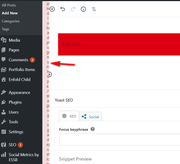
So I disabled it and enabled the block editor, and now it works.
Please see link in Private Content area.Best regards,
MikeHi,
Thank you for the link and login, I see that you are using Enfold v4.5.6, and you don’t have the last option “load in lightbox”
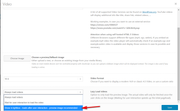
Please update, and also note that your video link needs to be in this format:https://www.youtube.com/watch?v=xxxxx_xxxxxBest regards,
MikeNovember 24, 2019 at 11:05 pm in reply to: Make mobile header transparency with Enfold Landing Page demo #1159707Hi,
To make your mobile header transparent please try this css:.html_mobile_menu_tablet #top #wrap_all .av_header_transparency { background-color: transparent !important; }After applying the css, Please clear your browser cache and check.
Best regards,
MikeNovember 24, 2019 at 10:50 pm in reply to: On a "full width" page, can I put "Page Content" element inside a box? #1159704Hey Thomas,
Thanks for the link and screenshot, but unfortunately, I don’t think this can be done.
I tried a few things, one of which was to wrap the shortcode with a div like this:
<div class="page_con">[av_postcontent link='page,1328' av_uid='av-44p3dk']</div>
but the shortcode closed the div before the end of the page.Best regards,
MikeHi,
Glad Rikard could help, we will close this now. Thank you for using Enfold.For your information, you can take a look at Enfold documentation here
For any other questions or issues, feel free to start new threads in the Enfold forum and we will gladly try to help you :)Best regards,
MikeNovember 24, 2019 at 10:16 pm in reply to: Burger menu not working for blog post pages on mobile? #1159696Hi,
Sorry, I’m getting “Whoopsie Daisy! Page Not Found” for your link, please check.Best regards,
MikeHi,
Sorry for the late reply, I have tested this solution and it is working for me, so first please download a modified gallery_horizontal.js file in the Private Content area.
and then replace the one at \enfold\config-templatebuilder\avia-shortcodes\gallery_horizontal\gallery_horizontal.js
Please retain a backup of the old one.
Then you will need to clear your browser cache a few times for it to work, please also disable your Enfold Theme Options > Performance > JS & CSS file merging and compression and any cache plugin until it works.
Sorry, I was not able to deregister the original script.Best regards,
MikeNovember 24, 2019 at 8:36 pm in reply to: Adding content to end of post – error with footer page selected #1159677Hi,
Thank you for sharing @Guenni007Best regards,
MikeHi,
Glad Rikard could help, we will close this now. Thank you for using Enfold.For your information, you can take a look at Enfold documentation here
For any other questions or issues, feel free to start new threads in the Enfold forum and we will gladly try to help you :)Best regards,
MikeHey Karl,
Entschuldigung für die verspätete Antwort, ich werde dies an unser Entwicklerteam weiterleiten. Vielen Dank für Ihre Geduld.— Translated with Google —
Sorry for the late reply, I will direct this to our dev team, Thank you for your patience.
Best regards,
MikeHey mynick,
Sorry for the late reply, each of the testimonial styles has a different amount of spacing, which is appealing to different people, if you would like the spacing to be different on your site, please link to your page and please give us an idea how close you would like things.
Another option is to change the bottom padding for the special heading above your testimonials:
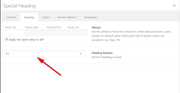
Best regards,
MikeNovember 24, 2019 at 7:51 pm in reply to: Changing the Title and Excerpt Font Sizes on Search Results Page #1159640Hi,
I started with the css @Rikard posted and then moved forward, perhaps this is no longer needed? Try removing it.#top.search-results h2.entry-title { padding: 0 !important; }But you do need this:
@media only screen and (min-width: 768px) {
otherwise the page is a mess on mobile, in my opinion.Best regards,
MikeHi,
Sorry for the late reply, currently the copyright is available for some images such as the featured image, if you add this css:small.avia-copyright { display: block !important; }
but it would not be practical for all images such as thumbnails and small gallery images, where the text would be larger than the image. Although we could ask the dev team to consiter adding this for larger gallery and plain images.Best regards,
MikeNovember 24, 2019 at 7:16 pm in reply to: Can you add text overlays on plain gallery thumbnails? #1159630Hey puwazatza,
Sorry for the late reply, as I understand you would like text overlays on your torso images.
Although I don’t quite understand what you mean by your examples, I don’t seem to see the “full navigation button set” nor the “orange text menu”.
Anyways this css will use the text block that is below your torso images as an overlay on hover, I wrote it so it will only work on this one page so there won’t be any conflicts.
Please try this code in the General Styling > Quick CSS field or in the WordPress > Customize > Additional CSS field:#top.page-id-460 .avia-gallery + .av_textblock_section { margin-top: -250px; margin-bottom: 200px; } #top.page-id-460 .avia-gallery:hover + .av_textblock_section { z-index: 50; position: relative; background: #fff; } .avia_transform #top.page-id-460 #wrap_all a.avia-gallery-big:hover .image-overlay { opacity: 0 !important; }Please see the screenshot in Private Content area.
Best regards,
MikeHi,
Sorry for the late reply, I see that your error is:OTS parsing error: incorrect file size in WOFF header OTS parsing error: fpgm: table overruns end of file Failed to decode downloaded fontaffected files are:
/enfold/config-templatebuilder/avia-template-builder/assets/fonts/entypo-fontello.woff
/wp-content/plugins/instagram-feed/js/sb-instagram.min.js?ver=2.1.2
https://connect.facebook.net/en_US/sdk/xfbml.customerchat.js
possible solution:
Turned out this was caused by a problem with FTP. The file was uploaded as text (ASCII) instead of binary, which corrupted the file. I simply changed my FTP software to binary, re-uploaded the font files, and then it all worked.
after trying this I also recommend clearing your local cache, server cache, & cdn cache, otherwise the same files will be served.
I also see that you are loading for Load jQuery in your footer from the theme settings, you may find this will cause you issues and you are also minifying via Enfold Theme Options > Performance > JS & CSS file merging and compression and WP Rocket, minifying on top of minifying often causes unexpected results.Best regards,
Mike -
AuthorPosts
