

Forum Replies Created
-
AuthorPosts
-
December 2, 2019 at 1:28 am in reply to: Horizontal gallery one click to scroll horizontally #1161701
Hi,
For a veil of color, Please try this code in the General Styling > Quick CSS field or in the WordPress > Customize > Additional CSS field:.av-horizontal-gallery-wrap:hover { filter: grayscale(100%) brightness(60%) sepia(100%) hue-rotate(128deg) saturate(1000%) contrast(0.6); -webkit-filter: grayscale(100%) brightness(60%) sepia(100%) hue-rotate(128deg) saturate(1000%) contrast(0.6); }Best regards,
MikeHi,
Your “Editor Notes” looks pretty cool, does it add on to any element or just the elements in your package?Best regards,
MikeHi,
Thanks for the login, the script I pointed out before was giving the error that Victoria, so I corrected. Often with javascript an error in one script can keep other scripts from working. Your web radio seems to be working now, please check.
I tested the two play buttons in the screenshot in the Private Content area, are these what you were talking about?Best regards,
MikeHi,
That is odd because I don’t see that, I made a new video for you, perhaps it’s your language settings? Try logging in with the account you gave us.Best regards,
MikeDecember 2, 2019 at 12:05 am in reply to: Can I insert a pic into a cell in the table element? #1161690Hey JeffBianchi,
I recommend using css like this:#av_section_2 > div > div > div > div > div > div:nth-child(1) > ul > li:nth-child(3):before { content: "\e812"; /*check mark*/ font-family: entypo-fontello; color: green; position: relative; padding-right: 11px; margin-left: -20px; } #av_section_2 > div > div > div > div > div > div:nth-child(1) > ul > li:nth-child(4):before { content: "\e813"; /*X mark*/ font-family: entypo-fontello; color: red; position: relative; padding-right: 11px; margin-left: -20px; }result

getting the sectors for the css might be a little tricky, please let us know if you would like to know how to do this.Best regards,
MikeHey xandria,
Yes, as long as they both have their own purchase codes, licenses.Best regards,
MikeDecember 1, 2019 at 11:46 pm in reply to: After Enfold v4.6.3.1update can’t access pull-down menus in Child Theme Options #1161685Hey Chnine,
Thank you for the login, when I check your theme option drop downs they are working for me when the middle of the drop downs are clicked, but they do look a little smaller than on my localhost. I don’t see any errors in the console.
Please try disabling your plugins and if that solves, enable one at a time clearing your browser and site cache after each one until the error is found.
I can say that this behavior is not what I’m experiencing on a clean install without plugins.Best regards,
MikeDecember 1, 2019 at 11:19 pm in reply to: Grid row mobile responsiveness not working properly #1161681Hi,
Thanks for the video, but you are adjusting a desktop browser without reloading the page, I tried explaining this above.
The browser is not re-calculating the percentages of the element widths when you test this way.
Please see the screenshots I posted above and try testing with your browsers dev tool and try testing with the Mobile Device Viewport Mode
The main point is that any device doesn’t drastically change it’s screen width like this, so to emulate we reload the page.Best regards,
MikeHi,
Glad we were able to help, we will close this now. Thank you for using Enfold.For your information, you can take a look at Enfold documentation here
For any other questions or issues, feel free to start new threads in the Enfold forum and we will gladly try to help you :)Best regards,
MikeHi,
Sorry, my mistake, please see video below.
This was taken from your page, you need to click the “Link Settings” tab, the second tab from the left.Best regards,
MikeHi,
Thank you for the feedback, I created a test page for you, please see the link in the Private Content area.
So I’m on the Windows OS and needed to remove the-webkit-min-device-pixel-ratio: 1from the css, which is only for IOS, but this will give you the idea how this works. You can add the-webkit-min-device-pixel-ratio: 1to check on IOS
So the sliders are#layer_slider_1, #layer_slider_2, and #layer_slider_3all of the#after_layer_slider_Xare the special headings used to easily show which slider is showing.
This is the css I added to a code block on the page, please feel free to examine and adjust./*this is to show slider 2 and hide the others*/ @media only screen and (min-device-width : 768px) and (max-device-width : 1024px) and (orientation : landscape) { #layer_slider_3,#after_layer_slider_2, #layer_slider_1,#slider_1 { display:none !important; } } /*this is to show slider 1 and hide the others for IOS if -webkit-min-device-pixel-ratio was used*/ @media only screen and (min-device-width : 768px) and (max-device-width : 1024px) and (orientation : portrait) { #layer_slider_3,#after_layer_slider_2, #layer_slider_2,#after_layer_slider_1 { display:none !important; } } /*this is to show slider 1 and hide the others for small devices*/ @media only screen and (min-device-width : 320px) and (max-device-width : 767px) { #layer_slider_3,#after_layer_slider_2, #layer_slider_2,#after_layer_slider_1 { display:none !important; } } /*this is to show slider 3 and hide the others for all devices*/ @media only screen and (min-device-width : 1025px) { #layer_slider_1,#slider_1, #layer_slider_2,#after_layer_slider_1 { display:none !important; } }


Please let us know if this helps.Best regards,
MikeHi,
Thank you for the feedback, I found that you are using PHP version 5.4.45
which is too old for WordPress, please ask your host to update to at least PHP version 7
You are also using WordPress 4.9.8, so I believe the combination of the old WordPress & PHP was causing an issue with the updated Enfold.
So please update your PHP & WordPress then let me know and I will try again.
After I get the theme installed, which demo do you want installed? You can see them all here. I recommend the 2017 demo.Best regards,
MikeHi,
Thank you for the feedback, but it is working for me, on your site, please see the video in the Private Content area
Please note I had to use Google Translate in the video as I only read English.Best regards,
MikeHi,
I will submit a feature request to the dev team, perhaps it will work better than I imagine.Best regards,
MikeHi,
@edwandz
Well there are 3 possible elements in the socket, the copyright, bookmarks, and menu. So one option for all three would not really work, besides many people put other items in the socket via the copyright field that they wish were aligned differently than the copyright. So limiting the socket could reduce it’s functionality for some. But we are more than happy to assist you with your customization.
Feel free to open a new thread to ask when the time arises.Best regards,
MikeHi,
Thank you for the feedback, Please try this code in the General Styling > Quick CSS field or in the WordPress > Customize > Additional CSS field to make it full height:#slider-8-slide-12-layer-10,#rev_slider_8_1_wrapper,#revolutionslider_1,#rev_slider_8_1_forcefullwidth,#rev_slider_8_1 { height: 100vh !important; min-height: 100vh !important; }To hide for mobile, try this css:
@media only screen and (max-width: 767px) {
	#revolutionslider_1 {
		display:none !important;
	}
	}
Best regards,
MikeHi,
Thank you for the feedback, there was a couple of issues with the Germanized plugin in the past, the last one was in January, which was solved and merged in February, but it is unclear which version it was. I see that Germanized was updated 4 days ago.
So I would like to submit this to the dev team to review, but I have to write a detailed report of the issue so they can address this in a timely manner and recreate the error to isolate it. Please create a video of how we can recreate the error, so I can follow along and then submit it to the dev team so they can too. The more details I can give them the faster they can solve.I recommend checking with your webhost to see if you have the one-click staging site option, this is an option in most cPanels to create a staging clone of your site so we can test on it and your site will stay up and running while we test. You can always ask your webhost to help you with finding this option if you want.
Here are some screenshots of what it would look like:

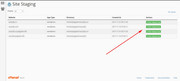
We will want to verify that if all other plugins and scripts are disabled that the error can be reproduced.
Sorry, I understand this may be a few more steps for you to take, but it will be the best course of action in this case, because your Woocommerce and Germanized settings could be a factor to creating this error, and we will need to ensure we are matching these settings exactly, especially since I have found no other reports of this error.
Again, sorry for the delay and thank you for your patience.Best regards,
MikeHi,
Thank you for the feedback, I checked your page again an I see the css is not applied, but I don’t see that you are using any caching plugins, or that your Enfold Theme Options > Performance > JS & CSS file merging and compression is activated. So you could have a css error such as a missing bracket, or something else. If you include a admin login in the Private Content area I could take a look for you.Best regards,
MikeHi,
Sorry for the late reply, I have seen all 3 of your messages, lets work from this one so we can all work together. Please don’t reply to this message.Best regards,
MikeHi,
Sorry for the late reply, I have seen all 3 of your messages, lets work from this one so we can all work together. Please don’t reply to this message.Best regards,
MikeHi,
Sorry for the late reply, I have found your 3 messages on this issue, I have been able to login to your WordPress site but I couldn’t FTP in to help. I tried “FTP & SFTP”, although you are not clear on your FTP password, I had to try the two passwords at the bottom of your private message. It looks like your webhost is in the Philippines and I don’t have a VPN for the Philippines, is your webhost blocking the USA from FTP access to your ftp access? This is common for FTP access. I have included my IP address in the private content area, if you can ask your webhost to “white list” me I will try to help. Otherwise, we have team members in the Philippines that can help, but it may take a day, depending on the time zone.
I will mark your other posts to this one, let’s work from this one so we are all on the same page / topic / post.
Thank you for your patience and using Enfold.Best regards,
MikeHi,
Glad we were able to help, we will close this now. Thank you for using Enfold.For your information, you can take a look at Enfold documentation here
For any other questions or issues, feel free to start new threads in the Enfold forum and we will gladly try to help you :)Best regards,
MikeHey Flow9999,
Yes, this is possible. Here is an example for a 1/3 column, but please note this is very general and will affect all 1/3 columns on your site, I recommend adding a custom class to your columns and adjusting the css to suit. If you would like a hand with this please apply the custom class and add a link to the page, or include an admin login in the Private Content area so we can demonstrate.
The demo css is:.flex_column.av_one_third:hover { animation: grow 2s; animation-fill-mode: forwards; position: relative; z-index: 50; } @keyframes grow { to { transform: scale(1.2) } }So the “keyframes” is how much the column will “grow”, please note that the word “grow” here means nothing, as long as it matches the rest of your css it can be any word.
The animation is set to 2s to compete, adjust to suit.
Theanimation-fill-mode: forwards;is the trick to “hold” the animation while “hover” is activated, otherwise it will go back to the regular size after 2s.
The “z-index” is needed otherwise, some columns will be under the others.
Here is a screenshot of the expected results:

Best regards,
MikeHi,
Glad we were able to help, we will close this now. Thank you for using Enfold.For your information, you can take a look at Enfold documentation here
For any other questions or issues, feel free to start new threads in the Enfold forum and we will gladly try to help you :)Best regards,
MikeHi,
Glad Rikard could help, we will close this now. Thank you for using Enfold.For your information, you can take a look at Enfold documentation here
For any other questions or issues, feel free to start new threads in the Enfold forum and we will gladly try to help you :)Best regards,
MikeHey marcoabis81,
Thanks for the login, to set a link in a image element, first change the “no link” to “manually set”
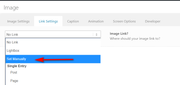
then you will see the link field
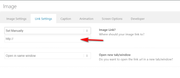
Best regards,
MikeHi,
Sorry, the login didn’t work for me, please check.
I assume your script is the remove img titles?
please adjust to this:(function($){ $(document).ready(function(){ $("img").removeAttr("title"); }); })(jQuery);Best regards,
MikeHi,
Thank you for the login, please include a DropBox link in the Private Content area to your copy of Enfold so we can try.
If you also include ftp access we will be able upload that way too.Best regards,
Mike -
AuthorPosts
