

Forum Replies Created
-
AuthorPosts
-
February 29, 2020 at 12:49 pm in reply to: Woo Cart will not icon or side cart does not show #1189014
Hey frankic,
Sorry for the late reply, to show the shopping cart button please go to Enfold > Shop Options then set the Header Shopping Cart Icon to the third option, attached to the main menu.
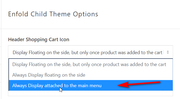
Expected results:

If this doesn’t help, please include an admin login in the private content area so we can be of more assistance.Best regards,
MikeHey Günter,
Sorry for the late reply, glad to hear that you are using a child theme, this is the best practice for modificating your theme files.
We do have a Change Log for you to review the latest changes, so you can see if one of your customized files needs to be updated. But on the most part files like the header & footer don’t change often, so typically you will not need to edit your customized files, unless an error occurs.Best regards,
MikeFebruary 29, 2020 at 12:12 pm in reply to: hover on column background image, floating button #1189011Hey Munford,
Sorry for the late reply, your image hover opacity is occurring with this css:body .flex_column.avia-link-column.avia-link-column-hover:hover { opacity: 0.8; }You can change this value and add an
!important;to the css like this:
opacity: 1 !important;Best regards,
MikeHi,
To open a link in an iFrame, please structure your link like this:
<a href="https://kriesi.at/?iframe=true">Open iFrame</a>
then when the link is clicked this is the result:
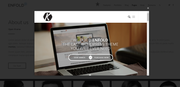
Best regards,
MikeFebruary 29, 2020 at 11:39 am in reply to: Mulitcolor accordion with png image (instead of icon) #1189001Hi,
Thanks for your css, I added a flat png image to each one, please try added this code in the General Styling > Quick CSS field or in the WordPress > Customize > Additional CSS field:/* Tab 1 */ .av-accordion-bg-multi .av_toggle_section:nth-child(1) .toggler { background: #ffb600; } .av-accordion-bg-multi .av_toggle_section:nth-child(1) .toggler:before { content: url(https://img.icons8.com/flat_round/20/000000/bird--v1.png); padding-right: 5px; } /* Tab 2 */ .av-accordion-bg-multi .av_toggle_section:nth-child(2) .toggler { background: #ee7623; } .av-accordion-bg-multi .av_toggle_section:nth-child(2) .toggler:before { content: url(https://img.icons8.com/flat_round/20/000000/falcon.png ); padding-right: 5px; } /* Tab 3 */ .av-accordion-bg-multi .av_toggle_section:nth-child(3) .toggler { background: #d50037; } .av-accordion-bg-multi .av_toggle_section:nth-child(3) .toggler:before { content: url(https://img.icons8.com/flat_round/20/000000/owl--v1.png ); padding-right: 5px; } /* Tab 4 */ .av-accordion-bg-multi .av_toggle_section:nth-child(4) .toggler { background: #e64783; } .av-accordion-bg-multi .av_toggle_section:nth-child(4) .toggler:before { content: url(https://img.icons8.com/flat_round/20/000000/pinguin--v1.png ); padding-right: 5px; } /* Tab 5 */ .av-accordion-bg-multi .av_toggle_section:nth-child(5) .toggler { background: #923a7f; } .av-accordion-bg-multi .av_toggle_section:nth-child(5) .toggler:before { content: url(https://img.icons8.com/flat_round/20/000000/unicorn.png ); padding-right: 5px; } /* Tab 6 */ .av-accordion-bg-multi .av_toggle_section:nth-child(6) .toggler { background: #0071ce; } .av-accordion-bg-multi .av_toggle_section:nth-child(6) .toggler:before { content: url(https://img.icons8.com/flat_round/20/000000/stork.png ); padding-right: 5px; } /* Tab 7 */ .av-accordion-bg-multi .av_toggle_section:nth-child(7) .toggler { background: #00a6ce; } .av-accordion-bg-multi .av_toggle_section:nth-child(7) .toggler:before { content: url(https://img.icons8.com/flat_round/20/000000/butterfly--v1.png ); padding-right: 5px; } /* Tab 8 */ .av-accordion-bg-multi .av_toggle_section:nth-child(8) .toggler { background: #37b30e; } .av-accordion-bg-multi .av_toggle_section:nth-child(8) .toggler:before { content: url(https://img.icons8.com/flat_round/20/000000/insect--v1.png ); padding-right: 5px; } /* Tab 9 */ .av-accordion-bg-multi .av_toggle_section:nth-child(9) .toggler { background: #129605; } .av-accordion-bg-multi .av_toggle_section:nth-child(9) .toggler:before { content: url(https://img.icons8.com/flat_round/20/000000/pig--v1.png ); padding-right: 5px; } /* Tab 10 */ .av-accordion-bg-multi .av_toggle_section:nth-child(10) .toggler { background: #5b6670; } .av-accordion-bg-multi .av_toggle_section:nth-child(10) .toggler:before { content: url(https://img.icons8.com/flat_round/20/000000/panda--v1.png ); padding-right: 5px; } /* Tab title color */ .av-accordion-bg-multi .toggler, .av-accordion-bg-multi .toggler.activeTitle:hover { color: #FFF; border:none; } /* Hide default icon */ .av-accordion-bg-multi .toggle_icon { display: none; } .av-accordion-bg-multi .toggler { padding-left:20px; font-size: 18px; font-weight: bolder; } /*Toggle content area */ .av-accordion-bg-multi .toggle_content { background: #f2f6fa; }and adjust the images to what you want to use, After applying the css, Please clear your browser cache and check.
Expected results:
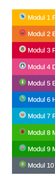
Best regards,
MikeHi,
Glad we were able to help, we will close this now. Thank you for using Enfold.For your information, you can take a look at Enfold documentation here
For any other questions or issues, feel free to start new threads in the Enfold forum and we will gladly try to help you :)Best regards,
MikeHi,
Glad we were able to help, we will close this now. Thank you for using Enfold.For your information, you can take a look at Enfold documentation here
For any other questions or issues, feel free to start new threads in the Enfold forum and we will gladly try to help you :)Best regards,
MikeHi,
Thank you for sharing your results and your solution, glad this worked for you.Best regards,
MikeFebruary 28, 2020 at 2:28 pm in reply to: Mulitcolor accordion with png image (instead of icon) #1188837Hi,
Thank you for the link to your page, as I understand your question you would like to replace the “plus” icon with a custom .png
I was not sure which image you want to use so I picked a blue plus sign and added your page ID to the css so it won’t interfere with other pages, Please try this code in the General Styling > Quick CSS field or in the WordPress > Customize > Additional CSS field:#top.page-id-1419 span.toggle_icon:before { content: url(https://img.icons8.com/officel/20/000000/plus-math.png); } #top.page-id-1419 span.vert_icon,#top.page-id-1419 span.hor_icon { display: none !important; }Expected results:
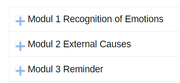
you can change the image in the url in the css to your image.
After applying the css, Please clear your browser cache and check.Best regards,
MikeHi,
Thank you for the example screenshot, I have matched the colors for your /pricing/ page with this css, Please add this code in the General Styling > Quick CSS field or in the WordPress > Customize > Additional CSS field:#av_section_1 > div > div > div > div > div.avia-table.main_color.avia-pricing-table-container.avia_pricing_default.avia-builder-el-9.el_after_av_one_third.el_before_av_one_full.avia-table-1 > div:nth-child(2) > ul > li.avia-pricing-row { background-color: #FFCFAB !important; } #av_section_1 > div > div > div > div > div.avia-table.main_color.avia-pricing-table-container.avia_pricing_default.avia-builder-el-9.el_after_av_one_third.el_before_av_one_full.avia-table-1 > div:nth-child(2) > ul > li.avia-button-row > div > a { background-color: #FFCFAB !important; } #av_section_1 > div > div > div > div > div.avia-table.main_color.avia-pricing-table-container.avia_pricing_default.avia-builder-el-9.el_after_av_one_third.el_before_av_one_full.avia-table-1 > div:nth-child(3) > ul > li.avia-pricing-row{ background-color: #D6AC56 !important; } #av_section_1 > div > div > div > div > div.avia-table.main_color.avia-pricing-table-container.avia_pricing_default.avia-builder-el-9.el_after_av_one_third.el_before_av_one_full.avia-table-1 > div:nth-child(3) > ul > li.avia-button-row > div > a { background-color: #D6AC56 !important; } #av_section_1 > div > div > div > div > div.avia-table.main_color.avia-pricing-table-container.avia_pricing_default.avia-builder-el-9.el_after_av_one_third.el_before_av_one_full.avia-table-1 > div:nth-child(3) > ul > li.avia-pricing-row > span { background-color: #D6AC56 !important; }After applying the css, Please clear your browser cache and check.
Best regards,
MikeFebruary 28, 2020 at 1:02 pm in reply to: thumbnail sizes are different for product categories #1188819Hi,
Sorry for the late reply, I have taken a look at your page and your image “Heartbeat Monitors” is 41px-80px so this is why it is showing taller than wide, if your images were square they would be consent. If we use css to make all of the products show the same size the images would be distorted.
If you would like to try anyways, please add this code in the General Styling > Quick CSS field or in the WordPress > Customize > Additional CSS field:.product-category.product,.product-category.product a { height: 300px !important; max-height: 300px !important; }Best regards,
MikeHey Elena,
Sorry for the late reply, on my localhost I set my home page to header not transparent and hide title and breadcrumbs for desktop, then to achieve a transparent header for mobile I added this css in the Quick CSS:@media only screen and (max-width: 766px) { .responsive #top #main {margin-top: -80px!important;} #top #wrap_all {background-color: transparent!important;} div#header_main > .container {display: block !important;} .header_color .header_bg {background-color: transparent !important;} }If the doesn’t work for you please link to your page so we can investigate further
After applying the css, Please clear your browser cache and check.Best regards,
MikeHi,
I will be happy to help, the latest version of Enfold is 4.7.3, try going to your Theme Forest account and download the latest version, and upload it to DropBox or something similar and attach FTP access in the Private Content area.
Please also update all or your plugins and your WordPress, Please look at your WordPress > Dashboard > Updates
I see the css you added is working now, please see the screenshot in the Private Content area, perhaps you just need to clear your browser cache. Just to be clear right now we are working on making sure your site is full-width for desktop, right?Best regards,
MikeHi,
Thank you for your feedback, lets try something different, using the shortcode wand get the shortcode for a icon like this:[av_font_icon icon='ue808' font='entypo-fontello' style='' caption='' size='40px' position='center' color='' link='' linktarget='' animation='' id='' custom_class='' av_uid='' admin_preview_bg=''][/av_font_icon]and enter it into a menu “Navigation Label” replacing the menu title like this:
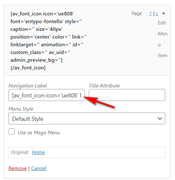
Then assuming this is#menu-item-3274we will add this Quick CSS to add the title under the icon:#menu-item-3274 span.av-icon-char::after { content: "Home"; font-size: 10px !important; display: block; line-height: 1px; } #menu-item-3274 > a > span.avia-menu-text > span { line-height: 40px; }
Since your menu is much larger the css may be a little different, can you include an admin login so we can adjust this for your site?Best regards,
MikeFebruary 27, 2020 at 12:52 pm in reply to: pdf generator plugin that works with avia elements #1188435Hi,
Glad we were able to help, we will close this now. Thank you for using Enfold.For your information, you can take a look at Enfold documentation here
For any other questions or issues, feel free to start new threads in the Enfold forum and we will gladly try to help you :)Best regards,
MikeHi,
Thank you for the login, I believe that this issue may be related to your old versions of Enfold and WooCommerce, please try updating your Theme and plugins. To update your theme you will need to Enter a valid Envato private token in the theme update option.
Otherwise, you can try this Quick CSS solution which will give you a min-width of 1440px for desktop on products, which I believe you are looking for.@media only screen and (min-width: 1440px) { #top .template-shop .container { min-width: 1440px !important; } }Best regards,
MikeHi,
Glad we were able to help, we will close this now. Thank you for using Enfold.For your information, you can take a look at Enfold documentation here
For any other questions or issues, feel free to start new threads in the Enfold forum and we will gladly try to help you :)Best regards,
MikeHi,
I see, you used the first set of icons or shortcode, I posted above, in that case, Please try this code in the General Styling > Quick CSS field or in the WordPress > Customize > Additional CSS field:#footer #custom_html-2 .avia-icon-pos-left { margin-right: 1.5em; }the ID for the “Custom HTML” widget might be different for you, we won’t be able to tell what the exact ID is until we can inspect the page. If this doesn’t work please let us know when we can see the page.
Best regards,
MikeHi,
To change the hover background-color, & font-color & font-size, Please try this code in the General Styling > Quick CSS field or in the WordPress > Customize > Additional CSS field:#top.page #nav_menu-2 #menu-produtos li a:hover { background-color: #f8f8f8; } #top.page #nav_menu-2 #menu-produtos li a { color: #222; font-size: 15px; }After applying the css, Please clear your browser cache and check.
Best regards,
MikeFebruary 27, 2020 at 10:43 am in reply to: Add icon list on all pages of my website, including product page? #1188368Hi,
Glad we were able to help, we will close this now. Thank you for using Enfold.For your information, you can take a look at Enfold documentation here
For any other questions or issues, feel free to start new threads in the Enfold forum and we will gladly try to help you :)Best regards,
MikeHi,
Thank you for the login, I reset your site to remove theMedia “” already exists.errors and tried importing the “default” demo as your request, but I had a504 Gateway Time-outerror a couple of times from your webhost, eventually I was able to get it to import.
All seems to be working now, please check.Best regards,
MikeHi,
Thank you for the login, I took a look at your sidebar settings:
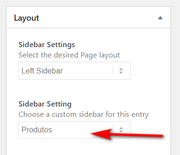
but your widget for the sidebar is empty:
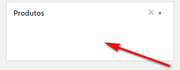
please try adding what you would like to see there for the sidebar.Best regards,
MikeHi,
I think I understand, your pages seems to be set to a max-width of 1010px, is this what you mean?
Please see the screenshot in Private Content area.
Please try adjusting this here:

Best regards,
MikeHi,
Please try this code in the General Styling > Quick CSS field or in the WordPress > Customize > Additional CSS field:#top.page-id-344 .av-masonry-entry { max-height: 100px !important; }I added the page ID thinking it was for one page only, but you can remove it if you wish.
Best regards,
MikeFebruary 26, 2020 at 11:20 am in reply to: Add icon list on all pages of my website, including product page? #1188021Hi,
OK, try this to not allow theava_before_footer_modon product pages:add_action('ava_before_footer', 'ava_before_footer_mod'); function ava_before_footer_mod() { if(!is_page(array(206,644)) && !is_product()) { echo do_shortcode("[MY OWN SHORTCODE]"); } }Best regards,
MikeFebruary 25, 2020 at 2:18 pm in reply to: How to style Blog post – Next /Previous buttons (bg color, opacity, etc.) #1187691Hi,
Thanks for the link, to change the color & opacity please try this css:#top a.avia-post-prev,#top a.avia-post-next { background-color: #F95020 !important; opacity: .5; }This color is from your logo, but you can adjust to suit.
I didn’t find a working solution to moving the next / previous buttons into the end of the content.Best regards,
Mike -
AuthorPosts
