

Forum Replies Created
-
AuthorPosts
-
Hi,
Sorry for the late reply, and thanks for the login, I took a look at your site and see that you are using Enfold v4.2 with WordPress v5.3.2, so you will need to manually update via FTP because of the API/Token changes with Envato.
The easiest and safest way to update is to download the newest version from Theme Forest and rename your current theme folder to “enfold-old” via ftp then upload the new “enfold” folder and check that your site is working correctly.
Should for some reason you wish to roll-back to the old version, it’s easy to do, simply rename the new “enfold” folder to “enfold-new” via ftp and then rename “enfold-old” to “enfold” then refresh your page.
Once you are happy you can delete the “enfold-old” folder via ftp, (not the WP theme page)
Please don’t try to overwrite the theme folder, as this will leave old files behind and cause errors.I didn’t find your error:
Warning: Cannot modify header information – headers already sent by (output started at /home/intera65/public_html/wp-content/plugins/search-filter-pro/includes/class-search-filter-post-cache.php:1513) in /home/intera65/public_html/wp-admin/post.php on line 223but this is caused by the plugin
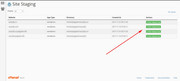
search-filter-proso I recommend disabling until after you update your theme and all plugins, perhaps then the conflict will be resolved.I also recommend checking with your webhost to see if you have the one click staging site option, this is a option in most cPanels to create a staging clone of your site so you can test updates on it and your live site will stay up and running untouched. This is a good practice should updating cause any issues that take time to resolve. You can always ask your webhost to help you with setting this up if you want.
Here are some screenshots of what it would look like:

Best regards,
MikeHi,
We would adjust the “Trip Advisor” code above to Telegram, but I checked fontello.com and found no “Telegram” icon font, so first you will want to find a Telegram svg and drag it into fontello.com to create a icon font:
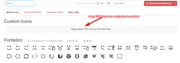
Please note that colored SVG’s will not work, fontello.com should convert them into black and white.
then you will have the icon code needed for the function.Best regards,
MikeHi,
Sorry for the late reply and thank you for the login to the staging site, I see you have the same css in your child theme stylesheet and in your Quick CSS, which can make it a little tricky to manage your styles, you may wish to keep your css in one place.
Anyways I commented out these two lines in both places:/*#top #header_main > .container .main_menu ul:first-child > li > a { line-height: 155px !important; }*/ /*#top .header-scrolled #header_main > .container .main_menu ul:first-child > li > a { line-height: 60px !important; }*/and now your mobile menu items are a natural size and expand well within the group, please clear your browser cache and check.
Best regards,
MikeHi,
Glad Ismael was able to help, we will close this now. Thank you for using Enfold.For your information, you can take a look at Enfold documentation here
For any other questions or issues, feel free to start new threads in the Enfold forum and we will gladly try to help you :)Best regards,
MikeHi,
Glad we were able to help, we will close this now. Thank you for using Enfold.For your information, you can take a look at Enfold documentation here
For any other questions or issues, feel free to start new threads in the Enfold forum and we will gladly try to help you :)Best regards,
MikeHi,
It sounds like this is sorted out now, shall we close this then?Best regards,
MikeHey Sam,
Your error message is from Google Maps been disabled in your theme option:

If you want to use Google Maps then please enable it and follow the steps on the option page to setup a Google Maps account with a payment type, and add your API.
Is your contact page suppose to be black with no padding or margin? Your Autoptimize plugin is causing this, I recommend disabling it for a while.Best regards,
MikeHey peterolle,
Typically this is the best way to show content in a lightbox, a possible reason you are getting the error could be because your site is loading the jQuery in the footer, perhaps via a caching plugin, Autoptimize, JetPack, or the setting at Enfold Theme Options > Performance > Load jQuery in your footer
If we can login and take a look we can probably sort this out.Best regards,
MikeHi,
Thank you for the login, I see that you have enabled the menu Description field so I assume that question is solved now.
As for editing your pages I see you have the “Visual Composer” page builder activated and can foresee future issues since Enfold has it’s own built-in Advanced Layout Builder that is not compatible with other builders.
Please disable the other builders.Best regards,
MikeHi,
Thank you for the login, I see this is not a true sidebar and is a 1/4 column, which is fine, but will this also be on other pages or only on this one? If you add this to other pages please add a custom class to them all so the same css with work on all of them.
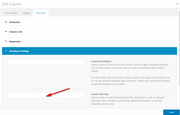
I see that some of your other pages have a true sidebar, do you want the background color changed for those too?
For the page you linked to, Please try this code in the General Styling > Quick CSS field or in the WordPress > Customize > Additional CSS field:#main > div > div.flex_cell.no_margin.av_one_fourth { background-color: #dddddd; }After applying the css, Please clear your browser cache and check.
Best regards,
MikeHey bitterlemmer,
Do you mean that you would like a Tiktok social icon in the header or footer next to the others, or do you mean a Tiktok social share button in the box after the posts?
The social share box button will require a request because of the linking involved, but a social icon can easily be added.
You can add more social profiles by following the steps outlined here in our documentation.
Then you can upload your new icon to the Enfold Theme Options > Import/Export > Iconfont Manager from http://fontello.com/
I didn’t find your Tiktok icon on fontello so you will need to find a SVG of it to drag into fontello to create the icon font:
The icon font will be black and white which css will color, so you don’t need to find a colored SVG, it won’t work. But if you find a png with a transparent background then you can convert it here.
Please give this a try and let us know if you need a hand with it.Best regards,
MikeHey mary301187,
You can add more social profiles by following the steps outlined here in our documentation.
Then you can upload your new icon to the Enfold Theme Options > Import/Export > Iconfont Manager from http://fontello.com/
I didn’t find your Beatport icon on fontello so you will need to find a SVG of it to drag into fontello to create the icon font:
The icon font will be black and white which css will color, so you don’t need to find a colored SVG, it won’t work. But if you want to use the png you linked to because it has a transparent background then you can convert it here.
Please give this a try and let us know if you need a hand with it.Best regards,
MikeFebruary 29, 2020 at 10:46 pm in reply to: Is it possible to insert a catalogue in a Accordion Toggle #1189109Hey peter51,
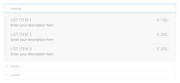
To get the shortcode of the catalog please use the shortcode wand
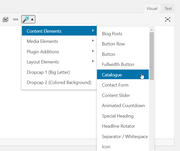
and then paste into the accordion in the “text” tab
Best regards,
MikeFebruary 29, 2020 at 10:34 pm in reply to: Mobile view on iPad/tablet (for single elements) #1189108Hi,
Thank you for enabling 2 articles, but only one is loading on page load then when the next/prev buttons are clicked the second is loaded with jQuery, so we won’t be able to change this behavior with css.
But to move the next/prev buttons up to the image for iPhone this css seems to work:@media only screen and (max-width: 767px) { #top .avia-content-slider .avia-slideshow-arrows a { top: 20% !important; } }After applying the css, Please clear your browser cache and check.
Best regards,
MikeFebruary 29, 2020 at 10:13 pm in reply to: Navigation menu is showing up twice on mobile devices #1189106Hi,
Glad we were able to help, we will close this now. Thank you for using Enfold.For your information, you can take a look at Enfold documentation here
For any other questions or issues, feel free to start new threads in the Enfold forum and we will gladly try to help you :)Best regards,
MikeHi,
Glad we were able to help, we will close this now. Thank you for using Enfold.For your information, you can take a look at Enfold documentation here
For any other questions or issues, feel free to start new threads in the Enfold forum and we will gladly try to help you :)Best regards,
MikeFebruary 29, 2020 at 10:11 pm in reply to: "Password Protected" Plugin Not Working Well With Enfold #1189103Hi,
When I examined your site I didn’t find any errors, and saw that you were not using the Enfold Theme Options > Performance > JS & CSS file merging and compression at this time, but in the future if you add a caching plugin or Autoptimize please don’t minify the JS files twice, that is once in Enfold and again in a caching plugin.
Also please don’t enable Enfold Theme Options > Performance > Load jQuery in your footer or have another plugin Load jQuery in your footer, it can cause strange behavior.
So right now I don’t see anything that could be causing an error.Best regards,
MikeHi,
Thank you for the login, I added this css to show the social icons on mobile and I changed the logo container width a little so the burger menu would not be on top of the logo:@media only screen and (max-width: 767px) { .responsive #top #wrap_all #header .social_bookmarks, .responsive #top #wrap_all #main .av-logo-container .social_bookmarks { display: block !important; } .responsive #top #wrap_all .container { width: 92% !important; max-width: 92% !important; } }please clear your browser cache and check.
Best regards,
MikeHi,
Sorry for the late reply and thanks for the login, I removed your css (top: 50%) and then compared your post slider to my localhost and everything seemed the same excerpt mine didn’t have the error, I then checked all of your custom css and found two errors that I corrected having to do with (top cal()) but it didn’t solve, but after some stabbing around I found adding this css to your child theme stylesheet solved:.avia-content-slider, .avia-content-slider-inner { position: initial !important; }please clear your browser cache and check.
Best regards,
MikeHey gretabeneforti,
Sorry for the late reply and thanks for the login, I took a look at your contact form and moved your email to the front of the list and added mine to the end and then sent a test that I received in my Gmail spam box, but I did get it, I assume that you have checked your spam box?
So you mail is sent-by: nereide.dnshigh.com and signed-by: francescopagani.com, which seems good, but I don’t see how you have setup your WordPress mail with your mail server. Meaning that typically you would use a plugin to connect to the ssl mail server, was this done by your webhost?
So often a mail server will mark mail as spam if it was sent without logging in, but I’m assuming your webhost did set this up because I got the email signed by you.
Another issue can be some mail servers will mark emails as spam if they don’t have “reply-to” or other mail headers, each webhost can be different.
So if you didn’t get the test email, and you checked your spam box, then please ask your webhost if there is a spam log that shows why, and ask if you need any certain headers in your messages.
Since you said the 4 other addresses are getting the emails, it makes sense that this is related to the mail server.Best regards,
MikeFebruary 29, 2020 at 7:16 pm in reply to: "Password Protected" Plugin Not Working Well With Enfold #1189044Hi,
Sorry for the late reply, were you using the maintenance redirect and the Password Protected at the same time?
The plugin says: “does not work with some caching setups.”
Clearing caches will often force you to have to login again.
Another plugin recommended by users is Hide My Site, perhaps this will work better.Best regards,
MikeFebruary 29, 2020 at 6:49 pm in reply to: Mulitcolor accordion with png image (instead of icon) #1189039Hi,
Glad we were able to help, we will close this now. Thank you for using Enfold.For your information, you can take a look at Enfold documentation here
For any other questions or issues, feel free to start new threads in the Enfold forum and we will gladly try to help you :)Best regards,
MikeHi,
Sorry for the late reply, the reason your filter is not working is becauseavf_modify_widget_image_sizeis not a valid hook, you would need to useavf_modify_thumb_sizelike this:add_filter( 'avf_modify_thumb_size', 'enfold_customization_modify_widget_size', 10, 1 ); function enfold_customization_modify_widget_size( $size ) { $size['widget'] = array('width'=>300, 'height'=>300); return $size; }then after adding you need to regenerate the widget image sizes, I used Simple Image Sizes to do this, but you can also use this plugin to change the size instead of the filter if you wish.
Then you also need to change the css so the image will show larger than the 36px by 36px size:div ul.product_list_widget li img { width: 300px !important; }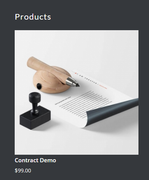
300px might be a little large for the widget area, but you can adjust to suit.Best regards,
MikeHi,
Sorry for the late reply and thanks for the login and links, but I’m not sure what the issue is, I see that on each page your content is 100% wide with images and text.
I see your table created in the text element, and I assume this is one that you “created manually” instead of using the “table element” but I’m not sure what you mean that you can’t add a table directly under a title? For a title would you use a special heading or a text element?
Do you mean there is too much padding or margin?
Perhaps if you can create a test page/post with a title and table the way you would like to so we can see the issue we can help adjust so you can do this in the future without the issue.Best regards,
MikeFebruary 29, 2020 at 5:00 pm in reply to: Header Background Image Doesnt Display full width #1189030Hi,
Sorry for the late reply, if I understand correctly you are not seeing these options when you upload an image for your logo?

Also the logo container is not the full width of the header, are you trying to add a header background image?
If so then try adding a background image to the #header_main with a background-size of “cover”
If you can link to your page and the image you want to use it will help us understand better so we can assist.Best regards,
MikeFebruary 29, 2020 at 4:36 pm in reply to: Navigation menu is showing up twice on mobile devices #1189028Hey Andi,
Sorry for the late reply and thanks for the login, I added this css into your Quick CSS to only show the burger up to 1023px and your main menu to start showing at 1024px, which I found to be the size that it shows well at, please clear your browser cache and check.@media only screen and (max-width: 1023px) { ul#avia-menu > li.menu-item-top-level { display: none !important; } .av-burger-menu-main.menu-item-avia-special { display: block; } }Best regards,
MikeHey Michael,
Sorry for the late reply and thanks for the link, when I examine your shop page there was a lot of padding around the sidebar and content making the sidebar look very large, so this css removes that and it seems to look better, Please try this code in the General Styling > Quick CSS field or in the WordPress > Customize > Additional CSS field:#top.woocommerce-page #main > div.container_wrap.container_wrap_first.main_color.sidebar_right.template-shop.shop_columns_4 > div { padding: 0px !important; } #top.woocommerce-page #main > div.container_wrap.container_wrap_first.main_color.sidebar_right.template-shop.shop_columns_4 > div > main > div { padding: 0px !important; }this is ment to only work on your shop pages, after applying the css, Please clear your browser cache and check.
Another option would be to adjust the content / sidebar ratio in your theme options at:
Enfold Theme Options > General Layout > Dimensions > Content | Sidebar Ratio
it looks like you have it set to “73% / 27%” perhaps “80% / 20%” would be better.Best regards,
MikeHey micha_media,
Sorry for the late reply, I have examined your page and found with your grid row container (q:1) you are using two elements with the same ID, one with 1/2 columns and the other with 1/3 columns, so based on the Element Visibility options you have set you seem to want the 1/2 columns to show stacked for 768px (iPad/Tablet) if so Please try this code in the General Styling > Quick CSS field or in the WordPress > Customize > Additional CSS field:#top.home #wrap_all #kontaktelement_1.av-desktop-hide.av-small-hide.av-mini-hide .no_margin.av_one_half { width: 100% !important; display: block !important; } #top.home #wrap_all #kontaktelement_1.av-desktop-hide.av-small-hide.av-mini-hide .no_margin.av_one_half > .flex_cell_inner { transform: translate(25%, 100%); }After applying the css, Please clear your browser cache and check.
For (q:2) please try this css:@media only screen and (min-width: 767px) and (max-width: 770px) { #top.page-id-123 #av-masonry-1 h3.av-masonry-entry-title.entry-title { font-size: 20px!important; } }the font-size was set by your child theme to 26px, so 20px seems to work well, but feel free to adjust to suit.
For (q:3) please enable the two articles for 768px so we can adjust.Best regards,
MikeHey beachcitiescryo,
Sorry for the late reply, Please try this code in the General Styling > Quick CSS field or in the WordPress > Customize > Additional CSS field:@media only screen and (min-width: 1440px) { #top.home #av_section_1 { background-image: none !important; } }Best regards,
Mike -
AuthorPosts
