

Forum Replies Created
-
AuthorPosts
-
Hi,
Thanks for the feedback, after editing the parent theme and regenerating your thumbnails, (for the old images), or by uploading a new image, did this work? I checked the test page but it seems like the image is not there, so I’m not sure.
If this worked then it could be added to your child theme with a fliter like this:add_filter( 'avf_modify_thumb_size', 'enfold_customization_modify_thumb_size', 10, 1 ); function enfold_customization_modify_thumb_size( $size ) { $size['gallery'] = array('width'=>845, 'height'=>684 , 'crop' => false); return $size; }Best regards,
MikeFebruary 26, 2021 at 12:51 pm in reply to: Images metadata lost in Enfolds generated images #1283833Hi,
I certainly don’t want to sound rude, but unfortunately, I have been trying to explain that WordPress doesn’t perform this way.
You can prove this to yourself by testing on a WordPress install without Enfold and your image with the IPTC

Best regards,
MikeHi,
Glad we were able to help with this, we will close this now. Thank you for using Enfold.For your information, you can take a look at Enfold documentation here
For any other questions or issues, feel free to start new threads in the Enfold forum and we will gladly try to help you :)Best regards,
MikeHi,
Wow, how about that? No, I didn’t do anything 😃
Thanks for the link, so the featured image on event detail page looks like it is using the “gallery” sized image (845px)
You could try editing the parent theme functions.php around line 187:

to this:
$avia_config['imgSize']['gallery'] = array('width'=>845, 'height'=>684 , 'crop' => false);
you would then need to regen your media thumbnails so the old images at this size are not cropped, all new images uploaded will follow this rule.
Or I believe you can choose which size image to use, within the element, if so try choosing the “masonry” sized image (705px), as you can see in the screenshot above, the masonry image is not cropped.Best regards,
MikeHi,
Sorry for the late reply and thanks I believe I understand better now. please try this script instead, you will notice two new lines targting the logo width, on scroll it will be 200px, after scroll it sets to 115px, which is the current width.function change_logo_on_scroll(){ ?> <script> (function ($) { $(window).scroll(function() { var width = $(window).width(), height = $(window).height(); var scroll = $(window).scrollTop(); if (scroll > 20 && width >= 900) { $('.logo a').find( 'img' ).attr('src', 'https://your-site.com/wp-content/uploads/2021/01/2nd-logo.png').css({ 'padding-top': '20px'}); $('.logo').css({ 'width': '200px'}); } else { $('.logo a').find( 'img' ).attr('src', 'https://your-site.com/wp-content/uploads/2021/01/logofinale.svg').css({ 'padding-top': '0px'}); $('.logo').css({ 'width': '115px'}); } }); })(jQuery); </script> <?php } add_action('wp_footer', 'change_logo_on_scroll');also check the url in the code above.
Best regards,
MikeHi,
Thank you for the screenshot, it looks very similar to my example above with the shortcode, to me this looks like the correct solution, please give this a try.
You can use the same slider as on your homepage if you copy and use that shortcode, you can see all of the pages shortcodes by using the Avia Layout Builder Debugger, or just recreate the element with the shortcode wand as described above.Best regards,
MikeHi,
Sorry for the late reply, I didn’t notice that this is not your thread, that is why you can not see the Private Content area and the screenshots.
Anyways, you said you like the result now, but you would like to have the read more button like it was in the “list layout”, unfortunately, the “Single Author, small preview Pic” layout doesn’t have a read more button, so for a workaround I added the “read more” to one of your posts:

Then I added this css to your Quick CSS:#top.blog .entry-content .more-link { text-align: right; position: relative; margin-top: 40px; } #top.blog .entry-content .more-link { display: inline-block; border-width: 1px; border-style: solid; border-radius: 100px; padding: 0 20px; text-transform: uppercase; font-size: 0.8em; font-weight: bold; position: relative; z-index: 2; background-color: #ffffff; color: inherit; line-height: 2.1em; font-size: 0.75em; }Now for the one post on your Blog the read more button is showing like on the “List Layout”

Please try adding the “read more” to the other posts, to show less of the excerpt try adding the “read more” above the post content.
The page is [your-domain]/news/Best regards,
MikeHi,
These fields in the WP media library are a part of the WP core and are not designed to get info from the images, they are designed to be entered manually by the user. (remember from above: “GD always strips profiles by default”)

But remember that the default WordPress has the functions for working with the GD script and not ImageMagick, so now that you are using ImageMagick and you want to incorporate its features I would recommend seeking out advice from an ImageMagick on WordPress expert, as in a freelancer, since ImageMagick is not used by WordPress by default researching into this further is beyond the scope of our support.Best regards,
MikeHi,
I’m not sure what you mean, on my localhost when I remove the css there are no issues?
Anyways this thread is starting to get off-topic, the topic of this thread is adding a “read more” button to the masonry items, and not the gallery. Which I was able to do for you.
While I would like to assist with your next topic of customizing the style your masonry items, I don’t see how this can effectively be done without seeing your site. I write this because often issues that I see are a result of css designed to target a different element and was not specific enough. This is one reason we typically ask to see the page you are working on, most css customization is not a “one-size-fits-all” situation.
We should close this thread as solved, and if you decide you would like more help customizing your masonry style and are willing to create a test page that we can work on together, then please open a new thread explaining what you are trying to achieve with a link, a screenshot is always welcome too.Best regards,
MikeHi,
To remove the ajax search result date, please try this css:.ajax_search_excerpt { display: none !important; }I’m not sure what you mean by adding the FULL-SCREEN SLIDER element inside a 1/1 layout, for a single product page, please include a mockup. I think you would like to edit the product page with the Advanced Layout Builder (ALB), and use columns, sliders, etc.
Which you can by switching the ALB:

and using these ALB elements:

But you can not re-create the exact same product page as the default Woocommerce product page, but you could create your own layout. Try editing a test product and see if this will help.
If it is important to keep the current layout and add a slider as I did above in the screenshot, then the steps I showed would be the solution.Best regards,
MikeHi,
Ok, when I check your /laboratorio/ page I see that no changes to the Initial Active Image have been made like I suggested to correct this. I made this change for you and now the issue is solved, please clear your browser cache and check.Best regards,
MikeHi,
I couldn’t find the single product page in your screenshot but I did find another linked below.
It is possible to inject a slider below the title bar on a single product page with a function and the slider shortcode in your functions.php
But I’m unsure if every single product gets the same slider or a different one, and if you plan on changing this often or never.
This example would be to add one slider to all single product pages. First, we will want to get the shortcode for our slider by using the Magic Shortcode Wand tool in the Classic Editor:

Then for this example I added only one image using the “featured” image size (1500px x 430px) with a title & caption, this is the shortcode result:

Then we will add that shortcode to this function, replacing[shortcode-here]with your shortcode.
the rresults:
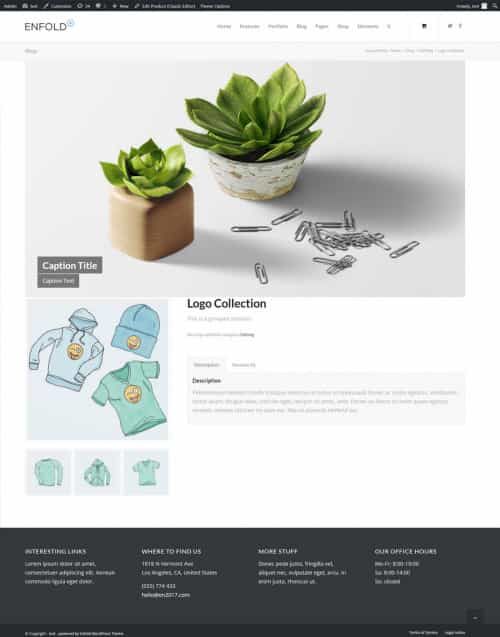
Please note that the slider is inside the page container so the page padding and margin still apply.If you are going to try this please edit your functions.php via FTP so if you make an error in the code and it crashes your site, you will be able to correct it. The WordPress > Appearance > Editor works good and is easy to use, but if your site crashes you can not reach the editor, but with FTP you can.
Best regards,
MikeHi,
I tested the masonry with the large gap and your css, and the issue I see is with your css, for example thepadding: 5px;adds the padding like this (the green area):

as you notice it is displacing the inner-masonry. I would recommend removing this padding.
Themargin-bottom: 15px;is increasing the “large gap”, I don’t believe that you wanted to increase the gap, so I would recommend removing this also (orange area):

as you can see, when the padding & margin is removed from your css, the issue is resolved:

Best regards,
MikeHi,
Glad to hear this helped, unless there is anything else we can help with on this issue, shall we close this then?Best regards,
MikeHi,
Glad we were able to help, we will close this now. Thank you for using Enfold.For your information, you can take a look at Enfold documentation here
For any other questions or issues, feel free to start new threads in the Enfold forum and we will gladly try to help you :)Best regards,
MikeHi,
Thanks, currently your code is like this:
$('.logo a').find( 'img' ).attr('src', 'xxx/uploads/2021/01/2nd-logo.png').css({ 'padding-top': '20px','width':'max-content'});
try removing the width part of the css and only use the padding part in the jQuery, then use this css in your Quick CSS to make the logo 200px:.logo { width: 200px !important; }The reason is that you want the logo 200px wide always, but the script is only fired on-scroll, so css in the Quick CSS would work better. The padding css is only for the second image (small one) to center it vertically, and is used only on scroll so the css in the jQuery is the correct approach.
I hope this helps.Best regards,
Mike-
This reply was modified 5 years, 1 month ago by
Victoria.
Hi,
Sorry for the late reply, I believe that Guenni007’s advice to use the “Special Character Translation” plugin from the dev team is a good idea. I tested your page by copying the html from your code block and added it to my localhost along with the relevant css, I then removed your line brake from the word “Halsschlagadern” and added the­

on larger screens it doesn’t show on the frontend:

but on smaller screens, in this case 320px with is typically the smallest phones like the iPhone 5, it does show:

I believe that this demonstrates that the technique works, but as Guenni007 pointed out, each time you edit the page WordPress will try to remove these, so using the “Special Character Translation” plugin is a good idea.Please note that the iPhone’s 6/7/8 have a screen width of about 375px, and at this size the word “Halsschlagadern” doesn’t break, because there is no need:

So perhaps you feel it doesn’t work on your device because it is not being triggered to work.
Another option might be to set the character width like this:.mobilleistung li { max-width: 30ch !important; }you could try changing the “30ch” to cause the brake where you want it, but to me currently even though the word doesn’t brake where you want it to, the text seems to display well in the table.

Best regards,
MikeHey egouldmedia,
Sorry for the very late reply and thanks for the login, I checked the layerslider template store, in the layerslider plugin, and found that the “ecommerce” template is a premium template, and I couldn’t download. I was able to export your slider to my localhost, but when I tested it I got this notice:
Notice: LayerSlider skin "numbers" not found. Defaulting to "noskin"
I found the setting the skin in the slider settings solved the error:

since this is a premium template I can imagine that it may not use premium features such as the skin in a premium template.
On your site I don’t see the prev/next buttons, but on the demo they look normal. I found that the Show navigation buttons are disabled:

I also found that the “Slide Transition” is not set. Please try looking at the slider settings for that slide and try changing any blank settings, these were probably the ones influenced by the premium settings.
After I made these changes to the copy on my localhost the slider seems to work well and similar to the demo.Best regards,
MikeHi,
Gracias por los comentarios, revisé su página nuevamente y el CSS parece estar funcionando correctamente. Intente borrar la caché de su navegador y cualquier complemento de almacenamiento en caché y vuelva a verificar.

— Translated with Google —
Thanks for the feedback, I checked your page again and the css seems to be working correctly. Please try clearing your browser cache and any caching plugins and check again.
Best regards,
MikeHi,
Good try, you were almost there, between the two css rules you needed a comma like this:
$('.logo a').find('img').attr('src','https://url.com/wp-content/uploads/2021/01/2nd-logo.png').css({'padding-top':'20px','width':'200px'});
Please give this a try.Best regards,
MikeFebruary 22, 2021 at 12:25 am in reply to: LayerSlider – Uncaught ReferenceError: jQuery is not defined #1282688Hey BierPlus,
Sorry for the very late reply, it looks like the layerslider is loading before jQuery, I tried many settings except for disabling your plugins, did you try this?
I also note that your theme editor is disabled so I’m unsure if your child theme is causing this, did you try enabling your parent theme?
I also exported your current slide to my localhost with a new install of v4.7.6.4 and it works correctly.
What is the “Raidbox” plugin? It has a “purge cache” dropdown but it doesn’t seem to work.Best regards,
MikeFebruary 21, 2021 at 11:33 pm in reply to: Keeping Parent Menu Item In Hoover State While Submenu Is Active #1282684Hey samebluesky,
Sorry for the very late reply and thanks for the link to your site, please try this code in the General Styling > Quick CSS field or in the WordPress > Customize > Additional CSS field:#top #header .av-main-nav > li#menu-item-782:hover > a { background-color: #328283 !important; }or if you want this to work for all menu items, try this css:
#top #header .av-main-nav > li:hover > a {
    background-color: #328283 !important;
}
After applying the css, please clear your browser cache and check.
Best regards,
MikeFebruary 21, 2021 at 10:25 pm in reply to: Lokal Fonts hochgeladen (Quicksand, Opensans) ABER immer noch google fonts aktiv #1282680Hi,
Sorry for the very late reply, to remove all google fonts, try adding this code to the end of your functions.php file in Appearance > Editor:
` /*remove all google fonts*/
add_action( ‘init’, ‘enfold_customization_switch_fonts’ );
function enfold_customization_switch_fonts() {
global $avia;
$avia->style->print_extra_output = false;
}`
I tested this on my localhost with adding a downloaded Google font in the Custom Font Manager of the theme settings, so that the font is loaded locally, I then set the elements to use this font in the Advanced Styling, H1-H6, and it worked correctly without connecting to fonts.googleBest regards,
Mike-
This reply was modified 3 years, 4 months ago by
Yigit.
Hi,
Sorry for the very late reply, and thanks for the login, I see that you are using the blog element to show one post, to show a specific post on your page please try filtering the posts by date:

I see that one of your posts was on 01/29 and the other was 02/15.Best regards,
MikeHi,
Sorry for the very late reply and thanks for the login. Unfortunately, I could not find the text referenced or any other text link on that page, do you have another example page?
I believe that the issue can be solved with more specific css, typically links like the ones you are trying to target are also influenced by another tag such as H1, span, p, etc.
So if your link is in a special heading element in a color section with the custom ID “features”, you would want to try#features > h2 > ainstead of#features a*for example.
If I could see examples of these links I’m sure we can sort this out.Best regards,
MikeHey projectt_co_uk,
Sorry for the very late reply, please try using the layerslider instead of the full-screen slider, they seem to have a workaround.
Just in case you didn’t know, the issue with mobile auto video playing is a browser restriction, while there may be other workarounds it is generally frowned upon by the browsers.Best regards,
MikeHi,
I checked your site and I do not see this css in your source code, so please ensure that it is in only one place, I recommend WordPress > Customize > Additional CSS and also ensure the code looks exactly the same as in this thread on a desktop. Sometimes if you copy the code from an email the arrow in the code looks like letters:>or>Best regards,
MikeHi,
Thank you, this script has been adjusted:function savvy_custom_mod(){ ?> <script> (function($){ $(window).on('av-height-change', function() { $('.av-masonry:not([class*="-gallery"]) .av-masonry-entry').each(function() { var more = $(this).find('.av-masonry-read-more'); var cont = $(this).find('.av-masonry-entry-content'); if( more.length == 1 ) return; cont.append('<div class="av-masonry-read-more">Read more</div>'); }); }); })(jQuery); </script> <?php } add_action('wp_footer', 'savvy_custom_mod');Please ensure to clear your browser and any caching plugins before checking.
Best regards,
MikeHi,
Glad to hear, unless there is anything else we can help with on this issue, shall we close this then?Best regards,
Mike -
This reply was modified 5 years, 1 month ago by
-
AuthorPosts

