

Forum Replies Created
-
AuthorPosts
-
Hi,
Thank you for your patience and for the cPanel login above, I was able to remove your old header.php and moved your GTM script that was in the old header.php to your child theme functions.php and your site seems to be working fine now. I tested by editing and saving your homepage and found no error, please clear your browser cache and check.Best regards,
MikeHi,
Thanks our responses did cross, instead of adding more to achieve this lets set the header with these settings, I un-checked Enfold Theme Options ▸ Header ▸ Header behavior ▸ Shrinking Header and changed Enfold Theme Options ▸ Header ▸ Header Layout ▸ Header Size ▸ custom pixel value of 46px, which was the size after scroll. Please check.Best regards,
MikeHi,
Thanks, I’m not sure about your error, perhaps your clipboard added something, I added the script to your functions.php with no error, and it seems to be working, please check.Best regards,
MikeOctober 17, 2021 at 8:26 pm in reply to: Background video options outside Color Section layout? #1325321Hey WebDevDept,
Thank you for your patience, as I understand your situation you would like to have some 1/2 column background videos with text blocks next to them like in a checkerboard pattern, tested using a grid row element with text on one side and a code block on the other with an html code for a background video.
This is the backend view:

this is the frontend view:

the html is based on this codepen, and if you are using the Avia Layout Builder Debugger you can add my test page to your site to examine with this shortcode:[av_heading heading='Below a grid row element is used' tag='h3' style='' subheading_active='' show_icon='' icon='ue800' font='entypo-fontello' size='' av-medium-font-size-title='' av-small-font-size-title='' av-mini-font-size-title='' subheading_size='' av-medium-font-size='' av-small-font-size='' av-mini-font-size='' icon_size='' av-medium-font-size-1='' av-small-font-size-1='' av-mini-font-size-1='' color='' custom_font='' subheading_color='' seperator_color='' icon_color='' margin='' margin_sync='true' padding='10' icon_padding='10' headline_padding='' headline_padding_sync='true' link='' link_target='' id='' custom_class='' template_class='' av_uid='av-kuvig2gc' sc_version='1.0' admin_preview_bg=''][/av_heading] [av_layout_row border='' min_height_percent='' min_height_pc='25' min_height='0' color='main_color' mobile='av-flex-cells' mobile_breaking='' av-desktop-hide='' av-medium-hide='' av-small-hide='' av-mini-hide='' id='' custom_class='' template_class='' aria_label='' av_element_hidden_in_editor='0' av_uid='av-5o6ocv' sc_version='1.0'] [av_cell_one_half av_uid='av-4at75r'] [av_textblock size='' av-medium-font-size='' av-small-font-size='' av-mini-font-size='' font_color='' color='' id='' custom_class='' template_class='' av_uid='av-kuvihovt' sc_version='1.0' admin_preview_bg=''] This is 1/2 of the grid row, the other half has a background video. [/av_textblock] [/av_cell_one_half][av_cell_one_half vertical_align='top' padding='0px' padding_sync='true' background='bg_color' background_color='' background_gradient_color1='' background_gradient_color2='' background_gradient_direction='vertical' src='' attachment='' attachment_size='' background_attachment='scroll' background_position='top left' background_repeat='no-repeat' link='' linktarget='' link_hover='' mobile_display='' custom_class='' template_class='' av_uid='av-2ohsgf' sc_version='1.0'] [av_codeblock wrapper_element='' wrapper_element_attributes='' codeblock_type='' alb_description='' id='' custom_class='' template_class='' av_uid='av-kuvijbtf' sc_version='1.0'] <style> /* video background */ #background-video { height: 100%; width: 100%; object-fit: cover; z-index: -1; } /* page content */ p.text { color: #fff; font-weight: bold; text-align: center; font-size:2em; } span.text { top: 30vh; position: absolute; z-index: 5; left: 30%; width: 50%; } @media (max-width: 750px) { #background-video { display: none; } body { background: url("https://assets.codepen.io/6093409/river.jpg") no-repeat; background-size: cover; } } </style> <video id="background-video" autoplay loop muted poster="https://assets.codepen.io/6093409/river.jpg"> <source src="https://assets.codepen.io/6093409/river.mp4" type="video/mp4"> </video> <span class="text"> <p class="text">THIS IS A RIVER.</p> <p class="text">How majestic.</p> </span> [/av_codeblock] [/av_cell_one_half] [/av_layout_row]Hopefully this helps.
Best regards,
MikeHi,
Thank you for your patience, could you please include a link to your site and set the cart as “always display attached to menu” for mobile we can assist with css so your burger icon is not over your logo, for desktop we could also help with css but I don’t know what the issue would be without seeing your site. Typically the cart icon is not actually in the menu, it is next to the social icons and menu.Best regards,
MikeHi,
Glad to hear this helped, for mobile you may want to use this:@media only screen and (max-width: 767px) { #top.home .n2-ss-no-bga-fixed { top: -130px; } }to make the mobile header background header transparent on first load, try this:
@media only screen and (max-width: 989px) {
.html_mobile_menu_tablet #top #wrap_all #header.av_header_transparency {
    background-color: transparent;
}
}
on scroll the header will turn black, if you want it to stay transparent use this instead:
@media only screen and (max-width: 989px) {
.html_mobile_menu_tablet #top #wrap_all #header.av_header_transparency,#header.header_color .header_bg {
    background-color: transparent;
}
}
to delay the header by 8 seconds (after your splash screen) Try adding this code to the end of your functions.php file in Appearance ▸ Editor:
function delay_header() { ?>
    <script>
(function($) {
	$("#header").css({'opacity':'0'});
	setTimeout(function(){
	$("#header").css({'opacity':'1'});
	},8000);
}(jQuery));
</script>
    <?php
}
add_action('wp_footer', 'delay_header');
to move your menu items up try this:
#top #header_main #av-burger-menu-ul {
    vertical-align: top;
}
After applying the css, please clear your browser cache and check.
Best regards,
MikeHi,
Thank you for your patience, I believe that you are asking how to fade out the background video on scroll similar to how the example site does. The example site does this with javascript changing the opacity on scroll, you could achieve this with some custom code like this.
If you would like some help with this please link to your test page.Best regards,
MikeHi,
Thank you for the update perhaps others will also find this modification helpful. If you have any further questions please create a new thread and we will gladly try to help you. Thank you for using Enfold.Best regards,
MikeHey ronellenfitsch,
Thank you for your patience and the link to your site, I believe that if you edit the file at\enfold\config-templatebuilder\avia-shortcodes\tabs\tabs.jsand on line 129 look for:
scoll_target = el_offset - 50 - parseInt($('html').css('margin-top'),10);and change the 50 to 180 like this:
scoll_target = el_offset - 180 - parseInt($('html').css('margin-top'),10);
Then clear your browser cache and any cache plugin a few times, and then check.Best regards,
MikeHey alliansohog,
Thank you for your patience and for the link to your site, but without logging in I can not see the content of your link, as it is a “preview” of a draft.
From your description, it sounds like you want to change a text block on your page with the sub-menu items, this may be possible by hiding the content on the page and making it visible by clicking on the menu items.
Is this what you ment?
Please include an admin login in the Private Content area and a test page for us to see your example.Best regards,
MikeHi,
Thank you for the link to your site, but I can not see the element backend without logging in, please include an admin login in the Private Content area so I can assist better.Best regards,
MikeHi,
Glad we were able to help, if you have any further questions please create a new thread and we will gladly try to help you. Thank you for using Enfold.Best regards,
MikeHey goldengate415,
Thank you for the link to your site, your header is transparent, but the slider shortcode is not at the top of the page under the header so the black you are seeing is the body background color, try adding this css to move the slider up so it will show through the header:#top.home .n2-ss-no-bga-fixed { top: -88px; }By the way, this negative height is automatically added for color sections & the layerslider when a transparent header is used, not that this helps your situation, but it may explain why you have not noticed this before.
Best regards,
MikeHi,
To change the arrow to black please adjust the css to this:.html_av-submenu-hidden .av-submenu-indicator:before { font-size: 20px; color: #000; }As for the header css, I didn’t mean for you to add it to your site, that css is already there, you should find and remove the css and correct your logo image in the theme settings.
For example find this css and remove it:.responsive #header_main .container { height: auto !important; }this should keep your header from changing sizes on page load.
Best regards,
MikeHey wagner3ddruck,
To set the header to only show on scroll down, go to the backend of the page you are working on and change the layout options for the Header visibility and transparency to Header is invisible and appears once the users scrolls down
 Then add this css to make it transparent:
#header.header_color .header_bg { background-color: transparent; }This worked on my demo site using the 2017 Demo, If this doesn’t help you please include an admin login in the Private Content area so we can be of more assistance.
Best regards,
MikeOctober 16, 2021 at 11:37 pm in reply to: Post Meta not showing & HR not going full width on Blog #1325273Hey Corina,
Thank you for your patience and for the screenshot and login, for the meta date I found that you had the date and time values in the WordPress ▸ Settings ▸ General ▸ Date Format set empty, I changed this so the date would show, feel free to re-adjust to suit.
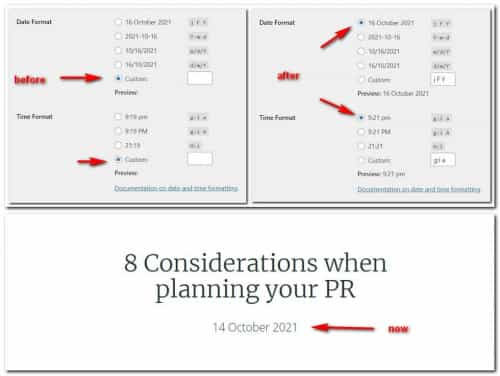
For the HR, you had the sidebar active on the post, even though there was no sidebar visible the class was in the page and the HR adjust to suit. The other elements were full-width elements so they didn’t need to take notice. I disabled the sidebar and now the HR is full-width.Best regards,
MikeOctober 16, 2021 at 10:37 pm in reply to: i want to connect the management of https://kriesi.at #1325269Hey Shan sagar,
Sorry please see: https://themeforest.net/item/enfold-responsive-multipurpose-theme/4519990Best regards,
MikeHey Lautho2011,
Please try using the option at Button Element ▸ Border ▸ Border Radius and adjust to suit:
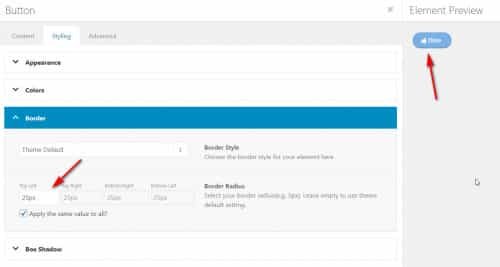
you should see results like this:
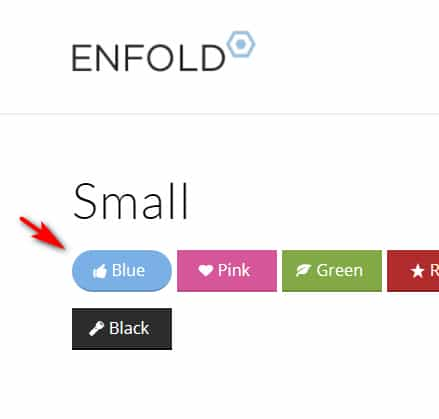
If you are still having trouble please include a admin login in the private content area so we can take a closer look.Best regards,
MikeHey KeesKaas,
Thank you for your question, one way you can do this is to hide the title bar & header on your one page by going to that page and selecting these options from the layout options in the editing sidebar:

If you want to show the header and logo, but hide the menu then try this css in the General Styling ▸ Quick CSS field or in the WordPress ▸ Customize ▸ Additional CSS field:nav.main_menu { display: none; }After applying the css, please clear your browser cache and check.
If this doesn’t help please include the url to the page in question so we can take a closer look at your specific needs.Best regards,
MikeOctober 16, 2021 at 10:17 pm in reply to: i want to connect the management of https://kriesi.at/ #1325264Hey waqas,
Sorry the Slider Revolution Plugin is not our product, please try: https://www.sliderrevolution.com/Best regards,
MikeHi,
I checked your site, but I don’t see the error now.
I suggested this because at the error location/class-asset-manager.php on line 904
was this comment:* Fix a possible bug occurring on some installs - occur ocasionally - reporting "Creating default object from empty value" * https://kriesi.at/support/topic/clean-enfold-install-with-woocommerce-and-demo-data-results-in-critical-error/ * https://github.com/KriesiMedia/wp-themes/issues/3281at the github issue page the Dev Team said they were not able to reproduce this, and my demo site also doesn’t give this error.
So that is why I was asking about your server settings, do you have any plugins or scripts you can disable?
Who is your webhost?Best regards,
MikeHi,
Glad Rikard could help, if you have any further questions please create a new thread and we will gladly try to help you. Thank you for using Enfold.Best regards,
MikeHi,
Glad Rikard could help, if you have any further questions please create a new thread and we will gladly try to help you. Thank you for using Enfold.Best regards,
MikeOctober 16, 2021 at 9:53 pm in reply to: Blog post element broken when Woocommerce is activated #1325258Hi,
I’m not sure if this will help your situation, but at the start of this thread you said that your issues seem to start when the woocommerce plugin is activated, if you are using WooCommerce 5.7.1 try downgrading to 5.6.1, in another thread woocommerce said that there was a known bug in 5.7.1 that caused issues on some sites. Perhaps this is your issue. I couldn’t login to your site and my keyboard doesn’t respond correctly on your site so it’s hard to say.Best regards,
MikeHey schweg33,
Thank you for the link to your site and the screenshot, please try this code in the General Styling ▸ Quick CSS field or in the WordPress ▸ Customize ▸ Additional CSS field:.html_av-submenu-hidden .av-submenu-indicator:before { font-size: 20px; }and adjust the font-size to suit.
On your mobile layout the size of the logo container starts as 80px, due to some css you have:.responsive #top #header_main > .container .main_menu .av-main-nav > li > a,.responsive #top #wrap_all .av-logo-container { height: 80px; line-height: 80px }but then it changes to 96px due to some more css you have
.responsive #header_main .container { height: auto !important; }I also not that your logo image leads to a 404 error:
/wp-content/uploads/2021/10/logo-mobil-300x57-1.png
the logo shown is from this css:/*Logo mobil kleiner*/ @media only screen and (max-width: 989px) { .logo img, .responsive .logo img { opacity: 0 !important; } .logo a { background-image: url(/wp-content/uploads/2021/10/logo-mobil.png)!important; background-size: contain; background-repeat: no-repeat; background-position: -15% 50%; }}but the actual image is
logo-mobil.webp
So to correct all of this perhaps you should remove the last two css rules and update your logo image to the one that shows, then you won’t have the conflicting rules and images causing the change.Best regards,
MikeOctober 16, 2021 at 9:04 pm in reply to: Setting to hide caption below lightbox doesn't work #1325255Hey Ueli,
Thank you for pointing this out, I have submited this to the dev team, meanwhile please try this css to hide the title in the lightbox:#top .mfp-gallery .mfp-content .mfp-title { display: none; }After applying the css, please clear your browser cache and check.
Best regards,
MikeHey sysop2018,
Thank you for the link to your site, try adding this code to the end of your functions.php file in Appearance ▸ Editor:function add_gtag_to_contact_submit() { ?> <script> (function($) { $('#top.page-id-1607 .contact-landing .button[type=submit]').attr('onclick', 'return gtag_report_conversion(\'https://sysop.com.mx/desarrollo-web-y-de-aplicaciones/\')\;'); })(jQuery); </script> <?php } add_action('wp_footer', 'add_gtag_to_contact_submit');Best regards,
MikeHey FamalcoGroup,
Thank you for the video, from which I found your site and was able to examine your custom css:} /*Set the brand logos to grayscale on load on the individual business units pages*/ #business-units-logos .slide-entry-excerpt { filter: grayscale(100%); opacity: 40%; } /*Enlarge the brand logos on hover on the individual business units pages*/ #business-units-logos .slide-entry-excerpt:hover { filter: grayscale(0%); transform: scale(1.2); opacity: 100%; }to correct your issue please change your css to this:
}  /*Set the brand logos to grayscale on load on the individual business units pages*/
#business-units-logos .slide-entry-excerpt
{
 filter: grayscale(100%);
 opacity: 40%;
}  /*Enlarge the brand logos on hover on the individual business units pages*/
#business-units-logos .slide-entry-excerpt:hover
{
 filter: grayscale(0%);
 opacity: 100%;
}
#business-units-logos .slide-entry-excerpt:hover img {
    transform: scale(1.2);
}
After applying the css, please clear your browser cache and check.
Best regards,
MikeHey sitibus,
Thank you for the link to your site, please try this code in the General Styling ▸ Quick CSS field or in the WordPress ▸ Customize ▸ Additional CSS field:#top.home #av_section_1 > .av-section-color-overlay-wrap { background-color: #000000; }After applying the css, please clear your browser cache and check.
Best regards,
Mike -
AuthorPosts
