

Forum Replies Created
-
AuthorPosts
-
Hey Swarez,
Thank you for your patience, I have looked at the two page tests that you have linked to, but they both have the same score, on mobile they both have zero

and for desktop they both have 0.12:

I also tested another random page /mirages/ and it tested the same.
On your “fixed” page /stella-nubis/ I see that you are using columns with inage elements, and on the “poor” page /neon-canyon/ you are using a grid. But they are both scoring the same.
On the PageSpeed linked explanation for Cumulative Layout Shift (CLS) it explains how users experience unexpected layout shifts, and the example shows a button moving after an unexpected element is added to the page so the user clicks the wrong button.
But on both of your pages, there is no unexpected layout shift to the human eye. I believe the test shows a false positive, perhaps it is the lazy loading of images or the height of the elements between the DOM load and the final paint of the page, that is, the half of a second before the human eye sees the page.
But I don’t see that abandoning the grids completely will give you a zero score.
When I tested your page on webvitals.dev/cls/ your mobile score was zero, and your desktop score was 0.0051 with the menu causing it:
div#header_main>div.container.av-logo-container>div.inner-container>nav.main_menu>div.avia-menu.av-main-nav-wrap

quite a difference in results compared to PageSpeed, I tried testing my page in PageSpeed but it gave no CLS score because it didn’t have enough data, apparently the test doesn’t give live results. When I tested my page on webvitals.dev/cls with no header I got a zero score, so I guess a drop down menu counts against you, but for a score of 0.0051 it seems fine.Best regards,
MikeSeptember 24, 2022 at 9:23 pm in reply to: Custom Font Manager, google fonts – Datenschutzkonform #1366229Hey redFox,
Thanks for the link to your page, I see that you have google maps showing, I believe that the map is pulling the font, please follow this thread.
If this doesn’t help please login to the support fourm and open a new thread your question was asked through our PreSale Request Contact Fourm which is not the correct place for support questions.
If you have not done so yet, please register for support.Best regards,
MikeSeptember 24, 2022 at 9:01 pm in reply to: Customizing Search Results, Particularly in WooCommerce Products #1366227Hey Jason,
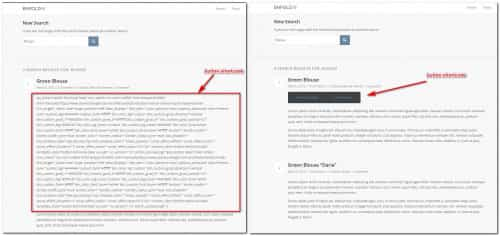
Thank you for the link to your page, I see the button shortcode in the search results and the only way I could recreate this on my test site was to add the button shortcode to a product short description:

so I assume this is what you have done, to enable the shortcode here try adding this code to the end of your child theme functions.php file in Appearance ▸ Editor:add_filter( 'the_excerpt', 'do_shortcode');this worked in my test:
Best regards,
MikeSeptember 24, 2022 at 8:30 pm in reply to: on second page of search results page some articles are not inside content #1366226Hi,
Glad to hear that you have this sorted out, shall we close this then?Best regards,
MikeSeptember 24, 2022 at 7:57 pm in reply to: Enfold Theme: Setting Headings and text copy slightly open #1366225Hi,
Thanks for the feedback, for the sub-menu items try this css:#top .av-main-nav ul a { letter-spacing: 0.4em; }for the headings try this css:
#top #wrap_all .all_colors h1,
#top #wrap_all .all_colors h2,
#top #wrap_all .all_colors h3,
#top #wrap_all .all_colors h4 {
    letter-spacing: 0.4em;
}
I left out H6 because this is what your columns of text is using and I didn’t think that you wanted the spacing there also, but if you did feel free to also add it.
After applying the css, please clear your browser cache and check.Best regards,
MikeHi,
Guenni007 yes I did test my solution above for the gallery element ▸ my test page ▸ [test page deleted]
Thanks for sharing your test page with the image element, content slider, and direct embed.Best regards,
MikeHi,
Thank you for your feedback, I have submitted an issue report to the Dev Team for their review, and a solution will most likely be added to a future update.
We need to keep this thread focused on this one issue, so please ask your other questions in separate threads, as keeping each thread on a single topic or issue is most efficient for support and future readers to find solutions, and in this case for the review of the Dev Team.
Thank you for your patience and understanding and using Enfold.Best regards,
MikeHey Stefan,
Perhaps it is the fonts for the google maps, if you have a map on the page please see this thread
If not then please link to your page so we can check.Best regards,
MikeSeptember 24, 2022 at 3:13 pm in reply to: Cannot make any changes in Enfold theme or page content #1366203Hi,
Glad Rikard could help, if you have any further questions please create a new thread and we will gladly try to help you. Thank you for using Enfold.Best regards,
MikeSeptember 24, 2022 at 3:00 pm in reply to: Enfold Theme: Setting Headings and text copy slightly open #1366201Hey markpay10,
Thank you for your question, but I don’t think that I understand what you would like to achieve.
I went to your website and mouse-over your menu and sub-menu items and see that the color of the text changes, so do you want your body text and the headings to also do this?
If so Please try this code in the Enfold Theme Options ▸ General Styling ▸ Quick CSS field field#top #wrap_all .all_colors h1:hover, #top #wrap_all .all_colors h2:hover, #top #wrap_all .all_colors h3:hover, #top #wrap_all .all_colors h4:hover, #top #wrap_all .all_colors h5:hover, #top #wrap_all .all_colors h6:hover, #top #wrap_all .all_colors p:hover, #top #wrap_all .all_colors span:hover{ color: #b3d5cd; }After applying the css, please clear your browser cache and check.
This is the expected results:

Best regards,
MikeHi,
Thanks for your feedback and pointing out this issue, I will be submitting the recommendation to the Dev Team for this once we identify the desired result. Which solution do you think is best?
The label inside the field, so that it is similar to the other fields that use a placeholder when the labels are hidden with the Hide Form Labels option:

or the label above the field for this one field only, even though the user has selected the labels to be hidden with the Hide Form Labels option:

Best regards,
MikeHi,
To disable the line please try this css:#top .header_color.av_header_transparency .avia-menu-fx { display: none; }After applying the css, please clear your browser cache and check.
Best regards,
MikeHey Armin-H,
Thanks for the login to your site, your titillium-for-enfold font zip had two folders in it:
__MACOSX
titillium-for-enfold
there should be no folders in your zip file, only fonts, I corrected this for you and tried to install but still had the error.
I tested on my test site and the new font zip installed correctly.
I believe the issue is that your server is using PHP 7.2.34 and the minimum recommended PHP version for WordPress is v7.4
Please check WordPress ▸ Dashboard ▸ Tools ▸ Site Health and ask your webhost to update your PHP version

Best regards,
MikeHi,
@paudimodel, please note that these icons are not default in the theme, you will need to add your own custom Fontello icons to your theme, please follow our documentation to add your own custom fonts: Adding your own Fontello
The code that Sozo posted will help you add many at the same time, but you will need to modify it for the icon font that you download.
If after you install your custom icon fonts to your site and follow the documentation find that you need further help, please create a new thread and include a recap, and WordPress admin access in the Private Content area so we can assist. Since this is not your thread posting your login here will not be private and is not recommended, and you will not see anything we write in the Private Content area.Best regards,
MikeHi,
Glad Rikard could help, if you have any further questions please create a new thread and we will gladly try to help you. Thank you for using Enfold.Best regards,
MikeHi,
Glad that Yigit and the LayerSlider team were able to sort this out, I have removed the login info, unless there is anything else we can help with on this issue, shall we close this then?Best regards,
MikeHey Beekster,
Thanks for the login, you had an old custom header.php in your child theme directory, I updated it for you and solved the error.
Please check.
I noticed in your WordPress ▸ Dashboard ▸ Tools ▸ Site Health that you are using PHP v7.3.33 and the minimum recommended version of PHP is 7.4.
You should ask your webhost to update this for you.

Best regards,
MikeHi,
So will the main menu items not have links? If you are using the click to expand them to show submenu items then you won’t be able to use click to go to a page from the main menu item, only from the submenu items. I assume that the submenu items will have no submenu items, that is sub-sub-menu items, because that would be a problem.
Please create a test menu / page that we can examine and link to it.Best regards,
MikeHi,
Thank you, I changed the color section ID’s to over & under and added this css:#top.av-curtain-footer.av-curtain-activated #wrap_all #main #over { z-index: 2; position: relative; } #top.av-curtain-footer.av-curtain-activated #wrap_all #main #under { z-index: 1; position: relative; }
the results:

You will need to adjust the placement of the box or make the height of the under section taller so the over box doesn’t cover the text.
Please adjust to suit, then clear your browser cache and check.Best regards,
MikeSeptember 22, 2022 at 7:42 pm in reply to: Enfold / Woocommerce: square images and image size #1366034Hi,
Glad we were able to help, if you have any further questions please create a new thread and we will gladly try to help you. Thank you for using Enfold.Best regards,
MikeHi,
Thanks for the login, I added this css:#top.single-post #main .post-meta-infos { display: none; }please clear your browser cache and check.
Best regards,
MikeHey dr_dominik,
Please try this solution which had this result:

if this doesn’t work please include a link to your site so we can check.Best regards,
MikeSeptember 22, 2022 at 7:23 pm in reply to: Enfold / Woocommerce: square images and image size #1366025Hi,
Glad to see that you found a plugin for this, to center the thumbnails try this css:#top #main .thumbnail_container img { margin: auto; }the expected results:

Best regards,
MikeHey swotes,
Please try using the gallery element and add a screenshot for each PDF you want in the gallery, then add the link to the PDF in the custom link field:

Then in the advanced tab Use Custom Link in the link setting:

Now the image of the PDF will show in the gallery and clicking on it will open the PDF.Best regards,
MikeHi,
Please link to the “Sortiment” page, I didn’t find it in your pages or portfolio items.Best regards,
MikeSeptember 22, 2022 at 1:08 pm in reply to: Enfold / Woocommerce: square images and image size #1365977Hi,
Unfortunately not with your current thumbnails because they are cropped, the thumbnail image you see is the whole image.
Please see the direct image link to the thumbnail below, you will see what I mean.
I don’t see any other solution but to create square new images.Best regards,
MikeSeptember 21, 2022 at 7:19 pm in reply to: Enfold / Woocommerce: square images and image size #1365906Hi,
Since your image is a portrait layout and looks like it is twice as tall as it is wide, I believe you will find your best results will be if you make your original image square and then upload it, your new thumbnails will then show the full product. Woocommerce images work better if they are square since the div is also square.Best regards,
MikeSeptember 21, 2022 at 7:06 pm in reply to: Increase the quality of the images (image list) in the Ajax portfolio preview #1365900Hi,
Glad to hear, if you have any further questions please create a new thread and we will gladly try to help you. Thank you for using Enfold.Best regards,
MikeSeptember 21, 2022 at 1:04 pm in reply to: Masonry Gallery – Different amounts of images in each column #1365833Hey engage24,
Thanks for the link to your site, I saw your draft homepage with the masonry gallery you are using Perfect Automatic Masonry where very wide images get twice the width and very high images get twice the height, this is the correct setting to achieve your mockup, I added another square image and moved the other images around to achieve the 3-2-3 layout. I also placed the masonry gallery in a full width column with 9% padding on the right and left to match your mockup.
Please check the draft home page and adjust the images to suit.Best regards,
MikeHi,
To add a screenshot please try using an Screenshot service and pasting the image URL in your post.
If the message in the backend then you probably need to follow our documentation to connect Google Maps with you API Key.
Google requires you to enable billing for the API key to work with a credit card, try to create a new unrestricted API key.
Check the Troubleshooting section of our documentation.
If this doesn’t correct please include admin login in the Private Content area so we can investigate.
When you are logged out do you see that the Google Maps is working correctly like in my screenshot above?Best regards,
Mike -
AuthorPosts
