

Forum Replies Created
-
AuthorPosts
-
Hi,
It sounds like regenerating your thumbnails is the root cause. I recommend testing on your staging site to correct this.Best regards,
MikeDecember 12, 2022 at 1:41 pm in reply to: Changing size of blog images from sidebar affects images of backend #1375942Hi,
Glad to hear that you have this sorted out, if you have any further questions please create a new thread and we will gladly try to help you. Thank you for using Enfold.Best regards,
MikeHi,
Glad we were able to help, if you have any further questions please create a new thread and we will gladly try to help you. Thank you for using Enfold.Best regards,
MikeDecember 12, 2022 at 1:40 pm in reply to: Update to Enfold 5.2.1 breaks footer and other child elements #1375939Hi,
Glad to hear, please let us know after you test the update.
In the link above the Dev Team explains it well, so your Dev’s workaround would be a good suggestion.
Unfortunately, we can’t make our selectors any weaker and still have the same functionality.Best regards,
MikeDecember 12, 2022 at 1:09 pm in reply to: Hidden full screen slider image is downloaded on phone #1375934Hi,
The javascript was running before the slider was created in the DOM, so the error was that the slider was not found.
This was because I originally loaded the script in the head add_action(‘wp_head’, , moving it to the footer corrects add_action(‘wp_footer’, this is the new script:function pure_javascript_remove_slider_on_mobile() { ?> <script> const fullscreenSlider = document.querySelector("#top.home .avia-fullscreen-slider"); const viewportWidth = Math.max(document.documentElement.clientWidth || 0, window.innerWidth || 0) function removefullscreenSlider(width){ if(width <= 480){ fullscreenSlider.parentNode.removeChild(fullscreenSlider); } return } removefullscreenSlider(viewportWidth); </script> <?php } add_action('wp_footer', 'pure_javascript_remove_slider_on_mobile');Please give this a try.
Best regards,
MikeHi,
For green font instead of a green background color change to this:.av-special-heading.lime-background h2.av-special-heading-tag { color: #719430; font-family: 'Caveat', cursive; }Best regards,
MikeHi,
Glad we were able to help, if you have any further questions please create a new thread and we will gladly try to help you. Thank you for using Enfold.Best regards,
MikeHi,
Glad to try to help, but I didn’t see any difference when enabling/disabling yoast.
We will leave this open while you double check.
Thanks for using Enfold.Best regards,
MikeHi,
You could add a custom class to your H2 element such as caveat-font and use this css:#top #wrap_all .all_colors .caveat-font h2 { font-family: 'Caveat', cursive; }Or you could add the font to the custom color class that you are using, but that was for a H1:
.av-special-heading.turquoise-background h1.av-special-heading-tag {
background-color: #24727c;
font-family: 'Caveat', cursive;
}
If it is for a special heading that is an H2 then try this:
.av-special-heading.turquoise-background h2.av-special-heading-tag {
background-color: #24727c;
font-family: 'Caveat', cursive;
}
Best regards,
MikeHi,
Thanks for the login to your site, when I checked the yoast plugin was active and I didn’t notice anything slow in your site loading so I ran two tests linked below.
with Yoast disabled it had First View in 3.907s
with Yoast abled it had First View in 3.978s
So no real difference, your slowest items were images that you could probably compress.
I tested your largest image on tinyjpg.com and it was able to make it 48% smaller:

so perhaps this would help you overall.Best regards,
MikeHi,
Thanks for linking to the duplicate thread for this, we will close this one since there is no need for duplicates.
Thank you for your understanding and for using Enfold.Best regards,
MikeHey Nic_007,
Do you want all H2 to be this font?
You can set this in Enfold Theme Options ▸ Advanced Styling choose the H2 element from the dropdown and choose the font.

Best regards,
MikeDecember 11, 2022 at 9:28 pm in reply to: enfold saving didnt work! please reload the page and try again! #1375883Hi,
Please explain what you are trying to do when you see this error so we can test and include an admin login in the Private Content area.Best regards,
MikeDecember 11, 2022 at 9:22 pm in reply to: Headline mit Hintergrundfarbe auf bestimmten Seiten #1375881Hi,
Glad we were able to help, if you have any further questions please create a new thread and we will gladly try to help you. Thank you for using Enfold.Best regards,
MikeHi,
Thank you for your explanation, featured images are picked in the featured image sidebar option, they are not automatically picked.

If you want to use an certain image as your featured image when you don’t choose one try the Default featured image plugin, I have tested it and it worked.
It creates an option in WordPress ▸ Dashboard ▸ Settings ▸ Media, select the image and save the settings at the bottom of the page.Best regards,
MikeDecember 11, 2022 at 8:06 pm in reply to: Headline mit Hintergrundfarbe auf bestimmten Seiten #1375875Hi,
To add a custom class to almost any element in Enfold open the element and look in the Advanced tab and then in the Developer Settings and you will see the Custom Class field:

To make the background color just a little bit larger than the text I changed the css to this:.av-special-heading.turquoise-background h1.av-special-heading-tag { background-color: #24727c; display: inline; padding: 0 20px; margin-left: -20px; } .av-special-heading.lime-background h1.av-special-heading-tag { background-color: #719430; display: inline; padding: 0 20px; margin-left: -20px; }please clear your browser cache and check.
Best regards,
MikeHi,
Glad we were able to help, if you have any further questions please create a new thread and we will gladly try to help you. Thank you for using Enfold.Best regards,
MikeDecember 11, 2022 at 7:50 pm in reply to: Issues with Product Gallery image size and Product images size #1375872Hey audreyweddingsalon,
Thanks for the explanation and the link to your page, to change the product image link to the full size image try adding this code to the end of your child theme functions.php file in Appearance ▸ Editor:function replace_product_image_with_full_size_image() { ?> <script> window.addEventListener('DOMContentLoaded', function() { (function($){ var lastOne = $('.single-product .woocommerce-product-gallery a').attr('data-srcset').split(',').pop().trim().split(' ')[0]; $(".single-product .woocommerce-product-gallery a").attr('href', lastOne); })(jQuery); }); </script> <?php } add_action('wp_footer', 'replace_product_image_with_full_size_image');It gets the last image in the data-srcset which is the original full size image.
Best regards,
MikeHey eddyvdt,
Thank you for the link to your site, please try adding this css to your Enfold Theme Options ▸ General Styling ▸ Quick CSS field:.main_color .avia-logo-element-container.avia-content-slider .slide-image { background: transparent; }After applying the css, please clear your browser cache and check.
Best regards,
MikeDecember 11, 2022 at 5:51 pm in reply to: Loading Google fonts locally for GDPR compliance – does not work for me #1375868Hey Creatifcator,
Thanks for the link to your page, I compared your site with the Google font test page here
and it looks the same to me, please see the screenshot in the Private Content area.
Perhaps try clearing your browser cache following these steps for Safari and note step 4 where you will Clear the History.Best regards,
MikeHi,
Glad we were able to help, if you have any further questions please create a new thread and we will gladly try to help you. Thank you for using Enfold.Best regards,
MikeDecember 11, 2022 at 5:37 pm in reply to: Headline mit Hintergrundfarbe auf bestimmten Seiten #1375865Hi,
Thanks for the login, I added this css to your Quick CSS:.av-special-heading.turquoise-background h1.av-special-heading-tag { background-color: #24727c; } .av-special-heading.lime-background h1.av-special-heading-tag { background-color: #719430; }Then for the special heading at the top of your homepage I added the custom class turquoise-background
now it shows a turquoise background color.
Please clear your browser cache and check.Best regards,
MikeHi,
I will follow up in this threadBest regards,
MikeHi,
Chrisxx1982 thanks your your patience and your screenshot: https://imgbb.com/47sQ41L
I see that you said: The problem first appeared when I regenerated the thumbnails. is this because you changed the size of some of your images?
I recommend following audreyweddingsalon advice and first create a staging site to test on, most cPanel webhosts have a staging site option, some in the dashboard:

Others add the option in the Softaculous WordPress Management

There may be other staging site options in different cPanel servers, these are the two that I have seen.
Then for your issue I recommend installing the plugin Simple Image Sizes as it will give you an easy way to set certain images to no crop:
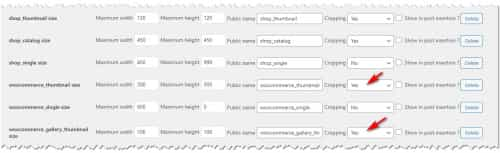
afterward you will want to use a regenerate thumbnails plugin.
The built-in thumbnail regeneration in the Simple Image Sizes plugin often fails for me, this is why I recommend a different plugin to regenerate thumbnails.
Please note there are several woocommerce & shop image sizes so try to change the ones you want to.Best regards,
MikeDecember 11, 2022 at 4:00 pm in reply to: Headline mit Hintergrundfarbe auf bestimmten Seiten #1375857Hey Nic_007,
To put a different background color behind different headlines on your site would best be done by adding a custom class to the headline for each color.
So please tell us which colors you want to use and link to two different headlines and I will explain how to do this.
If you include an admin login I could also demonstrate on one if you find that easier.
Is this a duplicate request to this thread? If so lets only use one of these threads otherwise it will get confusing to talk about the same subject in two threads.Best regards,
MikeHi,
I’m not sure which headline you want to look like it is highlighted, please include a screenshot and paste the image URL in your post and a direct link to the page.
Will this be for just one headline or all headlines?Best regards,
MikeDecember 11, 2022 at 3:30 pm in reply to: Problems with the automatic backup again! ***urgent*** #1375834Hi,
Glad we were able to help, if you have any further questions please create a new thread and we will gladly try to help you. Thank you for using Enfold.Best regards,
MikeDecember 11, 2022 at 3:26 pm in reply to: Anchor link form hotspot to content section on the same page #1375833Hi,
The anchor ID is what you choose it to be, I looked at your page and I see the hotspot link looks like id=”innovatieveteelten” is this what you typed in the manually link field? Please look at my screenshot above, in your case you should write #innovatieveteelten
I assume that you want it to go to the text INNOVATIEVE TEELTEN, but around this text you have added a link with the ID like this:
<h2 style="text-align: center;"><a href="#innovatieveteelten">Innovatieve teelten</a></h2>
please change to this:
<h2 style="text-align: center;" id="innovatieveteelten">Innovatieve teelten</h2>
If you have trouble achieving this please include an admin login in the Private Content area below so we can assist.Best regards,
MikeHi,
Thanks for the feedback, on your homepage I found 3 grid row sections that match this layout so I added the custom class custom-tablet-padding to the cell with text in each of these and then I changed the css to this:@media only screen and (max-width: 1085px) and (orientation: landscape) { .responsive #top #wrap_all #main .av-layout-grid-container .flex_cell.custom-tablet-padding { padding: 0 50px 50px 50px !important; } }and this seems to be working for all three, please clear your browser cache and check.
Please note that testing with iPads & iPhones can be hard to clear the cache, often you need to also clear the history to fully purge the cache, following these steps for Safari and note Step 4 where you will Clear the History.
Also note that your Kontakt has extra padding on the inner column, so if you want it to look like the other two sections please remove this extra padding.
Now you should be able to add the custom class custom-tablet-padding to grid row cells that are similar on other pages for the same effect.Best regards,
MikeDecember 11, 2022 at 2:40 am in reply to: Transparent Mobile menu as on desktop "Transparent header" function. #1375816Hi,
To have the burger menu icon white with the header is transparent and have it change to dark gray when the burger menu is opened please try this css:@media only screen and (max-width: 989px) { .html_mobile_menu_tablet .header_color.av_header_transparency div .av-hamburger-inner, .html_mobile_menu_tablet .header_color.av_header_transparency div .av-hamburger-inner::before, .html_mobile_menu_tablet .header_color.av_header_transparency div .av-hamburger-inner::after { background-color: #fff !important; } .html_av-overlay-side.av-burger-overlay-active #top .header_color.av_header_transparency div .av-hamburger-inner, .html_av-overlay-side.av-burger-overlay-active #top .header_color.av_header_transparency div .av-hamburger-inner::before, .html_av-overlay-side.av-burger-overlay-active #top .header_color.av_header_transparency div .av-hamburger-inner::after { background-color: #404040 !important; } }After applying the css, please clear your browser cache and check.
If you have trouble try clearing your server cache or add the css to the WordPress ▸ Customize ▸ Additional CSS fieldBest regards,
Mike -
AuthorPosts
