

Forum Replies Created
-
AuthorPosts
-
Wenn Ihr das jetzt mal nachträglich probieren wollt, dann löscht besser mal die Tabellen in der zu nutzenden Datenbank.
Was wird benötigt:
Die Neuen Datenbank Daten
Datenbank Name, DB-User, DB-Passwort
bei einigen Hostern ist es noch wichtig eventuell den localhost zu kennen. (Strato z.B.: rdbms.strato.de / oder United Domains etc)
Die Wollen dann dort die MySQL-Serveradresse stehen haben.ich vermute mal, das ihr das händisch erledigt habt. ( via ftp und dann Datenbank bearbeitet )
Ich nutze Duplicator Pro ( die kostenlose Freie Version ist aber entsprechend gut – es fehlen nur die Scheduling Möglichkeiten )
hier wird alles zu der neuen Domain korrekt migriert.Duplicator macht zwei Dateien bei der Sicherung. Eine installer.php und einen Archiv File ( zip – oder dup – je nach einstellungen)
Sinnvoll setzt Duplicator sogar Plugins wie (WPS Hide Login ) auf deactiviert – und gemahnt danach es wieder zu aktivieren._________________-
I assume that you have done this manually. ( via ftp and then edited the database )
I use Duplicator Pro ( but the free version is good enough ; only the scheduling options are missing )
everything is migrated correctly to the new domain.Duplicator creates two files during the backup. An installer.php and an archive file ( zip – or dup – depending on the settings )
Duplicator even sensibly sets plugins such as (WPS Hide Login) to deactivated – and then reminds you to reactivate them.try this instead in child-theme functions.php:
function replace_tag_for_breadcrumb_title($args,$id){
		$args['heading'] = 'div';
		return $args;
}
add_filter('avf_title_args', 'replace_tag_for_breadcrumb_title', 10, 2);
( you can find the args on enfold-functions.php on line 593ff )
_________________
just for info
by the way – woocommerce uses that filter to change the title on single product pages to “strong”
in this case it is in an if clause:if(is_single() && is_product()){ $args['heading'] = "strong"; }… sorry – soon there will be something more informing …
edit. a quick way is to replace that enfold h1 tag with jQuery in your child-theme functions.php:
or – maybe better try to change the heading in your shortcode of the plugin.function breadcrumb_change_tag(){ ?> <script type = "text/javascript"> window.addEventListener("DOMContentLoaded", function () { (function($) { $("#top #main .title_container .main-title").contents().unwrap().wrapAll('<div />'); })(jQuery); }); </script> <?php } add_action('wp_footer', 'breadcrumb_change_tag');but i guess we can influence the heading via filter : avf_title_args – …
if there is a possiblility to influence the building of an element – it is alway better than to change it afterwards – so use the next solution instead.btw – you can insert to page-scroll-to-id to offset a selector f.e. #header – so this will react on the current header height.

Next: on the input field for excluded selectors – add behind the given selectors : a.no-scroll
( ps avoid a comma behind the last excluded selector ! )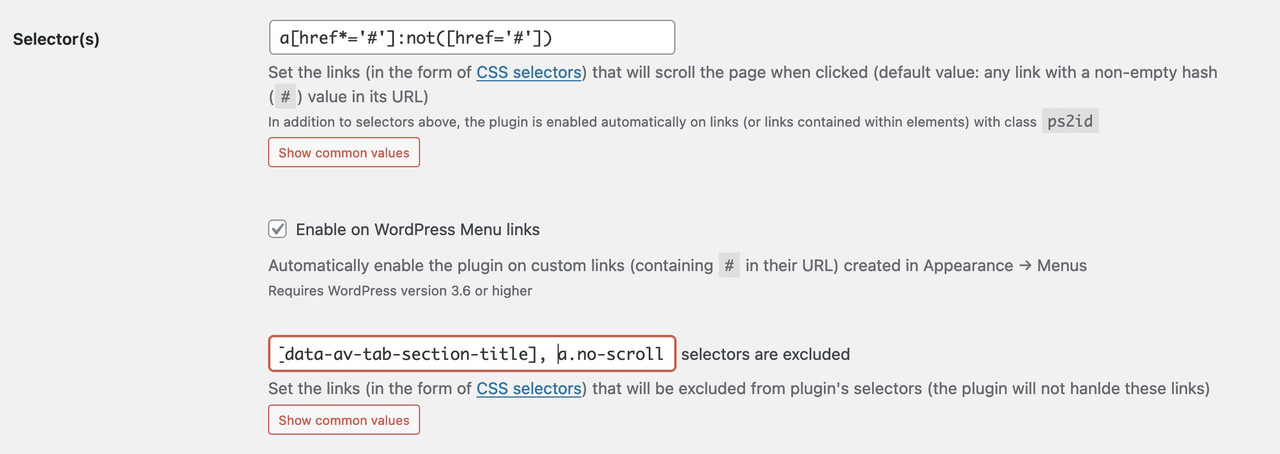
the no-scroll class is used on enfold for click events that do not need a scroll to ID. F.e. an inline popup. A link to a hidden container should only open in lightbox and not open the lightbox and scroll to that hidden container.
yes thats it – ( and btw. the way you described that “problem” was a bit misleading.
hm …
If I understand you correctly, then you have, for example, a page that is 1000px high – and you want to shrink the header over this entire scroll distance, e.g. from 100px to your 54px.
But that would mean that the header should only shrink by fractions of a pixel per pixel of scroll distance? I don’t think this is possible.
However, if you only want to have a delayed shrinkage, i.e. I first scroll 100px without anything happening to the header, and only then should the shrinkage start, that could be possible.November 4, 2023 at 8:33 pm in reply to: Icon Next to Burger / All previous topics won’t work #1424680By the way – if you are shure that you only need the burger menu from the beginning, you can change that snippet to that – and forget the moving menu item ( snippet 2 )
( because this line$items = $cartLink . $itemswill do the job. – first insertion then the other existing links )function add_cart_icon_to_main_menu( $items, $args ){ if ($args->theme_location == 'avia'){ $cartLink = '<li class="menu-item-cart menu-item-avia-special" role="menuitem"><a aria-label="Cart" href="#" rel="nofollow" aria-hidden="false" data-av_icon="" data-av_iconfont="entypo-fontello" alt="Cart" ><span class="avia_hidden_link_text avia-menu-text">Cart</span></a></li>'; $items = $cartLink . $items ; } return $items; } add_filter( 'wp_nav_menu_items', 'add_cart_icon_to_main_menu', 9999, 2 );I will never understand why the page links are not published here. Because assistance would be a lot easier (for us participants) if we could see the page in question.
November 4, 2023 at 6:55 pm in reply to: Icon Next to Burger / All previous topics won’t work #1424669The thing is, you didn’t mention that you were using the hamburger from the start.
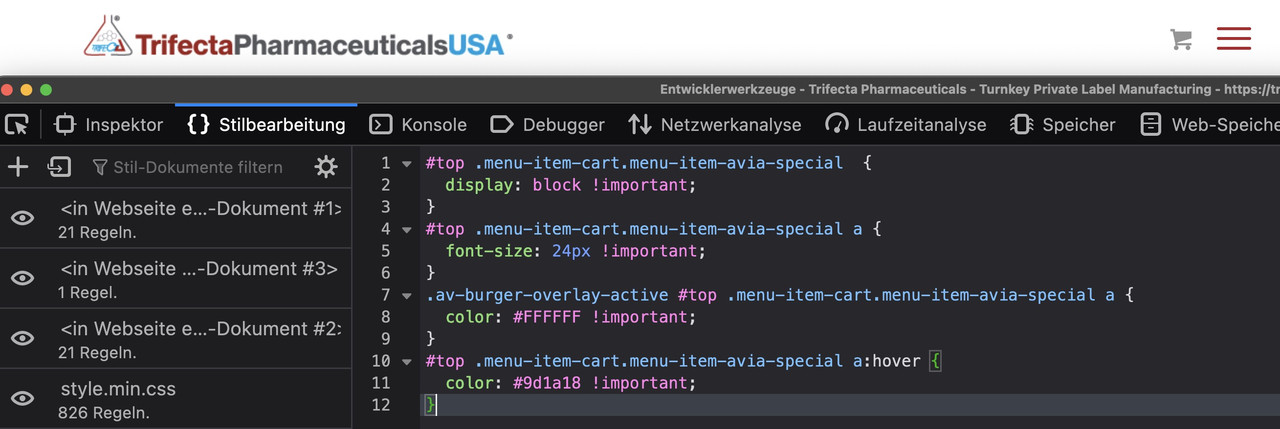
I can see the item but it is set to display none by css code.to see a first result bring this to quick css and look:
( a little bit more css to see selectors if influnce )#top .menu-item-cart.menu-item-avia-special { display: block !important; } #top .menu-item-cart.menu-item-avia-special a { font-size: 24px !important; } .av-burger-overlay-active #top .menu-item-cart.menu-item-avia-special a { color: #FFFFFF !important; } #top .menu-item-cart.menu-item-avia-special a:hover { color: #9d1a18 !important; }(click to enlarge:)
_____________________
and don’t forget to replace the “#” by the link of that cart icon
get rid of the class: menu-item in that snippet:
function add_cart_icon_to_main_menu( $items, $args ){ if ($args->theme_location == 'avia'){ $cartLink = '<li class="menu-item-cart menu-item-avia-special" role="menuitem"><a aria-label="Cart" href="#" rel="nofollow" aria-hidden="false" data-av_icon="" data-av_iconfont="entypo-fontello" alt="Cart" ><span class="avia_hidden_link_text avia-menu-text">Cart</span></a></li>'; $items = $items . $cartLink; } return $items; } add_filter( 'wp_nav_menu_items', 'add_cart_icon_to_main_menu', 9999, 2 );November 4, 2023 at 6:48 pm in reply to: Icon Next to Burger / All previous topics won’t work #1424664Please remove the other solution trials – do not use a combined solution – and only use that: https://kriesi.at/support/topic/icon-next-to-burger-all-previous-topics-wont-work/#post-1424623
And copy paste the code from there to your child-theme functions.php.
After doing that we can discuss when or when not the icon is visible.November 4, 2023 at 7:16 am in reply to: Icon Next to Burger / All previous topics won’t work #1424623In fact, you could do it with a hook as well. – but i would use a wordpress hook on that.
The main navigation menu theme_location is avia.
( you see that you can use that hook also to other menu locations :
avia(main-menu), avia2( top-menu), avia3(footer-menu) )function add_cart_icon_to_main_menu( $items, $args ){ if ($args->theme_location == 'avia'){ $cartLink = '<li class="menu-item menu-item-cart menu-item-avia-special" role="menuitem"><a aria-label="Cart" href="#" rel="nofollow" aria-hidden="false" data-av_icon="" data-av_iconfont="entypo-fontello" alt="Cart" ><span class="avia_hidden_link_text avia-menu-text">Cart</span></a></li>'; $items = $items . $cartLink; } return $items; } add_filter( 'wp_nav_menu_items', 'add_cart_icon_to_main_menu', 9999, 2 );replace that “#” in the snippet with your prefered link
this will insert a new menu-item to the main nav. But: it will be the very last menu-item even behind the search icon and even behind the hamburger icon itself.
Same here moving it to the right position is easy with that extra class from snippet ( menu-item-cart)function move_cart_icon_before_burger() { ?> <script> (function($){ $('li.menu-item-cart').insertBefore($('li.av-burger-menu-main')); })(jQuery); </script> <?php } add_action('wp_footer', 'move_cart_icon_before_burger');to see that solution used : https://webers-testseite.de/
November 4, 2023 at 6:39 am in reply to: Icon Next to Burger / All previous topics won’t work #1424622first : if you have a shop – and that is the cart icon for. i guess there are options to show that cart icon in main menu.
_______One method to do it:
i prefer the hook on next answer !
do you know how to give a custom class to a menu item?
place inside the menu an custom link ( preferably as the last link in your main menu. ), replace the label of that menu-item with your icon. give the custom-class : menu-item-avia-special to it. thats it
Menu-items with that class will be visible – if the burger is active1) custom link – the later “navigation label” is what you insert to “Link Text”
– in your case it is enough to insert:<span class='av-icon-char' aria-hidden='true' data-av_icon='' data-av_iconfont='entypo-fontello'></span>
2) give to that menu-item the custom class: menu-item-avia-special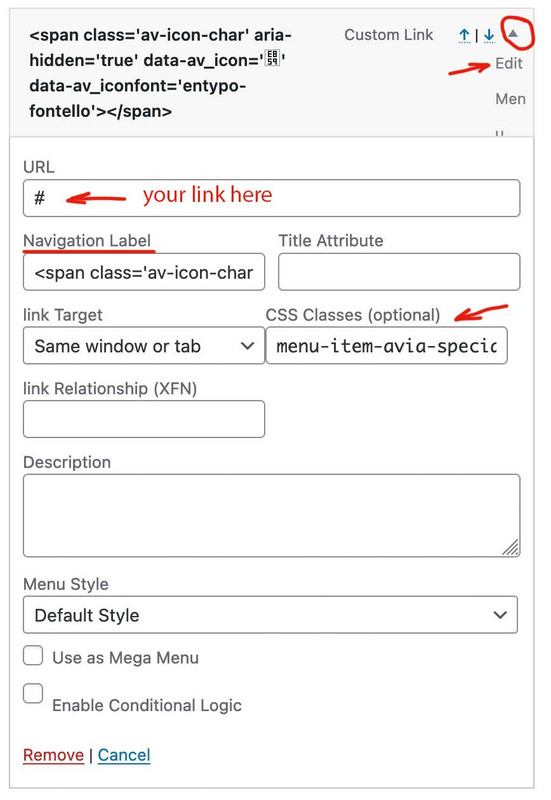
if you do not see on editing the menu-items a custom class input field. :
on top right Window of your Menus Option Dialog there is a slide out dialog : “Screen Options” – open it and mark all you needed for that:

to change position with f.e. the search icon that is easy … just ask
( in that case it might be useful to have another custom class on that menu-item f.e. in your case menu-item-cart)November 2, 2023 at 6:31 pm in reply to: Image “Slightly zoom the image” not working properly #1424431yes – and please – the update on 5.6.8. does not have that fixed.
test if the other selectors had to be set too!
.avia-image-container.av-hover-grow.av-hide-overflow, .avia-image-container.av-hover-grow.av-hide-overflow .avia-image-container-inner, .avia-image-container.av-hover-grow.av-hide-overflow .avia-image-overlay-wrap a.avia_image { overflow: hidden; }I take my example page offline again. It was probably not that urgent.
Did you try to embed the layerslider with its shortcode (on Project List hover the preview – click on the 3 dots on the top right – embed) ?
October 29, 2023 at 4:46 pm in reply to: Masonry-Gallery Lightbox Link Settings doesn’t work #1424032Yes – but that is sometimes difficult to realize. A child-theme header.php or footer.php is often easier to manage.
You only need to check after updates if there are significant changes in their parent themes files. Therefore, changes should be well documented (possibly by comments inside).But you use justification there, don’t you?
With justified text, that’s exactly what often happens, that there are unsightly word spacing. You will have the same problem in Word. In Word, a more or less intelligent word separation is set.so you have to decide now what to do if you set a text-block to justify.
By the way – how did you set this? because Tiny Editor does not offer – justified test.you can use hyphens or word-spacing f.e.:
p {
    text-align: justify;
    -webkit-hyphens: auto;
    hyphens: auto;
}
some css properties ( text-justify; word-spacing ) are not well supported by all browsers. see: https://css-tricks.com/almanac/properties/t/text-justify/
f.e.:
p {
  text-align: justify !important;
  -webkit-hyphens: auto;
  hyphens: auto !important;
  text-justify: distribute;
  word-spacing: -0.05em !important;
  text-align-last: left;
}
but i would not use everywhere a justification. So it is much better if you set a custom class to those texts that should be justified.
and use the custom class to specified text.btw – with the extra long words, which are separated unsightly, also a manually set “should break points” could be useful.
You can use for that the html entity:­
this is short for softhyphenation – in Word this is called conditional line break
and there is a nonbreakinghyphen entity too Link. for words like “on-page”, “off-page”There is one small catch – both Nikko’s and my solution. Masonries that load further elements with the More Link are not affected by this. You would then have to add attributes, e.g. with MutationObserver, at the moment of entry into the DOM.
f.e. ( in this case for all links in a Masonry )
function open_masonry_entries_in_new_tab(){ ?> <script> (function($) { MutationObserver = window.MutationObserver || window.WebKitMutationObserver; var observer = new MutationObserver(function() { $("a.av-masonry-entry").attr("target", "_blank"); }); observer.observe(document, { subtree: true, childList: true }); })(jQuery); </script> <?php } add_action('wp_footer', 'open_masonry_entries_in_new_tab');as far as I understood it, only the one link should open in a new tab. The others should open on the same page.
so maybe use instead:
function open_custodiapestcontrol_links(){
?>
<script type="text/javascript">
window.addEventListener("DOMContentLoaded", function () {
    (function($) {
        $('.av-masonry-entry[href*="custodiapestcontrol"]').attr('target', '_blank');
    })(jQuery);
});
</script>
<?php
}
add_action('wp_footer', 'open_custodiapestcontrol_links');
or – if you like to open all external links ( links that have a different domain ) in a new tab ( with some exceptions like mailto etc. )
use:function open_external_links_in_newtab(){ ?> <script type="text/javascript"> window.addEventListener("DOMContentLoaded", function () { (function($) { var url = window.location.origin; $('a').not('a[href*="'+url+'"], a[href*="mailto:"], a[href^="#"], a[href*="tel:"], a[href*="javascript:;"] ').attr({ 'target':'_blank', 'rel': 'noopener', }) })(jQuery); }); </script> <?php } add_action('wp_footer', 'open_external_links_in_newtab');(remove rel attribute if you do not like to set)
October 28, 2023 at 2:30 pm in reply to: Masonry-Gallery Lightbox Link Settings doesn’t work #1423967have a look if you got a child-theme header.php.
This file in particular has undergone major changes over time. In this case, you should remember why you created a child theme header.php. You should then apply these steps to an up-to-date header.php and upload it instead.Das sollte man noch ein wenig verfeinern, und auch browser übergreifend – zumindest mit -webkit prefix machen.
Das animation timing – eventuell mit bezier Kurve animieren.Es gibt einen hook, in den du ein Bild oder eventuell besser noch ein svg setzen könntest: wp_body_open
Es sollte nicht schwer sein das Bild so mit einem z-index zu belegen, der dann den eigentlichen Inhalt überdeckt. Eine getimete Animation der Transformation sollte dann auch möglich sein.Also für die child-theme functions.php:
add_action('wp_body_open', function() {
if(is_front_page()){
  echo '<div class="body-overlay"></div>';
}
});
für das Quick css:
.body-overlay { position: fixed; display: block; width: 100vw; height: 100vh; top: 0; left: 0; z-index: 5000; animation: transformUp 3s ease 2s forwards; /** for shortform see: https://www.w3schools.com/cssref/css3_pr_animation.php ***/ } .body-overlay { background-image: url(/wp-content/uploads/test-london.jpg); background-repeat: no-repeat; background-size: cover; } @keyframes transformUp { 0% { transform: translate(0px, 0px); } 100% { transform: translate(0px, -102vh); } }to this topic possibly one more. I have made the experience that plugins like : Post Types Order could interfere here.
it is working nice – but did not involve the portfolio – and i could not find out why. Portfolio are at least posts so – where is the crux?
it would be nice to participate as a participant ;)
next special question :
there is on github a wp-core snippet:
https://github.com/KriesiMedia/enfold-library/blob/master/codesnippets%2C%20tricks%2C%20plugins/WP%20Core/duplicate-posts-and-pages-without-plugins.php
btw. on your docu there is a dead link concerning to this.
It is for duplicate post/pages without plugin. It works – but portfolios are excluded from that trick.
how to include portfolios there ( or better to include a CPT )here is the pastbin page from my edited php: https://pastebin.com/AaiTX8kU
But : this is only a file that is translated inside to english where there are in original spanish terms. On those lines that are visible to users i only had insertet the option to translate strings with avia_frameworki think ismaels code should work.
on looking for this from docu:
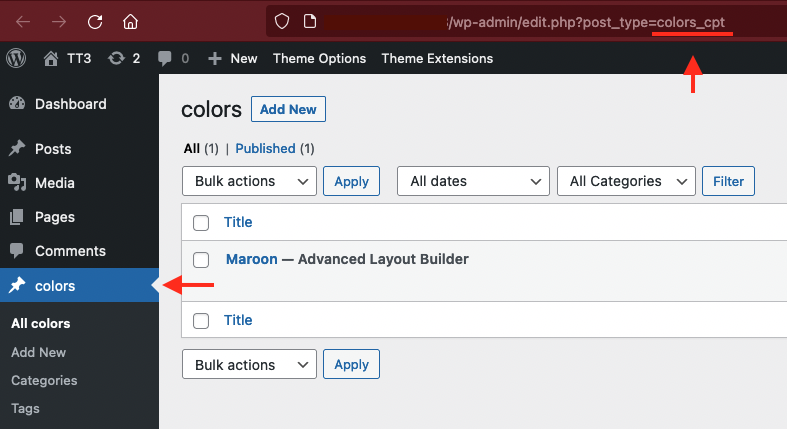
click on your CPT on dashboard and look to the url window on top – what post-type you see there
f.e. on portfolio ( which is a CPT too ). you see: edit.php?post_type=portfolio
try a shortform – then with the info you get from that url window
add_filter("avia_post_slide_query", function($query) { unset($query["post_type"]["vacature"]); return $query; }, 10, 1);yes this works for me too!
even on sortable toggles : https://webers-testseite.de/accordion/so this bug is my fault – one should always check first if something set has to be removed – before adding a new code.
II have tested it, but not stress tested. Means very lush content and fast clicking the toggle headings.
So – although the internet is full of suggestions about this Chrome bug regarding clearing – deleting the floating property is the solution.i’m so sorry – i tested it on my own toggles – and there it worked like a charm –
try this instead ( or in addition)
#top .single_toggle {
    clear:both;
}
but loosing the focus away to top is still on your page a problem – because if you open a toggle – you like to read it – and not to move to the top!
-
AuthorPosts
