

Forum Replies Created
-
AuthorPosts
-
August 25, 2018 at 6:38 am in reply to: can ENFOLD THEME it will have Image Before & After Element ? #1001482
i think this is not only an avada theme thing. I remeber that i have used a plugin for that feature.
But i have to make a research for the name. it is a few years ago.Edit : yes – it is Twenty20 : Link
Link to a : Demo of Twenty20
-
This reply was modified 7 years, 8 months ago by
Guenni007.
just so it’s clear. I am concerned with solving your problem – not the other way round.
A child theme is a completely normal thing in the use of WordPress.
It is highly recommended to use one, too – many things will become easier, and are independent from the next enfold update, i.e. they will not be lost the next time the parent topic is updated.on the other hand, no one is forcing you to use a toggler. An Accordion does not have to be used either. These elements are used to design the length of the content in such a way that even with large amounts of content, pages are not too long. Such pages usually frighten away the normal visitor of a page.
A toggler therefore leaves the decision of whether or not to view content to the visitor of the site.So if you attach great importance to SEO, then create the content as single pages.
PS: If you want simple solutions, you have to be satisfied with simple requirements.
Yes – it is hard to make a statement only about the simulation in the developer tools.
So i’m glad that it works for you nowif you mean that toggler –
“Warum sie Diamantwerkzeug kaufen sollten” etc.this is not possible – it will work with that code above and:
as additional line:replaceElementTag('.togglecontainer p.toggler', '<h3></h3>');but toggler is predefined over p tag – so there will be a lot to change in css to reach the toggle effect then.
ok i see your homepage now. – but where is the accordion ? – pleas look to your page and tell me the name of the alb element you used!
you want from h3 to h2 a change!
look to your source code of your page – allmost all modern browsers got developer tools
most you can go with your mouse over the element to inspect and then press context button of your mouse ( most right mouse button) – there will be something like inspect ( or inspect element) or so.the most snippets and scripts to enqueue go over that ( at the beginning empty) functions.php of the child theme.
if you got a child-theme installed there will be under dashboard – appearance – editor
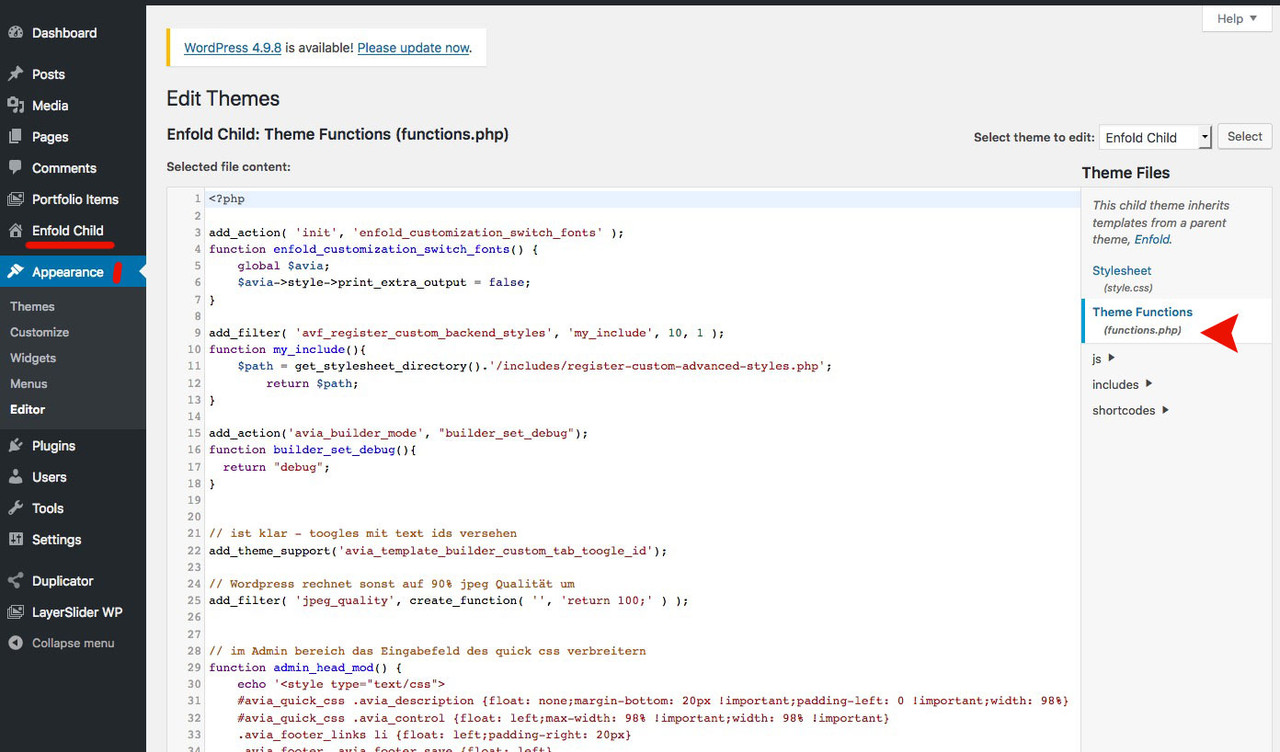
all is above said:
to functions.php of your child-themeYoast : you have to make your meta settings for the whole page – not for the #tabs
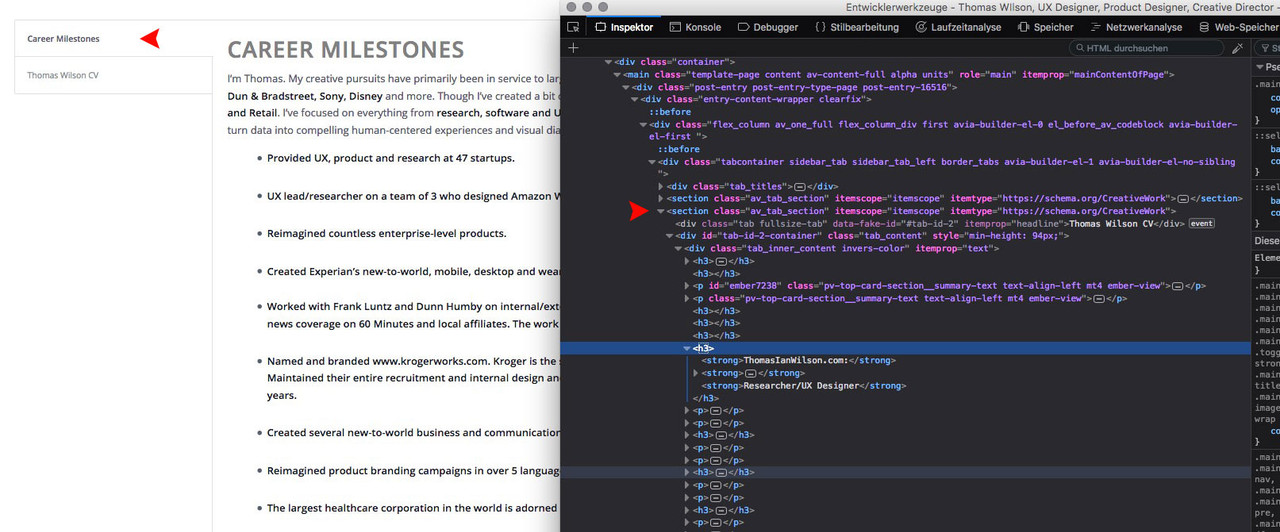
the whole page is visible and readable too. See source code all tab content is there.
Google will index the whole page ! : http://thomasianwilson.com/learn
but it will not index it with the hash as single content e.g. for: http://thomasianwilson.com/learn/#tab-id-4the code above allows you to set the id to e.g: http://thomasianwilson.com/learn/#color-blindness
you see that allthough the first tab is active – the content of the second tab is not set to display:none.
it is in source code visible/crawlable/readable
(click to enlarge)
-
This reply was modified 7 years, 8 months ago by
PS
this linereplaceElementTag('h3.aviaccordion-title', '<h2></h2>');could be added by new lines in the same way (‘tag to replace’, ‘new tag’)
so you can use this for more replacementsput this in your functions.php of your child-theme:
function replace_tags_with_tags(){ ?> <script> (function($) { function replaceElementTag(targetSelector, newTagString) { $(targetSelector).each(function(){ var newElem = $(newTagString, {html: $(this).html()}); $.each(this.attributes, function() { newElem.attr(this.name, this.value); }); $(this).replaceWith(newElem); }); } replaceElementTag('h3.aviaccordion-title', '<h2></h2>'); }(jQuery)); </script> <?php } add_action('wp_footer', 'replace_tags_with_tags');first : is there a link we could see.
then : describe a bit more your settings. Where did you place the video – as background in color-section; as video alb element in content; as a link and video opens on lightbox etc.August 24, 2018 at 10:27 am in reply to: How can I add an Icon to my text in the navigation? #1001097or you can insert on Dashboard / Menu into the navigation label an image just before the text
f.e. :<img src="https://webers-testseite.de/wp-content/uploads/webers-web-256farben.png" alt="image-before-menupoint" /> testpagesit is easier to address if you gave to that menu point a custom class as i did : imagelink
then on quick css the rest:
.imagelink.menu-item img {
    display: inline-block;
    width: auto !important;
    height: 50%;
    position: relative;
    vertical-align: middle;
    padding-right: 5px;
}
you have to adjust a bit for your needs the height
and for the mobile menu ( hamburger maybe display none or style it extra css)look here on testpages menupoint: https://webers-testseite.de/
first of all you can activate the prettier url hashes by this to functions.php of your child-theme:
you can then give each tab a unique custom idadd_theme_support('avia_template_builder_custom_tab_toogle_id');indeed these anchors are not crawled as a link for a unique page.
for Yoast it is best you ask there for a solution – they would know of that problematic.i do alway make a sitemap.xml and upload that to google webmaster tools.
-
This reply was modified 7 years, 8 months ago by
by the way – these entry fields of Enfold Options like copyright or telephone number field – They accept the input via shortcode
so you can even create a enfold button – activate the debug mode and copy/paste the shortcode to that entry fields
August 24, 2018 at 12:10 am in reply to: Full Screen Video need to compensate for the Navigation Menu #1001008yes – my solution will show the whole video – alway – like it was a background-size : contain.
But this will end in black bars left/right on wide screens – if you can live with a crop – than it is ok.
Glad we found a solution.August 23, 2018 at 9:10 pm in reply to: Full Screen Video need to compensate for the Navigation Menu #1000966without black bars left/right this will be not possible on wide screens.
you can force the height by:#top.home .av-video-slide iframe { height: calc(100vh - 88px) !important; top: 0 !important; } .home #wrap_all { height: 100vh !important; }because your header height is 88px at the beginning
PS: you have to go through your media links ( favicon etc. alot of them aren’t https) a search and replace plugin can do the jobAugust 23, 2018 at 6:30 pm in reply to: How can I move slider below "top bar" and make menu header transparent? #1000875just give a padding-top to main content:
.html_header_transparency #main { padding-top:35px }.wpb_animate_when_almost_visible { opacity: 1; }The opacity property can take a value from 0.0 – 1.0. The lower value, the more transparent:
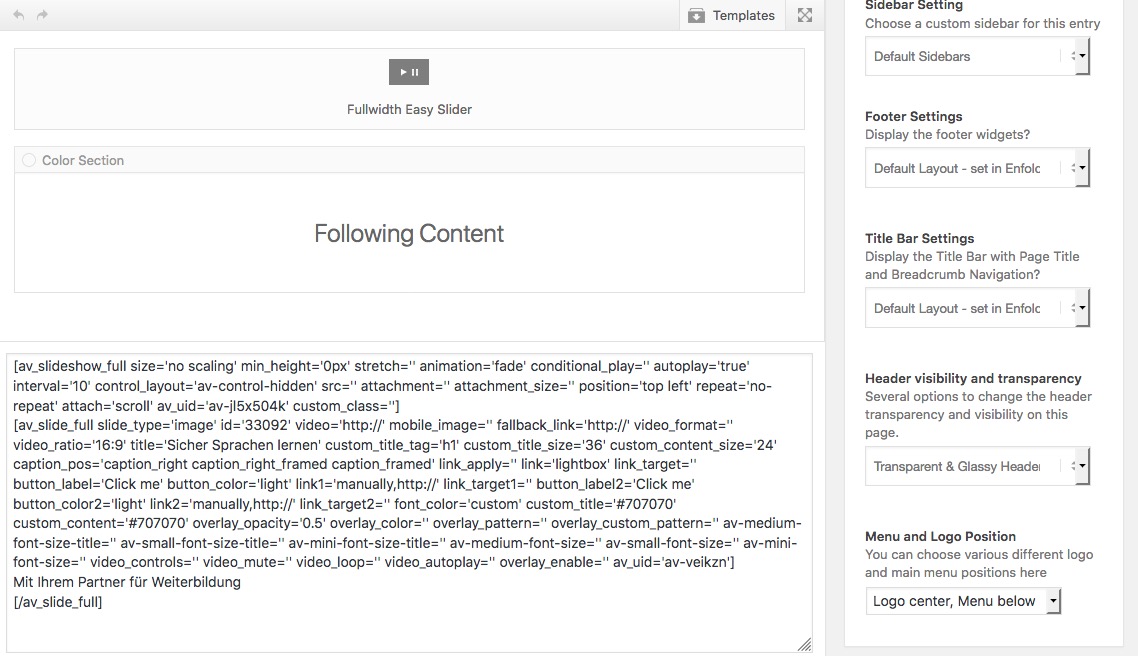
August 23, 2018 at 4:27 am in reply to: How can I move slider below "top bar" and make menu header transparent? #1000576ja aber wie gesagt – es ist doch alles vorhanden:
https://webers-testseite.de/beenee/Sorry es ist normalerweise nicht logo oben Nav unten – habe ich nur mal für diese Seite gemacht, deshalb nicht optimiert.
Das Bild was du hast muss auch anders sein.Aber das ist es doch .
 August 22, 2018 at 11:26 pm in reply to: LayerSldier Menu does show on firefox, but not on Chrome. #1000541
Thanks – !
you mean that normal /wp-login.php page?
this comes to functions.php of your child-theme
function custom_login_logo() {
    echo '<style type="text/css">
    h1 a { background-image:url(/wp-content/uploads/logo.png) !important;
    background-size: contain !important;
    height: 100px !important;
    width: 300px !important; }
    </style>';
}
add_action('login_head', 'custom_login_logo');

add_filter( 'login_headerurl', 'custom_loginlogo_url' );
function custom_loginlogo_url($url) {
  return 'https://url...';
}
the second one is for the backlink of the new image
you have to adjust the height and width to your logo and your needsf.e. :
-
This reply was modified 7 years, 8 months ago by
August 22, 2018 at 11:09 pm in reply to: How can I add an Icon to my text in the navigation? #1000538well –
1 you had to know the hex-code of the icon you like to use
2 you had to know the name of the icon-set
3 you had to know the menu-item id
4 this comes to quick css:#menu-item-2467 a::before { content: "\e8c9"; font-family: entypo-fontello; display: inline-block; font-size: 30px; padding-right: 5px; vertical-align: middle; color: #f00; }5 you must decide the style ( color of the icon-font , font-size etc)
see here with my impressum link : https://webers-testseite.de/if you have transparency pages it might be a good idea to define a color for it:
.header-scrolled #menu-item-2467 a::before { color: #333 }maybe we can do something over this check in contact.js:
if(classes && classes.match(/is_email/))
{
	if(!value.match(/^[\w|\.|\-]+@\w[\w|\.|\-]*\.[a-zA-Z]{2,20}$/))
	{
		surroundingElement.removeClass("valid error ajax_alert").addClass("error");
		send.validationError = true;
	}
	else
	{
		surroundingElement.removeClass("valid error ajax_alert").addClass("valid");
	}
	nomatch = false;
}
August 22, 2018 at 10:03 pm in reply to: How can I move slider below "top bar" and make menu header transparent? #1000530but this is something totaly different.
That is a normal full-screen slider as first alb element in your page setting. With a transparent ( maybe a glassy header style)
so where is you problem?can you please create such a page on your test environment. Then it is better to have some tips for you.
– oder mach einfach mal ne Zeichnung wie es aussehen soll.
da gab es mal bei dem speziellen Hoster einige Probleme.
Link
zB was auch den zip ( und die demos etc sind nun mal zip komprimiert) upload betrifft – der musste bei einigen aktiviert werden.
Eventuell ist das mit jpegs ähnlich.
Sind den alle jpgs so oder nur einige die sich nicht uploaden können.
was ist das für eine Fehlermeldung genau – bitte mal postenPS : welche php Version hast du laufen auf deinem Server?
August 22, 2018 at 7:17 pm in reply to: How can I move slider below "top bar" and make menu header transparent? #1000482you see that is only a good solution if you have a non shrinking and scrolling header !
btw: this is something you can see here on my start page between footer and socket https://webers-testseite.de/
on advanced layerslider there is a setting ( if advanced styling is on) to shift an existing advanced slider in the DOM
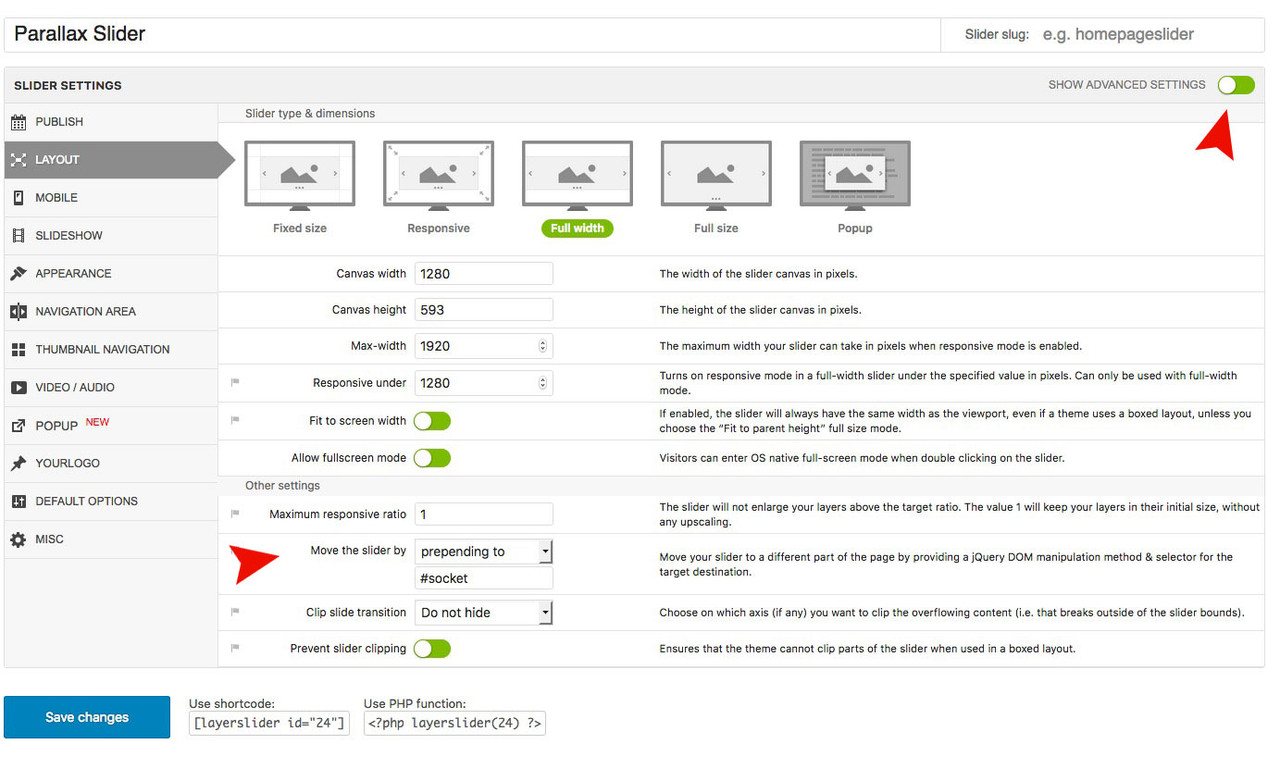
-
This reply was modified 7 years, 8 months ago by
-
AuthorPosts
