

Forum Replies Created
-
AuthorPosts
-
December 7, 2019 at 12:09 am in reply to: desktop 3 columns > tablet 2 columns > mobile 1 column #1163495
Well best would be to ignore Enfold Settings and play a bit with flexbox layout.
on my testpage you see on top the flexbox – and in the grey color-section this is columns declaration on default.
i gave to the top color-section a custom-class of: three-two-one :lol
the top columns ( i take 1/3 – but this is not important ) – but take individual height pleaseTo play a bit with justify-content it would be nice to only have columns in that container and no :before and :after pseudo elements
(thats the first rule)
Put this to quick css then:.three-two-one .entry-content-wrapper:before, .three-two-one .entry-content-wrapper::after{ display: none; } .three-two-one .entry-content-wrapper { display: flex; flex-flow: row wrap; justify-content: space-between; align-items: stretch } .three-two-one .entry-content-wrapper .flex_column { flex: 0 1 28%; margin:0; padding: 0; margin-bottom: 3% } /**** your tablet definitions - play with the values as you like ***/ @media only screen and (min-width: 768px) and (max-width: 989px) { .three-two-one .entry-content-wrapper .flex_column { flex: 0 1 47%; } } /*** this is not necessary because on that screen-width the Enfold default is 100% ***/ @media only screen and (max-width: 767px) { .three-two-one .entry-content-wrapper .flex_column { flex: 0 1 100%; } }you can see here the test page: https://webers-testseite.de/3columns/
_____
here a nice overview to flexbox layout: https://css-tricks.com/snippets/css/a-guide-to-flexbox/
here a playground to get a feeling on what could be done ( sorry this is german page – but you can play with checkboxes on bottom ) : https://www.mediaevent.de/css/display-flex.htmlon the last link for example see the part with : justify-content.
now you see why i do no want to have before and after containers in it – these would be handled like flex items .
The align-items : stretch results in “equal height containers” etc.A really might “tool” – isn’t it ?
you see the code above the selector is: grid-entry but to exclude the ajax thing i find it via grid-sort-container
and to exclude the ajax option there is the not rule
this is only for grid layoutis there a link to see – it is easier to give advice then
How did you embed the video in the Layerslider?
As a layer or background? A few settings that you can set depend on that.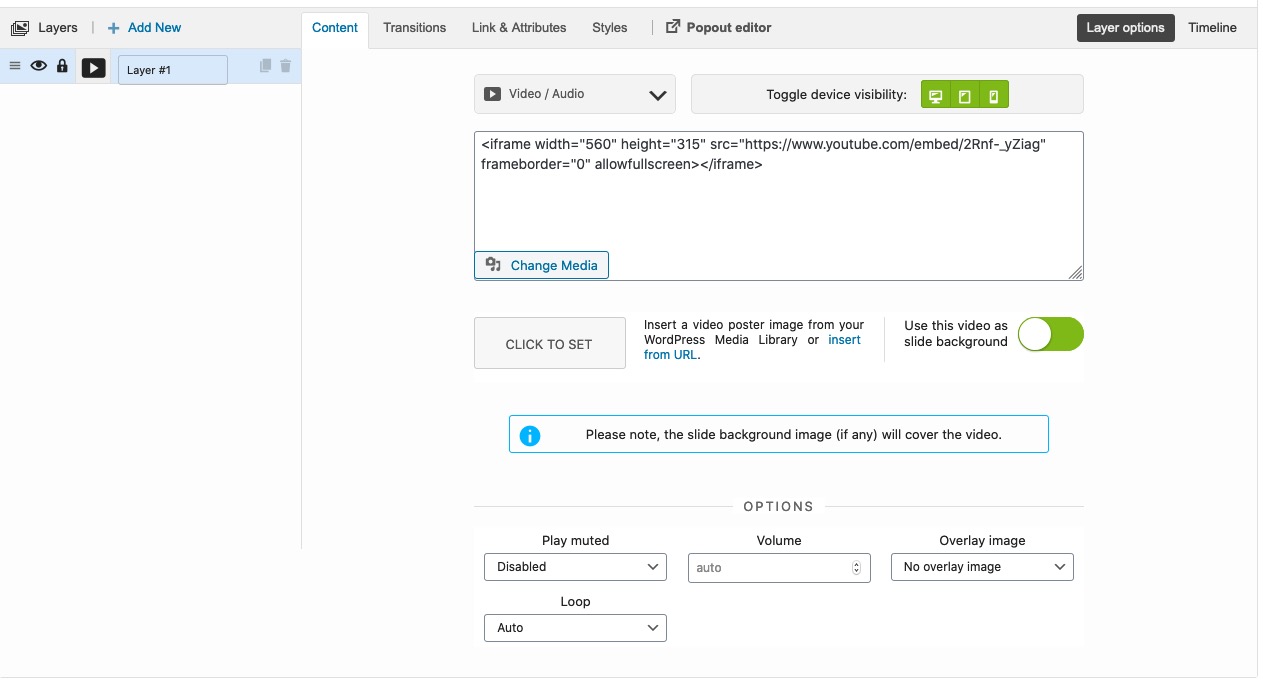
Just try to set the play muted to disabled
with that background-image it is hard to recognize that there is a hamburger to click.
And i would not show the advanced layerslider on responsive case ( mobile, small screens )maybe you style the colors a bit and make the line-height of the burger not shrink with the script:
.header_color .av-hamburger:not(.is-active) .av-hamburger-inner,
.header_color .av-hamburger:not(.is-active) .av-hamburger-inner::before,
.header_color .av-hamburger:not(.is-active) .av-hamburger-inner::after {
	background-color: #f4f1cb;
    -webkit-filter: drop-shadow(1px 1px 3px #000);
	filter: drop-shadow(1px 1px 3px #000);
}

.responsive #top #header_main > .container .main_menu .av-main-nav > li > a {
  line-height:82px !important;
}
December 6, 2019 at 12:13 pm in reply to: image linked to video appears to open duplicate lightboxes #1163340is it solved? because on testing the featured video function i had this too. And solved it by a littel functions.php snippet.
So tell me what you need.
December 5, 2019 at 10:41 pm in reply to: Can I rename "Portfolio Items" to something my content team will relate to? #1163240can you post your child-theme functions.php here!
have you activated the parent theme – before child-theme rename?
then rename – and after that activate child-theme.
then import theme settings fileyou can see results here on my test-page: https://webers-testseite.de/portfolio/
Edit : i’m still experimenting a bit – so the example page could be not of the intended function.maybe Ismael knows a method to do it for that ajax setup too. Without that selector only for non ajax grids the click on ajax has two click events and does open first the window above the grid – but directly moves to the single portfolio.
-
This reply was modified 6 years, 4 months ago by
Guenni007.
so we had to make the changings only for not ajax protfolios – try this instead please:
function transfer_link_from_child(){
?>
<script>
(function($){
	$(document).ready(function(){
		$('.grid-sort-container:not(.grid-links-ajax)').find('.grid-entry .inner-entry').each(function(){
			var theLink = $(this).find('.grid-image').attr('href');
			$(this).addClass("clickme");
			$(this).on("click", function(){
				window.location.href = theLink;
			});
		});
	});
})(jQuery);
</script>
<?php
}
add_action('wp_footer', 'transfer_link_from_child');
i styled it this way:
.clickme:hover {
	cursor: pointer;
	-webkit-filter: drop-shadow(2px 3px 5px #999);
	filter: drop-shadow(2px 3px 5px #999);
}
i changed the code to containter with .inner-entry class because if you got padding on those the styling could be more precise
click on one link please of the blog ( on the bottom or text )
really ?
yes i changed it allready on my post above – transmission errors ;)
bei deinem Nick gehe ich mal davon aus, dass du Deutsch sprichts.
Hast du mal einen Link worum es geht. In deiner Beschreibung oben fehlen ein paar Informationen um es nachzubauen.
Da ist ein Link immer besser um Ratschläge zu geben.December 5, 2019 at 9:36 am in reply to: Can I rename "Portfolio Items" to something my content team will relate to? #1162844did you make sure you left the top
<?phpup there ?The purpose of a child theme solution is to leave the parent elements untouched – my code above works without changing a parent element file.
Ishmael’s code from Back then (2016) certainly worked; only the function: unregister_taxonomy() has probably become part of the parent source code by now. And that would end in an error because: A redeclaration is not possible – thats why i wrote that i had renamed the function to something different.
I have tested it by myself and you see that even on this part there is book categories.
By the way, if you have not intentionally disabled it – you can edit the functions.php via the dashboard.
Dashboard – Appearance – Theme Editor
on the right side you can choose the file which you like to edit. On default there are only two files ( style.css and functions.php)December 5, 2019 at 2:13 am in reply to: Can I rename "Portfolio Items" to something my content team will relate to? #1162766maybe Ismael looks over it – if there could be more replacements in the code. On my test it works everything. Even the left right Postnavigation etc.
December 5, 2019 at 1:34 am in reply to: Can I rename "Portfolio Items" to something my content team will relate to? #1162765we only had to rename the function to let it work – because a redeclaration of a function that already exists is not possible : so code for you to try:
/**** Portfolio umbenennen im Dashboard ****/ add_action( 'init', 'unregister_taxonomy_for_custom_label', 30); function unregister_taxonomy_for_custom_label(){ global $wp_taxonomies; $taxonomy = 'portfolio_entries'; if ( taxonomy_exists( $taxonomy)) unset( $wp_taxonomies[$taxonomy]); } // portfolio args add_action( 'init', 'init_reg_portfolio', 50 ); function init_reg_portfolio() { add_filter('avf_portfolio_cpt_args', 'avf_portfolio_cpt_args_mod', 50, 1); $tax_args = array( "hierarchical" => true, "label" => "Books Categories", "singular_label" => "Books Category", "rewrite" => array('slug'=>_x($permalinks['portfolio_entries_taxonomy_base'],'URL slug','avia_framework'), 'with_front'=>true), "query_var" => true ); $avia_config['custom_taxonomy']['portfolio']['portfolio_entries']['args'] = $tax_args; register_taxonomy("portfolio_entries", array("portfolio"), $tax_args); } add_action( 'after_setup_theme', 'init_reg_portfolio' ); function avf_portfolio_cpt_args_mod($args) { $labels = array( 'name' => _x('Books', 'post type general name','avia_framework'), 'singular_name' => _x('Books Entry', 'post type singular name','avia_framework'), 'add_new' => _x('Add New', 'book','avia_framework'), 'add_new_item' => __('Add New Book Entry','avia_framework'), 'edit_item' => __('Edit Book Entry','avia_framework'), 'new_item' => __('New Book Entry','avia_framework'), 'view_item' => __('View Book Entry','avia_framework'), 'search_items' => __('Search Book Entries','avia_framework'), 'not_found' => __('No Book Entries found','avia_framework'), 'not_found_in_trash' => __('No Book Entries found in Trash','avia_framework'), 'parent_item_colon' => '' ); $args['labels'] = $labels; return $args; } /*** Ende ****/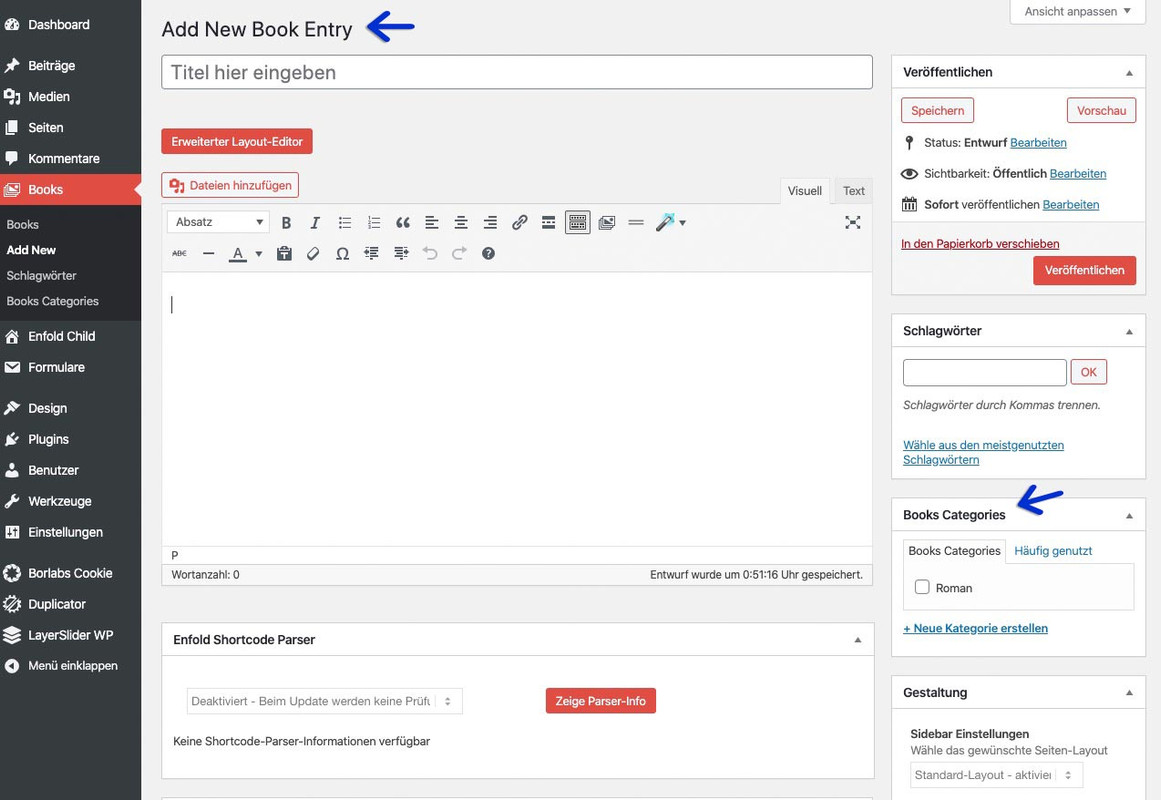 December 5, 2019 at 1:20 am in reply to: Can I rename "Portfolio Items" to something my content team will relate to? #1162764
if you put this to your child-Theme functions.php:
Edit : look
and on Permalinks change it to books and books_entries
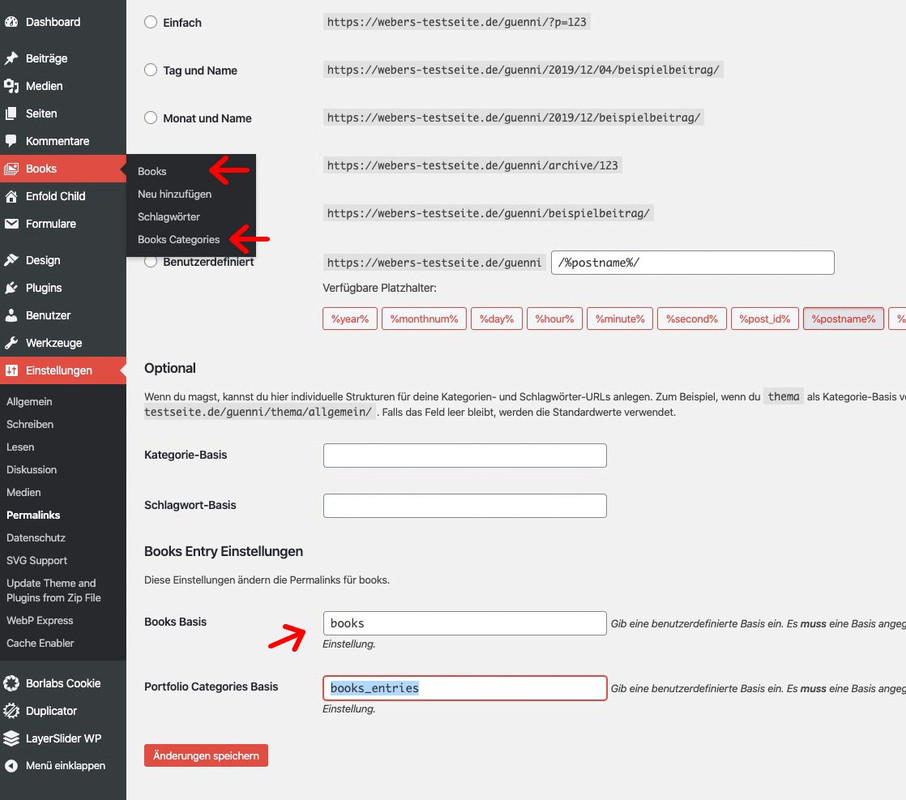 December 5, 2019 at 1:00 am in reply to: Can I rename "Portfolio Items" to something my content team will relate to? #1162762
Well you can change the label and on permalinks the slug you see in the url.
See here for Label: https://kriesi.at/support/topic/possible-to-rename-portfolio-entirely/and here is the child-theme usage : https://kriesi.at/support/topic/renaming-the-portfolio-custom-post-type-child-theme-issues/#post-564363
by the way the other method is elegant too and changes the standard settings before it they are built.
but it is not so easy to get the right code
on the code above you can add as many changes you like to have semi-colon separated ( this part: replaceElementTag…
The function on top is to transfer all attributes to the new tag.
see here explanation: https://kriesi.at/support/topic/widget-tags-remove-h3/#post-1016082you can use as many h2 and h3 etc as you like.
If you want the weighting in the sense of SEO to be different, then you can either use the filter: avf_customize_heading_settings
see here some explanations to it:https://kriesi.at/support/topic/timeline-milestone-h2-and-h3-tags-how-can-i-delete/#post-1098165
and following answers. ( or see github : Link )or use one nice thing i use when i want to replace only the tags of an existing structure.
This is a generally usable thing : https://kriesi.at/support/topic/widget-tags-remove-h3/#post-1016049in your case this comes to child-theme functions.php:
function replace_tags_with_tags(){ ?> <script> (function($) { function replaceElementTag(targetSelector, newTagString) { $(targetSelector).each(function(){ var newElem = $(newTagString, {html: $(this).html()}); $.each(this.attributes, function() { newElem.attr(this.name, this.value); }); $(this).replaceWith(newElem); }); } replaceElementTag('h3.grid-entry-title', '<h2></h2>'); replaceElementTag('h2.post-title', '<h3></h3>'); }(jQuery)); </script> <?php } add_action('wp_footer', 'replace_tags_with_tags');hm try this instead:
function shift_link_to_grid(){ ?> <script type="text/javascript"> (function($) { $(document).ready(function() { $('.grid-entry').on('click', function() { window.location.href = $(this).find('.grid-image').attr('href'); }); }); })(jQuery); </script> <?php } add_action('wp_footer', 'shift_link_to_grid');The rule of the hover state with font-size comes from:
#top #header .av-main-nav > li:hover > a {
	color: #ffffff;
	background-color: #d54238;
	font-size: 17px;
}
and maybe it is set in the “Advanced Styling”
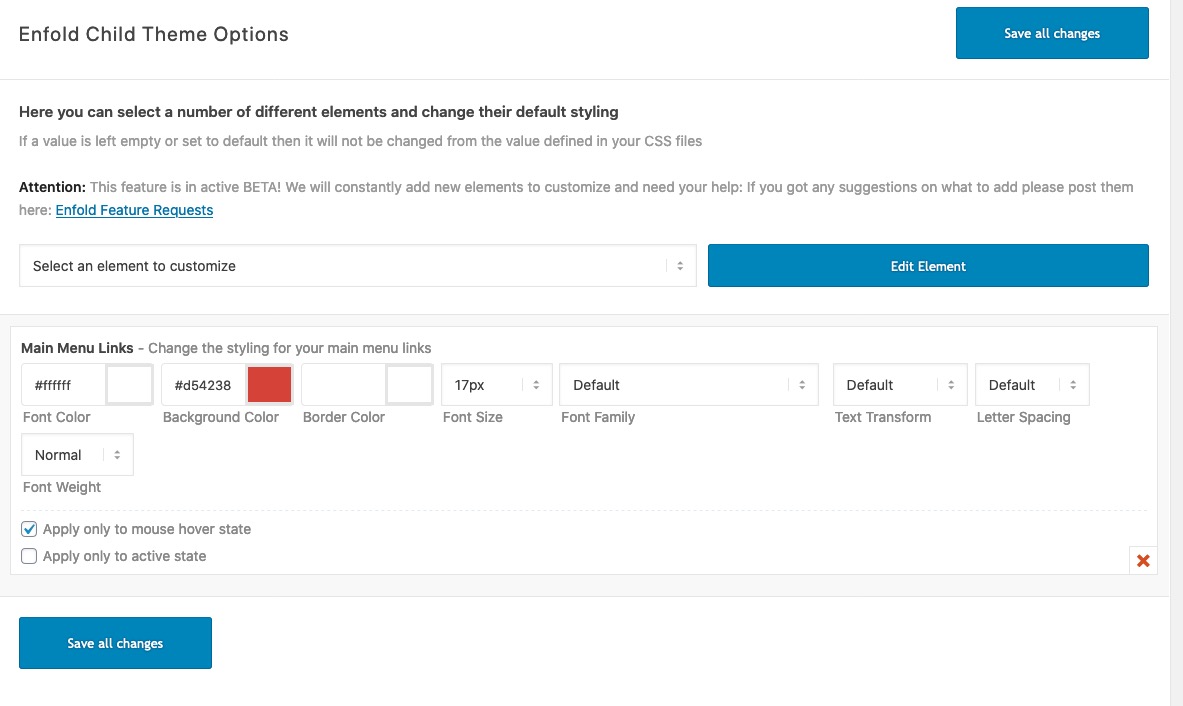
That file is only the backup for your theme settings and quick css entries etc. pp.
Renaming the child theme just with a ftp client and rename the child folder if you like and open the style css and rename it on “Theme Name:”
Do not change the part of the parent theme name: “Template: enfold”
This is possible too but …
here are some thoughts on obfuscating the source parent theme: https://kriesi.at/support/topic/source-code-change-delete-theme-name/hm sorry – I missed that ( By default notifications are hidden for the bundled version. The filter is only needed if you want to show notifications also for the bundled. ) , and because I had the code already in my child-theme functions.php it was clear to me that it was needed additionally.
My mistake ! yes so it is best.
And if we had the yes instead it will be shown – brilliant solution.Yoast SEO is a very powerful tool, but for many normal users it is a bit oversized.
If you are clear about what you want to include in a SEO project, you often get along better with less.
As a caching tool I like to use Cache Enabler at the moment. In combination with WebP Plugin which generates from my jpg and pngs webp this is a good performance increase.In that case, you should post it there, too.
so this might be then in your description:
Please Note: Most images in the theme demo are stock photos from photodune which are only for use with the themeAn additional info would be important.
As long as you only have the two files style.css and functions.php (and a third one: screenshot.png for preview) in your child theme folder, then your presumption is correct.However, some have headers or footers or other files as modified files that are intentionally located in their child-theme. This was obviously done to add functionality to the source code of these files. These changes must then still be included in the new files.
I remember here a change of the header.php of the parent theme regarding the lightbox settings – so here those who had a header.php in the child theme had problems with their lightbox function after updating the parent theme. So if you have additional files in your Child-Theme folder you need to check if the parent-themes files have changed.
See for example: https://kriesi.at/support/topic/lightbox-doesnt-work-anymore-after-update/ etc. ppI agree with you, of course, therefore I think it would be better to turn it off by default, and only be activated if the standalone plugin is installed.
-
This reply was modified 6 years, 4 months ago by
-
AuthorPosts
