

Forum Replies Created
-
AuthorPosts
-
yes Mike’s advice is best and safest way:
https://kriesi.at/support/topic/some-hints-and-advice-to-update-enfold/#post-1056107you are running Enfold 4.2.6 on this Version the option fields are not present.
But your example page from above: https://www.moneyprodigy.com/allowance-for-kids/ is something different. Isn’t it a blog page or a page which shows Portfolios etc. in a list? – or is it a handmade entry?
Do you use for “blog entries” a plugin? i see some classes that are not generated by enfold ez-…
Open that page on an editor and see what is the layout for it.________
But nevertheless:
On my old fashioned webdesigner mind it is not nice to have more than One h1 on each page visible;
( Maybe in a slider with different h1 captions it is ok )
even if Google sees it differently by now, I once learned that this way. A h1 should be something special and should appear only once on a page. Therefore the choice of Enfold is logical to assign a h2 to these headlines.ok now i see.
but maybe you make the shadow a bit more intense for it:
.popup_content--2JBXA {
    box-shadow: 0px 10px 75px 0px rgba(0,0,0,0.50), 0px 10px 50px 0px rgba(0,0,0,0.5);
}
December 22, 2019 at 9:27 am in reply to: Menu Above – Logo Below – Transparent logo background with full screen slider #1168555just use the css from above only for your non responsive case:
@media only screen and (min-width:990px) {
	.av-section-bottom-logo.header_color {
		 position:absolute;
		 z-index:5;
		 left:50%;
		 -webkit-transform:translateX(-50%);
		 transform:translateX(-50%);
		 background:rgba(255,255,255,0.0) !important
	}
}
you had to style the header logo for 768px to 990px – because i think you would like to have logo too on left side as it is on 768px and smaller.
It comes from that rule ( don’t know where it is from because you have allready merged the css):.html_header_top.html_logo_center .logo { left:50%; -webkit-transform:translate(-50%,0); -ms-transform:translate(-50%,0); transform:translate(-50%,0) }so maybe you use another media querry for it:
@media only screen and (min-width:768px) and (max-width:989px) {
	.html_header_top.html_logo_center .logo {
		left: 0;
		-webkit-transform: none;
		-ms-transform: none;
		transform: none
	}
}
maybe an !important is necessary – we will see
so a different way – elegant but more work to do is to register your own mobile menu
Well you can have classes on menu list points each – so create a main-menu
the one that should be displayed on desktop devices got then a different class then the mobile devices menu list points.the red arrows on menu page shows how to activate the menu-item classes field – open first on top “Screen Options” Flyout- then mark “CSS classes”.
that littel arrow besides each menu list point – click it – then you can set a custom-class for each Menu Listpoint.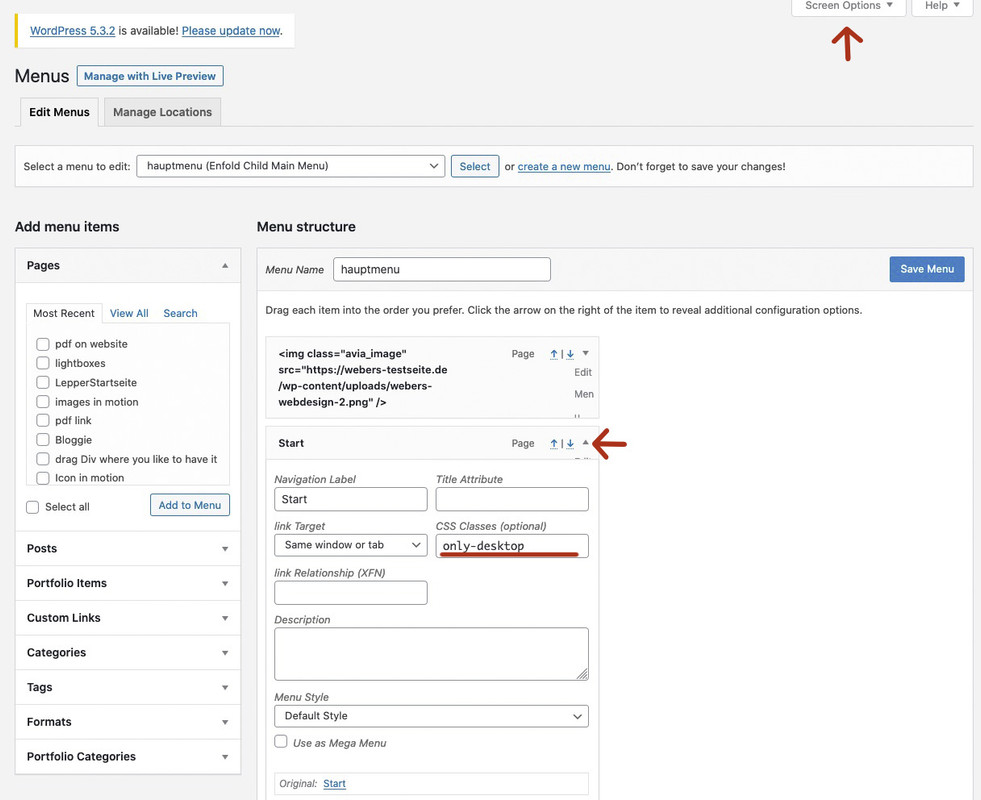
The rest is quick css with display:none
By the way – Enfold sets on default :
desktop devices got on html a custom class : avia_desktop
and mobile devices got: avia_mobileso for example: ( see image above)
.avia_mobile .only-desktop {display: none}
.avia_desktop .only-mobile {display: none}
or if it is not meant for devices but for screen-width do it with mediaquerries.
on your screenshot we do not see the selector (the element ) to what the box-shadow should go.
I suppose there is no-one.something like
.flex_column.av_one_third {
      box-shadow: 0px 10px 75px 0px rgba(0,0,0,0.10), 0px 10px 50px 0px rgba(0,0,0,0.15);
}
_________________________
By the way – but Off Topic – if you have found a way to show on a page a pdf – ;) i’m interesting too
the only way i know is via javascript to render a pdf on websites.
or to embed them like this:
<embed src="https://example.com/the.pdf" width="100%" height="800" type="application/pdf">but chrome and android do not support this anymore.
Edit: it seems that this is still supported by chrome
Alternative you can use the google pdf viewer to show pdfs on website:
<embed src="https://drive.google.com/viewerng/viewer?embedded=true&url=https://example.com/the.pdf" width="100%" height="800">you mean a different hamburger menu?
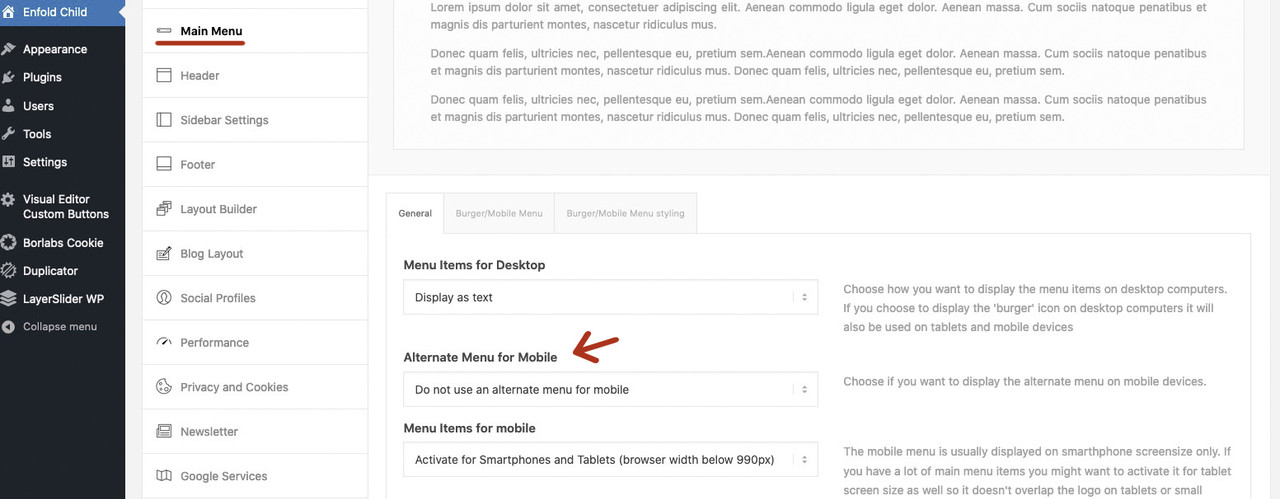 December 21, 2019 at 12:17 am in reply to: Remove the additional description menu; Advanced Layout Builder #1168357
or try this in child-theme functions.php
(the filter is part of WordPress template.php on function get_post_states( $post ) )
(you can include not to show draft and password protection too – but i think this is usefull to have)function remove_post_state( $post_states, $post ) { if("! has_blocks( $post->ID )") { unset($post_states['wp_editor']); } if("!= Avia_Builder()->get_alb_builder_status($post->ID)") { unset($post_states['avia_alb']); } return $post_states; } add_filter('display_post_states','remove_post_state',999,2);December 20, 2019 at 11:54 pm in reply to: Change name of Avia layout builder on page builder #1168354We don’t have an official way to do this, and I’m not sure of any issues it may cause, but if you thoroughly test this before trying this on a production site, you may find this works for you:
Try this in your child-theme functions.php:
function my_text_strings( $translated_text, $text, $domain ){
switch ( $translated_text ){
    case 'Advanced Layout Builder':  $translated_text = __( 'Guennis Great Builder', $domain );
    break;
    case 'Avia Layout Builder':  $translated_text = __( 'Guennis Great Builder', $domain );
    break;
    case 'Advanced Layout Editor':  $translated_text = __( 'Guennis Great Editor', $domain );
    break;
  }
  return $translated_text;
}
add_filter('gettext', 'my_text_strings', 20, 3);
You want to adorn yourself with someone else’s feathers? :lol ;)
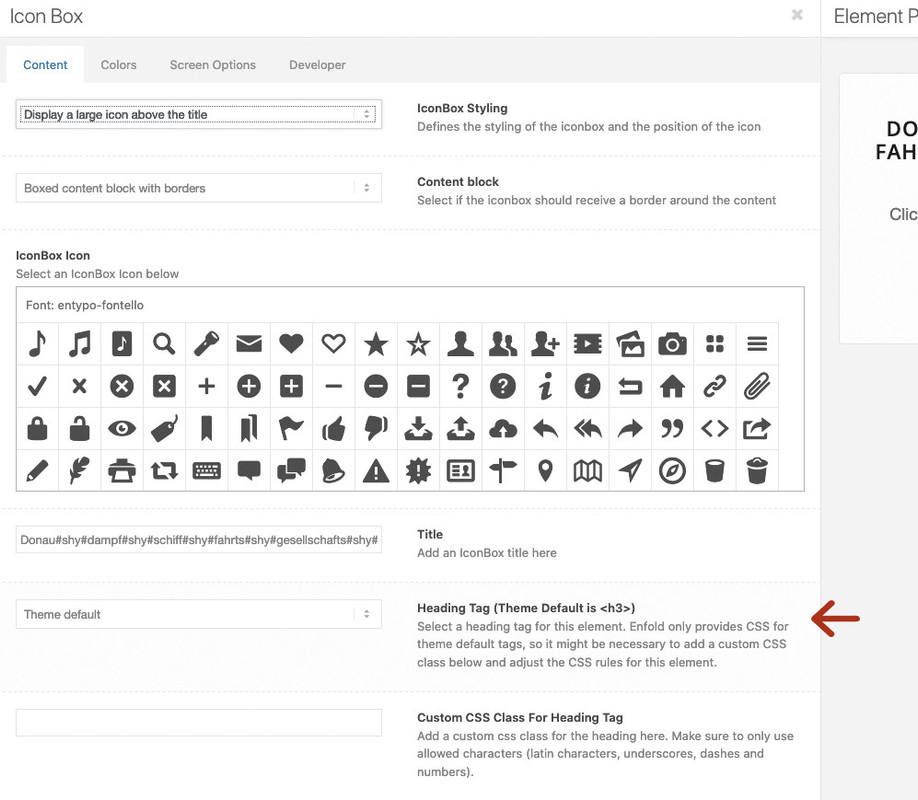
First go to enfold options : layout builder and select your needed settings – my advice do activate all three custom id and classes and selecting the header tags.
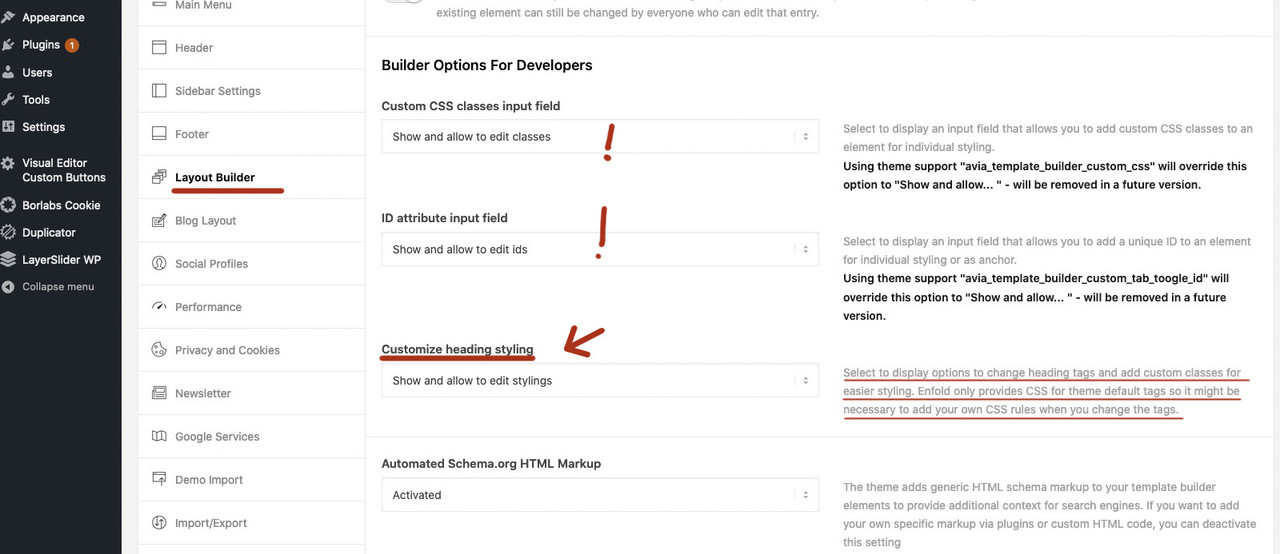
but for headings element – you don’t need to do that – here the choose of heading tag is still activated without those settings:
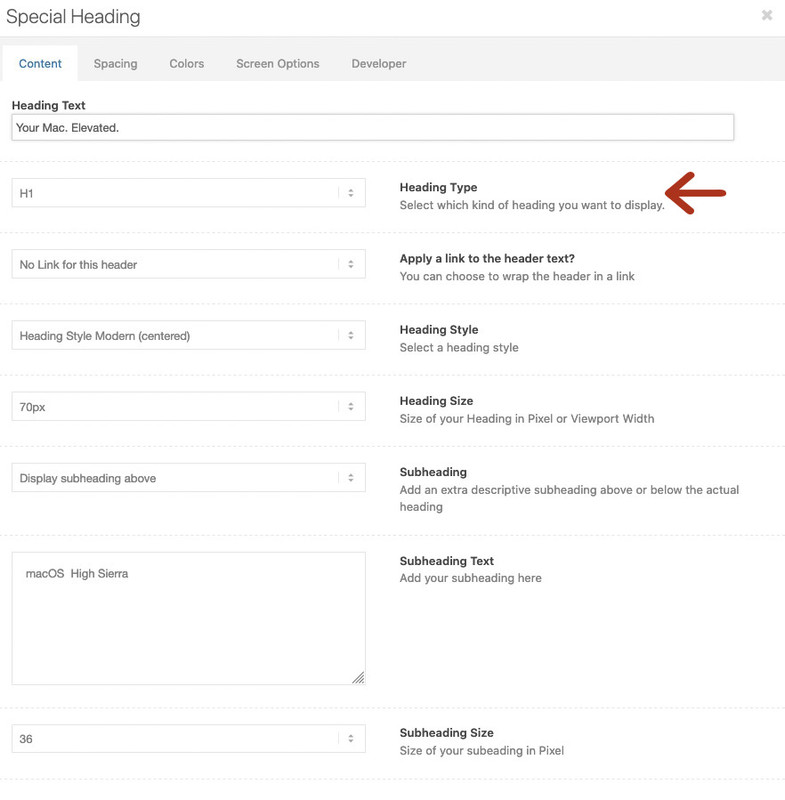
but with the settings above you will have on a lot of other alb elements the possibility to choose headings tag! f.e. iconbox etc. pp:
you can see here – if you put in your own text that a baskerville italic suits best:
https://www.1001fonts.com/libre-baskerville-font.html?text=%26%20abcdefor goto Google Fonts : https://fonts.google.com/specimen/Libre+Baskerville

PS : you can see on those signs better the source from the “ampers-and” latin and : et
on base css line 379 there is :
.special_amp{
font-family: "Baskerville", "Palatino Linotype", "Palatino", "Times New Roman", serif;
font-style: italic;
font-size: 1.3em;
line-height: 0.5em;
font-weight:normal;}
and on functions-enfold.php there is the function: avia_ampersand
to rule the substitution. ( it set the ampersand sign between span tags with class: special_amp
By the way if you gave that custom-class: special_amp to a whole text-block it will show you that styling.so a lot of users have the problem to get rid of it than to have the style.
And : Baskerville is not a good Websafe Font – so it might not be seen the substitution on older Win Systems: https://www.cssfontstack.com/Baskervillejust one moment:
… on the css it is declared as Baskerville – but this is no Baskerville et sign.
To me it looks like the FF Clifford Eighteen italic
Try to find a google font like this …
Aha could be a Baskerville italic seem that a lot of Fonts got this variation on italic et signDecember 19, 2019 at 5:42 pm in reply to: Dataprotection with Enfold? How to set header-tags? #1167844Yes – i know that this is not caused by Enfold (alone) but even on wordpress themes ( twenty-twenty etc.) the script-src and style-src had to be set to unsafe-inline.
But i do not see why. Is it the customizer script that is implemented in a “wrong” manner?Yes – but first with such an amount of text it would have to be so small that you could not read it clearly. Because you break the grid on 768px and even if you do it on 990px the font-size will be too small.
Then – your setting is not the normal usage of grid-row element. If you could insert your images as grid-cell background you can choose that the image fills the cell- but then, of course, it gets cut.Maybe you are satisfied if the images are vertical aligned in the middle – there is an option to do so for grid-cell positioning in each cell.
-
This reply was modified 6 years, 3 months ago by
Guenni007.
December 19, 2019 at 11:25 am in reply to: Add caption in lightbox under image in masonry gallery #1167682December 19, 2019 at 10:54 am in reply to: Add caption in lightbox under image in masonry gallery #1167671sorry for the popup-modal-dismiss thing on that code – on my own customizing i have build a link in the mfp-bottom container misunsing the alt attribute for that – which builds an anchor link to parent page – so i declared to this class (popup-modal-dismiss) the close function too.
December 19, 2019 at 10:39 am in reply to: Add caption in lightbox under image in masonry gallery #1167666This is a bit more than you like to have but it shows you how you can have influence on different settings using Enfold specific classes – and even you can change the markup for lightbox on that
my example page is on id: 36548 so if you want to have that globally – get rid of if-clause
look to this example code:function popup_masonry_gallery() { if(is_page(36548)){ ?> <script type="text/javascript"> (function($){ $(window).load(function(){ $('a.av-masonry-entry.lightbox-added').magnificPopup({ type: 'image', image: { titleSrc: false, markup: '<div class="mfp-figure">'+ '<div class="mfp-close"></div>'+ '<div class="mfp-top-bar"></div>'+ '<div class="mfp-img"></div>'+ '<div class="mfp-bottom-bar">'+ '<div class="mfp-title"></div>'+ '<div class="mfp-counter"></div>'+ '</div>'+ '</div>', }, mainClass: 'avia-popup mfp-zoom-in mfp-image-loaded', closeOnContentClick: false, midClick: true, gallery: { enabled: true }, callbacks: { markupParse: function (template, values, item) { values.title = item.el.find('img').attr('alt') + '<br>' + item.el.closest('.av-masonry-entry').find('.av-masonry-entry-content').text(); }, // this - is Magnific Popup object. change: function() { $(this.content) .find('.mfp-top-bar') .html( '<h2>' + $(this.currItem.el).attr('title') + '</h2>' ); }, buildControls: function() { // re-appends controls inside the main container this.arrowLeft.appendTo(this.contentContainer); this.arrowRight.appendTo(this.contentContainer); }, }, }); // close the iframe window $(document).on('click', '.popup-modal-dismiss', function (e) { $.magnificPopup.close(); }); }); })(jQuery); </script> <?php }} add_action('wp_footer', 'popup_masonry_gallery');first i get my selector – as on enfold it is the class lightbox-added
then i declare a new markup for that popup with f.e. a top-bar
on the callbacks i set the mfp-title to the image alt attribute and in the second line i look for the enfold description place – and get the text from: av-masonry-entry-content
in the new top-bar i place the img title as mfp-title !see result: https://webers-testseite.de/lightboxes/
click the first image – you will see where the texts comes from in that new markup
Important: The captions had to be shown on that masonry in the enfold options dialog – otherwise they are not in the markup.
so if you do not like to have the visible set the figcaption to display none..mfp-top-bar h2 { color: #fff; font-weight: normal; } .page-id-36548 .av-inner-masonry-content { display: none; }by the way ‘self’ is ok but unsafe-inline and unsafe-eval are not ok – but on most of wordpress installation they are needed to have a working Site
December 18, 2019 at 12:22 pm in reply to: Dataprotection with Enfold? How to set header-tags? #1167240hm – ismael that will not be enough : and will end in:
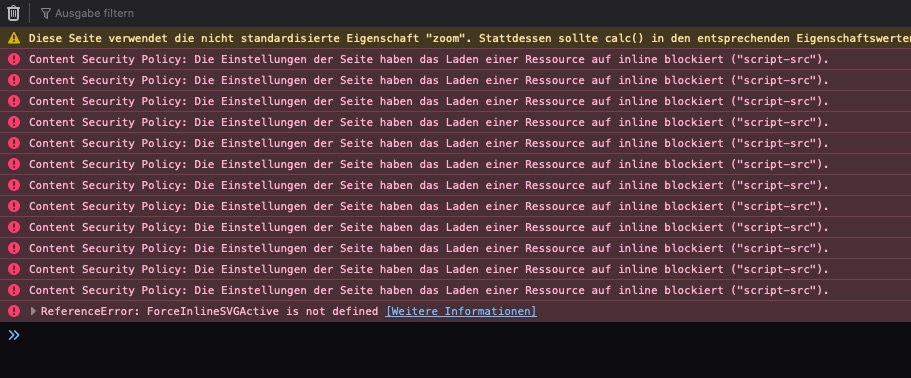
and a non working wordpress page (
December 18, 2019 at 11:35 am in reply to: Menu Above – Logo Below – Transparent logo background with full screen slider #1167222By the way – what kind of chairs are these? They look a bit like “upholstered Arne Jacobsen chairs”.
edit : thanks i found it: “Armen Living Cassie Dining Chair”
December 18, 2019 at 11:27 am in reply to: Menu Above – Logo Below – Transparent logo background with full screen slider #1167218hm – what i can not believe is that your home page is not declared as it is. : home – but nevertheless we can address that page via its id:
.page-id-45 .av-section-bottom-logo.header_color {
    position: absolute;
    z-index: 5;
    left: 50%;
    -webkit-transform: translateX(-50%);
    transform: translateX(-50%);
    background: rgba(255,255,255,0.5) !important
}
you decide what looks best on transparency options.
And by the way that element ( full-width slider with images and their captions) got for each image and its caption an own options dialog for responsive behavior:
 December 17, 2019 at 3:48 pm in reply to: Dataprotection with Enfold? How to set header-tags? #1166869
my thoughts on that are here resumed: https://kriesi.at/support/topic/header-security-entries/#post-1155949
the question is why we had to set it to unsafe-inline and unsafe-eval to have a working site?you can see here f.e.: that it is mostly a wordpress thing https://core.trac.wordpress.org/ticket/38695
I hope that WordPress should take care of that: and that an unsafe-inline and unsafe-eval is not necessary in the future releases
December 17, 2019 at 2:50 pm in reply to: Dataprotection with Enfold? How to set header-tags? #1166843na bei dem Ergebnis bin ich von den CSP und Header Security Einträgen HSTS ausgegangen! Das ist wie in meinem Link zu sehen schon was anderes.
Bei dem von Ihnen gesetzten Link – woran machen Sie das Fehlen von Meta-Tags jetzt dingfest?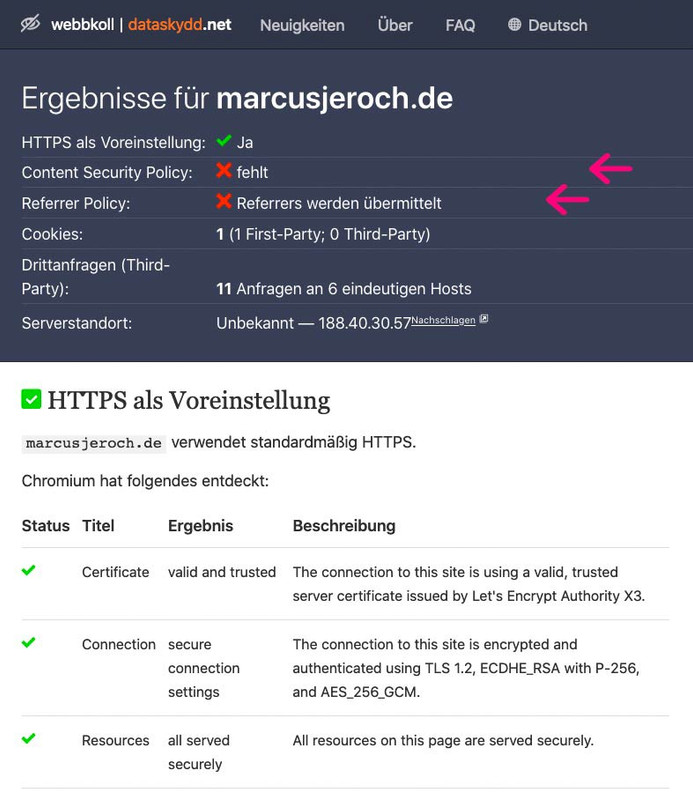
_________at the result of your link above I assumed that your quest concerns to the CSP and Header Security entries HSTS! This is like in my link to see already something else.
With the link you set – where do you make the absence of meta tags now visible?December 16, 2019 at 3:48 pm in reply to: Dataprotection with Enfold? How to set header-tags? #1166460hm – first of all : who is responsible for the contents of your page in your imprint?
So also this contact person has to take care of it.Everyone has completely different pages, and relevant also page requirements. If you use Google systems, then these must flow into your releases also there. Do you use cloud services or CDNs – and which ones etc. pp. Analytics Tools …
These are so many parameters that only you can know, that it would be unfair to charge these tasks to a theme creator.These header security entries are only indirectly related to the GDPR. They should prevent that various illegal attacks (Man in the Middle etc.) on the part of third can take influence on your site.
Well, don’t shirk your responsibilities. With SSL certificates, you also have to take care of it yourself.
That was my first idea – nikko had.
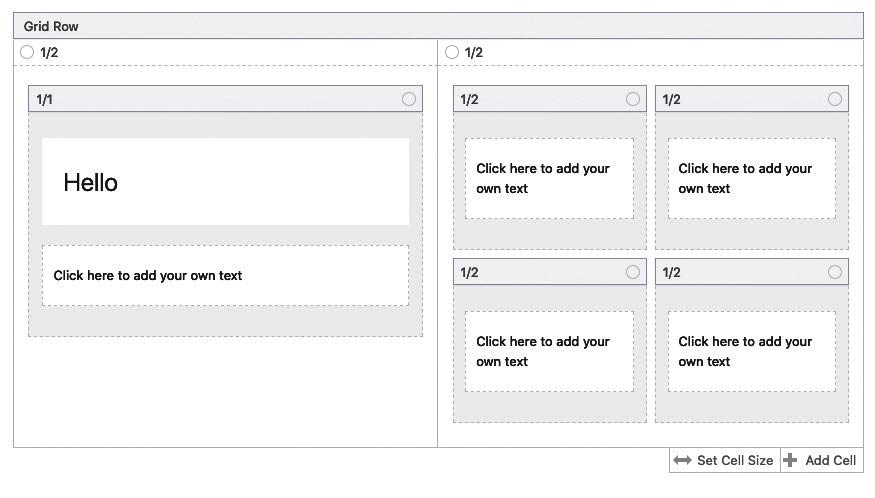
I use it often – when nesting columns.
the only difference is that a grid-row element is a full-width container. but that is not so hard to optain it the same width as normal content elements: https://webers-testseite.de/layout-mimic/December 14, 2019 at 2:02 am in reply to: Dataprotection with Enfold? How to set header-tags? #1165743https://kriesi.at/support/topic/header-security-entries/
i did it via htaccess file.
well the first i see is that there is something different on work.
There is nothing of the code i set on my page. no display flex etc. Guess your are trying a different method. -
This reply was modified 6 years, 3 months ago by
-
AuthorPosts
